Shop App - Attacker is able to intercept authorization code during authentication (OAuth) and is able to get access to Microsoft Outlook email account
The Shop App used a custom URL scheme to receive OAuth authorization codes without PKCE, allowing a malicious app registering the same scheme to intercept the code. An attacker could then exchange the code for a Microsoft session token to read the victim's emails or link the Outlook account to their own Shop account.

- Triaged in 25 hours
- Fixed in 2 months
- Paid in 8 days
- Disclosed after 6 months
Summary by the program
On September 14, 2022, @kun_19 reported an issue that would allow an attacker to use a malicious app to retrieve an Outlook authorization code during authentication, due to the use of deep links. An attacker could exploit this to have access to the victim's emails.
Our engineers implemented PKCE on this login flow, mitigating the issue.
The report
Summary:
Deep linking
Mobile apps have a unique vulnerability that is non-existent in the web: deep linking. Deep linking is a way of sending data directly to a native application from an outside source. A deep link looks like app:// where app is your app scheme and anything following the // could be used internally to handle the request. Deep links are NOT secure and you should never send any sensitive information in them. The reason deep links are not secure is because there is no centralized method of registering URL schemes. As an application developer, you can use almost any url scheme you choose by configuring it in Xcode for iOS or adding an intent on Android. There is nothing stopping a rogue application from hijacking your deep link by also registering to the same scheme and then obtaining access to the data your link contains.
Shop app - Microsoft Outlook Oauth flow and the vulnerability
The Shop App allows users to connect to their Microsoft Outlook account to import orders from the emails (via OAuth flow). Therefore, the custom url scheme shopapp:// is used for transmitting the authorization code at the end of the Oauth flow to the Shop App, which finally can be used to exchange the the authorization code with a valid session token from Microsoft.
Another (malicious) app is also able to claim the same url scheme and can intercept the authorization code! When the operating system has two or more applications to choose from when opening a link, Android will show the user a modal and ask them to choose which application to use to open the link. On iOS however, the operating system will make the choice for you, so the user will be blissfully unaware. Apple has made steps to address this issue in later iOS versions (iOS 11) where they instituted a first-come-first-served principle. Thus, if the malicious app is installed BEFORE the official Shop App, the malicious app "wins" and will receive the authorization code.
Normally, a special Oauth flow for mobile apps (Authorization Code Flow with Proof Key for Code Exchange (PKCE)) is used to prevent this ! It prevents an attacker, if the authorization code was intercepted, to exchange the authorization code with a valid session token (see here for more information https://auth0.com/docs/flows/authorization-code-flow-with-proof-key-for-code-exchange-pkce). This specific Oauth flow (PKCE) is not implemented by the Shop App for connecting a Microsoft Outlook account.
Thus, it is vulnerable to such kind of attacks. I created a malicious Android app which is able to intercept the authorization code (see PoC).
Steps To Reproduce:
- Install the attached malicious Android App (F1926639) on your device.
- Install the official/legit Shop App from the Google Play Store.
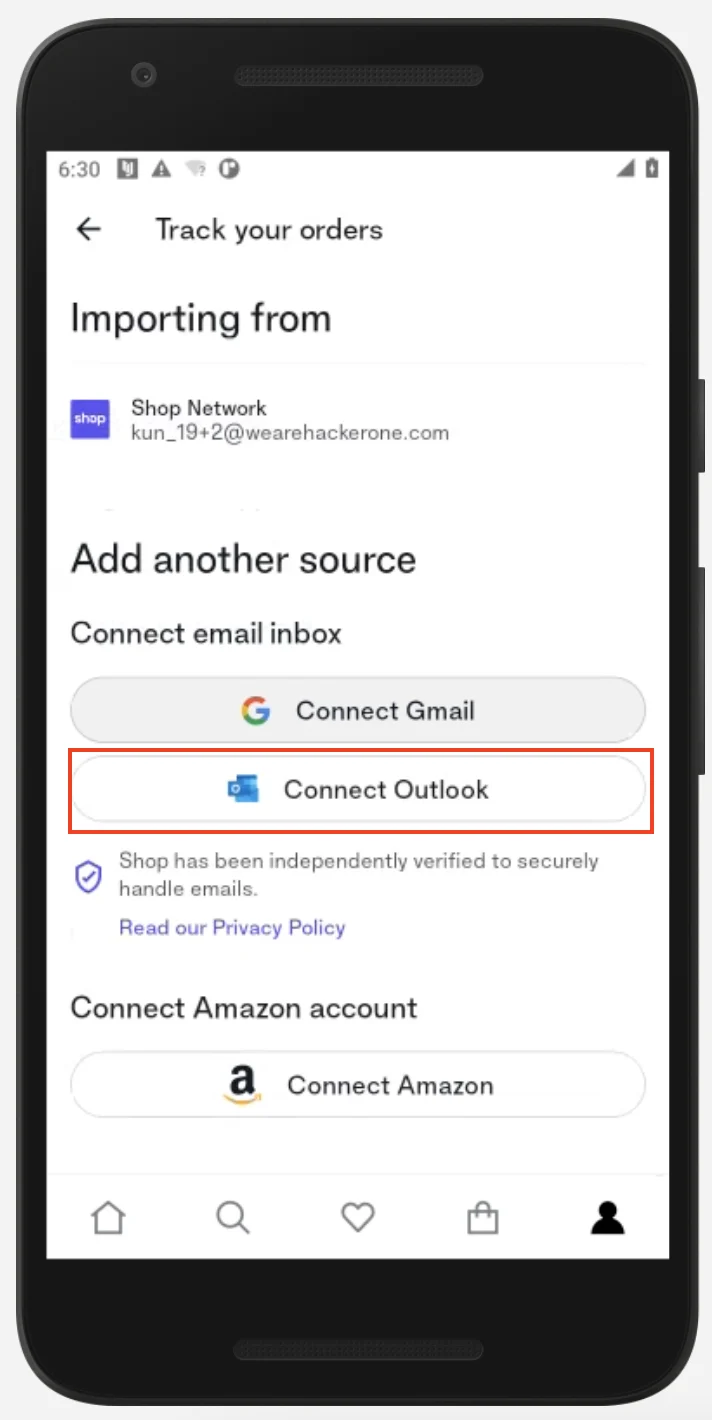
- Open the legit Shop App, create an account and start connecting to your Microsoft Outlook account:
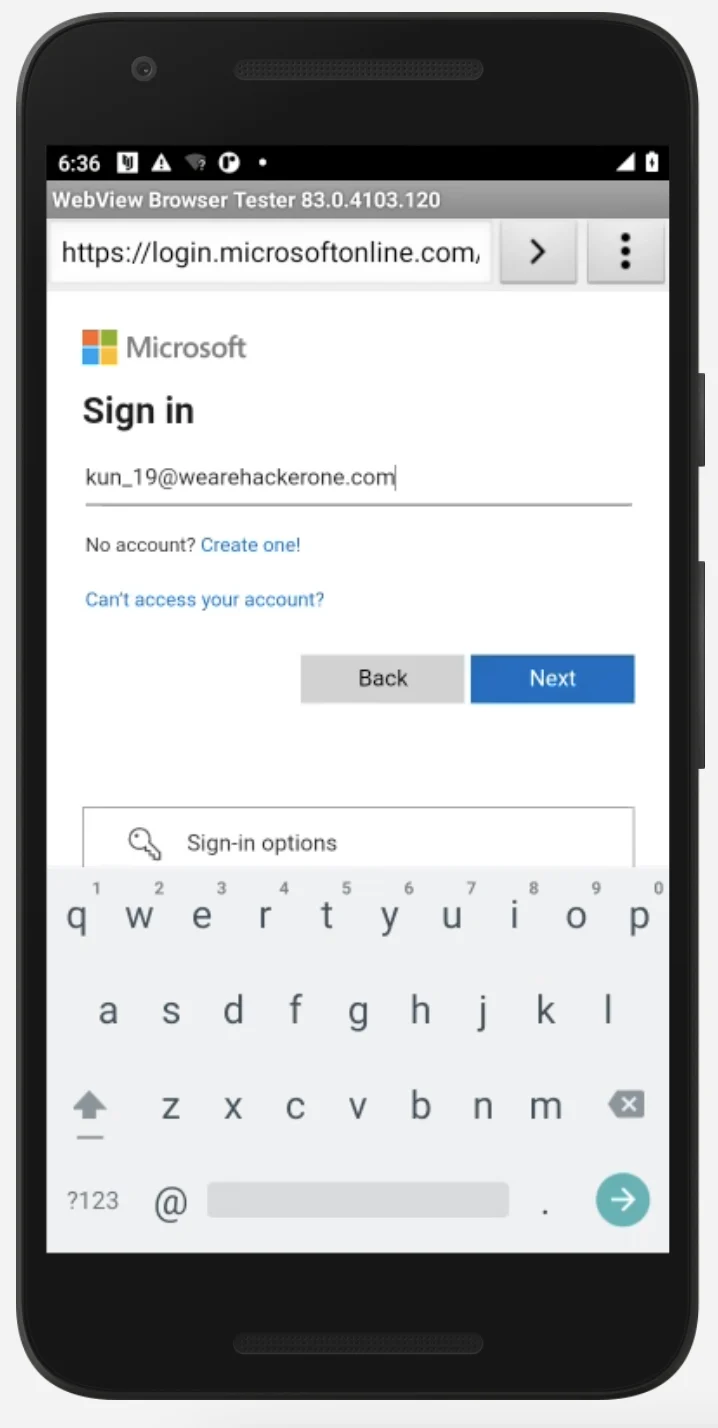
- Just log in to your Microsoft account and grant the Shop App the permissions to access/read your emails:
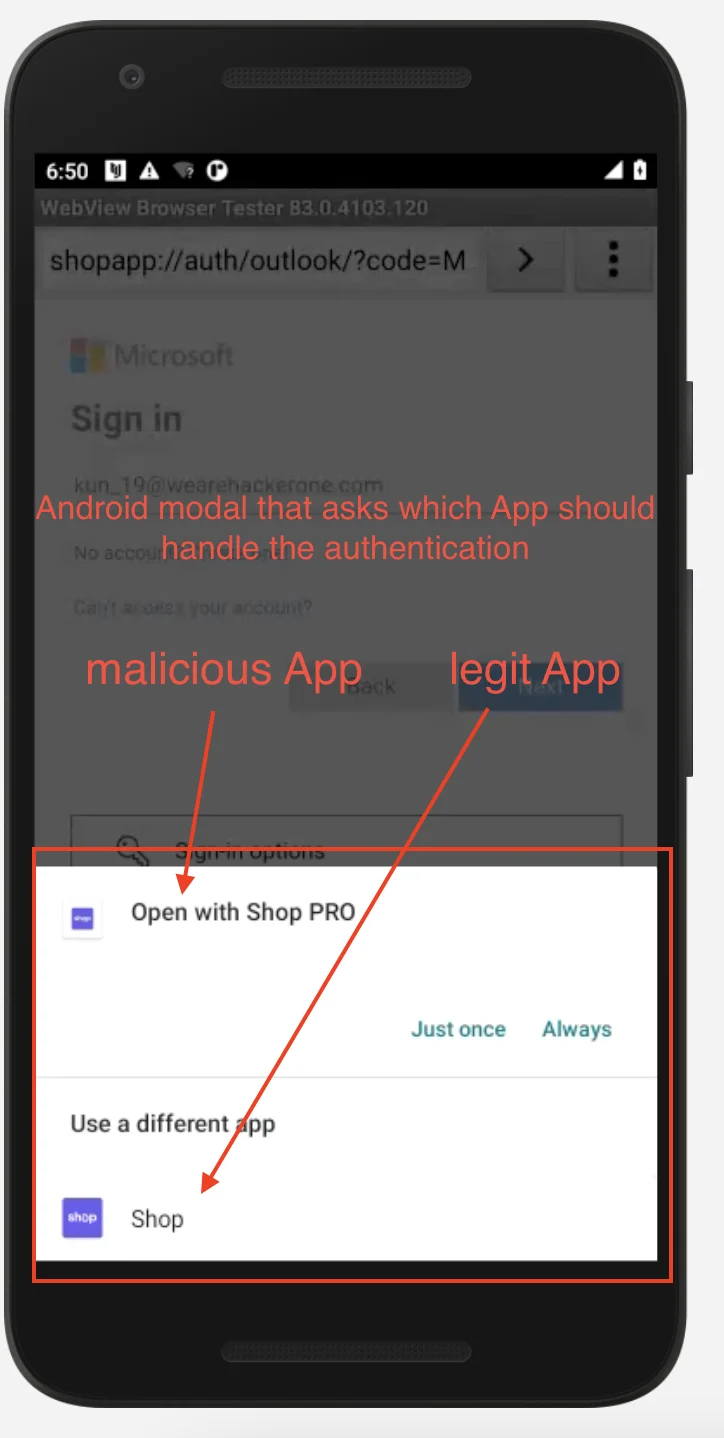
- After the login, a modal is shown which asks the user which app should handle the authentication. Choose "Shop PRO" (the malicious App):
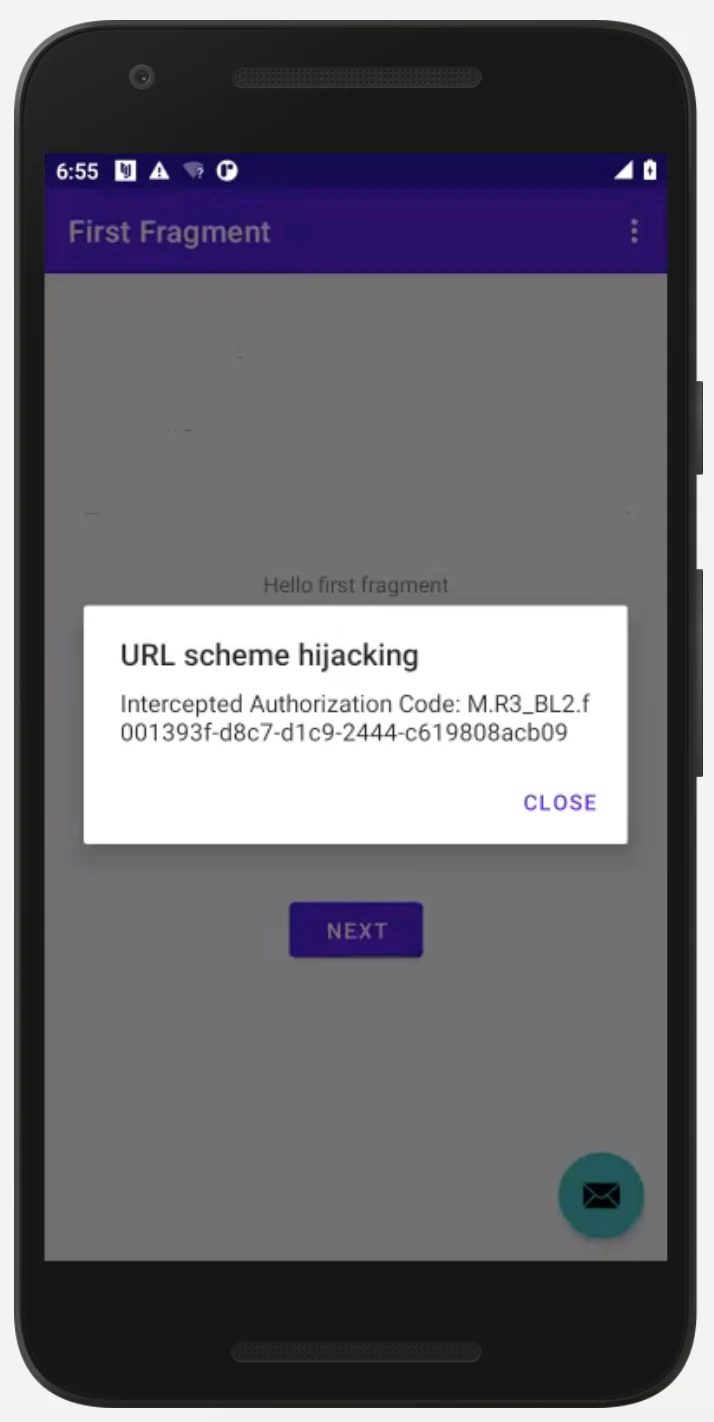
- The malicious App successfully intercepted the authorization code, which can now be exchanged to get a valid session token to read the victim's emails:
NOTE: Keep in mind that under iOS the first-come-first-served principle applies. If the malicious App is installed BEFORE the official Shop App, the malicious app "wins" and will receive the authorization code.
Impact
An attacker is able to intercept an authorization code and exchanges it for a valid session token from Microsoft to gain read access to the victim's emails.
Or the attacker uses the intercepted authorization code to link the Outlook account to his own Shop account via the endpoint https://server.shop.app/graphql (operation name: LinkOutlookAccount). Thus, all orders can now be tracked by the attacker.
Context
The target is the Shop App, the mobile client for shop.app, and specifically its feature for connecting a Microsoft Outlook account. The app lets a user link Outlook so that it can import orders from the emails in that mailbox. The connection is made through an OAuth flow: the user authenticates with Microsoft, grants the Shop App permission to access and read their emails, and at the end of the flow an authorization code is handed back to the Shop App. The code can then be exchanged for a valid session token from Microsoft.
Because this happens in a native mobile app rather than a browser, the authorization code is returned to the app through a custom URL scheme, shopapp://. The report's central point is that this delivery mechanism, a deep link, is not a secure channel for sensitive data.
Setup
To reproduce the issue the researcher used:
- A malicious Android app, written by the researcher and attached to the report as F1926639.
- The official Shop App, installed from the Google Play Store.
- A Microsoft account, used to log in and grant the Shop App permission to access and read emails.
A malicious app can claim the same custom URL scheme as the legitimate Shop App, making it a candidate handler for shopapp:// links. No special position on the device is required on Android, because the operating system asks the user which app should open the link when more than one app can handle it.
Finding it
The researcher starts from a general property of mobile apps: deep linking. A deep link sends data directly to a native application from an outside source, and looks like app://, where app is the app's scheme and anything after the // is handled internally by the app.
Deep links are not secure, and sensitive information should never be sent in them. The reason is that there is no centralised method of registering URL schemes. A developer can use almost any scheme by configuring it in Xcode for iOS or adding an intent on Android, and nothing stops a rogue application from registering the same scheme and receiving the data the link carries.
In the Shop App's Outlook flow, the authorization code is transmitted at the end of the OAuth flow through the custom scheme shopapp://. A malicious app that claims the same scheme can therefore intercept the authorization code.
The behaviour differs by platform:
- On Android, when two or more applications can open a link, the operating system shows the user a modal asking which application to use.
- On iOS, the operating system makes the choice for the user, so the user is unaware. Apple introduced a first-come-first-served principle in iOS 11, so if the malicious app is installed before the official Shop App, the malicious app wins and receives the authorization code.
The defence that mobile OAuth flows normally use against exactly this problem is the Authorization Code Flow with Proof Key for Code Exchange (PKCE). PKCE prevents an attacker who has intercepted the authorization code from exchanging it for a valid session token. The Shop App did not implement PKCE for connecting a Microsoft Outlook account, which is what made the interception useful to an attacker.
Exploitation
Step 1: install the malicious app
Install the attached malicious Android app (F1926639) on the device. The malicious app is able to claim the shopapp:// scheme and be selected as a handler for the OAuth redirect.
Step 2: install the official app
Install the official Shop App from the Google Play Store.
Step 3: start connecting Outlook
Open the legitimate Shop App, create an account, and start connecting a Microsoft Outlook account.
The screenshot shows the point in the Shop App where the Outlook connection is started.
Step 4: authenticate with Microsoft
Log in to the Microsoft account and grant the Shop App the permissions to access and read the emails.
This is the Microsoft login and consent screen for the Shop App.
Step 5: choose the malicious app
After the login, a modal is shown asking which app should handle the authentication. Choose "Shop PRO", the malicious app.
The modal asks the user which app should handle the authentication.
Step 6: capture the authorization code
The malicious app successfully intercepts the authorization code.
The screenshot shows the intercepted authorization code inside the malicious app. That code can now be exchanged for a valid session token that allows reading the victim's emails.
On iOS the same attack depends on installation order: because of the first-come-first-served principle, the malicious app must be installed before the official Shop App for it to win the scheme and receive the authorization code.
Root cause
The authorization code is delivered to the app through a custom URL scheme, shopapp://. URL schemes are not centrally registered, so any app can claim the same scheme and receive the data sent through it. The OAuth flow for connecting Outlook did not use PKCE, so an intercepted authorization code could still be exchanged for a valid session token. Without PKCE, an intercepted code can be exchanged for a valid session token.
Impact
An attacker who intercepts the authorization code can exchange it for a valid session token from Microsoft and gain read access to the victim's emails.
Alternatively, the attacker can use the intercepted authorization code to link the Outlook account to the attacker's own Shop account through the endpoint https://server.shop.app/graphql, using the operation name LinkOutlookAccount. In that case all orders can be tracked by the attacker.
On Android the victim must choose the malicious app in the chooser modal; on iOS the malicious app must have been installed before the official Shop App.
Fix
The program states that its engineers implemented PKCE on this login flow, mitigating the issue.
Variants to test
- Other OAuth or account-linking flows in mobile apps that return codes through a custom scheme. A positive result is a redirect such as
yourapp://...code=...that another app registering the same scheme can receive. - Flows that use a custom scheme but no PKCE.
- Account-linking GraphQL operations that accept an authorization code, such as the
LinkOutlookAccountoperation here. - Installation-order tests on iOS.
Hunting notes
This class of bug hides in mobile OAuth and account-linking flows, particularly where the redirect target is a custom URL scheme rather than a verified app link or universal link. The signal is a flow that returns an authorization code through such a scheme and does not use PKCE.
To show impact, the researcher built a working malicious app that claimed the same scheme, walked through the full connection flow with screenshots at each stage, and demonstrated the intercepted code. The report also named a concrete second use for the code, the LinkOutlookAccount GraphQL operation, which turns a stolen code into account linkage and order tracking.
What happened, in plain words
Shop App is the mobile app for shop.app. One of its features lets you connect your Microsoft Outlook email account, so that the app can read your emails and pull out your order confirmations automatically. To connect, the app sends you to Microsoft, you log in there, you say "yes, Shop App may read my emails", and Microsoft sends a short-lived piece of text called an authorization code back to the Shop App. That code can then be swapped for a longer-lived key (a session token) that can be used to read your mailbox.
The problem is how that code gets back to the app. On a phone, an app can ask the operating system to send it links that start with a name it chooses. Shop App chose shopapp://. Any other app on the same phone can also claim shopapp://, and then it can receive the same links. If a malicious app does that, it can catch the authorization code on its way to the real app. Because the Shop App did not use a standard protection called PKCE, the stolen code was enough on its own to get a working session token from Microsoft. That means the attacker could read the victim's emails, or attach the victim's Outlook account to the attacker's own Shop account and watch their orders.
The researcher built a small malicious Android app to prove it, walked through the whole connection flow, and captured the code. The program later said its engineers added PKCE to this login flow, which fixes the issue.
The pieces you need to know first
Before the steps make sense, here are the ideas the report leans on, explained from scratch.
An app on a phone is a program with a name. On Android and iOS, every installed app is a separate program with its own storage and its own permissions. Apps cannot normally read each other's data. The whole point of this bug is that one app can receive data that was meant for another.
OAuth is a way to let one app use another service without giving it your password. Think of a hotel reception desk. You do not hand the receptionist your house keys; you give them a temporary key card that only opens the room you booked, and it expires. In OAuth, you log in directly at Microsoft (the reception desk), and Microsoft gives the Shop App a temporary key card (the authorization code) instead of your password. The Shop App then trades that key card for a slightly longer-lived pass (the session token) that lets it read your emails.
An authorization code is a one-time voucher. It is a short string that Microsoft hands out after you approve the connection. It is not the final key; it is the thing you exchange for the final key. If someone else gets it before it is used, they can do the exchange themselves.
A session token is the actual key. Once the Shop App swaps the code for a token, that token is what it presents to Microsoft on every later request to read your mail. Whoever holds a valid token can read the mailbox.
A deep link is a link that opens an app instead of a web page. On a computer, https://example.com opens a website. On a phone, shopapp://something can open the Shop App directly. The part before :// is called the URL scheme, and it is just a name the app picks. The part after // is data the app handles internally.
A URL scheme is not registered anywhere central. There is no worldwide registry that says only one app may use shopapp://. On iOS you declare the scheme in a configuration file called Info.plist; on Android you declare it in a file called the manifest by adding an intent. Nothing stops a second app from declaring the same scheme.
PKCE is a lock that makes a stolen code useless. PKCE stands for Proof Key for Code Exchange. The idea is simple: before starting the login, the app invents a random secret and keeps it private. It sends only a scrambled fingerprint of that secret to Microsoft. When the app later trades the authorization code for a token, it must also present the original secret. A thief who catches the code but never saw the secret cannot complete the trade. Without PKCE, the code alone is enough.
A modal is a pop-up box that asks you to choose. On Android, when more than one app can open a link, the system shows a small chooser asking which app to use. That chooser is the modal in this report.
An API endpoint is a fixed address a program sends requests to. https://server.shop.app/graphql is the address Shop App's servers listen on for its app's requests. An operation name like LinkOutlookAccount is the label of one specific action the server understands, in this case "link this Outlook account to this Shop account".
The vulnerability class is "insufficiently protected credentials". That is a formal label meaning credentials (codes, tokens, passwords) are handled in a way that lets someone else get hold of them. Here the credential is the authorization code, and the weak handling is sending it through a deep link that other apps can claim.
The setup
To reproduce the issue, three things were needed:
- A malicious Android app, written by the researcher and attached to the report as F1926639.
- The official Shop App, installed from the Google Play Store.
- A Microsoft account, used to log in and grant the Shop App permission to access and read emails.
The malicious app is able to claim the same shopapp:// scheme as the real Shop App. That makes it a second candidate to receive the redirect at the end of the login. On Android nothing else is needed, because the operating system itself will ask the user which app should open the link when two apps can handle it.
Finding it
The researcher starts from a general property of mobile apps: deep linking. A deep link sends data directly to a native application from an outside source, and looks like app://, where app is the app's scheme and anything after the // is handled internally by the app.
Deep links are not secure, and sensitive information should never be sent in them. The reason is that there is no centralised method of registering URL schemes. A developer can use almost any scheme by configuring it in Xcode for iOS or adding an intent on Android, and nothing stops a rogue application from registering the same scheme and receiving the data the link carries.
In the Shop App's Outlook flow, the authorization code is transmitted at the end of the OAuth flow through the custom scheme shopapp://. A malicious app that claims the same scheme can therefore intercept the authorization code.
The behaviour differs by platform:
- On Android, when two or more applications can open a link, the operating system shows the user a modal asking which application to use.
- On iOS, the operating system makes the choice for the user, so the user is unaware. Apple introduced a first-come-first-served principle in iOS 11, so if the malicious app is installed before the official Shop App, the malicious app wins and receives the authorization code.
The defence that mobile OAuth flows normally use against exactly this problem is the Authorization Code Flow with Proof Key for Code Exchange (PKCE). PKCE prevents an attacker who has intercepted the authorization code from exchanging it for a valid session token. The Shop App did not implement PKCE for connecting a Microsoft Outlook account, which is what made the interception useful to an attacker.
In plain terms: the code travels in a link, links with custom schemes can be claimed by any app, and without PKCE a caught code is as good as a caught token. Each of those three facts is ordinary and well known on its own; the bug is that all three are true at once in one flow.
Exploitation
Step 1: install the malicious app
Install the attached malicious Android app (F1926639) on the device. The malicious app is able to claim the shopapp:// scheme and be selected as a handler for the OAuth redirect.
Why this step: the attacker needs a program on the phone that is willing to receive shopapp:// links. Registering the scheme is the whole trick. The app does not need to break into anything; it just announces that it can open links of that name, exactly as the real app does.
Step 2: install the official app
Install the official Shop App from the Google Play Store.
Why this step: the victim has to use the real app for the real login to happen. The malicious app is only useful alongside the genuine one, because it is the genuine one that starts the Outlook connection and causes Microsoft to send the code.
Step 3: start connecting Outlook
Open the legitimate Shop App, create an account, and start connecting a Microsoft Outlook account.
The screenshot shows the point in the Shop App where the Outlook connection is started. This is the ordinary user action: the victim is doing what the app is designed for, with no sign that anything is wrong.
Why this step: this is what triggers the OAuth flow. The Shop App sends the user to Microsoft to log in, and Microsoft will later send the code back to shopapp://.
Step 4: authenticate with Microsoft
Log in to the Microsoft account and grant the Shop App the permissions to access and read the emails.
This is the Microsoft login and consent screen for the Shop App. The user types their Microsoft credentials on Microsoft's own page and approves the access the Shop App asked for.
Why this step: the authorization code is only issued after the account owner approves. The consent screen is also where the victim confirms that reading emails is allowed, which is exactly the access the attacker ends up with.
Step 5: choose the malicious app
After the login, a modal is shown asking which app should handle the authentication. Choose "Shop PRO", the malicious app.
The modal asks the user which app should handle the authentication. The system cannot tell which one is genuine; it only knows that two apps say they can open this kind of link, so it asks.
Why this step: on Android the interception is not silent. The victim is shown a choice and has to pick the malicious app. The victim believes they are finishing the login.
Step 6: capture the authorization code
The malicious app successfully intercepts the authorization code.
The screenshot shows the intercepted authorization code inside the malicious app. That code can now be exchanged for a valid session token that allows reading the victim's emails.
Why this step matters: the code is the voucher. Because the flow has no PKCE, the malicious app can take that voucher to Microsoft and trade it for a token without ever proving it was the app that started the login. From that point the attacker holds a working key to the mailbox.
On iOS the same attack depends on installation order: because of the first-come-first-served principle, the malicious app must be installed before the official Shop App for it to win the scheme and receive the authorization code. There is no chooser on iOS, so the victim sees nothing at all; the only condition is that the malicious app got there first.
Root cause
The authorization code is delivered to the app through a custom URL scheme, shopapp://. URL schemes are not centrally registered, so any app can claim the same scheme and receive the data sent through it. The OAuth flow for connecting Outlook did not use PKCE, so an intercepted authorization code could still be exchanged for a valid session token. Without PKCE, an intercepted code can be exchanged for a valid session token.
Put another way, two separate weaknesses had to line up. The delivery channel was public, in the sense that any app could listen on it, and the voucher was usable by anyone who held it. The program fixed the second by adding PKCE.
Impact
An attacker who intercepts the authorization code can exchange it for a valid session token from Microsoft and gain read access to the victim's emails.
Alternatively, the attacker can use the intercepted authorization code to link the Outlook account to the attacker's own Shop account through the endpoint https://server.shop.app/graphql, using the operation name LinkOutlookAccount. In that case all orders can be tracked by the attacker.
Why the second path matters: reading email is one kind of harm, but the same code can also be spent differently. Instead of trading it for a mailbox token, the attacker hands it to Shop App's own server and asks it to attach that Outlook account to the attacker's Shop account. From then on, all orders can be tracked by the attacker. One stolen voucher, two different uses.
On Android the victim must choose the malicious app in the chooser modal; on iOS the malicious app must have been installed before the official Shop App.
Fix
The program states that its engineers implemented PKCE on this login flow, mitigating the issue.
In everyday terms: the voucher is no longer enough on its own. Whoever wants to trade it must also show the private secret that was created when the login started, and the malicious app never had that secret. The code can still be caught in the link, but it is now useless to the catcher.
Variants to test
These are the same idea applied elsewhere, written so that someone new to this can recognise the pattern.
- Other OAuth or account-linking flows in mobile apps that return codes through a custom scheme. A positive result is a redirect such as
yourapp://...code=...that another app registering the same scheme can receive. - Flows that use a custom scheme but no PKCE.
- Account-linking GraphQL operations that accept an authorization code, such as the
LinkOutlookAccountoperation here. - Installation-order tests on iOS.
Hunting notes
This class of bug hides in mobile OAuth and account-linking flows, particularly where the redirect target is a custom URL scheme rather than a verified app link or universal link. The signal is a flow that returns an authorization code through such a scheme and does not use PKCE.
If the address that comes back starts with a made-up name followed by :// rather than https://, the app is using a custom scheme, and any other app on the phone could have claimed that name. Then ask whether the flow uses PKCE. If it does not, a caught code is a usable code.
To show impact, the researcher built a working malicious app that claimed the same scheme, walked through the full connection flow with screenshots at each stage, and demonstrated the intercepted code. The report also named a concrete second use for the code, the LinkOutlookAccount GraphQL operation, which turns a stolen code into account linkage and order tracking.
Glossary
- Android: the mobile operating system made by Google, used on many phones; apps declare what they can do in a file called the manifest.
- API: a fixed set of addresses and actions a program can use to talk to a server, like a service counter with named windows.
- API endpoint: one specific address on a server that accepts requests, for example
https://server.shop.app/graphql. - Authorization code: a short one-time string Microsoft gives an app after the user approves access; the app trades it for a session token.
- Authorization Code Flow: the standard OAuth sequence where the user logs in at the service, the service returns an authorization code, and the app exchanges that code for a token.
- Consent screen: the page where the user approves which permissions an app is asking for.
- Credential: any piece of data that proves identity or grants access, such as a password, code or token.
- Custom URL scheme: a made-up prefix such as
shopapp://that opens a specific app instead of a website; any app can declare the same one. - Deep link: a link that sends data straight into an app rather than opening a web page.
- GraphQL: a way for an app to ask a server for exactly the data it wants, using named operations.
- Info.plist: a configuration file in an iOS app where, among other things, URL schemes are declared.
- Intent: Android's mechanism for declaring that an app can handle a certain kind of link or action.
- iOS: Apple's mobile operating system for iPhone.
- Manifest: the file in an Android app that lists its components and the links it can handle.
- Modal: a pop-up box that blocks the screen until the user makes a choice, such as which app should open a link.
- OAuth: a standard way to let one app access another service without sharing the user's password, by issuing temporary credentials instead.
- Operation name: the label of a specific action in a GraphQL request, such as
LinkOutlookAccount. - PKCE (Proof Key for Code Exchange): an addition to OAuth where the app keeps a private secret and must present it when trading the code for a token, so a stolen code alone is useless.
- Redirect: the point where the service sends the user (and the code) back to the app.
- Session token: the longer-lived key an app uses after login to make requests on the user's behalf.
- URL scheme: the part of a link before
://that says which app or protocol should handle it. - Universal link / verified app link: a link that uses
https://and is verified against the app's real domain, so other apps cannot claim it. - Xcode: Apple's program for building iOS apps, where URL schemes are configured.


