Collaborators and Staff members without all necessary permissions are able to create, edit and install custom apps
A staff member without the 'Manage and install apps and channels' permission could still create, edit and install custom apps via the API if they were granted access to just one specific app. This allowed them to create apps with chosen API scopes and modify or uninstall existing apps.

- Triaged in 9 days
- Fixed in 54 days
- Paid in 19 days
- Disclosed after 2 months
Summary:
Custom Apps - Permissions
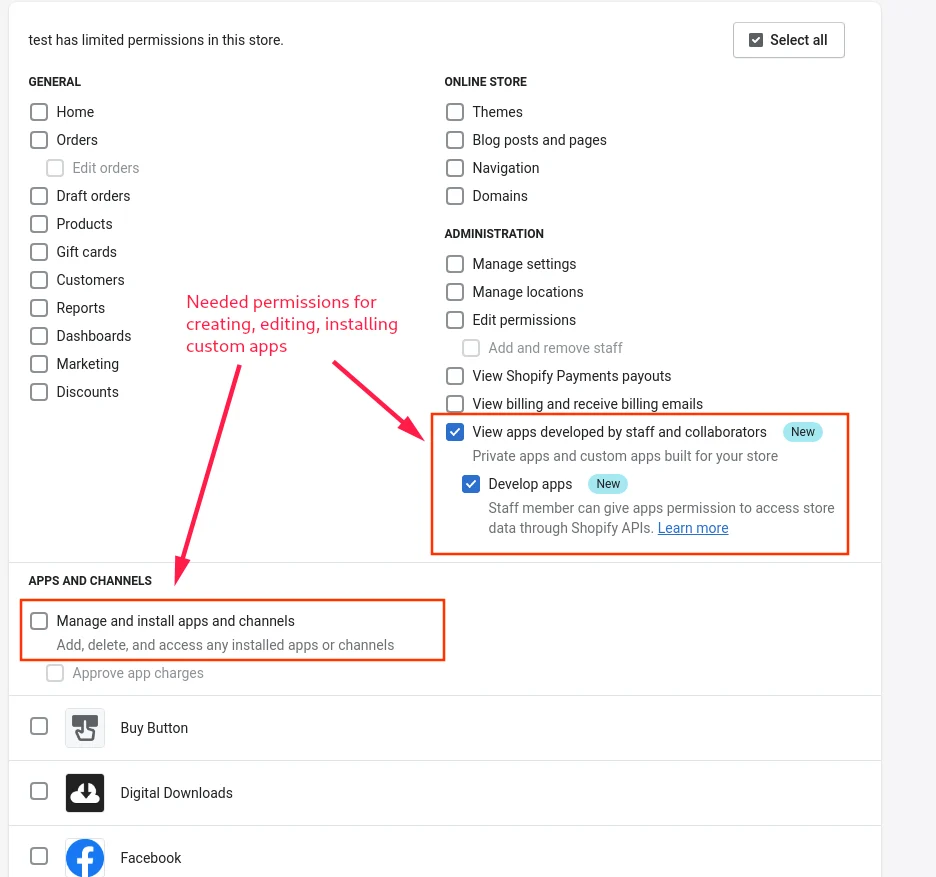
The store owner, collaborators and staff members can create, edit and install custom apps for their shopify store. Therefor, these users need multiple permissions. The permissions
View apps developed by staff and collaboratorsDevelop appsandManage and install apps and channels
are all needed. See also https://shopify.dev/apps/auth/admin-app-access-tokens#changing-api-scopes:
Anyone with a staff or collaborator account on a store can change what store resources an admin-created custom app can access, but only if they have all the following permissions: * the Manage and install apps and channels permission and the Develop apps permission * the relevant permissions for the respective store resource
Missing "Manage and install apps and channels" permission
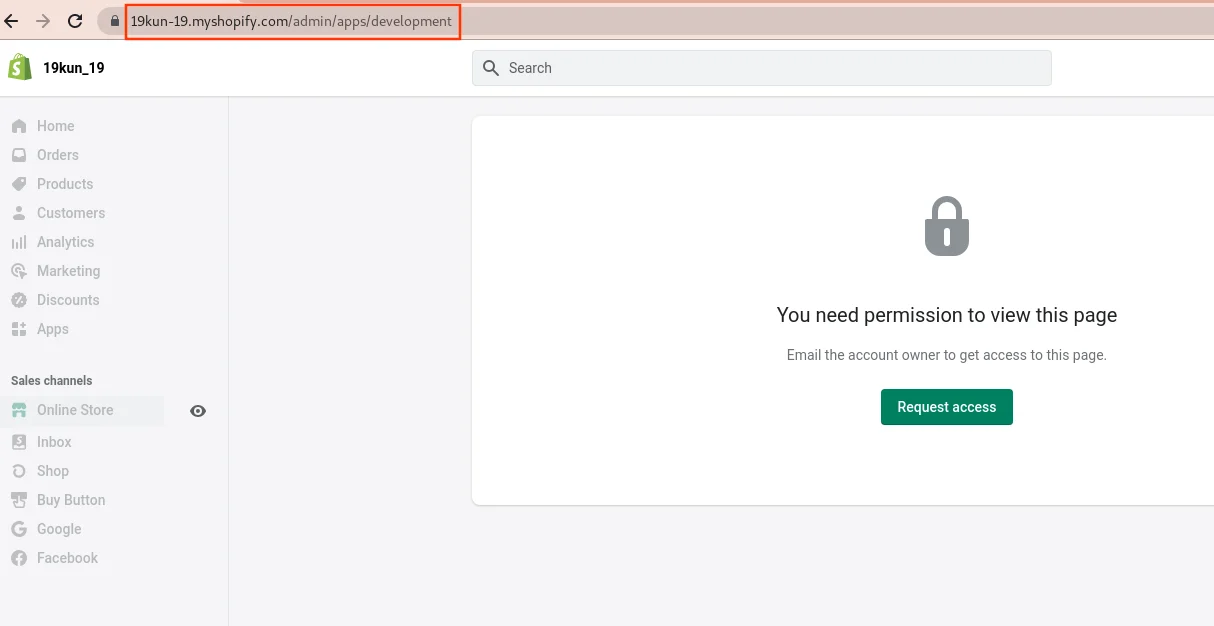
If the Manage and install apps and channels permission is finally not granted to a user, custom apps can't be created, edited or installed. The staff user in F1712978 has for example the two permissions View apps developed by staff and collaborators and Develop apps but not the Manage and install apps and channels permission. Thus, he is not able to create, edit and install custom apps. He is also not even able to reach the relevant config section at https://<YOUR_STORE>/admin/apps/development to manage custom apps:
Furthermore, the direct usage of the relevant API endpoints is also not possible. The request to create a custom app is not permitted and the server states that the user must have edit permissions for custom apps:
POST /admin/internal/web/graphql/core?operation=CreateAppMutation&type=mutation HTTP/2
Host: 19kun-19.myshopify.com
Cookie: <COOKIES_STAFF_MEMBER>
X-Csrf-Token: <CSRF_STAFF_MEMBER>
Origin: https://19kun-19.myshopify.com
...

{
   "operationName":"CreateAppMutation",
   "variables":{
      "input":{
         "title":"test",
         "maintainerUserId":"gid://shopify/StaffMember/76770345016"
      }
   },
   "query":"mutation CreateAppMutation($input: ShopOwnedAppCreateInput!) {\n  shopOwnedAppCreate(input: $input) {\n    app {\n      id\n      title\n      __typename\n    }\n    userErrors {\n      field\n      message\n      code\n      __typename\n    }\n    __typename\n  }\n}\n"
}
HTTP/2 200 OK
Date: Sat, 30 Apr 2022 20:04:03 GMT
Content-Type: application/json; charset=utf-8
...

{
   "data":{
      "shopOwnedAppCreate":null
   },
   "errors":[
      {
         "message":"Access denied for shopOwnedAppCreate field. Required access: The user must have edit permissions for custom apps.",
         "locations":[
            {
               "line":2,
               "column":3
            }
         ],
         "path":[
            "shopOwnedAppCreate"
         ],
         "extensions":{
            "code":"ACCESS_DENIED",
            "documentation":"https:\/\/shopify.dev\/api\/usage\/access-scopes",
            "requiredAccess":"The user must have edit permissions for custom apps."
         }
      }
   ],
   ...
}
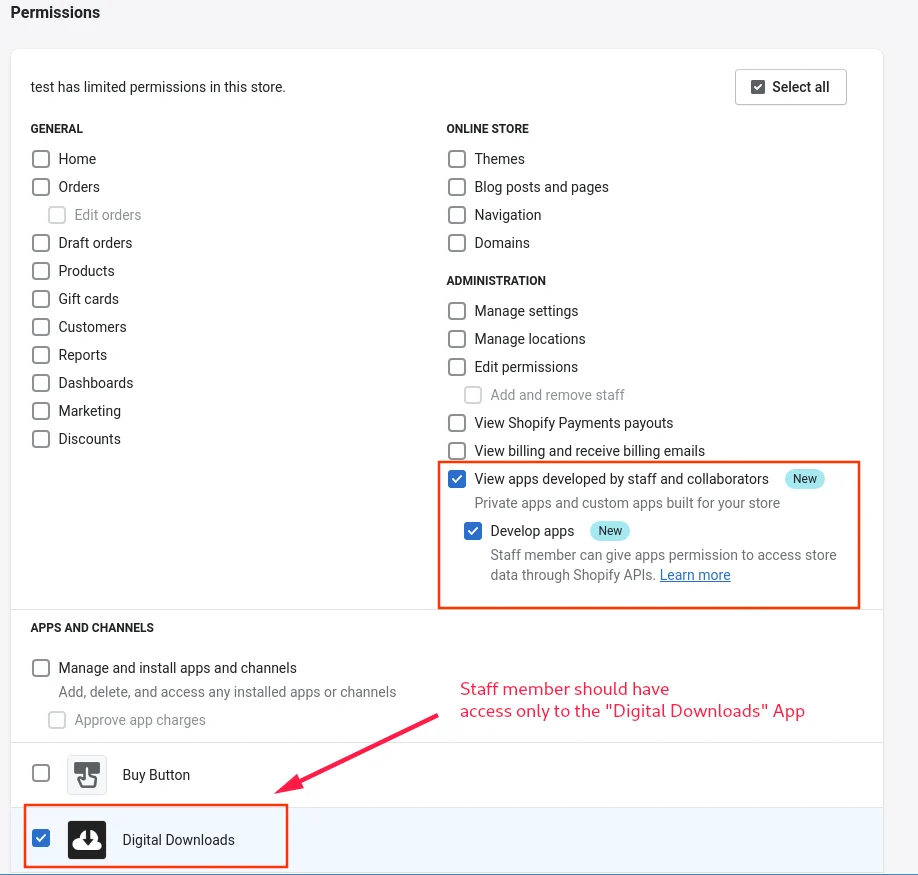
So far, so good, but if the store owner now decides to give the staff member only a permission to one specific app (see F1712985), a problem occurs. The staff member still have no access to the config section for managing the custom apps...
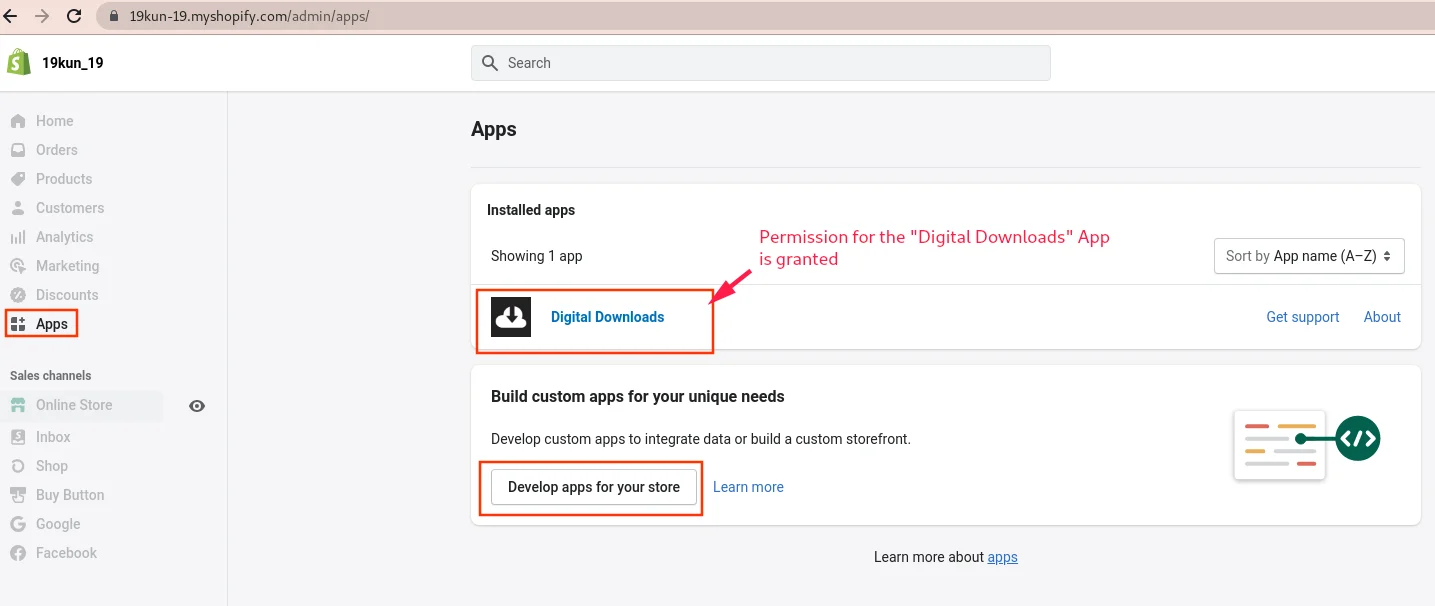
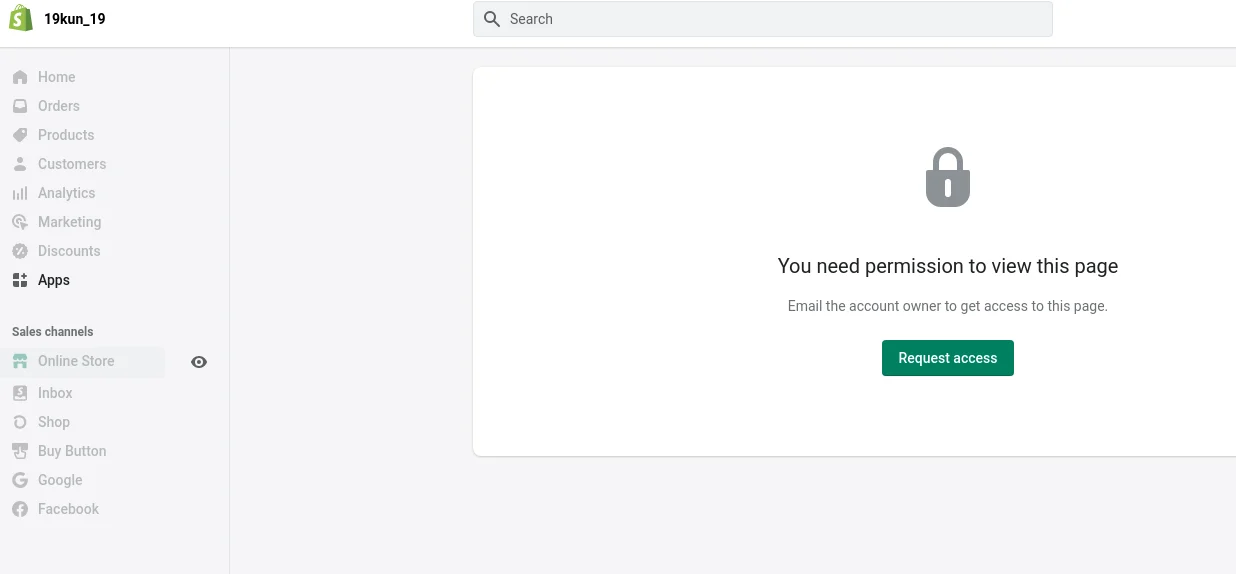
...but when using the API endpoints now directly, custom apps can be created, edited and installed by the staff member! The HTTP request above is now successful and the custom app could be created. This is definitely not intended.
Shops Used to Test:
https://19kun-19.myshopify.com
Steps To Reproduce:
- As s store owner, enable the custom app development
- Make sure you added a staff member to your store and give him the two rights
View apps developed by staff and collaboratorsandDevelop appsand the permission for just one specific app (like in F1712985) - Log in as staff member and visit https://<YOUR_STORE>/admin/apps/development (the config section for custom apps). You should see that you have no permissions to access this view (like in F1712991)
- Create a custom app by executing following request (replace the placeholders appropriately):
POST /admin/internal/web/graphql/core?operation=CreateAppMutation&type=mutation HTTP/2
Host: <YOUR_STORE>
Cookie: <STAFF_MEMBER_COOKIE>
Content-Length: 428
Sec-Ch-Ua: "Chromium";v="93", " Not;A Brand";v="99"
X-Csrf-Token: <CSRF_TOKEN>
Sec-Ch-Ua-Mobile: ?0
User-Agent: Mozilla/5.0 (Windows NT 10.0; Win64; x64) AppleWebKit/537.36 (KHTML, like Gecko) Chrome/93.0.4577.82 Safari/537.36
Content-Type: application/json
Accept: application/json
X-Shopify-Web-Force-Proxy: 1
Sec-Ch-Ua-Platform: "Linux"
Origin: https://19kun-19.myshopify.com
Sec-Fetch-Site: same-origin
Sec-Fetch-Mode: cors
Sec-Fetch-Dest: empty
Accept-Encoding: gzip, deflate
Accept-Language: en-US,en;q=0.9

{
   "operationName":"CreateAppMutation",
   "variables":{
      "input":{
         "title":"Broken Access PoC",
         "maintainerUserId":"gid://shopify/StaffMember/<STAFF_MEMBER_ID>"
      }
   },
   "query":"mutation CreateAppMutation($input: ShopOwnedAppCreateInput!) {\n  shopOwnedAppCreate(input: $input) {\n    app {\n      id\n      title\n      __typename\n    }\n    userErrors {\n      field\n      message\n      code\n      __typename\n    }\n    __typename\n  }\n}\n"
}
- Visit https://<YOUR_STORE>/admin/apps/development as a store owner. You should now observe the created custom app by the staff member:
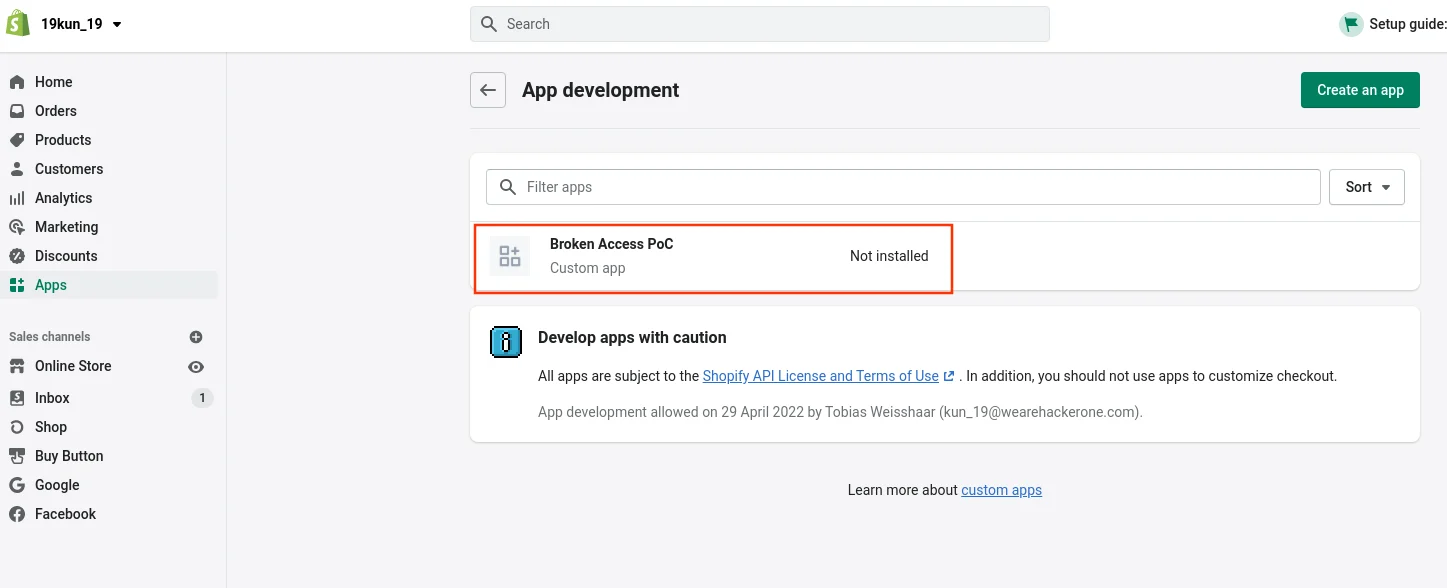
NOTE: The other API endpoints related to the custom apps can also be used. Thus, after creating the custom app, the staff member is for example also able to edit the Admin API access scope and install the custom app.
Impact
A shopify store owner / admin relies on the documentation and assumes that a staff member without the permission to Manage and install apps and channels is not able to create, edit or install custom apps. If the store owner / admin now grants a staff member the permission to only one app, the staff member (attacker) is able to
- create and install new custom apps with specific Admin API access scopes
- edit / modify existing custom apps of the store admin / other staff members, including
- changing Admin API scopes (Integrity)
- uninstalling the app (Availability)
- uninstalling / reinstalling the app (which rotates the access keys) (Integrity + Availability)
- etc.
Attachments
Context
Shopify lets a store owner, collaborators and staff members create, edit and install custom apps for a store. Because a custom app can be granted Admin API access scopes, the platform gates this capability behind several permissions. The report quotes Shopify's own documentation on changing API scopes:
Anyone with a staff or collaborator account on a store can change what store resources an admin-created custom app can access, but only if they have all the following permissions: * the Manage and install apps and channels permission and the Develop apps permission * the relevant permissions for the respective store resource
The three permissions the researcher identifies as necessary are:
View apps developed by staff and collaboratorsDevelop appsManage and install apps and channels
The feature under test is the custom app management area at https://<YOUR_STORE>/admin/apps/development, plus the internal GraphQL endpoint the admin UI uses to create apps.
Setup
The researcher used two staff configurations on a test store, 19kun-19.myshopify.com:
- A staff member (referenced as F1712978) holding
View apps developed by staff and collaboratorsandDevelop apps, but notManage and install apps and channels. - A second configuration (referenced as F1712985) in which the same staff member is additionally granted permission to one specific app.
Requests were sent with the staff member's session cookie and CSRF token, using a Chrome 93 user agent on Windows. The store owner account is used to observe results in the admin UI.
Finding it
With only the first two permissions, the behaviour matches the documentation. The staff member cannot reach the custom app configuration section at https://<YOUR_STORE>/admin/apps/development:
Direct calls to the API are refused as well. The create request returns an access error stating that the user must have edit permissions for custom apps:
POST /admin/internal/web/graphql/core?operation=CreateAppMutation&type=mutation HTTP/2
Host: 19kun-19.myshopify.com
Cookie: <COOKIES_STAFF_MEMBER>
X-Csrf-Token: <CSRF_STAFF_MEMBER>
Origin: https://19kun-19.myshopify.com
...

{
   "operationName":"CreateAppMutation",
   "variables":{
      "input":{
         "title":"test",
         "maintainerUserId":"gid://shopify/StaffMember/76770345016"
      }
   },
   "query":"mutation CreateAppMutation($input: ShopOwnedAppCreateInput!) {\n  shopOwnedAppCreate(input: $input) {\n    app {\n      id\n      title\n      __typename\n    }\n    userErrors {\n      field\n      message\n      code\n      __typename\n    }\n    __typename\n  }\n}\n"
}
HTTP/2 200 OK
Date: Sat, 30 Apr 2022 20:04:03 GMT
Content-Type: application/json; charset=utf-8
...

{
   "data":{
      "shopOwnedAppCreate":null
   },
   "errors":[
      {
         "message":"Access denied for shopOwnedAppCreate field. Required access: The user must have edit permissions for custom apps.",
         "locations":[
            {
               "line":2,
               "column":3
            }
         ],
         "path":[
            "shopOwnedAppCreate"
         ],
         "extensions":{
            "code":"ACCESS_DENIED",
            "documentation":"https:\/\/shopify.dev\/api\/usage\/access-scopes",
            "requiredAccess":"The user must have edit permissions for custom apps."
         }
      }
   ],
   ...
}
The request carries a maintainerUserId variable and calls the shopOwnedAppCreate mutation. The denial is clean: ACCESS_DENIED with requiredAccess set to edit permissions for custom apps.
The problem appears when the store owner grants the staff member permission to one specific app. The staff member still has no access to the configuration section for managing custom apps:
Yet the same API call now succeeds, and custom apps can be created, edited and installed by that staff member. The researcher describes this as definitely not intended.
Exploitation
Step 1: enable custom app development
As the store owner, enable custom app development for the store.
Step 2: configure the staff member
Add a staff member and grant View apps developed by staff and collaborators and Develop apps, plus the permission for just one specific app, as in F1712985.
Step 3: confirm the UI is blocked
Log in as the staff member and visit https://<YOUR_STORE>/admin/apps/development. The view shows that the user has no permission to access it, as in F1712991.
Step 4: create a custom app through the API
Send the following request with the staff member's cookie and CSRF token, replacing the placeholders:
POST /admin/internal/web/graphql/core?operation=CreateAppMutation&type=mutation HTTP/2
Host: <YOUR_STORE>
Cookie: <STAFF_MEMBER_COOKIE>
Content-Length: 428
Sec-Ch-Ua: "Chromium";v="93", " Not;A Brand";v="99"
X-Csrf-Token: <CSRF_TOKEN>
Sec-Ch-Ua-Mobile: ?0
User-Agent: Mozilla/5.0 (Windows NT 10.0; Win64; x64) AppleWebKit/537.36 (KHTML, like Gecko) Chrome/93.0.4577.82 Safari/537.36
Content-Type: application/json
Accept: application/json
X-Shopify-Web-Force-Proxy: 1
Sec-Ch-Ua-Platform: "Linux"
Origin: https://19kun-19.myshopify.com
Sec-Fetch-Site: same-origin
Sec-Fetch-Mode: cors
Sec-Fetch-Dest: empty
Accept-Encoding: gzip, deflate
Accept-Language: en-US,en;q=0.9

{
   "operationName":"CreateAppMutation",
   "variables":{
      "input":{
         "title":"Broken Access PoC",
         "maintainerUserId":"gid://shopify/StaffMember/<STAFF_MEMBER_ID>"
      }
   },
   "query":"mutation CreateAppMutation($input: ShopOwnedAppCreateInput!) {\n  shopOwnedAppCreate(input: $input) {\n    app {\n      id\n      title\n      __typename\n    }\n    userErrors {\n      field\n      message\n      code\n      __typename\n    }\n    __typename\n  }\n}\n"
}
The request targets the internal admin GraphQL endpoint with the CreateAppMutation operation. The input object carries the app title (Broken Access PoC) and the maintainerUserId, which points at the staff member's own ID. The X-Csrf-Token header and the session cookie identify the call as the staff member's. The mutation body is the same shopOwnedAppCreate call that was denied in the earlier test.
Step 5: verify as the store owner
Visit https://<YOUR_STORE>/admin/apps/development as the store owner. The custom app created by the staff member is now visible:
The researcher notes that the other API endpoints related to custom apps can be used in the same way. After creating the app, the staff member can, for example, edit the Admin API access scope and install the custom app.
Root cause
The report does not state why the check passes once the per-app permission is granted. When the staff member holds permission for one specific app, the shopOwnedAppCreate field stops returning ACCESS_DENIED and the mutation succeeds, even though the user lacks Manage and install apps and channels. The UI route at /admin/apps/development stays blocked, while the GraphQL call succeeds. The report does not describe the server-side implementation, so the exact check that is bypassed is not stated; the observable fact is that the API-level authorisation is weaker than the documented requirement and weaker than the UI gate.
Impact
A store owner or admin relies on the documentation and assumes that a staff member without Manage and install apps and channels cannot create, edit or install custom apps. If the owner grants a staff member permission to only one app, that staff member (the attacker) can:
- create and install new custom apps with specific Admin API access scopes
- edit or modify existing custom apps of the store admin or other staff members, including
- changing Admin API scopes (integrity)
- uninstalling the app (availability)
- uninstalling and reinstalling the app, which rotates the access keys (integrity and availability)
- and so on
The precondition is the per-app permission grant. Without it, the same requests are denied, as the first test shows.
Fix
Based on the finding, the server-side check on the custom app mutations should require the same permission set as the UI and the documentation, in particular Manage and install apps and channels alongside Develop apps, rather than accepting the per-app permission as sufficient.
Variants to test
- Other mutations on the same endpoint. Try edit, install and scope-change operations with a staff account that has only a per-app permission. A positive result is a successful response where the equivalent UI route is blocked.
- Other permission combinations. Grant
Develop appsplus a per-app permission but omitView apps developed by staff and collaborators, and vice versa. A positive result is any combination that unlocks mutations while the UI stays closed. - Per-resource permissions elsewhere. Look for features where a narrow, object-level grant (one app, one integration, one channel) is treated as a substitute for a broader management permission. A positive result is an API call that succeeds under the narrow grant but is refused under the documented broad permission alone.
- UI versus API parity. For each admin screen that returns a permission error, replay the underlying GraphQL operation directly. A positive result is a 200 with data instead of
ACCESS_DENIED.
Hunting notes
This kind of bug tends to hide where a product has both object-level permissions and feature-level permissions, and where the UI and the API enforce them separately. The signal during recon is a documented permission requirement that names several permissions together: if the documentation says "all of the following", test each subset. Another signal is an admin UI that hides a section entirely while the underlying endpoint remains reachable, which is exactly the gap shown here. The researcher showed the blocked UI, the denied request without the extra grant, the same request succeeding with the per-app grant, and the resulting app visible to the store owner, and noted that other custom app endpoints can be used too. That combination of a reproducible request and a concrete consequence for the store owner is what makes the finding actionable.
Attachments
What happened, in plain words
Shopify is a platform for running an online shop. A shop owner can invite other people to help run the shop. Two kinds of helpers appear in this report: collaborators and staff members. Both are accounts that belong to someone else's shop and have only the powers the owner gives them.
One of the things a shop can have is a custom app: a small piece of software built for that one shop. A custom app can be given permission to read or change parts of the shop through Shopify's Admin API. The Admin API is the back door that programs use to talk to a shop: instead of a person clicking buttons, a program sends requests and gets answers. Because a custom app can be powerful, Shopify only lets people create, edit and install custom apps if they hold certain permissions.
A permission here is a tick box in the staff member's settings, such as "can see orders" or "can edit products". The report quotes Shopify's own documentation, which says three permissions are needed together before someone may change what a custom app can access:
View apps developed by staff and collaboratorsDevelop appsManage and install apps and channels
The documentation text quoted in the report reads:
Anyone with a staff or collaborator account on a store can change what store resources an admin-created custom app can access, but only if they have all the following permissions: * the Manage and install apps and channels permission and the Develop apps permission * the relevant permissions for the respective store resource
The bug is a mismatch between what the shop's screens show and what the shop's API accepts. When a staff member has only the first two permissions, everything behaves as documented: the screens are closed and the API says no. But when the owner also gives that staff member permission over one specific app, the screens stay closed, yet the API suddenly says yes. The staff member can then create, edit and install custom apps even though they never received Manage and install apps and channels.
This kind of flaw is called broken access control, or improper access control. Access control is the set of rules about who may do what. When a rule is enforced in one place (the screen) but not in another (the API), the rule can be sidestepped. A simple comparison: a building where the front door is locked but the side door is not. The sign on the front says "staff only", and the sign is honest about the front door, but it tells you nothing about the side door.
The researcher reported this to Shopify through HackerOne, a bug bounty platform where companies pay people for finding and reporting security problems. The report was rated medium severity and a bounty of 1,900 USD was paid. It was disclosed publicly on 11 July 2022.
The pieces involved
Before walking through the steps, here are the moving parts, explained from zero.
The admin area. Every Shopify shop has an admin website at an address like https://<YOUR_STORE>/admin. That is where the owner and staff log in and click around. The custom app management screen lives at https://<YOUR_STORE>/admin/apps/development.
The API behind the screens. Modern admin screens are often thin: the page you see is drawn by your browser, but the actual work is done by requests the page sends to the server. Those requests go to an endpoint, which is simply a web address that accepts a particular kind of request. Here the endpoint is /admin/internal/web/graphql/core. The word GraphQL names a way of asking a server for exactly the data you want, in a structured text format, rather than fetching a fixed page. The word internal hints that this endpoint is meant for the admin website itself, not for the public.
Cookies and CSRF tokens. When you log in to a website, the server gives your browser a small piece of text called a session cookie. Your browser sends it back with every request, and that is how the server knows who you are. A CSRF token (Cross-Site Request Forgery token) is a second, secret value that the page includes with requests that change something. It exists to prove the request really came from the site's own page and not from a malicious page that tricked your browser. Both are secrets: anyone who has them can act as you, which is why they are redacted in this write-up.
HTTP requests. A request to a web server has a method (such as POST, meaning "here is data, please act on it"), a path (the address on the server), headers (extra labelled lines such as Cookie: or User-Agent:), and often a body (the data itself). A response comes back with a status code such as 200 OK, meaning the server processed the request, plus its own headers and body.
Mutations. In GraphQL, a mutation is an operation that changes something, as opposed to a query that only reads. CreateAppMutation is the mutation that creates a custom app. shopOwnedAppCreate is the field inside it that does the work.
The two test setups. The researcher used a test shop, 19kun-19.myshopify.com, and two staff configurations:
- A staff member (referenced as F1712978) holding
View apps developed by staff and collaboratorsandDevelop apps, but notManage and install apps and channels. - A second configuration (referenced as F1712985) in which the same staff member is additionally granted permission to one specific app.
Requests were sent with the staff member's session cookie and CSRF token, using a Chrome 93 user agent on Windows. The store owner account is used to look at the results in the admin screens.
First test: the documented behaviour
With only the first two permissions, the staff member cannot reach the custom app configuration section at https://<YOUR_STORE>/admin/apps/development:
The screenshot is the staff member's view of that address.
Calling the API directly is refused as well. The researcher sent this request:
POST /admin/internal/web/graphql/core?operation=CreateAppMutation&type=mutation HTTP/2
Host: 19kun-19.myshopify.com
Cookie: <COOKIES_STAFF_MEMBER>
X-Csrf-Token: <CSRF_STAFF_MEMBER>
Origin: https://19kun-19.myshopify.com
...

{
   "operationName":"CreateAppMutation",
   "variables":{
      "input":{
         "title":"test",
         "maintainerUserId":"gid://shopify/StaffMember/76770345016"
      }
   },
   "query":"mutation CreateAppMutation($input: ShopOwnedAppCreateInput!) {\n  shopOwnedAppCreate(input: $input) {\n    app {\n      id\n      title\n      __typename\n    }\n    userErrors {\n      field\n      message\n      code\n      __typename\n    }\n    __typename\n  }\n}\n"
}
Line by line:
POST /admin/internal/web/graphql/core?operation=CreateAppMutation&type=mutation HTTP/2is the request line. It says: send data (POST) to the internal GraphQL endpoint, and the query string after the?labels the operation asCreateAppMutationof typemutation.HTTP/2is the version of the web protocol being used.Host: 19kun-19.myshopify.comnames the shop the request is for.Cookie: <COOKIES_STAFF_MEMBER>carries the staff member's session cookie, which identifies them to the server. The actual value is redacted.X-Csrf-Token: <CSRF_STAFF_MEMBER>carries the staff member's CSRF token, the anti-forgery secret described above. Also redacted.Origin: https://19kun-19.myshopify.comtells the server which site the request came from.- The
...stands for further headers the report does not show. - The body is JSON, a text format for structured data.
operationNamenames the operation.variablesholds the inputs:titleis the name of the app to create (test), andmaintainerUserIdis an identifier pointing at a staff member, written in Shopify'sgid://identifier format.queryis the GraphQL text itself: it callsshopOwnedAppCreatewith the input, and asks for the new app'sidandtitle, plus anyuserErrors(field-level error messages) if something goes wrong.
The server answered:
HTTP/2 200 OK
Date: Sat, 30 Apr 2022 20:04:03 GMT
Content-Type: application/json; charset=utf-8
...

{
   "data":{
      "shopOwnedAppCreate":null
   },
   "errors":[
      {
         "message":"Access denied for shopOwnedAppCreate field. Required access: The user must have edit permissions for custom apps.",
         "locations":[
            {
               "line":2,
               "column":3
            }
         ],
         "path":[
            "shopOwnedAppCreate"
         ],
         "extensions":{
            "code":"ACCESS_DENIED",
            "documentation":"https:\/\/shopify.dev\/api\/usage\/access-scopes",
            "requiredAccess":"The user must have edit permissions for custom apps."
         }
      }
   ],
   ...
}
Line by line:
HTTP/2 200 OKis the status line.200means the server understood and answered. Note that a200does not mean the action succeeded: GraphQL often reports failures inside a successful HTTP response.DateandContent-Typeare response headers.Content-Type: application/jsonsays the body is JSON."data":{"shopOwnedAppCreate":null}is the answer to the requested operation:null, meaning no app was created."errors":[...]is a list of problems. Themessagesays access was denied and that the user must have edit permissions for custom apps.locationspoints at where in the GraphQL text the failing field sits (line 2, column 3).pathnames the failing field,shopOwnedAppCreate.extensionscarries machine-readable details:codeisACCESS_DENIED,documentationlinks to Shopify's page about access scopes, andrequiredAccessrepeats the requirement.
The denial is clean. This is the behaviour the documentation promises.
The twist: one specific app changes everything
The problem appears when the store owner grants the staff member permission to one specific app. The staff member still has no access to the configuration section for managing custom apps:
The two screenshots relate to the staff member's view after the extra grant.
Yet the same API call now succeeds, and custom apps can be created, edited and installed by that staff member. The researcher describes this as definitely not intended.
Why does this matter? The screen and the API are two doors into the same room. The screen checks the full set of permissions and stays shut. The API accepts the call once the per-app permission is granted. Anyone who can send requests directly, which is easy with a browser's developer tools or a tool that lets you edit requests, can walk through the API door.
Reproducing it, step by step
Step 1: enable custom app development
As the store owner, enable custom app development for the store. This is the switch that makes the custom app feature available at all. Without it there is nothing to test.
Step 2: configure the staff member
Add a staff member and grant View apps developed by staff and collaborators and Develop apps, plus the permission for just one specific app, as in F1712985. This is the exact combination that triggers the bug: the two documented permissions are present, the third (Manage and install apps and channels) is deliberately absent, and a narrow, single-app permission is added.
Step 3: confirm the screen is blocked
Log in as the staff member and visit https://<YOUR_STORE>/admin/apps/development. The view shows that the user has no permission to access it, as in F1712991. This step matters because it proves the front end is doing its job: the staff member is not supposed to be here, and the screen says so.
Step 4: create a custom app through the API
Send the following request with the staff member's cookie and CSRF token, replacing the placeholders:
POST /admin/internal/web/graphql/core?operation=CreateAppMutation&type=mutation HTTP/2
Host: <YOUR_STORE>
Cookie: <STAFF_MEMBER_COOKIE>
Content-Length: 428
Sec-Ch-Ua: "Chromium";v="93", " Not;A Brand";v="99"
X-Csrf-Token: <CSRF_TOKEN>
Sec-Ch-Ua-Mobile: ?0
User-Agent: Mozilla/5.0 (Windows NT 10.0; Win64; x64) AppleWebKit/537.36 (KHTML, like Gecko) Chrome/93.0.4577.82 Safari/537.36
Content-Type: application/json
Accept: application/json
X-Shopify-Web-Force-Proxy: 1
Sec-Ch-Ua-Platform: "Linux"
Origin: https://19kun-19.myshopify.com
Sec-Fetch-Site: same-origin
Sec-Fetch-Mode: cors
Sec-Fetch-Dest: empty
Accept-Encoding: gzip, deflate
Accept-Language: en-US,en;q=0.9

{
   "operationName":"CreateAppMutation",
   "variables":{
      "input":{
         "title":"Broken Access PoC",
         "maintainerUserId":"gid://shopify/StaffMember/<STAFF_MEMBER_ID>"
      }
   },
   "query":"mutation CreateAppMutation($input: ShopOwnedAppCreateInput!) {\n  shopOwnedAppCreate(input: $input) {\n    app {\n      id\n      title\n      __typename\n    }\n    userErrors {\n      field\n      message\n      code\n      __typename\n    }\n    __typename\n  }\n}\n"
}
Line by line:
POST /admin/internal/web/graphql/core?operation=CreateAppMutation&type=mutation HTTP/2is the same request line as before: a data-changing call to the internal GraphQL endpoint, labelled as theCreateAppMutationmutation.Host: <YOUR_STORE>is the shop's address. The placeholder is replaced with the real shop.Cookie: <STAFF_MEMBER_COOKIE>is the staff member's session cookie, the value that identifies them. Redacted.Content-Length: 428states how many bytes the body contains, so the server knows where the body ends.Sec-Ch-Ua,Sec-Ch-Ua-MobileandSec-Ch-Ua-Platformare browser information headers: they describe the browser and platform. They are copied from a real browser session so the request looks like normal traffic.X-Csrf-Token: <CSRF_TOKEN>is the anti-forgery token. Redacted.User-Agent: Mozilla/5.0 (Windows NT 10.0; Win64; x64) ... Chrome/93.0.4577.82 Safari/537.36identifies the browser as Chrome 93 on Windows.Accept: application/jsonsays the sender expects JSON back.X-Shopify-Web-Force-Proxy: 1is a Shopify-specific header that marks the request as coming from the admin web interface.Origin: https://19kun-19.myshopify.comnames the site the request came from.Sec-Fetch-Site,Sec-Fetch-Mode,Sec-Fetch-Destare browser security headers describing the context of the request: same-origin, a cross-origin-capable fetch, and no particular destination.Accept-Encoding: gzip, deflatesays the sender can accept compressed responses.Accept-Language: en-US,en;q=0.9says English is preferred.- The body is the same shape as the first test.
operationNameisCreateAppMutation.variables.input.titleis nowBroken Access PoC, a name that makes clear this is a proof of concept.maintainerUserIdpoints at the staff member's own ID, written asgid://shopify/StaffMember/<STAFF_MEMBER_ID>.queryis the same GraphQL text callingshopOwnedAppCreateand asking for the new app'sidandtitleplus anyuserErrors.
This is the same shopOwnedAppCreate call that was denied in the earlier test. The only meaningful difference is the permission setup on the account, not the request itself.
Step 5: verify as the store owner
Visit https://<YOUR_STORE>/admin/apps/development as the store owner. The custom app created by the staff member is now visible:
The screenshot relates to the store owner's view of the created app. This is the proof: the action the staff member was not supposed to be able to take actually happened, and the owner can see the result.
The researcher notes that the other API endpoints related to custom apps can be used in the same way. After creating the app, the staff member can, for example, edit the Admin API access scope and install the custom app.
Why it happens
The report does not state why the check passes once the per-app permission is granted. When the staff member holds permission for one specific app, the shopOwnedAppCreate field stops returning ACCESS_DENIED and the mutation succeeds, even though the user lacks Manage and install apps and channels. The screen at /admin/apps/development stays blocked, while the GraphQL call succeeds. A resolver is the piece of server code that answers a particular GraphQL field.
What an attacker could do
A store owner or admin relies on the documentation and assumes that a staff member without Manage and install apps and channels cannot create, edit or install custom apps. If the owner grants a staff member permission to only one app, that staff member (the attacker) can:
- create and install new custom apps with specific Admin API access scopes
- edit or modify existing custom apps of the store admin or other staff members, including
- changing Admin API scopes (integrity)
- uninstalling the app (availability)
- uninstalling and reinstalling the app, which rotates the access keys (integrity and availability)
- and so on
Two words in that list are standard security shorthand. Integrity means data or settings are changed without authorisation. Availability means something that should work stops working. Access keys are the secret credentials a custom app uses to talk to the Admin API; rotating them means replacing them with new ones, which breaks anything still using the old ones.
The precondition is the per-app permission grant. Without it, the same requests are denied, as the first test shows.
How it should be fixed
Based on the finding, the server-side check on the custom app mutations should require the same permission set as the screen and the documentation, in particular Manage and install apps and channels alongside Develop apps, rather than accepting the per-app permission as sufficient.
Other places to look
- Other mutations on the same endpoint. Try edit, install and scope-change operations with a staff account that has only a per-app permission. A positive result is a successful response where the equivalent screen is blocked.
- Other permission combinations. Grant
Develop appsplus a per-app permission but omitView apps developed by staff and collaborators, and vice versa. A positive result is any combination that unlocks mutations while the screen stays closed. - Per-resource permissions elsewhere. Look for features where a narrow, object-level grant (one app, one integration, one channel) is treated as a substitute for a broader management permission. A positive result is an API call that succeeds under the narrow grant but is refused under the documented broad permission alone.
- Screen versus API parity. For each admin screen that returns a permission error, replay the underlying GraphQL operation directly. A positive result is a
200with data instead ofACCESS_DENIED.
How to spot this kind of bug
This kind of bug tends to hide where a product has both object-level permissions (this one app) and feature-level permissions (the whole apps area), and where the screen and the API enforce them separately. The signal during recon, the early exploration of a target, is a documented permission requirement that names several permissions together: if the documentation says "all of the following", test each subset. Another signal is an admin screen that hides a section entirely while the underlying endpoint remains reachable, which is exactly the gap shown here. The researcher showed the blocked screen, the denied request without the extra grant, the same request succeeding with the per-app grant, and the resulting app visible to the store owner, and noted that other custom app endpoints can be used too. That combination of a reproducible request and a concrete consequence for the store owner is what makes the finding actionable.
Attachments
Glossary
- Access control: the rules that decide who is allowed to do what; broken access control means those rules are missing or can be bypassed.
- Access key: a secret credential a program uses to prove its identity to an API; rotating it means replacing it with a new one.
- Admin API: the interface programs use to read and change a shop's data, as opposed to the screens a person clicks.
- Admin area: the logged-in website where a shop owner and staff manage the shop.
- API: a way for one piece of software to talk to another by sending structured requests and receiving structured answers.
- Authorisation: the check that a known user is allowed to perform a particular action.
- Availability: a security goal meaning that things which should work keep working; an attack on availability makes them stop.
- Body: the data part of an HTTP request or response, as opposed to the headers.
- Broken access control: a flaw where the rules about who may do what are not enforced correctly, letting someone do more than they should.
- Bug bounty: a programme where a company pays researchers for reporting security problems responsibly.
- Collaborator: an outside account invited to help run a shop, with only the permissions the owner grants.
- Cookie: a small piece of text a website stores in your browser and receives back on each request, often used to identify your logged-in session.
- CSRF token: a secret value included with requests that change data, to prove the request came from the site's own page and not from a malicious page.
- Custom app: a piece of software built for one specific shop, which can be given permission to use that shop's Admin API.
- Endpoint: a specific web address that accepts a particular kind of request.
- GraphQL: a way of asking a server for exactly the data you want using a structured text query, instead of fetching a fixed page.
- Header: an extra labelled line in an HTTP request or response, such as
Cookie:orContent-Type:. - HTTP: the protocol browsers and servers use to exchange requests and responses.
- HTTP method: the verb of a request, such as
POST(send data and act on it) orGET(fetch something). - Integrity: a security goal meaning data and settings are not changed without authorisation.
- JSON: a text format for structured data, made of names and values in braces and brackets.
- Mutation: in GraphQL, an operation that changes something, as opposed to a query that only reads.
- Permission: a tick box in an account's settings that allows a specific kind of action.
- Per-app permission: permission limited to one specific app rather than to the whole apps area.
- Proof of concept (PoC): a minimal demonstration that a vulnerability really works.
- Recon: the early exploration of a target to learn how it is built and where to look for problems.
- Resolver: the server-side code that answers a particular GraphQL field.
- Response: what a server sends back after a request, including a status code, headers and often a body.
- Scope: the set of things an app or token is allowed to access; an Admin API access scope is one such allowance.
- Session: the period during which a website remembers you as logged in, usually tracked by a cookie.
- Severity: a rating of how serious a vulnerability is, often low, medium, high or critical.
- Staff member: an account added to a shop to help run it, with only the permissions the owner grants.
- Status code: a number in a response saying how the request went, such as
200 OKfor success or403for forbidden. - User agent: a header identifying the browser and operating system making a request.
- Vulnerability: a weakness in software that someone could exploit to do something they should not be able to do.


