[h1-2102] Stored XSS in product description via `productUpdate` GraphQL query leads to XSS at handshake-web-internal.shopifycloud.com/products/[ID]
A stored cross-site scripting vulnerability existed in the product description field of a Shopify store with the Handshake plugin enabled. An attacker could inject JavaScript that executed when the product was viewed on the Handshake website, allowing arbitrary script execution on a shared domain.

- Triaged in 5 days
- Fixed in 30 days
- Paid in 6 days
- Disclosed after 18 months
This is most likely going to be a duplicate, so I'll keep it short.
A stored cross site scripting vulnerability exists at handshake-web-internal.shopifycloud.com through the product description field.
Recruirements
A shop with the Handshake plugin enabled and set-up
Reproduction steps
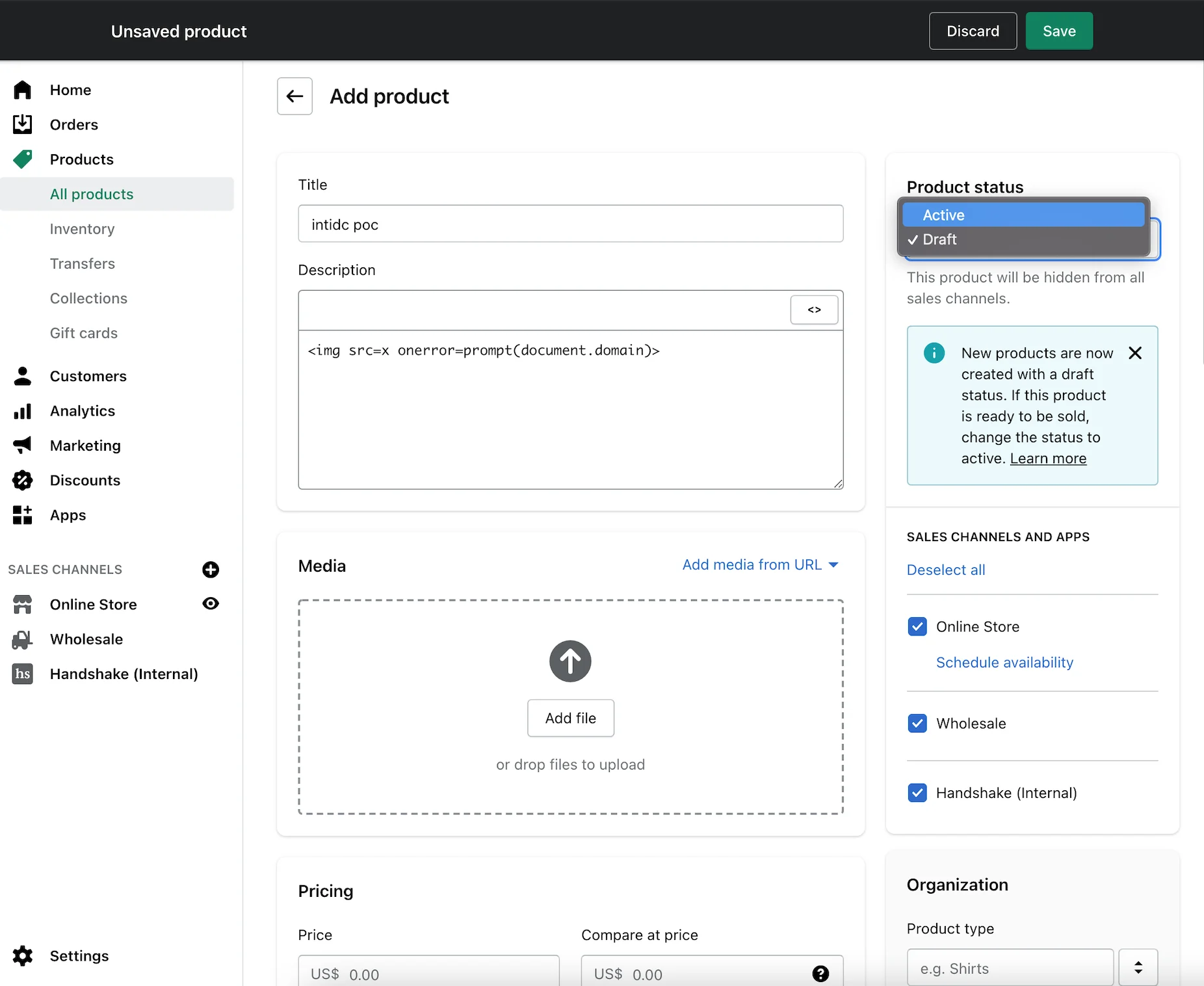
- Add a product in your store with the following description (make sure to click the < > button first so you can enter HTML):
<img src=x onerror=prompt(document.domain)>
then set it to Active:
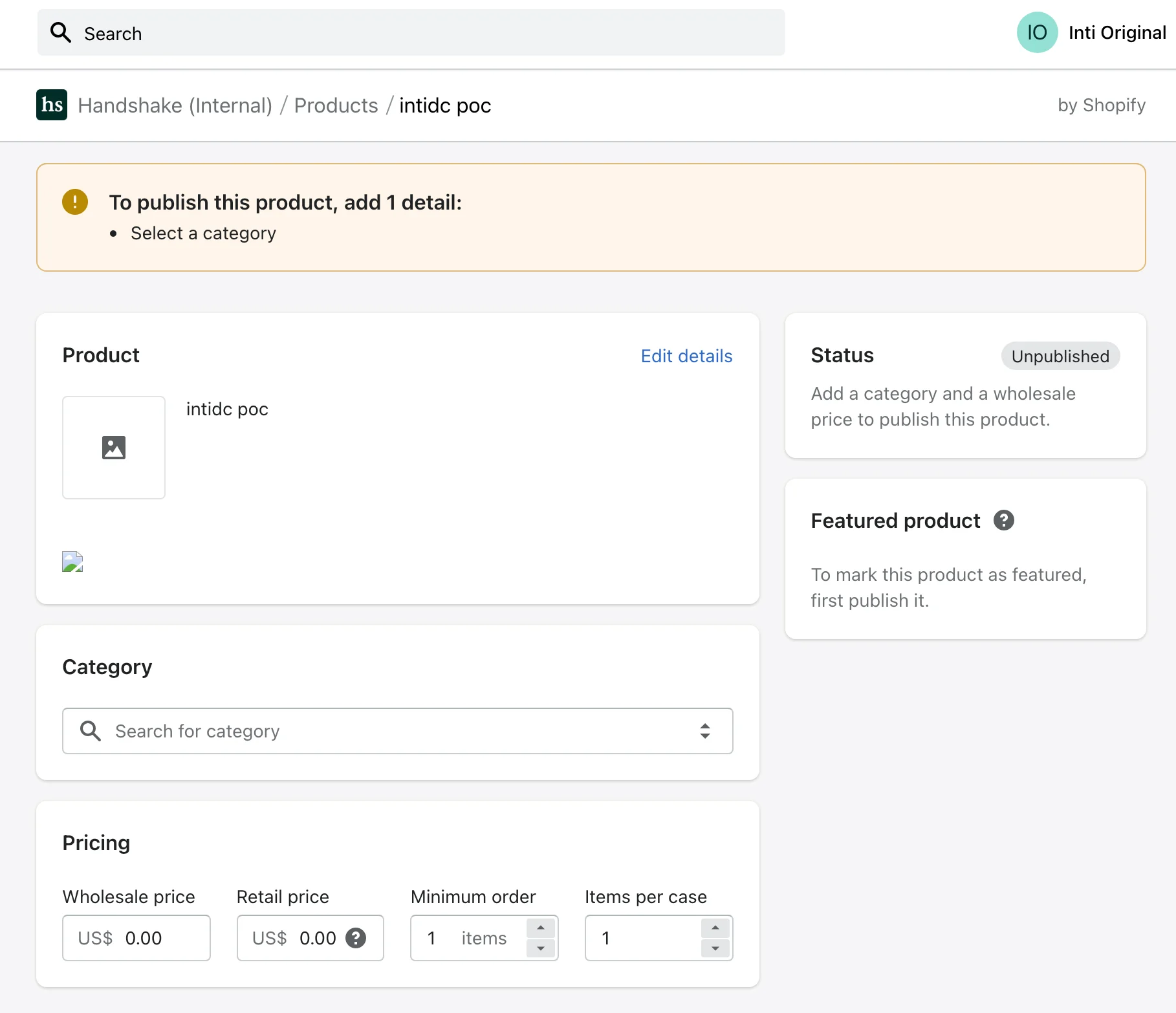
- Go to your Handshake portal, pick a price and a category to publish the item:
- Check your item in the on the handshake website, XSS will pop up after +/- 3 seconds:
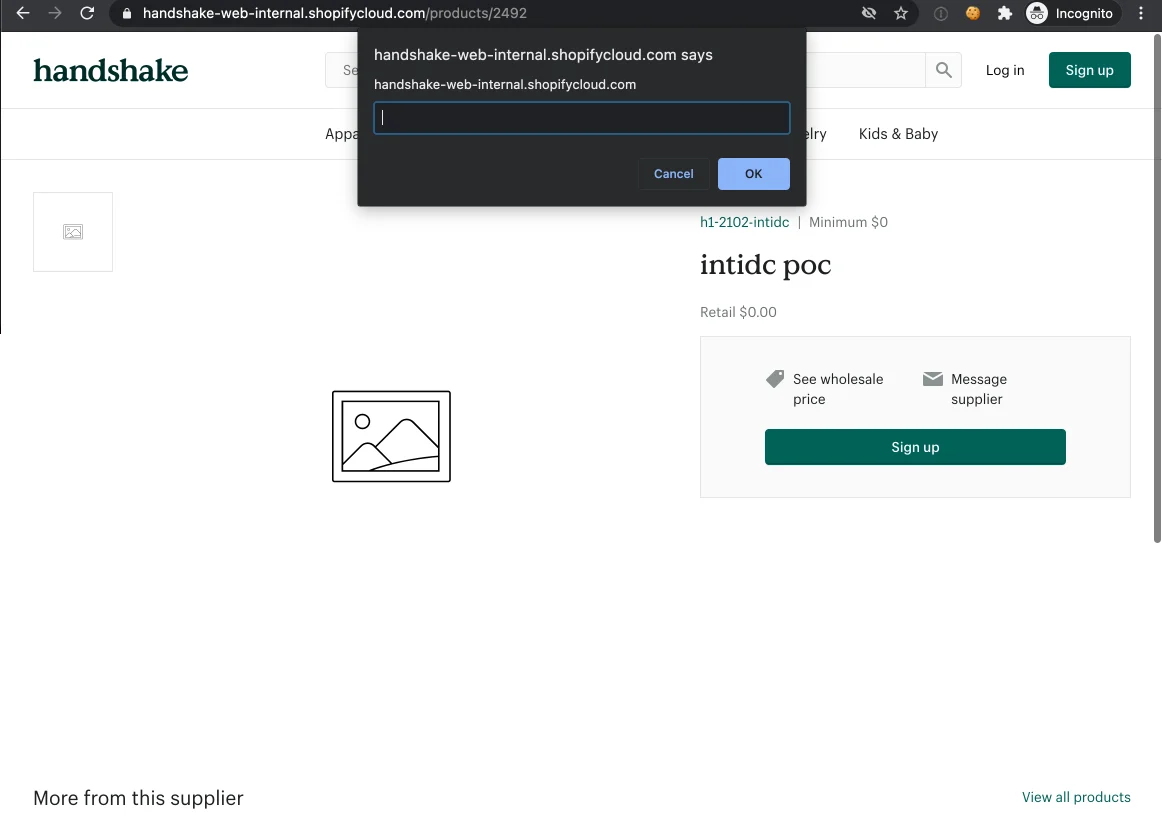
(I removed the PoC for obvious reasons, please do the same when triaging or everyone will submit)
Impact
Arbitrary javascript execution (stored) on a shared domain
What the report shows
The researcher reported a stored cross-site scripting issue on handshake-web-internal.shopifycloud.com, reached through the product description field of a product in a shop that has the Handshake plugin enabled and configured. The report opens by saying it is most likely a duplicate and keeps itself short.
The only prerequisite stated is a shop with the Handshake plugin enabled and set up.
The reproduction is three steps.
- Add a product in the store with the following description, clicking the
< >button first so that HTML can be entered:
<img src=x onerror=prompt(document.domain)>
Then set the product to Active.
- Go to the Handshake portal, pick a price and a category, and publish the item.
- Check the item on the Handshake website. The XSS fires after roughly three seconds.
The researcher notes that the proof of concept was removed from the public report and asks triagers to do the same, so that others do not submit it.
The impact is described as arbitrary JavaScript execution, stored, on a shared domain. The report records a medium severity, a CVSS score of 4.2, a bounty of 1,600 USD and disclosure on 11 July 2022. It does not describe a fix.
Root cause
The report does not state a root cause; it only shows the payload stored in the description and executing on the Handshake site. The payload is an img element with an invalid src and an onerror handler, so the browser executes the handler when the image fails to load.
Impact
The report's own framing is arbitrary JavaScript execution, stored, on a shared domain. The report describes arbitrary JavaScript execution, stored, on a shared domain. Because the domain is shared, the report treats the shared origin as part of the impact.
How this kind of bug works
Stored XSS happens when input that one user supplies is persisted and later rendered as markup to another user without correct output encoding. The dangerous pattern is a rich-text or HTML field that is accepted on write and trusted on read. If the stored value is placed into the page as HTML, any element with an event handler, a javascript: URL, or an SVG construct can execute script. The img/onerror trick is popular because it needs no user interaction and fires as soon as the element fails to load.
The context matters. Encoding must match where the value lands: HTML body, attribute, URL or script block each need different treatment. A sanitiser that allows a broad set of tags and attributes, or one applied only on input, will miss cases. The robust defences are contextual output encoding at render time, a strict allow-list sanitiser for any field that genuinely needs HTML, and a Content Security Policy that blocks inline handlers. Trusted Types and framework auto-escaping reduce the chance of raw HTML insertion.
How to test for it
- Identify fields that accept HTML or rich text: product and item descriptions, names, notes, support messages, profile fields. Look for an editor with a source or
< >toggle, which signals that markup is expected to survive. - Submit a benign marker first, such as a distinctive word wrapped in a harmless tag, and find every place the value is rendered: the editing UI, the public page, admin views, emails, exports and any secondary application that consumes the same data.
- Where the marker is rendered as markup, submit a minimal execution probe. Use a unique string in the handler so you can tell your execution apart from other testers' noise, and prefer a harmless action such as reading the document domain over anything destructive.
- Confirm execution in a clean browser session, ideally as a different user or in a private window, to prove the payload is stored and fires for a viewer rather than only for the author.
- Note the exact origin where it fires. A payload that executes on a different host from the one you entered it on is a cross-context issue and worth calling out.
A positive result is script running in the target origin when the stored value is viewed, with no interaction beyond loading the page. Common false positives: the payload firing only in your own session because the editor previews HTML locally; the value being reflected rather than stored; execution blocked by CSP in one browser but not another; and self-XSS, where only the person who typed the payload is affected. Check whether the application sanitises on render, and test several contexts (attribute, URL, script) before concluding.
How it is fixed
Apply contextual output encoding wherever stored values are rendered. For fields that must accept HTML, run a strict allow-list sanitiser on render, not only on input, and strip event handlers, javascript: URLs and dangerous elements. Add a Content Security Policy that disallows inline event handlers and restricts script sources. Where possible, avoid storing raw HTML at all and use a structured format that the renderer escapes.
Hunting notes
Stored XSS tends to hide in secondary surfaces: internal admin panels, marketplace or portal front ends that read data from the main application, notification emails, PDF exports and mobile web views. Any feature that copies data between two applications on a shared domain is worth a look, because the rendering rules often differ between them. Recon signals include rich-text editors, HTML toggles, fields labelled description or notes, and separate hostnames that display the same records. To get a report accepted, show the payload stored, the exact page where it fires, the origin it runs in, and a clean-session confirmation. Keep the proof minimal and non-destructive, and describe the impact in terms of what the script can actually reach rather than the general class of the bug.
What happened, in plain words
A security researcher found a way to make a shop's product description run JavaScript code on a Shopify website called Handshake. The report is short, and the researcher says at the start that it is most likely going to be a duplicate, meaning someone else probably reported the same thing first.
The problem is a stored cross-site scripting bug, usually shortened to stored XSS. To understand it, think of a guestbook in a hotel lobby. Guests write messages, and later visitors read them. If the hotel printed every message exactly as written, including any instructions hidden in the text, a guest could leave a note that tells the next reader to do something. Stored XSS is the same idea on a website: one person saves some text, the website later shows that text to other people, and the browser treats part of it as instructions (code) rather than as plain text.
The place where the text was saved is the product description field of a shop. The place where it was shown is handshake-web-internal.shopifycloud.com. The report says the only requirement is a shop with the Handshake plugin enabled and set up. A plugin is an add-on that gives a shop extra features.
The reproduction, step by step
Step 1: put the payload in a product description
The researcher added a product to the shop and, before typing, clicked the < > button in the description editor. That button switches the editor from normal text to raw HTML, so the shop owner can write markup. HTML is the language browsers use to describe a page: tags like <img> tell the browser to show an image. A payload here is the piece of text that carries the attack.
The description entered was:
<img src=x onerror=prompt(document.domain)>
Line by line:
<img ...>is an HTML tag that asks the browser to display an image.src=xsays the image is at the addressx. There is no real image there, so loading it will fail.onerror=...is an event handler: an instruction the browser runs when something goes wrong, in this case when the image fails to load.prompt(document.domain)opens a small pop-up box showing the domain of the page.document.domainis a browser property that holds the site's address. The researcher chose a harmless pop-up so the proof would not damage anything.
After saving, the product was set to Active, meaning it is live and visible rather than a draft.
Why this step matters: the text is now stored on Shopify's servers. It is not a one-off message that disappears; it sits in the shop's data and will be shown again later.
Step 2: publish the item to Handshake
Next, the researcher went to the Handshake portal, chose a price and a category, and published the item. A portal is a separate web page where a shop manages a particular service. Publishing makes the item appear on the Handshake website.
The description was written in the shop, but it is now going to be displayed on the Handshake site. That is the moment where the same text is read by a different application.
Step 3: view the item and watch the code run
The researcher then opened the item on the Handshake website. The XSS fired after roughly three seconds, meaning the pop-up appeared shortly after the page loaded.
Why this step matters: it proves the description was not treated as plain text when displayed. The browser saw the <img> tag, tried to load the image, failed, and ran the onerror instruction. The researcher's browser ran the code when the item page loaded.
The researcher removed the proof of concept from the public report and asked the people triaging it (the staff who review reports) to do the same, so that others would not copy and submit it.
What the impact was
The report describes the impact as arbitrary JavaScript execution, stored, on a shared domain. JavaScript is the programming language browsers run; arbitrary means the attacker can choose whatever code they like, not just a pop-up. A shared domain means many shops and pages live under the same site address.
The report records a medium severity, a CVSS score of 4.2, a bounty of 1,600 USD and disclosure on 11 July 2022. CVSS is a standard scoring system for how serious a vulnerability is. The report does not describe a fix, and it does not say what data or actions the script could reach, so no further consequences should be assumed from it.
In general, how this kind of bug works
Stored XSS happens when input from one person is saved and later shown to another person as markup instead of as text. The dangerous pattern is a field that accepts HTML when written and is trusted when read. If the saved value is dropped into the page as HTML, any tag with an event handler, a javascript: link, or certain SVG constructs can run code. The img/onerror trick is popular because it needs no click from the victim: it fires as soon as the image fails to load.
Context matters. The way you make text safe depends on where it lands: inside the page body, inside an attribute, inside a URL or inside a script block each need different handling. A filter that allows a broad set of tags, or one applied only when the text is saved, will miss cases. The robust defences are encoding at the moment of display, a strict allow-list filter for any field that genuinely needs HTML, and a Content Security Policy that blocks inline handlers. Encoding means turning characters like < into a safe form so the browser shows them instead of acting on them.
In general, how to test for it
- Find fields that accept HTML or rich text: descriptions, names, notes, support messages, profile fields. An editor with a source or
< >toggle is a signal that markup is expected to survive. - Submit a harmless marker first, such as a distinctive word inside a simple tag, and find every place the value appears: the editing screen, the public page, admin views, emails, exports and any other application that reads the same data.
- Where the marker appears as markup, submit a minimal probe. Use a unique string in the handler so you can tell your test apart from other testers' noise, and prefer a harmless action such as reading the document domain.
- Confirm it in a clean browser session, ideally as a different user or in a private window, to prove the payload is stored and fires for a viewer rather than only for the author.
- Note the exact origin where it fires. A payload that runs on a different host from the one where you entered it is a cross-context issue and worth calling out.
A positive result is code running in the target origin when the stored value is viewed, with no interaction beyond loading the page. Common false positives: the payload firing only in your own session because the editor previews HTML locally; the value being reflected rather than stored; execution blocked by a Content Security Policy in one browser but not another; and self-XSS, where only the person who typed the payload is affected.
In general, how it is fixed
Apply encoding wherever stored values are displayed. For fields that must accept HTML, run a strict allow-list filter at display time, not only at save time, and strip event handlers, javascript: URLs and dangerous elements. Add a Content Security Policy that disallows inline event handlers and restricts where scripts can come from. Where possible, avoid storing raw HTML at all and use a structured format that the renderer escapes.
Glossary
- Stored XSS: a vulnerability where saved input is later shown to other users as code instead of text.
- Payload: the piece of text or code that carries out the attack.
- HTML: the markup language browsers use to describe a page.
- Tag: an HTML instruction such as
<img>that tells the browser what to display. - Event handler: an instruction attached to an element that runs when something happens, such as
onerror. - JavaScript: the programming language browsers run.
document.domain: a browser property holding the address of the current page.- Plugin: an add-on that gives a website extra features.
- Portal: a separate web page where a shop manages a particular service.
- Origin: the combination of scheme, host and port that a browser uses to decide what a page is allowed to access.
- Shared domain: a site address used by many shops or pages, so code running there is trusted by all of them.
- Encoding: converting characters into a safe form so the browser displays them rather than acting on them.
- Sanitisation: filtering input to remove dangerous markup while keeping what is allowed.
- Content Security Policy (CSP): a browser rule set that limits which scripts a page may run.
- CVSS: a standard scoring system for the severity of a vulnerability.
- Duplicate: a report for a bug that has already been reported.
- Triaging: the process where staff review a report and decide what to do with it.
- Self-XSS: a case where only the person who typed the payload is affected.





