[Privilege Escalation] Shopify Admin -- Permission from Settings to Customer
A staff member with only Settings permission could potentially access the Multipass secret, which would allow them to access every customer account. The reporter could not verify this due to lacking a Shopify Plus account.

- Triaged in 22 hours
- Fixed in 3 months
- Paid in 23 hours
- Disclosed after 3 months
Hi,
This is my first report to shopify, hope this report is not too bad considering the fact I can't verify this finding since I don't have shopify plus access.
##Summary This page talks about the multipass, and quoting from the multipass page FAQ
###Security considerations
If your secret ever leaks.... You should do this as quickly as possible since everybody who knows the secret can potentially access every customer account!
It means anyone with this secret can get access to every customer in this shopify instance.
And interestingly, the multipass secret is located in the Settings part of shopify, so it means if a shopify staff has no permission to view/edit customer's details but has the permission to view/edit the settings of the shopify account, then this secret would help him to gain access to customer's details for this shopify instance.
But this is all speculation since I don't have a shopify plus account, so I can only assume this scenario was not considered while developing the Multipass feature. Hope I am correct, and if I am correct, then this would mean small privilege escalation from settings permission to customer permission for shopify staff.
Steps to reproduce
- As a shopify plus owner, visit
https://YOUR_SHOP.myshopify.com/admin/settings/account/newto create a new account with onlySettingspermission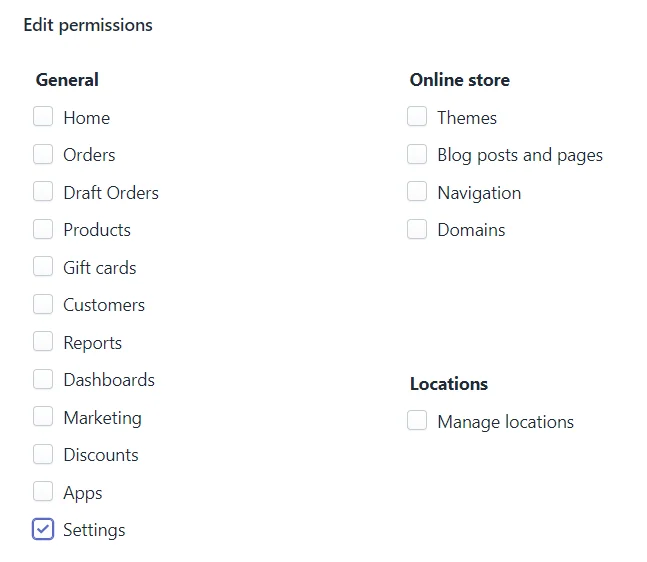
ppppppoc.PNG From the original on HackerOne - As the newly added staff member, visit the confirmation email's link and create a password and login to your store's url, then visit
https://h1-shopfiy-ron.myshopify.com/admin/settings/checkout - select Accounts are required or optional
- Enable Multipass
- Now you are reading the secret of the multipass -- meaning you can read customer's details using that
Step 4 and 5 are not verified yet, if it works, it means this multipass feature helps a staff member to escalate access from settings to customers
Impact
Step 4 and 5 are not verified yet, if it works, it means this multipass feature helps a staff member to escalate access from settings to customers
Not written yet. The AI write-up for this report has not been written yet. The Original tab links to the source.
How it worked
Root cause
Likely, the Multipass secret is stored in a settings page that is accessible to staff with only Settings permission, without additional checks to prevent them from viewing it.
Impact
A staff member with only Settings permission could gain access to all customer accounts, but this is unverified and may be limited by Shopify Plus requirements.
What the attacker needed
Shopify Plus account; Staff with Settings permission
How it was found
- As a Shopify Plus owner, create a new staff account with only Settings permission.
- Log in as that staff member and go to the checkout settings page.
- Enable Multipass.
Explained by bugbounty.wiki with AI from the original and checked against quotes from it; it can still be wrong. Read the original before relying on a detail.
Not written yet. The AI write-up for this report has not been written yet. The Original tab links to the source.
Shopify lets store owners give staff members limited permissions, like only managing settings. The Multipass feature uses a secret key to log in customers automatically. If a staff member with only settings access can see that secret, they could use it to log in as any customer, which they shouldn't be able to do.
What is Access control?
A user can do something their role should not allow: reach an admin function, act on a feature they have not paid for, or skip a permission check. IDOR is the special case where the object belongs to someone else.





