XSS on hardware.shopify.com
The cart-add endpoint on a Shopify hardware store accepted a crafted parameter that was later rendered unsafely, allowing script injection. An attacker could send a victim a link that adds a product and then triggers script execution when the victim clicks Remove.

- Triaged in 5 days
- Fixed in 6 days
- Paid in 18 days
- Disclosed after 18 days
Hello @Shopify. I found CSRF and XSS, that very good combine with each other.
CSRF
This CSRF is not dangerous, but is serves me in order to perform other bugs. For example, here CSRF for adding product:
http://hardware.shopify.com/cart/add?&id=1106494145&iPad Stand=1120276481&Cash Drawer=1120176153&Receipt Printer=1120166789&attributes[cart_exists]=true&properties[builder_id]=shapp_options_421549285_1455208671885&properties[master_builder]=1&properties[test]=test&properties[value]=11&add
Works with GET and POST requests, which greatly simplifies the work.
XSS
To reproduce this XSS, visit this link:
http://hardware.shopify.com/cart/add?id=1106494145&iPad Stand=1120276481&Cash Drawer=1120176153&Receipt Printer=1120166789&attributes[cart_exists]=true&properties[builder_id]=shapp_options_421549285_1455208671885%27%29%3Balert%28%27XSS&properties[master_builder]=1&properties[test]=test&properties[value]=11&add
And click "Remove" in attached product.
Vulnerable parameter: properties[builder_id]
For this XSS i used ');alert('XSS
Attachments
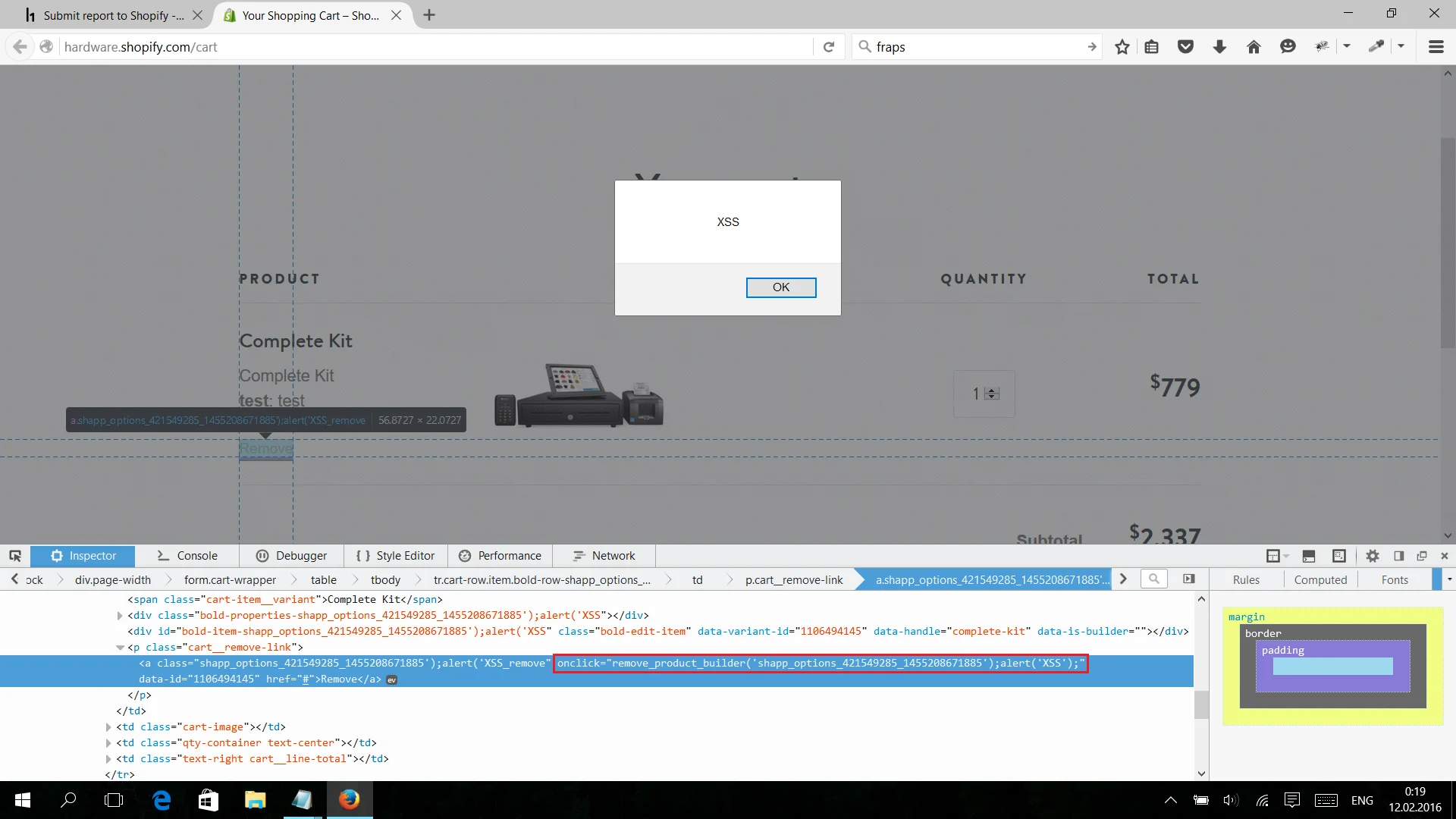
What the report shows
The target is the Shopify hardware store at hardware.shopify.com, specifically the cart feature. The researcher reported two issues that chain together: a cross-site request forgery (CSRF) on the add-to-cart endpoint, and a reflected cross-site scripting (XSS) in one of the cart properties. The report was disclosed on 1 March 2016, carries a bounty of 500.00 USD, and is classified as generic cross-site scripting.
The researcher is explicit that the CSRF on its own is not dangerous. Its value is that it lets an attacker drive the cart endpoint without the victim's cooperation, which makes the XSS easier to trigger. The add-to-cart request works with both GET and POST, which the researcher notes simplifies the work.
The CSRF example given is this request:
http://hardware.shopify.com/cart/add?&id=1106494145&iPad Stand=1120276481&Cash Drawer=1120176153&Receipt Printer=1120166789&attributes[cart_exists]=true&properties[builder_id]=[redacted]&properties[master_builder]=1&properties[test]=test&properties[value]=11&add
The XSS reproduction is a single link. The researcher instructs the reader to visit it and then click "Remove" on the attached product:
http://hardware.shopify.com/cart/add?id=1106494145&iPad Stand=1120276481&Cash Drawer=1120176153&Receipt Printer=1120166789&attributes[cart_exists]=true&properties[builder_id]=[redacted]%27%29%3Balert%28%27XSS&properties[master_builder]=1&properties[test]=test&properties[value]=11&add
The vulnerable parameter is properties[builder_id]. The payload used is:
');alert('XSS
In the URL it appears URL-encoded as %27%29%3Balert%28%27XSS, which decodes to the payload above. The report includes one screenshot as an attachment:
The report does not describe a fix.
Root cause
The report identifies properties[builder_id] as the vulnerable parameter and says the payload fires when the reader clicks "Remove" on the attached product. The payload begins with a single quote, a closing parenthesis and a semicolon, which suggests the value is placed inside a quoted string in a script context. That reading is likely rather than confirmed: the report does not show the generated markup.
Impact
The reproduction is triggered when the victim clicks "Remove" on the injected cart item. The researcher notes the add-to-cart request works with both GET and POST, which simplifies the work. The report does not go further than the alert proof and does not describe theft of session data, account actions or other consequences.
How this kind of bug works
Reflected XSS happens when a value supplied by the requester is written into a response without context-appropriate encoding. The browser cannot tell attacker-supplied markup from the site's own, so any script that reaches the page runs with the origin's privileges: it can read the DOM, act with the user's session and call same-origin endpoints.
The context matters. HTML body, attribute values, quoted JavaScript strings, JSON embedded in a script block and URL contexts each need different escaping. A payload that starts with a quote and a closing bracket is aimed at a string inside a script, where HTML entity encoding alone does nothing. Stored variants arise when the value is persisted, for example in a cart, and rendered later on a different page.
CSRF is a separate flaw: the server accepts a state-changing request without proving the request came from its own pages. It becomes relevant here because it removes the need for the victim to submit a form, letting a link or image load perform the state change.
The standard defences are output encoding matched to context, a restrictive Content Security Policy, and for CSRF a per-session token checked on state-changing requests plus SameSite cookies. Framework auto-escaping helps only if developers do not bypass it when building strings by hand.
How to test for it
- Map every parameter that ends up rendered back to the user: cart properties, names, notes, builder or configuration identifiers, and anything with a structured name such as
properties[...]. - Send a benign marker first, for example a unique alphanumeric string, and find where it appears in the response: view source, the DOM after scripts run, and any inline script blocks.
- Identify the context around the marker. If it sits inside a quoted string in a script, try breaking the quote and bracket; if it sits in an attribute, try closing the attribute; if it sits in HTML, try a tag.
- Test both the request that stores the value and the page that later renders it. A value that is harmless on the add page may execute on the cart or checkout page.
- Confirm execution with a harmless dialog or a DOM change, and check whether the request can be made cross-site with GET, which raises the impact.
Common false positives: the marker appears only URL-encoded or HTML-encoded and stays inert; the reflection lands in a context the browser does not execute, such as a comment or a text node; a filter strips the dangerous characters but the tester assumes execution; or the payload only fires in the tester's own browser because of an extension. Always verify in a clean browser profile and check the exact bytes returned by the server.
How it is fixed
Encode every reflected value for the context it lands in, using the templating engine's contextual escaping rather than string concatenation. Where a value must appear inside a script, pass it as data, for example through a JSON block with proper escaping, not by interpolating it into a quoted literal. Validate structured parameters such as properties[...] against an allowlist of expected keys and value formats. Add a Content Security Policy that blocks inline script. For the CSRF side, require a token on state-changing requests and set SameSite on session cookies.
Hunting notes
Cart, wishlist and builder features are productive because values are stored and re-rendered on several pages, and because the parameters are often nested and poorly validated. Look for parameters with bracketed names, identifiers copied from third-party builders, and anything echoed into inline scripts. Recon signals include storefronts with custom cart JavaScript, parameters that survive a round trip from add to cart page, and endpoints that accept both GET and POST for state changes.
What happened, in plain words
Shopify runs an online shop for hardware at hardware.shopify.com. Like most shops, it has a shopping cart: you add products to it, look at what is inside, and remove things you no longer want. The researcher found two problems in that cart, and showed that they work well together.
The first problem is CSRF (cross-site request forgery). In plain terms, a website should only accept a change to your cart if the request really came from its own pages, not from some other site you happen to have open. Here, the add-to-cart request could be triggered from anywhere. The researcher is clear that this alone is not dangerous; its value is that it lets an attacker put an item into a victim's cart without the victim doing anything deliberate.
The second problem is XSS (cross-site scripting). This is when a value that a visitor supplies is written back into a page without being made safe, so the browser treats it as part of the site's own code and runs it. The researcher found that one cart property, properties[builder_id], is the vulnerable parameter.
The report was disclosed on 1 March 2016, with a bounty of 500.00 USD, and is classified as generic cross-site scripting.
Step 1: the CSRF request
The researcher gives this request as the CSRF example:
http://hardware.shopify.com/cart/add?&id=1106494145&iPad Stand=1120276481&Cash Drawer=1120176153&Receipt Printer=1120166789&attributes[cart_exists]=true&properties[builder_id]=[redacted]&properties[master_builder]=1&properties[test]=test&properties[value]=11&add
Line by line, in everyday terms:
http://hardware.shopify.com/cart/addis the address of the feature that adds something to the cart. A request is simply the message your browser sends to a server when you open a link or submit a form; here it is a GET request, the kind you make by typing an address or clicking a link.id=1106494145identifies the product being added.iPad Stand=1120276481,Cash Drawer=1120176153andReceipt Printer=1120166789are extra product identifiers in the same request.attributes[cart_exists]=trueand theproperties[...]entries are extra pieces of information attached to the cart item. The square brackets are just part of the parameter name; they group related settings together.properties[builder_id]=[redacted]is the field that later turns out to be vulnerable.addat the end tells the server to go ahead and add the item.
The researcher notes that this request works with both GET and POST. That matters because a GET request can be fired by simply loading a link or an image, with no form and no click from the victim.
Step 2: the XSS link
To reproduce the XSS, the researcher gives a single link and asks the reader to visit it and then click "Remove" on the attached product:
http://hardware.shopify.com/cart/add?id=1106494145&iPad Stand=1120276481&Cash Drawer=1120176153&Receipt Printer=1120166789&attributes[cart_exists]=true&properties[builder_id]=[redacted]%27%29%3Balert%28%27XSS&properties[master_builder]=1&properties[test]=test&properties[value]=11&add
This is the same add-to-cart request, with one change: the value of properties[builder_id] now ends in a strange-looking sequence, %27%29%3Balert%28%27XSS. Those percent signs are URL encoding, a way of writing characters that are awkward inside a web address. Decoded, the sequence is the actual payload:
');alert('XSS
Read it as pieces: a single quote, a closing parenthesis, a semicolon, then alert('XSS. The quote and parenthesis suggest the value is placed inside a quoted string, and the semicolon ends that statement. What is left, alert('XSS, is then treated as code by the browser. alert is a built-in browser function that pops up a small dialog box; it is the standard harmless way to prove that script is running.
The vulnerable parameter is properties[builder_id]. The report includes one screenshot as an attachment:
The researcher's reproduction requires clicking "Remove" on the attached product after visiting the link. So the add request plants the value, and the later page view is where it fires.
In general, how this kind of bug works
Reflected XSS happens when a value you send to a site is written straight back into the page without being made safe for the place it lands. The browser has no way to tell the site's own code from text an attacker supplied, so anything that looks like script runs with the site's privileges. In practice that means it can read the page, act as the logged-in user, and call the site's own features.
The place a value lands is called its context, and each context needs different escaping. Text in the body of a page, a value inside an HTML attribute, a string inside a script block and a value inside a URL all need different treatment. A payload that starts with a quote and a closing bracket is aimed at a string inside a script, where ordinary HTML escaping does nothing. When the value is saved first, as in a cart, and shown later on another page, it is called stored XSS.
CSRF is a different flaw: the server accepts a change without checking that the request came from its own pages. It matters here because it removes the need for the victim to fill in a form; loading a link is enough.
The usual defences are output encoding matched to each context, a Content Security Policy (a header that tells the browser which scripts may run, and blocks inline ones), and for CSRF a per-session token plus SameSite cookies. A cookie is a small piece of data the browser stores for a site and sends back with each request, which is how a site remembers that you are logged in; SameSite limits when it is sent from other sites. A token is a random value the server issues and checks, so a request forged elsewhere cannot include it.
Glossary
- Request: the message a browser sends to a server when you open a link or submit a form.
- GET: a request made by loading a link or image, with no form submission.
- POST: a request made by submitting a form, which can carry more data.
- Parameter: a named value in a request, such as
idorproperties[builder_id]. - CSRF (cross-site request forgery): tricking a site into accepting a change that did not come from its own pages.
- XSS (cross-site scripting): getting a site to run script that an attacker supplied, in the context of that site.
- Reflected XSS: XSS where the value is echoed back in the same response.
- Stored XSS: XSS where the value is saved and shown later on another page.
- Payload: the crafted value an attacker sends to trigger a bug.
- URL encoding: writing awkward characters in a web address as
%plus a code, such as%27for a single quote. - Context: the place in a page where a value lands, which decides what escaping is needed.
- Encoding/escaping: converting characters so they are shown as text rather than treated as code.
alert: a browser function that shows a dialog box, used as harmless proof of script execution.- Cookie: a small value the browser stores for a site and sends back with requests, used to remember a login.
- Token: a random value the server issues and checks to confirm a request is genuine.
SameSite: a cookie setting that limits when the cookie is sent from other sites.- Content Security Policy: a header that tells the browser which scripts are allowed to run.
- Origin: the combination of scheme, host and port that a page belongs to, such as
hardware.shopify.com. - DOM: the browser's in-memory model of the page, which script can read and change.





