United Nations bug bounty[writeup]
The author found exposed files on United Nations subdomains that contained internal usernames and emails, by fuzzing for sensitive directories. An attacker could access these files to obtain internal information.
 Published on debprasadbanerjee502.medium.com
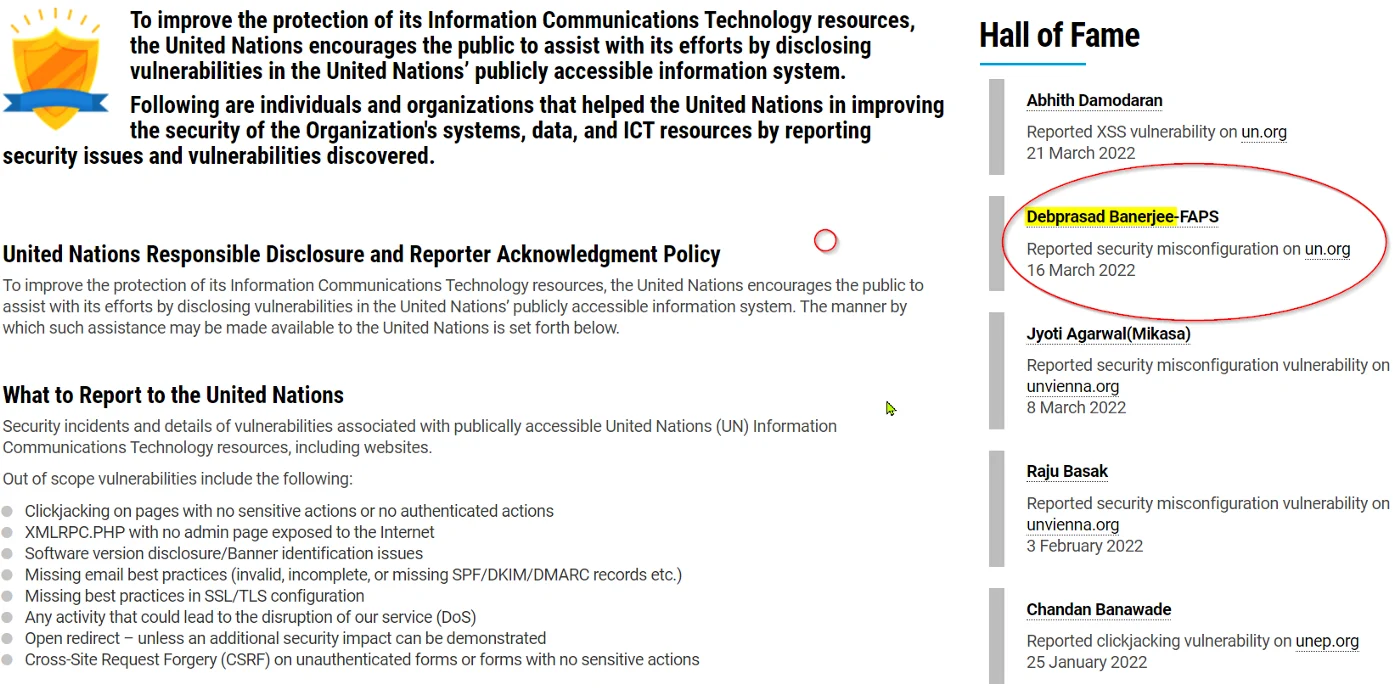
Let’s get to the point, how can you hack the UN and get your name featured in the prestigious hall of fame? Lemme show you a guaranteed method to do the following and I hope you benefit from it.
The full write-up lives on its author's site
It belongs to its author, so we link to it rather than copy it. The other two tabs are our own rewrites, checked against it.
Context
The United Nations runs a bug bounty programme with a public hall of fame, and this write-up describes a simple, repeatable method for finding information disclosure bugs on its web estate. The single-target example in the post uses the un.org domain. The technique is content discovery: brute forcing common sensitive file and directory names against live hosts and looking for files that should not be publicly reachable. The author reports finding a file containing internal usernames and email addresses, and says he found 19 other similar issues that he did not report.
Setup
The author does not describe any account, role or credential. The only preconditions are a list of live subdomains and two tools:
- A subdomain enumeration tool the author calls "subdomainer", which he says hunts for subdomains and runs httpx to sort them into live hosts. He notes he did not use the full subdomain enumeration approach from his previous post.
- FFUF, a fast fuzzing tool, installed with Go.
The wordlist is an extensive sensitive directory list published by Albusec on GitHub, which the author says is the key to the results.
Finding it
The author started from the programme's hall of fame page, noting that some entries were recent, which suggested bugs still existed. He then enumerated subdomains and ran content discovery against them. His stated view is that the most common mistake in file brute forcing is using a poor wordlist, and that the Albusec list reliably surfaces leaked files. Such files, he says, may contain ID numbers, leaked API keys, and exact software versions with internal IP addresses.
Exploitation
Step 1: install FFUF
go install github.com/ffuf/ffuf@latest
Step 2: get the wordlist
Clone the Albusec sensitive directory list from GitHub. The author links the Infodisclosure_Sensitive-list-1.txt file inside the Information Disclosure -01/Sensitive-Directory-list directory of the AlbusSec/Penetration-List repository.
Step 3: fuzz multiple targets at once
This uses two wordlists: the sensitive file list mapped to the FUZZ keyword, and a file of subdomains mapped to the URL keyword. The URL template URLFUZZ concatenates each subdomain with each candidate path. Only responses with HTTP status 200 are matched (-mc 200), and results are written as CSV to ffuf-result.txt.
Step 4: read the results
cat ffuf-result.txt | awk -F ',' '{print $3}'
This prints the third comma-separated column of the CSV.
Step 5: fuzz a single target
A simpler form for one host, again matching only status 200 responses.
Result
Among the hits, the author found a file containing internal usernames and email addresses. He does not name the path, the host, the file contents or the number of records. He states that he discovered 20 subdomains with almost the same misconfiguration and that he did not report 19 other findings.
The closing image of the post is captioned "FLEX TIME".
Root cause
Sensitive files were left reachable on public web servers, so a request for the right path returned content that should have been internal. The report does not describe the server configuration, the file type or why the files were deployed publicly.
Impact
The exposed file disclosed internal usernames and email addresses. The author also says such files can contain ID numbers, leaked API keys and exact software versions with internal IP addresses, which would help an attacker plan further access. The report gives no count of affected users or records and no evidence of exploitation beyond discovery.
Fix
The author does not describe a fix. In an update he says he tried to reproduce the bug and that all the findings were fixed. The report does not say what change was made.
Variants to test
- Run the same wordlist against every live subdomain, not just the apex. A positive result is a 200 response for a path that returns configuration, backup or export files.
- Try the single-target form on other government and international organisation domains. A positive result is a 200 with content such as usernames, email addresses, API keys or version strings.
- Filter on response size as well as status, since many hosts return 200 for custom error pages. A positive result is a consistent, non-trivial body length for the same path across hosts.
- Re-run the list periodically, because the author notes that fixes can land quickly. A positive result is a path that was previously absent now returning content.
The author's own advice is to try the method on other targets, noting that the Dutch may have swag for you.
What happened, in plain words
A security researcher wanted to see whether the United Nations bug bounty programme still had anything left to find. A bug bounty programme is an arrangement where an organisation invites outside people to look for security problems in its systems and report them, usually in exchange for recognition or money. The UN programme has a public hall of fame, a web page listing the people who have reported valid issues. The researcher noticed that some of the names on that page were recent, which told him that new bugs were still being found and accepted.
His method was simple. He collected a list of the UN's subdomains (more on that word below), then used a tool to try thousands of common file and folder names against each one, looking for files that were never meant to be public. One of those files contained internal usernames and email addresses. He says he found 20 subdomains with almost the same mistake and did not report 19 other findings.
This article walks through exactly what he did, in the same order, and explains every term from scratch. You only need a browser and a computer to follow the reasoning; the commands themselves are shown exactly as he wrote them.
The background you need first
Before the steps make sense, a few ideas need to be clear.
A domain and its subdomains. A domain is the main name of a website, here un.org. A subdomain is a name placed in front of it, such as careers.un.org or data.un.org. Large organisations run many subdomains, each often a separate server or application. Think of the domain as a big office building and the subdomains as the different departments inside it, each with its own door.
A web server and a URL path. When you type an address into your browser, the part after the domain name is the path. In un.org/reports/2022, the path is /reports/2022. The server looks at that path and decides what to send back. Some paths are meant for the public; others, like admin pages, backups or configuration files, are meant only for staff.
HTTP status codes. Every time a server answers a request, it includes a number saying how it went. 200 means "here is the content you asked for, all good". 404 means "nothing here". A file that returns 200 is a file that exists and is being served to anyone who asks.
Fuzzing. Fuzzing means sending lots of variations of an input automatically and watching for interesting answers. Instead of guessing one file name at a time, you feed a tool a long list of candidate names and let it try them all. It is like trying every key on a big bunch of keys in a lock, very fast, rather than reasoning about which key is likely to fit.
A wordlist. A wordlist is simply a text file with one candidate name per line, for example backup, config, admin, users.csv. The quality of the wordlist decides how much you find. A short, generic list misses most things; a long list built from names that commonly leak finds far more.
Information disclosure. This is the name for the class of bug where something that should be private is exposed to anyone who asks for it. Nothing is broken or crashed; the problem is that a file, a page or a message reveals data it should not. Examples include a backup file sitting on a public server, an error message showing internal paths, or a list of staff accounts left downloadable.
An API key. An API key is a long secret string that a program uses to prove its identity to another service, a bit like a password that software uses instead of a person. If one leaks, someone else can act as that program, often at the owner's expense.
An internal IP address. Computers on a private network have addresses that are only meaningful inside that network. Seeing one in a public file tells you something about how the inside of the organisation is laid out, which helps someone plan further intrusion.
With those ideas in place, the rest is straightforward.
Setup
The researcher did not need any account, login or special permission. The only things he needed were a list of live subdomains and two tools.
- A subdomain enumeration tool he calls "subdomainer". Enumeration here means discovering names: the tool searches for subdomains of the target and then runs another tool called httpx to check which of them actually respond, sorting the live ones from the dead ones. He notes that he did not use the fuller enumeration approach from an earlier post of his.
- FFUF, which he describes as a very fast fuzzing tool, installed using Go. Go is a programming language that also has a package manager, a way of downloading and installing programs written in it with a single command.
The wordlist is an extensive list of sensitive directory names published by Albusec on GitHub. GitHub is a website where people share code and files publicly. The researcher says this wordlist is the key to the results: the names in it are the kind that commonly end up exposed by mistake.
Finding it
He began at the programme's hall of fame page. Seeing recent entries there was his evidence that bugs were still being accepted, so it was worth spending time. He then enumerated subdomains and ran content discovery against them. Content discovery is the process of asking a server for many possible paths to see which ones exist.
His stated view is that the most common mistake people make when brute forcing file names is using a poor wordlist. With the Albusec list, he says, leaked files turn up reliably. Such files, he notes, may contain ID numbers, leaked API keys, and exact software versions together with internal IP addresses. Each of those is useful to an attacker: ID numbers can identify real people or records, API keys can grant access to services, and version numbers plus internal addresses help plan the next step.
Exploitation
Step 1: install FFUF
go install github.com/ffuf/ffuf@latest
This one line downloads and installs FFUF. go is the Go tool, install tells it to install a program, github.com/ffuf/ffuf is the address of the program's source code on GitHub, and @latest means "the newest published version". After this, the ffuf command is available on the computer.
Step 2: get the wordlist
He clones the Albusec sensitive directory list from GitHub. Cloning means making your own copy of a shared repository, the collection of files hosted there. The specific file he uses is Infodisclosure_Sensitive-list-1.txt, inside the Information Disclosure -01/Sensitive-Directory-list directory of the AlbusSec/Penetration-List repository. In plain terms: he downloads a long list of file and folder names that are known to leak information when they are left public.
Step 3: fuzz multiple targets at once
This is the core command, so it is worth going through piece by piece.
ffufruns the fuzzing tool.-w Infodisclosure_Sensitive-list-1.txt:FUZZgives the first wordlist, the sensitive file names, and labels itFUZZ. Wherever the wordFUZZappears later in the command, FFUF will substitute each line of this file in turn.-w subdomain.txt:URLgives a second wordlist, a file containing the subdomains, and labels itURL. Each line of that file will be substituted whereverURLappears.-u URLFUZZis the address to request. Because both labels are next to each other, FFUF builds one address per combination: each subdomain joined with each candidate path. So if the subdomain file contains a host and the file list containsbackup, one request goes to that host followed bybackup.-mc 200means match only responses with status code 200. Anything else, such as 404, is ignored. This is how the tool separates "this file exists and is being served" from "nothing here".-of csvsets the output format to CSV, comma-separated values, a plain text table where columns are separated by commas.-o ffuf-result.txtwrites the results to that file.
In short: try every sensitive name on every subdomain, keep only the ones that answer with real content, and save the list to a file.
Step 4: read the results
cat ffuf-result.txt | awk -F ',' '{print $3}'
This prints the interesting part of the saved results.
cat ffuf-result.txtoutputs the whole file to the screen.- The vertical bar
|passes that output to the next command instead of showing it. awk -F ','runs a small text-processing program, telling it that fields are separated by commas, which matches the CSV format.'{print $3}'prints only the third field of each line, which is where the matched URL appears.
So the whole line means: take the results file, split each line at the commas, and show only the address that was found. That gives a clean list of paths that returned content.
Step 5: fuzz a single target
This is the simpler form for one host. There is only one wordlist, the sensitive file names, and only one label, FUZZ, which is placed at the end of the address un.org/FUZZ. Again -mc 200 keeps only responses that return real content. Use this when you already have a single host in mind rather than a whole list.
Result
Among the hits, he found a file containing internal usernames and email addresses. He does not name the path, the host, the file contents or how many records it held. He states that he found 20 subdomains with almost the same misconfiguration and that he did not report 19 of the other findings. In other words, the same kind of mistake was repeated across many parts of the estate, and most of the findings went unreported.
The closing image of the post is captioned "FLEX TIME".
Why it worked
Sensitive files had been left reachable on public web servers. A request for the right name returned content that should have stayed internal. Nothing clever was needed beyond asking for the right name.
The report does not describe the server configuration, the type of file, or why the files ended up public. That is often called security through obscurity: relying on a name being unknown rather than on a real control. A broad wordlist removes that protection, because it contains the names people actually use.
What the exposure means
The exposed file disclosed internal usernames and email addresses. The researcher also notes that files of this kind can contain ID numbers, leaked API keys and exact software versions with internal IP addresses, each of which would help someone plan further access.
The report gives no count of affected users or records and no evidence of exploitation beyond discovery. He found the file; he does not say anyone used it.
The fix
The researcher does not describe a fix himself. In an update he says he tried to reproduce the bug and that all the findings were fixed. In general terms, the remedy for this class of issue is to stop serving the files publicly: remove them from the web root, restrict access, or block the paths at the server. But that is general knowledge, not something the report states.
Other ways to try the same idea
These are variations on the same method, each with a clear sign that it worked.
- Run the same wordlist against every live subdomain, not just the main domain. A positive result is a 200 response for a path that returns configuration, backup or export files.
- Try the single-target form on other government and international organisation domains. A positive result is a 200 with content such as usernames, email addresses, API keys or version strings.
- Filter on response size as well as status, since many hosts return 200 for custom error pages. A positive result is a consistent, non-trivial body length for the same path across hosts.
- Re-run the list periodically, because the researcher notes that fixes can land quickly. A positive result is a path that was previously absent now returning content.
His own advice is to try the method on other targets, noting that the Dutch may have swag for you.
Glossary
- Bug bounty programme: an arrangement where an organisation invites outsiders to find and report security problems, usually for recognition or payment.
- Hall of fame: a public page listing people who have reported valid issues to a programme.
- Domain: the main name of a website, such as
un.org. - Subdomain: a name placed in front of a domain, such as
careers.un.org, often a separate server or application. - Subdomain enumeration: the process of discovering which subdomains exist for a target.
- httpx: a tool the researcher uses to check which discovered subdomains actually respond.
- URL path: the part of an address after the domain name, such as
/reports/2022. - HTTP status code: a number a server returns with every response;
200means content was served,404means nothing was found. - Fuzzing: automatically sending many variations of an input and watching for interesting responses.
- Wordlist: a text file with one candidate name per line, used as input to a fuzzing tool.
- FFUF: a fast fuzzing tool used here to try many file and folder names against web servers.
- Go: a programming language whose tool can download and install programs with one command.
- Clone: to make your own copy of a shared code repository.
- Repository: a collection of files hosted on a service such as GitHub.
- GitHub: a website where people share code and files publicly.
- CSV: comma-separated values, a plain text table format where columns are separated by commas.
- Information disclosure: a bug where data that should be private is exposed to anyone who asks for it.
- API key: a secret string that software uses to prove its identity to another service, like a password for programs.
- Internal IP address: a network address that is only meaningful inside a private network, revealing something about internal layout.
- Security through obscurity: relying on something being unknown or hard to guess instead of on a real control.
- Phishing: a message that pretends to come from someone trusted in order to trick the recipient into revealing information or clicking something harmful.