API Does Not Apply Access Controls to Translations
The API did not enforce access controls on translation files, letting an anonymous user with no permissions view project details and download translation files.

- Fixed in 39 hours
- Disclosed after 4 days
Summary
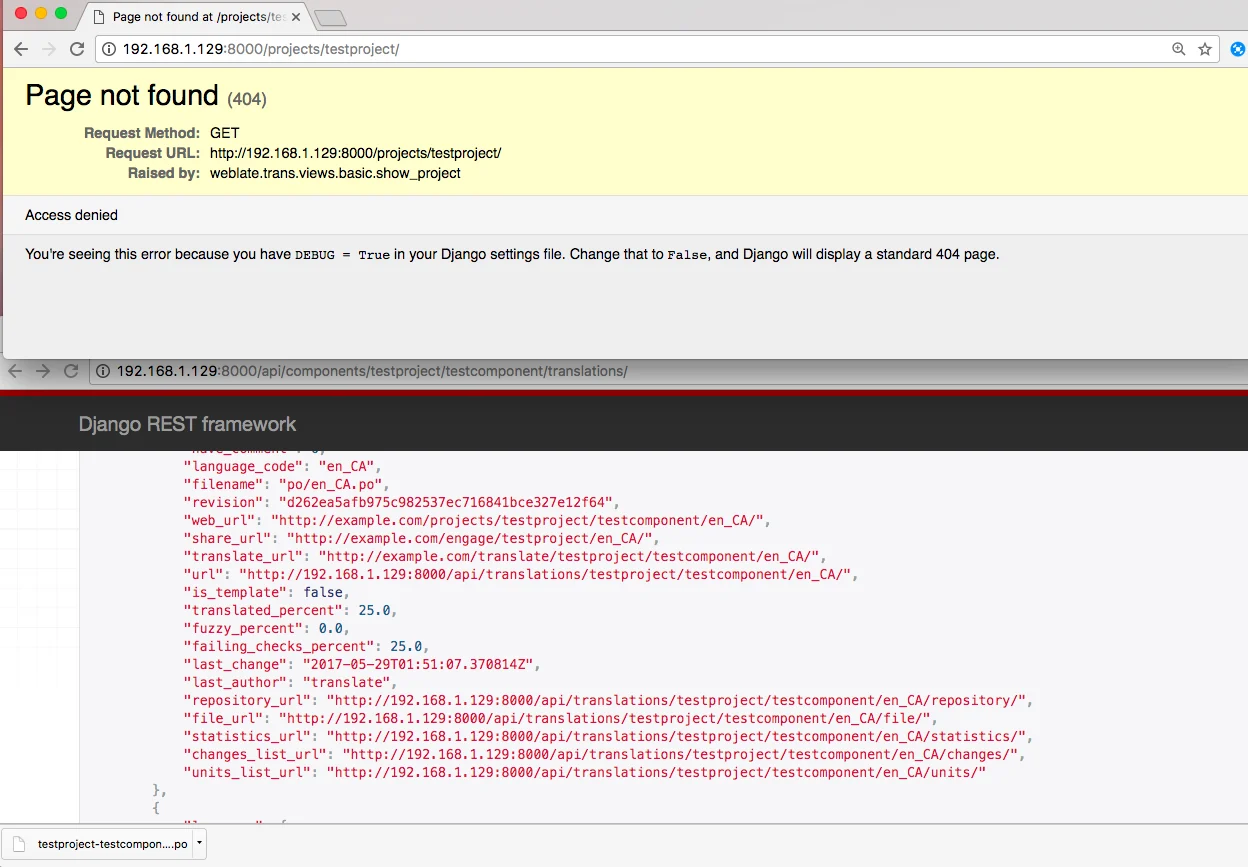
The /api/ does not enforce access control on the translation files, allowing anyone to download full translation files. See the screenshot for an example project being viewed by an anonymous account that is configured to have no permissions.
Description
On my local setup running Weblate 2.15-dev, I removed all permissions from the Guest group and restarted the server. When I tried to navigate to the test project through the UI the usual way at URL http://192.168.1.129:8000/projects/testproject/, I received an Access Denied message.
However I was able to find the project details through the API at http://192.168.1.129:8000/api/components/testproject/testcomponent/translations/ and even download the translations file by clicking on the "file_url" link, which in my case is "http://192.168.1.129:8000/api/translations/testproject/testcomponent/en_CA/file/".
Assessment
I am marking this as Medium because from what I have seen the access controls are not that important to Weblate's mission and it does not seem designed to keep translations secret, although the existence of access controls through the web app suggests that this is something that people wanted enough to implement. If enforcing the read access controls is of any importance, then I would treat this with higher severity.
Attachments
Not written yet. The AI write-up for this report has not been written yet. The Original tab links to the source.
How it worked
Root cause
Likely the API endpoints for translations and translation files lack the same permission checks that the web interface enforces.
Impact
An anonymous user could download full translation files and view project details, bypassing configured access controls.
What the attacker needed
None
The fix
The API should enforce the same access controls as the web interface.
How it was found
- Remove all permissions from the Guest group and restart the server.
- Try to access the project through the web UI and observe an Access Denied message.
- Access the API endpoint for translations and retrieve project details.
- Download the translation file via the provided file URL.
Explained by bugbounty.wiki with AI from the original and checked against quotes from it; it can still be wrong. Read the original before relying on a detail.
Not written yet. The AI write-up for this report has not been written yet. The Original tab links to the source.
Access controls are rules that decide who can see or do what. Here, the web interface correctly blocked a user with no permissions, but the API (a separate way to access the same data) did not check permissions, so anyone could fetch translation files directly.
What is Access control?
A user can do something their role should not allow: reach an admin function, act on a feature they have not paid for, or skip a permission check. IDOR is the special case where the object belongs to someone else.