IDOR User Account Takeover By Connecting My Facebook Account with victims Account
The Facebook account-linking callback accepted a user identifier from the request and linked the attacker's Facebook account to whichever site account that identifier belonged to. An attacker who knew a victim's identifier could therefore take over the victim's account without a password.
 Published on blog.securitybreached.org
Hey Guys Its Me Khizer again So This Blog is about an IDOR issue i found in a Web where changing the User ID in Facebook auth callback linking request actually connects my Facebook Account to the Victims Site Account so By this i could get complete access to User Account.
The full write-up lives on its author's site
It belongs to its author, so we link to it rather than copy it. The other two tabs are our own rewrites, checked against it.
Context
This write-up covers an IDOR in a web application's Facebook account-linking flow. The site identified each user by a unique identifier passed as _user_id, with values in a format like aff20-33f3-4c8e-b3cb-77b2. The feature in question is the Facebook auth callback used when a user links their Facebook account to an existing site account. The callback accepts a linking=true flag plus a redirect_uri and the _user_id of the account being linked.
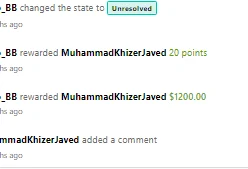
The researcher is Muhammad Khizer Javed (@khizer_javed47). The report does not name the target application; the request examples use target.com as a placeholder. The issue was triaged and rewarded with a 1200 USD bounty, disclosed on 2018-09-16.
Setup
- Create multiple accounts on the target site so that there are at least two test accounts: one attacker-controlled and one acting as the victim.
- Note the
_user_idvalue assigned to each account. - Have a Facebook account available for the linking flow.
- Intercept traffic with a proxy so the Facebook auth callback request can be inspected and modified.
The report does not list specific tool versions beyond the browser user agent shown in the captured request.
Finding it
The researcher first established how the site identified users: a unique _user_id value such as aff20-33f3-4c8e-b3cb-77b2. After creating several accounts, the next step was to find which requests carried that identifier. The Facebook auth callback linking request turned out to use it directly:
/login/auth/facebook/callback?linking=true&redirect_uri=https://target.com/account&_user_id=<User-ID>
The full captured request looked like this:
GET /login/auth/facebook/callback?linking=true&redirect_uri=https://target.com/account&_user_id=<User-ID> HTTP/1.1
Host: target.com
User-Agent: Mozilla/5.0 (Windows NT 10.0; Win64; x64; rv:58.0) Gecko/20100101 Firefox/58.0
Accept: text/html,application/xhtml+xml,application/xml;q=0.9,*/*;q=0.8
Accept-Language: en-US,en;q=0.5
Cookie: <Cookies>
Connection: close
Upgrade-Insecure-Requests: 1
The _user_id parameter is the account the callback links the Facebook identity to. Because it is supplied by the client in the query string, it can be tampered with: the server trusts the value rather than deriving the target account from the authenticated session.
Exploitation
Step 1: Capture the linking callback
With the victim test account's _user_id recorded, the researcher took the linking callback request generated for his own account and prepared to swap the identifier.
Step 2: Replace _user_id with the victim's value
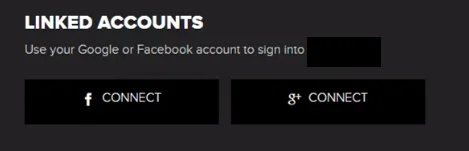
The only change was the _user_id parameter: the attacker's value was replaced with the _user_id of the second test account. The server answered with 200 OK. Before this request, the Linked Account section of the victim account looked like this:
Step 3: Complete the Facebook login
The researcher then logged in to the web app using his own Facebook account. The result was access to the second test account with no password at all. The Linked Accounts section in the victim account had changed to reflect the newly connected Facebook account:
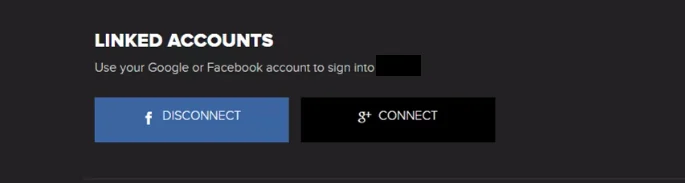

In other words, the modified callback had bound the attacker's Facebook identity to the victim's site account, and authenticating through Facebook then landed the attacker inside that account.
Step 4: Solve the identifier problem
The remaining obstacle was obtaining the victim's _user_id, which is unique per user. The analyst reviewing the submission was not convinced the issue deserved high priority for exactly this reason: the chance of an attacker learning the victim's _user_id was considered too low.
The researcher then tested many public endpoints looking for the identifier without success. The breakthrough came from user-shared images: opening the actual URL of an image showed it was hosted on an S3 bucket, and the URL always contained the user id:
subdoamin.terget.com/media-uploads/<User-ID>/1033244907382244534/source/default/1.jpg
The image URL contained the _user_id needed for the callback. With that, the issue was triaged and rewarded.
Root cause
The callback endpoint accepts the account to link from a client-controlled query parameter (_user_id) and acts on it without verifying that the authenticated session owns that account. The Facebook identity in the request is the attacker's, but the account it is attached to is chosen by the attacker.
The second weakness is disclosure: user-uploaded media is served from an S3 bucket with the _user_id in the path, so the identifier is exposed to anyone who views an image URL.
Impact
An attacker who knows a victim's _user_id can connect their own Facebook account to the victim's site account and then log in through Facebook without any password, gaining full access to that account. The precondition is knowledge of the victim's _user_id; the report notes that the reviewing analyst initially rated the likelihood of obtaining it as low, and that the S3 image URLs provide a practical way to get it for users who have shared images. The report does not describe any further actions taken inside the compromised account.
Fix
Variants to test
- Other OAuth linking callbacks. Look for
linking=truestyle flows on Google, Apple or other providers and swap the account identifier parameter. A positive result is a 200 response and the provider identity appearing under the victim account. - Identifier in query strings elsewhere. Search for any endpoint that takes a user identifier as a parameter and performs a state change (email change, MFA reset, account merge). A positive result is the change applying to an account other than the session's own.
- Media and CDN URL patterns. Inspect image, avatar and attachment URLs for path segments that look like user identifiers. A positive result is a stable identifier that matches the value used in authorisation-relevant requests.
- Public endpoints leaking identifiers. Enumerate public profile, comment and share endpoints for the same identifier. A positive result is the
_user_id(or equivalent) returned for a user you do not control. - Session binding checks. Replay a linking callback from one session with another session's identifier while authenticated as a different user. A positive result is the link succeeding despite the mismatch.
What happened, in plain words
A website let people sign in with their Facebook account. It also let people connect (link) a Facebook account to an account they already had on the site. The researcher found that the request which performs this linking contained the site's internal identifier for the account being linked, and that changing it to another account's identifier linked his Facebook account to that account. By changing that identifier to another person's, he could attach his own Facebook account to that person's site account. After that, logging in with Facebook dropped him straight into the other person's account, with no password needed.
There was a second problem: the identifier is unique per user, and the reviewer of the report was not convinced the issue deserved high priority because the chance of an attacker learning someone else's identifier was considered too low. The researcher then found that images people had uploaded were served from an Amazon S3 bucket (cloud file storage) with the identifier written into the image URL, so anyone who looked at an image's address could read it.
The report was triaged and rewarded with a 1200 USD bounty, and disclosed on 2018-09-16. The researcher is Muhammad Khizer Javed (@khizer_javed47). The site itself is not named; the examples use target.com as a stand-in.
A few words you will meet constantly below:
- Request: the message your browser sends to a server asking for something, for example "give me this page" or "do this action".
- Parameter: a named value attached to a request, usually after a
?in the address, like?colour=blue. The server reads it to decide what to do. - Cookie: a small piece of data the site stores in your browser so it can recognise you on the next request. It is how a site knows you are logged in.
- Session: the server-side record of "this browser is logged in as this user", looked up via the cookie.
- IDOR (Insecure Direct Object Reference): when a request names an object (an account, a file, an order) by an identifier and the server hands it over without checking that you are allowed to touch that particular object. The everyday comparison: a cloakroom that gives you a ticket with a number on it, and hands out any coat whose number you read out, without checking the ticket is yours.
- Account takeover: getting into someone else's account as if you were them.
Setting up
Before any testing, the researcher needed a small stage on which to experiment safely:
- Create several accounts on the target site, so there is at least one you control as the "attacker" and one that plays the "victim". Using your own accounts means you never touch a real person's data while learning how the bug works.
- Write down the
_user_idvalue each account was given. This is the site's internal name for the account, a string likeaff20-33f3-4c8e-b3cb-77b2. - Have a Facebook account ready, because the feature under test is about connecting Facebook to the site.
- Use a proxy: a tool that sits between your browser and the server and lets you read and edit each request before it is sent. Without one you cannot change a value inside a request; the browser builds it for you and sends it immediately.
Finding it
The first question was simply: how does this site tell users apart? The answer was a unique _user_id per account, in the format above. The next question was: in which requests does that value travel? After creating several accounts and watching the traffic, the researcher found it in the Facebook login callback used for linking:
/login/auth/facebook/callback?linking=true&redirect_uri=https://target.com/account&_user_id=<User-ID>
Reading that address piece by piece:
/login/auth/facebook/callbackis the endpoint, the specific address on the server that handles the step after you come back from Facebook. "Callback" means "the place Facebook sends you back to".linking=trueis a flag telling the server "this trip through Facebook is for connecting an account, not for a normal login".redirect_uri=https://target.com/accountsays where to send the browser afterwards, here the account page._user_id=<User-ID>is the account the Facebook identity should be attached to. The angle brackets are a placeholder: in a real request the actual identifier sits there.
The full captured request looked like this:
GET /login/auth/facebook/callback?linking=true&redirect_uri=https://target.com/account&_user_id=<User-ID> HTTP/1.1
Host: target.com
User-Agent: Mozilla/5.0 (Windows NT 10.0; Win64; x64; rv:58.0) Gecko/20100101 Firefox/58.0
Accept: text/html,application/xhtml+xml,application/xml;q=0.9,*/*;q=0.8
Accept-Language: en-US,en;q=0.5
Cookie: <Cookies>
Connection: close
Upgrade-Insecure-Requests: 1
Line by line:
- The first line is the request itself:
GETmeans "fetch this", followed by the path and its parameters, thenHTTP/1.1, the version of the language browsers and servers speak. Host: target.comnames the site the request is for. One server can host many sites, so it needs to be told which one.User-Agentdescribes the browser that sent the request. Here it is Firefox 58 on 64-bit Windows.Acceptlists the kinds of response the browser can handle, with quality scores (q=0.9means "preferred").Accept-Languagesays the browser prefers US English.Cookie: <Cookies>is where the browser's cookies would go. This is the crucial line: it is what tells the server which session, and therefore which logged-in user, is making the request. The report replaces the real value with a placeholder.Connection: closeasks the server to close the network connection after answering.Upgrade-Insecure-Requests: 1tells the server the browser can upgradehttplinks tohttps.
Why does this request matter? Because _user_id is supplied by the browser, in the address itself. Anything the browser supplies can be edited by its owner before it is sent. If the server simply believes the value, then the person making the request chooses which account gets the Facebook link. That is the classic shape of an IDOR: an object named by the client, acted on without an ownership check.
Exploiting it
Step 1: capture the linking request
With the victim test account's _user_id written down, the researcher performed the linking flow on his own account and caught the callback request in the proxy. The plan was to change one value in it.
Step 2: swap in the victim's identifier
The only edit was the _user_id parameter: his own value was replaced with the second test account's value. The server replied 200 OK, the standard "everything went fine" status code. Before this request, the Linked Account section of the victim account looked like this:
That screenshot shows the victim account's Linked Account section before the request.
Step 3: finish the Facebook login
The researcher then logged in to the site with his own Facebook account. The result was access to the second test account with no password at all, and the Linked Accounts section of the victim account now showed the newly connected Facebook account:
In plain terms: the edited callback had tied the attacker's Facebook identity to the victim's site account. Logging in with his Facebook account then gave him access to the victim's site account. The password was never involved, because the Facebook login replaced it.
Step 4: solving the identifier problem
One obstacle remained: getting the victim's _user_id in the first place. It is unique per user, so you cannot simply guess it. The analyst reviewing the submission was not convinced the issue deserved high priority for exactly this reason: the chance of an attacker learning the victim's _user_id was judged too low.
The researcher then tried many public endpoints (addresses the site exposes without login) looking for the identifier, without success. The breakthrough came from images that users share. Opening the actual address of an image, rather than the page it appears on, showed it was hosted on an S3 bucket, and the address always contained the user id:
subdoamin.terget.com/media-uploads/<User-ID>/1033244907382244534/source/default/1.jpg
Reading it: subdoamin.terget.com is the host serving the files (spelled as in the report), media-uploads is the folder for uploaded media, then comes the user's identifier, then a long number, then source/default/1.jpg, the file itself. Because the identifier sits in the path, anyone who views or copies an image's address can read it. The image URL contained the _user_id needed for the callback. With that, the issue was triaged and rewarded.
Why it worked
The callback endpoint takes the account to link from a value the client controls (_user_id) and acts on it without checking that the logged-in session owns that account. The Facebook identity in the request is the attacker's, but the account it gets attached to is chosen by the attacker.
The second weakness is disclosure: uploaded media is served from an S3 bucket with the _user_id in the path, so the identifier is visible to anyone who looks at an image URL.
What it means for users
Anyone who knows a victim's _user_id can connect their own Facebook account to the victim's site account and then log in through Facebook without any password, gaining full access to that account. The precondition is knowing the identifier. The reviewing analyst was not convinced the issue deserved high priority because that likelihood was considered too low, and the S3 image URLs contained the identifier. The report does not describe anything done inside the compromised account afterwards.
How it should be fixed
The report does not say what change was made.
Similar things to look for
- Other OAuth linking callbacks. OAuth is the general name for "log in with Google/Apple/Facebook" style flows. Look for
linking=truestyle flows on other providers and swap the account identifier parameter. A positive result is a 200 response and the provider identity appearing under the victim account. - Identifiers in query strings elsewhere. Search for any endpoint that takes a user identifier as a parameter and changes something (email change, two-factor reset, account merge). A positive result is the change applying to an account other than the session's own.
- Media and CDN URL patterns. A CDN is a network of servers that deliver files quickly. Inspect image, avatar and attachment URLs for path segments that look like user identifiers. A positive result is a stable identifier matching the value used in permission-relevant requests.
- Public endpoints leaking identifiers. Enumerate public profile, comment and share endpoints for the same identifier. A positive result is the
_user_id(or equivalent) returned for a user you do not control. - Session binding checks. Replay a linking callback from one session with another session's identifier while logged in as a different user. A positive result is the link succeeding despite the mismatch.
Glossary
- Request: a message from your browser to a server asking for a page or an action.
- Response: the server's reply, including a status code such as 200 OK.
- 200 OK: the standard status code meaning the server handled the request successfully.
- Endpoint: a specific address on a server that performs a particular function.
- Parameter: a named value attached to a request, often after
?in the address. - Query string: the part of an address after
?, holding parameters. - Header: a labelled line in a request or response carrying metadata, such as
HostorCookie. - Cookie: small data stored by the site in your browser so it can recognise your session.
- Session: the server-side record of which user a browser is logged in as.
- User-Agent: a header describing the browser and operating system that sent the request.
- Proxy: a tool between browser and server that lets you read and edit requests.
- Callback: the address a third party (here Facebook) sends you back to after you authorise something.
- OAuth: the family of protocols behind "log in with Facebook/Google/..." buttons.
_user_id: the site's unique internal identifier for an account, in this report a value likeaff20-33f3-4c8e-b3cb-77b2.- IDOR (Insecure Direct Object Reference): a request names an object by identifier and the server acts on it without checking you own it.
- Account takeover: gaining access to someone else's account as if you were them.
- S3 bucket: Amazon's cloud file storage, often used to serve uploaded images.
- CDN: a network of servers that delivers files to users quickly.
- Triage: the review step where a security team decides whether a report is valid and how serious it is.
- Bounty: a payment made to a researcher for a valid security report.
- Disclosure: the date a report is made public.