Stored XSS in wis.pr
A stored cross-site scripting flaw existed in the group name field on wis.pr. An attacker could create a group with a malicious name that executed script when the group's sharing URL was opened.
 Originally disclosed on HackerOne
- Triaged in 2 hours
- Fixed in 8 hours
- Paid in 8 hours
- Disclosed after 3 months
Hi,
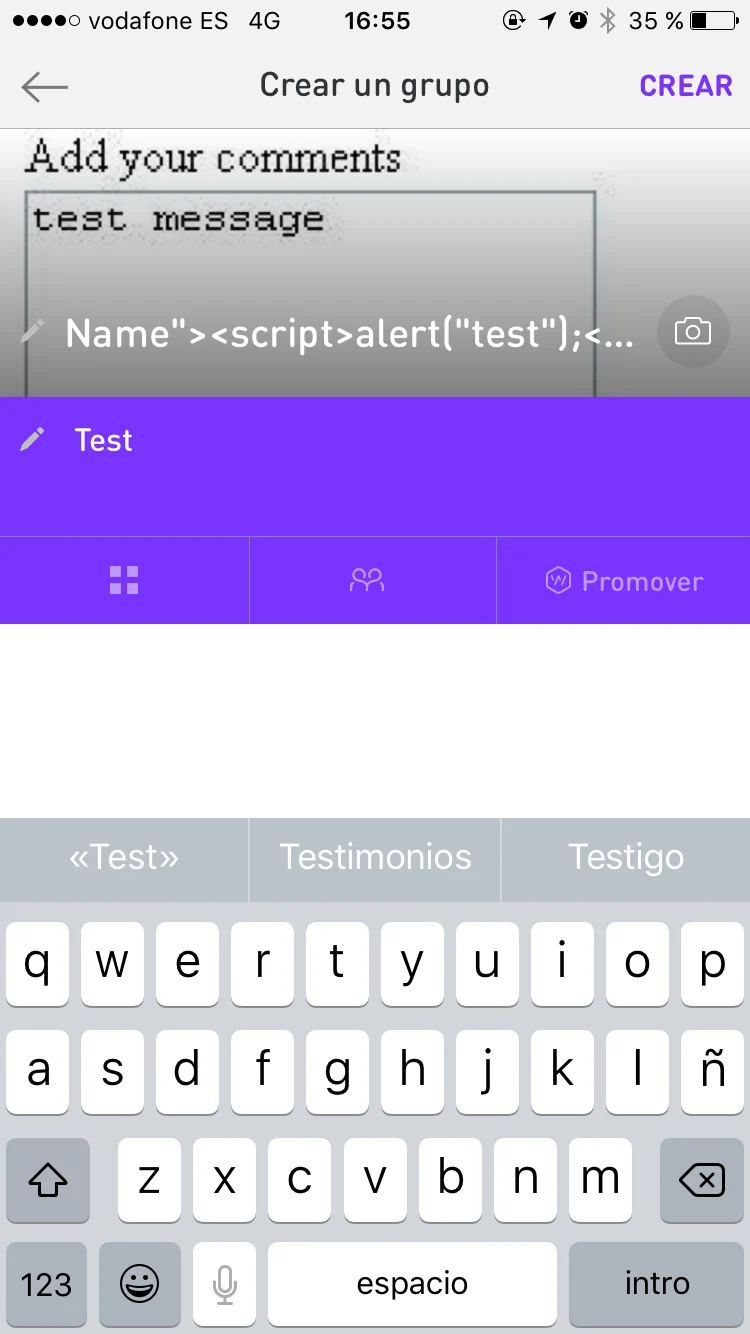
I detected a Stored XSS in wis.pr. These are the steps to reproduce the bug:
- Create a new group named: Test>"<script>alert('test');</script>
- Copy the sharing URL (http://wis.pr/*****).
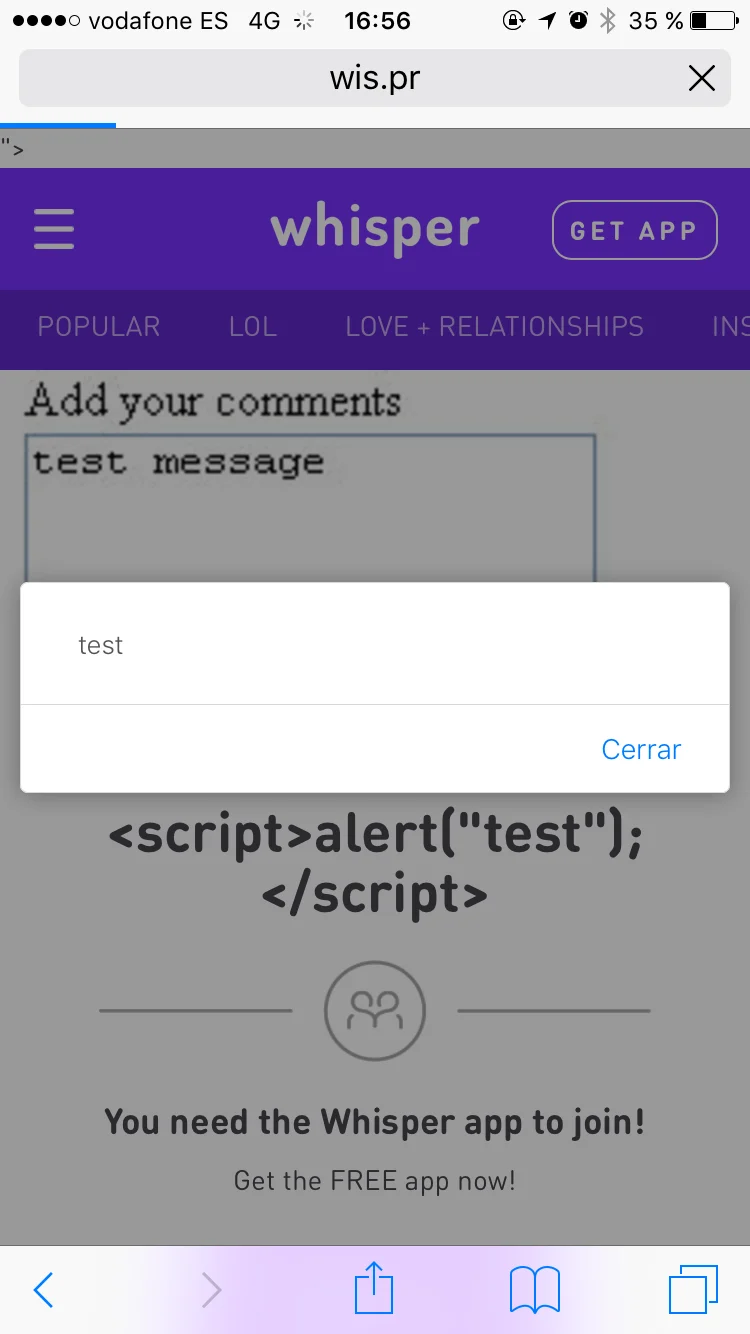
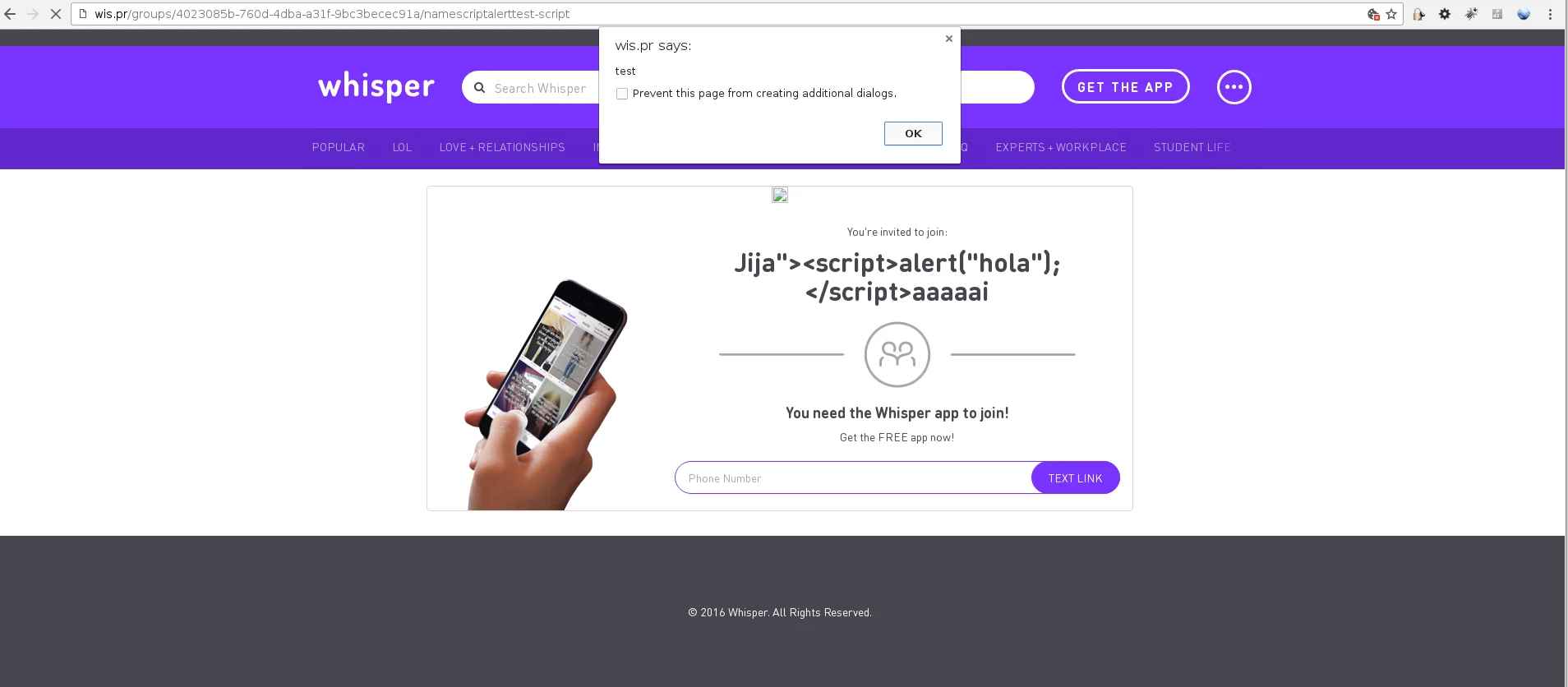
- Open this URL in a browser.
Please find the attached screenshots.
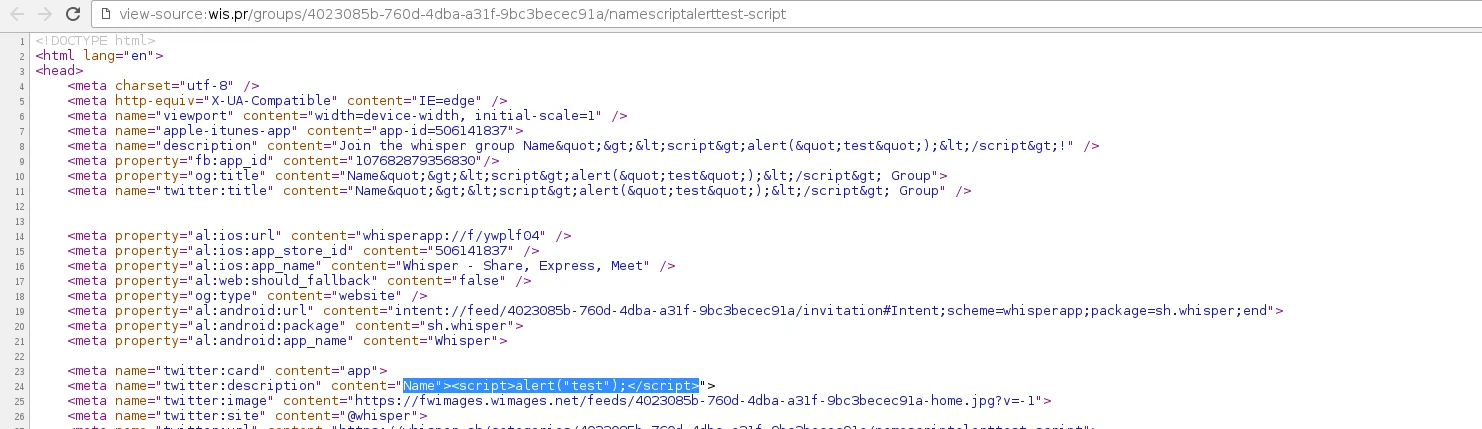
Fix: Sanitize the output in twitter:description meta. Please find attached the screenshot named "fix.jpg".
Don't hesitate to contact me if you need further details.
Attachments
What the report shows
This is a stored cross-site scripting report against wis.pr, submitted to the Whisper program on HackerOne by the researcher huntingforbugs. The report was disclosed on 16 October 2016 and paid a bounty of 100.00 USD. No severity rating or CVSS score is given.
The feature involved is group creation. A group name is stored by the application and later rendered into a page that is reachable through a sharing URL. The researcher found that the group name is not sanitised before it is written into the twitter:description meta tag, so markup placed in the name is emitted as HTML rather than as text.
The reproduction steps are short:
- Create a new group with the following name:
Test>"<script>alert('test');</script>
- Copy the sharing URL of the new group. The report shows its shape as
http://wis.pr/*****, with the identifier redacted. - Open that URL in a browser.
The payload is a classic breakout: the > and " characters are there to close whatever attribute or tag context the value lands in, and the script element follows. Because the value is stored, the script runs for anyone who loads the sharing page, not only for the person who created the group.
The report includes screenshots of the steps and of the fix.
The researcher's suggested fix is to sanitise the output in the twitter:description meta tag.
That is where the report ends: there is no discussion of other injection points, of which characters the application filters, or of how the value is escaped elsewhere on the page.
Root cause
The likely root cause is output encoding applied in the wrong context, or not applied at all, when the stored group name is written into a meta tag. A twitter:description meta tag carries its value inside an HTML attribute, so the value must be HTML-attribute-encoded before it is placed there. If the application instead inserts the raw string, or applies encoding suited to a different context such as a JavaScript string or a URL, the quote character in the name terminates the attribute and the rest of the input is parsed as markup.
Impact
Because the payload is stored with the group and served from the sharing URL, any user who opens that URL runs the script in the origin of wis.pr. That gives an attacker script execution in the victim's session on that origin, though the report only demonstrates an alert. The report itself only demonstrates an alert, and does not describe any account takeover or data theft, so the practical ceiling is not established in the text.
How this kind of bug works
Stored XSS arises when input that is persisted by the application is later rendered into a page without encoding appropriate to the place it lands. The browser has no way to distinguish data from markup once the bytes reach the parser: if a stored value contains a quote that closes an attribute, or a < that opens a tag, the parser treats what follows as structure. The storage step is what makes it dangerous, because the payload survives and is served to every visitor of the affected page, including users who never supplied it.
Meta tags are a frequent hiding place because developers think of them as metadata rather than as user-facing HTML. They are still parsed as HTML attributes, so the same rules apply. The same is true of Open Graph and Twitter card tags, JSON-LD blocks, title elements, and values echoed into href or src attributes.
The defence is context-aware output encoding at render time: HTML entity encoding for element text, attribute encoding (including quotes) for attribute values, JavaScript encoding inside script blocks, and URL encoding for URL components. Input validation and filtering are secondary; they reduce the attack surface but do not replace correct encoding. A Content Security Policy that disallows inline script limits the damage of an injection that slips through, but it is a mitigation, not a fix.
How to test for it
- Identify every feature where a value you control is stored and later displayed: profile names, group or project titles, comments, descriptions, filenames, and anything that appears in a share page or public profile.
- Submit a benign marker first, for example a unique string, and confirm where it is reflected: page body, attribute value, meta tag, script block, URL.
- Send a payload tailored to the context. For an attribute context, a value that closes the attribute with a quote and then opens a tag is the standard probe; for element text, a simple tag is enough. Use a harmless marker such as an alert or a call to a listener you control rather than anything destructive.
- Load the page as a different user, or in a private window, to confirm the value is stored and served to others rather than only echoed back to you.
- Check the raw response, not just the rendered page, so you can see whether your characters were encoded, stripped, or passed through.
A positive result is your markup executing in the origin of the target when the stored page is loaded. Common false positives are payloads that appear in the response but are entity-encoded, values that are reflected only in the response to your own request, and cases where a CSP blocks execution so the injection has no effect. Also watch for double encoding: a payload that looks filtered in one view may be decoded later by a client-side template.
How it is fixed
Apply context-aware output encoding wherever the stored value is rendered, including meta tags, attributes and script blocks. Prefer a templating engine that escapes by default and mark raw output explicitly where it is genuinely needed. Validate and length-limit input on the way in as defence in depth, and add a Content Security Policy to reduce the impact of any future injection. After the fix, re-test the original payload and variants that target other contexts on the same page.
Hunting notes
Stored XSS tends to hide in places that are rendered in more than one context: a name shown on a profile page, in a share preview, in an email, and in a meta tag. Share URLs and social preview endpoints are good places to look, because they often build meta tags from stored fields with string concatenation. Recon signals include parameters that reappear in og: and twitter: tags, values that survive a round trip through the application unchanged, and pages that render user content server-side rather than through a client framework that escapes by default. To make a report land, show the stored value being served to a second user or session, capture the raw response showing the unencoded payload, and state clearly what script execution in that origin allows. Keep the demonstration minimal and non-destructive.
What happened, in plain words
This report describes a stored cross-site scripting (XSS) bug in wis.pr, a site in the Whisper program on HackerOne. The researcher, huntingforbugs, submitted it and it was disclosed on 16 October 2016, with a bounty of 100.00 USD. No severity rating or CVSS score is given.
The feature involved is creating a group. When you create a group, you give it a name, and the site saves that name. Later, the site builds a sharing page for the group, reachable through a sharing URL, and puts the group name into that page. The researcher found that the name is not cleaned before it is written into a twitter:description meta tag, so anything that looks like HTML in the name is treated as HTML by the browser instead of being shown as plain text.
A meta tag is a small piece of information in a web page's source that is not shown on the page itself. Search engines and social networks read it, for example to build a preview when someone shares a link. twitter:description is the meta tag that holds the text shown in a Twitter card preview. It is still part of the HTML, so the browser parses it like the rest of the page.
The reproduction steps are short:
- Create a new group with this name:
Test>"<script>alert('test');</script>
- Copy the sharing URL of the new group. The report shows its shape as
http://wis.pr/*****, with the identifier hidden. - Open that URL in a browser.
Why each step matters:
- Step 1 is where the harmful text enters the site. The name is ordinary input, and the site stores it.
alert('test')is a harmless pop-up, used only to prove that code runs. - Step 2 matters because the sharing URL is the page that shows the stored name to other people. It is the delivery route.
- Step 3 is where the sharing URL is opened in a browser. Because the name was saved on the server, this happens for anyone who opens the link, not only for the person who created the group. That is what makes it stored XSS rather than a one-off reflection.
The report includes screenshots of the steps and of the fix.
The researcher's suggested fix is to sanitise the output in the twitter:description meta tag.
That is where the report ends. It does not discuss other injection points, which characters the site filters, or how the value is escaped elsewhere on the page.
In general, how this kind of bug works
Stored XSS happens when something a user types is saved by the site and later placed into a page without the right encoding for the spot it lands in. Encoding means turning special characters into harmless stand-ins, so that a < is displayed as a < instead of starting a tag. A useful comparison is a form: if you write a name on a line meant for a name, it stays a name. If the form has no boxes and you can write anywhere, you can also write instructions in the margin, and whoever reads the form may follow them. The browser is the reader, and it cannot tell data from markup once the characters reach it.
The storage step is what makes this dangerous. A reflected bug only affects the person who sends the request. A stored one survives on the server and is served to every visitor of the affected page, including people who never typed anything.
Meta tags are a common hiding place because developers think of them as background information rather than as visible HTML. They are still parsed as HTML attributes, so the same rules apply. The same is true of Open Graph and Twitter card tags, JSON-LD blocks, title elements, and values placed into href or src attributes.
The defence is context-aware output encoding at the moment the page is built: HTML entity encoding for text between tags, attribute encoding including quotes for attribute values, JavaScript encoding inside script blocks, and URL encoding for parts of a URL. Checking and filtering input helps reduce the attack surface but does not replace correct encoding. A Content Security Policy, which tells the browser which scripts it may run, limits the damage of an injection that slips through, but it is a mitigation, not a fix.
In general, how to test for it
- List every feature where a value you control is saved and later shown: profile names, group or project titles, comments, descriptions, filenames, and anything that appears on a share page or public profile.
- Submit a harmless marker first, such as a unique string, and note exactly where it appears: page body, attribute value, meta tag, script block or URL.
- Send a payload suited to that spot. For an attribute, a value that closes the attribute with a quote and then opens a tag is the standard probe; for text between tags, a simple tag is enough. Use a harmless marker such as an alert rather than anything destructive.
- Load the page as a different user, or in a private window, to confirm the value is stored and served to others rather than only echoed back to you.
- Look at the raw response, not just the rendered page, so you can see whether your characters were encoded, stripped or passed through untouched.
A positive result is your markup running in the target's origin when the stored page is loaded. Common false positives are payloads that appear in the response but are entity-encoded, values reflected only in the response to your own request, and cases where a Content Security Policy blocks execution so the injection has no effect. Watch for double encoding too: a payload that looks filtered in one view may be decoded later by a client-side template.
In general, how it is fixed
Apply context-aware output encoding wherever the stored value is rendered, including meta tags, attributes and script blocks. Prefer a templating engine that escapes by default and mark raw output explicitly where it is genuinely needed. Validate and length-limit input on the way in as defence in depth, and add a Content Security Policy to reduce the impact of any future injection. After the fix, re-test the original payload and variants aimed at other contexts on the same page.
Glossary
- Stored XSS: a cross-site scripting bug where the harmful input is saved by the site and served to later visitors.
- Cross-site scripting (XSS): a bug where input is treated as code by the browser, letting an attacker run script in another user's session on the site.
- Payload: the piece of input crafted to trigger the bug.
- Meta tag: an HTML element in the page source that carries information about the page, often used for search and social previews.
twitter:description: the meta tag holding the description text used in a Twitter card preview.- Attribute: a setting inside an HTML tag, written as a name and a value, such as
href="...". - HTML entity encoding: replacing special characters with safe stand-ins so they display as text rather than acting as markup.
- Context-aware output encoding: encoding applied according to where a value lands (text, attribute, script, URL).
- Sanitise: clean a value so that harmful parts cannot act as code.
- Sharing URL: the link to a page that shows a stored item, such as a group, to other people.
- Origin: the combination of scheme, host and port that a page belongs to; scripts run with the permissions of their origin.
- Session: the logged-in state a site keeps for a user, usually tied to a cookie.
- Cookie: a small piece of data a site stores in the browser to recognise the user on later requests.
- Content Security Policy (CSP): a rule set telling the browser which scripts and resources a page may load.
- Reflected XSS: a bug where the harmful input comes back only in the response to the sender's own request.
- False positive: a result that looks like a bug but is not exploitable.
- Double encoding: encoding a value twice, so it looks filtered in one place but is decoded later.
- CVSS: a standard scoring system for the severity of a vulnerability.



