[CVE-2019-17674 & CVE-2020-11025] Stored XSS through navigation menu item edited in Customizer in Wordpress (Write Up)
A stored cross-site scripting vulnerability existed in the WordPress Customizer's navigation menu editor, where the 'Navigation Label' field did not properly sanitise input. An attacker with the ability to edit menus could inject a script that would execute when the menu was rendered on the site.
 Published on blog.evanricafort.com
The original lives on blog.evanricafort.com
We do not hold its text, so we link to it rather than copy it. The other two tabs are our own rewrites, checked against it.
What the report shows
This write-up covers a stored cross-site scripting issue in the WordPress Customizer, tracked as CVE-2019-17674 and CVE-2020-11025. The asset named in the report is a WordPress.com hosted blog, blog.evanricafort.com, and the feature involved is the navigation menu editor inside the Customizer.
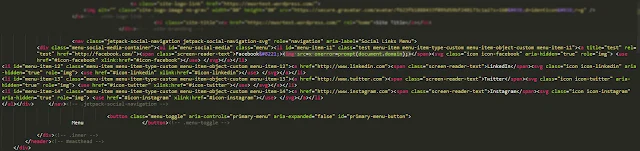
The researcher's reproduction steps are short and entirely UI-driven. They are reproduced here as written:
- go to https://wordpress.com/customize/<name>.wordpress.com
- click the "Menus" tab in the left side
- click "Social Media"
- choose any tab from "Facebook, Linkedin, Twitter and Instagram"
- after you choose a tab, input xss payload in the "Navigation Label"
- click Publish
- go to domain and see the result.
The steps show a "Social Media" section with tabs for Facebook, LinkedIn, Twitter and Instagram, and a Navigation Label field where a payload is entered before publishing and visiting the domain.
The report does not include the literal payload string, the HTTP request that saves the menu, or the server response. It also gives no CVSS score, no severity rating and no description of the fix. The bounty recorded for the report is 600.00 USD.
Root cause
The report points to the Navigation Label of a social media menu item as the injection point. The report does not state the cause; the injection point it identifies is the Navigation Label of a social media menu item. The report does not describe who else the stored value reaches.
Impact
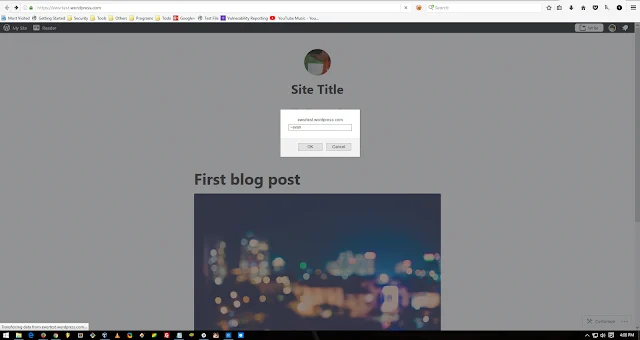
The report demonstrates a stored XSS payload entered in the Navigation Label and published, then the domain visited to see the result. The report does not go further than demonstrating that the payload executes after publishing and visiting the domain.
How this kind of bug works
Stored XSS arises when user-controlled input is persisted by the application and later included in an HTML response without context-appropriate encoding. The browser cannot tell data from markup, so a string that was meant to be a label becomes a script element, an event handler attribute, or a javascript: URL. The stored variant is more dangerous than the reflected one because the payload survives in the database and fires for every subsequent viewer, and because the request that plants it can look like ordinary use of a legitimate feature.
CMS customisers are a common home for this class because they combine several risky properties: they accept rich input from users with publishing rights, they save configuration that is rendered on the front end, and the rendering path is often different from the editing path, so escaping applied in one place may be missing in the other. Menu labels, widget titles, site titles and similar short text fields are frequently assumed to be plain text and handled with less care than post bodies.
Defences are layered. Input validation can reject obviously hostile markup, but the reliable control is output encoding at render time, chosen for the context (HTML body, attribute, URL, script block). A Content Security Policy that forbids inline script reduces the damage when encoding fails. Framework templating that escapes by default, plus explicit sanitisation for fields that genuinely allow markup, closes most of the gap.
How to test for it
- Identify features where a value you enter is saved and later displayed to other users: menu labels, widget titles, profile fields, site settings, comment author names.
- Enter a benign marker first, such as a distinctive word, and confirm where and how it appears on the rendered page. View source rather than trusting the visual result.
- Replace the marker with a payload appropriate to the context you observed. If the value lands in an HTML body, a simple element that triggers a visible effect is enough to prove execution; if it lands in an attribute or a URL, adjust accordingly.
- Save or publish, then load the public page as a different user or in a private window, so you are testing the stored rendering path and not a preview.
- Record the exact request that saved the value and the response that rendered it, and capture the moment of execution.
A positive result is script running in the origin of the target site when the page is loaded by a party who did not enter it. Common false positives include payloads that only execute inside the editor's own preview, values that are escaped on the front end but shown raw in the admin interface, and cases where a sanitising filter strips the dangerous part so only harmless markup remains. Check the actual response body before claiming execution.
How it is fixed
For WordPress-style code this means passing the stored value through the appropriate escaping function at the point of printing, and restricting who can set menu content. Regression tests should cover the customiser save and the front-end render separately, since the two paths can diverge. A restrictive CSP is a useful secondary control.
Hunting notes
This class tends to hide in administrative interfaces that feed public pages: theme and site customisers, menu and widget editors, form builders, and any settings screen with a free-text field that ends up in a template. Recon signals include CMS fingerprints and version numbers, customiser endpoints reachable by lower-privileged roles, and features that let a user with limited rights publish content shown to everyone. When you report, show the stored value surviving a fresh session and executing on the public page, include the save request and the rendered response, and state clearly which role is required to plant the payload. That evidence, rather than the payload alone, is what makes a program accept the finding.
What happened, in plain words
This report describes a bug in WordPress, the software that runs many blogs and websites. The researcher found that text typed into a settings screen is saved and later rendered on the site, where a script payload takes effect. That is the essence of the bug class called cross-site scripting, or XSS: a site lets someone slip code into a page, and the browser of whoever views the page runs it.
The specific versions of the bug are tracked as CVE-2019-17674 and CVE-2020-11025. A CVE is a public catalogue number given to a known security flaw so people can look it up and track fixes. The affected asset named in the report is a WordPress.com hosted blog, blog.evanricafort.com, and the feature involved is the navigation menu editor inside the Customizer.
The Customizer is WordPress's built-in tool for changing how a site looks, with a live preview beside the settings. One of its panels is "Menus", where you build the links that appear in the site's navigation. Inside that panel there is a "Social Media" section with tabs for Facebook, LinkedIn, Twitter and Instagram. Choosing a tab gives you a field called "Navigation Label", which is the text shown for that link.
The researcher's reproduction steps are short and use only the browser interface. They are reproduced here as written:
- go to https://wordpress.com/customize/<name>.wordpress.com
- click the "Menus" tab in the left side
- click "Social Media"
- choose any tab from "Facebook, Linkedin, Twitter and Instagram"
- after you choose a tab, input xss payload in the "Navigation Label"
- click Publish
- go to domain and see the result.
Step by step, here is why each one matters. Step 1 opens the Customizer for a WordPress.com blog. Step 2 moves to the Menus panel, the place where navigation links are configured. Steps 3 and 4 pick the social media menu and one of its tabs, which is what makes the Navigation Label field appear. Step 5 is the actual test: instead of ordinary label text, a script payload is typed in. Step 6 publishes the menu. Step 7 loads the domain to see the result.
In other words, a payload is typed into the Navigation Label, the menu is published, and the domain is visited to see the result. The report does not include the literal payload string, the HTTP request that saves the menu, or the server response. It also gives no CVSS score, no severity rating and no description of the fix. The bounty recorded for the report is 600.00 USD.
Root cause
The report points to the Navigation Label of a social media menu item as the injection point. The report does not state the cause; the injection point it identifies is the Navigation Label of a social media menu item. The report does not describe who else the stored value reaches.
Impact
The report demonstrates a stored XSS payload entered in the Navigation Label and published, then the domain visited to see the result. The report does not go further than demonstrating that the payload executes after publishing and visiting the domain.
In general, how this kind of bug works
Stored XSS arises when user-controlled input is persisted by the application and later included in an HTML response without context-appropriate encoding. The browser cannot tell data from markup, so a string that was meant to be a label becomes a script element, an event handler attribute, or a javascript: URL. The stored variant is more dangerous than the reflected one because the payload survives in the database and fires for every subsequent viewer, and because the request that plants it can look like ordinary use of a legitimate feature.
CMS customisers are a common home for this class because they combine several risky properties: they accept rich input from users with publishing rights, they save configuration that is rendered on the front end, and the rendering path is often different from the editing path, so escaping applied in one place may be missing in the other. Menu labels, widget titles, site titles and similar short text fields are frequently assumed to be plain text and handled with less care than post bodies.
Defences are layered. Input validation can reject obviously hostile markup, but the reliable control is output encoding at render time, chosen for the context (HTML body, attribute, URL, script block). A Content Security Policy that forbids inline script reduces the damage when encoding fails. Framework templating that escapes by default, plus explicit sanitisation for fields that genuinely allow markup, closes most of the gap.
In general, how to test for it
- Identify features where a value you enter is saved and later displayed to other users: menu labels, widget titles, profile fields, site settings, comment author names.
- Enter a benign marker first, such as a distinctive word, and confirm where and how it appears on the rendered page. View source rather than trusting the visual result.
- Replace the marker with a payload appropriate to the context you observed. If the value lands in an HTML body, a simple element that triggers a visible effect is enough to prove execution; if it lands in an attribute or a URL, adjust accordingly.
- Save or publish, then load the public page as a different user or in a private window, so you are testing the stored rendering path and not a preview.
- Record the exact request that saved the value and the response that rendered it, and capture the moment of execution.
A positive result is script running in the origin of the target site when the page is loaded by a party who did not enter it. Common false positives include payloads that only execute inside the editor's own preview, values that are escaped on the front end but shown raw in the admin interface, and cases where a sanitising filter strips the dangerous part so only harmless markup remains. Check the actual response body before claiming execution.
In general, how it is fixed
For WordPress-style code this means passing the stored value through the appropriate escaping function at the point of printing, and restricting who can set menu content. Regression tests should cover the customiser save and the front-end render separately, since the two paths can diverge. A restrictive CSP is a useful secondary control.
In general, hunting notes
This class tends to hide in administrative interfaces that feed public pages: theme and site customisers, menu and widget editors, form builders, and any settings screen with a free-text field that ends up in a template. Recon signals include CMS fingerprints and version numbers, customiser endpoints reachable by lower-privileged roles, and features that let a user with limited rights publish content shown to everyone. When you report, show the stored value surviving a fresh session and executing on the public page, include the save request and the rendered response, and state clearly which role is required to plant the payload. That evidence, rather than the payload alone, is what makes a program accept the finding.
Glossary
- Cross-site scripting (XSS): a bug where a site lets someone's input be treated as code by a visitor's browser, so the code runs on the site's page.
- Stored XSS: the variant where the malicious input is saved on the server and runs for every visitor who later loads the affected page.
- CVE: a public catalogue number for a known security flaw, used to track and look it up.
- WordPress: the software that runs many blogs and websites, including the hosted service in this report.
- Customizer: WordPress's built-in screen for changing a site's appearance, with a live preview.
- Navigation menu: the set of links shown on a site to help visitors move around.
- Navigation Label: the text displayed for a menu link.
- Payload: the piece of input an attacker sends to try to trigger a bug.
- Sanitisation: cleaning input so that anything dangerous is removed or neutralised before it is stored.
- Output encoding (escaping): converting stored text so the browser displays it as text rather than interpreting it as markup.
- HTML: the language browsers use to describe a page's structure and content.
- Markup: the tags and attributes in HTML that tell the browser how to display or behave.
- Content Security Policy (CSP): a rule set a site sends to the browser that limits what scripts may run on its pages.
- CVSS: a scoring system for rating the severity of a security flaw.
- Bounty: a reward paid by a programme for a valid security report.
- False positive: a test result that looks like a bug but is not one.
- Recon: the early information-gathering stage of testing a target.