Self-XSS to Stored XSS
The author found a DOM-based XSS in a URL path filter and a self-XSS in the username field. By chaining them, an attacker could use the DOM XSS to change the victim's username to a stored XSS payload, leading to persistent execution.
 Published on medium.com
In this article, I detail how I’ve leveraged self-XSS vectors to increase the impact of regular XSS.
The full write-up lives on its author's site
It belongs to its author, so we link to it rather than copy it. The other two tabs are our own rewrites, checked against it.
Context
This write-up is about chaining a DOM XSS with a Self-XSS in a username field to escalate the DOM XSS into a stored XSS. The researcher, Rodriguezjorgex, describes two real-world bugs from recent work. The first is a DOM XSS found in a search and filter feature where the input sits in the URL path rather than in a query parameter. The second is a Self-XSS in the username field of the same application, which the author proposes the DOM XSS could be used to write to.
The report opens with a short taxonomy of Self-XSS vectors. The two the author focuses on are cookie-based XSS and username XSS, because both are usually site-wide and therefore have a bigger impact than a one-off reflection.
- Cookie-based XSS: the application reflects the user's cookie back into the page, and the user can set that cookie to an XSS payload. It requires modifying the cookies the application sets and checking whether the application reflects the value.
- Username XSS: the user simply changes their username, or full name, to an XSS vector.
On their own these vectors are not a security impact. The point of the article is that they can be used to increase the impact of a reflected or DOM XSS. The author also notes that cookie-based XSS is not the only route: parameters which set cookies, or CRLF injections, can accomplish the same thing. A separate article covers the cookie scenario, linked in the report as https://medium.com/@rodriguezjorgex/escalating-dom-xss-to-stored-xss-eb6f3a669af3.
Setup
The initial recon for the DOM XSS bug was, in the author's words, non-existent. The steps were:
- Go to HackerOne and view which sites were in scope.
- Open the in-scope site.
- Play with the search features.
The main tool used throughout is DOM Invader, the Burp Suite browser extension for finding DOM XSS, with its canary token. Burp is also used later to send requests that the UI would not allow. No versions are given in the report.
Finding it
Search and the first canary
The author starts by searching for something like test, then searches for the DOM Invader canary token. They also try variations such as:
dominvadercanary"><b>test
and watch whether it turns bold or whether anything happens in DOM Invader. DOM Invader does turn red, but after inspecting the results the scenario looks un-exploitable.

DOM Invader showing the special characters being encoded
The filter in the URL path
Not deterred, the author keeps playing with the search results, this time using the site's filter to filter out results. Whenever they click on filters, they look at how the URL changes. They filter for news and check whether news appears anywhere in the URL bar.
The filter value does appear in the URL bar, so they replace that specific word with the DOM Invader string.

p3axusnf is the DOM Invader canary
The input is in the URL path, not in a parameter. The author notes that every XSS tutorial and lab they had seen put XSS in a parameter, so at this point it looked like there was no way this could be vulnerable.
DOM Invader turns red anyway. After investigating, the canary is being passed to an innerHTML. Adding "> to the end of the canary token shows that it is not being URL encoded like before.

First payload and the tag sanitizer
With special characters not being sanitised, the author tries a simple payload that should not be blocked by the WAF:
<b>p3axusnf
After checking DOM Invader again, the <b> tag was completely deleted. The conclusion is that some regex sanitizer is deleting anything that has opening and closing tags.
Exploitation
Step 1: splitting the payload across filters
The author tries numerous payloads without success. One WAF bypass technique they use is splitting the payload across multiple parameters, but this application uses the URL path, not parameters. So the question becomes: what happens if additional filters are added?

News filter added
A hyphen separates the different filters. Looking at DOM Invader gives a more interesting result.

It is backwards. The sanitizer deletes anything between <>, and each parameter adds a comma (,) to the innerHTML field. The plan is therefore to work backwards.
Step 2: understanding the WAF
The same sanitisation bypass also bypasses the WAF. The WAF (a well known one, not named in the report) allows onerror="blablabla", but as soon as any opening and closing parentheses () are typed, they are blocked. However, alert() without any opening < tag is allowed. The WAF appears to check whether the input is within an opening tag before blocking parentheses.
Step 3: first combined payload
With two parameters available, onerror= can go on one side and alert() on the other. The parameters render in reverse, so the following payload should work:
data-alert('XSS by Jorge')">-<img src onerror="
No XSS. The comma is breaking it.
Step 4: isolating the comma
The fix is to isolate the comma: assign a variable to the comma, then use a semicolon to start another JavaScript line and run alert():
data-';alert('XSS by Jorge')">-<img src onerror="test='
This produces the XSS.
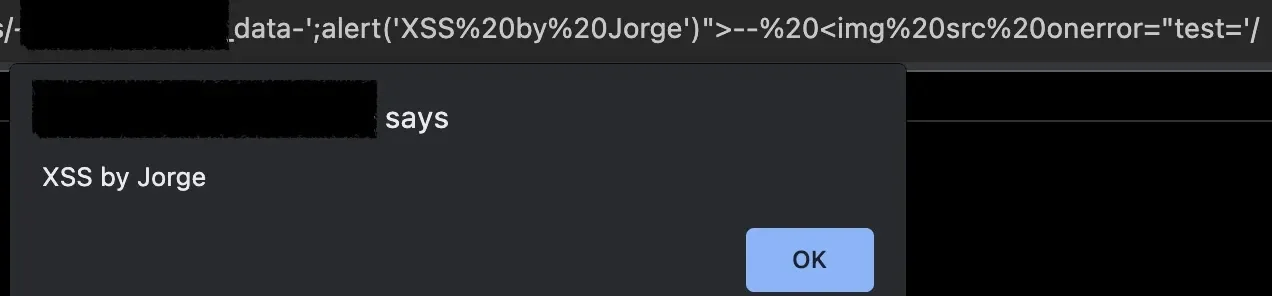
XSS Alert
Finding the Self-XSS in the username
On Synack the author would have reported the DOM XSS and moved on. On other platforms they prefer not to report a single issue, because chaining vulnerabilities lowers the chance of a duplicate.
The task is to find a way to change the username or name on the application to an XSS payload. The author registers on the application and finds the location where the username can be changed. The UI does not allow special characters, so Burp is used instead.
The next part was found by accident. The normal workflow is to start simple by inserting "> and looking at the response. Had that been done first, this would have been the response:

quotes escaped and greater than sign html encoded
The first payload actually tried was:
<img/src=x>

/ removed, quotes added to x
Examining the response (view-source, not the DOM), the payload appears to have been normalised in the backend. Earlier, "> was sanitised to \" and >, but this time those characters were not sanitised.
Putting quotes around the x gives this response:

So there is a sanitizer in the backend. In this particular case, that sanitizer is the downfall.
The quote normalizer
Looking at the second payload, the sanitizer adds quotes around the x, producing <img src="x">. Because of where the injection sits, this can be leveraged. The injection point looks like this:
<script type="text/javascript">d.push({"email":"myemail","username":"INJECTIONHERE"})</script>
The first attempt was to escape the function:
Jorge+Rodriguez-p3axusnf<img/src=});alert()//
Forward slashes are escaped, so that fails. The payload that worked, and probably the shortest one, was:
<img/src=-alert(document.domain)->
In the source code it looks like this:

alert injecting between key/value pair
The reason it works can be shown in the Chrome console. Typing the following gives an alert:
{"test":"testing"-alert()-"123"}
In this scenario the src quotes act as an escape that allows a JavaScript object to be injected between the string testing and 123. The browser then evaluates "testing" minus the result of alert() minus "123". Other operators work in the same position: *alert()*, +alert()+, /alert()/, ^alert()^, and so on.
Root cause
Two separate weaknesses combine here.
- The DOM XSS: filter values taken from the URL path are written into
innerHTMLwithout encoding. A regex sanitizer strips anything between<>, and the WAF blocks parentheses only when it believes the input is inside an opening tag. Splitting the payload across two hyphen-separated filters, which are rendered in reverse and joined with commas, lets the attacker placeonerror=on one side andalert()on the other, and the comma is neutralised by assigning it to a variable and starting a new statement with a semicolon. - The username Self-XSS: the backend sanitizer normalises the username by adding quotes around a bare attribute value, so
<img/src=x>becomes<img src="x">. Because the username is interpolated into a JavaScript string inside ad.push({...})call, the injected quotes close the string and the-alert()-expression is evaluated as part of the object literal.
Neither defence is sufficient on its own. The regex sanitizer deletes anything between angle brackets, which the author works around. The WAF's parenthesis rule depends on a guess about context that the split payload defeats. The backend quote normalizer, in this case, was the downfall.
Impact
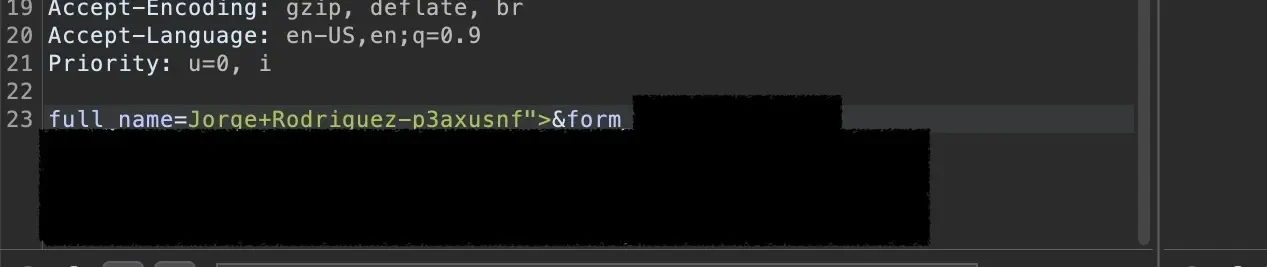
The Self-XSS in the username field is not exploitable by itself, because the victim would have to set their own username to a payload. Chained, the DOM XSS can send an XHR request to the account editing endpoint and change the full_name parameter to an XSS payload. That makes the payload persistent across the site, and the author notes it could be used to create a key logger that captures credit card information.
The report was submitted to a VDP program, so the author did not fully demonstrate how the two exploits fit together. The chaining description is therefore a proposed path rather than a demonstrated end-to-end exploit in the report.
Fix
The report does not describe any fix that was applied. Based on the described behaviour, the changes that would address it are:
- Encode filter values from the URL path before writing them to
innerHTML, or build the DOM withtextContentand attribute APIs instead of string concatenation. - Replace the regex tag stripper with context-aware output encoding, since stripping content between
<>does not stop attribute injection. - Stop relying on the WAF's context guess for parentheses; enforce the same encoding at the application layer.
- In the username field, encode the value for the JavaScript string context it is placed in, rather than normalising quotes around attribute values.
Variants to test
- Filter values in the URL path: add a filter, watch the URL, and replace the filter word with a DOM Invader canary. A positive result is DOM Invader turning red with the canary reaching
innerHTMLunencoded. - Multiple filters: add a second filter and observe how the values are joined. A positive result is a separator such as a hyphen or comma appearing between the rendered values, which can be used to split a payload.
- Tag stripping: submit
<b>canaryand check whether the tag is removed. A positive result is the tag disappearing while the text remains, indicating a regex sanitizer that only handles angle brackets. - WAF parenthesis rule: submit
onerror="x"and thenalert()separately. A positive result is the attribute being allowed while parentheses are blocked only when an opening<is present. - Comma handling: when a comma breaks a payload, assign it to a variable and start a new statement with a semicolon. A positive result is the payload executing.
- Username normalisation: submit
<img/src=x>and inspect the view-source response. A positive result is the backend adding quotes aroundx, producing<img src="x">. - JavaScript string context: find where the username is interpolated into a script, such as a
d.push({...})call, and try an arithmetic operator payload like<img/src=-alert(document.domain)->. A positive result is the alert firing when the object literal is evaluated. - Alternative operators: in the same position, try
*alert()*,+alert()+,/alert()/and^alert()^. A positive result is any of them executing.
What happened, in plain words
Imagine you have a website with a search box and some filter buttons. You type a word, click a filter, and the page shows you results. Now imagine that a clever person can sneak a tiny piece of computer code into that filter, so that when the page shows the results, the code runs in your browser. That is called cross-site scripting, or XSS for short. It is one of the most common and most dangerous kinds of web bug, because the code runs with the same trust your browser gives to the real website.
This article is about two bugs found on the same website. The first bug lets an attacker run code through the filter in the address bar. On its own that is already serious, but it only lasts while the victim is on that one page. The second bug is in the username field: the website lets you put a small piece of code into your own username, but only you can do it to yourself, so it is called Self-XSS and on its own it is not really a security problem. The author proposes that the first bug could be used to write the second bug into the victim's account. That would turn a temporary bug into a persistent one.
The author, Rodriguezjorgex, walks through both bugs step by step, including the dead ends. The report was submitted to a VDP program, which is a programme where companies invite researchers to report bugs but do not pay a cash reward. Because of that, the author did not fully demonstrate how the two bugs fit together end to end. The chaining part is described as a proposed path, not a recorded exploit.
The two kinds of Self-XSS the author cares about
Before the main story, the report gives a short list of Self-XSS types. Self-XSS means the victim has to do the attack to themselves, for example by pasting code into their own browser. That is why it is normally considered low impact: an attacker cannot make a victim do it. But some Self-XSS vectors are site-wide, meaning the value is shown on every page of the site, so if you could ever get a victim to set it, the impact would be large. The author focuses on two of these:
- Cookie-based XSS: a cookie is a small piece of text that a website asks your browser to store and send back on every request, like a name badge the site gives you so it remembers who you are. In this vector, the website takes the value of one of your cookies and prints it back into the page. If you can change that cookie to contain code, the site will print the code. To test it, you modify the cookies the site sets for you and check whether the site reflects your value back.
- Username XSS: you simply change your username, or your full name, to a piece of code. If the site prints your username on every page without cleaning it, the code runs everywhere.
On their own, neither of these is a security impact, because the victim would have to set the value themselves. The whole point of the article is that these vectors can be used to increase the impact of a reflected XSS or a DOM XSS. A reflected XSS is one where the malicious input is sent to the server and immediately echoed back in the response. A DOM XSS is one where the malicious input never reaches the server at all: the page's own JavaScript reads something from the URL and writes it into the page, and the browser runs whatever code ends up there. The author also notes that cookie-based XSS is not the only route: parameters that set cookies, or CRLF injections, can do the same thing. A CRLF injection is when an attacker sneaks carriage-return and line-feed characters into a request so that the server treats part of the input as a new header or a new response. A separate article covers the cookie scenario, linked in the report as https://medium.com/@rodriguezjorgex/escalating-dom-xss-to-stored-xss-eb6f3a669af3.
Setting up
The initial recon for the DOM XSS bug was, in the author's words, non-existent. Recon means the information-gathering phase before testing, such as mapping the site, listing its pages and looking for interesting features. Here the steps were simply:
- Go to HackerOne and view which sites were in scope. HackerOne is a bug bounty platform where companies list their programmes and researchers submit reports. In scope means the company has given permission to test that particular site.
- Open the in-scope site.
- Play with the search features.
The main tool used throughout is DOM Invader, a feature built into the Burp Suite browser. Burp Suite is a toolkit for testing websites: it sits between your browser and the site so you can see and change every request and response. DOM Invader watches the page's JavaScript and injects a unique marker, called a canary token, into places where input might end up. A canary token is a harmless unique string, like a canary in a coal mine: if it shows up somewhere dangerous, you know the input reached that place. When DOM Invader finds the canary in a dangerous spot, it turns red. Burp is also used later to send requests that the website's own forms would not allow. No versions are given in the report.
Finding the first bug
Searching and the first canary
The author starts by searching for something like test, then searches for the DOM Invader canary token. They also try variations such as:
dominvadercanary"><b>test
This is a plain text string, not a request. It contains the canary word, then a double quote and a greater-than sign, then a bold tag with the word test inside. The idea is to see whether the page treats those characters as code or as harmless text. The author watches whether the word turns bold, which would mean the <b> tag was interpreted as HTML, and whether anything happens in DOM Invader. DOM Invader does turn red, but after inspecting the results the scenario looks un-exploitable. In other words, the canary reached a dangerous place, but the surrounding context made it impossible to turn into working code.
DOM Invader showing the special characters being encoded
The filter in the URL path
Not deterred, the author keeps playing with the search results, this time using the site's filter to filter out results. A filter here is a button or link that narrows the results, for example showing only news items. Whenever they click on filters, they look at how the URL changes. The URL is the address in the browser bar, and many sites put the current state of the page into it so the page can be bookmarked or shared. They filter for news and check whether news appears anywhere in the URL bar.
The filter value does appear in the URL bar, so they replace that specific word with the DOM Invader string.
p3axusnf is the DOM Invader canary
The input is in the URL path, not in a parameter. This distinction matters. A URL is made of several parts: the scheme (https), the host (example.com), the path (/news/sports), and optionally a query string after a question mark, made of parameters like ?category=news&page=2. A parameter is a named value in the query string. The path is the part that looks like a folder structure. The author notes that every XSS tutorial and lab they had seen put XSS in a parameter, so at this point it looked like there was no way this could be vulnerable.
DOM Invader turns red anyway. After investigating, the canary is being passed to an innerHTML. innerHTML is a property of an element in the page that lets JavaScript set the element's contents as raw HTML. If you put text into innerHTML, the browser parses it as HTML, so tags become real elements and event handlers become real code. That is why writing untrusted input to innerHTML is dangerous. Adding "> to the end of the canary token shows that it is not being URL encoded like before. URL encoding is the process of replacing special characters with percent codes, for example a space becomes %20 and a double quote becomes %22, so that the value can travel safely in a URL. If the characters are not encoded, they arrive at the page as themselves.
First payload and the tag sanitizer
With special characters not being sanitised, the author tries a simple payload that should not be blocked by the WAF:
<b>p3axusnf
This is an HTML bold tag wrapped around the canary word. A WAF, or web application firewall, is a filter that sits in front of a website and blocks requests that look malicious, a bit like a bouncer at a door checking IDs. The author chose a simple bold tag because it is harmless-looking and unlikely to trip a WAF rule. After checking DOM Invader again, the <b> tag was completely deleted. The conclusion is that some regex sanitizer is deleting anything that has opening and closing tags. A regex, short for regular expression, is a pattern-matching language used to find text. A sanitizer is code that cleans input by removing or changing dangerous parts. Here the sanitizer appears to look for angle brackets and remove whatever sits between them.
Exploiting the first bug
Step 1: splitting the payload across filters
The author tries numerous payloads without success. One WAF bypass technique they use is splitting the payload across multiple parameters, so that no single part looks dangerous. But this application uses the URL path, not parameters. So the question becomes: what happens if additional filters are added?
News filter added
A hyphen separates the different filters. Looking at DOM Invader gives a more interesting result.
It is backwards. The sanitizer deletes anything between <>, and each parameter adds a comma (,) to the innerHTML field. The plan is therefore to work backwards. In other words, if you add two filters, their values end up in the page in reverse order and joined by a comma. That gives the attacker two separate slots to place pieces of a payload, plus a comma in between that has to be dealt with.
Step 2: understanding the WAF
The same sanitisation bypass also bypasses the WAF. The WAF (a well known one, not named in the report) allows onerror="blablabla", but as soon as any opening and closing parentheses () are typed, they are blocked. However, alert() without any opening < tag is allowed. The WAF appears to check whether the input is within an opening tag before blocking parentheses. onerror is an HTML attribute that runs JavaScript when an image fails to load. alert() is a JavaScript function that shows a pop-up box. The WAF's rule seems to be: if the input looks like it is inside an opening tag, block parentheses. If the input does not look like it is inside a tag, allow parentheses. That guess about context is what the split payload defeats.
Step 3: first combined payload
With two parameters available, onerror= can go on one side and alert() on the other. The parameters render in reverse, so the following payload should work:
data-alert('XSS by Jorge')">-<img src onerror="
This is one string that is meant to be split across the two filters. Reading it from left to right: data- is the start of the first filter value, then alert('XSS by Jorge') is the JavaScript call, then "> closes an attribute and a tag, then - is the separator between the two filters, then <img src onerror=" starts an image tag with an event handler whose value will be completed by the other filter. No XSS. The comma is breaking it.
Step 4: isolating the comma
The fix is to isolate the comma: assign a variable to the comma, then use a semicolon to start another JavaScript line and run alert():
data-';alert('XSS by Jorge')">-<img src onerror="test='
Reading this one: data- starts the first filter value, then ' closes a string, then ; ends the statement, then alert('XSS by Jorge') runs the pop-up, then "> closes the attribute and tag, then - is the separator, then <img src onerror=" opens the image tag and event handler, and finally test=' assigns the comma to a variable called test. The comma is isolated by assigning it to a variable and starting a new statement with a semicolon. This produces the XSS.
XSS Alert
Finding the Self-XSS in the username
On Synack the author would have reported the DOM XSS and moved on. Synack is a crowd-sourced security platform where researchers test on behalf of clients. On other platforms they prefer not to report a single issue, because chaining vulnerabilities lowers the chance of a duplicate. A duplicate is when two researchers report the same bug and only the first one counts. Chaining means combining two bugs so that the combined report is more valuable and less likely to overlap with someone else's.
The task is to find a way to change the username or name on the application to an XSS payload. The author registers on the application and finds the location where the username can be changed. The UI does not allow special characters, so Burp is used instead. The UI, or user interface, is the part of the site you see and click. Burp lets you capture the request the form sends and change it before it reaches the server, so client-side checks in the browser can be bypassed.
The next part was found by accident. The normal workflow is to start simple by inserting "> and looking at the response. Had that been done first, this would have been the response:
quotes escaped and greater than sign html encoded
The first payload actually tried was:
<img/src=x>
This is an image tag written without spaces, using a forward slash instead of a space between the tag name and the attribute. The attribute is src with the value x. The author was testing whether the site would accept a tag at all.
/ removed, quotes added to x
Examining the response (view-source, not the DOM), the payload appears to have been normalised in the backend. View-source means looking at the raw HTML the server sent, before the browser's JavaScript has changed anything. The DOM is the live tree of elements the browser builds from that HTML and updates as scripts run. Earlier, "> was sanitised to \" and >, but this time those characters were not sanitised. \" is a backslash followed by a quote, which in many languages means a literal quote character rather than the end of a string. > is the HTML entity for a greater-than sign. So the earlier test showed the site escaping those characters, but this payload did not trigger that escaping.
Putting quotes around the x gives this response:
So there is a sanitizer in the backend. In this particular case, that sanitizer is the downfall. The sanitizer adds quotes around the x, producing <img src="x">, which the author leverages.
The quote normalizer
Looking at the second payload, the sanitizer adds quotes around the x, producing <img src="x">. Because of where the injection sits, this can be leveraged. The injection point looks like this:
<script type="text/javascript">d.push({"email":"myemail","username":"INJECTIONHERE"})</script>
This is a script tag containing JavaScript. Inside it, a function called d.push is being given an object with two properties: email and username. The username value is where the attacker's input lands, inside a pair of double quotes. That context matters: the input is not sitting in HTML, it is sitting inside a JavaScript string. To break out, the attacker needs to close that string and then write JavaScript.
The first attempt was to escape the function:
Jorge+Rodriguez-p3axusnf<img/src=});alert()//
This is a plain text string. Reading it: a name, a hyphen, the canary, then an image tag whose src attribute is being closed with } and ), then ; to end the statement, then alert() to run the pop-up, then // to comment out the rest of the line. Forward slashes are escaped, so that fails. Escaped here means the site puts a backslash in front of them, which stops them from acting as a comment.
The payload that worked, and probably the shortest one, was:
<img/src=-alert(document.domain)->
This is an image tag with a src attribute whose value is -alert(document.domain)-. document.domain is a JavaScript property that returns the current site's domain name. The minus signs are arithmetic operators. In the source code it looks like this:
alert injecting between key/value pair
The reason it works can be shown in the Chrome console. The Chrome console is a panel built into the Chrome browser where you can type JavaScript and see the result immediately. Typing the following gives an alert:
{"test":"testing"-alert()-"123"}
This is a JavaScript object with one property called test. Its value is the expression "testing"-alert()-"123". In JavaScript, the minus sign subtracts numbers. When you subtract something that is not a number, JavaScript tries to convert it to a number first. A string that is not numeric becomes NaN, which means not a number. But before that conversion happens, the alert() call runs, because JavaScript evaluates the operands of an expression before applying the operator. So the pop-up appears, and then the subtraction produces NaN. In this scenario the src quotes act as an escape that allows a JavaScript object to be injected between the string testing and 123. The browser then evaluates "testing" minus the result of alert() minus "123". Other operators work in the same position: *alert()*, +alert()+, /alert()/, ^alert()^, and so on. The report notes other operators can be used in this instance.
Why it works
Two separate weaknesses combine here.
- The DOM XSS: filter values taken from the URL path are written into
innerHTMLwithout encoding. A regex sanitizer strips anything between<>, and the WAF blocks parentheses only when it believes the input is inside an opening tag. Splitting the payload across two hyphen-separated filters, which are rendered in reverse and joined with commas, lets the attacker placeonerror=on one side andalert()on the other, and the comma is neutralised by assigning it to a variable and starting a new statement with a semicolon. - The username Self-XSS: the backend sanitizer normalises the username by adding quotes around a bare attribute value, so
<img/src=x>becomes<img src="x">. Because the username is interpolated into a JavaScript string inside ad.push({...})call, the injected quotes close the string and the-alert()-expression is evaluated as part of the object literal.
Neither defence is sufficient on its own. The regex sanitizer only removes content between angle brackets and does not stop attribute-based payloads. The WAF's parenthesis rule depends on a guess about context that the split payload defeats. The backend quote normalizer turns an otherwise inert attribute into a syntactically valid one inside a JavaScript context.
What an attacker could do with it
The Self-XSS in the username field is not exploitable by itself, because the victim would have to set their own username to a payload. Chained, the DOM XSS can send an XHR request to the account editing endpoint and change the full_name parameter to an XSS payload. An XHR request is a way for JavaScript running in a page to talk to a server in the background, without reloading the page. An endpoint is a specific URL on the server that performs an action, here editing the account. A parameter is a named value sent with the request, here full_name. That makes the payload persistent across the site, and the author notes it could be used to create a key logger that captures credit card information. A key logger is code that records what the victim types.
The report was submitted to a VDP program, so the author did not fully demonstrate how the two exploits fit together. The chaining description is therefore a proposed path rather than a demonstrated end-to-end exploit in the report.
How to fix it
The report does not describe any fix that was applied. Based on the described behaviour, the changes that would address it are:
- Encode filter values from the URL path before writing them to
innerHTML, or build the DOM withtextContentand attribute APIs instead of string concatenation.textContentsets text without parsing it as HTML, so tags stay as visible characters. - Replace the regex tag stripper with context-aware output encoding, since stripping content between
<>does not stop attribute injection. Context-aware encoding means choosing the right escaping for where the value will land: HTML text, an HTML attribute, a JavaScript string, a URL, and so on. - Stop relying on the WAF's context guess for parentheses; enforce the same encoding at the application layer.
- In the username field, encode the value for the JavaScript string context it is placed in, rather than normalising quotes around attribute values.
Things to try on other sites
- Filter values in the URL path: add a filter, watch the URL, and replace the filter word with a DOM Invader canary. A positive result is DOM Invader turning red with the canary reaching
innerHTMLunencoded. - Multiple filters: add a second filter and observe how the values are joined. A positive result is a separator such as a hyphen or comma appearing between the rendered values, which can be used to split a payload.
- Tag stripping: submit
<b>canaryand check whether the tag is removed. A positive result is the tag disappearing while the text remains, indicating a regex sanitizer that only handles angle brackets. - WAF parenthesis rule: submit
onerror="x"and thenalert()separately. A positive result is the attribute being allowed while parentheses are blocked only when an opening<is present. - Comma handling: when a comma breaks a payload, assign it to a variable and start a new statement with a semicolon. A positive result is the payload executing.
- Username normalisation: submit
<img/src=x>and inspect the view-source response. A positive result is the backend adding quotes aroundx, producing<img src="x">. - JavaScript string context: find where the username is interpolated into a script, such as a
d.push({...})call, and try an arithmetic operator payload like<img/src=-alert(document.domain)->. A positive result is the alert firing when the object literal is evaluated. - Alternative operators: in the same position, try
*alert()*,+alert()+,/alert()/and^alert()^. A positive result is any of them executing.
Glossary
- XSS (cross-site scripting): a bug where an attacker gets their own code to run in someone else's browser on a trusted website.
- Reflected XSS: XSS where the malicious input is sent to the server and echoed straight back in the response.
- DOM XSS: XSS where the malicious input never reaches the server; the page's own JavaScript reads it from the URL and writes it into the page.
- Stored XSS: XSS where the malicious input is saved on the server and shown to other users later.
- Self-XSS: XSS where the victim has to set the malicious value themselves, so it is not exploitable by an attacker on its own.
- Cookie: a small piece of text a website asks your browser to store and send back on every request, used to remember who you are.
- Cookie-based XSS: a Self-XSS vector where the site reflects a cookie value back into the page.
- Username XSS: a Self-XSS vector where the site prints your username or full name without cleaning it.
- CRLF injection: sneaking carriage-return and line-feed characters into a request so the server treats part of the input as a new header or response.
- Recon: the information-gathering phase before testing, such as mapping pages and features.
- HackerOne: a bug bounty platform where companies list programmes and researchers submit reports.
- In scope: a site or feature the company has given permission to test.
- Burp Suite: a toolkit that sits between your browser and a website so you can see and change requests and responses.
- DOM Invader: a Burp Suite feature that injects a marker into inputs and reports where it ends up in the page.
- Canary token: a harmless unique string used to detect whether input reaches a dangerous place.
- URL: the address in the browser bar.
- Path: the part of a URL that looks like a folder structure, before the query string.
- Parameter: a named value in the query string of a URL, after the question mark.
- Query string: the part of a URL after the question mark, made of parameters.
- URL encoding: replacing special characters with percent codes so a value can travel safely in a URL.
- innerHTML: a property that sets an element's contents as raw HTML, so tags and event handlers become real.
- WAF (web application firewall): a filter in front of a website that blocks requests that look malicious.
- Regex (regular expression): a pattern-matching language used to find text.
- Sanitizer: code that cleans input by removing or changing dangerous parts.
- onerror: an HTML attribute that runs JavaScript when an image fails to load.
- alert(): a JavaScript function that shows a pop-up box.
- Synack: a crowd-sourced security platform where researchers test on behalf of clients.
- Duplicate: when two researchers report the same bug and only the first counts.
- Chaining: combining two bugs so the combined report is more valuable.
- UI (user interface): the part of a site you see and click.
- View-source: looking at the raw HTML the server sent, before JavaScript changes it.
- DOM: the live tree of elements the browser builds from HTML and updates as scripts run.
- HTML entity: a code like
>that represents a character such as>. - Escaping: putting a special character such as a backslash in front of another character so it loses its special meaning.
- document.domain: a JavaScript property that returns the current site's domain name.
- Chrome console: a panel in Chrome where you can type JavaScript and see the result immediately.
- NaN: JavaScript's value for not a number.
- Object literal: JavaScript syntax for creating an object with named properties, written with curly braces.
- XHR request: a way for JavaScript in a page to talk to a server in the background without reloading.
- Endpoint: a specific URL on a server that performs an action.
- Key logger: code that records what the victim types.
- VDP (vulnerability disclosure programme): a programme where companies invite researchers to report bugs but do not pay a cash reward.
- textContent: a property that sets an element's text without parsing it as HTML.
- Context-aware encoding: choosing the right escaping for where a value will land, such as HTML text, an attribute, or a JavaScript string.




