Beating an IP Block That Resets Itself: Broken Brute-Force Protection
 Published on medium.com
My last few labs were about spotting subtle signals — a wording difference, a full stop, a timing gap — to figure out which username was valid. This lab is a different problem entirely.
The full write-up lives on its author's site
It belongs to its author, so we link to it rather than copy it. The other two tabs are our own rewrites, checked against it.
Context
This is the fourth lab in a series on PortSwigger's Web Security Academy, and it deals with a brute-force protection that looks sound on paper: three wrong login attempts from an IP and that IP is blocked. The lab's title already tells you the protection is broken, and the break is not in some obscure edge case. It is in the defence's own reset condition.
Unlike the earlier labs in the series, there is no ambiguity about the target. The username is known in advance. The only obstacle is the lockout, and the goal is to keep guessing the password past it.
Setup
The lab hands you a known working username and password for a normal, low-privilege account, separate from the account you are actually trying to break into. That second set of credentials is the whole lever for the bypass.
The tool is Burp Suite, using Intruder with two payload positions and a Resource Pool. No versions are given in the write-up.
Finding it
A three-strikes IP lockout sounds like a reasonable control. The problem is what resets the counter: a successful login. Every time any login succeeds from a given IP, the failed-attempt count for that IP goes back to zero.
That is meant to be sensible. You do not want to permanently lock out an IP because someone mistyped their password a couple of times before getting it right. But it creates a gap: if an attacker has any valid set of credentials, even for a completely unrelated, low-privilege account, they can throw in a successful login every so often to reset the counter before it ever reaches the threshold, and keep guessing the target account's password indefinitely.
Exploitation
The plan is to never let two consecutive failures land. Instead of sending three failed attempts in a row and getting blocked, each pair of requests leads with a known-good login and follows it with a single failed guess against the target account. A successful login using the known credentials resets the counter, then one guess at the target's password is sent, then another successful login resets the counter again, then one more guess, repeating all the way through the password candidate list.
Step 1: Build two synchronised payload lists
Burp's built-in payload generators do not do this automatically. You need two lists that stay in sync with each other, position by position, where every alternate entry is deliberately the known-good username and password instead of the real attack values.
Both lists were built outside Burp, in a text editor, laid out so that the known-good username and password came first, followed by a single entry for the target username paired with a candidate password guess, then repeated down the full length of the password candidate list. The order matters: reset the counter first, spend a single failed attempt, then reset the counter again before the next guess is sent. The username list goes into one payload set and the password list into the other, aligned line for line.
Step 2: Capture the login request and mark positions
- Captured a login request and sent it to Burp Intruder.
- Marked the username and password fields as two positions.
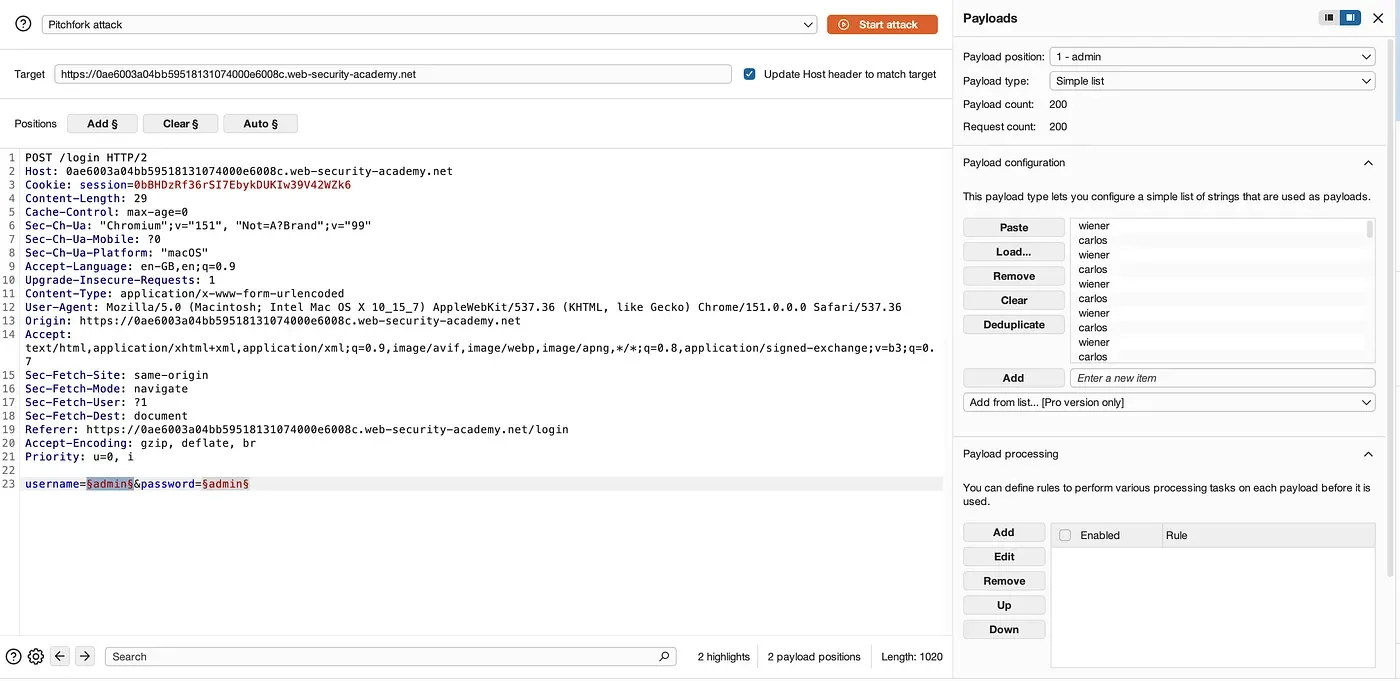
The Positions tab shows the two marked fields and Pitchfork selected as the attack type.
Step 3: Select Pitchfork
The attack type must be Pitchfork, because the two lists need to advance together in lockstep. Sniper would not let both fields vary together, and cluster bomb would try every combination instead of the specific, deliberately ordered sequence that was built.
Step 4: Load the payload sets
- Pasted the pre-built username list (known-good username first, then the target username, repeating) into payload set 1.
- Pasted the pre-built password list (known-good password first, then a candidate password, repeating) into payload set 2.
Step 5: Cap the Resource Pool to one concurrent request
This setting matters as much as the payload lists. By default, Intruder can fire multiple requests concurrently to speed an attack up. Here that would break the entire trick. The exploit depends on strict ordering: each known-good login has to complete and reset the server's counter before the next failed guess arrives. If several requests went out in parallel, a failed guess could land before the preceding reset had been processed, and the counter could tick up toward the lockout threshold anyway.
To force Burp to send requests one at a time, strictly in order, a Resource Pool was created for this attack with Maximum concurrent requests set to 1. That guarantees each request completes and gets its response before the next one is sent, so the reset always lands before the next guess, with no race condition between them.
Step 6: Read the results
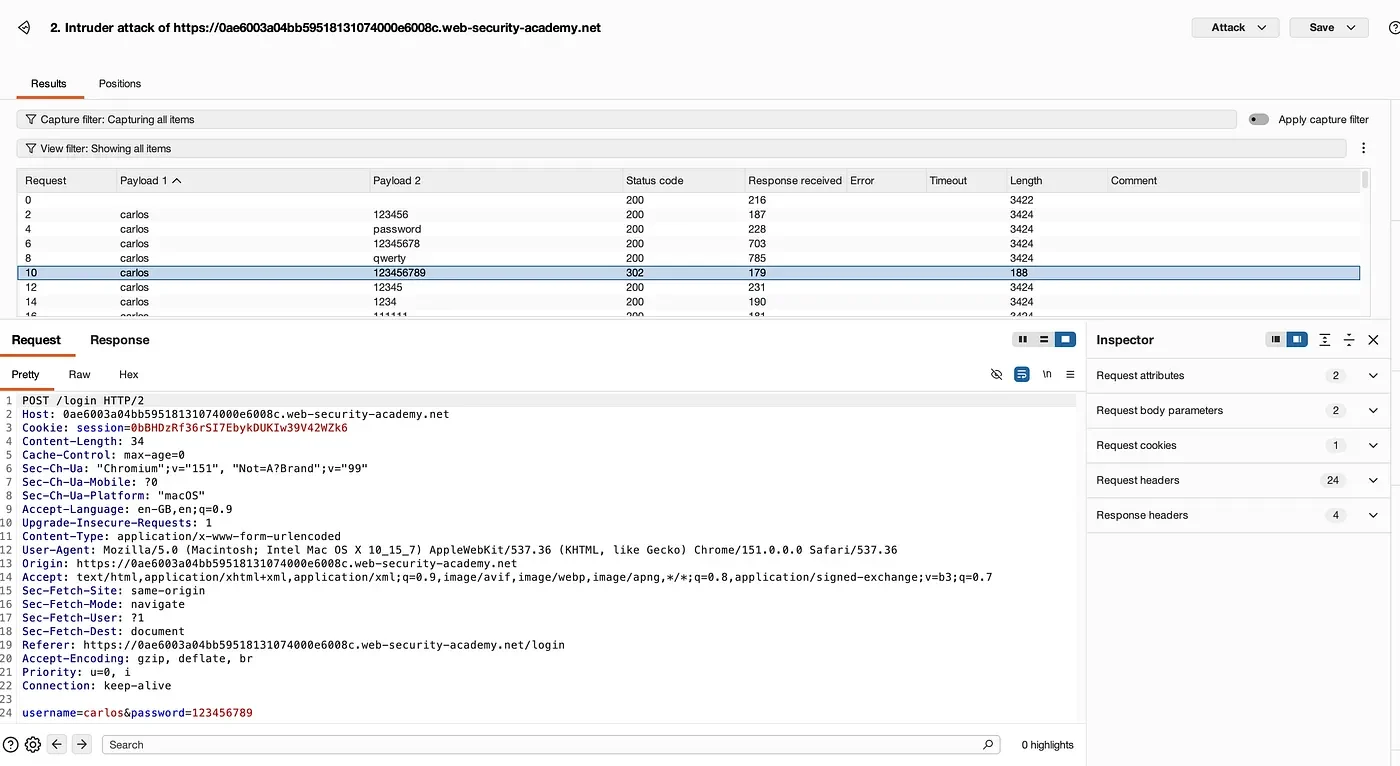
Because the counter kept resetting after every reset-guess pair, the attack ran cleanly through the entire password list without tripping the lockout. The results were checked for the response that differed from the standard failed-login pattern: the one request where the login actually succeeded against the target account, confirming the correct password.
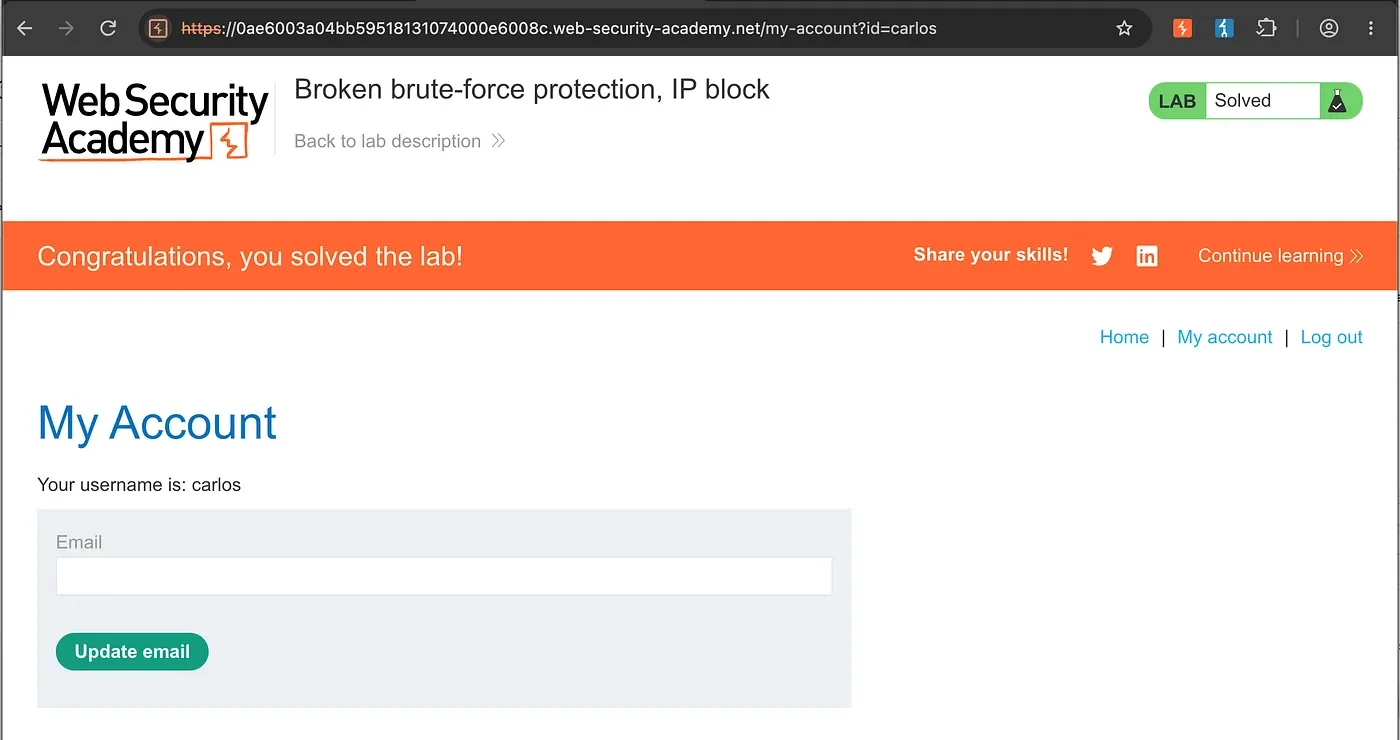
Entering the credentials identified via the Pitchfork attack gives a successful login.
Root cause
The reset condition is tied to the IP: any successful login from that IP zeroes the failed-attempt count. Any successful login from that IP, including one to an unrelated low-privilege account, zeroes the failed-attempt count for the IP. An attacker who can produce a success on demand can keep the count below the threshold indefinitely. The defence is individually reasonable but combinable into a bypass: nobody would call "reset the lockout on a successful login" a bad idea in isolation, and the problem only appears once you consider that any valid login resets it, not just a login to the account being protected.
Impact
An attacker holding any valid credentials can brute-force the target account's password without tripping the three-attempt lockout. The write-up does not describe any other consequence.
Fix
A more robust version of the control would scope the reset to the specific account being targeted, or track failed attempts per username rather than, or in addition to, per IP, so that unrelated successful logins cannot be used to launder around the block. The write-up does not say what the lab itself changed.
Variants to test
- Per-IP counters reset by any success. Try interleaving a known-good login with single guesses against the target, as here. A positive result is the attack running through the whole candidate list without a lockout and one response differing from the failed-login pattern.
What happened, in plain words
This is the story of a login page that tries to stop people from guessing passwords, and of a small flaw in how that protection works that lets someone guess anyway. The page belongs to a practice lab, one of a series of exercises for people learning web security. The lab's whole point is a defence that looks sensible: if someone types the wrong password three times from the same computer, that computer is blocked from trying again.
That sounds like a good idea, and in most situations it is. The problem is not the three-strike rule itself. The problem is what makes the counter go back to zero. In this lab, the counter resets whenever any login succeeds from that computer, even a login to a completely different account. So if you happen to know one working username and password, you can log in with it every so often, wipe the counter clean, and keep guessing the real target's password forever without ever being blocked.
The lab gives you that working username and password up front, for an ordinary low-privilege account, separate from the account you are trying to break into. The rest of the work is arranging the guesses in the right order and making sure the tool sends them one at a time.
The setup: what you are given and what you use
Before any of the trick makes sense, a few pieces need explaining.
A login form is the pair of boxes on a website where you type a username and a password. When you press the button, your browser sends those two values to the website's server, the computer that runs the site. The server checks them against its records and answers either "yes, you are in" or "no, wrong details".
Brute force means guessing a password by trying many possibilities in a row, usually from a list of common passwords, instead of thinking hard about one clever guess. It is like trying every key on a big ring on a door, one after another, rather than picking the lock.
A lockout is the defence against that: after too many wrong tries, the site refuses to answer for a while. Here the limit is three wrong attempts from the same IP address. An IP address is the number that identifies a computer on the internet, roughly like a postal address for your connection. The site uses it to tell one visitor from another.
Burp Suite is a program used by people who test websites. It sits between your browser and the website, so you can look at the requests your browser sends and change them before they go out. Burp Intruder is the part of it that sends the same request many times, each time with different values filled in. Think of a mail merge: one letter template, a list of names, and the program produces one personalised letter per name. Intruder does that with web requests.
A payload is one of the values you feed in, such as one username or one password from your list. A payload set is the whole list of those values.
The lab hands you a known working username and password for a normal, low-privilege account, separate from the account you are actually trying to break into. That second set of credentials is the whole lever for the bypass. The tool is Burp Suite, using Intruder with two payload positions and a Resource Pool. No versions are given in the write-up.
Finding it: why the defence has a hole
A three-strikes IP lockout sounds like a reasonable control. The problem is what resets the counter: a successful login. Every time any login succeeds from a given IP, the failed-attempt count for that IP goes back to zero.
That is meant to be sensible. You do not want to permanently lock out an IP because someone mistyped their password a couple of times before getting it right. Imagine a shared office connection where one person fumbles their password twice and then gets it right; blocking the whole office for that would be annoying and unfair.
But it creates a gap. If an attacker has any valid set of credentials, even for a completely unrelated, low-privilege account, they can throw in a successful login every so often to reset the counter before it ever reaches the threshold, and keep guessing the target account's password indefinitely. Break the run of failures with a success, and the count starts again from zero.
A useful comparison is a nightclub bouncer who throws you out after three complaints, but wipes your record clean every time you buy a drink. If you can buy a drink whenever you like, the three-complaint rule never catches up with you.
Exploitation: the plan
The plan is to never let two consecutive failures land. Instead of sending three failed attempts in a row and getting blocked, each pair of requests leads with a known-good login and follows it with a single failed guess against the target account. A successful login using the known credentials resets the counter, then one guess at the target's password is sent, then another successful login resets the counter again, then one more guess, repeating all the way through the password candidate list.
In other words, the sequence looks like this: log in as the throwaway account, guess once at the target, log in as the throwaway account again, guess once again, and so on. The counter never sees more than one failure before it is wiped.
Step 1: Build two synchronised payload lists
Burp's built-in payload generators do not do this automatically. You need two lists that stay in sync with each other, position by position, where every alternate entry is deliberately the known-good username and password instead of the real attack values.
Both lists were built outside Burp, in a text editor, laid out so that the known-good username and password came first, followed by a single entry for the target username paired with a candidate password guess, then repeated down the full length of the password candidate list. The order matters: reset the counter first, spend a single failed attempt, then reset the counter again before the next guess is sent. The username list goes into one payload set and the password list into the other, aligned line for line.
Why two lists rather than one? Because the login form has two boxes, a username and a password, and each request needs a value for both. If you only varied the password, every request would carry the same username, and you could not alternate between the throwaway account and the target. So the username list alternates too: throwaway name, target name, throwaway name, target name. The password list mirrors it: throwaway password, candidate guess, throwaway password, next candidate guess. Line one of each list belongs together, line two of each belongs together, and so on.
Step 2: Capture the login request and mark positions
- Captured a login request and sent it to Burp Intruder.
- Marked the username and password fields as two positions.
Capturing the request means letting Burp record one normal login attempt as it travels from the browser to the server, so you have a template to work from. Sending it to Intruder means handing that template to the part of Burp that repeats requests. Marking positions means telling Intruder which parts of the request should be swapped out for values from your lists. Here there are two such parts, the username and the password.
The Positions tab shows the two marked fields and Pitchfork selected as the attack type.
Step 3: Select Pitchfork
Intruder offers several attack types, which decide how the payload lists are combined with the marked positions.
- Sniper puts one list into one position at a time. It would not let both fields vary together.
- Cluster bomb tries every combination of every value in every list, which here would produce a huge number of requests in an order you did not choose.
- Pitchfork walks the lists in lockstep: line one of list one with line one of list two, then line two with line two, and so on.
The attack type must be Pitchfork, because the two lists need to advance together in lockstep. Sniper would not let both fields vary together, and cluster bomb would try every combination instead of the specific, deliberately ordered sequence that was built. Pitchfork is the only one that respects the careful alternation you wrote by hand.
Step 4: Load the payload sets
- Pasted the pre-built username list (known-good username first, then the target username, repeating) into payload set 1.
- Pasted the pre-built password list (known-good password first, then a candidate password, repeating) into payload set 2.
Payload set 1 feeds the username position, payload set 2 feeds the password position. Because both lists were written to the same pattern, request one is a login to the throwaway account, request two is a guess at the target, request three is another login to the throwaway account, and so on.
Step 5: Cap the Resource Pool to one concurrent request
This setting matters as much as the payload lists. By default, Intruder can fire multiple requests concurrently to speed an attack up. Here that would break the entire trick. The exploit depends on strict ordering: each known-good login has to complete and reset the server's counter before the next failed guess arrives. If several requests went out in parallel, a failed guess could land before the preceding reset had been processed, and the counter could tick up toward the lockout threshold anyway.
A Resource Pool in Burp is a group of settings that controls how requests are sent, including how many are allowed to be in flight at once. To force Burp to send requests one at a time, strictly in order, a Resource Pool was created for this attack with Maximum concurrent requests set to 1. That guarantees each request completes and gets its response before the next one is sent, so the reset always lands before the next guess, with no race condition between them.
A race condition is when the result depends on which of two things happens first, and you cannot control that order. Picture two people trying to book the last seat on a flight at the same moment: both see it free, both click, and the outcome depends on timing rather than on any rule. Here the danger is the same shape: a guess arriving before the reset has been counted. Sending one request at a time removes the race entirely.
Step 6: Read the results
Because the counter kept resetting after every reset-guess pair, the attack ran cleanly through the entire password list without tripping the lockout. The results were checked for the response that differed from the standard failed-login pattern: the one request where the login actually succeeded against the target account, confirming the correct password.
In plain terms, most responses look identical: the site says the details were wrong. One response looks different, because that time the site let the login through. That odd one out is the answer.
Entering the credentials identified via the Pitchfork attack gives a successful login.
Root cause
The reset condition is tied to the IP: any successful login from that IP zeroes the failed-attempt count. Any successful login from that IP, including one to an unrelated low-privilege account, zeroes the failed-attempt count for the IP. An attacker who can produce a success on demand can keep the count below the threshold indefinitely.
The defence is individually reasonable but combinable into a bypass. Nobody would call "reset the lockout on a successful login" a bad idea in isolation, and the problem only appears once you consider that any valid login resets it, not just a login to the account being protected. It is like a security guard who checks badges at the door but resets the alarm whenever anyone with a valid badge walks in, regardless of which office they are heading to.
Impact
An attacker holding any valid credentials can brute-force the target account's password without tripping the three-attempt lockout. The write-up does not describe any other consequence.
Fix
A more robust version of the control would scope the reset to the specific account being targeted, or track failed attempts per username rather than, or in addition to, per IP, so that unrelated successful logins cannot be used to launder around the block. The write-up does not say what the lab itself changed.
In everyday terms: count failures against the account being attacked, not just against the computer doing the attacking. Then a success on some other account does nothing to help the attacker.
Variants to test
- Per-IP counters reset by any success. Try interleaving a known-good login with single guesses against the target, as here. A positive result is the attack running through the whole candidate list without a lockout and one response differing from the failed-login pattern.
Glossary
- IP address: the number that identifies a computer or connection on the internet, used by sites to tell visitors apart.
- Brute force: guessing a password by trying many candidates in sequence rather than reasoning out one answer.
- Lockout: a defence that stops accepting attempts from a source after too many failures.
- Login form: the username and password boxes on a page that send your details to the server for checking.
- Server: the computer that runs a website and answers requests from browsers.
- Request: the message a browser (or a tool) sends to a server asking it to do something, such as check a login.
- Response: the server's reply to a request, such as a success page or an error message.
- Burp Suite: a program that sits between browser and website so requests can be inspected and altered.
- Burp Intruder: the part of Burp that repeats one request many times with different values filled in.
- Payload: one value fed into a marked position, such as a single username or password.
- Payload set: the full list of payload values used for one position.
- Position: a spot in a request that Intruder replaces with values from a payload set.
- Attack type: the rule Intruder uses to combine payload lists with positions, such as Sniper, Pitchfork or cluster bomb.
- Sniper: an attack type that varies one position at a time from a single list.
- Cluster bomb: an attack type that tries every combination of values across positions.
- Pitchfork: an attack type that advances several lists in lockstep, one line from each per request.
- Resource Pool: a Burp setting group that controls how requests are sent, including how many run at once.
- Concurrent requests: requests sent at the same time rather than one after another.
- Race condition: a situation where the outcome depends on uncontrolled timing between two actions.
- Counter: the running tally of failed attempts that a lockout watches.
- Reset condition: the event that sets that tally back to zero.
- Credential: a username and password pair used to log in.
- Low-privilege account: an account with little access, so misusing it causes limited harm.
- Root cause: the underlying reason a weakness exists, as opposed to its visible symptom.
- Bypass: getting around a protection without breaking it outright.
- Impact: what an attacker could actually achieve by exploiting the weakness.




