One Request, Every Password: Broken Brute-Force Protection via Multiple Credentials
The login endpoint accepted a JSON array of password guesses in a single request, and the server checked whether any value matched the stored password. An attacker could therefore try many passwords at once while request-based brute-force protections counted only one attempt.
 Published on medium.com
This lab, “Broken brute-force protection, multiple credentials per request,” turned out to be one of the more conceptually interesting ones so far — not because the attack itself was complicated, but because of a few questions it raised along the way that are worth answering properly rather than glossing over.
The full write-up lives on its author's site
It belongs to its author, so we link to it rather than copy it. The other two tabs are our own rewrites, checked against it.
Context
This is the sixth lab in a series on PortSwigger's Web Security Academy, and its subject is "Broken brute-force protection, multiple credentials per request". The target is a login endpoint that accepts its credentials as JSON rather than as a form-encoded body. Normally that endpoint takes one username and one password, checks them against the stored credentials, and returns a success or failure response. The lab's premise is that the protection counts requests rather than guesses.
The lab's premise is that this protection counts requests, not guesses. The endpoint's password field accepts not only a single string but an array of strings, and the server succeeds if any value in that array matches the stored password. One request carrying a hundred candidates is therefore equivalent to a hundred login attempts, while the counter sees a single request.
Setup
The only account needed is the target account, carlos, which the lab supplies directly. No username enumeration step was required, unlike the previous lab in the series. The request was captured in Burp and edited and resent in Repeater. The password candidates came from a list the lab provides. The request was already JSON by default, so no content-type conversion was needed.
Finding it
The starting point was the captured login request. Its Content-Type: application/json header and its body syntax, braces, quoted keys, colons and commas, rather than the key=value&key=value shape of a form-encoded body, identify it as JSON. JSON is a data format built from key, value pairs wrapped in curly braces, with string keys in double quotes and a colon separating each key from its value. The captured body looked like this:
{
 "username": "carlos",
 "password": "......"
}
The username was fixed by the lab. What made the request interesting is that JSON supports arrays with square brackets, so a field that is expected to hold a single string can be given a list instead. If the server's check is written to ask whether any element of that list matches the stored password, the single-value assumption behind the rate limit no longer holds.
Exploitation
Step 1: Replace the password string with an array
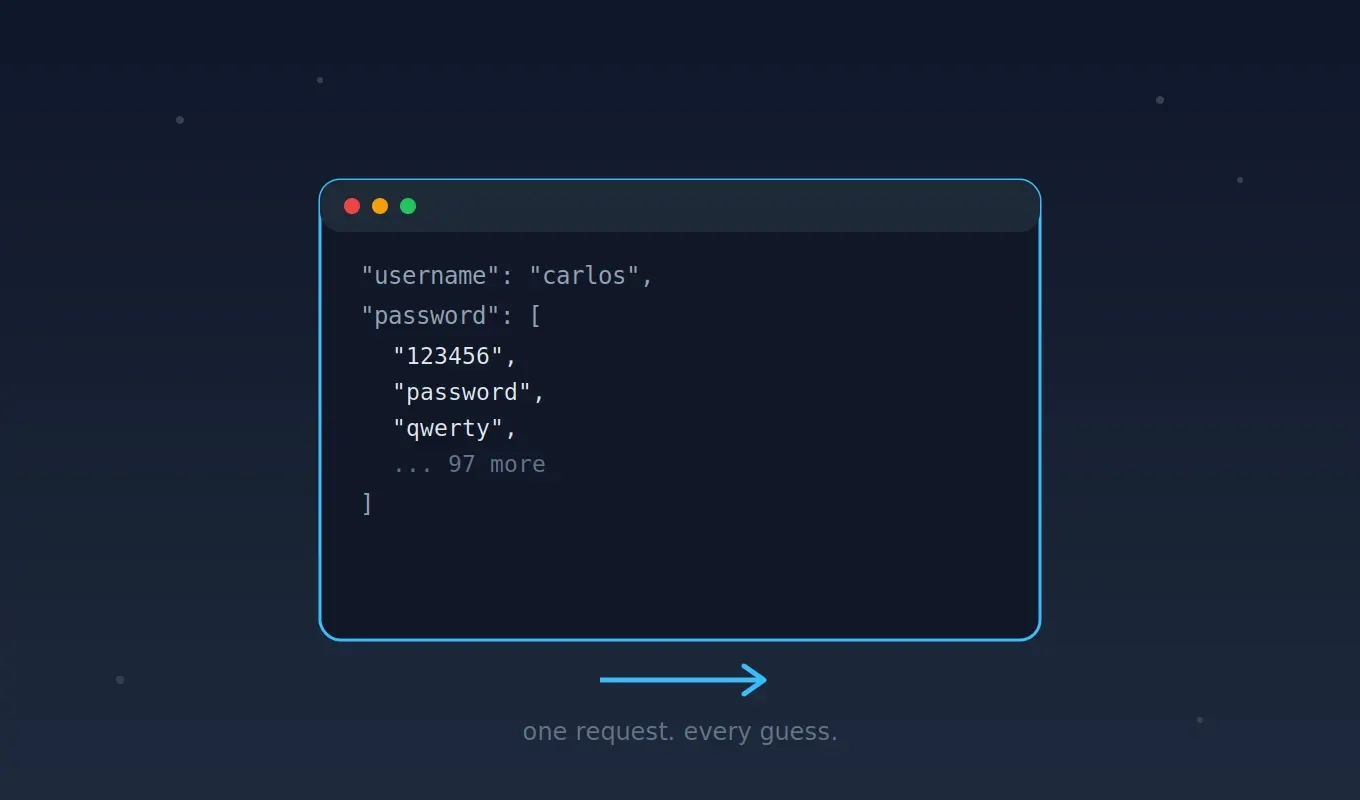
Instead of submitting one password as a string, the password value was replaced with an array containing many candidates at once:
{
 "username": "carlos",
 "password":[
 "123456",
 "password",
 "qwerty"
 // ...remaining candidates from the lab's list
 ]
}
The candidates came from the list the lab provided. The full list was pasted into the array, each entry quoted and comma-separated, and the request was sent.
Step 2: Send it from Repeater
Repeater, not Intruder, is the right tool here. Intruder's model is to mark a position in a request, substitute different payload values, and fire many separate requests, one per value. That fits an exploit that depends on iterating across requests. This exploit is the opposite: every guess lives inside a single request as one JSON array. There is no position to iterate across a series of requests because there is no series of requests. The body is one specific, static request constructed by hand and sent once, which is exactly what Repeater is for. Using Intruder would have meant fighting the tool to do something it is not designed to do.
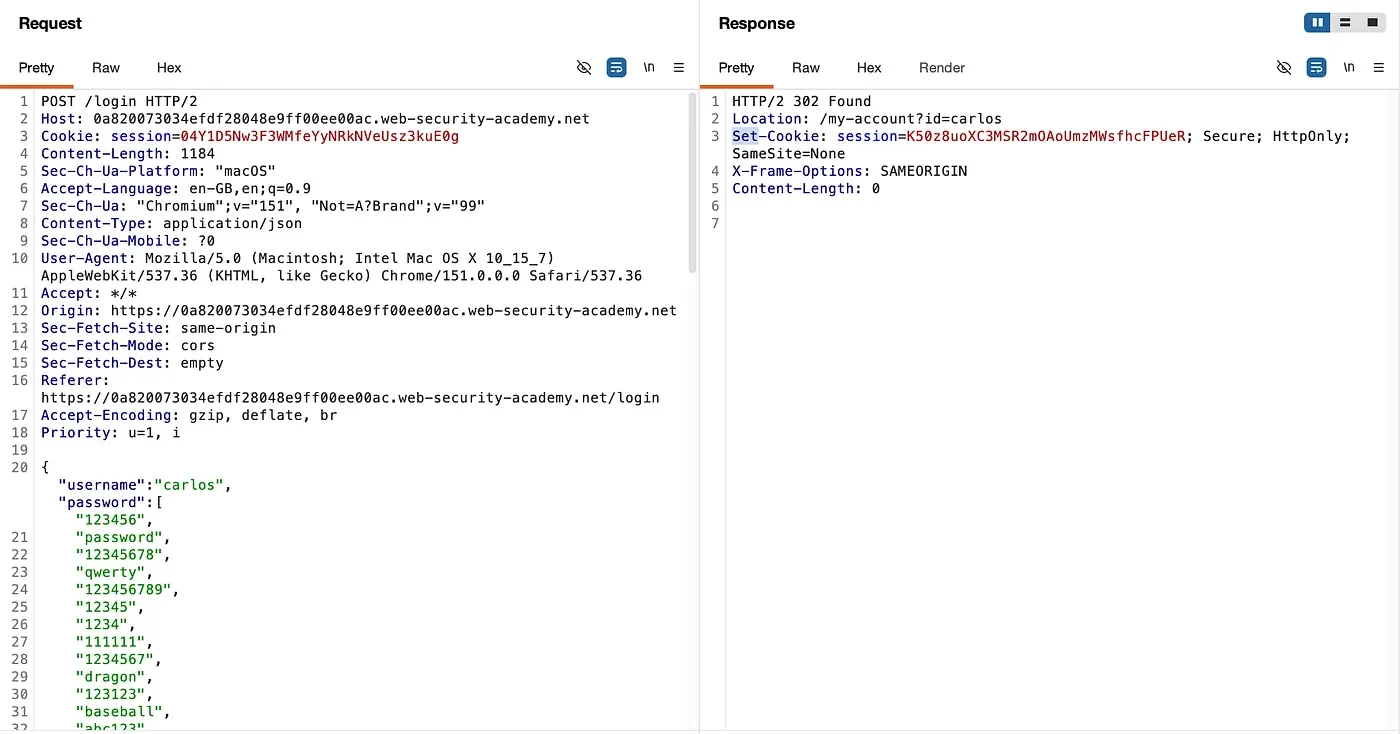
Step 3: Read the response
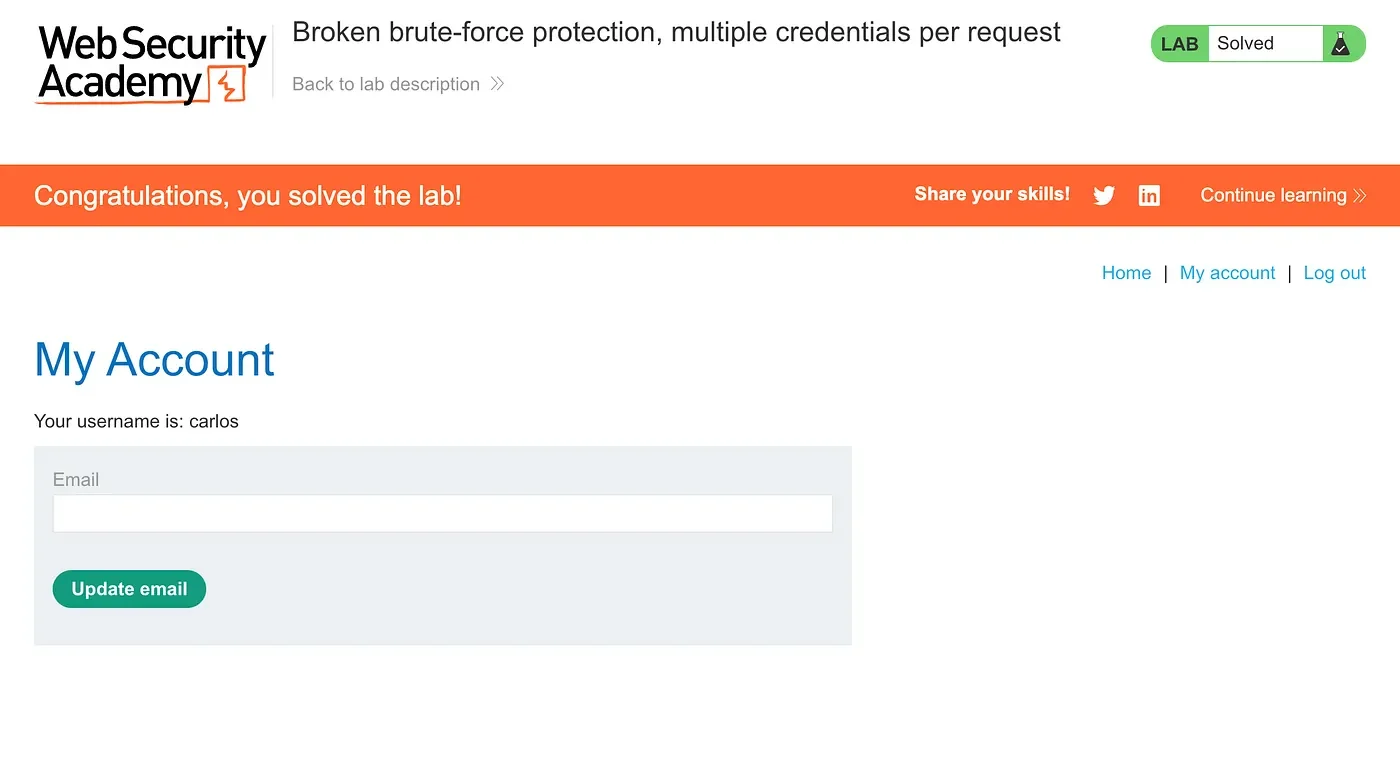
The lab only requires proving that a successful login is achievable this way. It does not reveal which entry in the array matched; it only confirms overall success. The lab only requires proving that a successful login is achievable this way, so that was as far as the exercise went.
Identifying the specific password, if needed
If the goal were to identify the correct password rather than merely prove one exists, the efficient method is bisection. Submit half the array and check whether the login still succeeds. If it does, the correct password is in that half; if not, it is in the other half. Repeating the split-and-check process narrows a hundred-candidate array to the single correct password in around seven follow-up requests. That is far fewer than testing every password one at a time, and it keeps the total number of requests low, which matters from a detection standpoint.
Root cause
The endpoint's password field accepts an array of strings, and the server's check succeeds if any value in the array matches the stored password. The brute-force protection counts requests, so it assumes a one-to-one relationship between requests and credential guesses. Once a single request can carry many guesses, the counter never sees the extra attempts. The defence is not bypassed in the traditional sense; it simply never applied to this request shape.
The deeper lesson is not specific to JSON arrays. Any way of packing multiple guesses into one call, a batch endpoint for example, breaks the same assumption. A defence that tracks requests per IP or requests per minute becomes irrelevant without any counter being tripped.
Impact
An attacker who can reach a login endpoint that behaves this way can test many passwords per request against a known account, here carlos, while the request-based counter registers only one attempt. The response confirms success or failure for the batch but not which candidate matched, so recovering the exact password needs the bisection follow-up described above. The report does not describe the resulting access or any further actions taken with the account.
Fix
The report does not describe a fix applied to the lab. The implied correction is to stop treating requests and guesses as equivalent, so that one request cannot carry many candidates.
Variants to test
- Send an array in the password field of any JSON login endpoint. A positive result is a success response for a batch that contains the correct password among many wrong ones.
- After a successful batch, apply bisection to the array. A positive result is that half the array still logs in, narrowing to the single correct value in a handful of requests.
What happened, in plain words
A website's login page usually lets you try a username and a password. To stop people guessing passwords over and over, sites often add a limit: after a few wrong tries, you get blocked for a while. That protection normally counts requests, meaning each time your browser sends a login attempt to the server.
This lab shows a way around that limit. The login form on this site sends its data in a format called JSON, and the password field turned out to accept not just one password but a whole list of passwords in a single request. The server checked the list and logged in if any password in it was correct. So one request could carry a hundred guesses, while the site's counter only saw one request. The protection was never defeated in the usual sense; it simply never noticed the extra guesses.
This is the sixth lab in a series on PortSwigger's Web Security Academy, and its subject is "Broken brute-force protection, multiple credentials per request". The rest of this article walks through the same steps as the technical write-up, but explains every term from scratch.
The vulnerability, in short
Most brute-force protections count failed attempts per request. This lab breaks that assumption at its root: what if you did not need multiple requests at all?
The login endpoint here accepts its credentials as JSON, and its password field turns out to accept not just a single string, but an array of strings. If the server checks whether any value in that array matches the stored password, then a single request carrying a hundred password guesses is functionally equivalent to a hundred separate login attempts, except it is one request, not a hundred. Any protection that counts requests, rather than credential guesses, never even sees it coming.
A few terms are worth unpacking before going further.
- Brute force means trying many passwords in turn until one works, like trying every key on a keyring on a locked door.
- An endpoint is a specific address on a server that does one job, such as checking a login. Think of it as one particular counter in a large building.
- An API is the general name for the way software talks to a server: you send a structured message to an endpoint and get a structured answer back. The login endpoint in this lab is a small API.
- A request is one message your browser (or a tool) sends to the server. A response is the server's reply.
- A rate limit is a rule that says "only so many requests in a given time". It is the bouncer at the door counting how many times you come in.
What JSON is, and how to spot it
It is worth being precise about this, since it is the whole mechanism the lab hinges on.
JSON (JavaScript Object Notation) is a data format built from key-value pairs, wrapped in curly braces, with string keys in double quotes and a colon separating each key from its value. A useful everyday comparison is a labelled form: each label (the key) has one answer written next to it (the value).
You will typically spot JSON two ways in Burp: the Content-Type: application/json header on the request, and the body syntax itself, braces, quoted keys, colons and commas, rather than the key=value&key=value shape of a form-encoded body.
- A header is a small line of extra information attached to a request, such as what format the body is in.
Content-Typeis the header that names the format. - Form-encoded is the older, simpler format a normal web form uses: `username=carlos&[redacted] It looks like a shopping list written on one line.
- Burp Suite is a tool that sits between your browser and the website so you can look at, edit and resend requests. Proxy is the part that captures them; Repeater is the part that lets you edit one and send it again by hand.
In this lab, the request I captured was already JSON by default, so no conversion was needed. The body looked like this:
{
 "username": "carlos",
 "password": "......"
}
Line by line:
- The outer
{and}mark the start and end of one JSON object, the whole message. "username": "carlos"is one key-value pair: the key isusername, and its value is the textcarlos."password": "......"is the second pair: the key ispassword, and its value is a placeholder for the real password text.- The comma between the two pairs separates them. The quotes around keys and text values are required in JSON.
The username, carlos, was given directly by the lab as the target account, so no username enumeration step was required this time. Username enumeration means working out which usernames exist on a site, often by noticing that the site answers differently for real and fake names. Here the lab simply told us the account to attack.
The exploit: swapping a string for an array
JSON supports arrays using square brackets, and this is where the vulnerability lives. An array is an ordered list of values, like a shopping list with several items on it. Instead of submitting a single password as a string, I replaced that value with an array containing many password candidates at once:
{
 "username": "carlos",
 "password":[
 "123456",
 "password",
 "qwerty"
 // ...remaining candidates from the lab's list
 ]
}
Line by line:
- The outer braces still wrap one JSON object, exactly as before.
"username": "carlos"is unchanged: one key, one text value."password":[opens the password key, but this time its value is a list, marked by the square bracket[."123456",,"password",and"qwerty"are the first three entries in that list, each a quoted string, separated by commas.- The line starting with
//is a comment in the write-up, not part of the JSON itself; it stands for the rest of the lab's password list. - The closing
]ends the list, and the final}ends the object.
The password candidates themselves came from the list the lab provided. I pasted the full list into the array, each one quoted and comma-separated, and sent the request.
Why does this matter? If the server checks whether any entry in the list matches, the single-value assumption behind the rate limit no longer holds. That is the bug: the field was never meant to hold a list, but nothing stopped it, and the check was written in a way that accepts a match anywhere in the list.
Why Repeater, not Intruder?
After several labs in this series leaning heavily on Intruder, it is worth pausing on why this one did not need it. The answer comes down to what each tool is actually built for.
Intruder's entire model is: mark a position in a request, substitute in different payload values, and fire off many separate requests, one per value. That is the right tool when the exploit genuinely depends on iterating across multiple requests. Think of it as a machine that fills in one blank on a form and posts the form again and again, once per candidate answer.
This exploit is the opposite of that. The entire point is that every password guess lives inside a single request, as one JSON array. There is no position to iterate across a series of requests, because there is no series of requests. I was constructing one specific, static request body by hand and sending it once, which is exactly what Repeater is for. Reaching for Intruder here would have meant fighting the tool to do something it is not designed to do.
Identifying the specific password
This lab only requires proving that a successful login is achievable this way, and that is as far as I took it. I did not need to identify which specific password in the array was the correct one, just that the login succeeded with the array submitted.
But it is worth noting the response alone does not tell you which entry matched; it just confirms overall success. If you genuinely needed to identify the specific correct password rather than just proving one exists, the efficient way to do it would be bisection: submit half the array, check whether the login still succeeds. If it does, the correct password is somewhere in that half; if it does not, it is in the other half. Repeating that split-and-check process narrows a hundred-candidate array down to the single correct password in around seven follow-up requests, far fewer than testing every password one at a time, and still consistent with sending very few requests overall, which keeps the whole approach quiet from a detection standpoint.
Bisection is the same trick as guessing a number between 1 and 100 by asking "is it higher or lower than 50?" Each question halves the possibilities, so you get there in about seven questions instead of a hundred.
Why this matters
The deeper lesson here is not really about JSON arrays specifically. It is about what a rate limit or brute-force counter is actually counting. A defence that tracks "requests per IP" or "requests per minute" is implicitly assuming a one-to-one relationship between requests and credential guesses. Once that assumption breaks, whether through an array like this, a batch endpoint, or some other way of packing multiple guesses into one call, the entire defence can become irrelevant without ever technically being "bypassed" in the traditional sense. It just never applied to begin with.
- An IP address is the number that identifies a device on a network, a bit like a postal address for your computer. A limit "per IP" counts requests coming from one address.
- A batch endpoint is an endpoint designed to accept several items in one call, for example several records to create at once. It is a legitimate feature that can carry the same problem if it also accepts several credentials.
Takeaways from Lab Six:
Know your data formats. Recognising JSON versus form-encoding, and understanding that JSON supports arrays where a single value might be expected, is what makes this entire vulnerability class visible in the first place.
Rate limits often assume requests and guesses are the same thing. That assumption is exactly what this bug breaks, and it is a pattern worth watching for in real applications, not just this lab.
Response after submitting the passwords provided in the portswigger lab
Root cause
The endpoint's password field accepts an array of strings, and the server's check succeeds if any value in the array matches the stored password. The brute-force protection counts requests, so it assumes a one-to-one relationship between requests and credential guesses. Once a single request can carry many guesses, the counter never sees the extra attempts. The defence is not bypassed in the traditional sense; it simply never applied to this request shape.
The deeper lesson is not specific to JSON arrays. Any way of packing multiple guesses into one call, a batch endpoint for example, breaks the same assumption. A defence that tracks requests per IP or requests per minute becomes irrelevant without any counter being tripped.
Impact
An attacker who can reach a login endpoint that behaves this way can test many passwords per request against a known account, here carlos, while the request-based counter registers only one attempt. The response confirms overall success but not which candidate matched, so recovering the exact password needs the bisection follow-up described above. The report does not describe the resulting access or any further actions taken with the account.
Fix
The report does not describe a fix applied to the lab. The implied correction is to stop treating requests and guesses as equivalent: count credential guesses rather than requests, and reject or normalise unexpected types such as an array where a single string is expected, so that one request cannot carry many candidates.
Variants to test
- Send an array in the password field of any JSON login endpoint. A positive result is a success response for a batch that contains the correct password among many wrong ones.
- After a successful batch, apply bisection to the array. A positive result is that half the array still logs in, narrowing to the single correct value in a handful of requests.
Glossary
- API: the general way software talks to a server, sending structured messages to specific endpoints and receiving structured replies.
- Array: an ordered list of values in JSON, written inside square brackets and separated by commas.
- Batch endpoint: an endpoint built to accept several items in one call rather than one at a time.
- Bisection: finding one correct value in a list by repeatedly splitting the list in half and checking which half still works.
- Brute force: trying many passwords in turn until one succeeds.
- Burp Suite: a tool that sits between your browser and a website so you can capture, edit and resend requests.
- Content-Type: a request header that states the format of the request body, such as
application/json. - Endpoint: a specific address on a server that performs one job, such as checking a login.
- Form-encoded: a simple body format shaped like
key=value&key=value, used by ordinary web forms. - Header: a small line of extra information attached to a request or response.
- Intruder: the Burp Suite tool that substitutes different values into a marked position and sends many separate requests, one per value.
- IP address: the number that identifies a device on a network.
- JSON (JavaScript Object Notation): a data format made of key-value pairs in curly braces, with quoted keys and colons between keys and values.
- Key-value pair: one label and its answer in a JSON object, such as
"username": "carlos". - Proxy: the Burp Suite component that captures requests between your browser and the website.
- Rate limit: a rule limiting how many requests can be made in a given time, often per IP address.
- Repeater: the Burp Suite tool that lets you edit a single captured request and send it again by hand.
- Request: one message sent from a browser or tool to a server.
- Response: the server's reply to a request.
- String: a piece of text in JSON, written inside double quotes.
- Username enumeration: working out which usernames exist on a site, often from differences in how the site responds.
- Web Security Academy: PortSwigger's free set of practice labs for learning web security, of which this is lab six in the series.




