Reverse-Engineering a Cookie’s Format, Then Brute-Forcing It: Brute-Forcing a Stay-Logged-In Cookie
The stay-logged-in cookie was built from a username, a colon, and the MD5 hash of the password, then Base64 and URL encoded, with no server-side secret. An attacker who can guess passwords could construct valid cookies offline and brute-force the account by sending one request per guess.
 Published on medium.com
Most of the authentication labs in this series involved breaking a check that happened somewhere on the server. This one is different.
The full write-up lives on its author's site
It belongs to its author, so we link to it rather than copy it. The other two tabs are our own rewrites, checked against it.
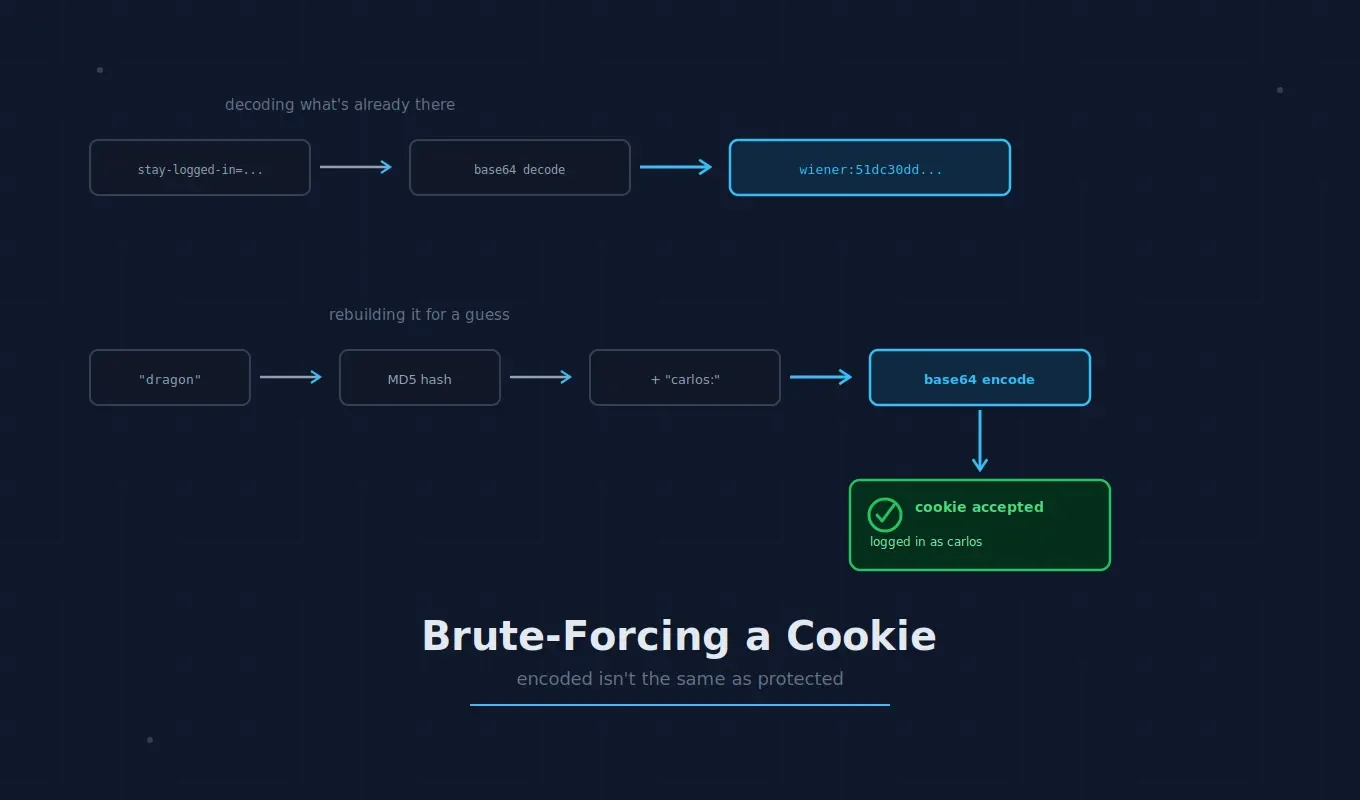
Most of the authentication labs in this series involved breaking a check that happened somewhere on the server. This one is different. The actual vulnerability lives entirely inside a cookie's value, something sitting in the browser, readable and decodable by anyone who bothers to look closely at it.
Context
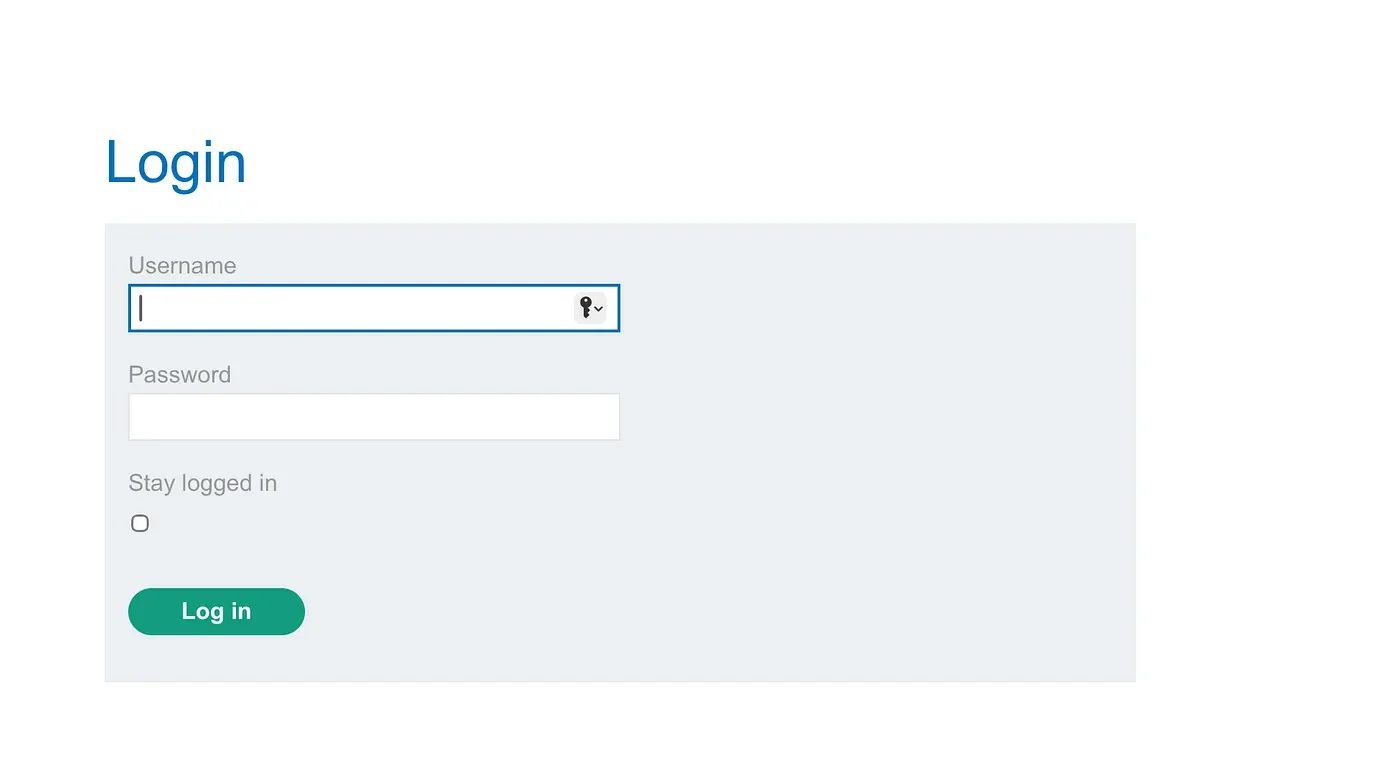
The application's login form offers a stay-logged-in option. Checking that box is a request to skip re-entering credentials on future visits. Behind the scenes, that usually means the application hands back a long-lived cookie that, by itself, is enough to prove identity later without a password ever being typed again.
That convenience only stays safe if the cookie's contents are either meaningless to anyone who doesn't already hold the real credentials, or cryptographically protected in a way that can't be reconstructed from scratch. In this case neither held: the cookie carried the account's password hash in a form anyone could rebuild.
Setup
The work was done with Burp Suite, using its inspector to decode the cookie and Intruder with payload processing rules to rebuild it for each guess. A known account was used to learn and validate the format, and the chain was then run against the target account with a candidate list. The report does not name the application, its version, or the size of the candidate list.
Finding it
Logging in with the known username and password, with the stay-logged-in option checked, produced exactly that kind of cookie alongside the usual session.
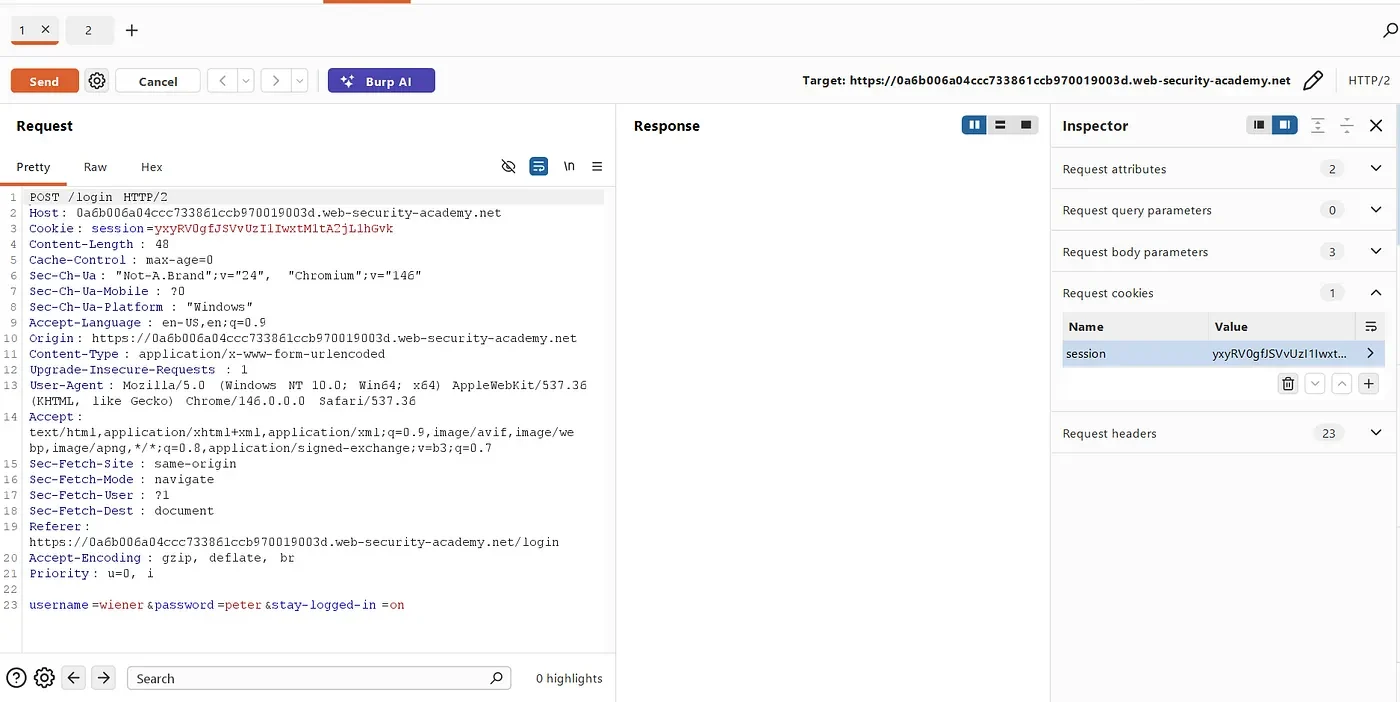
Pulling that cookie's value apart in Burp's inspector, rather than just treating it as an opaque token, showed it was layered. One decode, URL decoding, peeled back the first layer. A second decode, this time Base64, peeled back another, and what came out the other side was plain text: a username, a colon, and a long string of hexadecimal characters that looked exactly like a hash.
A string of hexadecimal characters that length is consistent with more than one hashing algorithm, so rather than guessing, the quickest way to confirm it was to actually hash the known password and compare. Running the account's real password through an MD5 hash produced the exact same string sitting after the username in the decoded cookie.
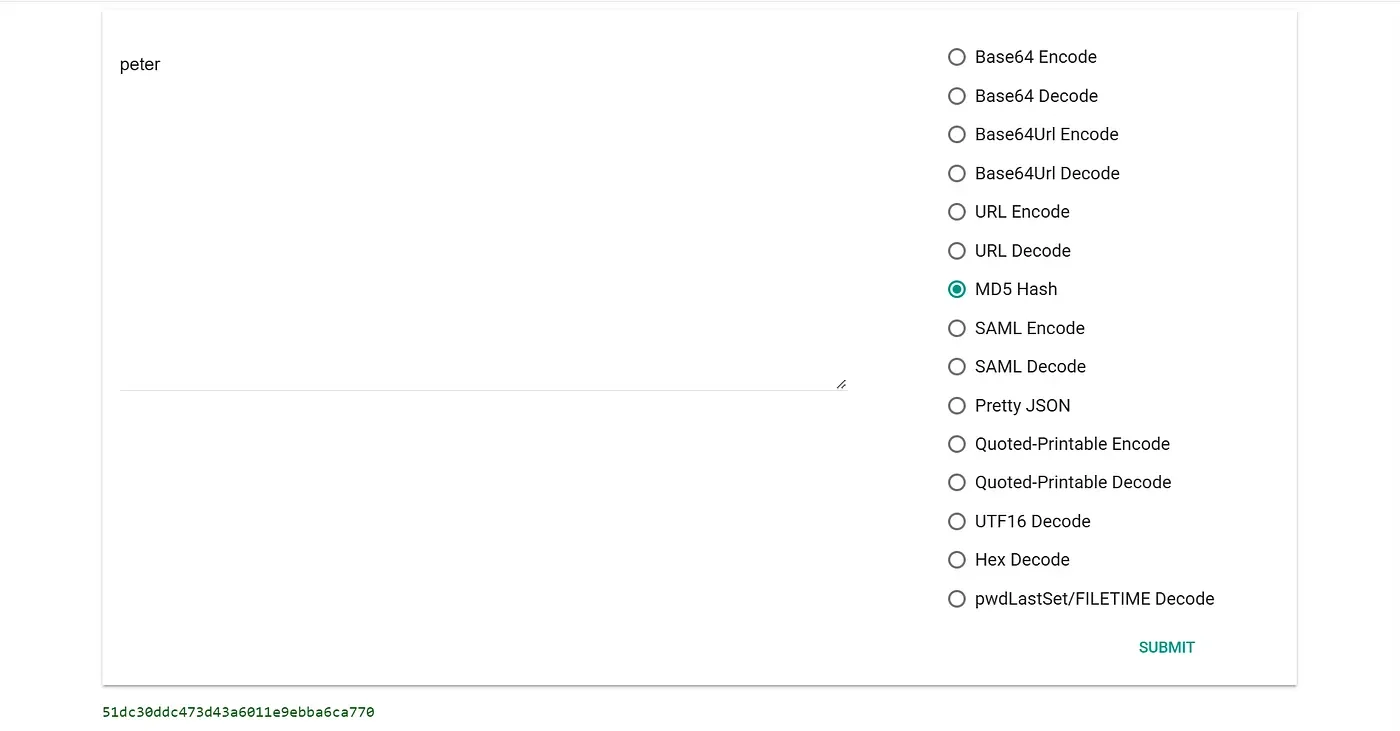
That confirmed the cookie's entire construction: a username, a colon, the MD5 hash of that account's password, all of it Base64-encoded, then URL-encoded on top for safe transport as a cookie. Nothing about that construction requires a server-side secret. Anyone who knows a plaintext password can build a valid cookie for that account by hand, which also means anyone who can guess a password can do the same thing, one guess at a time, entirely offline from the server's perspective until the final request goes out.
Exploitation
Step 1: Decode the cookie to recover the format
URL-decode the cookie value once, then Base64-decode the result. The output is plain text in the shape username:md5(password). The report does not reproduce the literal cookie value.
Step 2: Confirm the hash algorithm
Hash the known account's real password with MD5 and compare it to the hexadecimal string after the colon. The two matched exactly, which settled the algorithm without further guessing.
Step 3: Build the transformation chain in Intruder
Knowing the exact recipe meant the brute force itself could be built as a chain of transformations applied to each password guess, rather than something requiring a custom script. Burp Intruder's payload processing rules handle exactly this kind of layered transformation: take each candidate password, hash it with MD5, prepend the target username and a colon, then Base64-encode the whole result, each step feeding into the next automatically for every payload in the list.
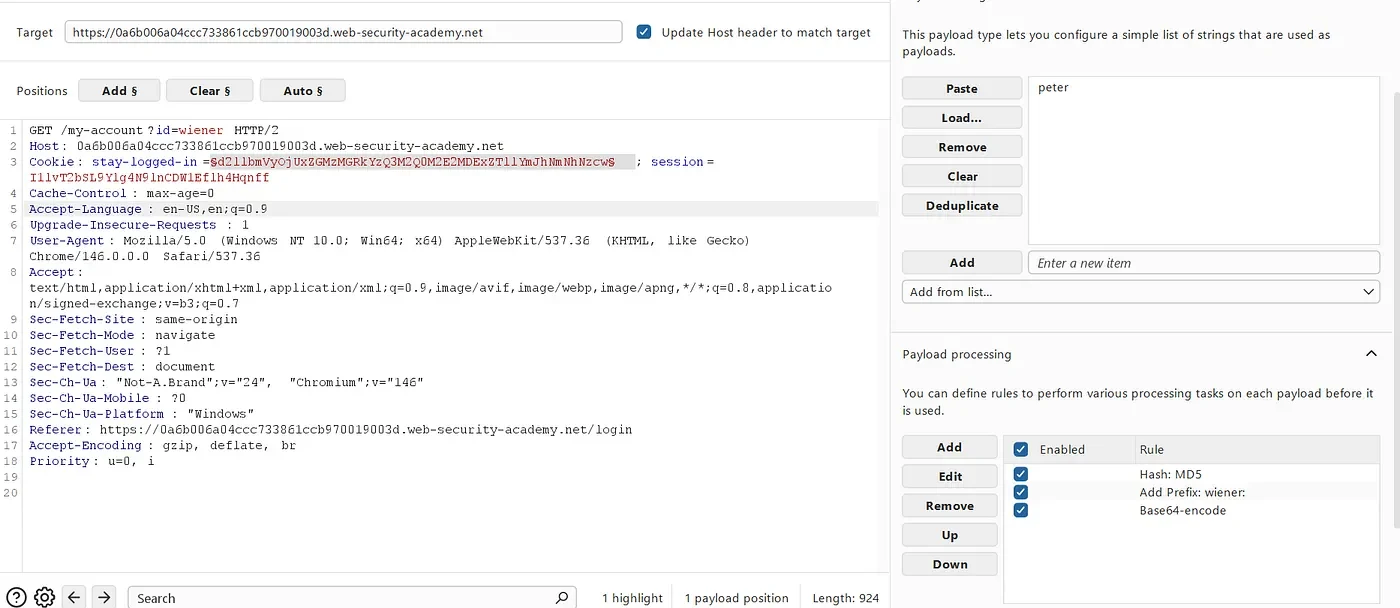
Step 4: Validate the chain against the known account
Before pointing this at the real target, it was worth proving the chain actually reproduced a cookie the server would accept at all. Running it once against the known account and its known password, and confirming the resulting request logged in successfully, validated the entire construction before trusting it against passwords that weren't already known to be correct.
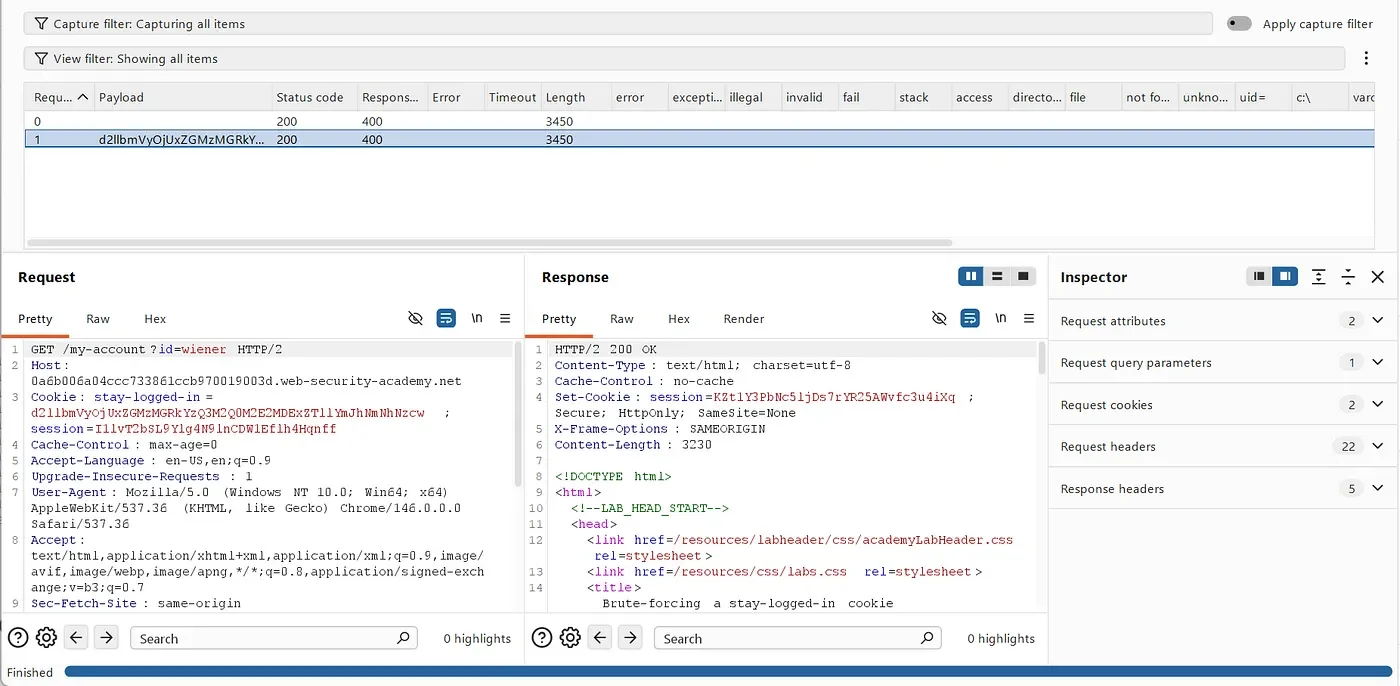
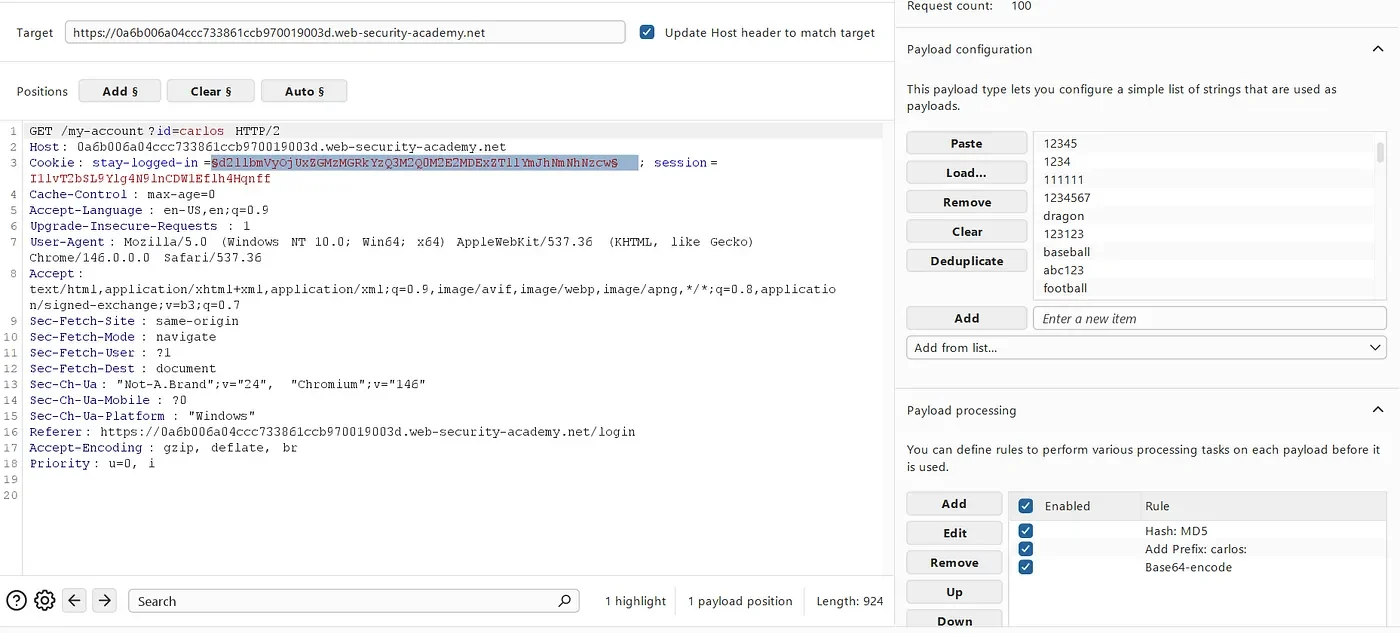
Step 5: Run the chain against the target account
With the mechanism confirmed, the same payload processing chain went to work against the target account, this time cycling through the actual password candidate list rather than a single known value.
Step 6: Flag the successful response with a grep match
Scanning manually through thousands of results for the one that actually succeeded isn't practical, so a grep match rule was set up to flag any response containing a specific piece of page content that only appears once genuinely logged in, a quick way to let Burp itself point out the right row instead of reading every response by eye.
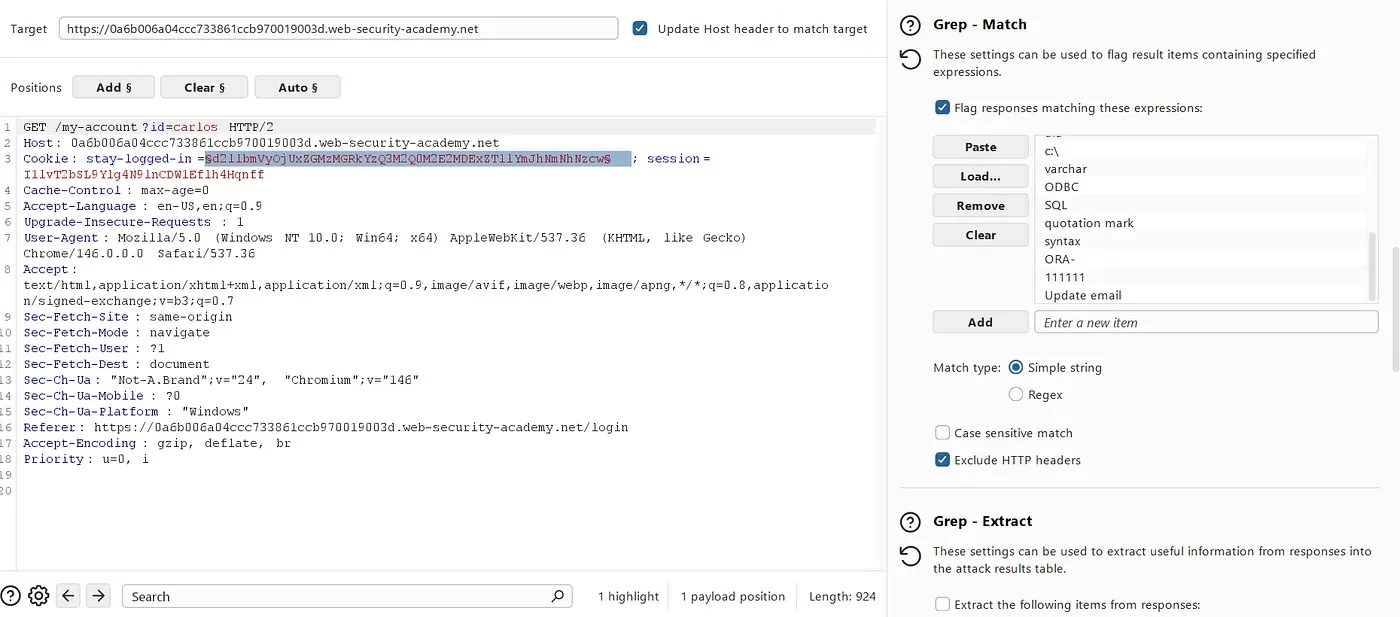
One result stood apart from the long run of redirects back to the login page, a full 200 response matching the flagged content.
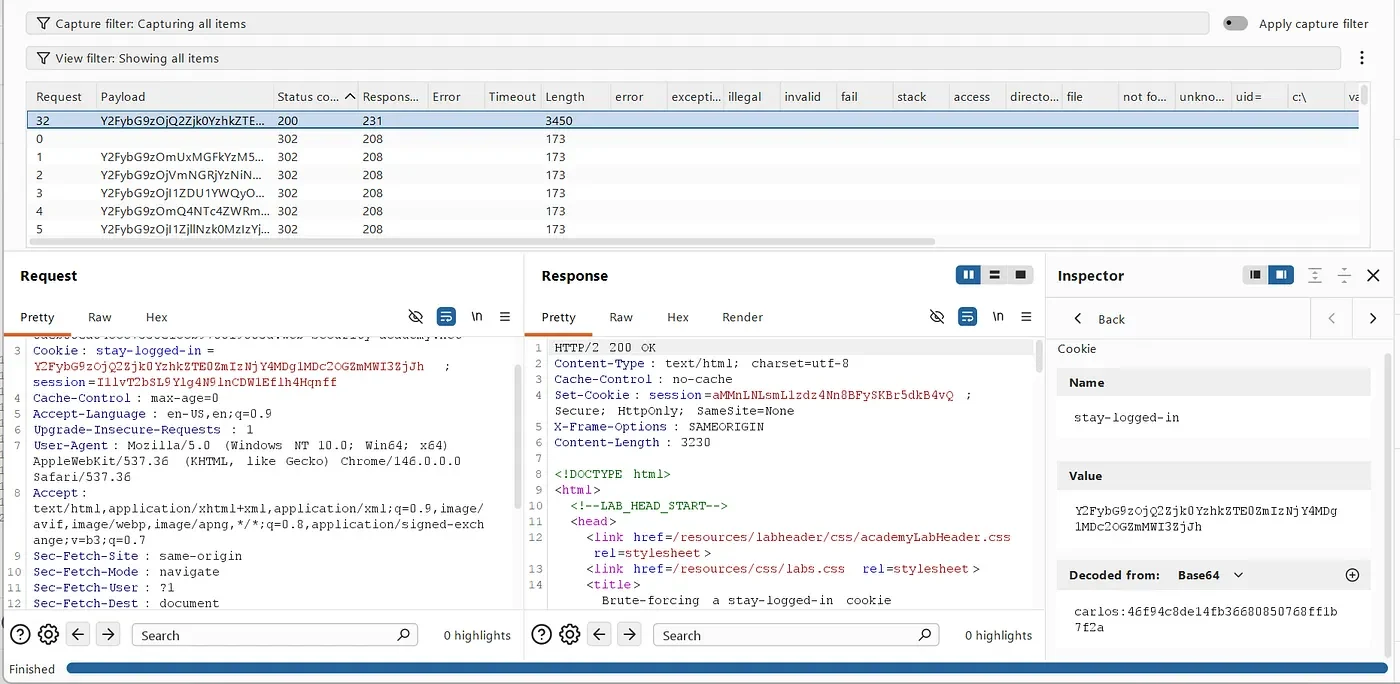
Step 7: Read the password off the winning row
Because the payload list itself was the plaintext password candidates, the successful row directly revealed which password had worked, no decoding or further guessing required. The cookie built from that password logged straight into the target account.
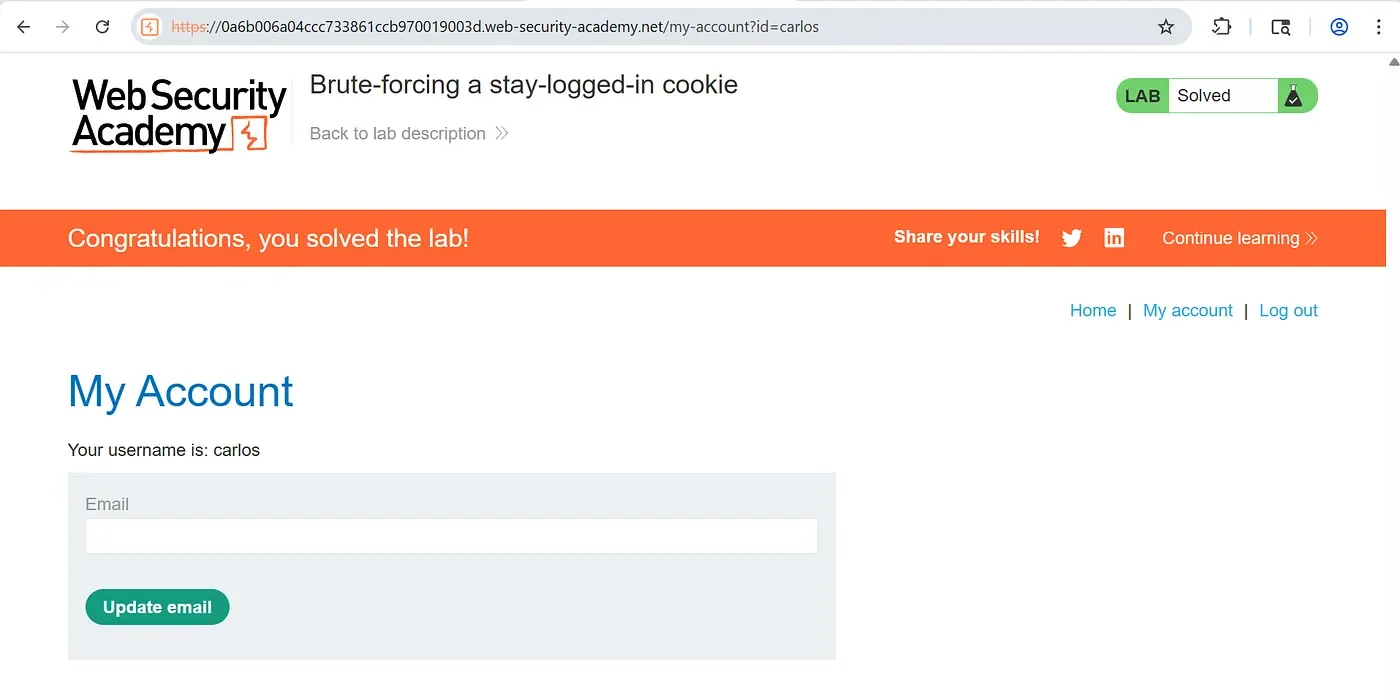
Root cause
The cookie was never actually opaque, just encoded. Encoding is not protection. Base64 and URL encoding exist to make data safely transportable, not to hide it from anyone willing to decode it, and an unsalted hash of a password, however it's wrapped, is only as strong as that password's resistance to guessing.
The token is built from the username and the MD5 hash of the password, with no server-side secret involved, so anyone who knows the password can rebuild it. The report does not describe any server-side validation logic beyond the fact that a correctly built cookie was accepted.
Impact
A stay-logged-in mechanism like this one gives an attacker an entire offline-feeling brute force: construct the cookie, send one request, read the result, repeated as many times as there are guesses worth trying. The attacker needs a username and a candidate password list. Each guess is a single request, and the response tells the attacker directly whether the guess was right.
Because the payload list is the plaintext candidate list, a successful row reveals the password itself, not just a valid token. The report demonstrates this against one target account; it does not discuss how many accounts or how much traffic would be needed at scale.
Fix
What the design requires is a token the client cannot forge: either a value that is meaningless without server-side state, or one protected by a keyed construction such as an HMAC over the username and a server-held secret, so that a guessed password alone is not enough to build a valid cookie.
Variants to test
- Double-encoded cookies elsewhere. Look for any cookie that looks structured after one decode and decode it again. A positive result is readable plain text such as a username, an identifier, or a hash after the second layer.
- Deterministic remember-me tokens.
- Unsalted password hashes in tokens.
- Grep-match driven brute force.
- Validate before attacking.
What happened, in plain words
A website had a login form with a small checkbox next to it: stay logged in. When you tick that box and sign in, the site gives your browser a small piece of data called a cookie. On later visits, the browser sends that cookie back, and the site uses it to recognise you without asking for your password again.
That is a normal, convenient feature. The problem in this case was what the cookie actually contained. It was not a random, meaningless string. It was the username, a colon, and a scrambled version of the password, wrapped in two layers of encoding. Encoding is a way of rewriting data so it can travel safely, not a way of hiding it. Anyone who knows how to undo the encoding can read the cookie, and, more importantly, anyone who can guess a password can build a valid cookie for that account by hand.
The researcher worked this out in a few steps. First, log in with an account whose password was already known, and look at the cookie. Second, undo the two encoding layers and see the plain text inside. Third, confirm that the scrambled part really was the password run through a common scrambling function called MD5. Fourth, set up a tool to repeat the same recipe for every password guess in a list. Fifth, test the recipe against the known account to make sure it produced a cookie the site accepted. Sixth, run it against a second account whose password was unknown. Seventh, let the tool highlight the one response that showed a successful login, and read the winning password straight off that row.
The rest of this article walks through each of those steps slowly, explaining every term as it comes up.
Background: what a cookie is, and what stay-logged-in means
When you type a username and password into a website, the server checks them. If they are correct, the server needs a way to remember you on the next page load, and the page load after that. Web browsers and servers do this with cookies.
A cookie is a small labelled piece of text that a server asks the browser to store. On every later request to that site, the browser automatically attaches the cookie. Think of it like a cloakroom ticket: you hand over your coat, you get a ticket, and later the ticket is enough to get the coat back. The ticket does not need to describe the coat. It just needs to be something the cloakroom recognises.
A session cookie is the short-lived version of this. It is often discarded when the browser closes, and it is enough to keep you logged in during one visit.
A stay-logged-in cookie, sometimes called a remember-me cookie, is the long-lived version. When you tick the stay-logged-in box, you are asking the site to give you a cookie that will still work days or weeks later, so you do not have to type your password again. That is convenient, and it is also a bigger risk: a cookie that lives for weeks is a cookie an attacker has weeks to study.
For that convenience to be safe, the cookie's contents need to be one of two things:
- Meaningless to anyone who does not already hold the real credentials. A long random string that only the server can look up in its own records is the classic example.
- Cryptographically protected, meaning scrambled with a secret key in a way that cannot be reproduced without that key. The server can then tell whether it issued the cookie or whether someone else made it.
In this case, neither held. The cookie was readable, and it could be rebuilt from scratch by anyone who knew the username and could guess the password.
The setup: what tools were used
The work was done with a tool called Burp Suite. Burp sits between your browser and the website and lets you see and change every request and response. Two parts of Burp mattered here:
- The inspector, which shows the contents of a request or response in a readable form and can decode common encodings.
- Intruder, which sends the same request many times, each time with a different value in a chosen place. That is how a password guessing attack is automated.
Two accounts were involved. One was a known account: the researcher already had its username and password, and used it to learn and check the cookie format. The other was a target account whose password was unknown, attacked with a list of candidate passwords.
The report does not name the application, its version, or how many candidate passwords were in the list.
Finding it: logging in and looking at the cookie
The first step was simply to log in with the known username and password, with the stay-logged-in box ticked. That produced the kind of long-lived cookie described above, alongside the usual session cookie.
Most people never look at a cookie. It looks like a random jumble of letters and numbers, and it is easy to assume it is meaningless. The researcher did not assume that. Instead, the cookie's value was opened in Burp's inspector and taken apart layer by layer.
Two layers came off:
- URL decoding. URLs and cookies have a restricted set of characters they can carry safely. Characters outside that set are written in a percent-encoded form, where a percent sign followed by two characters stands for the original byte. URL decoding turns those back into the original characters. Think of it like untying a parcel before you can see what is inside.
- Base64 decoding. Base64 is a way of turning arbitrary data into plain letters, digits and a couple of symbols, so it can travel through systems that only accept text. It is not encryption. Anyone can reverse it with a free tool. Think of it like writing a message in a different alphabet: it looks different, but the meaning is unchanged and the conversion is public.
After both layers came off, the contents were plain text: a username, a colon, and a long string of hexadecimal characters. Hexadecimal means digits 0 to 9 plus letters a to f, the standard way of writing raw bytes as text. A long run of hex characters is exactly what a hash looks like.
A hash is the output of a one-way scrambling function. You put data in, you get a fixed-length string out. The same input always gives the same output, but you cannot work backwards from the output to the input. It is like a fingerprint: it identifies the person, but you cannot rebuild the person from the fingerprint. Hashing is not encryption, because there is no key and no way to reverse it. It is used to store or compare passwords without keeping the password itself.
Confirming what the hash actually was
A hex string of that length could have come from more than one hashing algorithm. Common ones include MD5, SHA-1 and SHA-256, and they produce different lengths and different values. Rather than guess, the researcher did the obvious check: take the known account's real password, run it through MD5, and compare the result with the hex string sitting after the colon in the decoded cookie.
They matched exactly. That settled the algorithm without any further guessing.
That confirmed the cookie's entire construction, in this order:
- Start with the username.
- Add a colon.
- Add the MD5 hash of that account's password.
- Base64-encode the whole thing.
- URL-encode the result on top, so it can travel safely as a cookie value.
Nothing in that recipe needs a secret held by the server. Anyone who knows a plaintext password can build a valid cookie for that account by hand. And that means anyone who can guess a password can do the same thing, one guess at a time. From the server's point of view, each guess is just one more request carrying a cookie. The guessing itself happens on the attacker's machine, and each guess is sent as a request carrying a built cookie.
Rebuilding the format inside Intruder
Knowing the exact recipe meant the guessing attack did not need a custom script. Burp Intruder has a feature called payload processing rules, which apply a chain of transformations to each value in a list before sending it. That is exactly what this recipe is: a chain of transformations.
For each candidate password in the list, the chain does the following:
- Take the candidate password.
- Hash it with MD5.
- Put the target username and a colon in front of the hash.
- Base64-encode the whole result.
- Use that as the cookie value in the request.
Each step feeds into the next automatically, for every payload in the list. The chain was built from Intruder's payload processing rules rather than a custom script.
Validating the chain against the known account
Before pointing the chain at the real target, it was worth proving that it actually produced a cookie the server would accept. So the chain was run once against the known account, using its known password. The resulting request logged in successfully.
That is a small but important habit. If the chain had a mistake in it, every guess against the unknown account would fail for the wrong reason, and the researcher would have no way to tell a wrong password from a broken recipe. Testing against a known-correct answer catches mistakes early, when they are cheap to fix, rather than after thousands of wasted requests.
Running it against the real target
With the mechanism confirmed, the same payload processing chain was pointed at the target account. This time, instead of a single known password, it cycled through the actual list of password candidates.
Flagging the successful response with a grep match
A brute-force run produces thousands of responses. Reading them one by one to find the one that worked is not practical. Burp has a feature called a grep match rule, which scans each response for a piece of text you specify and flags the rows that contain it.
The researcher set the rule to look for a specific piece of page content that only appears once you are genuinely logged in. That way, Burp itself points out the right row instead of the researcher reading every response by eye.
One result stood apart from the long run of redirects back to the login page: a full 200 response that matched the flagged content.
A quick word on those numbers. HTTP status codes are three-digit numbers a server sends back with every response. A 200 means the request succeeded and the server returned the page. A redirect, usually a 302, means the server is sending the browser somewhere else. In a login form, a failed attempt often redirects back to the login page, while a successful one returns the logged-in page with a 200. So a single 200 among a sea of redirects is exactly the shape of a successful guess.
Reading the password off the winning row
Because the payload list itself was the plaintext password candidates, the successful row directly revealed which password had worked. There was no need to decode anything or guess further. The cookie built from that password logged straight into the target account.
Why this matters
The cookie was never actually opaque. It was just encoded. Encoding is not protection. Base64 and URL encoding exist to make data safely transportable, not to hide it from anyone willing to decode it. And an unsalted hash of a password, however it is wrapped, is only as strong as that password's resistance to guessing.
An unsalted hash means the password was hashed on its own, with nothing extra added. Salting means adding a random value to each password before hashing, so that two users with the same password get different hashes, and so that precomputed tables of common password hashes become useless. Without a salt, a hash is a direct fingerprint of the password, and anyone with a list of candidate passwords can hash each one and compare.
The token is built from the username and the MD5 hash of the password, with no server-side secret involved, so anyone who knows the password can rebuild it. The report does not describe any server-side validation logic beyond the fact that a correctly built cookie was accepted.
Impact
A stay-logged-in mechanism like this one gives an attacker an entire offline-feeling brute force. Construct the cookie, send one request, read the result, and repeat as many times as there are guesses worth trying. The attacker needs a username, which the cookie format itself carries in plain text, and a candidate password list. Each guess is a single request, and the response tells the attacker directly whether the guess was right.
Because the payload list is the plaintext candidate list, a successful row reveals the password itself, not just a valid token. The report demonstrates this against one target account. It does not discuss how many accounts or how much traffic would be needed at scale.
Fix
What the design requires is a token the client cannot forge. That means either a value that is meaningless without server-side state, or one protected by a keyed construction such as an HMAC over the username and a server-held secret, so that a guessed password alone is not enough to build a valid cookie.
An HMAC is a kind of checksum that uses a secret key. The server computes it over the data in the cookie, and later recomputes it to check the cookie has not been tampered with. Without the key, an attacker cannot produce a valid checksum, so a hand-built cookie is rejected even if the password guess was right.
Variants to test
- Double-encoded cookies elsewhere. Look for any cookie that looks structured after one decode, and decode it again. A positive result is readable plain text such as a username, an identifier, or a hash after the second layer.
- Deterministic remember-me tokens.
- Unsalted password hashes in tokens.
- Grep-match driven brute force.
- Validate before attacking.
Glossary
- Authentication: the process of proving who you are, usually with a username and password.
- Base64: a way of rewriting arbitrary data using only plain letters, digits and a couple of symbols, so it can travel through text-only systems. It is reversible by anyone and is not encryption.
- Brute force: trying many candidate values, such as passwords, one after another until one works.
- Burp Suite: a tool that sits between a browser and a website so you can inspect and modify requests and responses.
- Candidate list: a list of passwords to try, usually ordered by likelihood.
- Cookie: a small piece of text a website asks the browser to store and send back on later requests, used to recognise you.
- Deterministic: always producing the same output for the same input.
- Encoding: rewriting data into a different representation so it can be transported safely. It is not protection, because anyone can reverse it.
- Grep match rule: a Burp feature that scans each response for specified text and flags the rows that contain it.
- Hash: the fixed-length output of a one-way function. The same input always gives the same output, and you cannot work backwards from the output to the input.
- Hexadecimal: a way of writing bytes using digits 0 to 9 and letters a to f.
- HMAC: a checksum computed with a secret key, used to prove data was produced by someone holding that key.
- HTTP status code: a three-digit number a server sends with each response. 200 means success, 302 means a redirect.
- Intruder: the part of Burp that sends the same request many times with different values in a chosen place.
- MD5: a widely used hashing algorithm that produces a fixed-length hex string. It is fast and not suitable for protecting passwords on its own.
- Opaque: impossible to interpret without extra information, like a random token only the server can look up.
- Payload processing rules: a Burp Intruder feature that applies a chain of transformations to each value in a list before sending it.
- Redirect: a response that tells the browser to go to a different address.
- Remember-me cookie: a long-lived cookie that keeps you logged in across visits without retyping your password.
- Salt: a random value added to a password before hashing, so identical passwords produce different hashes and precomputed tables become useless.
- Session cookie: a short-lived cookie that keeps you logged in during one visit.
- Stay-logged-in cookie: another name for a remember-me cookie.
- URL decoding: turning percent-encoded characters back into the original bytes.
- URL encoding: writing characters that are not safe in a URL or cookie as a percent sign followed by two characters.
- Username: the name that identifies an account on a site.



