Blind Command Injection - It hurts
A search parameter was vulnerable to blind command injection, allowing an attacker to execute arbitrary operating system commands on the server. The author confirmed this by using tcpdump to observe outbound ping traffic triggered by a crafted request.
 Published on shahjerry33.medium.com
Generally it is tough to find command injection but luckily I found one few months ago. I noticed something weird with the GET parameter /?search= when I was testing for command injection.
The full write-up lives on its author's site
It belongs to its author, so we link to it rather than copy it. The other two tabs are our own rewrites, checked against it.
Context
This write-up is about a blind OS command injection found in a GET parameter of a web application. The researcher describes command injection as an attack that executes arbitrary commands on the host operating system, and explains that it happens when an application passes unsafe user-supplied data to a system shell, made possible by insufficient input validation. The affected feature is a search endpoint that takes the query through the search parameter:
/?search=
The report does not name the target application or program, and the payload examples use a placeholder host, www.mytarget.com, with <MyIP> standing in for the researcher's own address.

Setup
The only tooling the report relies on is:
- A proxy to inspect responses, in this case Burp Suite.
tcpdump, which the researcher notes comes pre-installed on Kali Linux, to observe outbound traffic from the target.- Optionally Wireshark, which the report says can be used instead of
tcpdumpfor checking blind command injection.
No account, role or version information is given. The precondition is simply that the application passes the parameter value into a shell, which is what the researcher set out to confirm.
Finding it
The researcher noticed something odd with the GET parameter /?search= while testing for command injection. Many payloads were tried and none worked. When the response was checked in Burp Suite, it contained the following text:
this object will store some %symbols% in the javascript space, so that libs can read them
That message made the researcher think this might be a blind command injection: the command would run, but its output would not come back in the HTTP response.: the command would run, but its output would not come back in the HTTP response. To confirm it, the plan was to make the target send traffic to a host the researcher controlled and watch for it with tcpdump.
Exploitation
Step 1: Identify a candidate parameter
Browse the target website and look for common parameters. In this case the candidate was:
/?search=
Step 2: Try a simple pipe payload
The first attempt used a pipe operator to chain a command. There was no response from the injected command: the server returned a normal 200 OK.
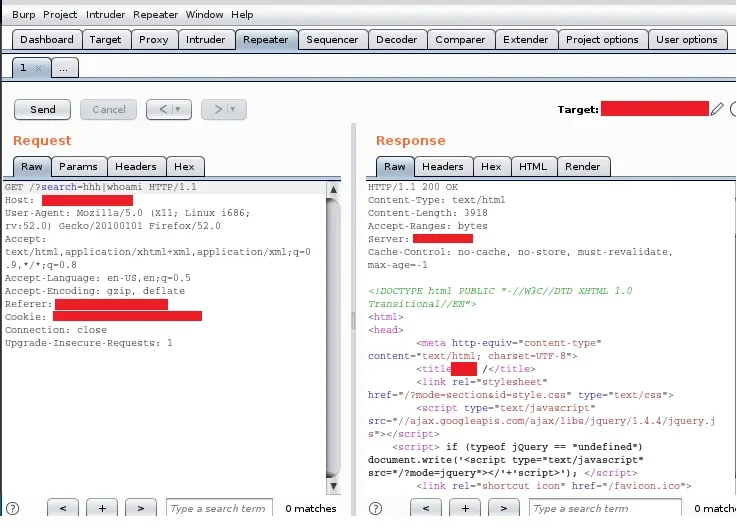
Pipe Operator
A 200 OK here only means the page rendered; it says nothing about whether the command ran, which is exactly the problem with blind injection.
Step 3: Find a payload that survives filtering
Many payloads were tested and only one worked: a bypass using a null byte character.
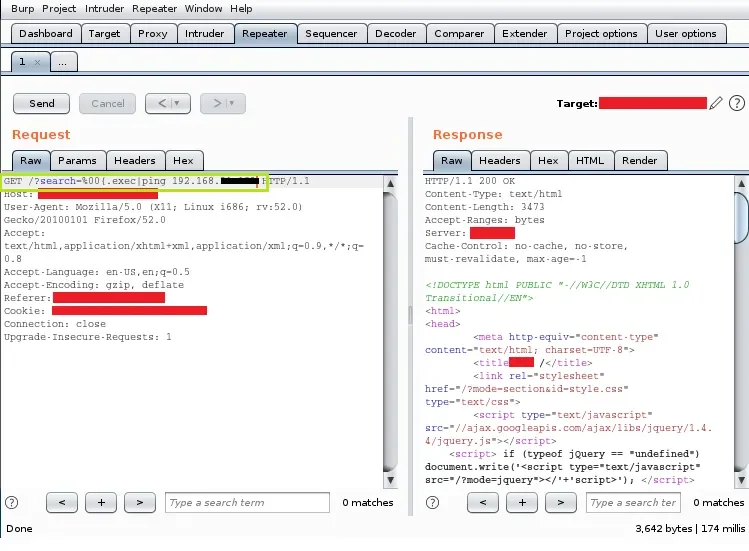
Payload
The custom payload that worked was:
http://www.mytarget.com/?search=%00{.exec|ping <MyIP>
Breaking it down: %00 is the URL-encoded null byte, used here as a bypass; {.exec| and the pipe are the syntax the application's shell handling apparently accepted; ping <MyIP> is the command that would generate traffic towards the researcher's address. The report does not explain which filter the null byte bypassed or how the application parsed the {.exec| construct.
Step 4: Confirm the blind execution with tcpdump
Because the command output never appears in the HTTP response, confirmation came from the network. The researcher started tcpdump on Kali to confirm the blind command injection.
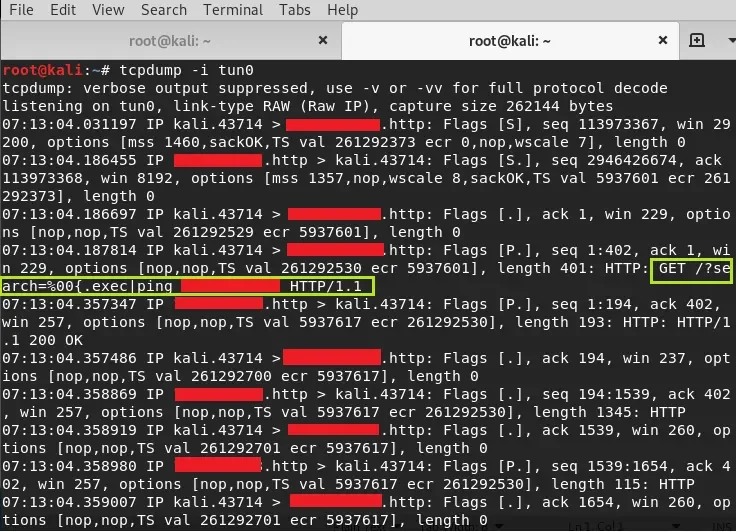
TcpDump
Traffic arriving from the target towards the researcher's address would confirm that the injected command executed on the server. The report does not include the exact tcpdump command line or the captured output.
Result
The researcher notes that, despite the effort, the finding was a duplicate of another report on a private program.
Root cause
The report states the general cause: the application passes unsafe user-supplied data to a system shell, and input validation is insufficient. In this case the search parameter value was passed to a shell, and only a payload using a null byte character worked.
Impact
Command injection allows an attacker to execute arbitrary commands on the host operating system. In this instance the impact was demonstrated only through a ping callback, which proves execution but does not by itself show data exfiltration or lateral movement. The report does not assess severity, CVSS or bounty.
Fix
The report's mitigation is short: to prevent command injections, never call out to OS commands from application-layer code.
No information is given about what the affected application actually changed.
Variants to test
The report lists common parameters worth probing for command injection:
/?query=
/?email=
/?id=
/?username=
/?user=
/?to=
/?from=
/?search=
/?query=
/?q=
/?s=
/?shopId=
/?blogId=
/?phone=
/?mode=
/?next=
/?firstname=
/?lastname=
/?locale=
/?cmd=
/?sys=
/?system=
- Pipe chaining on any of the parameters above, for example
| ping <your host>. A positive result is traffic from the target arriving at your listener, even though the HTTP response is a normal200 OK. - Null byte bypass, as in the payload that worked here:
%00followed by the command syntax. A positive result is the same callback traffic where a plain pipe payload produced nothing. - Start
tcpdump(or Wireshark) on a host you control before sending payloads, and filter for ICMP or for connections to your address. A positive result is any packet originating from the target's address. - Use the payload collection at
https://github.com/swisskyrepo/PayloadsAllTheThings/tree/master/Command%20Injectionto widen coverage beyond a single syntax. - Run Commix, the automated tool the report links to at
https://github.com/commixproject/commix, written by Anastasios Stasinopoulos, which tests web applications for command injection bugs in parameters and HTTP headers.
What happened, in plain words
A security researcher was testing a website and noticed that one of its search boxes, the part of the page that takes what you type and looks for matching content, behaved strangely. When you type something into a search box on a website, your browser sends it to the server, the computer that runs the site, and the server sends back a page of results. The researcher noticed something odd with the search parameter while testing for command injection. If that is true, then anyone who can type into the search box can also make the server run commands of their choosing. That class of bug is called command injection.
The tricky part is that the server never showed the output of the command. The page came back looking normal, a plain 200 OK, which is the standard "everything is fine" reply a web server gives when it serves a page. So the researcher could not simply read the result on screen. This is what people call a blind bug: the damage happens, but you cannot see it directly. To prove it, the researcher made the server send a small network message to a machine they controlled, and watched for that message with tcpdump.
The report describes the whole journey: how the researcher spotted the odd behaviour, which payloads were tried, which one worked, how the confirmation was done, and how to prevent this kind of bug. It also lists common places to look and tools that help. The finding turned out to be a duplicate of another report on a private program.
The idea behind command injection
The report defines command injection as an attack that executes arbitrary commands on the host operating system. In plain words: the server machine has a command line, just like the terminal on a laptop, where you can type things like "list the files" or "send a network ping". Normally only the people who run the server can type there. Command injection means a visitor to the website can sneak their own command into something the website passes along, and the server runs it as if an administrator had typed it.
The report says this happens when an application passes unsafe user-supplied data to a system shell. A shell is the program that reads commands and runs them. An application here means the website's own code, the part that handles your search and builds the page. When that code takes your text and hands it to the shell without checking it carefully, your text becomes a command. The report calls the underlying problem insufficient input validation, meaning the site did not properly check what you typed before using it.
A simple everyday comparison: imagine a receptionist who takes a note from a visitor and reads it aloud to the workshop. If the note says "please bring me a coffee", fine. If the note says "please bring me a coffee, and also unlock the safe", the workshop may do both, because the receptionist just read the whole note. Input validation is the receptionist checking that the note only contains a coffee order and nothing else.
The feature that was affected
The affected feature is a search endpoint, a URL that the site uses to handle searches. The query, the text you are searching for, travels in a parameter called search. A parameter is the part of a web address after the question mark that carries extra information, like the colour you picked in a form. The report shows the shape of it as:
/?search=
This means: the site's address, then a question mark, then the word search, then an equals sign, then whatever you want to search for. If you typed cats, the address would end in /?search=cats. The report does not name the target application or program, and the example addresses use a placeholder host, www.mytarget.com, with <MyIP> standing in for the researcher's own address.
What tools were used
The report relies on a small set of tools:
- A proxy to inspect responses, in this case Burp Suite. A proxy sits between your browser and the website and lets you see and change the messages going back and forth. Think of it as a mailroom that opens every letter, shows it to you, and then sends it on.
tcpdump, a command-line program that watches network traffic going in and out of a machine. The researcher notes it comes pre-installed on Kali Linux, a Linux distribution made for security testing. Watching traffic is like standing by the door and noting everyone who comes in.- Optionally Wireshark, a program with a graphical window that does the same job as
tcpdump, which the report says can be used instead for checking blind command injection.
No account, role or version information is given. The precondition is simply that the application passes the parameter value into a shell, which is what the researcher set out to confirm.
Finding it
The researcher noticed something odd with the GET parameter /?search= while testing for command injection. A GET parameter is simply a value carried in the web address itself, as opposed to being sent hidden in a form submission. Many payloads were tried and none worked. A payload is the piece of text you send to try to trigger the bug, like a special key cut to fit a lock.
When the response was checked in Burp Suite, it contained the following text:
this object will store some %symbols% in the javascript space, so that libs can read them
This is a message the site itself sent back. It mentions JavaScript, the programming language that runs inside web pages, and libraries, which are bundles of ready-made code that other programs use. The message suggested to the researcher that the input was being handled somewhere that could reach a shell, so they formed the hypothesis that this was a blind command injection: the command would run, but its output would not come back in the HTTP response. An HTTP response is the reply a server sends to your browser, containing the page and a status code such as 200 OK.
To confirm the hypothesis, the plan was to make the target send traffic to a host the researcher controlled and watch for it with tcpdump. A host here just means a machine on the network, in this case the researcher's own computer.
Exploitation
Step 1: Identify a candidate parameter
Browse the target website and look for common parameters. In this case the candidate was:
/?search=
The reason for this step: command injection can only happen where the site takes input from you and uses it. Search boxes, login fields and filters are typical places because they all accept text.
Step 2: Try a simple pipe payload
The first attempt used a pipe operator to chain a command. A pipe operator is the vertical bar character |. On a command line, it means "take the result of the first command and feed it to the second", and it is also a common way to run one command after another. If the site passes your text straight to a shell, a pipe in your text can start a second command.
There was no response from the injected command: the server returned a normal 200 OK.
Pipe Operator
A 200 OK here only means the page rendered; it says nothing about whether the command ran, which is exactly the problem with blind injection. The page looks healthy either way, so the researcher could not tell from the browser alone whether the attempt had failed or simply been silent.
Step 3: Find a payload that survives filtering
Many payloads were tested and only one worked: a bypass using a null byte character. A null byte is a character with the value zero, written %00 when it is encoded inside a web address. It is invisible and has no printed form. A bypass means getting past a check the site put in place, in this case a filter that was meant to block dangerous characters.
Payload
The custom payload that worked was:
http://www.mytarget.com/?search=%00{.exec|ping <MyIP>
Breaking it down piece by piece:
http://www.mytarget.com/is the address of the site, with the real host replaced by a placeholder.?search=starts the parameter calledsearch, the search box value.%00is the URL-encoded null byte, used here as a bypass. The report does not explain how the null byte bypass worked.{.exec|is the syntax the application's shell handling apparently accepted.ping <MyIP>is the command that would generate traffic towards the researcher's address.pingis a standard command that sends a small message to another machine and waits for a reply, a bit like knocking on a door to see if anyone is home.<MyIP>stands for the researcher's own address, which is not given.
The reason for trying this step: when a plain pipe is blocked or ignored, the next move is to find a variation that slips past the check while still reaching the shell.
Step 4: Confirm the blind execution with tcpdump
Because the command output never appears in the HTTP response, confirmation came from the network. The researcher started tcpdump on Kali and watched for the ICMP traffic produced by ping. ICMP is a simple network protocol used for small control messages, and ping uses it to ask "are you there?".
TcpDump
Traffic arriving from the target towards the researcher's address confirms that the injected command executed on the server. The report does not include the exact tcpdump command line or the captured output.
Result
The researcher notes that, despite the effort, the finding was a duplicate of another report on a private program. A duplicate means someone else had already reported the same bug, so the second report does not earn a separate reward. A private program is a bug bounty arrangement where the details are not public and only invited researchers can take part.
Root cause
The report states the general cause: the application passes unsafe user-supplied data to a system shell, and input validation is insufficient. In this case the search parameter value was passed to a shell, and only a payload using a null byte character worked. A denylist is a list of things that are forbidden; it only works if the list is complete, and an unusual character like a null byte can slip past it.
Impact
Command injection allows an attacker to execute arbitrary commands on the host operating system. Privileges are the permissions an account has, like whether a key opens one door or the whole building. In this instance the impact was demonstrated only through a ping callback, which proves execution but does not by itself show data exfiltration or lateral movement. Data exfiltration means stealing information out, and lateral movement means using one compromised machine to reach others. The report does not assess severity, CVSS or bounty. CVSS is a standard scoring system for how serious a vulnerability is.
Fix
The report's mitigation is short: to prevent command injections, never call out to OS commands from application-layer code. In plain words: the website's own code should not ask the operating system to run commands on its behalf.
No information is given about what the affected application actually changed.
Variants to test
The report lists common parameters worth probing for command injection:
/?query=
/?email=
/?id=
/?username=
/?user=
/?to=
/?from=
/?search=
/?query=
/?q=
/?s=
/?shopId=
/?blogId=
/?phone=
/?mode=
/?next=
/?firstname=
/?lastname=
/?locale=
/?cmd=
/?sys=
/?system=
Each line is a parameter name followed by an equals sign, the same shape as the search parameter. The reason to try many of them: any field that ends up in a shell is a candidate, and you cannot know which one without testing.
- Pipe chaining on any of the parameters above, for example
| ping <your host>. A positive result is traffic from the target arriving at your listener, even though the HTTP response is a normal200 OK. - Null byte bypass, as in the payload that worked here:
%00followed by the command syntax. A positive result is the same callback traffic where a plain pipe payload produced nothing. - Start
tcpdump(or Wireshark) on a host you control before sending payloads, and filter for ICMP or for connections to your address. A positive result is any packet originating from the target's address. A packet is one small unit of network traffic. - Use the payload collection at
https://github.com/swisskyrepo/PayloadsAllTheThings/tree/master/Command%20Injectionto widen coverage beyond a single syntax. A payload collection is a shared list of ready-made test strings that other researchers have found useful. - Run Commix, the automated tool the report links to at
https://github.com/commixproject/commix, written by Anastasios Stasinopoulos, which tests web applications for command injection bugs in parameters and HTTP headers. An HTTP header is extra information sent alongside a request, such as the type of browser you are using.
Glossary
- Application: the website's own code that handles your requests and builds pages.
- Blind injection: a bug where the harmful action happens but its result is not shown back to you.
- Burp Suite: a tool that sits between your browser and a website so you can inspect and change the traffic.
- Bypass: getting past a check or filter that was meant to stop you.
- Command injection: a bug where text you supply is run as an operating system command on the server.
- CVSS: a standard scoring system for the severity of a vulnerability.
- Data exfiltration: stealing information out of a system.
- Denylist: a list of forbidden things; it only works if nothing is missing from the list.
- Duplicate: a report of a bug that someone else has already reported.
- GET parameter: a value carried in the web address after a question mark.
- Host: a machine on a network.
- HTTP header: extra information sent alongside a web request or response.
- HTTP response: the reply a server sends to your browser, including a status code and the page.
- ICMP: a simple network protocol used for small control messages, such as those sent by
ping. - Input validation: checking what a user typed before using it.
- JavaScript: the programming language that runs inside web pages.
- Kali Linux: a Linux distribution made for security testing.
- Lateral movement: using one compromised machine to reach others.
- Library: a bundle of ready-made code that other programs use.
- Mitigation: a change that reduces or removes a risk.
- Null byte: a character with the value zero, written
%00in a web address, invisible when printed. - Operating system: the software that runs a machine and its basic commands.
- Packet: one small unit of network traffic.
- Parameter: the part of a web address after the question mark that carries extra information.
- Payload: the piece of text you send to try to trigger a bug.
- Pipe operator: the vertical bar character
|, used on a command line to chain commands. - Privileges: the permissions an account has.
- Private program: a bug bounty arrangement that is not public and is open only to invited researchers.
- Proxy: a middleman that relays traffic between your browser and a website.
- Root cause: the underlying reason a bug exists.
- Shell: the program that reads commands and runs them.
tcpdump: a command-line program that watches network traffic.- Wireshark: a program with a graphical window that watches network traffic.




