Cross Site Port Attack - A Stranger’s Call
A WordPress site had xmlrpc.php enabled, and its pingback.ping method fetched attacker-supplied URLs without validation. An attacker could make the server send requests to internal or external hosts, confirming open ports and reaching services that are not directly exposed.
 Published on shahjerry33.medium.com
It allows attackers to abuse available functionality in most web applications to scan port of intranet and external Internet facing servers, fingerprint internal (non-Internet exposed) network aware services, perform banner grabbing, identify web application frameworks, exploit vulnerable programs, run code on…
The full write-up lives on its author's site
It belongs to its author, so we link to it rather than copy it. The other two tabs are our own rewrites, checked against it.
Context
Cross Site Port Attack, abbreviated XSPA, is a class of vulnerability that appears when an application processes user supplied URLs and does not verify or sanitise the back end response it receives from remote servers before sending that response back to the client. An attacker can send crafted queries to a vulnerable web application to proxy attacks to external Internet facing servers, intranet devices and the web server itself. The responses, in certain cases, can be studied to identify service availability, such as open ports and banner versions, and even to fetch data from remote services in unconventional ways.
The researcher's target was a website built on WordPress, identified with Wappalyzer, with the common xmlrpc.php file enabled. Most XSPA attacks occur when xmlrpc.php is enabled. The exploit returned a list of methods, among them pingback.ping, which makes the server fetch a URL supplied by the caller. That fetch is the primitive the whole attack rests on.
The report lists the following attacks as possible through XSPA:
- Port scanning remote Internet facing servers
- Port scanning intranet
- Port scanning local web server
- Exploiting vulnerable programs running on the intranet or on the local web server
- Attacking internal and external web applications that are vulnerable to GET parameter based vulnerabilities such as SQLi
- Reading local web server files using the
file:///protocol handler
Setup
The only tooling the report names is:
- Wappalyzer, used to fingerprint the target as WordPress.
- Burp Collaborator Client, used to receive out-of-band DNS and HTTP callbacks.
- Hookbin (
https://hookbin.com/), used as a second callback service for a cross check. - An ngrok server, used for a third check.
No accounts, roles or versions are described. The report describes no accounts, roles or versions.
Finding it
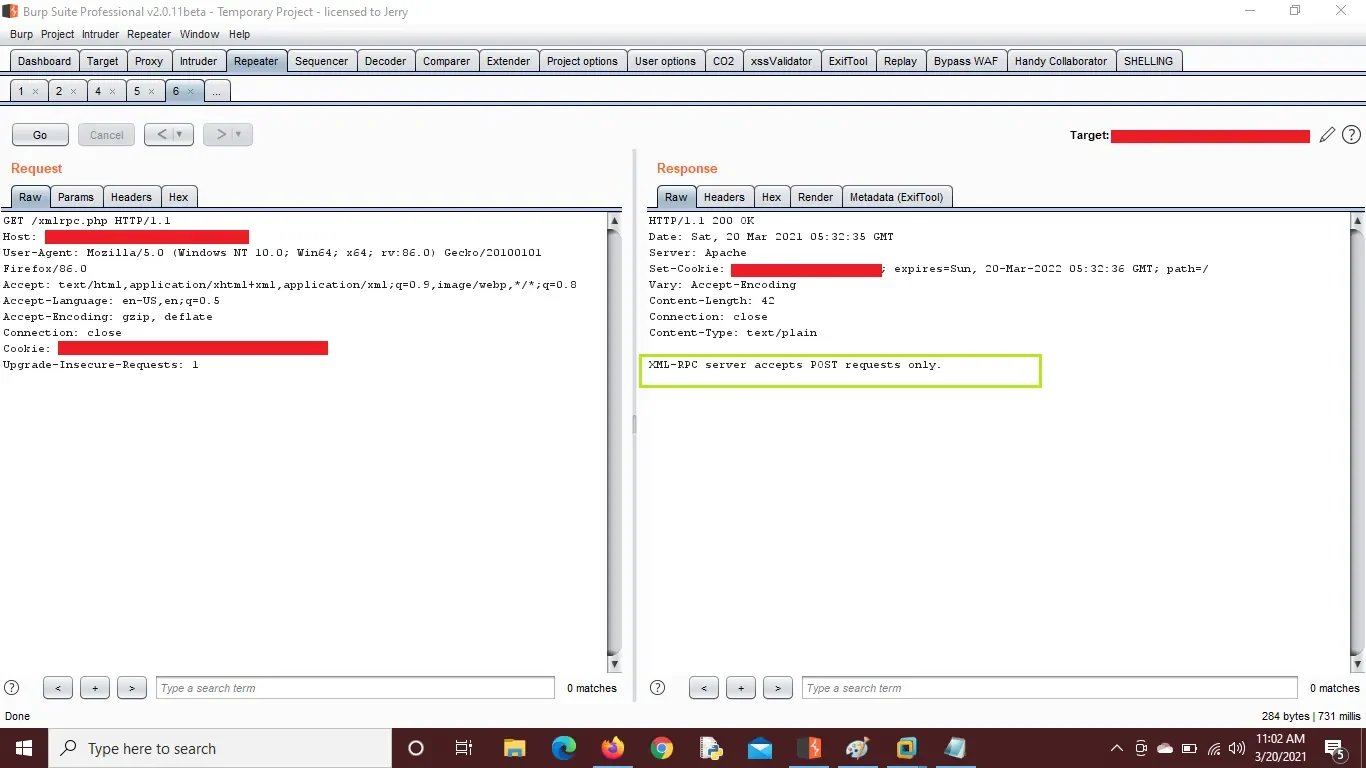
The researcher went to the target website and requested the endpoint /xmlrpc.php. As usual, it returned an error.
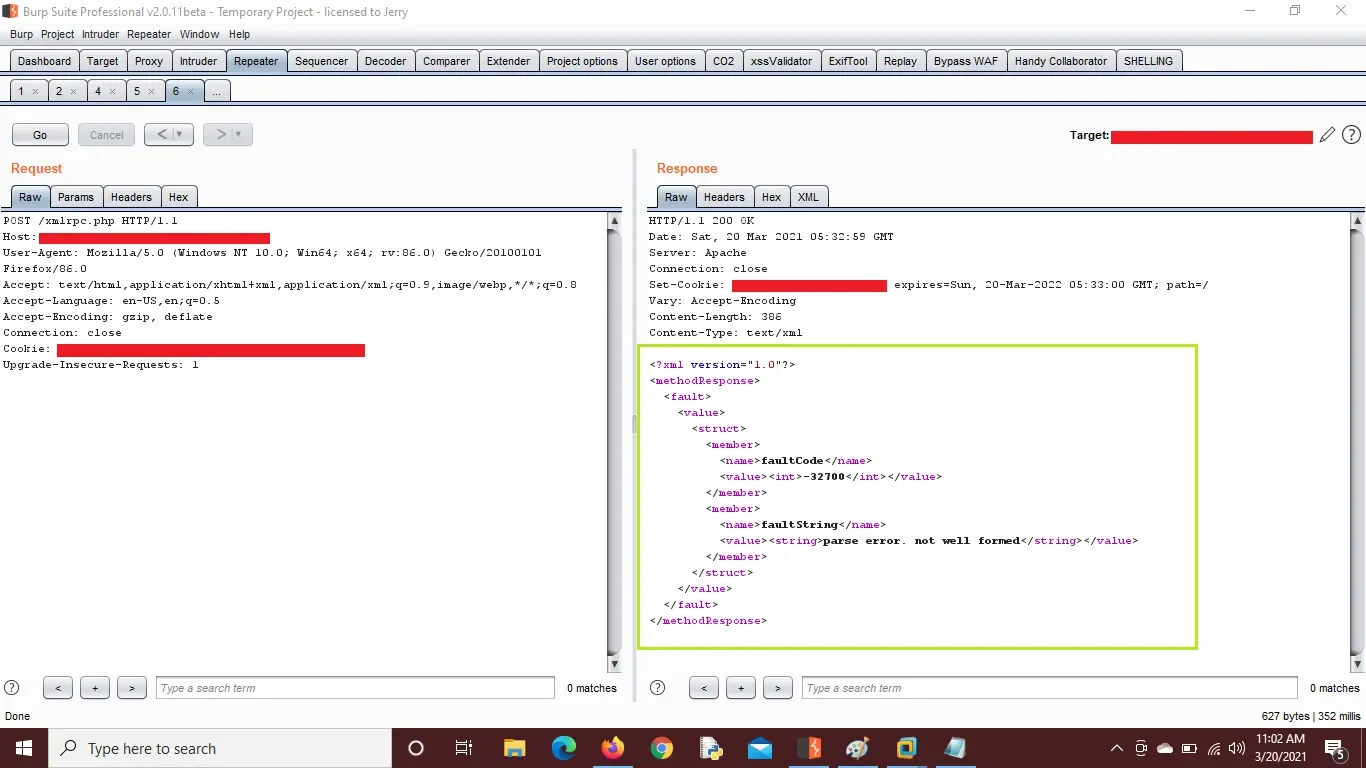
Changing the verb from GET to POST produced what the report calls a weird response.
Searching for how xmlrpc.php is exploited led to a blog on the subject. Using the exploit from that blog returned a list of methods.
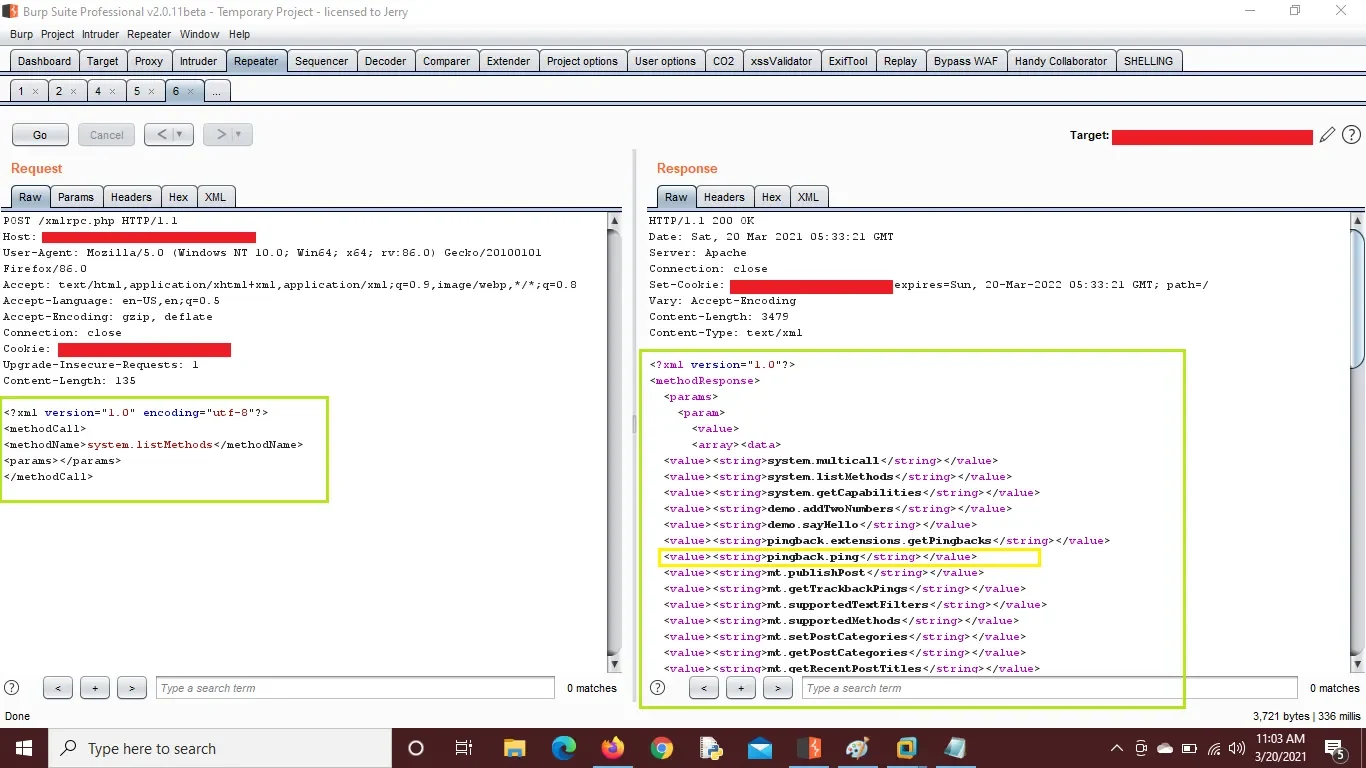
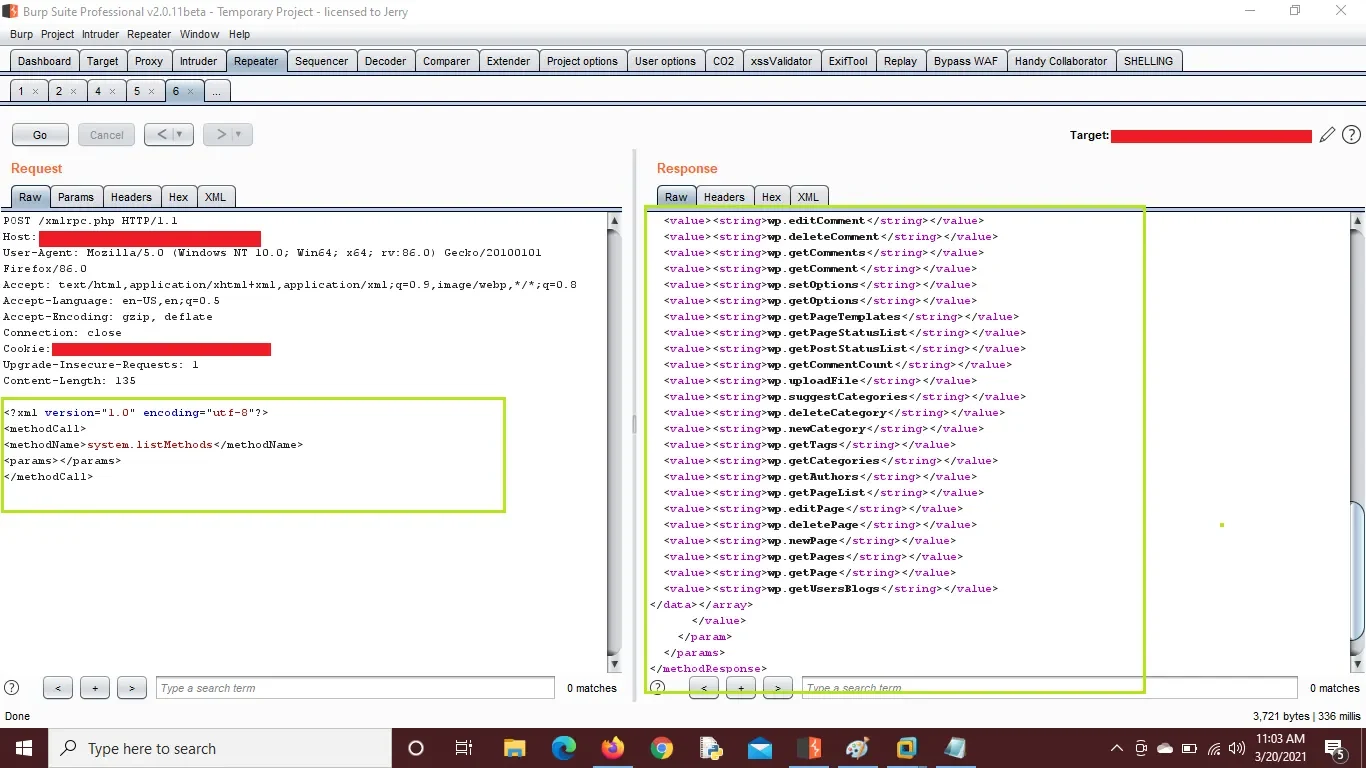
Among the returned methods was pingback.ping, which is the method that makes the server issue a request to a URL of the caller's choosing.
Exploitation
Step 1: Reach xmlrpc.php
Requesting /xmlrpc.php with GET returned an error. The endpoint exists but does not answer a plain GET usefully.
Step 2: Switch to POST
Sending the same endpoint with the POST verb returned a different response, which is what prompted the researcher to look for the standard exploitation technique.
Step 3: Enumerate methods
The exploit from the referenced blog was used and returned a set of methods. The payload for listing all available methods is given in the report as:
<methodCall>
<methodName>system.listMethods</methodName>
<params></params>
</methodCall>
The report gives this payload for listing all available methods.
Step 4: Prepare an out-of-band listener
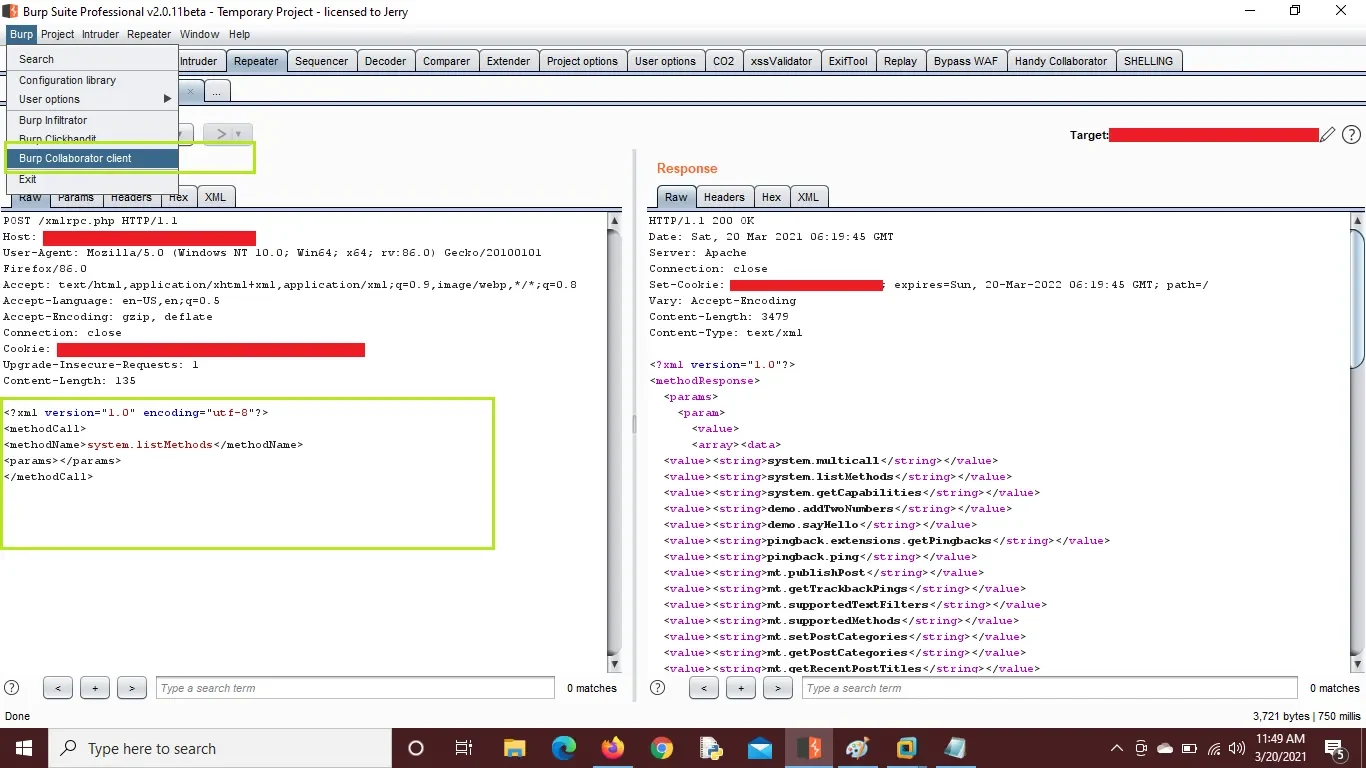
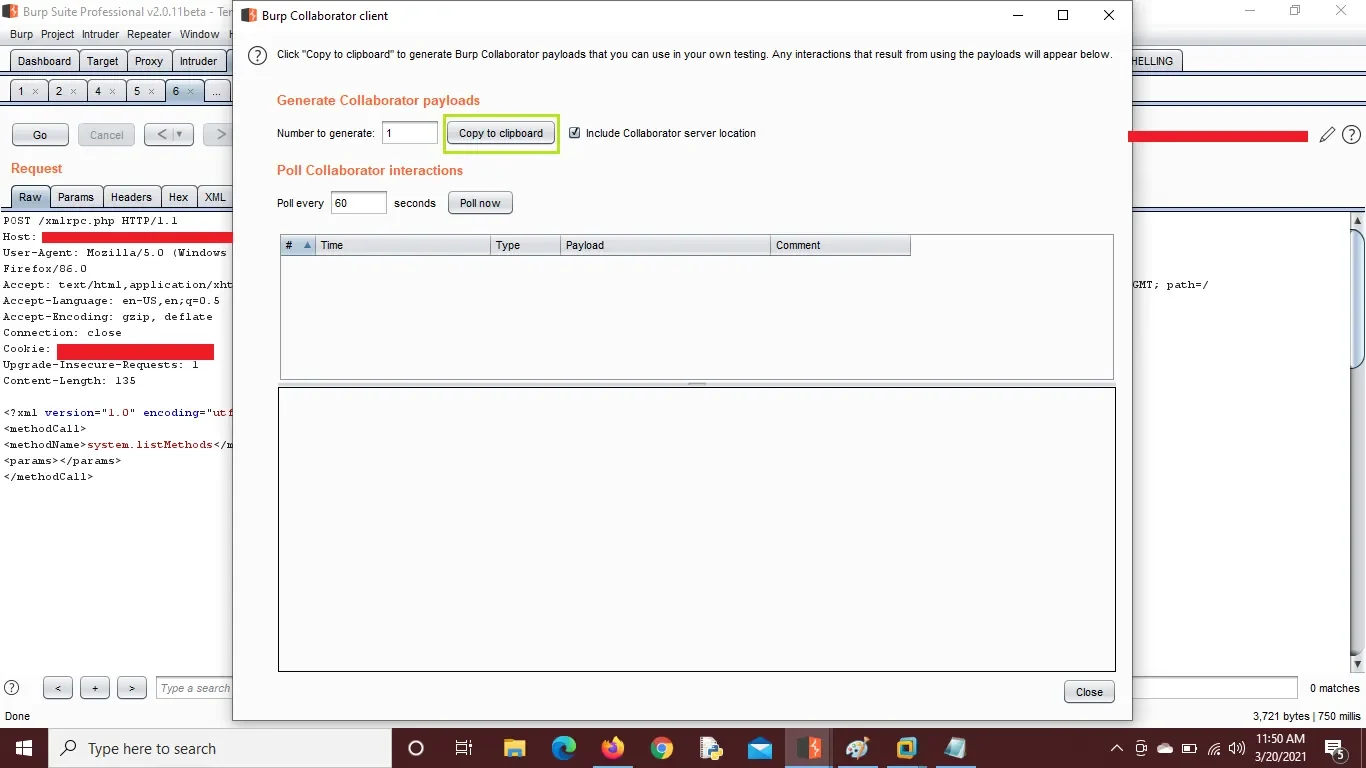
The Burp Collaborator Client was opened and its collaborator URL copied. That URL is the "server" side of the pingback call: if the target fetches it, the collaborator records the DNS lookup and the HTTP request.
Step 5: Call pingback.ping
The pingback exploit was sent and returned another unusual response.
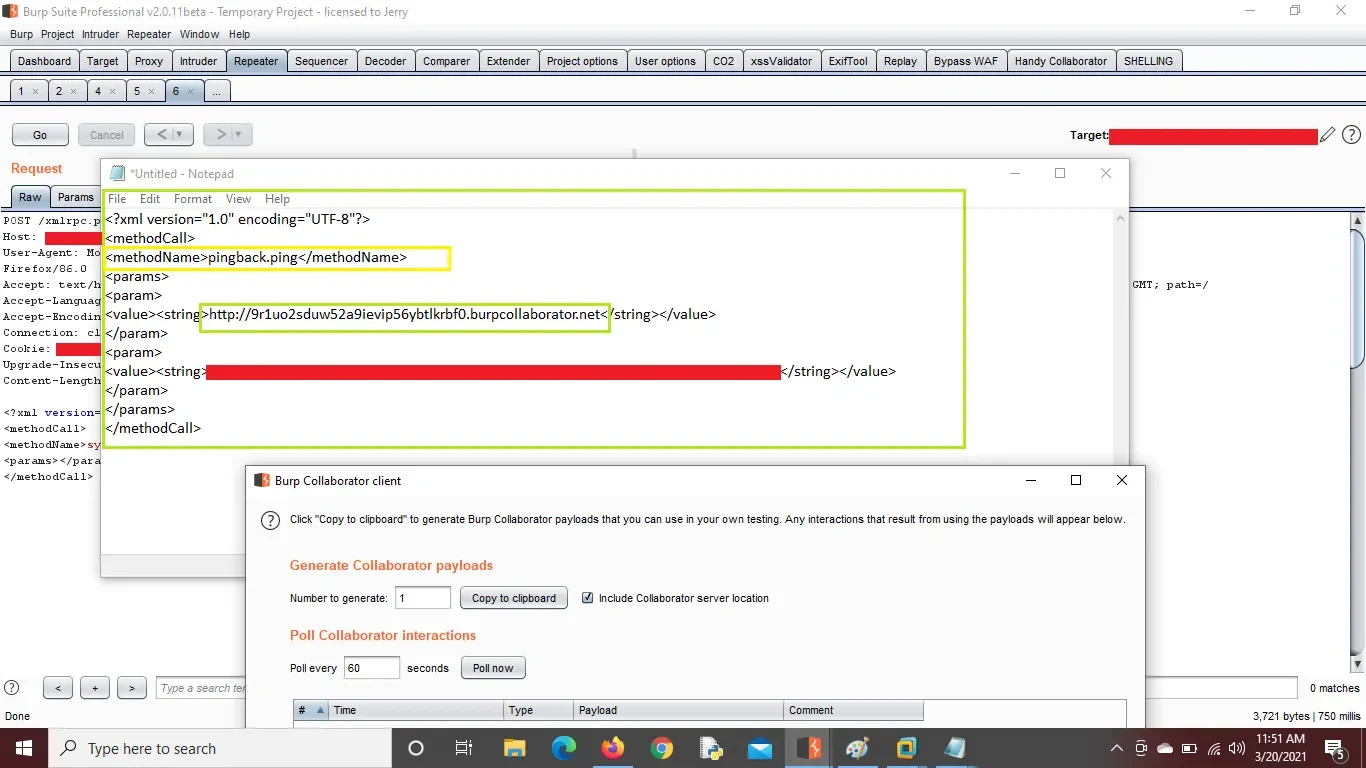
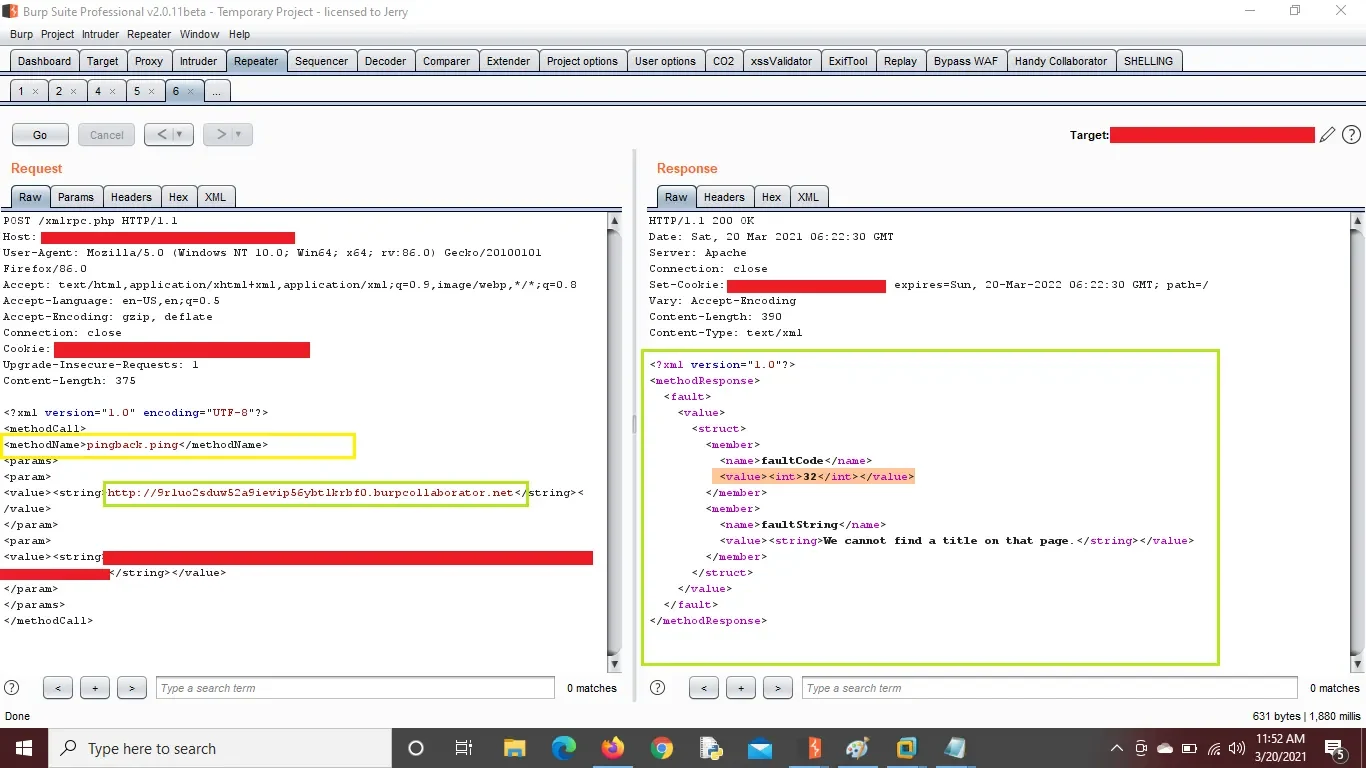
The payload for exploiting pingback.ping is given in the report as:
<?xml version=”1.0" encoding=”UTF-8"?>
<methodCall>
<methodName>pingback.ping</methodName>
<params>
<param>
<value><string>URL of your server</string></value>
</param>
<param>
<value><string>Target URL with an endpoint</string></value>
</param>
</params>
</methodCall>
In this call, <methodName> is pingback.ping. The first <string> value is the URL of your server, the listener that will receive the callback. The second <string> value is the URL of the target with one of its endpoints. Using an endpoint of the target website is mandatory: without one, the call returns the error shown later.
Step 6: Confirm the callback
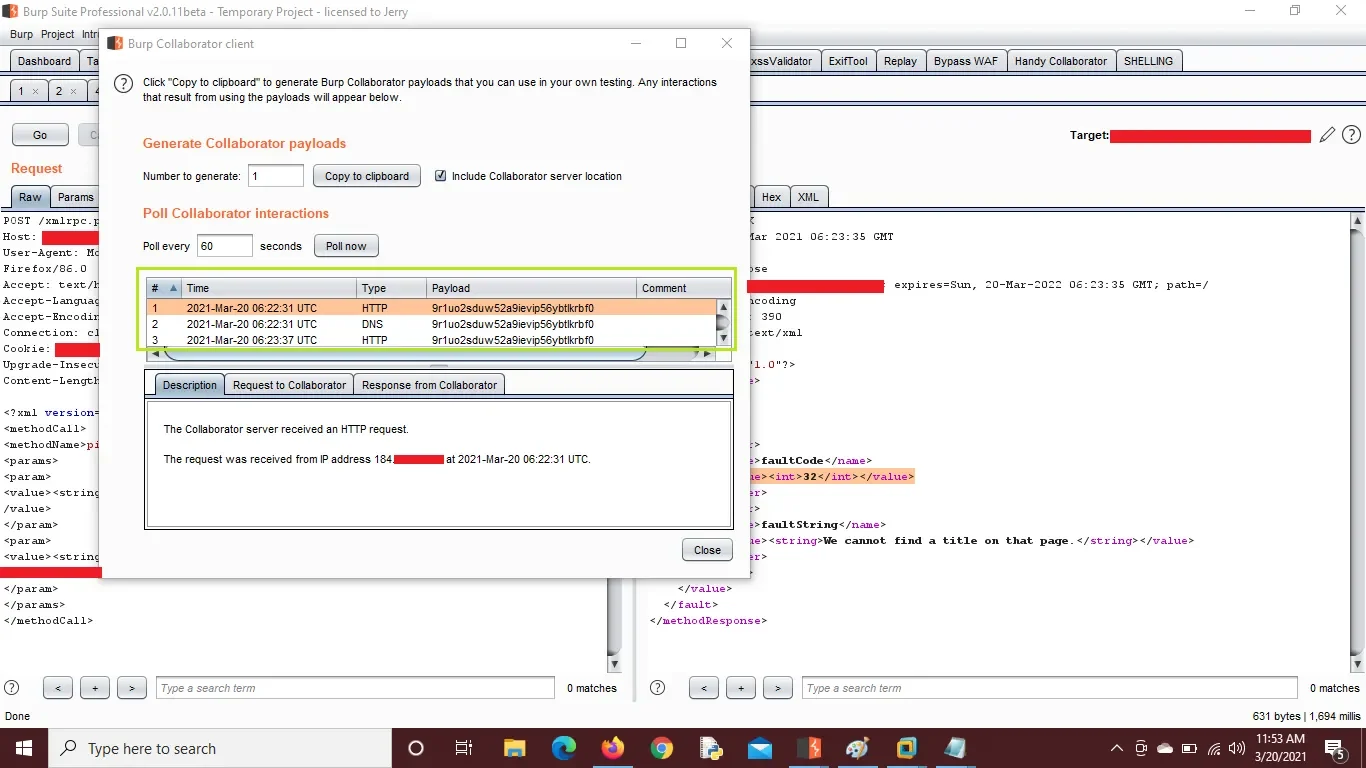
Checking the Collaborator client showed a successful DNS and HTTP request, confirming that the website is vulnerable to XSPA.
Step 7: Cross check with Hookbin
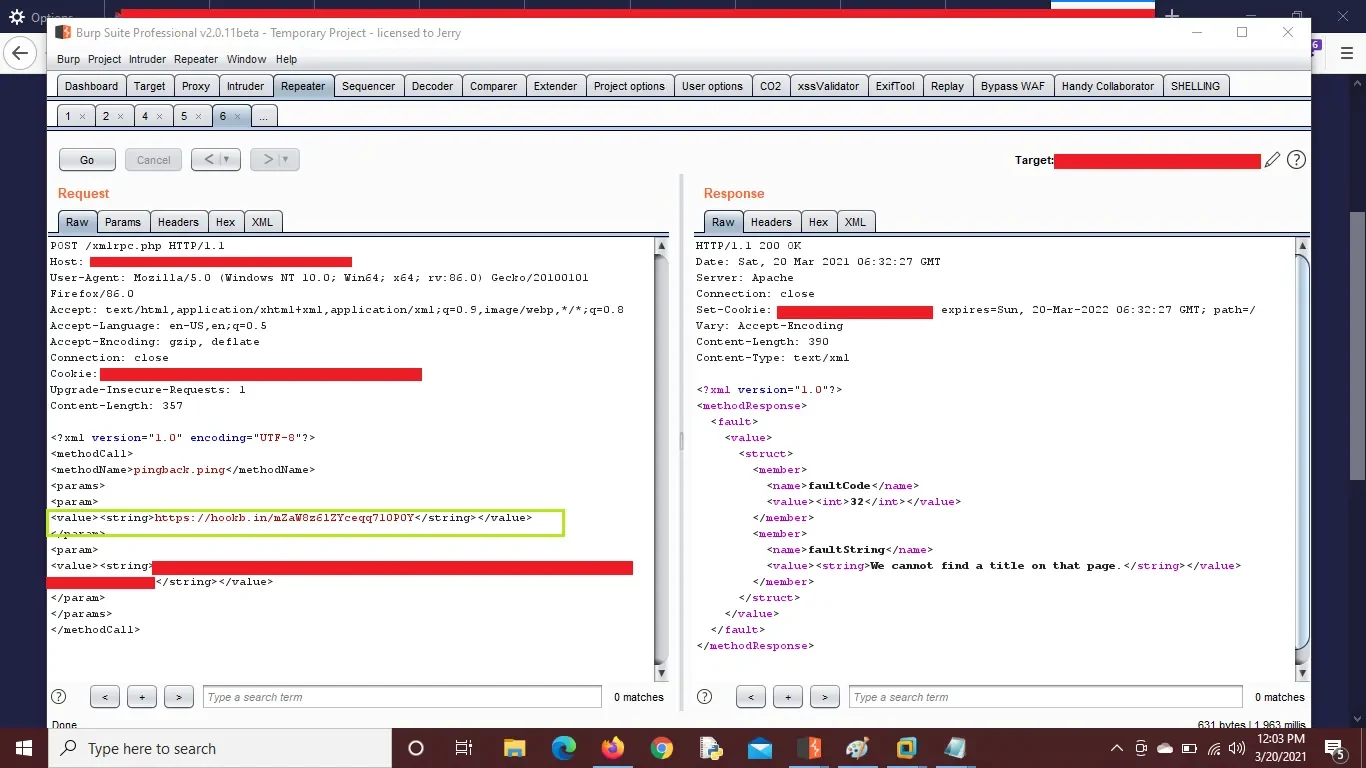
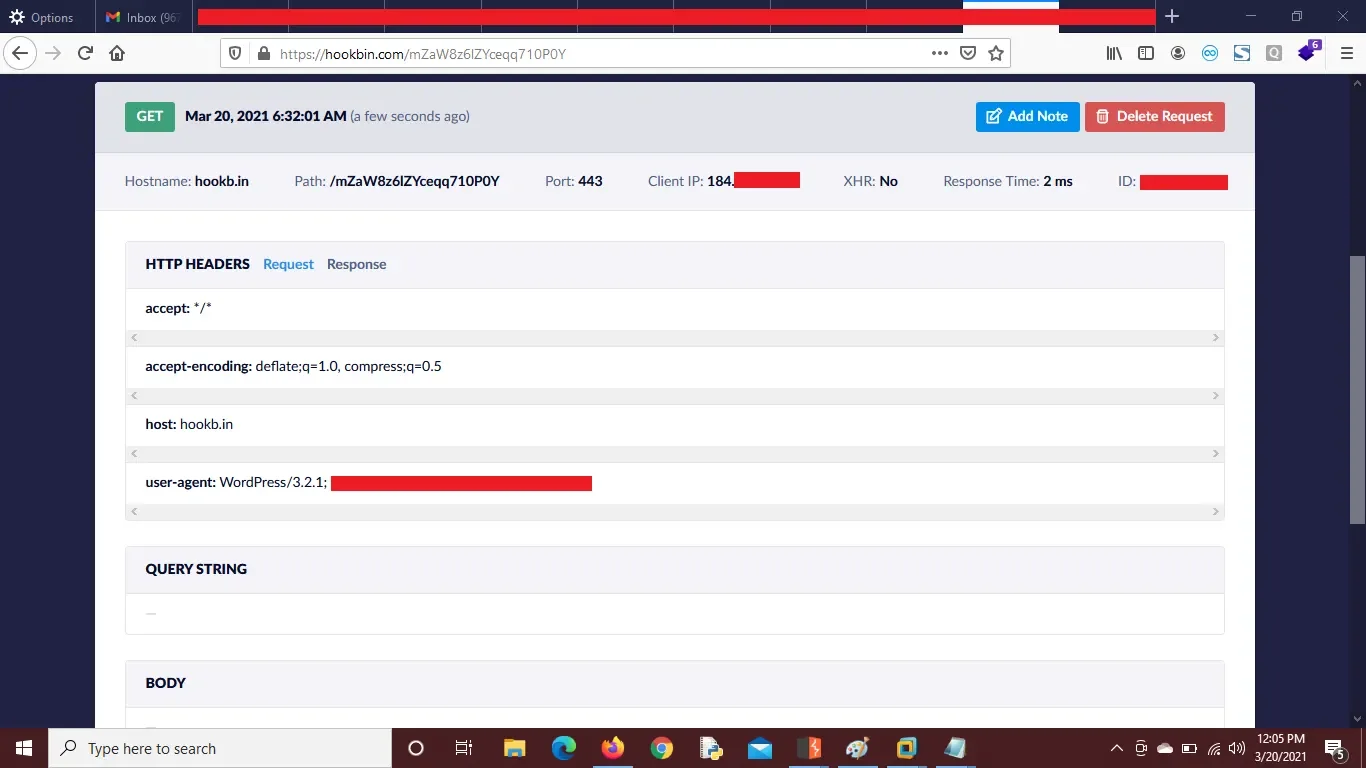
Instead of Burp Collaborator, https://hookbin.com/ was used for the callback, and a successful callback arrived there as well.
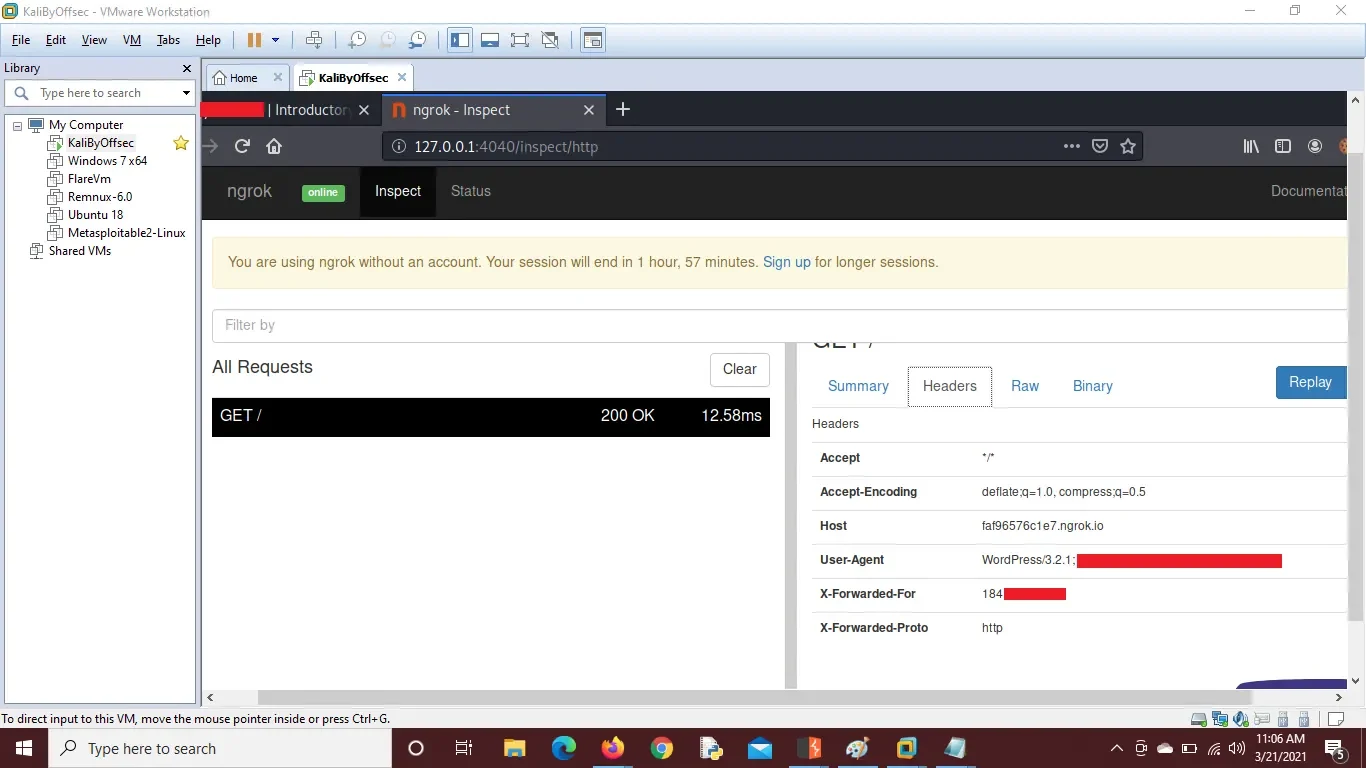
Step 8: Cross check with ngrok
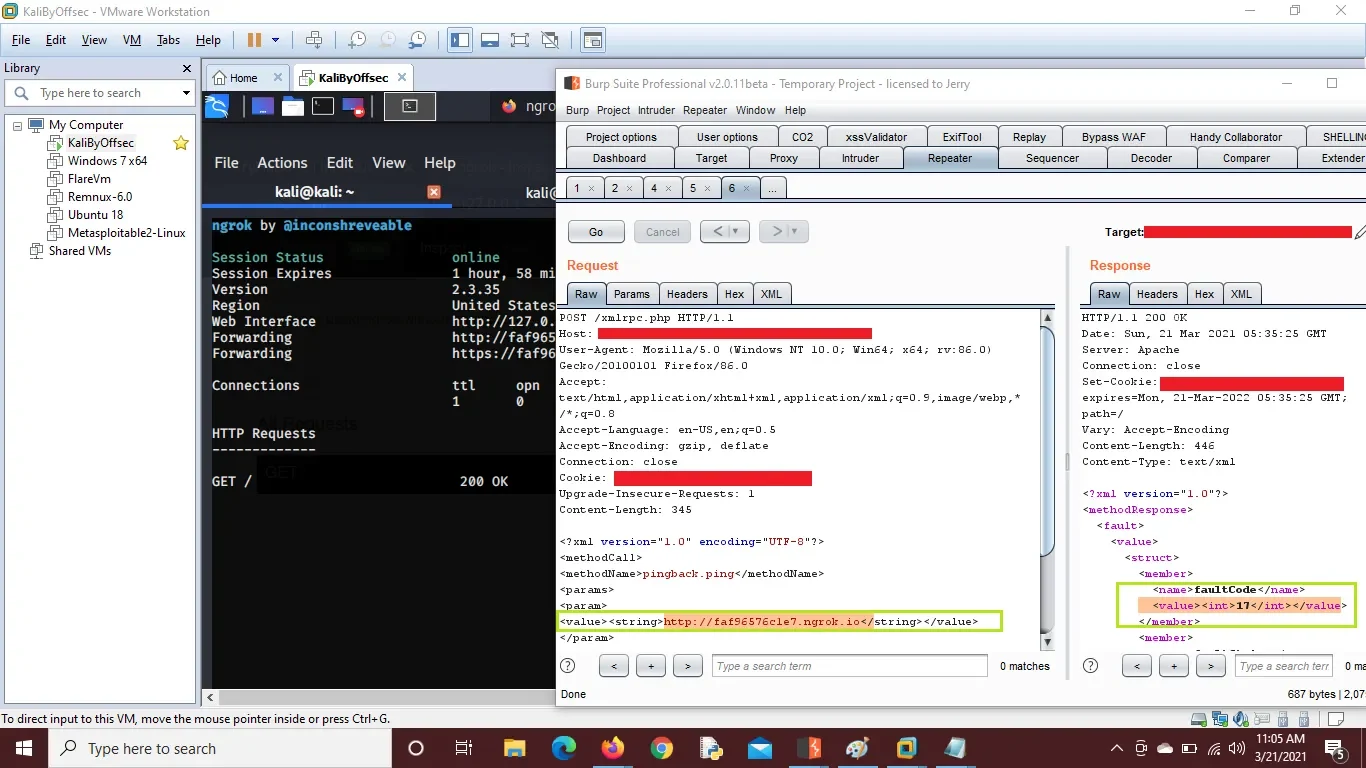
An ngrok server was then used to check the XSPA attack again.
Reading the faultCode
In the response, the faultCode value was 17, which the report says means the port is open. A faultCode greater than 0 means the port is open. This is how the pingback response is turned into a port scan result: the error code returned by the XML-RPC layer leaks whether the target could be reached on the probed port.
From callback to file read
Normally the internal IP address is what comes back, but the IP the researcher obtained was not internal: a whois lookup showed it was owned by the target company. Visiting that IP, written in the report as 184.xxx.xx.xx, showed an empty page. A directory traversal payload was then added and returned a listing.
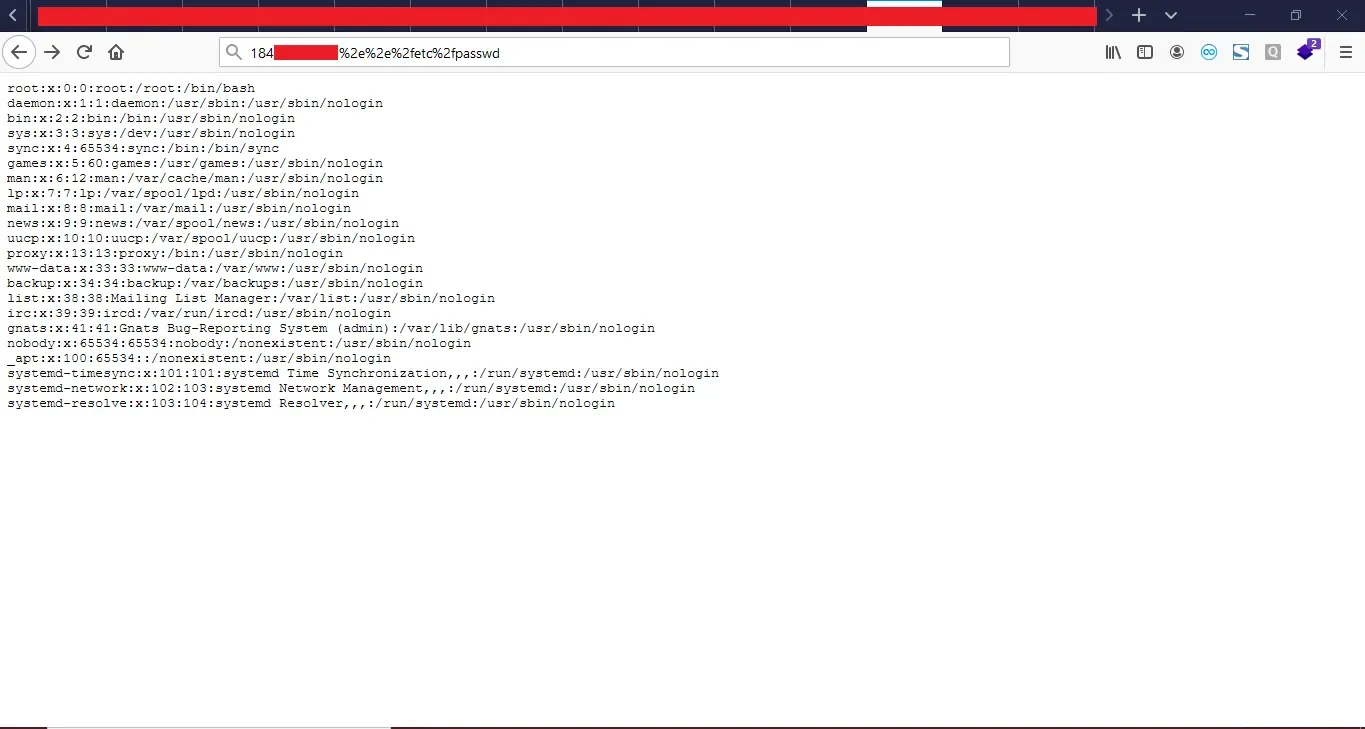
The traversal payload reached /etc/passwd on that host.
The endpoint requirement
The second <string> must be a target URL that includes an endpoint. Using the bare host, for example https://www.mytarget.com instead of https://www.mytarget.com/visit-my-new-interesting-blogs, produces this error:
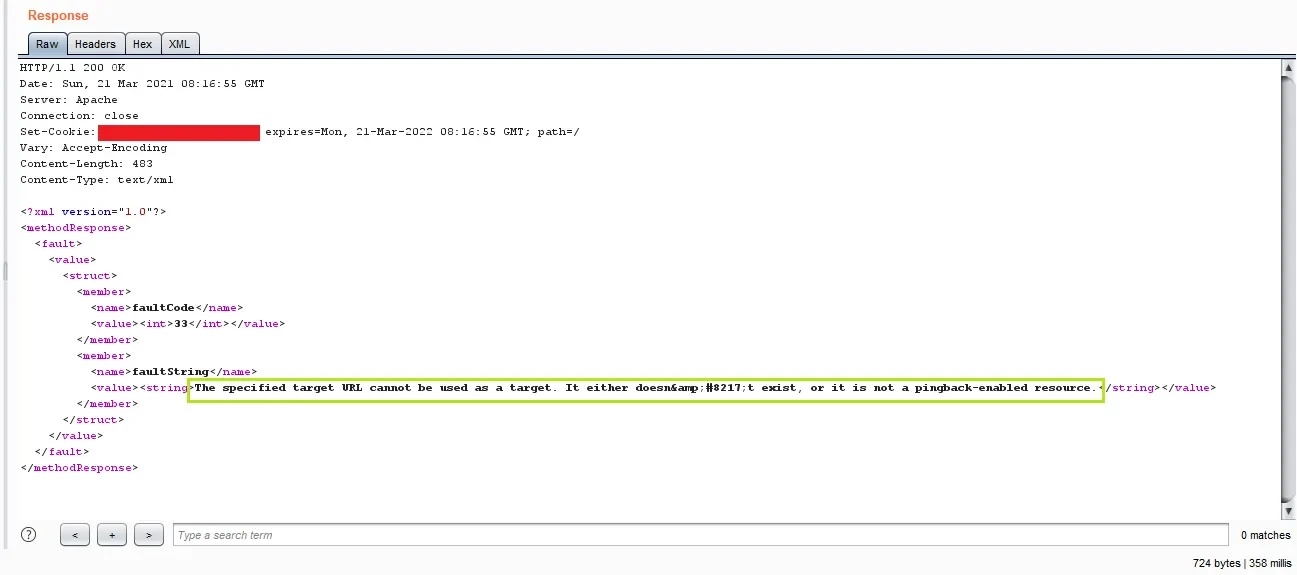
The error reads: "The specified target URL cannot be used as a target. It either doesn't exist, or it is not a pingback-enabled resource."
The reason is that pingback methods are usually enabled where blog links are mentioned. If two websites both have pingback enabled on a blog endpoint, and the owner of website 1 mentions one of your blogs in their comment section, you receive a pingback on your server, and vice versa. The endpoint has to be a pingback-enabled resource for the call to proceed.
Root cause
The application processes user supplied URLs and does not verify or sanitise the back end response received from remote servers before sending it back to the client. In this target the user supplied URL enters through pingback.ping in xmlrpc.php, which was enabled on the target. The server-side fetch is made from the web server's network position, so it can reach hosts and ports the attacker cannot reach directly, and the resulting response or error is reflected back to the caller. The report says a faultCode greater than 0 means the port is open.
The report does not describe any defence that was present and bypassed.
Impact
The report states that this kind of attack is used to perform Denial-of-Service, port scanning, remote code execution and reading internal files. In this instance the demonstrated outcomes were:
- Confirmed out-of-band DNS and HTTP requests from the target to attacker-controlled listeners (Collaborator, Hookbin, ngrok), proving the server-side fetch.
- A
faultCodevalue of17in the response, which the report says means the port is open. - Discovery of an IP address owned by the target company, and a directory traversal on that host that reached
/etc/passwd.
The conditions are that xmlrpc.php is enabled and the pingback method is available, and that the second parameter points at a pingback-enabled endpoint on the target.
Fix
The report gives general mitigations rather than a specific patch:
- Unauthorised URL access should be restricted.
- Restrict connectivity to internal ports.
- Blacklist internal IP addresses and internal host names.
- Disable unwanted protocols.
Variants to test
- Other XML-RPC methods that fetch URLs. Enumerate with
system.listMethodsand look for any method that takes a URL and makes the server request it. A positive result is an out-of-band DNS or HTTP hit on your listener. - Port probing through
faultCode. Point the second parameter at endpoints on ports you suspect are open on internal or same-owner hosts and comparefaultCodevalues. A value greater than0indicates an open port according to the report. - Protocol handlers. The report lists
file:///as a way to read local web server files through XSPA. A positive result is file content returned in the response. - Directory traversal on hosts discovered through XSPA. Once a callback reveals an IP, request it directly and try traversal payloads. A positive result is a directory listing or a known file such as
/etc/passwd. - Pingback-enabled endpoints. Test blog post and comment endpoints as the second parameter; a bare host fails with the "not a pingback-enabled resource" error, so the endpoint matters.
Hunting notes
The signal during recon is a WordPress site with xmlrpc.php reachable. A GET to /xmlrpc.php returning an error and a POST returning a different response is the first sign. From there, system.listMethods tells you whether pingback.ping is exposed.
The out-of-band listener is what turns a suspicion into proof: a DNS and HTTP callback from the target's infrastructure to a Collaborator, Hookbin or ngrok URL is hard to dispute. Repeating the callback across more than one service, as done here, removes doubt about a single service's behaviour.
The impact story in this report rests on three things: the callback itself, the faultCode reading that turns the primitive into a port scan, and the follow-on traversal on the IP that the callback exposed, which reached /etc/passwd. That chain, from an enabled WordPress file to a confirmed server-side request and then to file disclosure on a company-owned host, is what the report describes.
What happened, in plain words
A security researcher found that a WordPress website would happily make requests to other computers on command. By sending a specially formatted message to a file that ships with WordPress, the researcher could make the website's own server reach out to an address of the researcher's choosing. That is useful to an attacker because the website's server often sits inside a private network and can reach machines that the attacker, sitting on the public internet, cannot reach directly. The researcher proved the behaviour by pointing the website at a listener they controlled and watching the connection arrive. They then reached a machine owned by the target company and read a system file from it.
The class of bug is called Cross Site Port Attack, or XSPA. The name is a little misleading: it is not only about ports. It is about any situation where a website takes a web address (a URL) from a user, fetches it from the server side, and passes information about the result back to the user without checking it.
The idea behind XSPA
Think of a hotel concierge. Guests can ask the concierge to phone any number and report back what happened. A guest in room 12 cannot dial the staff-only extension in the basement, but the concierge can. If the concierge also tells the guest exactly what the basement extension said, the guest has effectively made a call they were never allowed to make. That is XSPA: the website is the concierge, and the attacker is the guest.
In technical terms, an application processes user supplied URLs and does not verify or sanitise the back end response it receives from remote servers before sending that response back to the client. The server makes the request from its own network position, so it can reach things the attacker cannot, and the answer, or even just an error message, leaks back to the attacker.
The report says the responses can, in certain cases, be studied to identify service availability, such as open ports and banner versions, and even to fetch data from remote services in unconventional ways. "Banner" here means the short greeting some network services send when you connect, which often names the software and its version.
The researcher's target was a website built on WordPress, identified with a tool called Wappalyzer, with the common xmlrpc.php file enabled. Two concepts need unpacking:
- WordPress is a very popular system for building websites and blogs. Many sites run it, which is why a single WordPress weakness can matter widely.
- Wappalyzer is a browser extension that looks at a website and guesses which software it is built with, by spotting telltale files, headers and page details. It is a shortcut for the first question of any assessment: what am I looking at?
The report says most XSPA attacks occur when xmlrpc.php is enabled. xmlrpc.php is a WordPress file that provides an API. An API is a way for one program to talk to another in a structured format, rather than a human clicking pages. The format here is XML-RPC: the caller sends an XML document (XML is a text format built from tags in angle brackets) describing which "method" it wants to run and with what arguments, and the server replies in the same format. A method is simply a named action the API offers, like a menu item.
Among the methods xmlrpc.php exposes is pingback.ping. A pingback is a normal blogging feature: when one blog links to another, the linking blog can notify the linked blog, and the linked blog verifies the link by fetching the page that mentions it. That verification fetch is the primitive the whole attack rests on. The server fetches a URL supplied by the caller, and the caller gets to see something about the outcome.
The report lists the following attacks as possible through XSPA:
- Port scanning remote Internet facing servers
- Port scanning intranet
- Port scanning local web server
- Exploiting vulnerable programs running on the intranet or on the local web server
- Attacking internal and external web applications that are vulnerable to GET parameter based vulnerabilities such as SQLi
- Reading local web server files using the
file:///protocol handler
A few of those terms need explaining for a newcomer:
- Port scanning means probing a machine to see which numbered doors are open. A computer offers services on numbered ports; for example, web traffic conventionally goes to port 80 or 443. If a port answers, something is listening there.
- Intranet means a private internal network, the part of a company's network not reachable from the open internet.
- SQLi, or SQL injection, is a bug where user input is pasted into a database query and changes its meaning. A database stores a site's data, and SQL is the language used to ask it questions.
- GET parameter means values placed in a URL after a question mark, such as
?id=5. Many pages read those values and act on them. file:///is a URL scheme that means "a file on this computer" rather than "a page on a web server". If a server can be persuaded to fetch afile:///URL, it may hand back the contents of its own disk.
The tools used
The only tooling the report names is:
- Wappalyzer, used to fingerprint the target as WordPress.
- Burp Collaborator Client, used to receive out-of-band DNS and HTTP callbacks.
- Hookbin (
https://hookbin.com/), used as a second callback service for a cross check. - An ngrok server, used for a third check.
Burp Collaborator deserves a plain explanation because it is the heart of the proof. When you want to know whether a server actually made a request, you need somewhere for that request to arrive. Collaborator gives you a unique, throwaway address and records every connection made to it. Out-of-band means the evidence arrives through a separate channel, not in the response you are looking at: the target's server quietly contacts your listener, and the listener logs it. DNS is the internet's address book, turning names into numeric addresses; a DNS lookup happens before any web request, so seeing one proves the target tried to resolve your address. HTTP is the protocol browsers use to fetch pages, so an HTTP hit proves it went further and actually connected.
Hookbin is a website that gives you a temporary URL and shows you anything sent to it, useful as a second opinion. ngrok is a small program that exposes a server running on your own machine to the internet through a public address, so you can receive callbacks on your own equipment.
No accounts, roles or versions are described. The precondition is simply that the target runs WordPress with xmlrpc.php reachable and the pingback method available.
How the researcher found it
The researcher went to the target website and requested the endpoint /xmlrpc.php. An endpoint is a specific address on a site that does a specific job, as opposed to a normal page meant for people. As usual, it returned an error.
The screenshot is captioned xmlrpc.php and shows the error the plain request produced. The endpoint exists but does not answer a plain GET usefully. GET is the ordinary browser verb for "give me this page".
Next, the researcher changed the verb from GET to POST. POST is the verb used when you submit a form or send data to a server; the data travels in the request body rather than in the URL. Sending the same endpoint with POST returned a different response, which the report calls a weird response.
The screenshot is captioned "POST Response". The change of verb produced a different response, which the report calls a weird response. A POST gives it something to parse, and the reply changes shape. That difference is the first sign that the file is live and processing input.
Searching for how xmlrpc.php is exploited led to a blog on the subject. Using the exploit from that blog returned a list of methods.
Both screenshots are captioned "Exploit xmlrpc.php" and show the list of methods the endpoint reported. Among the returned methods was pingback.ping, which is the method that makes the server issue a request to a URL of the caller's choosing. This is the moment the researcher moved from "this file exists" to "this file can be made to fetch things".
Exploitation, step by step
Step 1: Reach xmlrpc.php
Requesting /xmlrpc.php with GET returned an error. The purpose of this step is discovery: confirm the file is present before spending effort on it.
Step 2: Switch to POST
Sending the same endpoint with the POST verb returned a different response, which is what prompted the researcher to look for the standard exploitation technique. The purpose here is to speak the endpoint's language. Once it answers in XML-RPC terms, the standard playbook applies.
Step 3: Enumerate methods
The exploit from the referenced blog was used and returned a set of methods. The payload for listing all available methods is given in the report as:
<methodCall>
<methodName>system.listMethods</methodName>
<params></params>
</methodCall>
Line by line:
<methodCall>opens the request. Everything inside is one call to the API.<methodName>system.listMethods</methodName>names the action you want.system.listMethodsis a built-in method that asks the endpoint to enumerate every method it exposes, like asking a restaurant for the full menu rather than guessing dishes.<params></params>is the argument list, empty here because listing methods needs no arguments.</methodCall>closes the request.
The report gives this payload for listing all available methods.
Step 4: Prepare an out-of-band listener
The Burp Collaborator Client was opened and its collaborator URL copied. That URL is the "server" side of the pingback call: if the target fetches it, the collaborator records the DNS lookup and the HTTP request.
The screenshot is captioned "Burp Collaborator Client" and shows the client with its generated address.
The second screenshot is captioned "Collaborator URL Copied" and shows the address being taken for use in the payload. The reason for this step is to have somewhere for the evidence to land before you fire the request. If you send the pingback first and only then set up a listener, you have nothing to compare against.
Step 5: Call pingback.ping
The pingback exploit was sent and returned another unusual response.
The first screenshot is captioned "Exploit pingback.ping" and shows the request being sent; the second is captioned "Response" and shows what came back. The payload for exploiting pingback.ping is given in the report as:
<?xml version=”1.0" encoding=”UTF-8"?>
<methodCall>
<methodName>pingback.ping</methodName>
<params>
<param>
<value><string>URL of your server</string></value>
</param>
<param>
<value><string>Target URL with an endpoint</string></value>
</param>
</params>
</methodCall>
Line by line:
<?xml version=”1.0" encoding=”UTF-8"?>is the XML declaration. It tells the parser this is XML, version 1.0, encoded as UTF-8 (a standard way of representing text). It is boilerplate, not part of the attack.<methodCall>opens the call.<methodName>pingback.ping</methodName>selects the pingback method, the one that makes the server fetch a URL.<params>opens the list of arguments. Pingback takes exactly two.- The first
<param>with<value><string>URL of your server</string></value>is the source URL: the address the server should fetch. In a real attack this is your listener, the Collaborator, Hookbin or ngrok address.<string>says the value is text. - The second
<param>with<value><string>Target URL with an endpoint</string></value>is the target URL: a page on the victim site that the server will treat as the page doing the linking. It must be a real, pingback-enabled page, which is explained below. </params>and</methodCall>close the structure.
In this call, <methodName> is pingback.ping. The first <string> value is the URL of your server, the listener that will receive the callback. The second <string> value is the URL of the target with one of its endpoints. Using an endpoint of the target website is mandatory: without one, the call returns the error shown later.
Step 6: Confirm the callback
Checking the Collaborator client showed a successful DNS and HTTP request, confirming that the website is vulnerable to XSPA.
The screenshot is captioned "HTTP and DNS Request" and shows both kinds of interaction recorded by the listener. This is the proof. A DNS lookup alone could be a coincidence of resolution; a DNS lookup followed by an HTTP request from the target's infrastructure to an address that exists only for this test is very hard to explain any other way.
Step 7: Cross check with Hookbin
Instead of Burp Collaborator, https://hookbin.com/ was used for the callback, and a successful callback arrived there as well.
Both screenshots are captioned "Callback on hookbin" and show the request arriving at the second service. The reason for repeating the test on a different service is to rule out the possibility that the first service behaved oddly or that the hit was somehow generated locally. Two independent listeners receiving the same callback make the finding solid.
Step 8: Cross check with ngrok
An ngrok server was then used to check the XSPA attack again.
The screenshots are captioned "Ngrok" and "Ngrok Web Interface". This third check uses infrastructure the researcher runs personally, which removes any remaining doubt about a third-party service's behaviour.
Reading the faultCode
In the response, the faultCode value was 17, which the report says means the port is open. A faultCode greater than 0 means the port is open. This is how the pingback response is turned into a port scan result: the error code returned by the XML-RPC layer leaks whether the target could be reached on the probed port.
A faultCode is XML-RPC's way of saying "something went wrong", paired with a number describing the kind of failure. The insight is that the number differs depending on what happened on the far side. If the port is closed, the fetch fails one way; if it is open, it fails another way, and the code tells you which. You never see the remote service's content, only the error, but the error is enough to answer the yes or no question "is something listening there?". That is a port scan performed entirely by the victim's server, from inside its own network.
From callback to file read
Normally the internal IP address is what comes back, but the IP the researcher obtained was not internal: a whois lookup showed it was owned by the target company. Whois is a public directory lookup that says who registered an address or domain. Visiting that IP, written in the report as 184.xxx.xx.xx, showed an empty page. A directory traversal payload was then added and returned a listing.
The screenshot is captioned /etc/passwd and shows the file contents returned. Directory traversal is a bug where a request for a file uses ../ sequences to climb out of the folder it is supposed to be confined to, like asking a librarian for a book and then walking past the shelf into the staff room. /etc/passwd is a standard file on Linux systems that lists user accounts. Reading it does not usually give passwords on modern systems, but it proves the attacker can read files on the host, which is serious on its own.
The traversal payload reached /etc/passwd on that host. The chain is worth pausing on: the pingback told the researcher an address existed, the whois lookup said the address belonged to the target company, and a direct visit plus a traversal payload turned that knowledge into file disclosure.
The endpoint requirement
The second <string> must be a target URL that includes an endpoint. Using the bare host, for example https://www.mytarget.com instead of https://www.mytarget.com/visit-my-new-interesting-blogs, produces this error:
The screenshot is captioned "Error" and shows the rejection message. The error reads: "The specified target URL cannot be used as a target. It either doesn't exist, or it is not a pingback-enabled resource."
The reason is that pingback methods are usually enabled where blog links are mentioned. If two websites both have pingback enabled on a blog endpoint, and the owner of website 1 mentions one of your blogs in their comment section, you receive a pingback on your server, and vice versa. The endpoint has to be a pingback-enabled resource for the call to proceed. In other words, the victim server checks that the page you named is a real article that could plausibly contain a link, before it bothers fetching your URL. A home page is not such a page, so the check fails early and no fetch happens.
Why it works at all
The application processes user supplied URLs and does not verify or sanitise the back end response received from remote servers before sending it back to the client. In this target the user supplied URL enters through pingback.ping in xmlrpc.php, which was enabled on the target. The server-side fetch is made from the web server's network position, so it can reach hosts and ports the attacker cannot reach directly, and the resulting response or error is reflected back to the caller. The report says a faultCode greater than 0 means the port is open.
The report does not describe any defence that was present and bypassed. That is a common pattern with features designed for convenience: the feature is doing exactly what it was built to do, and the problem is that it will do it for anyone who asks.
What an attacker could do with it
The report states that this kind of attack is used to perform Denial-of-Service, port scanning, remote code execution and reading internal files. Denial-of-Service means making a service unavailable, for example by flooding it. Remote code execution means getting a machine to run commands of your choosing, the most severe outcome in this list.
In this instance the demonstrated outcomes were:
- Confirmed out-of-band DNS and HTTP requests from the target to attacker-controlled listeners (Collaborator, Hookbin, ngrok), proving the server-side fetch.
- A
faultCodevalue of17in the response, which the report says means the port is open. - Discovery of an IP address owned by the target company, and a directory traversal on that host that reached
/etc/passwd.
The conditions are that xmlrpc.php is enabled and the pingback method is available, and that the second parameter points at a pingback-enabled endpoint on the target.
How to fix it
The report gives general mitigations rather than a specific patch:
- Unauthorised URL access should be restricted.
- Restrict connectivity to internal ports.
- Blacklist internal IP addresses and internal host names.
- Disable unwanted protocols.
In plain terms: decide which addresses the server is allowed to fetch and refuse the rest, keep the server from reaching internal services it has no business reaching, keep a list of internal addresses and names that must never be fetched, and turn off URL schemes such as file:/// that have no reason to appear in a pingback.
Other things to try
- Other XML-RPC methods that fetch URLs. Enumerate with
system.listMethodsand look for any method that takes a URL and makes the server request it. A positive result is an out-of-band DNS or HTTP hit on your listener. - Port probing through
faultCode. Point the second parameter at endpoints on ports you suspect are open on internal or same-owner hosts and comparefaultCodevalues. A value greater than0indicates an open port according to the report. - Protocol handlers. The report lists
file:///as a way to read local web server files through XSPA. A positive result is file content returned in the response. - Directory traversal on hosts discovered through XSPA. Once a callback reveals an IP, request it directly and try traversal payloads. A positive result is a directory listing or a known file such as
/etc/passwd. - Pingback-enabled endpoints. Test blog post and comment endpoints as the second parameter; a bare host fails with the "not a pingback-enabled resource" error, so the endpoint matters.
What to look for when hunting
The signal during recon is a WordPress site with xmlrpc.php reachable. A GET to /xmlrpc.php returning an error and a POST returning a different response is the first sign. From there, system.listMethods tells you whether pingback.ping is exposed.
The out-of-band listener is what turns a suspicion into proof: a DNS and HTTP callback from the target's infrastructure to a Collaborator, Hookbin or ngrok URL is hard to dispute. Repeating the callback across more than one service, as done here, removes doubt about a single service's behaviour.
The impact story in this report rests on three things: the callback itself, the faultCode reading that turns the primitive into a port scan, and the follow-on traversal on the IP that the callback exposed, which reached /etc/passwd. That chain, from an enabled WordPress file to a confirmed server-side request and then to file disclosure on a company-owned host, is what the report describes.
Glossary
- API: a defined way for one program to ask another program to do something, using structured messages instead of web pages meant for people.
- Banner: the short greeting some network services send on connection, often naming the software and version.
- Burp Collaborator: a service that gives you a unique address and records any DNS or HTTP interaction sent to it, used to prove a server made a request.
- Callback: a connection arriving at a listener you control, triggered by the target rather than by you.
- Cross Site Port Attack (XSPA): a class of bug where a site fetches a user-supplied URL from the server side and leaks information about the result back to the user.
- Database: software that stores and retrieves a site's data.
- Denial-of-Service: making a service unavailable to its legitimate users.
- Directory traversal: a bug where
../sequences in a file path let a request escape its intended folder and reach other files. - DNS: the internet's naming system that turns names into numeric addresses; a lookup happens before a web request.
- Endpoint: a specific address on a site that performs a specific function, such as
/xmlrpc.php. - faultCode: the number XML-RPC returns alongside an error, describing the kind of failure.
- GET: the HTTP verb a browser uses to ask for a page or resource.
- GET parameter: a value placed in a URL after a question mark, such as
?id=5. - Hookbin: a website that gives you a temporary URL and displays anything sent to it.
- HTTP: the protocol browsers and servers use to exchange pages and data.
- Intranet: a private internal network not reachable from the open internet.
- Method: a named action offered by an API, such as
pingback.ping. - ngrok: a program that exposes a server on your own machine to the internet through a public address.
- Out-of-band: evidence that arrives through a separate channel rather than in the response you are reading.
- Pingback: a blogging feature where one blog notifies another that it linked to it, and the notified blog verifies the link by fetching the linking page.
- Port: a numbered door on a computer through which a particular service is reached, for example 80 or 443 for web traffic.
- Port scanning: probing a machine to discover which ports have services listening.
- POST: the HTTP verb used to send data to a server in the request body, as when submitting a form.
- Remote code execution: getting a machine to run commands chosen by an attacker.
- SQL: the language used to query a database.
- SQL injection (SQLi): a bug where user input alters the meaning of a database query.
- URL: a web address identifying a resource and how to reach it.
- Wappalyzer: a browser extension that guesses which software a website is built with.
- Whois: a public lookup that shows who registered a domain name or address.
- WordPress: a widely used system for building websites and blogs.
- XML: a text format built from tags in angle brackets, used to structure data.
- XML-RPC: a protocol that sends XML documents to invoke named methods on a remote server.
- xmlrpc.php: the WordPress file that exposes an XML-RPC API, including the pingback method.





