CVE-2026–40281 Explained: A Patch That Guarded “=” on One Side Only
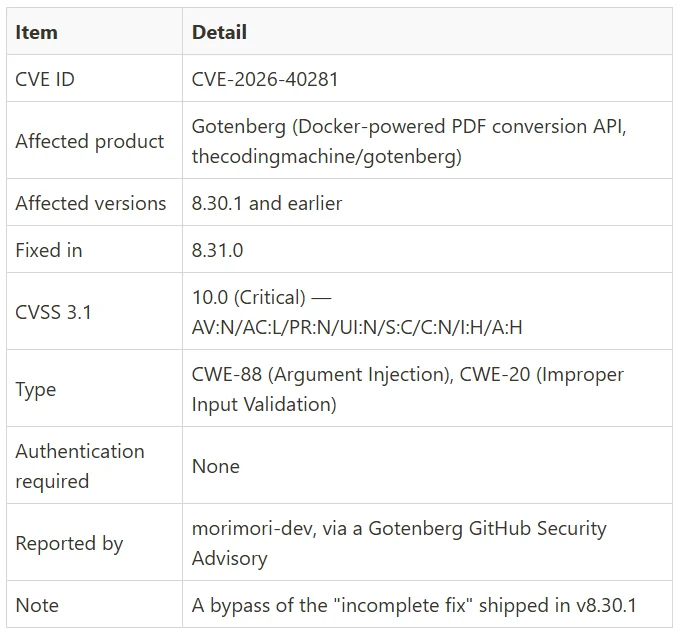
A patch for an earlier argument-injection flaw in Gotenberg only validated metadata keys, not values. An unauthenticated attacker could inject newlines into a metadata value to pass extra arguments to ExifTool, moving or overwriting arbitrary files inside the container as root.
 Published on medium.com
Docker
The full write-up lives on its author's site
It belongs to its author, so we link to it rather than copy it. The other two tabs are our own rewrites, checked against it.
Context
Gotenberg is a Docker-based API server that converts HTML and Office documents into PDFs. It can also write metadata, such as title and author, into the generated PDF. The actual metadata write is handled internally by an external program called ExifTool.
The flaw described here is a bypass of an earlier fix. The earlier reported issue was that a newline inside a metadata key could inject arbitrary arguments into ExifTool, and Gotenberg responded by adding a regex check on keys. Metadata, however, is a key/value pair and the attacker controls both sides. The patch validated only the left side of = (the key); the right side (the value) kept flowing to ExifTool unchecked. The same class of argument injection therefore became possible again by putting a newline in the value instead. An unauthenticated attacker can move or overwrite arbitrary files inside the Gotenberg container, or create symlinks and hardlinks at paths of their choosing, all as root.

Setup
The request shown targets a Gotenberg instance at http://target:3000, and the verification commands run against a container named gotenberg-test. The versions named are Gotenberg 8.30.1, whose patch added the key-only validation, and Gotenberg 8.31.0, which extends the validation to values. The earlier key-injection issue is tracked as CVE-2026-42589.
Finding it
The starting point is the metadata write pipeline. A client sends a PDF file plus JSON metadata, for example {"Title": "..."}, to /forms/pdfengines/metadata/write. Gotenberg passes that metadata to WriteMetadata() in pkg/modules/exiftool/exiftool.go. WriteMetadata() hands each key/value pair to SetString() in the go-exiftool library, which writes it, line by line, to the standard input (stdin) of a running ExifTool process:
fmt.Fprintln(e.stdin, "-"+k+"="+str)
ExifTool is a command-line tool, but instead of launching fresh for every request, Gotenberg keeps one process running and feeds it commands over stdin (-stay_open mode). In this design, every line written to stdin is effectively one command-line argument. If that one line secretly contains another newline, it creates an unintended second argument.
Exploitation
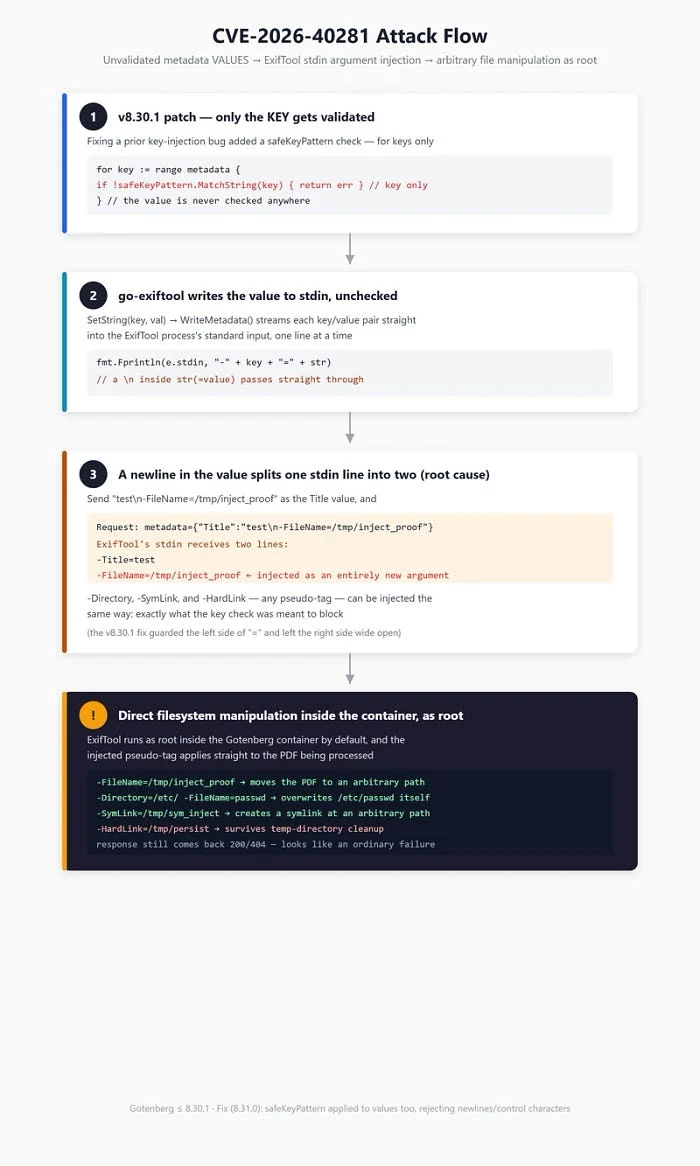
Step 1: the v8.30.1 patch validates the key, and only the key
In response to the earlier flaw, injecting arguments via a newline in the metadata key, Gotenberg 8.30.1 added this key-validation logic:
for key := range metadata { if !safeKeyPattern.MatchString(key) { return fmt.Errorf("write PDF metadata with ExifTool: invalid metadata key %q", key) }}
safeKeyPattern is a regex that only allows safe characters such as alphanumerics, blocking newlines or = from sneaking into a key. This part works exactly as intended.
Step 2: the value sails straight through to ExifTool, unchecked
The problem is the very next step. Once a key clears validation, its value is handed to SetString() with no check at all:
case string: fileMetadata[0].SetString(key, val)
go-exiftool's WriteMetadata() takes this key/value pair and writes it as one line to ExifTool's stdin:
fmt.Fprintln(e.stdin, "-"+k+"="+str)
k (the key) just passed validation, so it is safe. Nobody checks what is inside str (the value).
Step 3: a newline in the value splits one stdin line into two
fmt.Fprintln appends a newline after the string it is given, and does nothing to stop a newline that is already inside that string. So if str itself contains \n, ExifTool's stdin receives two lines instead of the intended one.
For example, send this as the Title metadata value:
Title = "test\n-FileName=/tmp/inject_proof"
and ExifTool's stdin actually receives:
-Title=test-FileName=/tmp/inject_proof
To ExifTool this is not "set Title to test": it is two entirely separate commands, the second being -FileName=/tmp/inject_proof. -FileName, -Directory, -SymLink and -HardLink are ExifTool pseudo-tags: they do not write metadata, they manipulate the filesystem directly. An attacker can inject any of these pseudo-tags through the value, and notably these are exactly the tags the key validation was meant to block. The v8.30.1 patch checked only the left side of =; the attacker reproduces the same outcome through the right side.
Step 4: direct filesystem manipulation inside the container, as root
Inside the Gotenberg container, ExifTool runs as root by default. Since the injected pseudo-tag applies directly to the PDF currently being processed, an attacker can manipulate the filesystem. The request used to demonstrate this is:
curl -s -w "\nHTTP %{http_code}" \ -F '[email protected];type=application/pdf' \ -F 'metadata={"Title":"test\n-FileName=/tmp/inject_proof"}' \ http://target:3000/forms/pdfengines/metadata/write
The Title value carries the newline followed by the -FileName pseudo-tag, so the second stdin line tells ExifTool to write the file it is processing to /tmp/inject_proof.
The result is verified inside the container:
docker exec gotenberg-test ls -la /tmp/inject_proof# -rw-r--r-- 1 root root ... /tmp/inject_proof (the PDF landed here)
The listing shows the processed PDF at /tmp/inject_proof.
Combining -Directory and -FileName can overwrite an arbitrary system file:
Title = "test\n-Directory=/etc/\n-FileName=passwd"
Here, ExifTool moves the entire PDF being processed to /etc/passwd, clobbering the system's user database with a PDF binary.
-SymLink creates a symlink at an arbitrary path, which can become a stepping stone for chaining into other read/write primitives:
Title = "test\n-SymLink=/tmp/sym_inject"
docker exec gotenberg-test ls -la /tmp/sym_inject
-HardLink creates a hard link, which can keep data around even after Gotenberg cleans up its temp directory.
The HTTP response itself comes back as an ordinary 200 (a valid PDF returned) or 404 (the file vanished mid-processing), so on the surface it just looks like a routine processing failure, which is easy to miss with basic monitoring.
Root cause
The mistake is a validation applied to one half of a key/value pair. The safeKeyPattern regex correctly rejects newlines and = in keys, but the value is concatenated into the same stdin line without any check. Because fmt.Fprintln only appends a trailing newline and does not escape embedded ones, a newline in the value splits the single line into two commands for the long-running -stay_open ExifTool process. The existing defence did not stop it because it was scoped to the key only, and the attacker controls the value just as much as the key.
Impact
An unauthenticated attacker can move or overwrite arbitrary files inside the Gotenberg container, or create symlinks and hardlinks at paths of their choosing, all as root, because ExifTool runs as root by default. The injected pseudo-tag applies to the PDF currently being processed, so the attacker can redirect that file to a chosen path, including system files such as /etc/passwd. Symlinks can serve as a stepping stone for chaining into other read/write primitives, and hard links can keep data around after Gotenberg cleans up its temp directory. The HTTP response is an ordinary 200 or 404, so the activity looks like a routine processing failure and is easy to miss with basic monitoring.
Fix
Gotenberg 8.31.0 extends the safeKeyPattern check, previously applied to keys only, to values as well, rejecting any value that contains a newline or other control character:
for key, value := range metadata { if !safeKeyPattern.MatchString(key) { return fmt.Errorf("write PDF metadata with ExifTool: invalid metadata key %q", key) } if str, ok := value.(string); ok { if strings.ContainsAny(str, "\n\r\x00") { return fmt.Errorf("write PDF metadata with ExifTool: invalid value for key %q (contains control character)", key) } }}
The lesson is that any code handing key=value pairs to an external process has to assume both sides of = are attacker-controlled. A fix that validates one side and assumes the rest must be safe leaves the door open. This is especially worth flagging in code review for any long-running, stay-open process fed commands over stdin: the moment a newline slips into a string written there, it becomes a brand new command line on its own.
The report's remediation guidance:
-
Update Gotenberg to 8.31.0 or later immediately.
-
If an immediate update is not possible, block the metadata-write endpoint (
/forms/pdfengines/metadata/write) at a reverse proxy or WAF, or add a temporary rule rejecting requests whose metadata values contain newlines or control characters. -
Running the Gotenberg container as a non-root user limits the blast radius of the same class of bug to whatever paths that user can write to, even if a similar flaw resurfaces.
-
If exposure is possible, check the container for unexpected file moves, symlinks or overwrites, especially under
/etc/and/tmp/, and recreate any container that may have been affected. -
Other metadata fields. Send the same newline-plus-pseudo-tag payload in fields other than
Title, such as author or subject. A positive result is a file appearing, moving or linking at the path named in the injected pseudo-tag. -
Other pseudo-tags. Try
-Directory,-SymLinkand-HardLinkin the value, alone and combined. A positive result is a file relocated to a chosen directory, a symlink created at a chosen path, or a hard link that survives temp-directory cleanup. -
Other control characters. The 8.31.0 fix rejects
\n,\rand\x00in values. On an unpatched instance, try carriage returns and other control characters in the value to see whether they also split or alter the stdin line. A positive result is the same filesystem effect as the newline payload. -
Other endpoints that feed ExifTool. Any Gotenberg feature that writes metadata through the same
WriteMetadata()path is worth testing with a newline in the value. A positive result is an injected pseudo-tag taking effect on the processed file. -
Response-based detection. Watch for 200 responses returning a valid PDF and 404 responses where the file vanished mid-processing. A positive result is a 404 on a request that should have succeeded, which may indicate the processed file was moved away by an injected pseudo-tag.
What happened, in plain words
Imagine a hotel reception desk. Guests fill in a form with two boxes: a label ("Name") and a value ("Alice"). The receptionist takes each completed form and reads it out loud to a clerk in the back office, one line at a time. The clerk does whatever the line says.
Now imagine a guest writes in the value box: "Alice" followed by a line break, and then a second instruction like "open the safe". The receptionist reads the form out loud, and because the line break looks exactly like the pause between two separate forms, the clerk hears two instructions instead of one. The second instruction was never meant to be there, but the clerk cannot tell the difference.
That is, in essence, what happened in this report. A program called Gotenberg lets people send it documents and some extra information about those documents (the "metadata": title, author and so on). Gotenberg passes that information to a helper program called ExifTool. An earlier bug had let an attacker sneak extra instructions into the label half of the information, and Gotenberg fixed that by checking labels carefully. But nobody checked the value half. So an attacker could put a line break in the value and sneak the very same kind of extra instruction through the other door.
The consequence is serious: an attacker who has never logged in can make the server move or overwrite files inside its own container, or create links to files, and all of this happens with the highest level of permission on the machine (the "root" user). The server's reply looks ordinary, so it is easy to miss with basic monitoring.
This article walks through the flaw step by step, in the same order as the technical write-up, and explains every term along the way.
The pieces involved
Before the steps, here is what each part of the story is.
Gotenberg is a Docker-based API server. Two ideas are packed into that phrase.
- An API server is a program that other programs talk to over the network. You send it a request in a structured format, and it sends back a structured answer. Think of a restaurant: you do not walk into the kitchen, you give your order to the waiter, and food comes back. The waiter is the API. The menu of things you can ask for is made of endpoints: each endpoint is one specific address, like a counter in the restaurant that handles one kind of order.
- Docker is a way of packaging a program together with everything it needs (its files, its settings, its libraries) into a sealed box called a container. The container runs on a machine but behaves like a small separate computer. If something goes wrong inside the container, the damage is normally limited to what is inside that box.
Gotenberg's job is to convert HTML pages and Office documents (Word files, spreadsheets) into PDFs, the fixed-layout document format you have probably opened in a browser or a PDF reader.
It can also write metadata into the PDF it produces. Metadata is information about a document rather than the document's content: the title, the author's name, the subject, keywords. If you have ever right-clicked a photo and chosen "Properties" to see the date it was taken, you have looked at metadata.
Metadata is stored as key/value pairs. A key is the label ("Title"), and a value is what goes in that label ("Annual Report"). The equals sign = is the conventional way to write the pair down: Title=Annual Report. This detail matters enormously later, because the whole bug is about one side of that = being checked and the other side not.
The actual writing of metadata into the PDF is not done by Gotenberg itself. It hands that job to a separate program called ExifTool, a well-known command-line utility for reading and writing metadata in many file formats.
A command-line tool is a program with no buttons or windows. You give it instructions as text, one instruction per line, and it does what the text says. When you type a command in a terminal, you are doing exactly this.
Overview
The short version of the story: a previous fix only closed half the door.
The earlier reported problem was that a newline inside a metadata key could inject arbitrary arguments into ExifTool. Gotenberg responded by adding a check on keys. But metadata is a key/value pair, and the attacker controls both sides, not just the key. The patch validated only the left side of = (the key); the right side (the value) kept flowing to ExifTool completely unchecked.
As a result, the exact same class of argument injection became possible again, simply by putting a newline in the value instead. An unauthenticated attacker (someone with no account and no login) can move or overwrite arbitrary files inside the Gotenberg container, or create symlinks and hardlinks at paths of their choosing, all as root.
We will unpack "argument injection", "symlink", "hardlink" and "root" as they come up.
Where the flaw lives: the metadata write pipeline
Here is how Gotenberg handles a request to write metadata into a PDF, in four numbered stages. A chain of stages like this is often called a pipeline: data enters at one end and is passed from hand to hand until it comes out the other end.
- A client sends a PDF file plus JSON metadata (for example
{"Title": "..."}) to the endpoint/forms/pdfengines/metadata/write. - Gotenberg passes that metadata to a function called
WriteMetadata()in the source filepkg/modules/exiftool/exiftool.go. WriteMetadata()hands each key/value pair to a function calledSetString()in a library calledgo-exiftool, which writes it, line by line, to the standard input of a running ExifTool process.- ExifTool reads those lines and acts on them.
Some vocabulary from that list:
- A client is simply the program making the request. It could be a browser, a script, or a tool like
curl(which we will meet shortly). - JSON is a text format for structured data. It looks like
{"Title": "..."}, with names in quotes, a colon, and a value. It is how programs pass labelled information to each other in a way both sides can read. - A function is a named block of code that does one job.
WriteMetadata()is the function whose job is to write metadata;SetString()is a function inside a library whose job is to set one string value. - A library is a collection of ready-made code that a program borrows instead of writing everything from scratch.
go-exiftoolis a library that lets Go programs talk to ExifTool. - stdin, short for standard input, is the stream of text a program reads as its input. When you type into a terminal and press Enter, your typing goes to the program's stdin. A program can also have its stdin fed by another program instead of a human.
Here is the line of code that does the writing:
fmt.Fprintln(e.stdin, "-"+k+"="+str)
Line by line, in plain words:
fmt.Fprintln(...)is a Go instruction meaning "print this text, then add a newline at the end".fmtis Go's formatting package,Fprintlnis the specific function, and thelnat the end signals the trailing newline.e.stdinis where the text goes: the stdin of the ExifTool process that Gotenberg keeps running."-"+k+"="+strbuilds the text out of three pieces glued together with+: a minus sign-, thenk(the key), then an equals sign=, thenstr(the value). So a keyTitleand a valueAnnual Reportbecome the text-Title=Annual Report.
Why the leading minus sign? Because ExifTool is a command-line tool, and on a command line a word starting with - is an option (also called a flag or argument): an instruction about how to behave, rather than a file to work on. -Title=Annual Report tells ExifTool "set the Title tag to Annual Report".
Now the crucial design detail. ExifTool is a command-line tool, but instead of launching a fresh copy for every request, Gotenberg keeps one process running and feeds it commands over stdin. This is called -stay_open mode: the program stays open and waits for more lines instead of exiting after one job. It is a performance trick, like keeping a shop assistant at the counter instead of hiring a new one for every customer.
In this design, every line written to stdin is effectively one command-line argument. So if that one line secretly contains another newline, it creates an unintended "second argument".
An everyday comparison: think of a fax machine that sends one page per sheet. If you sneak a second sheet into the feeder, the recipient receives two pages and treats them as two separate documents, even though you only meant to send one.
Step-by-step source analysis
Step 1: the v8.30.1 patch validates the key, and only the key
In response to an earlier-reported flaw (injecting arguments via a newline in the metadata key, tracked as CVE-2026-42589), Gotenberg 8.30.1 added this key-validation logic:
for key := range metadata { if !safeKeyPattern.MatchString(key) { return fmt.Errorf("write PDF metadata with ExifTool: invalid metadata key %q", key) }}
Line by line:
for key := range metadata {starts a loop that goes through every key in the metadata. A loop is code that repeats the same steps for each item in a collection. Here the collection ismetadata, the set of key/value pairs the client sent.if !safeKeyPattern.MatchString(key) {asks a question: does this key not match the safe pattern?safeKeyPatternis a regex (regular expression), which is a compact way of describing "what allowed text looks like".MatchStringchecks the key against that description, and the!means "not".return fmt.Errorf("write PDF metadata with ExifTool: invalid metadata key %q", key)is what happens when the answer is yes: the function stops and returns an error message saying the key is invalid.%qis a placeholder that inserts the offending key, wrapped in quotes, into the message.
safeKeyPattern is a regex that only allows safe characters such as alphanumerics (letters and digits), blocking newlines or = from sneaking into a key. This part works exactly as intended.
A CVE is a public catalogue number for a known security flaw. The letters stand for Common Vulnerabilities and Exposures, and the number lets everyone refer to the same bug unambiguously. The earlier key-injection issue is CVE-2026-42589.
Why was this step taken? Because the earlier bug proved that a newline in a key could smuggle a second instruction into ExifTool. The fix was to refuse any key that contains anything unusual. It is a sensible fix, and it does its job. The problem is what it does not cover.
Step 2: the value sails straight through to ExifTool, unchecked
The problem is the very next step. Once a key clears validation, its value is handed to SetString() with no check at all:
case string: fileMetadata[0].SetString(key, val)
Line by line:
case string:is part of a switch, a Go construct that picks one branch depending on what type of thing it is looking at. This branch runs when the value is a piece of text (a string, in programming terms).fileMetadata[0].SetString(key, val)calls theSetStringfunction on the first entry offileMetadata, passing along the key and the value.[0]means "the first item", because programmers count from zero.
go-exiftool's WriteMetadata() takes this key/value pair and writes it as one line to ExifTool's stdin:
fmt.Fprintln(e.stdin, "-"+k+"="+str)
This is the same line we already met: print a minus sign, the key, an equals sign and the value, then a newline, into ExifTool's stdin.
k (the key) just passed validation, so it is safe. Nobody checks what is inside str (the value).
Why does this matter? Because the attacker supplies the value too. The fix treated the key as dangerous and the value as harmless, but both arrive from the same untrusted request. It is like a nightclub that searches everyone's left pocket and waves through whatever is in the right one.
Step 3: a newline in the value splits one stdin line into two (the root cause)
fmt.Fprintln appends a newline after the string it is given, and does nothing to stop a newline that is already inside that string. So if str itself contains \n, ExifTool's stdin receives two lines instead of the intended one.
A newline is the invisible character that marks the end of a line, the one produced when you press Enter. In many programming languages it is written \n in text: a backslash followed by the letter n, standing for "new line". To a program reading line by line, a newline is not decoration; it is the boundary between one instruction and the next.
For example, send this as the Title metadata value:
Title = "test\n-FileName=/tmp/inject_proof"
and ExifTool's stdin actually receives:
-Title=test-FileName=/tmp/inject_proof
What these two blocks show:
- The first block is what the attacker puts in the request. The value of
Titleis the texttest, then a newline (\n), then-FileName=/tmp/inject_proof. - The second block is what ExifTool's stdin ends up containing. Gotenberg glues
-, the keyTitle,=, and the value together, then adds its own newline at the end. Because the value already contained a newline, the result is two lines:-Title=testand-FileName=/tmp/inject_proof.
To ExifTool this is not "set Title to test": it is two entirely separate commands, the second being -FileName=/tmp/inject_proof.
-FileName, -Directory, -SymLink and -HardLink are ExifTool pseudo-tags: they do not write metadata, they manipulate the filesystem directly. A pseudo-tag is a name that looks like a metadata field but is really an instruction to the program itself. -FileName says "put the file here"; -Directory says "put it in this folder"; -SymLink and -HardLink create links, which we will explain in the next step.
An attacker can inject any of these pseudo-tags through the value, and notably these are exactly the tags the key validation was meant to block. The v8.30.1 patch checked only the left side of =; the attacker reproduces the same outcome through the right side.
This is the root cause: the single underlying mistake from which everything else follows. The check was applied to one half of a pair whose other half is equally under the attacker's control.
Step 4: direct filesystem manipulation inside the container, as root
Inside the Gotenberg container, ExifTool runs as root by default. Root is the all-powerful account on a Unix-like system: it can read, write, move or delete any file, regardless of who owns it. Running a service as root is like giving the cleaner a master key to every room in the building.
Since the injected pseudo-tag applies directly to the PDF currently being processed, an attacker gains filesystem control. The request used to demonstrate this is:
curl -s -w "\nHTTP %{http_code}" \ -F '[email protected];type=application/pdf' \ -F 'metadata={"Title":"test\n-FileName=/tmp/inject_proof"}' \ http://target:3000/forms/pdfengines/metadata/write
Line by line:
curlis a command-line program for sending web requests. It is the terminal equivalent of typing an address into a browser, but it can also attach files and data.-smeans silent: do not print progress information, only the result.-w "\nHTTP %{http_code}"means write out: after the response, print a newline and the textHTTPfollowed by the HTTP status code. A status code is the three-digit number a web server returns to say how the request went; 200 means success, 404 means not found.-F '[email protected];type=application/pdf'attaches a file to the request as a form field namedfiles. The@means "read the contents from this local file",test.pdfis the file, andtype=application/pdfdeclares that it is a PDF. A form field is one named part of a request, the same idea as one box on a web form.-F 'metadata={"Title":"test\n-FileName=/tmp/inject_proof"}'attaches a second form field namedmetadata, whose content is the JSON with the maliciousTitlevalue. This is the payload: the data crafted to trigger the bug.http://target:3000/forms/pdfengines/metadata/writeis the address being called.targetstands for the server's hostname,3000is the port (the numbered door on that machine where Gotenberg listens), and the rest is the endpoint path.- The backslashes
\at the end of lines simply mean "this command continues on the next line". They are there for readability.
The Title value carries the newline followed by the -FileName pseudo-tag, so the second stdin line tells ExifTool to write the file it is processing to /tmp/inject_proof.
Why this step? To prove the theory end to end: not just that a newline reaches ExifTool, but that it produces a real, visible effect on the filesystem.
The result is verified inside the container:
docker exec gotenberg-test ls -la /tmp/inject_proof# -rw-r--r-- 1 root root ... /tmp/inject_proof (the PDF landed here)
Line by line:
docker execmeans "run a command inside a running container".gotenberg-testis the container's name.ls -lais the standard command for listing files.-lasks for the long format (permissions, owner, size, date), and-aincludes hidden files./tmp/inject_proofis the path being inspected./tmpis the conventional temporary folder on Unix-like systems.- The line beginning
#is the output:-rw-r--r--describes the permissions (readable and writable by the owner, readable by everyone else),1is the number of links,root rootis the owner and group, and the comment notes that the PDF landed here.
The listing shows the processed PDF at /tmp/inject_proof. In other words, the attacker made the server place the document it was working on at a location of the attacker's choosing.
Combining -Directory and -FileName can overwrite an arbitrary system file:
Title = "test\n-Directory=/etc/\n-FileName=passwd"
Here, ExifTool moves the entire PDF being processed to /etc/passwd, clobbering the system's user database with a PDF binary.
/etc/passwd is a real system file on Unix-like machines that lists the user accounts. It is not a password store in the modern sense, but it is a core part of how the system knows who exists. Overwriting it with a PDF means the machine's account information is destroyed. The two pseudo-tags work together: -Directory chooses the folder, -FileName chooses the name inside it.
-SymLink creates a symlink at an arbitrary path, which can become a stepping stone for chaining into other read/write primitives:
Title = "test\n-SymLink=/tmp/sym_inject"
docker exec gotenberg-test ls -la /tmp/sym_inject
What a symlink (symbolic link) is: a file that is really a signpost pointing at another file. Opening the signpost opens the target. It is like a shortcut on a desktop. Attackers like symlinks because a program that is allowed to write to the signpost may end up writing to whatever it points at, which is why the report calls it a stepping stone for chaining into other read/write primitives. A primitive here means a small, reliable capability that can be combined with others to achieve more.
The second block is the same docker exec ... ls -la pattern as before, this time checking whether the symlink appeared at /tmp/sym_inject.
-HardLink creates a hard link, which can keep data around even after Gotenberg cleans up its temp directory.
A hard link is different from a symlink. It is a second name for the same file on disk. Deleting one name does not delete the data as long as another name still points at it. That is why the report notes it can keep data around after cleanup: the cleanup removes one name, but the attacker's name still refers to the same content.
The HTTP response itself comes back as an ordinary 200 (a valid PDF returned) or 404 (the file vanished mid-processing), so on the surface it just looks like a routine processing failure, which is easy to miss with basic monitoring.
Monitoring means watching a system's logs and traffic for signs of trouble. Here the trouble leaves almost no trace in the response: a success code or a not-found code, both of which a normal, broken request could also produce.
Root cause
The mistake is a validation applied to one half of a key/value pair. The safeKeyPattern regex correctly rejects newlines and = in keys, but the value is concatenated into the same stdin line without any check. Because fmt.Fprintln only appends a trailing newline and does not escape embedded ones, a newline in the value splits the single line into two commands for the long-running -stay_open ExifTool process. The existing defence did not stop it because it was scoped to the key only, and the attacker controls the value just as much as the key.
To concatenate means to join pieces of text end to end. To escape a character means to mark it so it is treated as ordinary text rather than as a special instruction. fmt.Fprintln does not escape the newline inside the value; it just adds its own newline at the end and sends the whole thing.
Impact
An unauthenticated attacker can move or overwrite arbitrary files inside the Gotenberg container, or create symlinks and hardlinks at paths of their choosing, all as root, because ExifTool runs as root by default. The injected pseudo-tag applies to the PDF currently being processed, so the attacker can redirect that file to a chosen path, including system files such as /etc/passwd. Symlinks can serve as a stepping stone for chaining into other read/write primitives, and hard links can keep data around after Gotenberg cleans up its temp directory. The HTTP response is an ordinary 200 or 404, so the activity looks like a routine processing failure and is easy to miss with basic monitoring.
Unauthenticated means no login is required. The attacker does not need an account, a password or a session; reaching the endpoint is enough.
Fix
Gotenberg 8.31.0 extends the safeKeyPattern check, previously applied to keys only, to values as well, rejecting any value that contains a newline or other control character:
for key, value := range metadata { if !safeKeyPattern.MatchString(key) { return fmt.Errorf("write PDF metadata with ExifTool: invalid metadata key %q", key) } if str, ok := value.(string); ok { if strings.ContainsAny(str, "\n\r\x00") { return fmt.Errorf("write PDF metadata with ExifTool: invalid value for key %q (contains control character)", key) } }}
Line by line:
for key, value := range metadata {loops over the metadata again, but this time it picks up both the key and the value of each pair.if !safeKeyPattern.MatchString(key) {is the old key check, unchanged: if the key does not match the safe pattern, stop with an error.if str, ok := value.(string); ok {asks whether the value is text. If it is, it is stored instrand the branch runs; if not, the branch is skipped.if strings.ContainsAny(str, "\n\r\x00") {is the new check: does the value contain any of these characters?\nis a newline,\ris a carriage return (the older, related way of marking a line break), and\x00is a null byte, a character with value zero that some programs treat as an end-of-text marker. These are control characters: characters that do not print but tell a program how to behave.return fmt.Errorf("write PDF metadata with ExifTool: invalid value for key %q (contains control character)", key)stops with an error naming the key whose value was rejected.
The lesson is that any code handing key=value pairs to an external process has to assume both sides of = are attacker-controlled. A fix that validates one side and assumes the rest must be safe leaves the door open. This is especially worth flagging in code review for any long-running, stay-open process fed commands over stdin: the moment a newline slips into a string written there, it becomes a brand new command line on its own.
Code review is the practice of having other developers read a change before it ships, looking for mistakes exactly like this one.
The report's remediation guidance:
- Update Gotenberg to 8.31.0 or later immediately.
- If an immediate update is not possible, block the metadata-write endpoint (
/forms/pdfengines/metadata/write) at a reverse proxy or WAF, or add a temporary rule rejecting requests whose metadata values contain newlines or control characters. - Running the Gotenberg container as a non-root user limits the blast radius of the same class of bug to whatever paths that user can write to, even if a similar flaw resurfaces.
- If exposure is possible, check the container for unexpected file moves, symlinks or overwrites, especially under
/etc/and/tmp/, and recreate any container that may have been affected.
A reverse proxy is a server that sits in front of the real application and forwards requests to it, which makes it a convenient place to block certain requests. A WAF (web application firewall) is a filter that inspects web traffic and rejects patterns that look malicious. Blast radius means how much damage a single failure can cause.
These are the follow-up checks the report suggests, for anyone verifying a similar setup.
- Other metadata fields. Send the same newline-plus-pseudo-tag payload in fields other than
Title, such as author or subject. A positive result is a file appearing, moving or linking at the path named in the injected pseudo-tag. - Other pseudo-tags. Try
-Directory,-SymLinkand-HardLinkin the value, alone and combined. A positive result is a file relocated to a chosen directory, a symlink created at a chosen path, or a hard link that survives temp-directory cleanup. - Other control characters. The 8.31.0 fix rejects
\n,\rand\x00in values. On an unpatched instance, try carriage returns and other control characters in the value to see whether they also split or alter the stdin line. A positive result is the same filesystem effect as the newline payload. - Other endpoints that feed ExifTool. Any Gotenberg feature that writes metadata through the same
WriteMetadata()path is worth testing with a newline in the value. A positive result is an injected pseudo-tag taking effect on the processed file. - Response-based detection. Watch for 200 responses returning a valid PDF and 404 responses where the file vanished mid-processing. A positive result is a 404 on a request that should have succeeded, which may indicate the processed file was moved away by an injected pseudo-tag.
Glossary
- API: a defined way for one program to ask another program to do something, over the network, using structured requests and responses.
- API server: a program that listens for those structured requests and answers them.
- Argument: an instruction given to a command-line program, usually a word starting with
-, telling it how to behave. - Argument injection: sneaking extra arguments into a program's input so it does something the sender never intended.
- Blast radius: how much damage one failure can cause.
- Client: the program making a request.
- Code review: other developers reading a code change before it ships, to catch mistakes.
- Concatenate: join pieces of text end to end.
- Container: a sealed package containing a program and everything it needs, running like a small separate computer.
- Control character: a character that does not print but tells a program how to behave, such as a newline or a null byte.
- CVE: a public catalogue number for a known security flaw, so everyone can refer to the same bug.
- Docker: software for building and running containers.
- Endpoint: one specific address on a server that handles one kind of request.
- Escape: mark a character so it is treated as ordinary text rather than a special instruction.
- ExifTool: a command-line program for reading and writing metadata in files.
- Form field: one named part of a web request, like one box on a form.
- Function: a named block of code that does one job.
- Gotenberg: a Docker-based API server that converts HTML and Office documents into PDFs and can write metadata into them.
- Hard link: a second name for the same file on disk; the data survives as long as any name remains.
- JSON: a text format for structured data, made of names, colons and values.
- Key/value pair: a label and the content stored under it, conventionally written
key=value. - Library: ready-made code a program borrows instead of writing everything itself.
- Loop: code that repeats the same steps for each item in a collection.
- Metadata: information about a document rather than its content, such as title or author.
- Monitoring: watching logs and traffic for signs of trouble.
- Newline: the invisible character marking the end of a line, written
\nin text. - Option: another word for an argument to a command-line program.
- PDF: a fixed-layout document format.
- Pipeline: a chain of stages where data is passed from one hand to the next.
- Port: the numbered door on a machine where a service listens.
- Primitive: a small, reliable capability that can be combined with others.
- Pseudo-tag: an ExifTool name that looks like a metadata field but is really an instruction to manipulate the filesystem.
- Regex: a compact way of describing what allowed text looks like.
- Reverse proxy: a server in front of the real application that forwards requests to it.
- Root: the all-powerful account on a Unix-like system, able to read and write any file.
- Status code: the three-digit number a web server returns to say how a request went, such as 200 for success or 404 for not found.
- stdin: the stream of text a program reads as its input.
-stay_openmode: an ExifTool mode where one process stays running and reads commands over stdin instead of restarting for each job.- String: a piece of text in programming.
- Switch: a programming construct that picks one branch depending on what it is looking at.
- Symlink: a file that acts as a signpost pointing at another file.
- Unauthenticated: requiring no login or account.
- WAF: a web application firewall, a filter that inspects web traffic and rejects malicious patterns.



