CVE-2026–64638 (XSS2Shell): From a WordPress Login-Page XSS to Remote Code Execution
A reflected cross-site scripting flaw in the WordPress login page lets an unauthenticated attacker inject an HTML element that hijacks a JavaScript variable, leading to arbitrary method execution in the site's origin. When chained with a logged-in administrator opening an attacker page, this can steal an application password and ultimately upload a PHP webshell for remote code execution.
 Published on medium.com
WordPress
The full write-up lives on its author's site
It belongs to its author, so we link to it rather than copy it. The other two tabs are our own rewrites, checked against it.
Context
XSS2Shell is a chain that starts at wp-login.php, the WordPress login page. That page is reachable by anyone, needs no account, and is exposed to the Internet by design on virtually every WordPress installation. The report's point is not an exotic technique but the entry point: a single reflected XSS on that page, chained through features already present in Core, climbs to PHP code execution on the server.
The chain has two phases of very different strength. Phase 1, the reflected XSS, is unauthenticated and unconditional: it fires against any default install. Phase 2, escalation to a webshell, is conditional: it requires a logged-in administrator to open an attacker-controlled page. The CVSS vector's AC:H (high attack complexity) and UI:R (user interaction required) describe exactly that conditionality.

Setup
The first four steps need no special conditions and are reproducible by anyone. The last three assume one click from a logged-in administrator. The report walks through each step at source-code level.
Finding it
When a login attempt fails, WordPress echoes the submitted username back in the error message, for example "Unknown username johndoe". Before that value reaches the page it travels this path:
wp_signon()
  └─ wp_authenticate()
       └─ sanitize_user()
            └─ wp_strip_all_tags()
                 └─ strip_tags()
     └─ wp_login() fails → login_header()
          └─ wp_admin_notice()
               └─ wp_kses_post()
The same string is sanitised twice, once by strip_tags() and once by wp_kses_post(). The bug is that the two functions disagree on what counts as a tag.
strip_tags()'s blind spot
PHP's strip_tags() only recognises something as a tag when the tag name sits flush against the opening <.
strip_tags('<area id=x>');
strip_tags('< area id=x>');
With a single space right after the <, strip_tags() decides the input is plain text, not markup, and leaves it untouched. At that point the string is not yet dangerous; it has simply survived the first filter.
wp_kses_post()'s blind spot
Right before the value is rendered, WordPress runs it through wp_kses_post(), its flagship HTML sanitizer. Unlike strip_tags(), the wp_kses_post() tokenizer disregards whitespace before the tag name, so it parses < area ...> as an ordinary <area> tag. <area> is on the wp_kses_post() allowlist, together with the id, href, class and name attributes. The value is therefore never escaped and is rendered as live HTML.
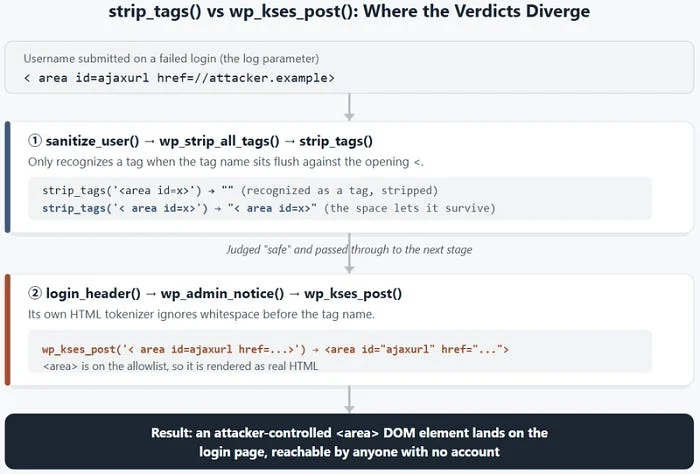
The disagreement in one line each:
strip_tags(): "not a tag, leave it alone", so it passes through.wp_kses_post(): "this is an allowlisted tag", so it renders as real HTML.
The same string is judged harmless by the first filter and valid HTML by the second. In that gap an attacker plants an <area> element of their choosing on the login page, with no account required. <script> tags and event attributes such as onclick are still blocked by wp_kses_post(), so this step alone does not run JavaScript.
Exploitation
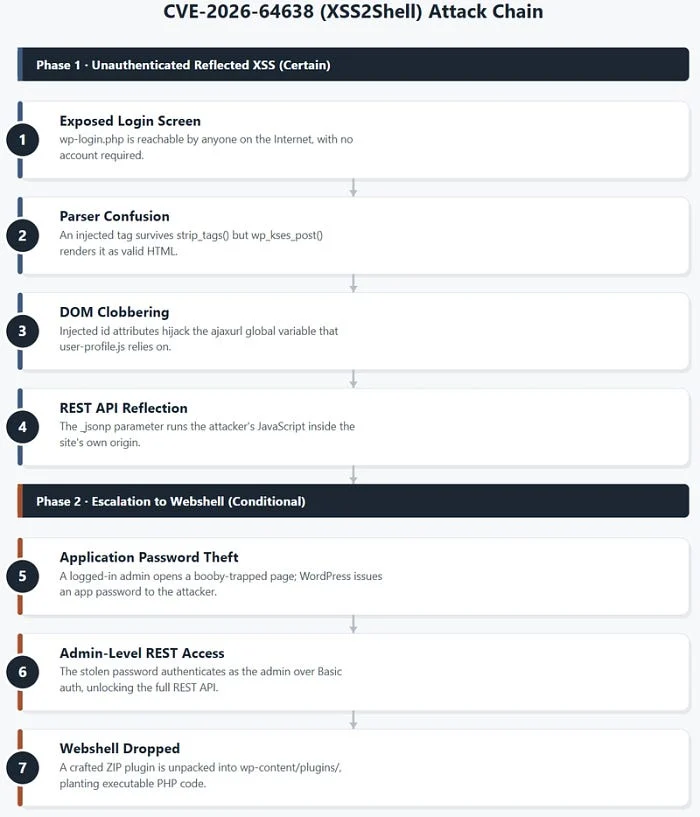
Step 1: Parser confusion between two sanitizers
The injected value is an <area> element with attributes chosen by the attacker. It survives strip_tags() because of the space after <, and it is accepted by wp_kses_post() because that tokenizer ignores the same whitespace and because <area> and its attributes are allowlisted. The result is attacker-controlled HTML on the login page, unauthenticated.
Step 2: DOM clobbering a JavaScript global
The login page also loads user-profile.js, a script meant for the password-reset flow. On load it looks for the password-generation button and, in doing so, references the global ajaxurl variable as a string.
DOM clobbering pollutes JavaScript globals using only HTML. Browsers expose elements with an id or name attribute as properties on window, provided no real variable with that name is already declared. An injected <area id="ajaxurl" href="attacker-url"> is enough to make window.ajaxurl reference that DOM element instead of a string.
When user-profile.js uses ajaxurl as a string, for example by concatenating it into a URL, the JS engine calls .toString() on it. An <area> element's toString() returns exactly its href attribute, so the destination the script was about to hit becomes whatever URL the attacker wrote.
Injected tag:  <area id="ajaxurl" href="/?rest_route=/&_method=GET&_jsonp=<callback>&_envelope=1">
What user-profile.js does (conceptually):  var url = ajaxurl + "?action=...";
At this point the attacker can redirect one outgoing request to a URL of their choosing. That is not yet code execution.
Step 3: REST API JSONP reflection
The attacker points the "redirect one request" primitive at WordPress's REST API JSONP support:
GET /?rest_route=/&_method=GET&_jsonp=<callback-name>&_envelope=1
The REST API validates the _jsonp value against ^[a-zA-Z0-9_.]+$. The character that stands out is the dot. What looks like a standard callback-name filter (letters, digits, underscore) also allows dots, so <callback-name> can be a dotted object path such as window.opener.approve.click.
The server responds with Content-Type: application/javascript:
window.opener.approve.click({ ...REST API response data... })
WordPress admin screens run jQuery, and jQuery passes responses like this through globalEval() without question. The result is an arbitrary object.method() call, chosen by the attacker, executing inside the site's own origin. This is not a toy alert(): window.opener refers to the window the admin already had open, so the attacker can programmatically click a specific button inside it.
Steps 1 to 3 together are the unauthenticated, unconditional reflected XSS. They reproduce on any exposed login page regardless of who the visitor is.
Step 4 (conditional): SOME steals an application password
From here the chain requires an already-logged-in administrator to open an attacker-controlled page.
WordPress ships an Application Password feature so external tools can authenticate to the REST API. The authorisation screen, authorize-application.php, generates a new password when the user clicks "Approve", then redirects to a pre-specified return URL carrying the username and cleartext password.
The attacker gets the admin's browser to open this authorisation screen and, using the JSONP execution primitive from Step 3, programmatically fires the click event on the "Approve" button. The admin never clicked anything, but WordPress treats it as a legitimate click, issues the application password, and hands it to the attacker's return URL.
This class of attack is SOME (Same-Origin Method Execution). It introduces no vulnerability of its own; it triggers an existing, legitimate feature, a button click, at a time and in a way the attacker chooses.
Step 5: Admin-level REST API access
An application password lets anyone authenticate over HTTP Basic auth with username:app-password, without the real login password or session cookie, and with the full privileges of that account on the REST API. The attacker now has admin-level API access without ever seeing the real credentials.
Step 6: Webshell drop via plugin upload
The last step abuses the ordinary plugin-installation feature:
- Fetch a CSRF nonce from the plugin-upload screen via the REST API.
- Craft a ZIP file containing a PHP webshell and submit it via
POST /wp-admin/update.php?action=upload-plugin. - WordPress extracts the ZIP directly into
wp-content/plugins/.
PHP files inside a plugin directory are directly web-reachable and executable without the plugin ever being activated. Hitting the uploaded PHP file directly completes the chain to remote code execution.
Root cause
The root cause is the disagreement between strip_tags() and wp_kses_post() about whitespace between < and a tag name, combined with the fact that the username is echoed back into an error notice that is rendered as HTML. strip_tags() lets the value through; wp_kses_post() then treats it as an allowlisted <area> element and renders it live. <script> and event handlers remain blocked, so the XSS is built from DOM clobbering and a JSONP callback rather than from inline script.
Each later stage relies on a legitimate Core feature behaving as designed: window property exposure for id/name elements, <area>.toString() returning href, jQuery's globalEval() on JSONP responses, the _jsonp regex permitting dots, the Application Password approval flow, and plugin upload extracting into a web-reachable directory without requiring activation.
Impact
Phase 1 is unauthenticated and unconditional: any visitor can plant the <area> element on an exposed login page. Phase 2 requires a logged-in administrator to open an attacker-controlled page, which is why the vector carries AC:H and UI:R. When that condition is met, the attacker obtains an application password with the admin's REST API privileges, then uploads a ZIP containing a PHP webshell into wp-content/plugins/ and executes it directly, achieving remote code execution on the server.
Fix
The fix is deliberately narrow. Rather than reconciling the disagreement between strip_tags() and wp_kses_post(), WordPress escapes the value right before it is rendered:
$message = sprintf(
    __( '<strong>Error</strong>: %s is not a registered username.' ),
    $username
);
$message = sprintf(
    __( '<strong>Error</strong>: %s is not a registered username.' ),
    esc_html( $username )
);
esc_html() turns < and > into < and >, so it no longer matters what the wp_kses_post() allowlist contains downstream: nothing is left that can be parsed as a real tag. The underlying disagreement between the two sanitizers still exists elsewhere in the codebase; it simply no longer surfaces at this output point.
The fix landed in 7.0.3 and was backported across 24 maintenance branches back to 4.7. Because the exact backported version differs per branch (6.9.x got 6.9.6, 6.8.x got 6.8.7, and so on), a blanket "below 7.0.3" check is unreliable: verify against the latest maintenance release for your specific branch, since that comparison alone can produce false positives on older branches.
Variants to test
Confirm the reflection directly (non-destructive)
No account creation and no write operations: just check whether the payload reflects unescaped. The space between < and the tag name is the key marker.
curl -s -X POST https:  -H 'Content-Type: application/x-www-form-urlencoded' \
  --data 'log=%3C%20area%20id%3Dajaxurl%20href%3D%2F%3Frest_route%3D%2F%26_method%3DGET%26_jsonp%3Dalert%3E&pwd=x&wp-submit=Log+In' \
  | grep -io '<area[^>]*id=["'"'"']*ajaxurl[^>]*>'
A response containing an unescaped <area id=ajaxurl ...> means the target is vulnerable. No output does not by itself prove a patched state: a WAF or reverse proxy could be stripping the value upstream, so cross-check against the actual version.
Log signatures worth watching
- A
POST /wp-login.phpwhoselogfield contains a URL-encoded<(%3C) followed by an encoded whitespace character (%20,%09,%0a,%0d). No legitimate username needs an angle bracket. - A REST API request with a
_jsonp=parameter whose callback value contains a dot, a sign of an object-path call rather than a plain callback name. - Access to
authorize-application.phpwith a return URL outside your own domain, immediately followed byPOST /wp-admin/update.php?action=upload-plugin.
Do not scope detection rules to the literal string < area. Any tag on the wp_kses_post() allowlist works just as well, and a tab (%09) or newline (%0a, %0d) is as effective as a space. The rule needs to catch an encoded < immediately before what looks like a tag name, not one specific tag.
Mitigations pending a patch
Patching remains the only complete fix. If you cannot update immediately, these reduce the blast radius:
- Restrict access to
wp-login.phpby IP or upstream authentication, cutting off the initial entry point. - Disable Application Passwords if you do not use them, which neutralises Step 4.
- Define
DISALLOW_FILE_MODSinwp-config.phpto block plugin installation from the admin UI, breaking Step 6. - Ensure PHP cannot execute directly from inactive plugin directories. Since the chain never activates the uploaded plugin, closing this gap stops execution even if a webshell is dropped.
All of these interrupt escalation after the fact; none touches the root cause, the reflected XSS in Steps 1 to 3. A WAF rule that only blocks the literal < area string is trivially bypassed and is no more than a stopgap.
What happened, in plain words
A security researcher described a way to take over a WordPress website, starting with something odd typed into its login page. WordPress is the software that runs a very large share of the world's blogs and small business sites. Its login page, the one at wp-login.php where you type your username and password, is open to the whole Internet on almost every WordPress site, because that is how it is designed: anyone who visits the site can reach it, and no account is needed to look at it.
The researcher's point is not that the trick is exotic. The point is where it starts. A single flaw on that public login page, combined with several ordinary features that already ship inside WordPress, can be pushed step by step until the attacker can run their own code on the server. Running your own code on someone else's server is called remote code execution, and it is about as bad as it gets: the attacker is no longer a visitor, they are effectively the machine.
The chain of steps splits into two halves that are not equally strong.
- Phase 1, the reflected XSS. This is the flaw on the login page itself. It needs no account and no special conditions: it works against any default WordPress install. "Reflected" means the bad input is not stored on the site; it bounces straight back to whoever sent it, in the page that is returned.
- Phase 2, turning that into a webshell. A webshell is a small program an attacker uploads to a server so they can send it commands later, through the browser, like a remote control. This half is conditional: it needs a logged-in administrator to open a page the attacker controls. That is one click from a real person with real power.
The report describes this conditionality with a CVSS vector. CVSS is a standard scoring system for how serious a vulnerability is, and its vector is a short code listing the reasons for the score. Two parts of that code matter here: AC:H, meaning high attack complexity, and UI:R, meaning user interaction is required. In plain words: the attack is fiddly and it needs a person to do something.
At a glance
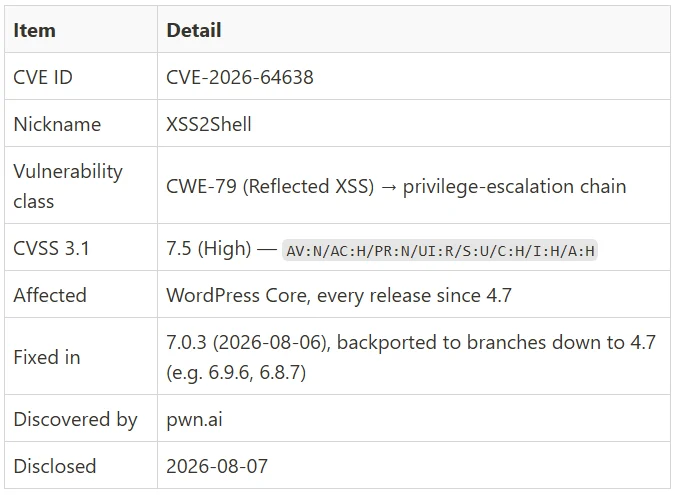
Before the details, here is the shape of the whole thing. The entry point is wp-login.php, reachable by anyone, no account required, exposed to the Internet by design on virtually every WordPress site. A single XSS there, chained through several features that were already sitting in Core, climbs all the way to PHP code execution on the server. "Core" means the main body of WordPress itself, as opposed to a plugin or theme someone added. PHP is the programming language WordPress is written in, and the language most WordPress sites run on their server.
XSS stands for cross-site scripting. It is a class of bug where a website takes something a visitor typed and puts it back into a page as if it were part of the site's own instructions, so the visitor's browser obeys the attacker instead of the site. Think of a noticeboard where the rule is "write your name here", and someone writes their name plus a note saying "and also hand your keys to the person who wrote this". If the board does not check, the next person reads the note as if the board itself had written it.
The chain splits cleanly into two phases, and they do not carry the same weight. Phase 1, the reflected XSS, is unauthenticated and unconditional: it fires against any default install. "Unauthenticated" means you do not need to log in to trigger it. "Unconditional" means there is no if, no prerequisite, no waiting for someone else. Phase 2, escalation to a webshell, is conditional: it requires a logged-in administrator to open an attacker-controlled page. The CVSS vector's AC:H and UI:R capture exactly that conditionality.
The full attack chain
The first three steps need no special conditions and are reproducible by anyone. The last three assume one click from a logged-in admin. Each step below is explained at the level of the source code, which is the actual text of the program that WordPress runs.
Step 1: parser confusion, two sanitizers, two different verdicts
When a login attempt fails, WordPress echoes the submitted username back in the error message, for example "Unknown username johndoe". That is a friendly thing to do: it tells you which part of your login was wrong. It is also where the trouble starts, because the username is something the visitor controls completely.
Before that value reaches the page, it travels through this path:
wp_signon()
  └─ wp_authenticate()
       └─ sanitize_user()
            └─ wp_strip_all_tags()
                 └─ strip_tags()
     └─ wp_login() fails → login_header()
          └─ wp_admin_notice()
               └─ wp_kses_post()
Line by line, in plain words:
wp_signon()is the function that handles a login attempt. Everything starts here.wp_authenticate()is the next function down, which checks the credentials.sanitize_user()is a cleaning step for usernames. "Sanitise" means to make something safe to use, usually by removing or neutralising dangerous parts.wp_strip_all_tags()is a WordPress wrapper around a PHP function that removes HTML tags. An HTML tag is a piece of markup in angle brackets, like<b>for bold, that tells the browser how to display something.strip_tags()is that PHP function itself. It is the first of the two cleaners in this story.wp_login() failsmeans the login did not succeed, so WordPress moves on to showing an error.login_header()builds the top of the login page, including its notices.wp_admin_notice()is the function that draws an admin notice, the coloured box that says something went wrong.wp_kses_post()is WordPress's main HTML sanitizer, the second cleaner. It is the one that decides which tags and attributes are allowed to appear in content.
The same string is sanitised twice, once by strip_tags() and once by wp_kses_post(). The bug is that these two functions disagree on what counts as a tag. Two cleaners, two different opinions, and the gap between the opinions is where the attacker lives.
strip_tags()'s blind spot: the space between < and the tag name
PHP's strip_tags() only recognises something as a tag when the tag name sits flush against the opening <.
strip_tags('<area id=x>');
strip_tags('< area id=x>');
Line by line:
- The first line passes a normal-looking tag,
<area id=x>, tostrip_tags(). The wordareatouches the<directly, so the function recognises it as a tag and removes it. - The second line passes the same thing with one space after the
<. The wordareano longer touches the<, so the function does not recognise a tag at all.
Slip a single space right after the <, and strip_tags() decides this is plain text, not markup, and leaves it untouched. At this point the string is not dangerous yet. It has simply survived the first filter, like a parcel that got past the first guard because it did not look like a parcel.
wp_kses_post()'s blind spot: its tokenizer ignores that same whitespace
Here is where it goes wrong. Right before this value is rendered, WordPress runs it through wp_kses_post(), its flagship HTML sanitizer. A tokenizer is the part of a program that chops text into pieces it can recognise, the way you might split a sentence into words before deciding what it means. Unlike strip_tags(), the wp_kses_post() tokenizer disregards whitespace before the tag name, so it parses < area ...> as a perfectly ordinary <area> tag.
<area> sits on wp_kses_post()'s allowlist, together with the id, href, class and name attributes. An allowlist is the opposite of a blocklist: instead of naming what is forbidden, it names what is permitted, and everything on the list is let through. An attribute is an extra piece of information attached to a tag, such as a name or a link. So the value is never escaped, and it is rendered as live HTML. "Escaped" means the dangerous characters have been swapped for harmless stand-ins, so the browser shows them as text instead of acting on them.
To summarise the disagreement:
strip_tags(): "not a tag, leave it alone", so it passes it through.wp_kses_post(): "this is an allowlisted tag", so it renders it as real HTML.
The exact same string is judged harmless by the first filter and judged valid HTML by the second. In that gap, an attacker plants an <area> element of their choosing on the login page, with no account required. An element is one complete piece of HTML, tag plus attributes plus closing, the way a word plus its punctuation makes a unit.
<script> tags and event attributes like onclick are still blocked by wp_kses_post(), so this step alone does not yet run JavaScript. JavaScript is the programming language that runs inside your browser and makes pages interactive. onclick is an attribute that says "run this code when the thing is clicked". Both are refused here, which is why the attacker has to be cleverer than simply writing a script.
Step 2: DOM clobbering, hijacking a JS variable with nothing but HTML
The login page also loads user-profile.js, a script meant for the password-reset flow. A script is a file of JavaScript that the page pulls in and runs. On load, it looks for the password-generation button and, in doing so, references the global ajaxurl variable as a string. A variable is a named box in a program that holds a value. A global variable is one that every script on the page can see and use. A string is a piece of text, as opposed to a number or an object.
DOM clobbering is a well-known technique for polluting JavaScript globals using only HTML. The DOM, short for Document Object Model, is the browser's live model of the page: every element on the page is an object in that model, and scripts read and change the page through it. Browsers automatically expose elements with an id or name attribute as properties on window, provided no real variable with that name is already declared. window is the browser's global object, the top-level box that holds everything the page can reach. A property is simply a named thing attached to an object.
So an injected <area id="ajaxurl" href="attacker-url"> alone is enough to make window.ajaxurl reference this DOM element instead of a string. The attacker did not write any JavaScript. They wrote HTML, and the browser itself did the rest, because that is how browsers are specified to behave.
The moment user-profile.js tries to use ajaxurl as a string, say by concatenating it into a URL, the JS engine automatically calls .toString() on it. Concatenating means gluing pieces of text together end to end. .toString() is the standard way an object turns itself into text when a program needs text. An <area> element's toString() is specified to return exactly its href attribute. href is the attribute that holds a link address. The destination the script was about to hit is now whatever URL the attacker wrote.
Injected tag:  <area id="ajaxurl" href="/?rest_route=/&_method=GET&_jsonp=<callback>&_envelope=1">
What user-profile.js does (conceptually):  var url = ajaxurl + "?action=...";
Line by line:
- The first line is the HTML the attacker plants.
id="ajaxurl"gives the element the name the script is looking for, so the browser will expose it aswindow.ajaxurl.href="..."is the address the attacker wants the script to end up talking to. The address contains several parameters, which are name and value pairs after a question mark that tell a server what you want. - The second line shows, in simplified form, what the innocent script does. It takes
ajaxurl, glues a query string onto the end, and stores the result in a variable calledurl. Becauseajaxurlis now an element rather than text, the gluing step silently converts the element to itshref, and the script ends up building the attacker's address.
At this point the attacker can redirect one outgoing request to a URL of their choosing. A request is what your browser sends to a server when it wants something, like a page or some data. That is not yet code execution. It is one redirected request, a small lever.
Step 3: REST API reflection, one dot in _jsonp changes everything
The attacker now points this "redirect one request" primitive at WordPress's REST API JSONP support. An API, short for Application Programming Interface, is a way for programs to talk to a website without a human clicking around: you send a structured request, you get structured data back. WordPress's REST API is exactly that, a set of addresses under the site that return data rather than web pages. JSONP is an older trick for getting data across origins. An origin is the combination of scheme, host and port that a browser treats as one trust boundary, roughly "this site". JSONP wraps the returned data in a function call so that a script tag can load it, and the name of that function is chosen by whoever asks.
GET /?rest_route=/&_method=GET&_jsonp=<callback-name>&_envelope=1
Line by line:
The REST API validates the _jsonp value against ^[a-zA-Z0-9_.]+$. That is a regular expression, a compact pattern for describing which text is allowed. Read it piece by piece: ^ means the start of the value, [a-zA-Z0-9_.] means any single character that is a letter, a digit, an underscore or a dot, + means one or more of those, and $ means the end. So the whole value must consist only of letters, digits, underscores and dots.
Notice the character that stands out: the dot. What looks like a standard callback-name filter, letters, digits, underscore, also allows dots, which means <callback-name> can be a dotted object path like window.opener.approve.click. An object path is a chain of names leading to one specific thing inside a program, the way a postal address leads to one specific door. window.opener is the window that opened the current one, so it refers back to the tab the admin already had open. approve would be a thing inside that page, and click a method on it. A method is an action an object can perform.
The server responds with Content-Type: application/javascript. The content type is the label a server puts on its response saying what kind of thing it is, so the browser knows whether to display it, play it or run it. application/javascript means "this is code, run it".
window.opener.approve.click({ ...REST API response data... })
Line by line:
window.openerrefers to the window the admin already had open.
The WordPress admin screens run jQuery, a widely used JavaScript library that makes writing browser code easier. jQuery passes responses like this through globalEval() without question. The result is an arbitrary object.method() call, chosen by the attacker, executing inside the site's own origin. "Arbitrary" here means the attacker picks it, not the site. This is not a toy alert() popup: window.opener refers to the window the admin already had open, so the attacker can programmatically click a specific button inside it.
Steps 1 to 3 together are the unauthenticated, unconditional reflected XSS. They reproduce on any exposed login page regardless of who the visitor is.
Step 4 (conditional): SOME steals an application password
From here on, the chain requires an already-logged-in administrator to open an attacker-controlled page. That is the condition the CVSS vector was talking about.
WordPress ships an Application Password feature so external tools can authenticate to the REST API. Think of it as a spare key cut for one specific door: a long random password that a program can use instead of a human's real login password. The authorisation screen, authorize-application.php, generates a new password when the user clicks "Approve", then redirects to a pre-specified return URL carrying the username and cleartext password. A redirect is the server telling the browser "go to this other address instead". Cleartext means not encrypted, readable as-is.
The attacker gets the admin's browser to open this authorisation screen and, using the JSONP execution primitive from Step 3, programmatically fires the click event on the "Approve" button. A primitive, in security writing, is a small reliable capability you can reuse as a building block. The admin never clicked anything, but WordPress treats it as a legitimate click, issues the application password, and hands it to the attacker's return URL.
This class of attack is called SOME, Same-Origin Method Execution. It introduces no vulnerability of its own. It just triggers an existing, legitimate feature, a button click, at a time and in a way the attacker chooses. The comparison is a vending machine: the machine is not broken, but if someone else can press the button for you, they get the snack.
Step 5: admin-level REST API access
An application password lets anyone authenticate over HTTP Basic auth with username:app-password, without the real login password or session cookie, and with the full privileges of that account on the REST API. HTTP Basic auth is the simplest form of login a web request can carry: the username and password are glued together with a colon and sent along with every request. A session cookie is a small piece of data your browser stores after you log in, so the site recognises you on the next page; it is like a wristband at an event. The attacker now has admin-level API access without ever seeing the real credentials.
Step 6: webshell drop via plugin upload
The last step abuses the ordinary plugin-installation feature. A plugin is an add-on that extends WordPress, and installing one is a normal admin task.
- Fetch a CSRF nonce from the plugin-upload screen via the REST API.
- Craft a ZIP file containing a PHP webshell and submit it via
POST /wp-admin/update.php?action=upload-plugin. - WordPress extracts the ZIP directly into
wp-content/plugins/.
Line by line:
PHP files inside a plugin directory are directly web-reachable and executable without the plugin ever being activated. Activation is the step where an admin switches a plugin on. No activation step is needed: hitting the uploaded PHP file directly completes the chain to remote code execution.
How it was patched
The fix is deliberately narrow. Rather than reconciling the disagreement between strip_tags() and wp_kses_post(), WordPress escapes the value right before it is ever rendered:
$message = sprintf(
    __( '<strong>Error</strong>: %s is not a registered username.' ),
    $username
);
$message = sprintf(
    __( '<strong>Error</strong>: %s is not a registered username.' ),
    esc_html( $username )
);
Line by line:
esc_html() turns < and > into < and >, so it no longer matters what wp_kses_post()'s allowlist contains downstream: there is nothing left that can be parsed as a real tag. The underlying disagreement between the two sanitizers still exists elsewhere in the codebase; it simply no longer surfaces at this output point.
The fix landed in 7.0.3 and was backported across 24 maintenance branches back to 4.7. A branch is a line of development kept alive for older versions, and a backport is a fix copied from the newest line into an older one. Because the exact backported version differs per branch (6.9.x got 6.9.6, 6.8.x got 6.8.7, and so on), do not rely on a blanket "below 7.0.3" version check. Verify against the latest maintenance release for your specific branch, since that comparison alone can produce false positives on older branches. A false positive is an alarm that fires when nothing is actually wrong.
Detection
Confirm the reflection directly (non-destructive)
No account creation, no write operations: just check whether the payload reflects unescaped. A payload is the piece of input an attacker sends to trigger a bug. The space between < and the tag name is the key marker.
curl -s -X POST https:  -H 'Content-Type: application/x-www-form-urlencoded' \
  --data 'log=%3C%20area%20id%3Dajaxurl%20href%3D%2F%3Frest_route%3D%2F%26_method%3DGET%26_jsonp%3Dalert%3E&pwd=x&wp-submit=Log+In' \
  | grep -io '<area[^>]*id=["'"'"']*ajaxurl[^>]*>'
Line by line:
If the response contains an unescaped <area id=ajaxurl ...>, the target is vulnerable. No output does not prove a patched state on its own: a WAF or reverse proxy could be stripping the value upstream. A WAF, web application firewall, is a filter that sits in front of a site and blocks suspicious requests. A reverse proxy is a server that passes requests on to the real site. Cross-check against the actual version.
Three log signatures worth watching
A log is the running record a server keeps of requests it received. A signature is a pattern in that record that suggests something specific happened.
- A
POST /wp-login.phpwhoselogfield contains a URL-encoded<(%3C) followed by an encoded whitespace character (%20,%09,%0a,%0d). No legitimate username needs an angle bracket. Those codes are, in order, a space, a tab, a newline and a carriage return. - A REST API request with a
_jsonp=parameter whose callback value contains a dot, a sign of an object-path call rather than a plain callback name. - Access to
authorize-application.phpwith a return URL outside your own domain, immediately followed byPOST /wp-admin/update.php?action=upload-plugin.
Do not scope detection rules to the literal string < area. Any tag on the wp_kses_post() allowlist works just as well, and a tab (%09) or newline (%0a, %0d) is as effective as a space. The rule needs to catch an encoded < immediately before what looks like a tag name, not one specific tag.
Mitigations pending a patch
A mitigation is a measure that reduces the damage while the real fix is not yet in place. Patching remains the only complete fix. If you cannot update immediately, these reduce the blast radius, meaning how much damage a successful attack can do:
- Restrict access to
wp-login.phpby IP or upstream authentication, cutting off the initial entry point. An IP address is the numeric address of a computer on a network, and upstream authentication means a login enforced by something in front of the site. - Disable Application Passwords if you do not use them, which neutralises Step 4, the credential theft.
- Define
DISALLOW_FILE_MODSinwp-config.phpto block plugin installation from the admin UI, breaking Step 6, the webshell drop.wp-config.phpis WordPress's main configuration file, andDISALLOW_FILE_MODSis a setting that forbids changing files from the dashboard. - Ensure PHP cannot execute directly from inactive plugin directories. Since this chain never activates the uploaded plugin, closing this gap stops execution even if a webshell is dropped.
All of these interrupt escalation after the fact. None of them touches the root cause, the reflected XSS in Steps 1 to 3. A WAF rule that only blocks the literal < area string is trivially bypassed and should not be treated as more than a stopgap.
Glossary
- AC:H: part of a CVSS vector meaning high attack complexity, so the attack is hard to carry out reliably.
- Allowlist: a list of things that are permitted, with everything else refused.
- API: a way for programs to talk to a website by sending structured requests and receiving structured data.
- Application Password: a long random password WordPress issues so an external tool can log in to the REST API without the real account password.
- Attribute: extra information attached to an HTML tag, such as an id or a link address.
- Backport: copying a fix from the newest version of software into an older, still-maintained version.
- Blast radius: how much damage a successful attack can do.
- Branch: a line of development kept alive for a particular version of software.
- Cleartext: data that is not encrypted and can be read as-is.
- Concatenate: glue pieces of text together end to end.
- Content type: the label on a server response saying what kind of thing it is.
- Core: the main body of WordPress itself, as opposed to plugins or themes.
- CSRF: cross-site request forgery, tricking a browser into sending a request the user did not intend.
- CSRF nonce: a one-time code that lets a server tell a genuine form submission from a forged one.
- CVSS: a standard scoring system for the severity of a vulnerability, with a vector code listing the reasons for the score.
- DOM: the browser's live model of a page, which scripts read and change.
- DOM clobbering: polluting JavaScript global variables using only HTML elements with matching id or name attributes.
- Element: one complete piece of HTML, such as a tag with its attributes.
- Escaping: replacing dangerous characters with harmless stand-ins so they are shown as text rather than acted on.
- False positive: an alarm that fires when nothing is actually wrong.
- GET: the request method meaning "give me something".
- Global variable: a variable every script on the page can see and use.
- Header: a small label sent alongside a web request or response.
- href: the HTML attribute that holds a link address.
- HTML: the markup language that describes the structure of a web page.
- HTTP Basic auth: the simplest web login, sending username and password joined by a colon with each request.
- IP address: the numeric address of a computer on a network.
- JavaScript: the programming language that runs in the browser and makes pages interactive.
- jQuery: a widely used JavaScript library that simplifies browser code.
- JSONP: an older technique for loading data across origins by wrapping it in a function call.
- Log: the running record a server keeps of the requests it received.
- Method: in programming, an action an object can perform; in HTTP, the verb of a request such as GET or POST.
- Mitigation: a measure that reduces damage while the real fix is not yet applied.
- Object path: a chain of names leading to one specific thing inside a program.
- Origin: the combination of scheme, host and port that a browser treats as one trust boundary.
- Parameter: a name and value pair in a request that tells the server what you want.
- Payload: the piece of input an attacker sends to trigger a bug.
- PHP: the programming language WordPress is written in and most WordPress sites run on the server.
- Plugin: an add-on that extends WordPress.
- POST: the request method for sending data to a server.
- Primitive: a small reliable capability reused as a building block in an attack.
- Property: a named thing attached to an object.
- Redirect: the server telling the browser to go to a different address instead.
- Reflected XSS: an XSS where the bad input bounces straight back in the response instead of being stored.
- Regular expression: a compact pattern describing which text is allowed.
- Remote code execution: running your own code on someone else's server.
- Request: what a browser sends to a server when it wants something.
- REST API: a set of web addresses that return data rather than pages, for programs to use.
- Reverse proxy: a server that passes requests on to the real site behind it.
- Sanitise: make something safe to use by removing or neutralising dangerous parts.
- Script: a file of JavaScript that a page loads and runs.
- Session cookie: a small piece of data stored by the browser after login so the site recognises you.
- Signature: a pattern in a log that suggests something specific happened.
- SOME: Same-Origin Method Execution, triggering an existing legitimate action in a page from the same origin at a time the attacker chooses.
- String: a piece of text in a program.
- Tag: a piece of HTML markup in angle brackets that tells the browser how to treat something.
- Token: a small piece of data used to prove identity or permission, such as a nonce.
- Tokenizer: the part of a program that chops text into pieces it can recognise.
- UI:R: part of a CVSS vector meaning user interaction is required for the attack to work.
- Unauthenticated: possible without logging in.
- Unconditional: working without any prerequisite or waiting for someone else.
- URL-encoded: special characters written as percent codes so they survive a web request.
- Variable: a named box in a program that holds a value.
- WAF: web application firewall, a filter in front of a site that blocks suspicious requests.
- Webshell: a small program uploaded to a server that lets an attacker send it commands over the web.
- window: the browser's global object, holding everything the page can reach.
- XSS: cross-site scripting, a bug where a site puts visitor input back into a page as if it were the site's own instructions.




