Exposed .env File di Subdomain Development Portal Pemerintah Kabupaten [REDACTED]: Kebocoran APP_KEY dan Kredensial Database
A development subdomain served its Laravel environment file publicly, exposing the application key, database credentials, Redis configuration and debug mode. An attacker could use these secrets to reach the database, decrypt session cookies and potentially take over accounts.
 Published on icikiwirsol.medium.com
Bug Hunter
The full write-up lives on its author's site
It belongs to its author, so we link to it rather than copy it. The other two tabs are our own rewrites, checked against it.
Context
The target was a public service portal belonging to the Pemerintah Kabupaten [REDACTED], a regional government. The specific asset was a development subdomain, dev.redactedkab.go.id, running an application built on the Laravel framework. Laravel applications keep their environment configuration in a .env file at the application root: the framework reads it to obtain the application key, database credentials, cache and queue settings, and other secrets that must never be served to a browser.
Normally the web server should refuse any request for a dotfile. On this host it did not, so the environment file was reachable as a static resource at the root of the site. The researcher classifies the issue as Sensitive Information Disclosure (Exposed Environment File), rates it High, and lists its status as Fixed (Reported & Acknowledged).
Setup
No accounts, roles or special tooling are described. The work was reconnaissance and directory fuzzing against the development subdomain. The researcher's own summary of the timeline is:
- 15 November 2025: found the issue and verified the PoC.
- 15 November 2025: reported it to the responsible party.
- 15 November 2025: the responsible party responded and confirmed the report.
- Late 2025 to early 2026: the fix was applied and access to
.envwas blocked. - 16 October 2026: re-checked and confirmed the hole was closed; the write-up was published as portfolio documentation.
Finding it
While fuzzing directories on dev.redactedkab.go.id, the researcher found that a .env file could be accessed publicly. The file is the standard Laravel environment file; what was wrong was that the server returned it instead of rejecting the request.
Exploitation
Step 1: request the .env file
Open a browser and request the .env path on the development subdomain:
https://dev.redactedkab.go.id/.env
The request is for a dotfile at the document root. The server did not reject it and returned the contents of the file in full.
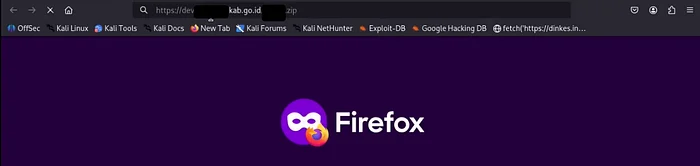
Step 2: analyse the configuration
The .env file was downloaded successfully. Opening it in a text editor such as VS Code showed a set of sensitive configuration values that should never be exposed to the public.
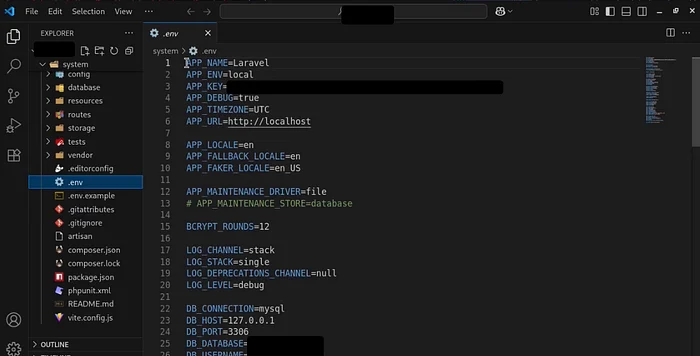
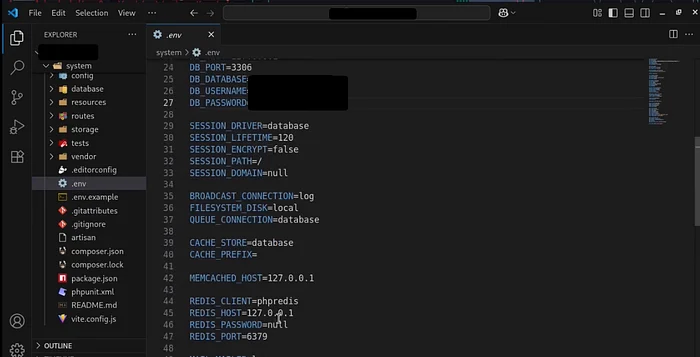
The values recovered included:
APP_KEY=[REDACTED]APP_DEBUG=trueDB_DATABASE=[REDACTED]DB_USERNAME=[REDACTED]DB_PASSWORD=[REDACTED]REDIS_PASSWORD=null
The report groups these by what they are for:
| Key | Purpose as described in the report |
|---|---|
APP_KEY |
Used to encrypt sessions and cookies |
APP_DEBUG=true |
Can leak stack traces when an error occurs |
DB_USERNAME, DB_PASSWORD, DB_DATABASE |
Database credentials |
REDIS_PASSWORD=null |
Redis without authentication |
Step 3: verify the fix
After the report, the responsible party responded quickly and applied a fix. Access to the .env file was no longer possible. Verification was carried out on 16 October 2026.
Root cause
The application's web server had no blocking rule for sensitive files whose names begin with a dot (dotfiles), in particular .env. Because of that, a request to /.env was not refused and the server returned the whole file as static content. The mistake is in the server configuration: the web server had no blocking rule for dotfiles. The report does not describe any other defence that was present or bypassed.
Impact
With the values from the file, an attacker could, according to the report:
- Access the database directly. Using
DB_USERNAMEandDB_PASSWORDto connect to the database, then read, modify or delete all data. - Decrypt sessions and cookies. If
APP_KEYleaks, an attacker can decrypt session cookies belonging to other users, leading to account takeover. - Disclose information through debug mode. With
APP_DEBUG=true, an error can leak stack traces, absolute paths and other sensitive information. - Reach Redis.
REDIS_PASSWORD=nullmeans Redis is not protected by a password; if the Redis port is exposed, an attacker can manipulate cached or session data.
The Redis point is conditional: the report says an attacker can manipulate cached or session data if the Redis port is exposed.
Fix
The report says the responsible party fixed the issue and that access to .env was blocked, verified on 16 October 2026. It does not describe the exact change made. The remediation it recommends has three parts:
- Block access to dotfiles. Add a rule to the web server configuration (Apache or Nginx) that denies all access to
.envand other sensitive files. - Rotate credentials. Replace
APP_KEY,DB_USERNAME,DB_PASSWORDand the Redis password that were exposed. ChangingAPP_KEYinvalidates all active user sessions (a forced logout), but the report treats this as mandatory for security. - Turn off debug mode. Set
APP_DEBUG=falsein production, and in any development environment that is publicly reachable, to prevent information leaking through errors.
Variants to test
The same class of misconfiguration is worth checking on other hosts, especially development and staging subdomains:
- Other dotfiles at the root. Request paths such as
/.env,/.env.backup,/.env.exampleand/.git/config. A positive result is a 200 response containing key-value configuration lines or Git metadata rather than an error page. - Framework-specific environment files. Try the environment file names used by other frameworks and runtimes at the document root. A positive result is any file whose body contains credentials, keys or connection strings.
- Backup and editor artefacts. Request common backup suffixes and editor leftovers next to known files. A positive result is a downloadable copy of a configuration or source file.
- Debug mode probing. On a Laravel host, trigger an application error and inspect the response for a stack trace or absolute paths. A positive result is a verbose error page instead of a generic one.
- Redis exposure. If the environment file shows an empty Redis password, check whether the Redis port is reachable from outside. A positive result is a successful connection without authentication.
What happened, in plain words
A bug hunter was looking around a public website run by a regional government in Indonesia (a kabupaten, which is a district or regency). The site had a special subdomain used for development work, dev.redactedkab.go.id. On that subdomain, a configuration file called .env could be downloaded by anyone who asked for it, with no login and no password.
That file is where a web application keeps its most private settings: the key it uses to scramble (encrypt) user sessions, the username and password for its database, and other secrets. Because the file was readable from the internet, all of those secrets were effectively published. The hunter reported it, the responsible party fixed it, and later the hunter checked again to confirm the file was no longer reachable.
This article walks through the same story for someone who has never done security work. Every technical word is explained the first time it appears, and there is a glossary at the end.
Some background you need first
Before the steps make sense, here are a few ideas in everyday terms.
A web server and a website. When you type an address into your browser, your browser sends a request to a computer somewhere on the internet. That computer runs a program called a web server. The web server decides what to send back. Sometimes it sends back a web page; sometimes it sends back a file; sometimes it sends back an error saying "not found" or "forbidden".
A subdomain. A domain like example.go.id can have smaller addresses in front of it, such as dev.example.go.id or shop.example.go.id. Each one can point to a different server or a different application. The dev. prefix usually means development: a copy of the site used while it is being built or tested, before it goes live for the public.
A file path. A website is backed by files on a disk. The address you type in the browser maps to a path on that disk. If the address is https://example.com/logo.png, the server looks for a file called logo.png and sends it back. If the address is https://example.com/.env, the server looks for a file called .env.
A dotfile. A file whose name starts with a dot, like .env or .git, is called a dotfile. On many systems these are hidden by default, and they usually hold settings rather than content meant for visitors. A well-configured web server should refuse to hand them out, because they are not part of the public site.
The .env file and Laravel. Laravel is a popular toolkit (a framework) for building web applications in the PHP programming language. Laravel applications keep their private settings in a file named .env at the top of the application folder. When the application starts, it reads that file to learn things like which database to talk to and which secret key to use. The file is meant to stay on the server, away from visitors.
A database. A database is an organised store of information, like a very large, very strict spreadsheet. A website's database usually holds user accounts, content, and records. To use it, a program needs an address, a username and a password.
Credentials. A username and password pair, or any similar proof of identity, is called credentials. Leaked credentials are dangerous because anyone who has them can pretend to be the legitimate program.
Encryption, sessions and cookies. Encryption means scrambling information so that only someone with the right key can unscramble it. When you log in to a website, the site gives your browser a small piece of data called a cookie. The cookie usually contains a session identifier, which is like a claim ticket: on every later request, your browser shows the ticket, and the server knows who you are. Laravel encrypts these cookies using a secret called APP_KEY. If someone else gets that key, they can unscramble other people's cookies and potentially impersonate them.
Redis. Redis is a fast in-memory storage service often used by websites to hold temporary data such as sessions and caches. It can be protected with a password. If it is not, anyone who can reach it can read or change what is inside.
Sensitive Information Disclosure. This is the name of the category of problem in this report. It simply means that information which should have stayed private was exposed. Nothing was broken into; the server politely handed over something it should have kept to itself.
Severity. Security reports often carry a severity label such as Low, Medium, High or Critical, to say how serious the problem is. This one was rated High.
The target and the setup
The target was a public service portal belonging to the Pemerintah Kabupaten [REDACTED], a regional government. The specific asset was the development subdomain dev.redactedkab.go.id, which ran an application built on Laravel.
No accounts, roles or special tools were needed. The work was reconnaissance (looking around to see what exists) and directory fuzzing (trying many common file and folder names to see which ones exist) against the development subdomain.
The hunter's own timeline was:
- 15 November 2025: found the issue and verified the proof of concept.
- 15 November 2025: reported it to the responsible party.
- 15 November 2025: the responsible party responded and confirmed the report.
- Late 2025 to early 2026: the fix was applied and access to
.envwas blocked. - 16 October 2026: re-checked and confirmed the hole was closed; the write-up was published as portfolio documentation.
Finding it
While fuzzing directories on dev.redactedkab.go.id, the hunter found that a .env file could be accessed publicly. The file itself is the standard Laravel environment file; what was wrong was that the server returned it instead of rejecting the request.
Exploitation
Step 1: request the .env file
Open a browser and request the .env path on the development subdomain:
https://dev.redactedkab.go.id/.env
This is a plain request for a file at the top of the site. In browser terms, it is the same kind of action as opening any other address: the browser asks the server for that path, and the server decides what to do. A correctly configured server would answer with an error such as "forbidden" or "not found". This one did not reject the request and returned the contents of the file in full.
Step 2: analyse the configuration
The .env file was downloaded successfully. Opening it in a text editor such as VS Code showed a set of sensitive configuration values that should never be exposed to the public.
The values recovered included:
APP_KEY=[REDACTED]APP_DEBUG=trueDB_DATABASE=[REDACTED]DB_USERNAME=[REDACTED]DB_PASSWORD=[REDACTED]REDIS_PASSWORD=null
Each line is a setting written as a name, an equals sign, and a value. Here is what each one means:
APP_KEYis the secret Laravel uses to encrypt sessions and cookies. It is the master key for those scrambled values.APP_DEBUG=trueturns on debug mode. When debug mode is on, an application shows detailed error messages, including internal details, instead of a generic "something went wrong" page.DB_DATABASE,DB_USERNAMEandDB_PASSWORDare the database name, the database username and the database password. Together they are the credentials needed to connect to the database.REDIS_PASSWORD=nullmeans the Redis service has no password set. The wordnullhere means "nothing".
The report groups these by what they are for:
| Key | Purpose as described in the report |
|---|---|
APP_KEY |
Used to encrypt sessions and cookies |
APP_DEBUG=true |
Can leak stack traces when an error occurs |
DB_USERNAME, DB_PASSWORD, DB_DATABASE |
Database credentials |
REDIS_PASSWORD=null |
Redis without authentication |
A stack trace is the list of internal steps a program took before it failed. It often includes file paths and function names, which help developers fix bugs but also tell an outsider how the system is built.
Step 3: verify the fix
After the report, the responsible party responded quickly and applied a fix. Access to the .env file was no longer possible. Verification was carried out on 16 October 2026.
Checking again after a fix matters because a fix can be partial, or a server can be restored from an old backup. Re-requesting the same address and getting an error instead of the file is the simple confirmation that the hole is closed.
Root cause
The application's web server had no blocking rule for sensitive files whose names begin with a dot (dotfiles), in particular .env. Because of that, a request to /.env was not refused and the server returned the whole file as static content. The mistake is in the server configuration: the web server had no blocking rule for dotfiles. The report does not describe any other defence that was present or bypassed.
A useful comparison: a house with a private study is not insecure because the study exists. It is insecure if the front door opens straight into the study. Here the application kept its secrets in a room, but the web server was the door, and the door was open.
Impact
With the values from the file, an attacker could, according to the report:
- Access the database directly. Using
DB_USERNAMEandDB_PASSWORDto connect to the database, then read, modify or delete all data. - Decrypt sessions and cookies. If
APP_KEYleaks, an attacker can decrypt session cookies belonging to other users, leading to account takeover. - Disclose information through debug mode. With
APP_DEBUG=true, an error can leak stack traces, absolute paths and other sensitive information. - Reach Redis.
REDIS_PASSWORD=nullmeans Redis is not protected by a password; if the Redis port is exposed, an attacker can manipulate cached or session data.
Account takeover means logging in as someone else without their permission. An absolute path is the full location of a file on the server's disk, such as the exact folder it lives in.
The Redis point is conditional: the report says an attacker can manipulate cached or session data if the Redis port is exposed.
Fix
The report says the responsible party fixed the issue and that access to .env was blocked, verified on 16 October 2026. It does not describe the exact change made. The remediation it recommends has three parts:
- Block access to dotfiles. Add a rule to the web server configuration (Apache or Nginx) that denies all access to
.envand other sensitive files. Apache and Nginx are two common web server programs; both let an administrator write rules about which paths may be served. - Rotate credentials. Replace
APP_KEY,DB_USERNAME,DB_PASSWORDand the Redis password that were exposed. Rotating means changing a secret so the old one stops working. ChangingAPP_KEYinvalidates all active user sessions (a forced logout), but the report treats this as mandatory for security, because anyone who copied the old key could still use it otherwise. - Turn off debug mode. Set
APP_DEBUG=falsein production, and in any development environment that is publicly reachable, to prevent information leaking through errors.
Variants to test
The same class of misconfiguration is worth checking on other hosts, especially development and staging subdomains. Staging is a near-final copy of a site used for testing before release.
- Other dotfiles at the root. Request paths such as
/.env,/.env.backup,/.env.exampleand/.git/config. A positive result is a 200 response containing key-value configuration lines or Git metadata rather than an error page. A 200 response is the standard code a web server sends when a request succeeds. - Framework-specific environment files. Try the environment file names used by other frameworks and runtimes at the document root. A positive result is any file whose body contains credentials, keys or connection strings.
- Backup and editor artefacts. Request common backup suffixes and editor leftovers next to known files. A positive result is a downloadable copy of a configuration or source file.
- Debug mode probing. On a Laravel host, trigger an application error and inspect the response for a stack trace or absolute paths. A positive result is a verbose error page instead of a generic one.
- Redis exposure. If the environment file shows an empty Redis password, check whether the Redis port is reachable from outside. A positive result is a successful connection without authentication.
Glossary
- Absolute path: the full location of a file on a server's disk, including every folder from the top.
- Account takeover: gaining access to another person's account without their permission.
- Apache: a widely used web server program.
- APP_KEY: the secret Laravel uses to encrypt sessions and cookies.
- APP_DEBUG: a Laravel setting that, when true, shows detailed error information instead of a generic error page.
- Cache: temporary stored data kept to make a site faster.
- Cookie: a small piece of data a website asks your browser to keep and send back on later requests, often used to remember who you are.
- Credentials: a username and password, or similar proof of identity.
- Database: an organised store of information that a website reads from and writes to.
- Debug mode: a setting that makes a program show detailed internal information when something goes wrong.
- Development subdomain: a subdomain used while a site is being built or tested, usually prefixed with
dev.. - Directory fuzzing: trying many common file and folder names to discover which ones exist on a server.
- Dotfile: a file whose name starts with a dot, such as
.envor.git, usually holding settings rather than public content. - Encryption: scrambling information so only someone with the right key can read it.
- Framework: a toolkit of ready-made code that developers build an application on top of.
- GET request: the ordinary kind of request a browser makes when you open an address, asking the server to return something.
- Laravel: a framework for building web applications in PHP.
- Nginx: a widely used web server program.
- PHP: a programming language commonly used for websites.
- Proof of concept (PoC): a small, repeatable demonstration that a problem is real.
- Reconnaissance: looking around a target to see what exists before testing anything.
- Redis: a fast in-memory storage service often used for sessions and caches.
- Response code (200): the standard code a web server sends when a request succeeds.
- Rotate: change a secret so the old value stops working.
- Sensitive Information Disclosure: a category of problem where information that should be private is exposed.
- Session: the period during which a website remembers that you are logged in.
- Severity: a label such as Low, Medium, High or Critical saying how serious a problem is.
- Stack trace: the list of internal steps a program took before it failed, often including file paths and function names.
- Staging: a near-final copy of a site used for testing before release.
- Subdomain: a smaller address in front of a main domain, such as
dev.example.com. - Web server: the program that receives browser requests and decides what to send back.
.envfile: the file where a Laravel application keeps its private settings, such as keys and database credentials.




