Reflected XSS di Aplikasi Pelaporan Kecamatan Pemerintah Kabupaten [REDACTED] via Parameter id
A reporting page reflected the URL parameter id into the HTML response without output encoding, so injected markup and script ran in the browser. An attacker could run arbitrary JavaScript in a victim's browser, potentially stealing session cookies if they are not marked HttpOnly.
 Published on icikiwirsol.medium.com
Bug Hunter
The full write-up lives on its author's site
It belongs to its author, so we link to it rather than copy it. The other two tabs are our own rewrites, checked against it.
Context
The target is a public service portal belonging to Pemerintah Kabupaten [REDACTED], specifically the aplikasi pelaporan kecamatan, the sub-district reporting application. The feature under test is the resident report detail page, which takes an identifier in the id parameter. The report is written by Primandito Adi Setiya ("Mencari si dia") and was published on 14 October 2026.
The vulnerability is a Reflected Cross-Site Scripting (XSS) in the URL parameter id. The application takes the value of id and reflects it into the HTML response without output encoding or adequate sanitisation, so an attacker can inject HTML and JavaScript that the victim's browser executes. The author rates severity as Medium.
Setup
The write-up does not describe any accounts, roles, tooling or versions. Testing was performed against the live public portal; the only precondition shown is that the report detail page is reachable and accepts an id parameter in the query string. No authentication is mentioned at any point.
Finding it
The report states that the application reflects the id parameter into the HTML response without output encoding or adequate sanitisation, and that the payload uses tag breaking to leave the attribute context.
Exploitation
Step 1: Identify the target
The entry point is the report detail page:
The report gives this page as the entry point and places the payload in the id parameter.
Step 2: Inject the payload
The payload is placed in the id parameter of the URL. The write-up shows the injection step as a screenshot rather than as a text block, so the exact payload string is not reproduced in the article text.
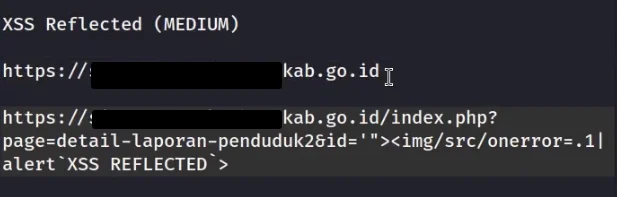
The technique is described as follows. A tag breaking sequence ('">) is used to close out of the HTML attribute context the value is reflected into. After that, an <img> tag is injected with an onerror attribute, so the JavaScript runs when the image fails to load. The author also notes the use of a .1|alert(...) construct, intended to trigger execution in a way that might get past basic sanitisation filters.
Step 3: Execute and verify
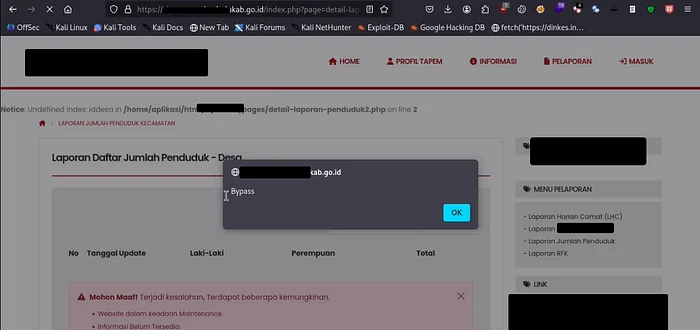
When the crafted URL is opened, the browser processes the payload and an alert box appears showing the message Bypass. That confirms the injected JavaScript executed in the page context.
Step 4: Post-fix status
As of publication on 14 October 2026, the affected party had not responded and the vulnerability was not fixed. The same payload still executed on re-check.
Root cause
The application reflects the id parameter into the HTML response without output encoding or adequate sanitisation. The author used tag breaking ('">) to exit the HTML attribute context, then injected an <img> tag with an onerror attribute. The author notes the .1|alert(...) construct was used to trigger execution in a way that might get past basic sanitisation filters. The report does not describe the server-side code, so the exact filtering in place, if any, is not known.
Impact
The author lists the following consequences, all conditional on a victim visiting the crafted URL:
- Cookie/session theft: stealing the session cookie of a logged-in user, leading to account takeover, if the cookie is not set with
HttpOnly. - Phishing: altering the page's appearance to trick users into entering sensitive data.
- Defacement: temporarily changing how the page looks.
- Malicious redirect: sending the user to an attacker-controlled site.
Execution happens in the victim's browser, so the attacker needs the victim to open the crafted link. The report notes account takeover is possible if the cookie is not set with HttpOnly.
Fix
The report recommends three measures:
- Output encoding: apply HTML entity encoding to
<,>,",'and&on every input that is rendered back into HTML. - Input validation: restrict the characters allowed in the URL parameter and reject suspicious input.
- Content Security Policy: deploy a strong CSP to mitigate the impact of XSS if it occurs.
No fix was applied by the affected party at the time of writing.
Variants to test
- Attribute-context breakout: try
'">followed by a new tag in any parameter that is reflected inside an attribute. A positive result is the injected tag appearing in the response and its handler firing. onerrorimage payload: inject<img src=x onerror=...>where markup injection is possible. A positive result is the alert or other script running when the image fails to load.- Filter-evasion constructs: try forms such as
.1|alert(...)against parameters that appear to be filtered. A positive result is execution despite the filter. - Other reflected parameters: test every query parameter on the same page for unencoded reflection. A positive result is the value appearing verbatim in the HTML response.
HttpOnlycheck: inspect session cookies on the target. If they lackHttpOnly, the cookie-theft impact described above becomes realistic.
What happened, in plain words
A security researcher was testing a public website run by a local government (a kabupaten, which is a district or regency in Indonesia). The site has a feature where residents can file reports, and each report has its own detail page. The page takes an identifier from the web address.
The researcher found that the page reflects the identifier from the address into the HTML without output encoding or adequate sanitisation. That means anyone who controls the link can put a small piece of JavaScript (a program that runs inside your browser) into the address, and the page will happily run it. This kind of flaw is called Reflected Cross-Site Scripting, or reflected XSS for short.
To prove it, the researcher built a special link. When the link is opened, the browser shows a pop-up box with the word Bypass. A pop-up is harmless by itself, but it proves that code from the link really ran inside the page. From there, a real attacker could do worse things: read the visitor's login cookie if it is not marked HttpOnly, change what the page looks like, or send the visitor somewhere else.
The researcher reported the problem on 14 November 2025. As of 14 October 2026, when the write-up was published, there had been no reply and the flaw was still there. The researcher rates the severity as Medium.
Background you need first
Before walking through the steps, here are the few ideas the rest of the article relies on. None of them require any security knowledge.
What a URL and a query parameter are
A URL is the address you type into the browser bar. Some addresses carry extra information after a question mark, in the form name=value. Each name=value pair is called a query parameter. For example, in shop.example/?item=42, the parameter name is item and its value is 42. Websites use these to know which page or which record you want to see.
What HTML is
HTML is the language that describes what a web page contains: headings, paragraphs, images, links. It is written with tags, which look like <img> or <a>. Tags can carry extra settings called attributes, written inside the tag, for example <img src="photo.jpg">. The browser reads the HTML and draws the page.
What JavaScript is
JavaScript is the programming language that runs inside your browser. It makes pages interactive: buttons that respond, menus that open, forms that check your input. It can also read things the page can see, including your cookies. That is why running someone else's JavaScript on a page is dangerous.
What a cookie is
A cookie is a small piece of text that a website asks your browser to store and send back on every later request. It is how a site remembers that you are logged in. If someone else gets your session cookie, they can often act as you without knowing your password. A flag called HttpOnly tells the browser that JavaScript is not allowed to read that cookie. When a cookie has that flag, stealing it through injected JavaScript does not work.
What reflected XSS is
Cross-Site Scripting (XSS) is a class of bug where a website lets an attacker's code end up in a page that other people view. In the reflected variety, the attacker's input is not stored on the server; it travels in the link itself and is echoed back into the page when the victim opens that link. Think of a shop that prints whatever you write on the order form directly onto the receipt: if you write a rude word, the receipt shows it. Here, the "receipt" is a web page, and the "rude word" is JavaScript.
What output encoding and sanitisation are
Output encoding means converting special characters into harmless text before putting them on a page. If a value contains <, the page shows the literal characters < instead, so the browser displays a less-than sign rather than treating it as the start of a tag. Sanitisation is the broader idea of cleaning input so that only safe content gets through. When a site skips both, whatever the user supplies is treated as part of the page.
What the target application does
The target is a public service portal of Pemerintah Kabupaten [REDACTED], specifically the aplikasi pelaporan kecamatan, the sub-district reporting application. The feature being tested is the resident report detail page. Normally it takes an identifier and shows the matching report. The researcher's name is Primandito Adi Setiya, who writes under the name "Mencari si dia". The write-up was published on 14 October 2026.
Finding it
While testing the resident report feature, the researcher noticed that whatever value was placed in the id parameter came back inside the HTML of the page. In other words, the page echoed the input. Because the echoed value was not encoded, it was a strong candidate for reflected XSS: if the page will print anything you give it, it may also run anything you give it.
The next job was to work out where in the HTML the value lands. A value that appears between two tags is one situation; a value that appears inside an attribute is another. The payload uses tag breaking ('">) to exit the HTML attribute context.
Exploitation, step by step
Step 1: Identify the target
The entry point is the report detail page:
Line by line:
https://is the normal secure web protocol.redactedkab.go.idis the site's domain. The.go.idending is used by Indonesian government bodies./index.phpis the script that builds the page.?page=detail-laporan-penduduk2is a query parameter telling the script which page to show: the resident report detail page.
This page loads a resident report by its identifier, which is passed as the id query parameter. The report gives this page as the entry point for the test. No login or account is mentioned anywhere in the write-up.
Step 2: Inject the payload
The payload goes into the id parameter of the URL. The write-up shows this step as a screenshot rather than as text, so the exact payload string is not reproduced in the article text.
The screenshot shows the injection step.
The technique works in three parts:
- Tag breaking with the sequence
'">. The value is being printed inside an HTML attribute, which is wrapped in quotes. Supplying a quote character ends the attribute early, and the>ends the tag. This is like writing a closing quotation mark and a full stop in the middle of a sentence so that you can start a new sentence of your own. - An
<img>tag with anonerrorattribute. Once out of the original tag, the researcher adds a new image tag. Theonerrorattribute holds JavaScript that the browser runs if the image fails to load. This is a common trick because it does not need the wordscriptanywhere, which some filters look for. - A
.1|alert(...)construct. The researcher notes this form was used to try to get past basic sanitisation filters. The report does not explain exactly what filter it was aimed at.
Step 3: Execute and verify
When the crafted URL is opened, the browser processes the payload and an alert box appears showing the message Bypass. That confirms the injected JavaScript ran inside the page.
The screenshot shows the alert box with the message Bypass, the visible proof that the code executed.
Why this matters: an alert box is chosen because it is the simplest possible visible signal. If the box appears, the browser treated the attacker's text as code, not as plain text. Any other JavaScript would have run just as well.
Step 4: Post-fix status
As of publication on 14 October 2026, the affected party had not responded and the vulnerability was not fixed. The same payload still executed when the researcher checked again.
Why it works
The application takes the id parameter and places it into the HTML response without output encoding or adequate sanitisation. Because the value lands inside an HTML attribute, an attacker can end the attribute with '">, close the tag, and add new markup such as an <img> element whose onerror handler carries the script. The author notes the .1|alert(...) form was used to try to get past basic sanitisation filters. The report does not describe the server-side code, so what filtering exists, if any, is not known.
What an attacker could do with it
The author lists four consequences. All of them depend on a victim opening the crafted link, because the code runs in the victim's browser, not on the server.
- Cookie and session theft. If a logged-in user opens the link, the injected JavaScript can read their session cookie and send it to the attacker. With that cookie, the attacker can act as the user, which is called account takeover. This only works if the cookie is not marked
HttpOnly; with that flag, JavaScript cannot read it. - Phishing. The script can manipulate the page's appearance to trick the visitor into entering sensitive data.
- Defacement. The script can temporarily change how the page looks.
- Malicious redirect. The script can send the visitor to a site the attacker controls.
How to fix it
The report recommends three measures:
- Output encoding. Apply HTML entity encoding to
<,>,",'and&on every input that is rendered back into HTML. In plain terms, turn the dangerous characters into text that the browser displays but does not act on. - Input validation. Restrict the characters allowed in the URL parameter and reject suspicious input. Restrict the characters allowed in the URL parameter and reject suspicious input.
- Content Security Policy (CSP). A CSP is a set of rules the site sends to the browser saying which sources of script are allowed. A strong policy limits the damage if an XSS bug slips through, because the browser refuses to run code from unexpected places.
No fix had been applied by the affected party at the time of writing.
Other things worth testing on a page like this
The technical write-up lists variants a tester can try when a parameter is reflected. They are useful because the same mistake often appears in more than one place.
- Attribute-context breakout. Try
'">followed by a new tag in any parameter that is reflected inside an attribute. A positive result is the injected tag appearing in the response and its handler firing. onerrorimage payload. Inject<img src=x onerror=...>where markup injection is possible. A positive result is the alert or other script running when the image fails to load.- Filter-evasion constructs. Try forms such as
.1|alert(...)against parameters that appear to be filtered. A positive result is execution despite the filter. - Other reflected parameters. Test every query parameter on the same page for unencoded reflection. A positive result is the value appearing verbatim in the HTML response.
HttpOnlycheck. Inspect the session cookies on the target. If they lackHttpOnly, the cookie-theft impact described above becomes realistic.
Timeline
- 14 November 2025: the researcher found the vulnerability and verified the proof of concept.
- 14 November 2025: the researcher reported it to the affected party.
- Until 14 October 2026: no reply or confirmation from the affected party.
- 14 October 2026: the researcher re-checked and the vulnerability was still unfixed. The write-up was published as a portfolio record and as a reminder of why responsible disclosure matters.
Glossary
- Attribute (HTML): a setting written inside an HTML tag, such as
srcoronerrorin<img src="x" onerror="...">. - Account takeover: gaining control of someone else's account, usually by stealing their session.
- Content Security Policy (CSP): rules a site sends to the browser listing which sources of script and other content are allowed.
- Cookie: a small piece of text a site asks the browser to store and send back on later requests, commonly used to remember a login.
- Cross-Site Scripting (XSS): a bug where a site lets an attacker's code end up in a page other people view.
- Defacement: changing how a page looks, usually to make a point or cause embarrassment.
- HTML: the language that describes the structure and content of a web page using tags.
- HTML entity encoding: replacing characters such as
<,>,",'and&with safe text equivalents so the browser displays them instead of acting on them. - HttpOnly: a cookie flag that stops JavaScript from reading that cookie.
- JavaScript: the programming language that runs inside a web browser and makes pages interactive.
- Output encoding: converting special characters into harmless text before placing them on a page.
- Phishing: tricking someone into entering sensitive information, often by imitating a trusted page.
- Query parameter: a
name=valuepair after the?in a URL, used to pass information to the page. - Reflected XSS: XSS where the attacker's input travels in the link and is echoed back into the page when the victim opens it.
- Sanitisation: cleaning input so that only safe content is accepted or displayed.
- Session hijacking: taking over an active session, typically by stealing its cookie.
- Tag breaking: supplying characters such as
'">to end an HTML attribute and tag early, so that new markup can be added. - URL: the address of a page or resource on the web.



