Menemukan 3 Kerentanan di 3 Subdomain Nokia dalam Sehari (Semuanya Duplikat)
Three Nokia subdomains exposed sensitive data: a Base64 config with SAML private keys and OAuth secrets, a reflected XSS in the SMAGENTNAME parameter, and hardcoded OAuth client secrets in a JavaScript bundle. An attacker could forge authentication tokens, steal session cookies, or abuse OAuth credentials, though all three were duplicates of previously reported issues.
 Published on icikiwirsol.medium.com
Bug Hunter
The full write-up lives on its author's site
It belongs to its author, so we link to it rather than copy it. The other two tabs are our own rewrites, checked against it.
Context
On 20 July 2026 I spent a single hunting session against several Nokia subdomains and came away with three separate findings on three separate hosts. All three were later marked as duplicates by Nokia's security team, but the process is worth documenting: each one is a common class of client-side mistake, and together they show how much can be found by reading what the browser is given.
The three targets, referred to here as Subdomain A, B and C, are all Nokia subdomains of the form redacted.redacted.nokia.com. The affected features are:
- Subdomain A: a login page that ships a large Base64-encoded configuration object inside a
<script>tag. - Subdomain B: a login endpoint (
/login/login.jsp) that reflects a URL parameter back into the page. - Subdomain C: a JavaScript bundle (
chunk-*.js) containing a single sign-on configuration object for Google and Azure.
The vulnerability classes are sensitive information disclosure (client-side configuration and hardcoded secrets) and reflected cross-site scripting. The stated impact is leakage of cryptographic material (SAML, OAuth), a hardcoded client secret, and potential theft of session cookies.
Setup
No accounts, special roles or tooling beyond a browser are described. The work was manual: viewing page source, reading JavaScript bundles in the browser's developer tools, and decoding a Base64 blob in a terminal.
Finding it
Subdomain A: a Base64 blob in the page source
Opening the login page on Subdomain A and reviewing its source, I found a variable named base64Config inside a <script> tag. Its value was a very long Base64 string.
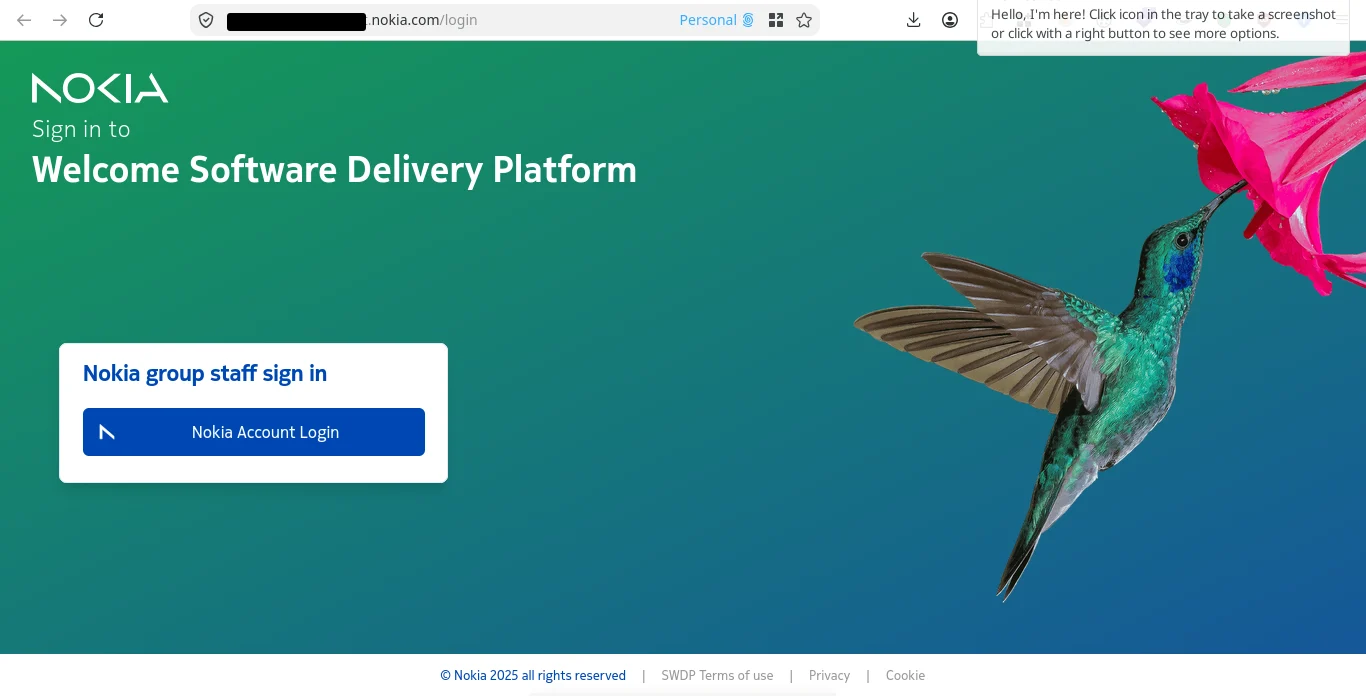
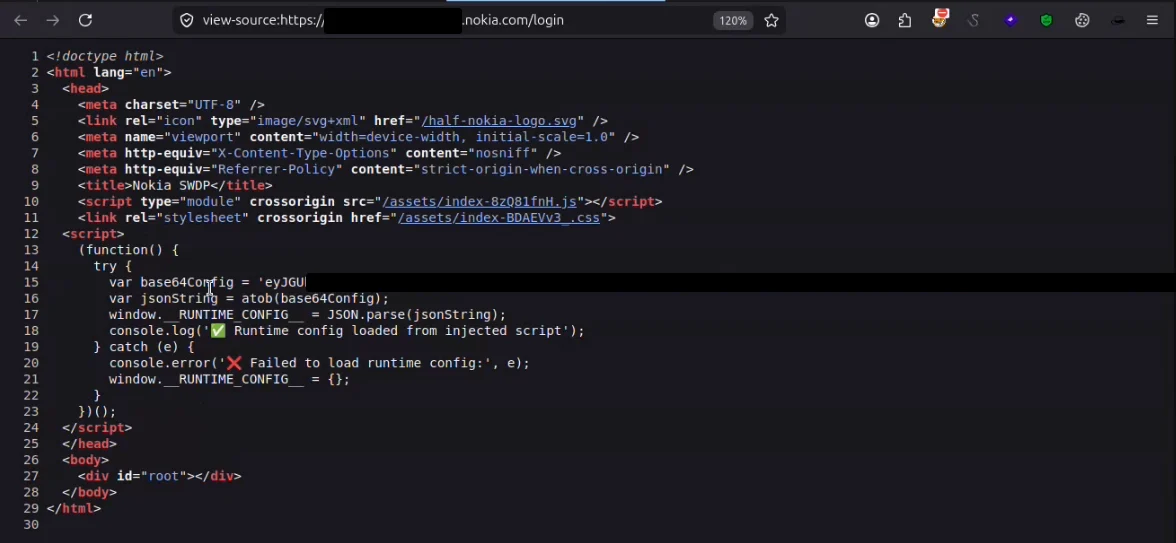
A configuration object that is large enough to be Base64-encoded and shipped to every visitor is a strong signal: whatever it contains is readable by anyone who opens the page, so it should only ever hold public values.
Subdomain B: an unsanitised parameter
On the login endpoint of Subdomain B I found reflected cross-site scripting. The SMAGENTNAME parameter is not correctly sanitised, which allows JavaScript to execute in the page.
Subdomain C: SSO configuration in a bundle
While analysing a JavaScript file (chunk-*.js) loaded by Subdomain C, I found an environment object holding single sign-on configuration for Google and Azure. Besides clientId, which is public by design, it also contained clientSecret and client_secret, which are not.
Exploitation
Step 1: decode the Base64 configuration on Subdomain A
- Extract the Base64 string into a file, for example
base64.txt. - Decode it and format the result as JSON from a terminal:
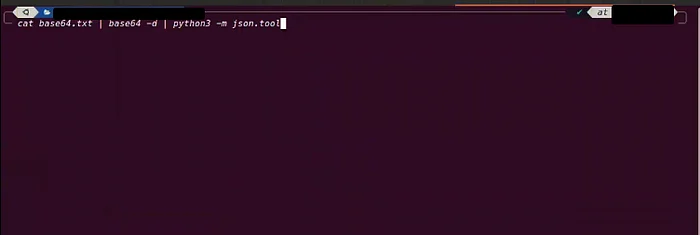
cat base64.txt | base64 -d | python3 -m json.tool
base64 -d decodes the string and python3 -m json.tool pretty-prints the resulting JSON so the keys are readable.
The decoded output contained a range of sensitive secrets that should never have been exposed publicly.
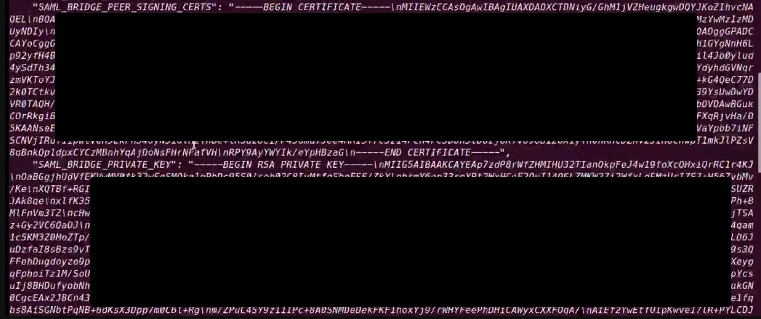
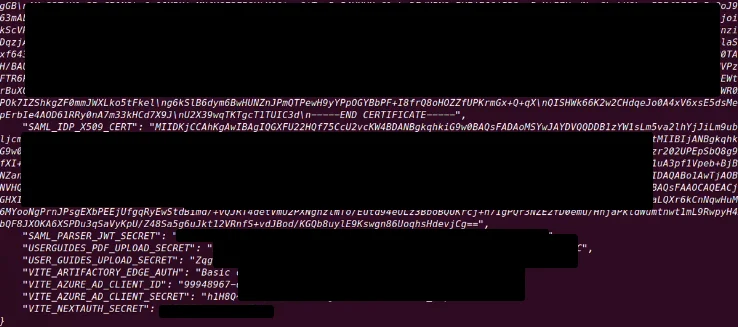
The leaked values were:
SAML_BRIDGE_PRIVATE_KEYandSAML_BRIDGE_PEER_SIGNING_CERTSSAML_IDP_X509_CERTSAML_PARSER_JWT_SECRETVITE_AZURE_AD_CLIENT_SECRETVITE_NEXTAUTH_SECRETUSERGUIDES_POF_UPLOAD_SECRET
Step 2: trigger the reflected XSS on Subdomain B
- Request the following URL. The payload is shown as it appears in the report:
The SMAGENTNAME value carries a $SM$-prefixed token followed by '”><img src=x onerror=alert(document.cookie);>. The quote and angle brackets close the attribute and the surrounding tag, and the injected <img> fails to load x, firing onerror, which reads document.cookie.
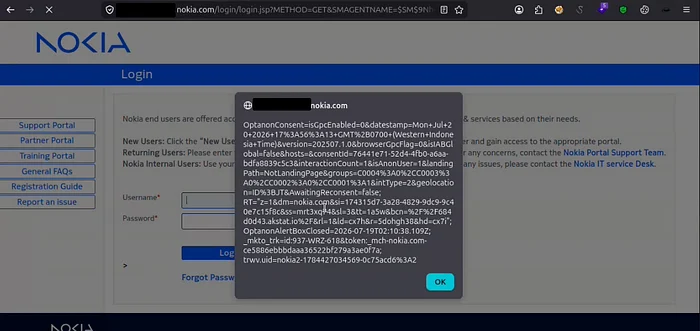
- Once the page loads, the browser executes the payload and shows an alert pop-up containing the user's session cookies, such as
OptanonConsentand_mktk.
Step 3: read the SSO configuration on Subdomain C
- Open Developer Tools (F12) in the browser.
- Go to the Sources tab and look for the JavaScript file containing the
environmentconfiguration. - The
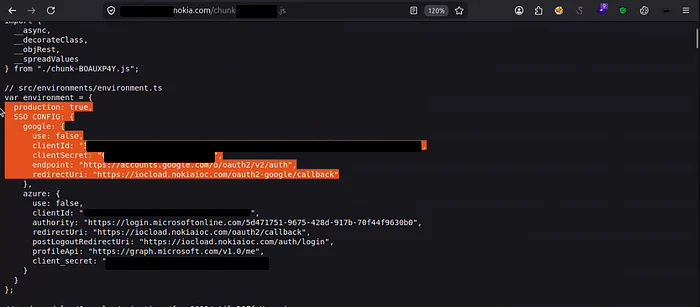
SSO_CONFIGobject was found to contain:
google.clientSecret(exposed)azure.client_secret(exposed)google.clientId,azure.clientIdand various OAuth endpoints
Root cause
All three findings share the same underlying mistake: material that belongs on the server was shipped to the browser.
- On Subdomain A, a configuration object containing private keys, certificates and signing secrets was serialised, Base64-encoded and embedded in the login page. Base64 is an encoding, not protection, so anyone viewing source can recover every value.
- On Subdomain B, the
SMAGENTNAMEparameter is not correctly sanitised, which allows JavaScript to execute in the page. The report does not describe the server-side code, so the exact escaping that was missing is not stated. - On Subdomain C, the SSO configuration object in the bundle includes
clientSecretandclient_secretalongside the publicclientId. Client secrets are meant to stay on the server; placing them in a bundle makes them readable by anyone who loads the file.
Impact
- Subdomain A: leakage of the SAML private key and OAuth (Azure) secrets could let an attacker forge authentication tokens, access internal APIs, or perform account takeover, if those keys are still valid and used in production. That condition is explicit in the report.
- Subdomain B: an attacker can steal a user's session cookies, potentially leading to session hijacking. The cookies observed in the alert were
OptanonConsentand_mktk. - Subdomain C: although
clientIdis designed to be public,clientSecret(especially for Azure) must not be on the client side. If exposed, an attacker could abuse the credentials to impersonate the application, access backend APIs without authorisation, or perform account takeover if there is no additional server-side validation.
Fix
The report gives three recommendations:
- Never store secrets client-side. Do not put private keys,
clientSecretor any credentials in source code sent to the browser; use server-side environment variables. - Output encoding. Apply HTML entity encoding to all input reflected back into HTML pages to prevent XSS.
- Input validation. Restrict the characters allowed in URL parameters.
The report does not say whether Nokia changed anything; the findings were marked as duplicates of earlier reports.
Variants to test
- Base64 configuration blobs in page source. Search login and error pages for variables with names like
base64Configor long Base64 strings inside<script>tags, then decode them. A positive result is a decoded JSON object containing keys whose names suggest secrets: private keys, certificates, JWT secrets, client secrets, upload secrets. - Reflected parameters in login flows. Take parameters such as
SMAGENTNAME,TARGETand similar agent or redirect parameters and inject a quote followed by an event-handler payload. A positive result is the payload executing in the page context, for example an alert showingdocument.cookie. - SSO configuration in JavaScript bundles. In the Sources tab, search bundles for
clientSecret,client_secret,SSO_CONFIGandenvironment. A positive result is a secret value sitting next to a publicclientIdin a file served to the browser. - Build-time environment prefixes. Look for
VITE_,NEXT_PUBLIC_and similar prefixes on values that are clearly secret. A positive result is a secret-named variable carrying such a prefix and appearing in client-side output.
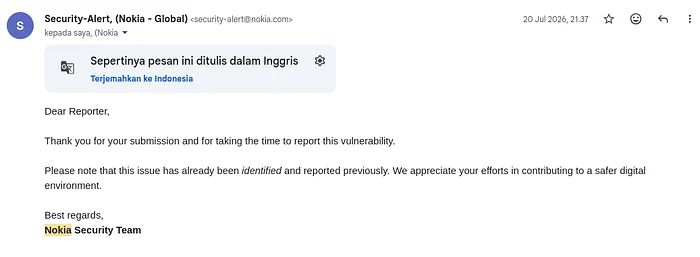
All three reports were confirmed valid by Nokia's security team but marked as duplicates of earlier reports. No bounty was awarded, but finding the same issues independently is a useful check that reconnaissance and testing are working.
What happened, in plain words
On 20 July 2026 I spent one hunting session looking at several Nokia subdomains and found three separate security problems on three separate hosts. A subdomain is a smaller part of a company's main website address: if the main site is example.com, then login.example.com and shop.example.com are subdomains. Each one can be built and run by a different team, which is why one company can have the same kind of mistake in three different places.
All three findings were later marked as duplicates by Nokia's security team. A duplicate means the company already knew about that problem because another researcher had reported it first. Even so, the process is worth writing down. Each finding is a common kind of client-side mistake, and together they show how much you can find just by looking at what your browser is given.
The three targets are called Subdomain A, B and C here. All of them are Nokia subdomains of the form redacted.redacted.nokia.com. The features involved are:
- Subdomain A: a login page that sends a large configuration object, encoded as Base64, inside a
<script>tag. A configuration object is a bundle of settings that a program reads at start-up, like the list of settings on a phone. Base64 is a way of writing any data using only ordinary letters, digits and a couple of symbols, so it can travel safely inside text. A<script>tag is the part of a web page that tells the browser to run code. - Subdomain B: a login endpoint (
/login/login.jsp) that takes a value from the address bar and copies it back into the page. An endpoint is a specific address on a server that does one job, like a counter in a shop that only handles returns. - Subdomain C: a JavaScript bundle (
chunk-*.js) containing a single sign-on configuration object for Google and Azure. A JavaScript bundle is a large file of code that a website sends to your browser so the page can work. Single sign-on (SSO) is the feature that lets you log in once with, say, your Google account and then be let into another service without typing a new password.
The kinds of problem are sensitive information disclosure (client-side configuration and hardcoded secrets) and reflected cross-site scripting. Sensitive information disclosure means private data was handed out to anyone who asked. A hardcoded secret is a password or key written directly into the code instead of being kept safely on the server. Reflected cross-site scripting means a value you put in the address bar is echoed back into the page and the browser runs it as code. The stated impact is leakage of cryptographic material (SAML, OAuth), a hardcoded client secret, and potential theft of session cookies. Cryptographic material means keys and certificates used to prove identity and protect data. SAML and OAuth are two common systems for logging people in across different services. A session cookie is a small piece of data your browser keeps after you log in, so the site can recognise you on the next click, a bit like a wristband you get at an event.
Setup
No accounts, special roles or tools beyond a browser are described. The work was manual: viewing page source, reading JavaScript bundles in the browser's developer tools, and decoding a Base64 blob in a terminal.
Finding it
Subdomain A: a Base64 blob in the page source
I opened the login page on Subdomain A and reviewed its source. Every browser can show you the source of a page: it is the raw text the server sent, including the code the browser will run. Inside a <script> tag I found a variable named base64Config whose value was a very long Base64 string. A variable is a named box in a program that holds a value, like a labelled drawer in a kitchen.
A configuration object that is big enough to be Base64-encoded and sent to every visitor is a strong signal. Whatever it contains can be read by anyone who opens the page, so it should only ever hold public values.
Subdomain B: an unsanitised parameter
On the login endpoint of Subdomain B I found reflected cross-site scripting. The SMAGENTNAME parameter is not correctly sanitised, which allows JavaScript to execute in the page. A parameter is a named value attached to the end of a web address, the part after the ?. Sanitising means cleaning a value before using it, for example removing characters that could be mistaken for code. JavaScript is the programming language that browsers run, so if an attacker can get their JavaScript into a page, it runs with the page's permissions.
Subdomain C: SSO configuration in a bundle
While analysing a JavaScript file (chunk-*.js) loaded by Subdomain C, I found an environment object holding single sign-on configuration for Google and Azure. Besides clientId, which is public by design, it also contained clientSecret and client_secret, which are not. A client ID is the public name an application uses when it talks to a login provider, like the name on a badge. A client secret is the matching password that proves the application really is itself, and it is meant to stay on the server where visitors cannot see it.
Exploitation
Step 1: decode the Base64 configuration on Subdomain A
- Extract the Base64 string into a file, for example
base64.txt. - Decode it and format the result as JSON from a terminal:
cat base64.txt | base64 -d | python3 -m json.tool
This is one line made of three commands joined by pipes. A pipe, the | symbol, passes the output of one command into the next, like handing a document from one desk to another.
cat base64.txtprints the contents of the filebase64.txtto the screen, which here means into the pipe.base64 -dtakes that text and decodes it, turning the Base64 string back into the original data. The-dmeans decode.python3 -m json.toolreads the decoded data and prints it in a neat, indented layout. JSON is a common text format for structured data, with names and values in curly braces, and the tool makes the names easy to read.
The decoded output contained a range of sensitive secrets that should never have been exposed publicly.
The leaked values were:
SAML_BRIDGE_PRIVATE_KEYandSAML_BRIDGE_PEER_SIGNING_CERTSSAML_IDP_X509_CERTSAML_PARSER_JWT_SECRETVITE_AZURE_AD_CLIENT_SECRETVITE_NEXTAUTH_SECRETUSERGUIDES_POF_UPLOAD_SECRET
A private key is the secret half of a pair used to prove identity and sign data; anyone holding it can pretend to be its owner. A certificate is the public half, used to check a signature. A JWT secret is the key used to sign JSON Web Tokens, which are small signed notes that services pass around to say who a user is.
Step 2: trigger the reflected XSS on Subdomain B
- Request the following URL. The payload is shown as it appears in the report:
Reading it piece by piece:
https://redacted.redacted.nokia.com/login/login.jspis the login page being requested.?METHOD=GETstarts the list of parameters and says the request is a GET, which is the ordinary kind of request a browser makes when you open a link.SMAGENTNAME=$SM$9Nh+[redacted]is the parameter under test. Its normal value is a$SM$-prefixed token, a long string the login system uses to identify a session.'”><img src=x onerror=alert(document.cookie);>is the injected payload. The quote and angle brackets are there to close whatever attribute and tag the value sits inside, so the browser stops treating the text as data and starts treating it as markup.<img src=x ...>asks the browser to load an image fromx, which does not exist. Because the load fails, theonerrorhandler runs, and that handler isalert(document.cookie);, which shows a pop-up with the page's cookies.document.cookieis the browser's built-in way of reading the cookies for the current page.TARGET,TYPE,REALMOID,GUIDandSMAUTHREASONare part of the original login flow.
- Once the page loads, the browser executes the payload and shows an alert pop-up containing the user's session cookies, such as
OptanonConsentand_mktk.
Step 3: read the SSO configuration on Subdomain C
- Open Developer Tools (F12) in the browser. Developer Tools is a panel built into every browser that shows what the page is doing behind the scenes.
- Go to the Sources tab and look for the JavaScript file containing the
environmentconfiguration. The Sources tab lists every file the page loaded, so you can read the code the browser received. - The
SSO_CONFIGobject was found to contain:
google.clientSecret(exposed)azure.client_secret(exposed)google.clientId,azure.clientIdand various OAuth endpoints
Root cause
All three findings share the same underlying mistake: material that belongs on the server was shipped to the browser.
- On Subdomain A, a configuration object containing private keys, certificates and signing secrets was serialised, Base64-encoded and embedded in the login page. Serialising means turning a structured object into a flat string so it can be stored or sent. Base64 is an encoding, not protection: it changes how the data looks, not who can read it, in the same way that writing a message in a different alphabet does not hide it from someone who knows the alphabet. Anyone viewing source can recover every value. The
VITE_prefix on two of the names suggests a build-time environment mechanism intended for public client configuration was used to carry secrets. - On Subdomain B, the
SMAGENTNAMEparameter is not correctly sanitised, which allows JavaScript to execute in the page. Output encoding means converting characters like<and>into safe stand-ins before placing a value in a page, so the browser shows them as text instead of treating them as markup. The report does not describe the server-side code, so the exact escaping that was missing is not stated. - On Subdomain C, the SSO configuration object in the bundle includes
clientSecretandclient_secretalongside the publicclientId. Client secrets are meant to stay on the server; placing them in a bundle makes them readable by anyone who loads the file.
Impact
- Subdomain A: leakage of the SAML private key and OAuth (Azure) secrets could let an attacker forge authentication tokens, access internal APIs, or perform account takeover, if those keys are still valid and used in production. An API is the set of addresses a service offers so other programs can ask it for data or actions, like a service counter at a bank. Account takeover means an attacker gets into someone else's account. The condition about the keys still being valid and used in production is explicit in the report.
- Subdomain B: an attacker can steal a user's session cookies, potentially leading to session hijacking. Session hijacking means using a stolen cookie to act as the logged-in user. The cookies observed in the alert were
OptanonConsentand_mktk. - Subdomain C: although
clientIdis designed to be public,clientSecret(especially for Azure) must not be on the client side. If exposed, an attacker could abuse the credentials to impersonate the application, access backend APIs without authorisation, or perform account takeover if there is no additional server-side validation.
Fix
The report gives three recommendations:
- Never store secrets client-side. Do not put private keys,
clientSecretor any credentials in source code sent to the browser; use server-side environment variables. An environment variable is a setting kept outside the code, on the machine that runs the program, so it never travels to visitors. - Output encoding. Apply HTML entity encoding to all input reflected back into HTML pages to prevent XSS. HTML entity encoding replaces special characters with safe codes, so a
<becomes something the browser displays rather than acts on. - Input validation. Restrict the characters allowed in URL parameters, so unexpected symbols are rejected before they reach the page.
The report does not say whether Nokia changed anything; the findings were marked as duplicates of earlier reports.
Variants to test
- Base64 configuration blobs in page source. Search login and error pages for variables with names like
base64Configor long Base64 strings inside<script>tags, then decode them. A positive result is a decoded JSON object containing keys whose names suggest secrets: private keys, certificates, JWT secrets, client secrets, upload secrets. - Reflected parameters in login flows. Take parameters such as
SMAGENTNAME,TARGETand similar agent or redirect parameters and inject a quote followed by an event-handler payload. A positive result is the payload executing in the page context, for example an alert showingdocument.cookie. - SSO configuration in JavaScript bundles. In the Sources tab, search bundles for
clientSecret,client_secret,SSO_CONFIGandenvironment. A positive result is a secret value sitting next to a publicclientIdin a file served to the browser. - Build-time environment prefixes. Look for
VITE_,NEXT_PUBLIC_and similar prefixes on values that are clearly secret. A positive result is a secret-named variable carrying such a prefix and appearing in client-side output.
All three reports were confirmed valid by Nokia's security team but marked as duplicates of earlier reports. No bounty was awarded, but finding the same issues independently is a useful check that reconnaissance and testing are working. Reconnaissance means the early survey work of mapping what a target has before you test anything.
Glossary
- Account takeover: an attacker gaining control of someone else's account.
- API: the set of addresses a service offers so other programs can ask it for data or actions.
- Base64: an encoding that rewrites any data using ordinary letters, digits and a few symbols so it can travel inside text; it hides nothing.
- Bundle: a large file of JavaScript that a website sends to the browser so the page can work.
- Certificate: the public half of a key pair, used to check a signature.
- Client ID: the public name an application uses when it talks to a login provider.
- Client secret: the password that proves an application really is itself; it belongs on the server.
- Configuration object: a bundle of settings a program reads at start-up.
- Cookie: a small piece of data a site stores in your browser, often used to recognise you after login.
- Cross-site scripting (XSS): getting a page to run code an attacker supplied, usually by echoing input back into the page.
- Developer Tools: a panel built into browsers that shows the files, code and network activity behind a page.
- Duplicate: a report for a problem the company already knew about from an earlier report.
- Endpoint: a specific address on a server that does one job.
- Environment variable: a setting kept outside the code, on the machine that runs the program.
- Hardcoded secret: a password or key written directly into code instead of being kept safely on the server.
- HTML entity encoding: replacing special characters with safe codes so the browser displays them as text.
- JSON: a common text format for structured data, with names and values in curly braces.
- JWT (JSON Web Token): a small signed note that services pass around to say who a user is.
- JWT secret: the key used to sign JSON Web Tokens.
- OAuth: a common system for letting one service log you in to another without sharing your password.
- Output encoding: converting characters like
<and>into safe stand-ins before placing a value in a page. - Parameter: a named value attached to the end of a web address, after the
?. - Pipe: the
|symbol, which passes the output of one command into the next. - Private key: the secret half of a key pair, used to prove identity and sign data.
- Reconnaissance: the early survey work of mapping what a target has before testing it.
- Reflected XSS: cross-site scripting where the attacker's value is echoed straight back into the page from the request.
- SAML: a common system for logging people in across different services.
- Sanitising: cleaning a value before using it, for example removing characters that could be mistaken for code.
- Sensitive information disclosure: private data being handed out to anyone who asks.
- Serialising: turning a structured object into a flat string so it can be stored or sent.
- Session cookie: a cookie that keeps you logged in between clicks.
- Session hijacking: using a stolen cookie to act as the logged-in user.
- Single sign-on (SSO): logging in once with one account and being let into other services without a new password.
- Subdomain: a smaller part of a company's main website address, such as
login.example.com. - Variable: a named box in a program that holds a value.




