Error-Based SQL Injection di Portal Perizinan Pemerintah Kabupaten [REDACTED] via Parameter id
The id parameter of a licensing portal was inserted into a MySQL query without sanitisation, so a single quote broke the query and the raw database error was shown to the user. An attacker could use those error messages to map the database structure and potentially extract sensitive data.
 Published on icikiwirsol.medium.com
Bug Hunter
The full write-up lives on its author's site
It belongs to its author, so we link to it rather than copy it. The other two tabs are our own rewrites, checked against it.
Context
The target is a public service portal belonging to the government of Kabupaten [REDACTED] in Indonesia. The researcher, publishing under the account Mencari si dia, was testing the licensing requirements feature of the portal, the page that lists the documents and conditions an applicant must satisfy for a given permit. That page is reached through a URL whose com parameter selects the feature and whose id parameter selects the individual permit record.
The vulnerability is an error-based SQL injection in that id parameter. The application takes the value straight from the URL and places it into a SQL query without escaping or parameterisation, and when the query breaks it returns the raw MySQL error text to the browser. The researcher rates the severity as Critical and records the status as unfixed: the report was sent, no reply came, and the issue was still present when the write-up was published on 9 October 2026.
Setup
No accounts, roles, tools or software versions are described. The testing was manual: the researcher changed the value of the id parameter in the browser and read the response. The only precondition is network access to the public portal. The write-up does not say whether the researcher was authenticated or what privileges, if any, the session held.
Finding it
While testing the licensing requirements feature, the researcher noticed that the id parameter was being passed into the database query without sanitisation. The signal was simple: inserting a special character, specifically a single quote, into the value broke the SQL statement and produced a database error. Because the error was rendered to the page, the behaviour was visible to any visitor and confirmed that user input reaches the query text directly.
Exploitation
Step 1: Identify the target
The researcher opened the licensing requirements page with a normal numeric identifier:
com=persyaratan selects the requirements feature and id=1 selects a permit record.
Step 2: Inject the payload (error-based test)
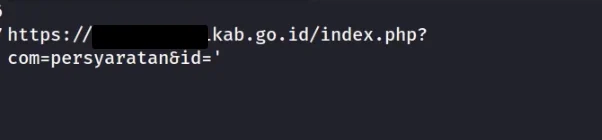
The value of id was replaced with a single quote:
A single quote is the string delimiter in MySQL. If the value is concatenated into a quoted literal in the query, the quote closes that literal early and leaves the rest of the statement syntactically invalid, which is exactly what an error-based test is looking for.
Step 3: Analyse the error
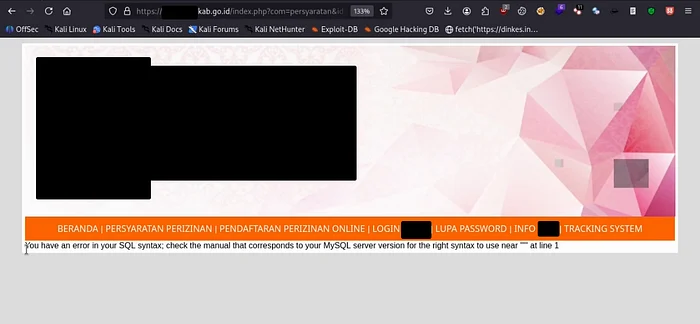
Requesting the modified URL returned a raw MySQL error to the page:
You have an error in your SQL syntax; check the manual that corresponds to your MySQL server version for the right syntax to use near ''" at line 1
This is the server's own parser message, not a generic application error page. It confirms three things at once: the backend is MySQL, the id value is embedded in the query text, and the application is configured to display database errors to the client. The fragment near ''" shows the parser failing at the point where the injected quote disturbed the statement.
Step 4: Post-fix status
As of the publication date, 9 October 2026, the same payload still triggered the SQL error. No fix had been applied and no response had been received from the responsible party.
Root cause
The id parameter is concatenated into a SQL query without escaping or prepared statements, so any character with meaning in SQL changes the structure of the statement. The second failure is disclosure: the application surfaces raw MySQL error text to the user instead of handling the failure internally. Either mistake alone would be a defect; together they turn a malformed query into a reliable oracle for the database's behaviour and, by extension, its structure.
The write-up does not show the query itself, so the exact shape of the statement is not stated.
Impact
The researcher lists four consequences, with the usual hedges:
- Information disclosure. Database structure, including table and column names, can be read through the leaked error messages.
- Data exfiltration. Sensitive data such as administrator credentials, user data or other internal information could potentially be extracted.
- Data manipulation. If the database privileges of the application account are high enough, an attacker could modify or delete existing data.
- Authentication bypass. In some cases SQL injection can be used to get past a login page.
Items 2 to 4 are stated as potential outcomes that depend on the privileges and query context, not as demonstrated results. What the write-up actually demonstrates is the error-based confirmation in Step 3.
Fix
No fix was applied. The researcher recommends three measures:
- Use prepared statements. Parameterised queries keep SQL code separate from user input, so the value of
idcan never alter the statement. - Validate input. Restrict the
idparameter to the characters it legitimately needs, for example digits only, and reject anything suspicious. - Disable error messages in production. Never show raw database errors to users. Serve a custom error page and write the details to an internal log only.
Variants to test
- Numeric context. If
idis used unquoted, a single quote may not break the query. Try a numeric expression such asid=1 AND 1=1againstid=1 AND 1=2; a positive result is a page that renders normally for the first and differently, empty or erroring, for the second. - Other parameters on the same page. Test
comand any other query string values with the same single quote. A positive result is the same MySQL syntax error appearing from a different parameter. - Other features of the same portal. The
comparameter suggests a router over several features; apply the quote test to each feature's identifiers. A positive result is a raw database error on any of them. - Error text as an oracle. Where errors are shown, try payloads that force a type or function error, for example a subquery returning an unexpected type. A positive result is a database error that reveals the expression was evaluated, which confirms injectability without needing a visible data change.
- Blind fallback. If errors are later suppressed, compare response timing or content length for true and false conditions. A positive result is a consistent, repeatable difference between the two.
Timeline
- 14 November 2025: vulnerability found and PoC verified.
- 14 November 2025: reported to the responsible party.
- Until 9 October 2026: no reply or confirmation received.
- 9 October 2026: rechecked, still unfixed; write-up published as portfolio documentation and as a reminder about responsible disclosure.
What happened, in plain words
A security researcher was looking at a public website run by a local government in Indonesia, the kind of site where people apply for permits and licences. On one of its pages, the page that lists the documents you need for a particular permit, he found a serious flaw. The page takes a number from the address bar (the id of the permit) and drops it straight into a question it asks its database, without checking it first. When he put a single quote character into that number, the database complained and the website printed the database's own error message on the screen for anyone to read. That is the whole finding: the site trusts what a visitor types, and it tells the world when something goes wrong inside. He rated it Critical, reported it, got no reply, and when he checked again on 9 October 2026 it was still broken.
This article walks through the same steps he did, explaining every piece from scratch. You only need a browser to follow along.
The target and the feature
The portal belongs to the government of Kabupaten [REDACTED]. A kabupaten is an administrative district in Indonesia, roughly what you might call a county. The site offers public services, and one of them is licensing: citizens can look up what a given permit requires.
The page in question is the licensing requirements page. It lists the documents and conditions an applicant must satisfy for a particular permit. Think of it like the checklist a clerk hands you at a counter: bring a photocopy of your ID, bring proof of address, and so on. The website version of that checklist is generated on demand, because there are many different permits and each has its own list.
How does the site know which permit's checklist to show? From the address bar. The URL contains two pieces of information:
com=persyaratantells the site which feature you want.persyaratanis Indonesian for requirements.id=1tells the site which individual permit record you want. Here, record number 1.
A URL is just the address of a page, and everything after the ? is extra information sent along with the request. Each name=value pair is called a parameter. You have seen this before without thinking about it: a search engine URL like example.com/search?q=cats has a parameter called q with the value cats. The site reads that value and uses it to build the page. That is the entire mechanism here, and it is also where the problem lives.
What kind of flaw this is
The flaw is called SQL injection. To understand the name you need to know what SQL is.
A website like this one stores its content in a database, a program built for holding and looking up large amounts of structured data. The website does not keep the list of permit requirements in the page itself; it asks the database for them each time. The language it uses to ask is SQL (Structured Query Language). A typical question looks like this in shape: select the requirements from the permits table where the record number equals 1.
Now the important part. The website has to put the visitor's number into that question. If it does so carelessly, by gluing the number into the text of the question, then whatever the visitor types becomes part of the question. Normally the visitor types 1 and all is well. But a visitor can type something else, something that changes the meaning of the question. That is injection: user input slipping out of its intended slot and becoming instructions.
A useful comparison is a form at a bank. The form says: pay to the account of ______. You write a name in the blank. But imagine the clerk reads the whole line aloud to the payment system, including anything you wrote. If you write a name followed by a full stop and then a second instruction, the system might carry out both. The blank was supposed to hold a name; you made it hold a command. SQL injection is exactly that, with a database instead of a bank.
The specific variety here is error-based SQL injection. That means the attacker learns things not by seeing stolen data on the page, but by deliberately causing the database to fail and reading the error message it produces. The error message is the leak.
The vulnerability in detail
The application takes the value of the id parameter from the URL and places it into a SQL query without escaping or using prepared statements.
Escaping means marking special characters in a value so they are treated as ordinary text rather than as part of the query's grammar. Prepared statements are a stronger version of the same idea: the query is written first with a placeholder, and the value is handed over separately, so the database never confuses the two. The write-up does not show the query itself, so the exact shape of the statement is not stated, but the behaviour shows the value is being pasted into the query text.
When a visitor inserts a special character, specifically a single quote ', the query breaks and the database raises an error. In SQL, a single quote marks the beginning and end of a piece of text. If the site writes the query as ... WHERE id = '1', the quotes around the 1 are the text delimiters. Put a quote inside the value and you close the text early, leaving the rest of the statement as nonsense to the database.
And because the application shows the raw MySQL error message to the user, the attacker can use that message to map the database: its structure, its table names, and potentially to extract sensitive data. MySQL is one popular brand of database server; the error text names it, which is how the researcher knew.
Steps to reproduce
These are the steps the researcher followed to reproduce the vulnerability. Each one is something you could do in a browser.
Step 1: Identify the target
First, open the licensing requirements page on the target with a normal, ordinary value:
Line by line, in plain words:
https://is the secure version of the protocol browsers use to fetch pages.redacted.redactedkab.go.idis the site's address. The.go.idending is the Indonesian government domain, which is how you can tell this is an official public sector site./index.phpis the file the server runs to build the page. The.phpending tells you the site is written in PHP, a common language for web pages.?marks the start of the parameters.com=persyaratanasks for the requirements feature.&separates one parameter from the next.id=1asks for permit record number 1.
Why this step? Because before you can show that something breaks, you need to see it working. This request is the baseline: it asks for the checklist for permit 1. Everything after this is compared against it.
Step 2: Inject the payload (error-based test)
Next, change the value of the id parameter by adding a single quote character ('):
Line by line:
- Everything is the same as the baseline request except the last part.
id='means the value ofidis now a single quote instead of the number 1.
Why this step? A single quote is the text delimiter in MySQL, as explained above. If the site pastes the value into a quoted piece of the query, the quote closes that piece early and leaves the rest of the statement syntactically invalid. If the site handles the value safely, the quote is just a character and nothing happens. So the quote is a cheap, harmless probe: it either does nothing (good) or it breaks the query (bad). This is what an error-based test means: you are not stealing anything yet, you are checking whether the site reacts.
Step 3: Analyse the error
After the URL is accessed, the application displays a raw SQL error message from MySQL:
You have an error in your SQL syntax; check the manual that corresponds to your MySQL server version for the right syntax to use near ''" at line 1
Line by line, in plain words:
You have an error in your SQL syntaxmeans the database could not understand the question it was given. The grammar was wrong.check the manual that corresponds to your MySQL server versionis the database telling you to look up the correct syntax in its documentation. It is a standard message, not written by the website.for the right syntax to use near ''" at line 1points at roughly where the parser gave up. The fragmentnear ''"shows the parser failing at the point where the injected quote disturbed the statement.at line 1means the problem is on the first line of the query.
Why this step matters: this is the server's own parser message, not a generic application error page. It confirms three things at once. First, the backend is MySQL. Second, the id value is embedded in the query text, because otherwise a quote in the value could not affect the query's grammar. Third, the application is configured to display database errors to the client, meaning any visitor sees them.
Step 4: Post-fix status
As of the publication date, 9 October 2026, the same payload still triggered the SQL error. No fix had been applied and no response had been received from the responsible party.
Why this step? Because a vulnerability report is only useful if it says what happened after the report was sent. Checking again on 9 October 2026 shows whether the site owner acted. Here, they did not.
Root cause
The id parameter is concatenated into a SQL query without escaping or prepared statements, so any character with meaning in SQL changes the structure of the statement. Concatenated means glued together as text: the site builds the query by joining strings, and the visitor's value is one of the pieces.
The second failure is disclosure: the application surfaces raw MySQL error text to the user instead of handling the failure internally. Either mistake alone would be a defect. Together they turn a malformed query into a reliable oracle for the database's behaviour and, by extension, its structure. An oracle here means a source of answers: the attacker asks a question by crafting input, and the error message tells them whether they were right.
Interpolated means inserted into the middle of a string. A development setting is a configuration meant for programmers while building the site, where errors are shown in full so they can debug; in production, on the live site, those messages should be hidden. The write-up does not show the query itself, so the exact shape of the statement is not stated.
Impact
The researcher lists four consequences, with the usual hedges. Hedges means he says these are possible outcomes, not proven ones.
- Information disclosure. Database structure, including table and column names, can be read through the leaked error messages. A table is like a spreadsheet inside the database; a column is one field in it, such as a name or a password.
- Data exfiltration. Sensitive data such as administrator credentials, user data or other internal information could potentially be extracted. Credentials are the username and password that let someone log in.
- Data manipulation. If the database privileges of the application account are high enough, an attacker could modify or delete existing data. Privileges are the permissions an account has, like whether a key opens one door or the whole building.
- Authentication bypass. In some cases SQL injection can be used to get past a login page. Authentication is the process of proving who you are when you log in.
Items 2 to 4 are stated as potential outcomes that depend on the privileges and query context, not as demonstrated results. What the write-up actually demonstrates is the error-based confirmation in Step 3.
Fix
No fix was applied. The researcher recommends three measures.
- Use prepared statements. Parameterised queries keep SQL code separate from user input, so the value of
idcan never alter the statement. Think of it as a form with a sealed box for the number: the clerk reads the number from the box but cannot mistake it for an instruction. - Validate input. Restrict the
idparameter to the characters it legitimately needs, for example digits only, and reject anything suspicious. If the field is supposed to hold a number, accept only numbers. - Disable error messages in production. Never show raw database errors to users. Serve a custom error page and write the details to an internal log only. A log is a private record the site owner keeps for themselves.
Variants to test
These are other things a tester could try, in case the obvious test does not work or to look for related problems.
- Numeric context. If
idis used unquoted, a single quote may not break the query. Try a numeric expression such asid=1 AND 1=1againstid=1 AND 1=2; a positive result is a page that renders normally for the first and differently, empty or erroring, for the second. The idea is to ask the database a question whose answer you already know, and see whether the page changes accordingly. - Other parameters on the same page. Test
comand any other query string values with the same single quote. A positive result is the same MySQL syntax error appearing from a different parameter. - Other features of the same portal. The
comparameter suggests a router over several features; apply the quote test to each feature's identifiers. A positive result is a raw database error on any of them. A router here means one page that switches between features based on a parameter. - Error text as an oracle. Where errors are shown, try payloads that force a type or function error, for example a subquery returning an unexpected type. A positive result is a database error that reveals the expression was evaluated, which confirms injectability without needing a visible data change. A subquery is a question nested inside another question.
- Blind fallback. If errors are later suppressed, compare response timing or content length for true and false conditions. A positive result is a consistent, repeatable difference between the two. Blind means you cannot see the answer directly, so you infer it from side effects such as how long the page takes to load.
Timeline
- 14 November 2025: vulnerability found and PoC verified. PoC stands for proof of concept: a small demonstration that the flaw is real.
- 14 November 2025: reported to the responsible party.
- Until 9 October 2026: no reply or confirmation received.
- 9 October 2026: rechecked, still unfixed; write-up published as portfolio documentation and as a reminder about responsible disclosure. Responsible disclosure is the practice of telling the owner privately first, giving them time to fix it, before telling the public.
Glossary
- API: a way for one piece of software to ask another for something, like a waiter taking your order to the kitchen.
- Authentication: proving who you are, usually with a username and password.
- Authentication bypass: getting past a login check without valid credentials.
- Baseline request: the normal, working request you compare later tests against.
- Blind SQL injection: injection where you cannot see the result directly and infer it from side effects such as timing.
- Column: one field in a database table, such as a name or a password.
- Concatenation: gluing pieces of text together into one string.
- Credentials: the username and password used to log in.
- Critical: the highest severity rating, meaning the flaw should be fixed urgently.
- Database: a program that stores and looks up structured data for a website.
- Data exfiltration: copying data out of a system without permission.
- Error-based SQL injection: injection where the attacker learns about the database by causing and reading error messages.
- Escaping: marking special characters so they are treated as plain text rather than as code.
- Hedge: a statement that something is possible rather than proven.
- Information disclosure: leaking information that should have stayed private.
- Injection: user input slipping out of its intended slot and becoming an instruction.
- Interpolation: inserting a value into the middle of a string.
- Kabupaten: an administrative district in Indonesia, similar to a county.
- Log: a private record of events kept by the site owner.
- MySQL: a popular brand of database server.
- Oracle: a source of answers that tells an attacker whether a guess was right.
- Parameter: a
name=valuepair in a URL that sends extra information to the site. - Parameterised query: a query written with placeholders so user input is handled separately from the SQL code.
- Payload: the crafted input an attacker sends to trigger a behaviour.
- PHP: a programming language commonly used to build web pages.
- PoC (proof of concept): a small demonstration that a flaw is real.
- Prepared statement: another name for a parameterised query.
- Privileges: the permissions an account has, like which doors a key opens.
- Production: the live, public version of a website, as opposed to a development copy.
- Query: a question asked of a database in SQL.
- Responsible disclosure: telling the owner privately first and giving them time to fix the issue before going public.
- Router: one page that switches between features based on a parameter.
- Sanitisation: cleaning or checking input so it cannot do harm.
- Severity: how serious a flaw is rated to be.
- SQL (Structured Query Language): the language used to ask a database questions.
- SQL injection: a flaw where user input becomes part of a database query and changes its meaning.
- Subquery: a question nested inside another question.
- Table: a set of rows and columns inside a database, like a spreadsheet.
- URL: the address of a page, including any parameters after the
?. - Validation: checking that input is in the expected form, such as digits only.
- Vulnerability: a weakness in software that can be exploited.




