Reflected XSS pada Dua Parameter Berbeda di Portal Pemerintah Kabupaten [REDACTED]
Two URL parameters on a government portal reflected user input into HTML without proper output encoding, allowing script execution in a victim's browser. An attacker could steal session cookies, show fake dialogs for phishing, or redirect users to a malicious site.
 Published on icikiwirsol.medium.com
Bug Hunter
The full write-up lives on its author's site
It belongs to its author, so we link to it rather than copy it. The other two tabs are our own rewrites, checked against it.
Context
The target was a public service portal belonging to the Government of Kabupaten [REDACTED], reachable at redacted.kab.go.id. The researcher, Primandito Adi Setiya, tested the site on 14 November 2025 and found two reflected cross-site scripting (XSS) issues in two different URL parameters. Both parameters are reflected into the HTML response without proper output encoding.
The two features involved are:
- A news page at
/pages/berita, which takes apageparameter. - An article page at
/index.php?r=artikel%2Findex, which takes anidparameter and anamaKategoriparameter.
The report describes the vulnerability type as reflected XSS, the vector as the URL parameters page and namaKategori, and the severity as Medium. The status is fixed: reported and acknowledged.
Setup
The report does not describe any accounts, roles, tools or software versions. The proof of concept relies on JavaScript dialogs (alert and confirm) appearing when a crafted URL is opened. No authentication is mentioned, and both URLs are ordinary public pages.
Finding it
While testing several features of the portal, the researcher noticed that input from URL parameters was being reflected back into the HTML page. The researcher used two different techniques, one per parameter:
page: a<script>tag with mixed case (<ScRiPt>). The payload used mixed case (<ScRiPt>) to get past a filter that likely matched only the lowercase form.namaKategori: an<svg>tag with anonloadattribute.
The common cause is that the application takes the parameter value and writes it into the HTML response without output encoding, so the browser parses the injected markup as part of the page.
Exploitation
Step 1: Identify the target for page
The news page was opened at:
Step 2: Inject the payload into page
The following payload was placed in the page parameter:
"><ScRiPt>alert(document.cookie)</ScRiPt>
The payload begins with "> and then a <ScRiPt> element, which the browser parses as a new tag. The tag name is written in mixed case (<ScRiPt>). The body calls alert(document.cookie), which displays the page's cookies, including the session cookie.
The encoded form of the payload, as given in the report, is:
?page=%22%3E%3CScRiPt%3Ealert(document.cookie)%3C/ScRiPt%3E

Step 3: Execute and verify
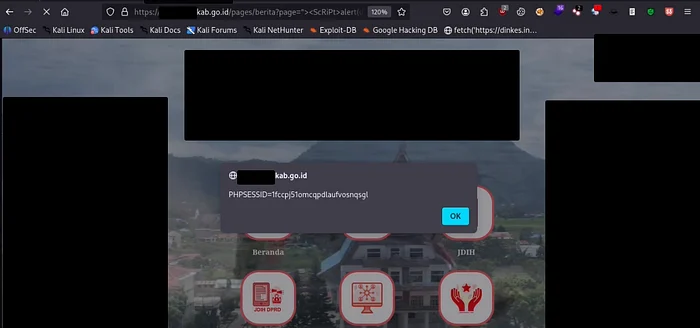
When the crafted URL was opened, a pop-up alert appeared showing the session cookie (PHPSESSID=...). This confirms that the injected JavaScript executed and that the cookie was readable from JavaScript.
Step 4: Identify the target for namaKategori
The article page was opened at:
Step 5: Inject the payload into namaKategori
The following payload was placed in the namaKategori parameter:
<svg/onload="if(confirm('Session expired?')){location.href='http://testphp.vulnweb.com/'}">
The <svg> element carries an onload handler, so the code runs as soon as the element loads. The handler shows a confirm dialog with the text Session expired?. If the victim presses OK, the browser navigates to http://testphp.vulnweb.com/, an external site.

Step 6: Execute and verify
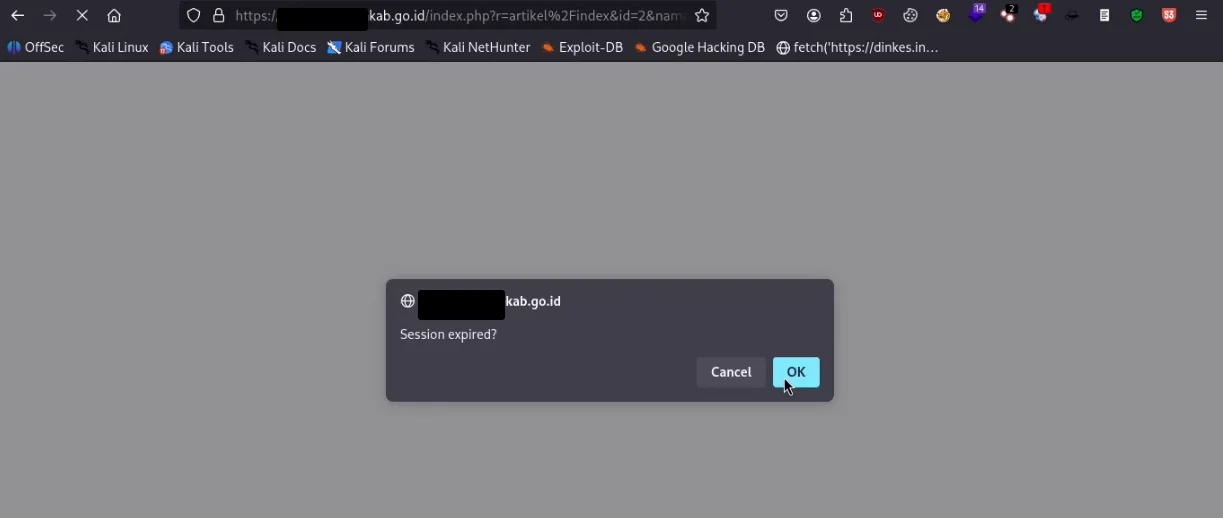
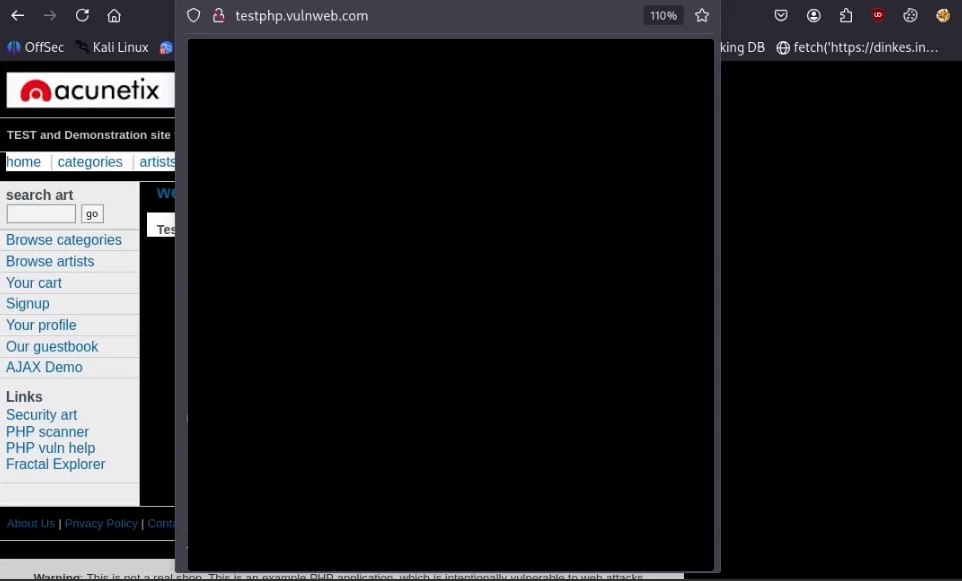
When the crafted URL was opened, a fake confirm dialog reading "Session expired?" appeared. Pressing OK redirected the browser to the external site testphp.vulnweb.com.
Step 7: Verify the fix
After the report, the responsible party responded quickly and applied a fix. Both payloads no longer execute. The verification was carried out on 9 October 2026.
Root cause
The application reflects URL parameter values into the HTML response without proper output encoding. The report states this directly: input from parameters such as page and namaKategori is reflected into the HTML page without correct output encoding, so injected HTML and JavaScript is executed by the victim's browser.
The report does not explain why the mixed-case spelling was used.
Impact
The report lists four ways the two issues could be abused:
- Cookie and session theft: stealing the user's session cookie (
PHPSESSID), which leads to account takeover if the cookie is not set withHttpOnly. - Phishing: showing fake dialogs such as "Session expired" to trick users into clicking malicious links.
- Malicious redirect: sending users to a site controlled by the attacker.
- Defacement: temporarily changing the appearance of the web page.
These effects depend on a victim opening a crafted URL. The account takeover outcome is conditional on the session cookie being readable from JavaScript, that is, not marked HttpOnly.
Fix
The report says the responsible party fixed the issue and that both payloads no longer execute, verified on 9 October 2026.
The report recommends three measures:
- Output encoding: apply HTML entity encoding to
<,>,",'and&on all input that is written back into HTML pages. - Input validation: restrict the characters allowed in URL parameters and reject suspicious input.
- Content Security Policy: deploy a strong CSP to mitigate the impact of XSS if it occurs.
Variants to test
- Other reflected parameters on the same pages: try the
idparameter on the article page and any other query string values. A positive result is the value appearing unencoded in the HTML source, followed by execution of a harmlessalertpayload. - Case and encoding bypasses: if a lowercase
<script>is blocked, try mixed case such as<ScRiPt>, and try HTML entity or URL encoding of the tag and attribute names. A positive result is the browser executing the handler despite the filter. - Different execution contexts: test payloads that break out of attributes (
">), out of text nodes, and out of JavaScript string contexts, since the correct payload depends on where the value lands. A positive result is a dialog firing from each context. - Event handler tags: where
<script>is filtered, try tags with handlers such as<svg onload=...>or<img src=x onerror=...>. A positive result is the handler running when the element loads or fails to load. - Cookie accessibility: check whether session cookies carry
HttpOnly. A positive result for an attacker isdocument.cookiereturning the session identifier, as happened here withPHPSESSID.
What happened, in plain words
A security researcher was looking at a public website run by a local government (a "kabupaten" is an Indonesian district). The site is a portal where citizens read news and articles. While clicking around, he found that two parts of the site took text from the address bar of the browser and pasted it straight into the page without cleaning it first.
That sounds harmless, but it is not. If a website pastes whatever you type in the address bar into the page, then an attacker can type not just words but instructions that the browser will obey. Those instructions are written in a language called JavaScript, the language that makes web pages interactive. When the browser reads them, it runs them as if the website itself had written them. This class of bug is called Cross-Site Scripting, or XSS for short. The word "reflected" means the bad text bounces straight back from the server into the page you see, rather than being stored on the server for later.
A simple comparison: imagine a coffee shop with a sign that says "Welcome, [your name]!". The barista writes whatever name you give on the sign. If you give the name "Alice", the sign reads "Welcome, Alice!". If you give the name "Alice, and by the way the shop is closed", the sign now says the shop is closed, because the barista copied your words without thinking. XSS is the same idea, except the sign is a web page and the copied words are code the browser executes.
The researcher found two separate places where this happened, on two different pages, using two different tricks. He reported both to the government, they fixed them, and he later checked that the fixes worked. This article walks through exactly what he did, in the order he did it, so that someone who has never done security testing can follow along.
The target and the two features
The site lives at redacted.kab.go.id. Two features were involved:
-
A news listing page at
/pages/berita. This page shows a list of news items. It takes a parameter calledpage. A parameter is the part of a web address after the question mark. In?page=1, the parameter name ispageand its value is1. Parameters are how a website passes small pieces of information between pages. -
An article page at
/index.php?r=artikel%2Findex. This page shows a single article. It takes anidparameter and anamaKategoriparameter.
The researcher tested the site on 14 November 2025. He describes the vulnerability type as reflected XSS, the vector (the way in) as the URL parameters page and namaKategori, and the severity as Medium. Severity is a rough label for how bad a bug is; Medium sits between Low and High. The status is fixed: it was reported and acknowledged.
How he set up
No accounts, tools or software versions are mentioned. The proof of concept relies on JavaScript dialogs appearing when a crafted URL is opened. That is possible because the proof of concept relies on JavaScript pop-up dialogs (alert and confirm) appearing when a crafted URL is opened. If you can open a link in a browser, you can reproduce this kind of test. Neither URL requires logging in; both are ordinary public pages.
How he found it
While testing several features of the portal, he noticed that text from URL parameters was being copied back into the HTML page. HTML is the language that describes the structure of a web page: headings, paragraphs, links, images. When a server builds a page, it writes HTML and sends it to your browser. If it writes your input into that HTML without escaping special characters, your input becomes part of the page's structure, not just its text.
He used two different techniques, one for each parameter. A payload is the piece of text an attacker sends to trigger the bug. The two cases were:
-
page: a<script>tag with mixed case (<ScRiPt>). A tag is an HTML instruction in angle brackets, like<script>. The<script>tag tells the browser "run the JavaScript between here and the closing</script>". He wrote it in mixed case (<ScRiPt>). A filter is a piece of code on the server that tries to block bad input; if it only checks for one exact spelling, changing the case slips past it. -
namaKategori: an<svg>tag with anonloadattribute. SVG is a format for drawing shapes on a web page. An attribute is extra information attached to a tag, written inside the angle brackets.onloadis a special attribute that says "when this element finishes loading, run this code". So an SVG withonloadruns code as soon as it appears.
The common cause in both cases: the application takes the parameter value and writes it into the HTML response without output encoding. Output encoding means converting dangerous characters like < and > into harmless codes (for example < and >) so the browser shows them as text instead of treating them as tags. Without it, the browser parses the injected markup as part of the page.
Step by step: the first bug, in the page parameter
Step 1: Identify the target
He opened the news page at:
This is the normal page with page=1. The point of this step is to see the page working normally before changing anything, so you know what "normal" looks like.
Step 2: Inject the payload into page
He put the following payload into the page parameter:
"><ScRiPt>alert(document.cookie)</ScRiPt>
Line by line, in plain words:
">: these two characters end the current markup and let a new tag begin. The"ends the value, and the>ends the tag. Now the browser thinks the tag is finished and is ready for a new one.<ScRiPt>: this opens a script tag. The mixed capitalisation is the trick to get past a filter that only looks for lowercase<script>.alert(document.cookie): this is the JavaScript that runs.alert(...)shows a pop-up box with whatever is inside the brackets.document.cookieis a built-in way for JavaScript to read the cookies that belong to the current page. A cookie is a small piece of data a website asks your browser to store and send back on every request. Cookies are how websites remember who you are between page loads. The session cookie is the one that proves you are logged in.</ScRiPt>: this closes the script tag.
The encoded form of the payload, as given in the report, is:
?page=%22%3E%3CScRiPt%3Ealert(document.cookie)%3C/ScRiPt%3E
URL encoding (also called percent encoding) is how special characters are written inside a web address. Characters like ", <, > and / are not allowed raw in a URL, so they are replaced with a % followed by two hexadecimal digits. %22 is ", %3E is >, %3C is <, %2F is /. The browser does this automatically when you type such characters into the address bar, but the report shows the encoded form so you can copy and paste it exactly.
The image shows the crafted URL being used against the news page.
Step 3: Execute and verify
When the crafted URL was opened, a pop-up alert appeared showing the session cookie (PHPSESSID=...). PHPSESSID is the default name PHP (a common web programming language) gives to its session cookie. Seeing it in the alert proves two things: the injected JavaScript ran, and the cookie was readable from JavaScript. If the cookie had been marked HttpOnly, a setting that tells the browser "never let JavaScript see this cookie", the alert would have shown nothing useful.
The image shows the alert box with the cookie value inside it.
Step by step: the second bug, in the namaKategori parameter
Step 4: Identify the target
He opened the article page at:
Again, this is the normal page. The r=artikel%2Findex part tells the site which internal page to load (artikel/index, with %2F being the slash). id=2 and namaKategori=1 are the parameter values used. The point of this step is the same as before: see the page working normally first.
Step 5: Inject the payload into namaKategori
He put the following payload into the namaKategori parameter:
<svg/onload="if(confirm('Session expired?')){location.href='http://testphp.vulnweb.com/'}">
Line by line, in plain words:
<svg/onload="...">: this opens an SVG element. The/beforeonloadis a shorthand way of writing the tag; the browser accepts it. Theonloadattribute holds the code to run when the element loads.if(confirm('Session expired?')):confirm(...)shows a dialog with an OK and a Cancel button and the text inside the quotes. It returns true if the user clicks OK and false if they click Cancel. Theif(...)means "only do the next part if the user clicked OK".{location.href='http://testphp.vulnweb.com/'}: if the user clicked OK, this sets the browser's current address (location.href) to the given URL, which makes the browser navigate there.testphp.vulnweb.comis an external site used for testing.- The closing
">finishes the attribute and the tag.
The effect: a fake "Session expired?" dialog appears. If the victim clicks OK, they are sent to an external site. This is phishing: tricking someone into trusting a message that looks official so they take an action that helps the attacker.
The image shows the payload placed in the namaKategori parameter.
Step 6: Execute and verify
When the crafted URL was opened, a fake confirm dialog reading "Session expired?" appeared. Pressing OK redirected the browser to the external site testphp.vulnweb.com.
The images show the fake dialog and the redirect that follows when OK is pressed.
Step 7: Verify the fix
After the report, the responsible party responded quickly and applied a fix. Both payloads no longer execute. The verification was carried out on 9 October 2026.
Why it worked (root cause)
The application reflects URL parameter values into the HTML response without proper output encoding. The report states this directly: input from parameters such as page and namaKategori is reflected into the HTML page without correct output encoding, so injected HTML and JavaScript is executed by the victim's browser.
The report does not explain why the mixed-case spelling was used. The report does not describe the filter itself, so the exact mechanism is not documented.
What an attacker could do with it
The report lists four ways the two issues could be abused:
- Cookie and session theft: stealing the user's session cookie (
PHPSESSID), which leads to account takeover if the cookie is not set withHttpOnly. Account takeover means logging in as the victim without knowing their password, simply by using their stolen session cookie. - Phishing: showing fake dialogs such as "Session expired" to trick users into clicking malicious links.
- Malicious redirect: sending users to a site controlled by the attacker.
- Defacement: temporarily changing the appearance of the web page.
All of these depend on a victim opening a crafted URL. The account takeover outcome is conditional on the session cookie being readable from JavaScript, that is, not marked HttpOnly.
The fix
The report says the responsible party fixed the issue and that both payloads no longer execute, verified on 9 October 2026.
The report recommends three measures:
- Output encoding: apply HTML entity encoding to
<,>,",'and&on all input that is written back into HTML pages. This turns dangerous characters into harmless text. - Input validation: restrict the characters allowed in URL parameters and reject suspicious input. For example, a page number should only contain digits.
- Content Security Policy: deploy a strong CSP to mitigate the impact of XSS if it occurs. A CSP is a rule the server sends to the browser saying which sources of code are allowed to run; a good CSP blocks inline scripts like the ones used here.
Other places to look (variants)
If you want to try this kind of testing yourself, here are the directions the report points to:
- Other reflected parameters on the same pages: try the
idparameter on the article page and any other query string values. A positive result is the value appearing unencoded in the HTML source, followed by execution of a harmlessalertpayload. - Case and encoding bypasses: if a lowercase
<script>is blocked, try mixed case such as<ScRiPt>, and try HTML entity or URL encoding of the tag and attribute names. A positive result is the browser executing the handler despite the filter. - Different execution contexts: test payloads that break out of attributes (
">), out of text nodes, and out of JavaScript string contexts, since the correct payload depends on where the value lands. A positive result is a dialog firing from each context. - Event handler tags: where
<script>is filtered, try tags with handlers such as<svg onload=...>or<img src=x onerror=...>. A positive result is the handler running when the element loads or fails to load. - Cookie accessibility: check whether session cookies carry
HttpOnly. A positive result for an attacker isdocument.cookiereturning the session identifier, as happened here withPHPSESSID.
Glossary
- XSS (Cross-Site Scripting): a bug where a website lets an attacker's text become code that runs in a victim's browser.
- Reflected XSS: XSS where the bad input bounces straight back from the server into the page you see, rather than being stored.
- Parameter: the part of a web address after the question mark, made of a name and a value, like
page=1. - Payload: the piece of text an attacker sends to trigger a bug.
- HTML: the language that describes the structure of a web page.
- Tag: an HTML instruction in angle brackets, like
<script>. - Attribute: extra information attached to a tag, written inside the angle brackets.
- JavaScript: the programming language that makes web pages interactive and runs in the browser.
<script>tag: an HTML tag that tells the browser to run the JavaScript inside it.<svg>tag: an HTML tag for drawing shapes; it can carry anonloadattribute that runs code when it loads.onload: an attribute that runs code when an element finishes loading.alert(...): a JavaScript function that shows a pop-up box with the given text.confirm(...): a JavaScript function that shows a dialog with OK and Cancel and returns true or false.document.cookie: a JavaScript way to read the cookies that belong to the current page.- Cookie: a small piece of data a website asks your browser to store and send back on every request.
- Session cookie: the cookie that proves you are logged in.
PHPSESSID: the default name PHP gives to its session cookie.HttpOnly: a cookie setting that stops JavaScript from reading the cookie.- Output encoding: converting dangerous characters like
<and>into harmless codes so the browser shows them as text. - HTML entity encoding: the specific form of output encoding that uses codes like
<and>. - Input validation: restricting what characters or values a parameter is allowed to contain.
- Filter: a piece of code on the server that tries to block bad input.
- URL encoding (percent encoding): how special characters are written inside a web address, using
%followed by two hexadecimal digits. - CSP (Content Security Policy): a rule the server sends to the browser saying which sources of code are allowed to run.
- Phishing: tricking someone into trusting a message that looks official so they take an action that helps the attacker.
- Account takeover: logging in as someone else without their password, for example by using their stolen session cookie.
- Defacement: changing the appearance of a web page without permission.
- Severity: a rough label for how bad a bug is, such as Low, Medium or High.
- Vector: the way an attacker gets in, such as a particular URL parameter.
- Root cause: the underlying reason a bug exists.
- PoC (proof of concept): a small demonstration that proves a bug is real.
- Kabupaten: an Indonesian district.



