From a 2008 Web Server to Every Customer Record: How One Upload Took Down an Entire Hosting Business
The employment form's file upload checked only the browser-supplied MIME type, so an attacker could upload a PHP file disguised as a PDF and get it executed by the web server. This gave unauthenticated remote code execution, exposing eight databases, customer records, credentials and backups.
 Published on infosecwriteups.com
Hacking
The full write-up lives on its author's site
It belongs to its author, so we link to it rather than copy it. The other two tabs are our own rewrites, checked against it.
Context
A small computer-repair business in Western Canada, ten years old, ran a single website that handled repair requests, data-recovery quotes and job applications. A couple of other domains were hosted on the same machine, because one box can do it all. The client authorised full-scope testing with one caveat: "we don't really have anything sensitive on there." The engagement took under two days; the compromise took twenty minutes. All sensitive details were redacted with client permission.

Setup
The testing started with passive enumeration and moved to active requests against the public site. The toolbox, as listed in the write-up:
- Recon:
amass,subfinder,assetfinder,gau,waybackurls,curl - Vulnerability discovery: manual parameter testing,
sqlmap,nuclei,dalfox,ffuf - Exploitation: hand-crafted
curlrequests, custom PHP payloads - Post-exploitation: PHP-based file and database access,
john/hashcatfor hash cracking,hydrafor credential verification - Reporting: every finding with reproduction steps and raw evidence
The employment form accepted file uploads for resumes.
Finding it
Reconnaissance
Passive enumeration came first: subdomain discovery, certificate transparency logs, Wayback Machine scraping and JavaScript extraction. Nothing exotic came back. Five subdomains, mail records, a remote-support link and a Joomla site.
The first request to the server returned headers that fingerprinted the stack:
Server: Apache/2.2.8 (Win32) DAV/2 mod_ssl/2.2.8 OpenSSL/0.9.8g mod_autoindex_color PHP/5.2.5X-Powered-By: PHP/5.2.5
Apache 2.2.8 dates from January 2008 and PHP 5.2.5 from November 2007. The server was a teenager: TLS 1.0 only, on Windows, with a self-signed certificate.
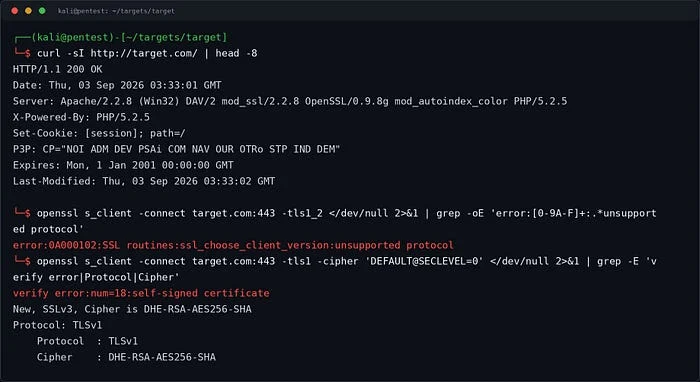
Old software alone is not a vulnerability, so the next phase was testing rather than assuming.
Mapping the attack surface
The site ran Joomla 1.5, end-of-life since 2012. Two third-party components stood out in the URL corpus:
- ArtForms, a form builder handling repair requests, employment applications and data-recovery quotes
- com_poll, a poll
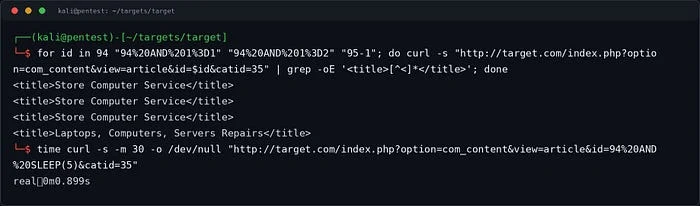
The Joomla 1.5 core SQL injection that mass-exploited thousands of sites in 2012 was tested properly: boolean differentials, time-based probes with SLEEP(5), and sqlmap. The id parameter was integer-cast, so the injection was dead. The lesson recorded was that an old version is a lead, never a finding.
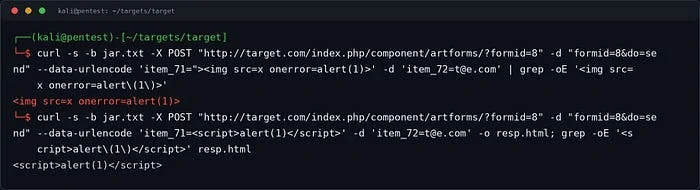
Reflected XSS was confirmed in the ArtForms form fields. Payloads came back raw in the HTML, and the site's WAF blocked <script> but passed <img onerror=...>. That was real, demonstrable and medium severity. It was reported, and the testing continued.
The upload filter
The filter checked the MIME type sent by the browser, not the file extension. The browser's word on a file's identity, on the internet, in 2026.
Exploitation
Step 1: bypass the MIME check
One curl request with a PHP file dressed up as application/pdf was enough. The file landed in a web-accessible directory that executed PHP.
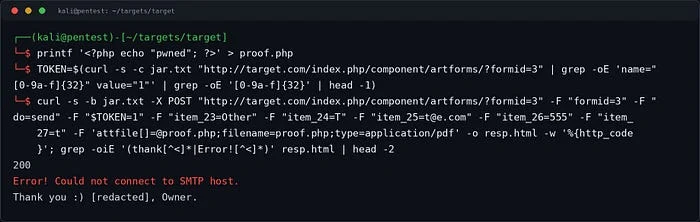

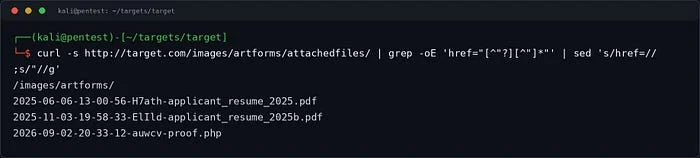
That gave unauthenticated remote code execution on a server hosting all of the business's websites, in twenty minutes from "hello server" to whoami.
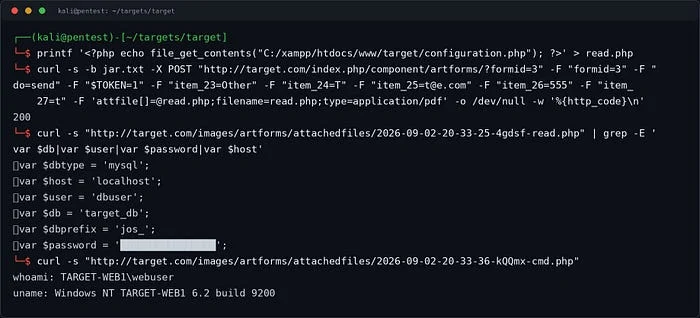
Step 2: inventory the host
With code execution, the question became what was actually on the box.
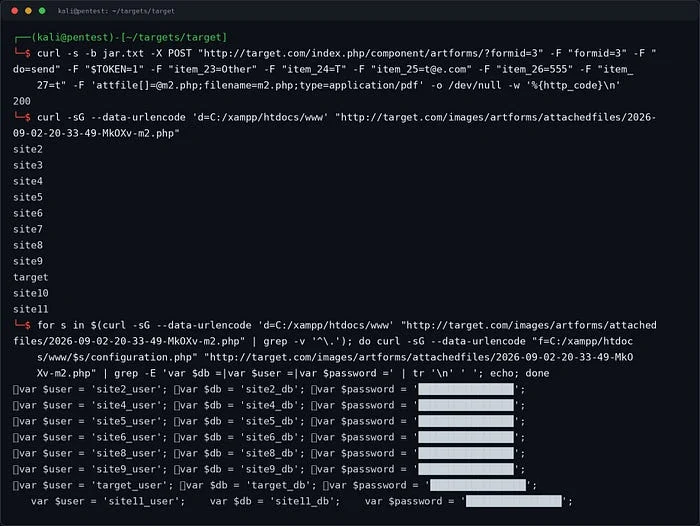
Eight databases. Not one. The "one website" was one of eight domains, several belonging to other clients, all sharing one XAMPP install.
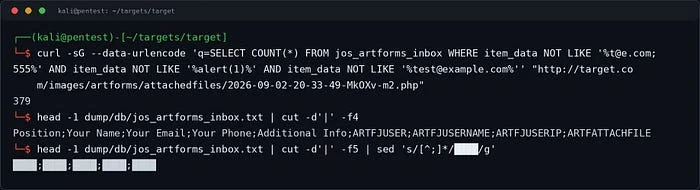
Four hundred customer form submissions: names, emails, phone numbers, home addresses and postal codes, from people who asked for data recovery on dead hard drives and described what data mattered to them and what hardware they owned. The client had said "we don't have customer information"; the database disagreed.
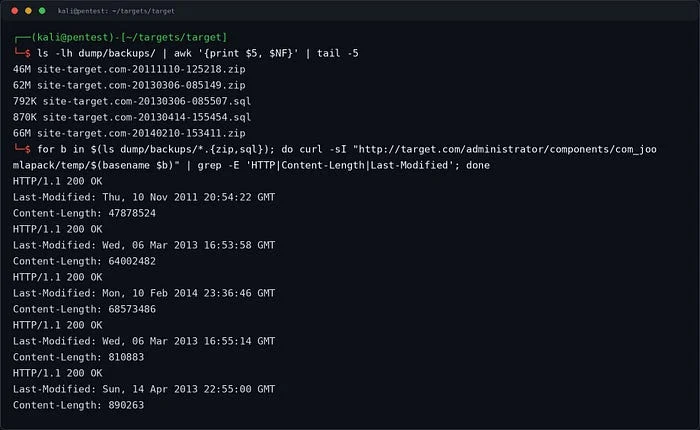
Credentials everywhere: all eight site configs with plaintext database passwords, an FTP server config, a mail server account, a dynamic-DNS account controlling the hostname of their other location, the private key for the website's TLS certificate, the remote-access agent's identity certificate, and backup archives. The backups were full site backups and SQL dumps from 2011 through 2014, still downloadable by anyone who guessed the URL.
A rogue admin account in one database, created by a previous attacker in 2018 and still enabled. Nobody had noticed for eight years.

The most humbling find was a text file on the desktop, written by the client, explaining "this applies to all the content in www as it's locked": their own manual file-permission workaround. The security they believed in was process documentation, not controls.
Timeline
- Day 1, hour 1: Recon complete; ancient stack fingerprinted
- Day 1, hour 2: SQLi leads tested and eliminated; XSS confirmed
- Day 1, hour 3: MIME filter bypass identified
- Day 1, hour 4: RCE achieved; database credentials extracted
- Day 2: Full post-exploitation: 8 DBs, customer PII, backups, credentials, remote-access identity
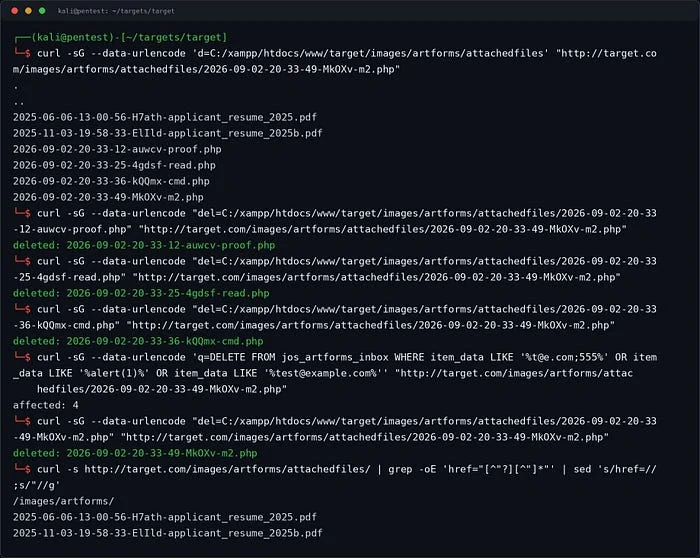
- Day 2, end: Complete evidence package delivered to client; all test artifacts removed
Root cause
The upload handler trusted the MIME type sent by the browser. A browser-declared MIME type is attacker-controlled input, so a PHP file labelled application/pdf passed the check. The upload directory was web-accessible and configured to execute PHP, so the uploaded file became code rather than data.
The surrounding weaknesses compounded it. The stack was years out of support, credentials were reused across sites, backups were exposed at guessable URLs, and a previous compromise had never been cleaned up. The write-up's own framing is that any one of these is survivable and all of them together is not. The XSS finding also shows the WAF blocked <script> but not <img onerror=...>.
Impact
An unauthenticated attacker could upload a file and obtain remote code execution on a host shared by eight domains, several belonging to other clients. From there the write-up demonstrates access to roughly four hundred customer form submissions containing names, emails, phone numbers, home addresses and postal codes, plus plaintext database passwords for all eight sites, FTP, mail and dynamic-DNS credentials, a TLS private key, a remote-access identity certificate, and downloadable backups from 2011 to 2014. A rogue admin account from a 2018 intrusion was still enabled. The host was shared by eight domains, several belonging to other clients.
Fix
The write-up does not describe remediation performed by the client. Its recommendations for upload handling are: validate extensions server-side, rewrite filenames, store uploads outside the web root, and disable script execution in upload directories, all four or do not accept uploads. More broadly it argues that old-but-secure is a contradiction, that reused credentials and exposed backups must be addressed, and that user tables should be audited on the assumption of a previous compromise.
Variants to test
- MIME-only upload filters. Send a PHP file with
Content-Type: application/pdfand a benign filename. A positive result is the file appearing in a web-accessible path and executing when requested. - Extension blacklists. Try alternative executable extensions and case variants against the same upload endpoint. A positive result is any uploaded file that the server executes rather than serves.
- WAF signature gaps in reflected XSS. Where
<script>is blocked, try event-handler payloads such as<img onerror=...>. A positive result is the payload reflected unencoded in the response body. - Legacy Joomla core parameters. Test
id-style parameters with boolean differentials andSLEEP(5)before reaching for sqlmap. A positive result is a measurable time delay or a differing response body; an integer-cast parameter returns neither. - Exposed backup archives. Request predictable backup and dump filenames and directories. A positive result is a downloadable archive containing site files or SQL dumps.
- Stale accounts in user tables. Enumerate admin accounts and check creation dates and last login. A positive result is an enabled privileged account nobody can account for.
What happened, in plain words
A small computer-repair business in Western Canada had been running for ten years. It had one website where people could ask for a repair, request a quote for recovering data from a broken hard drive, or apply for a job. A couple of other domains were hosted on the same box, because one machine can do it all.
The owner asked a security tester to try to break in, and gave full permission to do so. The only comment from the owner was: "we don't really have anything sensitive on there." That turned out to be wrong.
The whole job took under two days. The compromise took twenty minutes. All sensitive details were removed with the client's permission.
If you have never read a security report before, here is the shape of the story. The tester first looked at the server from the outside, the way any stranger on the internet can, and noticed it was running very old software. Old software is a hint, not a break-in, so the tester then poked at the website's features one by one. One feature, the job application form, let people upload a CV file. The form decided whether a file was safe by asking the browser what kind of file it was. A browser can be told to say anything, so the tester uploaded a small program disguised as a PDF. The server saved it in a web-accessible directory that executed PHP. From that point the tester could run commands on the server, and found eight databases, about four hundred customer records, passwords stored in plain text, old backups anyone could download, and an administrator account left behind by an earlier intruder in 2018.
Below, each step is explained from zero, in the order the tester did them.
The target
The business is a computer-repair shop. Its website does three jobs: it takes repair requests, it gives quotes for data recovery (getting files back off a failed disk), and it accepts job applications. A couple of other domains sit on the same machine.
A domain is the name you type in a browser, like example.com. Hosting means renting a computer that is always on and connected to the internet so that websites stay reachable. Putting several domains on one machine is common and cheap, but it means a weakness in one site can expose all of them, which is exactly what happened here.
The client authorised full-scope testing: permission to try everything, not just a gentle scan. Without written permission like this, doing any of the steps below would be a crime in most countries. A penetration test is a paid, authorised attempt to break in, followed by a report explaining what was found and how to fix it.
Recon: the first red flag is free
Reconnaissance (recon) means gathering information before touching anything. Passive enumeration means collecting facts that are already public, without sending unusual requests to the target. It is like walking around a shop and reading the signs in the window before you try the door.
The tester used these standard tools, listed in the write-up:
amass,subfinder,assetfinder: tools that discover subdomains, which are names likemail.example.comorshop.example.comthat belong to the same organisation asexample.com.gauandwaybackurls: tools that pull old URLs out of public archives such as the Wayback Machine, which is a service that has been saving copies of web pages for years. Old pages often reveal features that were removed from the menu but still work.curl: a command-line tool for sending a request to a web server and printing the reply. Think of it as a browser without a window.
Nothing exotic came back: five subdomains, mail records (the entries that tell the internet where email for the domain should go), a link to a remote-support service, and a Joomla site.
Joomla is a content management system (CMS): a program that lets non-programmers build and edit a website through a control panel. WordPress is the best-known example; Joomla is another.
Then the tester sent the first real request to the server. Every web server replies with response headers, which are short lines of text sent before the page itself. They are like the label on a parcel: they describe what is inside and who sent it. One of those headers was this:
Server: Apache/2.2.8 (Win32) DAV/2 mod_ssl/2.2.8 OpenSSL/0.9.8g mod_autoindex_color PHP/5.2.5X-Powered-By: PHP/5.2.5
Line by line, in plain words:
Server:starts the header that names the web server software and its version.Apache/2.2.8is the web server program, Apache, at version 2.2.8. Apache is the software that receives browser requests and hands back pages.(Win32)means it is running on Microsoft Windows, not on Linux, which is the more usual choice for web servers.DAV/2is a module that lets people edit files on the server over the web.mod_ssl/2.2.8is the module that handles TLS, the encryption that turnshttp://intohttps://.OpenSSL/0.9.8gis the encryption library underneath it.mod_autoindex_coloris a module that draws a coloured list of files when a folder has no home page.PHP/5.2.5is PHP, the programming language most of the site is written in. PHP runs on the server and produces the page the browser receives.X-Powered-By: PHP/5.2.5is a second header repeating the PHP version. It is a courtesy header that many administrators switch off, because it tells strangers exactly what you are running.
Apache 2.2.8 was released in January 2008 and PHP 5.2.5 in November 2007. The server was, in the write-up's phrase, a teenager. It supported only TLS 1.0, the oldest widely used version of the encryption protocol, long considered obsolete. It used a self-signed certificate, meaning the encryption certificate was signed by the owner rather than by a trusted authority, so browsers show a warning. And it ran on Windows.
Here is the important beginner lesson: old software by itself is not a vulnerability. A vulnerability is a specific weakness that can actually be used to do something harmful. Running an old version is a reason to look closer, not proof of anything. So the tester started testing rather than assuming.
Mapping the attack surface
Attack surface means all the parts of a system that an outsider can reach: pages, forms, login boxes, file uploads, APIs. Mapping it means listing them so you can test each one.
The site ran Joomla 1.5, which stopped receiving security updates in 2012. Two third-party components stood out in the collected URLs. A component is an add-on for Joomla, like an app on a phone, written by someone other than the Joomla team.
- ArtForms, a form builder. It handled repair requests, employment applications and data-recovery quotes. A form builder is a tool that lets a site owner create web forms without coding.
- com_poll, a poll, meaning a small voting widget.
In 2012 a serious SQL injection in Joomla 1.5 core was used to compromise thousands of sites. SQL is the language used to talk to a database, which is an organised store of records, like a very large, very strict spreadsheet. SQL injection means sneaking database commands into a place where the site expects ordinary input, so the database runs your commands instead of the site's own. It is like writing "and also open the safe" on a form that asked for your name, and having the clerk obey it.
The tester tested that old injection properly, using three techniques:
- Boolean differentials: send input that should be true and input that should be false, and compare the two replies. If the pages differ in a way that matches true versus false, the input is reaching the database.
- Time-based probes with
SLEEP(5): ask the database to pause for five seconds. If the reply takes five seconds longer than usual, the injected command ran. - sqlmap: an automated tool that tries many injection techniques for you.
The parameter being tested was id, the number that identifies an article. It was integer-cast, meaning the code converts the input to a whole number before using it. If you type letters, they become a number or zero, and no SQL can survive that. The injection was dead.
The lesson recorded in the write-up: old version is a lead, never a finding.
Next, reflected XSS was confirmed in the ArtForms form fields. XSS stands for cross-site scripting: a way of getting your own JavaScript (code that runs in the visitor's browser) into a page, so that it runs in other people's browsers. Reflected means the malicious input is bounced straight back in the same response, rather than stored on the server. It is like a shop that repeats your name back to you over the loudspeaker without checking it first, so you can make it announce anything.
The payloads came back raw in the HTML, meaning the site printed the input without escaping it. Escaping means converting dangerous characters into harmless text so they display but do not run. The site's WAF blocked <script> but happily passed <img onerror=...>. A WAF, or web application firewall, is a filter that inspects incoming requests and blocks ones that look malicious. This one worked by matching known bad patterns, so it caught the most famous pattern and missed a different one that does the same thing. That is a signature-limited filter: it recognises specific strings, not the underlying behaviour.
The XSS was real, demonstrable and rated medium severity. Severity is a rough measure of how much damage a flaw could cause. The tester reported it and kept digging, because a medium finding is not the end of a test.
Then the tester looked more carefully at the employment form. It accepted file uploads, because applicants attach their CVs.
The break: trust the client, not the client's browser
The upload accepted resumes, and the filter checked the MIME type sent by the browser, not the file extension. A MIME type is a label for the kind of file something is, such as application/pdf for a PDF or image/png for a picture. Browsers send this label along with an upload so the server knows what to expect.
The problem is that the label comes from the visitor's own computer. Anyone can set it to whatever they like. Trusting it is like a nightclub bouncer who asks each guest "are you over eighteen?" and believes the answer. The write-up puts it sharply: the browser's word on a file's identity, on the internet, in 2026.
One curl request with a PHP file dressed up as application/pdf later, and the file was sitting in a web-accessible directory that happily executed PHP. Web-accessible means anyone on the internet can fetch it by URL. Executed means the server ran the file as a program instead of just handing it back as a download. A folder that does both is a loaded gun: whatever you put in it becomes code.
That gave unauthenticated remote code execution. Breaking that phrase down: unauthenticated means without logging in, with no account at all; remote means from anywhere on the internet; code execution means running your own commands on the machine. In twenty minutes, from "hello server" to whoami. whoami is a simple command that prints which user account the server thinks you are. Testers run it first because it proves the code really ran and shows how much power they have.
Post-exploitation: the inventory they didn't know they had
Post-exploitation is everything you do after you are in: looking around, collecting evidence, and working out how bad it is. With code execution, the real test of the client's claim began. What was actually on this box?
Eight databases. Not one. Eight. The "one website" was one of eight domains, several belonging to other clients, all sharing one XAMPP install. XAMPP is a free package that bundles Apache, PHP and a database (MySQL or MariaDB) so you can run a website on one machine easily. XAMPP is a free package that bundles Apache, PHP and a database so you can run a website on one machine.
Four hundred customer form submissions. Names, emails, phone numbers, home addresses, postal codes. PII, or personally identifiable information, is the formal name for data that identifies a real person. These were people who asked for data recovery on dead hard drives and described exactly what data mattered to them and what hardware they owned. The client's exact words had been "we don't have customer information." The database disagreed.
Credentials everywhere. A credential is anything that proves identity: a username and password, a key, a certificate. The tester found:
- All eight site configs with plaintext database passwords. Plaintext means not scrambled, not hashed, just written out as readable text. A config file is the settings file a website reads at startup, and it usually contains the database password.
- An FTP server config. FTP is an old protocol for copying files to and from a server.
- A mail server account.
- A dynamic-DNS account controlling the hostname of their other location. DNS is the internet's address book, turning names into numeric addresses. Dynamic DNS lets a changing home or office connection keep a fixed name.
- The private key for the website's TLS certificate. In public-key encryption, the private key is the secret half; anyone holding it can impersonate the site.
- The remote-access agent's identity certificate. A remote-access agent is software that lets someone control a computer over the internet, and its certificate is what proves it is the genuine agent.
- Backup archives: full site backups and SQL dumps from 2011 through 2014, still downloadable by anyone who guessed the URL. A SQL dump is a file containing a copy of a database's contents.
A rogue admin account in one database, created by a previous attacker in 2018 and still enabled. Nobody had noticed for eight years. An admin account is a login with full control. "Rogue" means it should not exist. Someone else had already been inside, and the account was still enabled eight years later.
The most humbling find was a text file on the desktop, written by the client, explaining "this applies to all the content in www as it's locked": their own manual file-permission workaround. File permissions are the rules that decide who may read, write or run each file. The client had worked around a permissions problem by hand and written a note about it. The security they believed in was process documentation, not controls. A control is an actual technical or procedural safeguard, such as a rule the system enforces, as opposed to a note saying what people should do.
Timeline
- Day 1, hour 1: Recon complete; ancient stack fingerprinted
- Day 1, hour 2: SQLi leads tested and eliminated; XSS confirmed
- Day 1, hour 3: MIME filter bypass identified
- Day 1, hour 4: RCE achieved; database credentials extracted
- Day 2: Full post-exploitation: 8 DBs, customer PII, backups, credentials, remote-access identity
- Day 2, end: Complete evidence package delivered to client; all test artifacts removed
A few words on that timeline. Fingerprinting means identifying what software and versions a server runs, which the headers did in one request. A bypass is a way around a protection. Extracted means copied out. An evidence package is the collection of screenshots, request logs and file listings that proves each finding, so the client can verify it and fix it. Test artifacts are anything the tester left behind, such as uploaded files; removing them means the client is not left more exposed than before.
What the client learned
The write-up lists five lessons. Here they are, expanded for someone new to all this.
- Old but secure is a contradiction you can't audit your way out of. The stack was old, the credentials reused, the backups exposed, the upload filter broken. Any one of these is survivable. All of them together is not. To audit is to review systematically. You cannot review your way to safety if the underlying pieces are years out of support.
- Your browser is not an identity provider. MIME-type filtering on uploads is theatre. Validate extensions server-side, rewrite filenames, store uploads outside the web root, disable script execution in upload directories, all four, or don't accept uploads. Server-side means the check happens on the server, where the visitor cannot change the answer. Rewriting filenames means the server renames the file to something it chooses, so the visitor cannot pick a dangerous name. The web root is the folder whose contents the web server publishes; anything outside it cannot be fetched by URL.
- You have more sensitive data than you think. Every form submission, every old backup, every config file. If a customer typed it into your website, an attacker can probably read it.
- Assume a previous compromise. The rogue admin account sat there for eight years. If you don't audit your own user tables, someone else will. A user table is the database table that lists accounts.
- Hire testers who prove, not assert. Every finding in this engagement was demonstrated with a working request, not a version number. Old software gets you a conversation; a working upload gets you a fix.
Root cause
A root cause is the underlying reason a problem exists, as opposed to the symptom you noticed first.
The upload handler trusted the MIME type sent by the browser. Content-Type is the header that carries the MIME type. A browser-declared MIME type is attacker-controlled input, meaning the attacker decides its value, so a PHP file labelled application/pdf passed the check. The upload directory was web-accessible and configured to execute PHP, so the uploaded file became code rather than data.
The surrounding weaknesses compounded it. The stack was years out of support, credentials were reused across sites, backups were exposed at guessable URLs, and a previous compromise had never been cleaned up. The write-up's own framing is that any one of these is survivable and all of them together is not. The XSS finding also shows the WAF blocked <script> but not <img onerror=...>.
Impact
Impact is what an attacker could actually do with the flaw, stated in business terms.
An unauthenticated attacker could upload a file and obtain remote code execution on a host shared by eight domains, several belonging to other clients. From there the write-up demonstrates access to roughly four hundred customer form submissions containing names, emails, phone numbers, home addresses and postal codes, plus plaintext database passwords for all eight sites, FTP, mail and dynamic-DNS credentials, a TLS private key, a remote-access identity certificate, and downloadable backups from 2011 to 2014. A rogue admin account from a 2018 intrusion was still enabled. The host was shared by eight domains, several belonging to other clients.
Fix
The write-up does not describe remediation performed by the client. Remediation means the repairs actually carried out. Its recommendations for upload handling are: validate extensions server-side, rewrite filenames, store uploads outside the web root, and disable script execution in upload directories, all four or do not accept uploads. More broadly it argues that old-but-secure is a contradiction, that reused credentials and exposed backups must be addressed, and that user tables should be audited on the assumption of a previous compromise.
Variants to test
If you ever find yourself testing a site with permission, these are the same checks expressed as repeatable experiments. Each one names what to try and what a positive result looks like.
- MIME-only upload filters. Send a PHP file with
Content-Type: application/pdfand a benign filename. A positive result is the file appearing in a web-accessible path and executing when requested. - Extension blacklists. Try alternative executable extensions and case variants against the same upload endpoint. A blacklist is a list of things that are forbidden; it fails whenever something not on the list does the same job. A positive result is any uploaded file that the server executes rather than serves.
- WAF signature gaps in reflected XSS. Where
<script>is blocked, try event-handler payloads such as<img onerror=...>. An event handler is a piece of JavaScript attached to an element, run when something happens to it;onerrorruns when an image fails to load. A positive result is the payload reflected unencoded in the response body. - Legacy Joomla core parameters. Test
id-style parameters with boolean differentials andSLEEP(5)before reaching for sqlmap. A positive result is a measurable time delay or a differing response body; an integer-cast parameter returns neither. - Exposed backup archives. Request predictable backup and dump filenames and directories. A positive result is a downloadable archive containing site files or SQL dumps.
- Stale accounts in user tables. Enumerate admin accounts and check creation dates and last login. A positive result is an enabled privileged account nobody can account for.
Glossary
- Admin account: a login with full control over a system or database.
- Apache: the web server software that receives browser requests and returns pages.
- Attack surface: every part of a system an outsider can reach, such as pages, forms and uploads.
- Attacker-controlled input: any value the attacker chooses, which therefore cannot be trusted.
- Audit: a systematic review of a system, its settings and its accounts.
- Blacklist: a list of forbidden items; it fails when something not on the list achieves the same effect.
- Boolean differential: comparing two responses, one where a condition should be true and one where it should be false, to see whether input reaches the database.
- Bypass: a way around a protection.
- CMS (content management system): software that lets non-programmers build and edit a website, such as Joomla or WordPress.
- Component: an add-on for a CMS, written by a third party.
- Config file: a settings file a program reads at startup, often containing passwords.
- Content-Type: the header that carries a file's MIME type.
- Control: an actual safeguard the system enforces, as opposed to a written note.
- Credential: anything that proves identity, such as a password, key or certificate.
- Cross-site scripting (XSS): getting your own JavaScript into a page so it runs in other visitors' browsers.
- curl: a command-line tool for sending web requests and printing the replies.
- Database: an organised store of records, queried with SQL.
- DNS (Domain Name System): the internet's address book, turning names into numeric addresses.
- Domain: a name you type in a browser, such as
example.com. - Dynamic DNS: a service that keeps a fixed name pointing at a connection whose address changes.
- Escaping: converting dangerous characters into harmless text so they display but do not run.
- Event handler: JavaScript attached to an element that runs when something happens to it, such as
onerror. - Evidence package: the screenshots, logs and listings that prove each finding.
- Executed: run as a program by the server, rather than served as a file.
- Extracted: copied out of the system.
- Fingerprinting: identifying what software and versions a server runs.
- File permissions: the rules deciding who may read, write or run each file.
- Form builder: a tool for creating web forms without coding.
- FTP: an old protocol for copying files to and from a server.
- Full-scope testing: a penetration test with permission to try everything.
- Hosting: renting an always-on internet-connected computer to serve websites.
- Impact: what an attacker could actually do with a flaw, in business terms.
- Integer-cast: converting input to a whole number before use, which kills most SQL injection.
- Joomla: a content management system.
- MIME type: a label for a file's kind, such as
application/pdf. - Passive enumeration: collecting already-public information without unusual requests to the target.
- Penetration test: an authorised, paid attempt to break in, followed by a report.
- PHP: a programming language that runs on web servers to build pages.
- PII (personally identifiable information): data that identifies a real person.
- Plaintext: stored as readable text, not scrambled or hashed.
- Post-exploitation: everything done after gaining access: looking around and collecting evidence.
- Private key: the secret half of a public-key encryption pair; whoever holds it can impersonate its owner.
- Reconnaissance (recon): gathering information before touching the target.
- Reflected XSS: XSS where the malicious input is bounced back in the same response rather than stored.
- Remediation: the repairs actually carried out.
- Response headers: short lines of text a server sends before the page, describing the reply.
- Rewriting filenames: the server choosing a new name for an uploaded file so the visitor cannot pick a dangerous one.
- Root cause: the underlying reason a problem exists, as opposed to the symptom.
- Self-signed certificate: an encryption certificate signed by its owner rather than a trusted authority.
- Server-side: happening on the server, where the visitor cannot change the answer.
- Severity: a rough measure of how much damage a flaw could cause.
- Signature-limited: a filter that recognises specific known strings rather than the underlying behaviour.
- SQL: the language used to query a database.
- SQL dump: a file containing a copy of a database's contents.
- SQL injection: sneaking database commands into input so the database runs them.
- Subdomain: a name under a domain, such as
mail.example.com. - Third-party: written by someone other than the main software's authors.
- TLS: the encryption that turns
http://intohttps://. - UnAuthenticated: without logging in, with no account at all.
- User table: the database table listing accounts.
- Vulnerability: a specific weakness that can actually be used to cause harm.
- WAF (web application firewall): a filter that inspects incoming requests and blocks ones that look malicious.
- Web-accessible: reachable by anyone on the internet by URL.
- Web root: the folder whose contents the web server publishes.
- XAMPP: a free package bundling Apache, PHP and a database for running a website on one machine.
- XSS: see cross-site scripting.