From Revealing Emails to Taking Over Accounts (Hacking Telecom)
The password reset flow verified the OTP only on the client side, so an attacker could manipulate the server response to bypass verification. This allowed disclosure of the victim's email and, because the change-password step lacked authorization, full account takeover.
 Published on ahmdhalabi.medium.com
Working at Resecurity — A Cyber Security Intelligence Company protecting Fortune 500 against threats of all types.
The full write-up lives on its author's site
It belongs to its author, so we link to it rather than copy it. The other two tabs are our own rewrites, checked against it.
Context
Ahmad Halabi, working at Resecurity, describes a bug he found in the "Forgot Login Details" flow of a large telecom company's application. The feature is a standard password recovery flow: a user who has forgotten their password supplies a phone number, chooses whether the PIN code is sent to the email or the phone number, and then enters the PIN to reach a change password page. The application hides both the phone number and the email address during this flow, so the recovery page is not supposed to reveal either identifier.
The bug chained two weaknesses: a client-side response manipulation that let the researcher bypass the PIN verification, and an authorisation problem on the change password step. Together they allowed him to reveal the email address associated with any phone number and then take over the account.
Setup
The researcher only needed a victim phone number. The tooling was Burp Suite, used to intercept the PIN verification request and its response. No accounts, roles or versions are described in the report.
Finding it
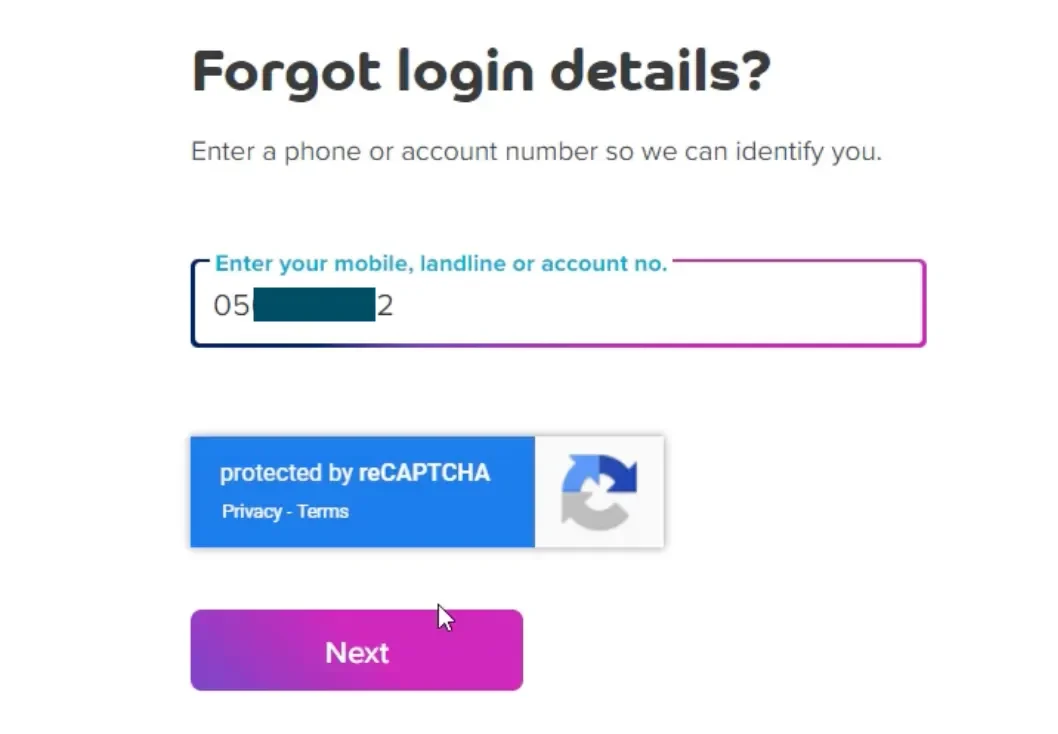
The recovery flow forces the user to enter a phone number in the "Forgot Login Details" section. The researcher entered the victim's phone number.
The application then offers two choices for delivering the PIN code: to the email or to the phone number.
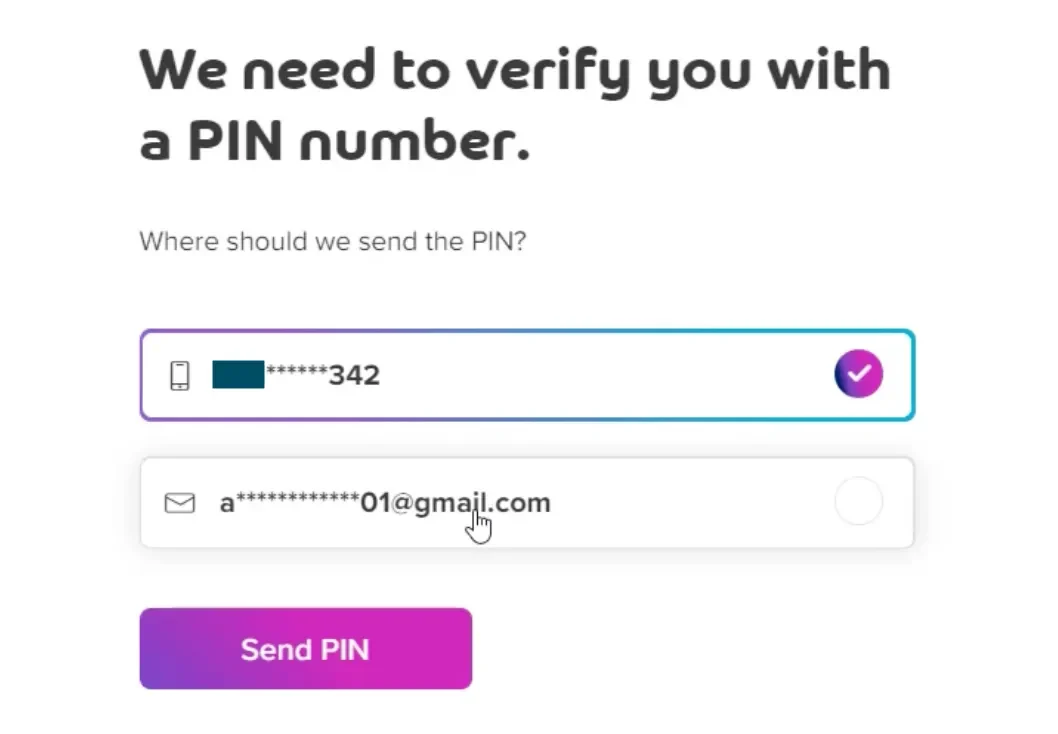
Both the phone number and the email are masked on this screen. Since the researcher already knew the victim's phone number, the goal was to reveal the email. The delivery channel did not matter because the plan was to bypass the verification anyway, so either option could be used.
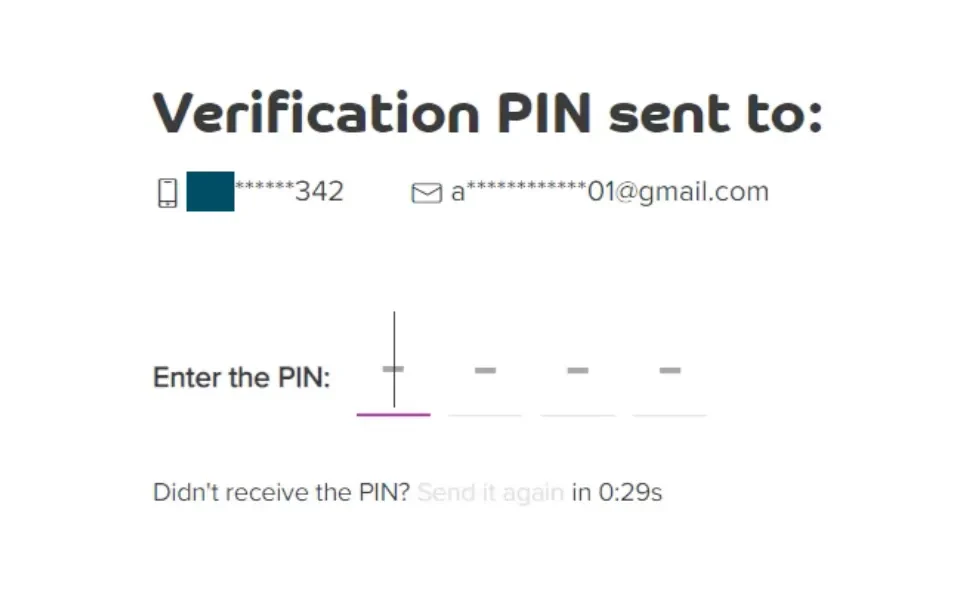
After clicking Send PIN, the code is sent. The researcher did not use it.
Exploitation
Step 1: submit a random PIN
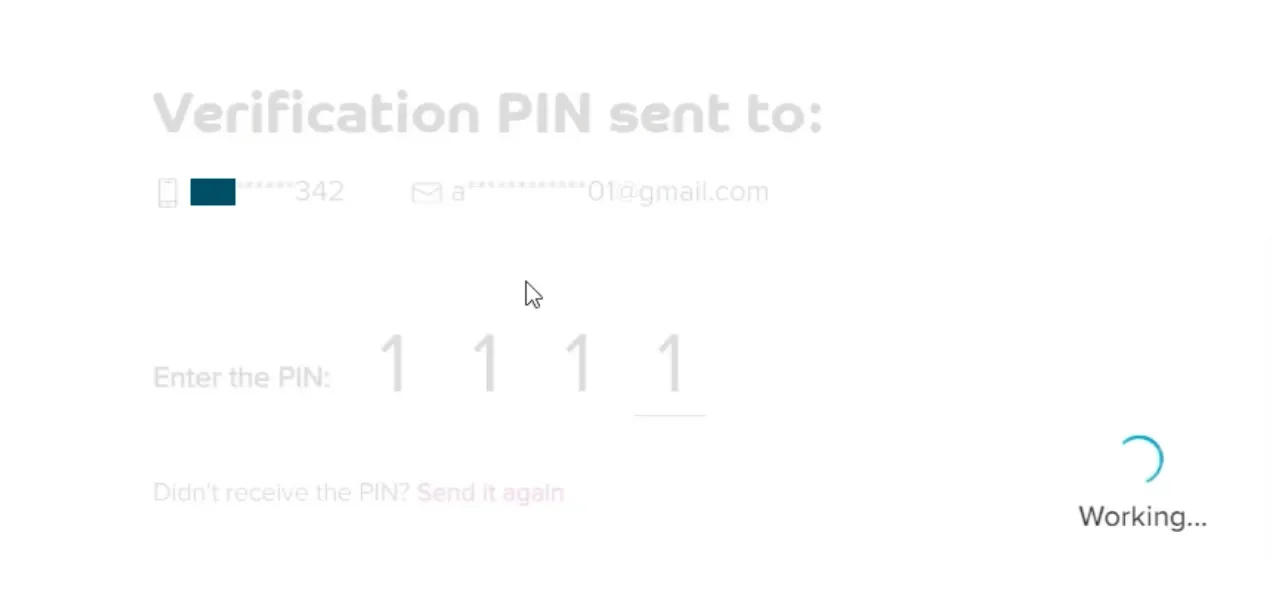
The technique is response manipulation: replace the wrong response to the code verification request with a correct one. The researcher entered the random PIN 1111.
Step 2: intercept the verification request
The request was intercepted with Burp.

The request splits the four-digit code into four pin inputs (pin1, pin2, pin3, pin4) and three normal pin inputs. The researcher notes this splitting was done to protect against brute forcing the PIN. Seeing this, he did not attempt any brute force and instead intercepted the response.

Step 3: read the failure response
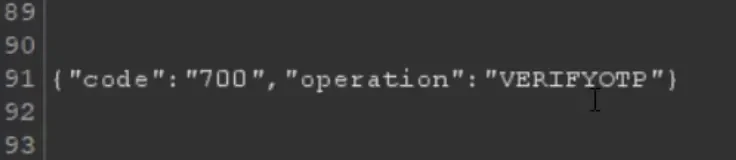
After sending the request, the response showed status code 700 and operation verify OTP, meaning the verification failed because the OTP was wrong.
Step 4: replace the response
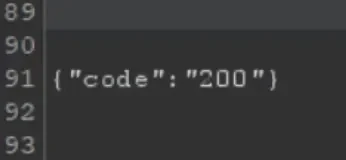
The researcher replaced the failure body with a success body and forwarded the request:
{"code":"700","operation":"VERIFYOTP"}
was replaced with:
{"code":"200"}
Step 5: reach the change password page
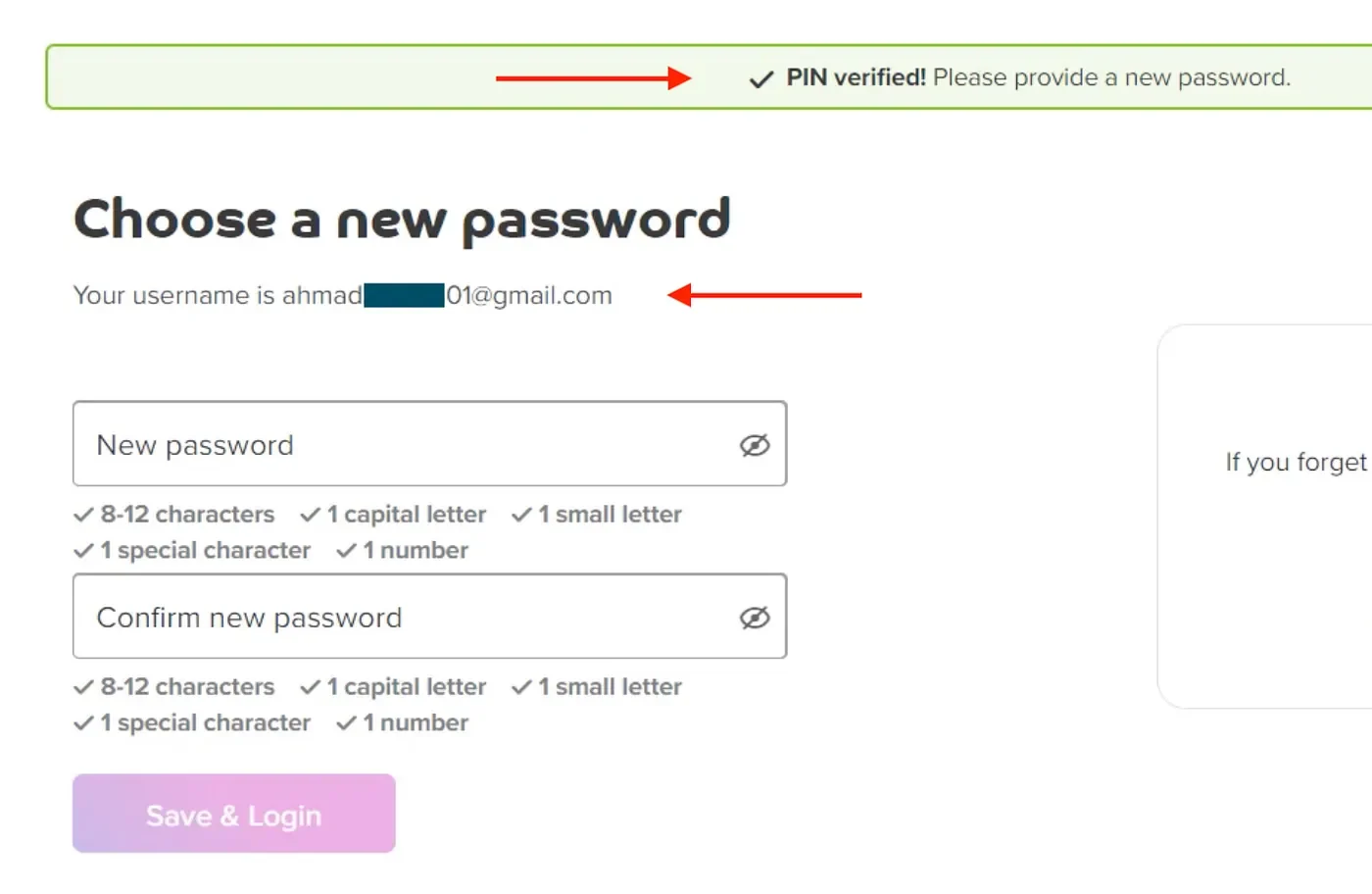
After forwarding, the application redirected to the Change Password page. That page revealed the email address and treated the PIN verification as confirmed.
Step 6: take over the account
Adding a new password on that page completed an account takeover.

Root cause
The researcher manipulated the response body, replacing the failure status with a success status, and the client then proceeded as if the PIN were correct. The report does not explain the underlying mechanism. The PIN splitting into separate inputs raised the cost of brute forcing but did nothing against tampering with the response.
On top of that, the change password step had an authorisation problem: the researcher states that fixing the response manipulation alone was not enough, because the authorisation problem on changing the password also had to be fixed so it would not be bypassed. The report does not describe the exact authorisation check that was missing.
Impact
Two impacts are described:
- Disclosure of user emails stored in the telecom company's database. An attacker could collect all phone numbers belonging to the telecom, automate the vulnerability across them, sell the disclosed private emails on the dark web, and use them in large phishing campaigns.
- Password change on accounts in the telecom company, giving full account takeover. The researcher says this could easily have led to financial loss for users and huge packages loss.
Fix
The researcher states that fixing the response manipulation bug was not enough: the authorisation problem on changing the password also had to be fixed so it could not be bypassed.
Variants to test
- Response tampering on OTP verification. Intercept the verification response and change a failure status to a success status. A positive result is being redirected to the next step (password change, profile, dashboard) without a valid code.
- Client-side trust of status fields. Look for responses carrying fields such as
code,statusoroperationthat the front end uses to gate navigation. A positive result is reaching a protected screen after editing only the response body. - Authorisation on the change password endpoint. After bypassing verification, try submitting a new password for a different account or session. A positive result is the password changing without a valid server-side authorisation check.
- Identifier disclosure in recovery flows. Check whether the recovery or change password page displays masked identifiers that become visible after a bypass. A positive result is an email or phone number being revealed for an account you do not control.
- PIN input splitting. Where a code is split across multiple inputs, confirm whether the split is enforced server-side or only in the UI. A positive result is the server accepting a code assembled differently from the intended form.
What happened, in plain words
A security researcher named Ahmad Halabi, who works at a cyber security company called Resecurity, found a bug in a large telecom company's website. The bug was in the "Forgot Login Details" feature, the part of a website you use when you cannot remember your password.
Normally that feature works like this: you type in your phone number, the site sends you a short numeric code (a PIN) by text message or email, you type the code back in, and then you are allowed to set a new password. The site is supposed to hide both your phone number and your email address on those screens, so that nobody can use the feature to find out who owns a phone number.
The researcher found that he could trick his own browser into believing the PIN was correct, even though he had typed a random one. Once the site believed the PIN was right, it showed him the victim's email address and let him set a new password, which means he could take over the account. He could do this for any phone number belonging to that telecom.
Two separate mistakes made this possible, and they had to be fixed together. The first was that the website trusted something running in the visitor's own browser to decide whether the PIN was correct. The second was that the "change password" step did not properly check that the person changing the password was allowed to do so.
Some background before we start
If you are new to this, a few ideas will make everything below much easier to follow.
What a website actually is. When you open a page, your browser (Chrome, Firefox, Safari) sends a request to a computer somewhere, called a server, and the server sends back the page. The page you see is drawn by your browser from what the server sent. Anything that happens inside your browser is under your control, because it is your computer. That single fact is the heart of this whole story.
What an API is. Think of a restaurant. You (the browser) do not walk into the kitchen (the server). You tell a waiter what you want, and the waiter brings back a plate. An API is that waiter: a defined way for your browser to ask the server for something and get an answer back. The answer usually comes in a compact format called JSON, which looks like {"code":"700"}. It is just labelled data, a bit like a form with boxes filled in.
What a request and a response are. A request is the message your browser sends: "here is my phone number, please send a PIN". A response is the message the server sends back: "done", or "wrong code", or the data you asked for. Both are just text travelling over the network.
What an OTP or PIN is. OTP stands for one-time password. It is the short code, often four or six digits, that a site sends you to prove you really are the person who owns that phone number or email address. It only works once and expires quickly. A PIN here means the same thing.
What response manipulation means. Because the response arrives at your own computer, and because tools exist that let you pause the conversation and edit it, you can change what the server said before your browser reads it. It is like intercepting a letter, crossing out "no" and writing "yes", then handing it to the person who was waiting for the answer. If the person trusts the letter rather than checking with the sender, the trick works. That is exactly what happened here.
What Burp Suite is. Burp Suite is a program that sits between your browser and the website, like a recording machine on a phone line. It lets you see every request and response, pause them, and change them before they continue. Security testers use it constantly. You do not need to install anything to understand this article; just know that it is the tool that made the editing possible.
What brute forcing means. Brute forcing is guessing. If a code has four digits, there are only 10,000 possible combinations, and a computer can try all of them very quickly. Websites defend against this by limiting attempts, adding delays, or, as here, splitting the code into separate boxes so that guessing is harder to automate.
What account takeover means. Account takeover is when someone else gains control of your account, usually by changing your password so that you are locked out and they are in. Everything in your account, and anything the account can do, becomes theirs.
What authorisation means. Authentication is proving who you are (logging in). Authorisation is what you are allowed to do once you are in. A site can get authentication right and still get authorisation wrong, for example by letting any logged-in person change any account's password.
The setup
The researcher needed only one thing to start: the victim's phone number. His tool was Burp Suite, used to pause the PIN verification request and its response so he could edit the response. The report does not mention any particular accounts, user roles or software versions.
Finding it
The recovery flow begins by forcing you to enter a phone number in the "Forgot Login Details" section. The researcher entered the victim's phone number.
That screenshot shows the forgot password page with the victim's phone number filled in.
The application then offers two choices for where to send the PIN code: to the email address or to the phone number.
This screen shows the two delivery options, with the phone number and the email address both hidden.
Both identifiers are masked on this screen. Since the researcher already knew the victim's phone number, his goal was to make the site reveal the email address. It did not matter which delivery option he picked, because the plan was to bypass the verification step entirely rather than use the code. So either choice would do.
Here the screen confirms that the verification PIN code has been sent.
After clicking Send PIN, the code is sent. The researcher never used it. That is the key idea: the code itself was irrelevant, because the next step was going to be faked.
Exploitation
Step 1: submit a random PIN
The technique is response manipulation: take the wrong answer to the code verification request and replace it with a correct-looking one. The researcher entered the random PIN 1111.
This screenshot shows the random PIN being typed into the code entry screen.
Why a random PIN? Because the point is not to guess the real one. The point is to produce a request that the server will reject, so that there is a failure response to intercept and edit. Any wrong code would have done.
Step 2: intercept the verification request
The request was intercepted with Burp.
This screenshot shows the verification request as captured in Burp, with the PIN fields visible.
The request splits the four-digit code into four pin inputs (pin1, pin2, pin3, pin4) and three normal pin inputs. The researcher notes that this splitting was done to protect against brute forcing the PIN. In plain terms, instead of one box holding "1111", the site sends four boxes each holding one digit, which makes automated guessing more awkward. Seeing this, he did not attempt any brute force. Instead he turned his attention to the response.
This screenshot shows the response to the PIN code request being intercepted.
Why look at the response rather than the request? Because the request is the question and the response is the answer. If the answer is what decides whether you get in, then the answer is the thing worth editing.
Step 3: read the failure response
After sending the request, the response showed status code 700 and operation verify OTP, meaning the verification failed because the OTP was wrong.
This screenshot shows the wrong OTP response, with the failure status visible.
In everyday terms, the server replied "no, that code is wrong". The code field is a number the site uses to mean a particular outcome, and operation says which action the outcome belongs to, here verifying the OTP. The browser was expected to read this and show the user an error.
Step 4: replace the response
The researcher replaced the failure body with a success body and forwarded the request. The original failure body was:
{"code":"700","operation":"VERIFYOTP"}
and it was replaced with:
{"code":"200"}
Line by line, in plain words:
{"code":"700","operation":"VERIFYOTP"}is the server's real answer. The curly braces mark a JSON object, a set of labelled values.codeis700, the site's internal number for "this failed".operationisVERIFYOTP, saying the failed action was the OTP check.{"code":"200"}is the edited answer. It keeps only thecodefield and changes its value to200, which the site treats as success. Theoperationfield is dropped entirely.- "Forwarded the request" means letting the edited response continue on to the browser, as if the server had really sent it.
Why does this work? Because the browser had no independent way to know what the server truly said. It simply read the answer it was handed. If that answer says success, the browser behaves as though the check passed. The server, meanwhile, had already done its job and rejected the code; the problem is that the decision about what to do next was made on the visitor's side, where the visitor can edit things.
This screenshot shows the edited response, with the failure replaced by the success value.
Step 5: reach the change password page
After forwarding, the application redirected to the Change Password page. That page revealed the email address and treated the PIN verification as confirmed.
This screenshot shows the Change Password page displaying the victim's email address under "Your username is".
This is the moment the email disclosure happens. The page was only ever meant to be shown to someone who had proved they owned the phone number, and it displays the account's email as a convenience. Because the browser had been told the PIN was correct, the page appeared, and with it the email address that was supposed to stay hidden.
Step 6: take over the account
Adding a new password on that page completed an account takeover.
This screenshot shows the account takeover after the new password was set.
Why is this the serious part? Because revealing an email is a privacy problem, but setting a new password means the real owner can no longer log in, and the attacker can do anything the account can do. After the edited response unlocked the email, the researcher was able to set a new password.
Why it worked
The researcher edited the response that arrived on his own computer, replacing the failure status with a success status, and the browser then carried on as if the PIN had been correct. The report does not explain the underlying mechanism. So changing 700 to 200 was enough to make the browser carry on as if the PIN had been correct. The PIN splitting into separate inputs made guessing more expensive, but it did nothing at all against someone editing the answer.
On top of that, the change password step had an authorisation problem. The researcher states that fixing the response manipulation alone was not enough, because the authorisation problem on changing the password also had to be fixed so it would not be bypassed. In plain terms: even if the site had stopped believing the fake "success", the password change step still needed to check for itself that this person was allowed to change this account's password.
Impact
Two impacts are described.
- Disclosure of user emails stored in the telecom company's database. An attacker could collect all phone numbers belonging to the telecom, automate the vulnerability across them, sell the disclosed private emails on the dark web, and use them in large phishing campaigns. Phishing means sending convincing fake messages that trick people into handing over passwords or money, and a real email address makes such a message far more believable.
- Password change on accounts in the telecom company, giving full account takeover. The researcher says this could easily have led to financial loss for users and huge packages loss.
Fix
The researcher states that fixing the response manipulation bug was not enough: the authorisation problem on changing the password also had to be fixed so it could not be bypassed.
Variants to test
If you want to look for similar problems, these are the angles the researcher's findings point to. Each one describes what to try and what a positive result looks like.
- Response tampering on OTP verification. Intercept the verification response and change a failure status to a success status. A positive result is being redirected to the next step (password change, profile, dashboard) without a valid code.
- Client-side trust of status fields. Look for responses carrying fields such as
code,statusoroperationthat the front end uses to gate navigation. A positive result is reaching a protected screen after editing only the response body. - Authorisation on the change password endpoint. After bypassing verification, try submitting a new password for a different account or session. A positive result is the password changing without a valid server-side authorisation check.
- Identifier disclosure in recovery flows. Check whether the recovery or change password page displays masked identifiers that become visible after a bypass. A positive result is an email or phone number being revealed for an account you do not control.
- PIN input splitting. Where a code is split across multiple inputs, confirm whether the split is enforced server-side or only in the UI. A positive result is the server accepting a code assembled differently from the intended form.
Glossary
- API: the defined way one program asks another for something and gets an answer back, like a waiter carrying orders between you and the kitchen.
- Account takeover: gaining control of someone else's account, usually by changing their password so they are locked out.
- Authorisation: what a person is allowed to do once they are identified, as opposed to authentication, which is proving who they are.
- Brute forcing: guessing a code or password by trying many possibilities quickly.
- Burp Suite: a tool that sits between your browser and a website so you can view, pause and edit requests and responses.
- Client-side: happening inside your own browser, on your own computer, where you are in control.
- Code (status code): a number a server uses to signal an outcome, such as failure or success.
- Dark web: parts of the internet reachable only with special software, often used to sell stolen data.
- Email disclosure: revealing an email address that was supposed to stay hidden.
- Endpoint: a specific address on a server that performs a particular action, such as verifying a PIN.
- Forgot Login Details: the feature that lets you recover access when you cannot remember your password.
- JSON: a compact text format for labelled data, written with curly braces, names and values.
- OTP (one-time password): a short code sent to your phone or email to prove you own it, valid once and briefly.
- PIN: here, the same as an OTP: a short numeric code used to verify you.
- Phishing: fake messages designed to trick people into giving away passwords, money or personal data.
- Request: the message your browser sends to a server asking for something.
- Response: the message a server sends back.
- Response manipulation: editing a server's response on its way to the browser so the browser acts on false information.
- Server-side: happening on the server, where the visitor cannot edit it.
- Telecom: a telecommunications company, a provider of phone and internet services.





