Fun with header and forget password, with a twist
The password reset link was built using the X-Forwarded-Host header, so an attacker could make the site send a reset link pointing to a domain they control. If the victim clicked it, the attacker could capture the reset token and take over the account.
 Published on medium.com
Headers are quite something to play with. The most usual ones are X-Forwarded-For (usually used for waf bypass), and X-Forwarded-Host (personally, interesting one for achieving dns/http pingbacks, sometimes ssrf).
The full write-up lives on its author's site
It belongs to its author, so we link to it rather than copy it. The other two tabs are our own rewrites, checked against it.
Headers are quite something to play with. The most usual ones are X-Forwarded-For, usually used for WAF bypass, and X-Forwarded-Host, which is personally interesting for achieving DNS or HTTP pingbacks and sometimes SSRF.
This article covers the case where I was able to use one of those headers to trick a website into sending a forgot password link that included the domain of my choosing.
Spoiler alert: the twist, together with the nature of this bug, resulted in a lower payout, much lower than if it weren't for the said twist.
Context
The target is a website I will call website.com. It had sign up, and with it a Forgot password feature. The reset link I expected looked like this:
https://website.com/resetpassword?email=[redacted]&id=1234&hash=randomstuff
The link carries the user's email, an id and a hash parameter, and the base domain of that link is what the whole bug is about.
Setup
- I registered on the site, as usual, to get further insight into how it functions, what additional access it provides to registered users, and whether it can be leveraged for IDORs or even for getting admin functions via false2true (as in my other article on that topic).
- I had a Burp Match and Replace rule set up for
X-Forwarded-Hostwhile messing around on the site. - The testing of the forgot password flow was left for the end, because it means logging out.
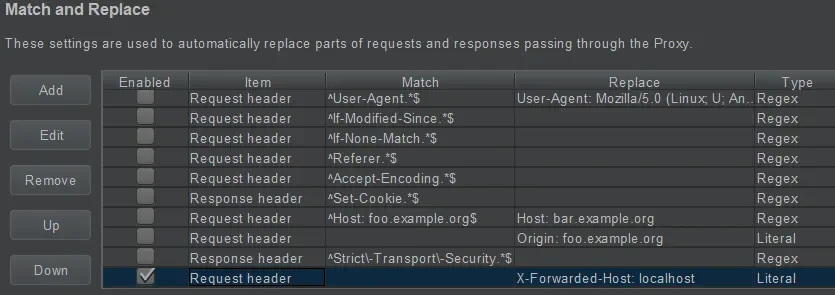
Note the Match and Replace rule for X-Forwarded-Host
The idea for testing this at all came from a #BugBountyTip on Twitter. Without going through Twitter and finding it there, I would probably have missed it, at least on the first go. Maybe days, weeks or months later, bored or whatever, I would have read through my notes and, having a House MD moment of clarity, given it a go.
The tip listed a set of headers worth trying:
---For waf bypass, and similar---X-Forwarded-HostX-Forwarded-PortX-Forwarded-SchemeOrigin: nullOrigin: [siteDomain].attacker.comX-Frame-Options: AllowX-Forwarded-For: 127.0.0.1X-Client-IP: 127.0.0.1Client-IP: [redacted]
Finding it
During clicking around after registering, and finding nothing, there was this one "last" thing to test for. I tend to leave it for the end because I'm logging out.
So I logged out and went for the Forgot password page. The thought behind it, at the time (I learned more afterwards), was to see how the whole forgot password link looked: whether there was something that indicated a way to guess the reset link parameter that associates the link with the user. But there has always been another thing to keep an eye on: the base domain of the link itself.
After entering my email, I clicked the Submit button and waited. A few moments later, as the narrator voice of Sponge Bob Square Pants would say, I checked my email and pretty much immediately noticed that the reset password link had a very unusual base domain, hard to miss really. Instead of the expected
https://website.com/resetpassword?email=[redacted]&id=1234&hash=randomstuff
I got:
https://localhost/resetpassword?email=[redacted]&id=1234&hash=randomstuff
You can already see the potential. But it's not as obvious as it appears to be.
Exploitation
Step 1: the obvious payload
I went for the obvious content of the X-Forwarded-Host:
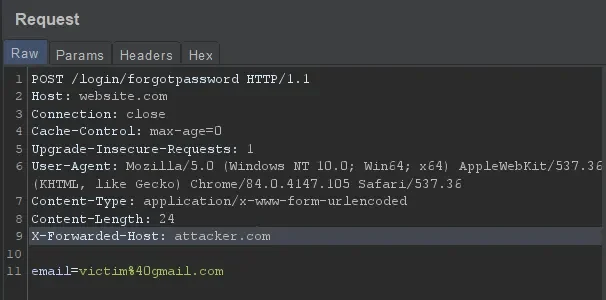
but I got BAD REQUEST.
WTH? This is where experience, memory and notes come in handy. I remembered from the earlier list this part:
Origin: [siteDomain].attacker.com
Which gave me this thought: if attacker.com is blacklisted, but localhost is whitelisted, then localhost.attacker.com is the answer (and you also see now why the lower bounty amount).
Step 2: the working payload
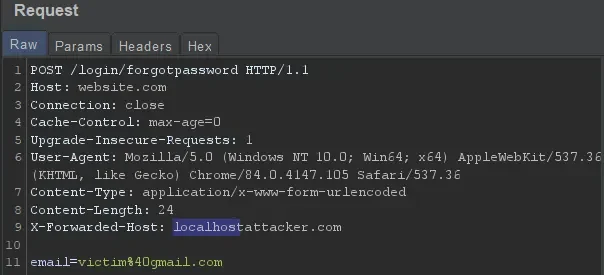
This one resulted in 200 OK, and the email was sent with localhostattacker.com as the base domain:
Note that it accepted localhostattacker.com, didn't even require the dot.
Interestingly enough, whatever parser they used, it actually accepted any base domain as long as it contained localhost, meaning junklocalhostjunk.com was being accepted as well.
Step 3: capturing the reset
Now, using Burp Collaborator or even your own VPS, you get to log the random string required for password reset, as long as the user or victim clicks the link. Thus you get account takeover of the user's or victim's account. That is, as long as the user doesn't mind clicking on a link with a localhost string as part of its name, and not to mention not having any memory of ever requesting to reset their password.
Root cause
The application builds the base domain of the password reset link from the X-Forwarded-Host request header instead of from a fixed, server-side configured value. The header is attacker-controlled, so the link in the email points wherever the attacker chooses.
The report does not describe the validation logic; the observed behaviour suggests attacker.com was blocked while localhost was permitted. The author's guess was that attacker.com was blacklisted while localhost was whitelisted, so a value combining both passed. The author notes that whatever parser was used, it accepted any base domain containing localhost, such as junklocalhostjunk.com. The exact parser and validation logic are not described in the report; the behaviour above is what was observed.
Impact
An attacker who can get a victim to click the poisoned reset link can log the random string required for the password reset on their own infrastructure (Burp Collaborator or a VPS) and take over the victim's account. The attack depends on the victim clicking a link whose name contains localhost and not remembering that they never requested a password reset. The nature of the bug, together with the twist described above, resulted in a lower payout than it would have without the twist.
Fix
The report does not say what was changed. A sensible fix would be to stop deriving the reset link's base domain from request headers such as X-Forwarded-Host and use a fixed, server-side configured domain instead.
Variants to test
- Send a password reset request with
X-Forwarded-Hostset to an attacker domain and check whether the email link uses it. A positive result is a reset link whose base domain is the attacker's. - If the obvious value is rejected, try combining a whitelisted string with the attacker domain, as in
localhost.attacker.com, and then without the dot, as inlocalhostattacker.com. A positive result is a 200 OK and an email whose base domain contains the whitelisted string plus the attacker domain. - Try junk around the whitelisted string, such as
junklocalhostjunk.com. A positive result is acceptance of any domain that merely contains the whitelisted string. - A positive result is any of them changing the base domain of the reset link.
- Keep notes of every response and watch for anything familiar from earlier testing that seemed unimportant at the time but may now prove crucial.
What happened, in plain words
A website had a "Forgot password" button. You type your email address, the site sends you an email with a link to set a new password. Normally that link points at the site's own address, something like https://website.com/resetpassword?.... The researcher found that by sending a particular header, he could make the site send a reset link pointing at a domain he chose. By putting a domain of his choosing into that header, he could make the site send a reset link pointing at a domain he controlled. If a victim clicks such a link, the secret code inside the link lands on the attacker's server, and the attacker can use it to take over the victim's account.
There was a twist: the author's guess was that attacker.com was blocked while localhost was permitted, so a value mixing both got through. The twist, together with the nature of the bug, resulted in a much lower payout than it would have been without it.
Before going further, a few words on the pieces involved.
A header is a small line of extra information that your browser (or a tool) sends along with every request to a website, next to the actual address you are asking for. Think of a posted letter: the address on the envelope is the URL, and the headers are the notes written on the back ("fragile", "this side up"). Servers read those notes and sometimes act on them.
A request is what your browser sends when you open a page or submit a form. A response is what the server sends back, including a status code such as 200 OK (fine) or BAD REQUEST (the server did not like what it received).
A WAF (web application firewall) is a filter that sits in front of a website and blocks requests that look malicious. A WAF bypass is a way of getting a request past that filter.
DNS is the phone book of the internet: it turns a name like website.com into the numeric address of a server. An HTTP pingback is when you make a server contact a machine you control, so you can see that it did. SSRF (server-side request forgery) is a related bug where you trick a server into making a request to a destination of your choosing.
Burp is a tool that sits between your browser and the website and lets you look at and change every request. Match and Replace is a Burp feature that automatically swaps a piece of text in requests for something else, every time, without you editing each request by hand. Burp Collaborator is a service that gives you a domain you control and records any contact made to it, so you can see when a server reaches out to you. A VPS is simply a server you rent and control yourself.
IDOR (insecure direct object reference) is a bug where changing an identifier in a request (say, a number that belongs to another user) lets you see or change someone else's data. false2true is the researcher's own name, from another article of his, for turning a false condition into a true one through manipulation.
Account takeover means getting control of someone else's account, usually by obtaining their password or a reset code.
Now the story itself.
Headers are quite something to play with. The most usual ones are X-Forwarded-For, usually used for WAF bypass, and X-Forwarded-Host, which is personally interesting for achieving DNS or HTTP pingbacks and sometimes SSRF.
This article covers the case where he was able to use one of those headers to trick a website into sending a forgot password link that included the domain of his choosing.
Spoiler alert: the twist, together with the nature of this bug, resulted in a lower payout, much lower than if it weren't for the said twist.
Context
The target is a website he calls website.com. It had sign up, and with it a Forgot password feature. The feature normally sends the user an email containing a reset link whose base domain is the site's own domain, in the shape of:
https://website.com/resetpassword?email=[redacted]&id=1234&hash=randomstuff
Line by line, in plain words:
https://is the secure version of the protocol browsers use to fetch pages.website.comis the base domain: the part that says which site the link belongs to. This is the part the whole bug is about./resetpasswordis the path, the page on that site that handles the reset.?starts the query string, a list of small labelled values passed to the page.email=[redacted]tells the page which account the reset is for.&id=1234is another labelled value, an identifier for the request.&hash=randomstuffis another labelled value in the link.
The link carries the user's email, an id and a hash parameter, and the base domain of that link is what the whole bug is about.
Setup
- He registered on the site, as usual, to get further insight into how it functions, what additional access it provides to registered users, and whether it can be leveraged for IDORs or even for getting admin functions via false2true (as in his other article on that topic). Registering matters because many features, including the reset flow, only make sense once you have an account.
- He had a Burp Match and Replace rule set up for
X-Forwarded-Hostwhile messing around on the site. In other words, every request his browser sent was automatically given an extra header, without him editing each one. - The testing of the forgot password flow was left for the end, because it means logging out. Logging out is disruptive when you are in the middle of exploring a logged-in area, so it is natural to postpone it.
Note the Match and Replace rule for X-Forwarded-Host
The idea for testing this at all came from a #BugBountyTip on Twitter. Without going through Twitter and finding it there, he would probably have missed it, at least on the first go. Maybe days, weeks or months later, bored or whatever, he would have read through his notes and, having a House MD moment of clarity, given it a go.
The tip listed a set of headers worth trying:
---For waf bypass, and similar---X-Forwarded-HostX-Forwarded-PortX-Forwarded-SchemeOrigin: nullOrigin: [siteDomain].attacker.comX-Frame-Options: AllowX-Forwarded-For: 127.0.0.1X-Client-IP: 127.0.0.1Client-IP: [redacted]
This block is a list of header names and values, run together in the original. Read it as follows:
---For waf bypass, and similar---is just a comment line saying what the list is for.X-Forwarded-Hostis the header that tells a server which host name the request was originally meant for. Servers behind a proxy or load balancer use it to know the site's address.X-Forwarded-Portdoes the same for the port number (the numbered door on a server that a service listens on).X-Forwarded-Schemedoes the same for the scheme, that is, whether the request washttporhttps.Origin: nullandOrigin: [siteDomain].attacker.comare two values for theOriginheader, which normally says which site a request came from.nullis a special empty value, and the second one puts the site's name in front of the attacker's domain, separated by a dot.X-Frame-Options: Allowis a header normally used to control whether a page may be shown inside a frame on another site. Sending it as a request header is part of the shotgun approach of the tip.X-Forwarded-For: [redacted],X-Client-IP: [redacted]andClient-IP: [redacted]all try to tell the server which IP address the request came from.[redacted]is the special address that always means "this same machine", so these are attempts to make the server think the request came from itself, which often bypasses filters.
Finding it
During clicking around after registering, and finding nothing, there was this one "last" thing to test for. He tends to leave it for the end because he is logging out.
So he logged out and went for the Forgot password page. The thought behind it, at the time (he learned more afterwards), was to see how the whole forgot password link looked: whether there was something that indicated a way to guess the reset link parameter that associates the link with the user. But there has always been another thing to keep an eye on: the base domain of the link itself.
After entering his email, he clicked the Submit button and waited. A few moments later, as the narrator voice of Sponge Bob Square Pants would say, he checked his email and pretty much immediately noticed that the reset password link had a very unusual base domain, hard to miss really. Instead of the expected
https://website.com/resetpassword?email=[redacted]&id=1234&hash=randomstuff
he got:
https://localhost/resetpassword?email=[redacted]&id=1234&hash=randomstuff
Compare the two lines: everything after the base domain is identical. The only difference is the base domain itself, which changed from website.com to localhost. localhost is the name a computer uses for itself. So the site had taken the host name from somewhere in the request and put it into the email, instead of using its own fixed name. That is the signal that the header was being trusted.
You can already see the potential. But it is not as obvious as it appears to be.
Exploitation
Step 1: the obvious payload
He went for the obvious content of the X-Forwarded-Host:
but he got BAD REQUEST.
WTH? This is where experience, memory and notes come in handy. He remembered from the earlier list this part:
Origin: [siteDomain].attacker.com
This line from the tip list puts the site's name first, then a dot, then the attacker's domain.
Which gave him this thought: if attacker.com is blacklisted, but localhost is whitelisted, then localhost.attacker.com is the answer (and you also see now why the lower bounty amount).
A blacklist is a list of things that are forbidden. A whitelist (allowlist) is a list of things that are permitted. The author's guess was that the site blocked the attacker's domain but allowed localhost, so a value containing both could pass.
Step 2: the working payload
This one resulted in 200 OK, and the email was sent with localhostattacker.com as the base domain:
Note that it accepted localhostattacker.com, didn't even require the dot.
So the check was even looser than expected: it did not require localhost to be a separate part of the name, separated by a dot. The resulting domain, localhostattacker.com, still belongs to the attacker, because the part that decides ownership is the end of the name, not the beginning.
Interestingly enough, whatever parser they used, it actually accepted any base domain as long as it contained localhost, meaning junklocalhostjunk.com was being accepted as well. A parser is the piece of software that reads a value and breaks it into parts; here it apparently just searched for the word.
Step 3: capturing the reset
Now, using Burp Collaborator or even your own VPS, you get to log the random string required for password reset, as long as the user or victim clicks the link. Thus you get account takeover of the user's or victim's account. That is, as long as the user doesn't mind clicking on a link with a localhost string as part of its name, and not to mention not having any memory of ever requesting to reset their password.
The chain is: the victim receives an email with a link pointing at the attacker's server, clicks it, and the random string needed for the reset arrives at the attacker's server.
Root cause
The application builds the base domain of the password reset link from the X-Forwarded-Host request header instead of from a fixed, server-side configured value. The header is attacker-controlled, so the link in the email points wherever the attacker chooses.
The report does not describe the validation logic; the observed behaviour suggests attacker.com was blocked while localhost was permitted. The author's guess was that attacker.com was blacklisted while localhost was whitelisted, so a value combining both passed. The author notes that whatever parser was used, it accepted any base domain containing localhost, such as junklocalhostjunk.com. The exact parser and validation logic are not described in the report; the behaviour above is what was observed.
Impact
An attacker who can get a victim to click the poisoned reset link can log the random string required for the password reset on their own infrastructure (Burp Collaborator or a VPS) and take over the victim's account. The attack depends on the victim clicking a link whose name contains localhost and not remembering that they never requested a password reset. The nature of the bug, together with the twist described above, resulted in a lower payout than it would have without the twist.
Fix
The report does not say what was changed. A sensible fix would be to stop deriving the reset link's base domain from request headers such as X-Forwarded-Host and use a fixed, server-side configured domain instead.
Variants to test
- Send a password reset request with
X-Forwarded-Hostset to an attacker domain and check whether the email link uses it. A positive result is a reset link whose base domain is the attacker's. - If the obvious value is rejected, try combining a whitelisted string with the attacker domain, as in
localhost.attacker.com, and then without the dot, as inlocalhostattacker.com. A positive result is a 200 OK and an email whose base domain contains the whitelisted string plus the attacker domain. - Try junk around the whitelisted string, such as
junklocalhostjunk.com. A positive result is acceptance of any domain that merely contains the whitelisted string. - A positive result is any of them changing the base domain of the reset link.
- Keep notes of every response and watch for anything familiar from earlier testing that seemed unimportant at the time but may now prove crucial.
Glossary
- Header: a small labelled line of extra information sent with a request or response, separate from the URL.
- Request: what a browser or tool sends to a server to ask for a page or submit data.
- Response: what the server sends back, including a status code such as
200 OKorBAD REQUEST. - Status code: a number in the response saying how the request went;
200means success,400means the server rejected the request. - WAF: web application firewall, a filter in front of a site that blocks requests that look malicious.
- WAF bypass: a technique for getting a request past that filter.
- DNS: the system that turns names like
website.cominto server addresses. - HTTP pingback: making a server contact a machine you control, so you can observe that it did.
- SSRF: server-side request forgery, tricking a server into making a request to a destination of your choosing.
- Burp: a tool that sits between browser and site and lets you inspect and modify requests.
- Match and Replace: a Burp feature that automatically swaps text in requests or responses.
- Burp Collaborator: a service giving you a domain that records any contact made to it.
- VPS: a server you rent and control yourself.
- IDOR: insecure direct object reference, a bug where changing an identifier lets you reach another user's data.
- false2true: the researcher's term for turning a false condition into a true one through manipulation.
- Account takeover: gaining control of someone else's account.
- Base domain: the part of a URL that names the site, such as
website.com. - Query string: the part of a URL after
?, holding labelled values such asemail=...andhash=.... - Parameter: one labelled value inside a query string.
- Hash (in this context): the secret-looking value in the reset link that ties it to the user.
- localhost: the name a computer uses for itself; also the special address
[redacted]. - Blacklist: a list of forbidden values; anything not listed is allowed.
- Whitelist (allowlist): a list of permitted values; anything not listed is refused.
- Parser: the software that reads a value and breaks it into parts.
- Payload: the value an attacker sends in order to trigger a bug.



