I Started the Login. You Finished It. I Got Your Account.
The OAuth login flow handed out a public login attempt identifier before authentication and later accepted that same identifier as the token to redeem a session, without binding it to the browser that started the login. An attacker could start a login, send the genuine Google sign-in URL to a victim, and after the victim completed Google sign-in but was diverted to a non-callback path so the token was not spent, redeem the identifier to obtain the victim's session cookies.
 Published on medium.com
Account Takeover
The full write-up lives on its author's site
It belongs to its author, so we link to it rather than copy it. The other two tabs are our own rewrites, checked against it.
Context
The target was a large online shop running a bug bounty program. The author cannot name it, so he calls it shop.example. Customer accounts on the shop hold the usual personal and commercial data: name, home address, phone number, order history and similar records.
The feature under test is the shop's "Continue with Google" login, an OAuth 2.0 flow. The shop does not simply redirect the browser to Google. It builds the whole login through its GraphQL API, opening the Google sign-in in a popup and finishing with a token that the frontend redeems for session cookies.
Setup
The setup was deliberately simple:
- Two Google test accounts, both owned by the researcher.
- One account played the attacker, the other the victim.
- Each account was used in its own browser.
- The attacker browser had never typed a password or signed into Google.
The goal was to map the Google login step by step and see where it could be bent. The researcher began, as usual with OAuth, by logging in normally with his own account and watching every request go by, to understand the flow before attacking anything.
Finding it
The popup that didn't talk
Clicking Continue with Google opened the Google sign-in in a popup. After picking an account, the popup closed and the page behind it was already logged in.
A popup login usually means postMessage: the popup finishes the OAuth dance and messages the result back to the page that opened it, and sloppy origin checks on that message are a classic bug. The researcher opened DevTools and went looking for it.
There was no postMessage. Not one.
That raised a better question than any message handler could have: if the popup never tells the parent page anything, how does the parent page know the user just logged in? The two windows were not talking to each other, so they had to be talking to the server about the same thing. The next step was to find out what that thing was.
Reading the flow
The shop builds the login through its GraphQL API in five steps:
- The page sends a GraphQL request to start a Google login. It includes a
callbackUrl, which is where the browser lands at the end. - The backend answers with two things: an
Idfor this login attempt, and a ready-made Google sign-in URL containing astatevalue. - The popup opens that Google URL. The user picks an account, and Google redirects back to the shop's auth server with a
code. - The auth server exchanges the code with Google, marks the login attempt as done, and redirects to the
callbackUrlwith a token attached:?t=… - A second GraphQL request redeems
tand gets session cookies back.
Lining the responses up side by side showed that the t from step 4 was exactly the same string as the Id from step 2.
That answered the question. The parent page never needed a message from the popup, because it received the Id in the very first response, before anyone had authenticated. Once Google was done, it only had to swap that Id for a session.
What happens if someone else finishes my login?
Looking at the flow again with a suspicious mind: the value that buys a logged-in session at the end is handed out at the start, to whoever begins the login. The backend never checks that the browser redeeming it is the one that went through Google: there is no cookie binding and no per-device secret. The Id works like a cloakroom ticket, and whoever holds the ticket gets the coat.
So the question became: what happens if the attacker starts the login, somebody else does the Google part, and then the attacker finishes it?
The catch: the victim spends the token first
The first attempt failed, for a good reason. t is single-use. On the normal, happy path, the victim's browser lands on the callback page and the shop's frontend redeems t immediately. The victim gets logged in, the token is burned, and the attacker's copy of the Id becomes a dead string. The backend just says no.
To make this work, the attacker needed an unhappy path: the victim has to finish the Google step, but their browser must never spend the token.
Exploitation
Step 1: find a lever in the callback URL
The callbackUrl from step 1 was the only lever available, and it was a narrow one. The backend locked the callback down hard: the host, the existing path and any of the query parameters the frontend sends by default could not be changed. Every attempt to swap the redirect for something else was rejected.
One thing was allowed: appending to the end of the path. As long as the URL still began with the real callback, anything added after it went through.
Step 2: append two junk path segments
The researcher put the "start login" GraphQL request through his proxy, intercepted it, and added two junk segments to the path:
default: https://shop.example/account/auth/login?redirect=...&provider=GOOGLEappended: https://shop.example/account/auth/login/x/y?redirect=...&provider=GOOGLE
The backend accepted it, because it still started with the real callback path. The frontend, though, did not recognise /login/x/y as a login callback. When the victim's browser lands there, the page shrugs, redirects to the homepage, and never touches t.
The victim ends up on the shop's front page, not logged in, and assumes the link was boring. Meanwhile t sits on the server: authenticated as the victim, unused, and waiting for the attacker.
Step 3: run the full attack
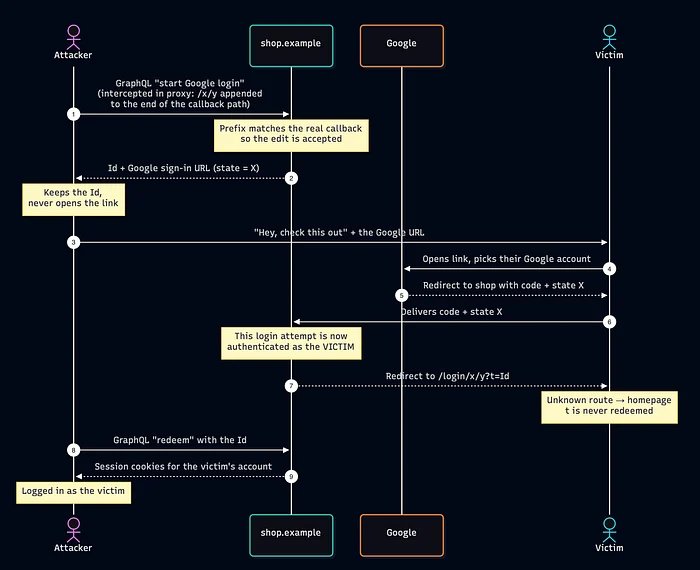
In plain words:
- The attacker starts a login as an anonymous guest, intercepts the GraphQL request, and appends
/x/yto the callback path. - The attacker keeps the
Idand sends the victim the Google URL. It really isaccounts.google.com. Hovering over it, inspecting it, or running it through a link scanner shows it is clean, because it is clean: the shop generated it. - The victim clicks and picks their Google account. If they have used Google sign-in on the shop before, there is not even a consent screen.
- Their browser hits the unhappy path, lands on the homepage, and leaves
talone. - The attacker redeems his
Id. The backend replies with the victim's email, name and user ID, and sets logged-in session cookies in the attacker's browser.
By the end, the attacker browser, which had never typed a password or signed into Google, was logged in to the victim test account. All the victim had done was click a link to accounts.google.com (a real one, not a lookalike) and pick their Google account.
Root cause
Two design mistakes combine here.
First, the value that redeems a session is the same value that is handed out before authentication. The Id returned when a login starts is reused verbatim as the t token that buys the session at the end. The backend never binds the login attempt to the browser that started it: there is no cookie binding and no per-device secret, so any browser holding the Id can redeem it.
Second, the callback URL validation is a prefix check rather than an exact match. "Starts with our callback" is not an allowlist, and two extra path segments were enough to flip the happy path into an unhappy one, where the frontend does not recognise the URL as a login callback and therefore never redeems the token.
The single-use property of t is the only thing that normally protects the flow, and it only protects it because the victim's own browser spends the token immediately. Once the victim's browser is steered away from the redemption step, that defence disappears.
Impact
An attacker can take over a victim's shop account with one click from the victim. The attacker needs no credentials and never signs into Google. The victim only has to click a genuine accounts.google.com link and choose their Google account; if they have used Google sign-in on the shop before, there is not even a consent screen.
After redemption, the attacker receives the victim's email, name and user ID, and logged-in session cookies are set in the attacker's browser. From there the attacker has access to whatever the account holds: name, home address, phone number, order history and similar data.
The lure is hard to spot because the domain is genuine and was generated by the shop itself. The victim does nothing wrong: they sign in to a shop they already use, with the account they already use. Nothing looks off afterwards either: they land on the homepage with no error and no warning.
The bug scales across the brand: the same login component ran every regional storefront the researcher tried, so one bug covered all of them.
The one honest limit is the click. This is a one-click takeover, not a zero-click one.
Fix
The report recommends three changes:
- Bind the login attempt to the browser that started it. Set an unguessable, HttpOnly cookie when the login starts and require it at redemption. An attacker can start as many logins as they like, but they cannot redeem one their own browser did not complete.
- Never reuse the public
Idas the redemption token. Whatever is handed out before authentication must not be the thing that buys a session after it. - Match callback URLs exactly. "Starts with our callback" is not an allowlist. Two extra path segments were enough to flip the happy path into an unhappy one.
Variants to test
- Look for popup logins with no
postMessage. If the popup closes and the parent page is logged in without any message passing, the two windows are coordinating through the server. A positive result is a first response that already contains an identifier for the login attempt, before any authentication has happened. - Compare the pre-auth identifier with the post-auth redemption token. Intercept the start-login response and the callback redirect, and compare the strings. A positive result is the
Idfrom the start response being byte-for-byte identical to thetin the callback URL. - Try redeeming the identifier from a different browser. Start a login in one browser, complete the Google step in another, and redeem the identifier from the first. A positive result is session cookies being set in the browser that never completed the Google step.
- Probe callback URL validation for path appending. Take the legitimate
callbackUrland append extra path segments, as in the report:
https://shop.example/account/auth/login/x/y?redirect=...&provider=GOOGLE
A positive result is the backend accepting the modified URL because it still begins with the real callback path, while the frontend no longer treats it as a login callback and does not redeem the token. 5. Check whether the frontend redeems the token on the modified path. Load the appended URL after completing the Google step and watch for the redemption GraphQL request. A positive result is the page redirecting to the homepage without ever sending the redemption request, leaving the token unspent on the server. 6. Test the same login component across regional storefronts. If the same component serves multiple regional sites, a positive result on one is likely to reproduce on the others.
What happened, in plain words
A large online shop let people sign in with their Google account, using a button labelled Continue with Google. The researcher found a way to make that button work against the person clicking it. He could start a login on his own computer, hand the victim a link that really did go to Google, and when the victim picked their Google account, the researcher ended up logged in as the victim. The victim never gave away a password, never installed anything, and saw nothing unusual: they clicked a genuine Google link and then landed on the shop's homepage.
This article walks through the whole thing from zero. You only need to know how to use a browser. Every technical word is explained the first time it appears, and there is a glossary at the end.
The target and the feature
The target was a large online shop that runs a bug bounty program. A bug bounty program is an arrangement where a company invites independent researchers to look for security problems in its systems and report what they find. The researcher cannot name the shop, so throughout the report it is called shop.example. The .example ending is a reserved placeholder domain, used in writing so that no real company is named.
Customer accounts on this shop hold the usual valuables: name, home address, phone number, order history and similar records. That is why someone taking over an account matters: they get all of that.
The feature under test is the shop's Continue with Google login. This is an example of OAuth 2.0. OAuth is a standard way for one website to let another website confirm who you are, without the second website ever seeing your password. The everyday comparison is a hotel reception desk: you do not hand the receptionist your house keys, you show them a card that a trusted authority issued, and they let you into the room. Here, Google is the trusted authority, and the shop is the reception desk. You prove who you are to Google, Google tells the shop "this person is who they say", and the shop lets you in.
One detail matters for everything that follows: the shop does not simply send your browser off to Google and back. It builds the whole login through its GraphQL API, and it opens the Google sign-in in a popup (a small separate browser window). At the end, the shop's frontend swaps a token for session cookies.
Three of those words need explaining now.
- An API (Application Programming Interface) is the set of doors a website's own pages use to talk to its servers. When you click a button, the page does not do the work itself; it sends a structured request to the server and the server answers. An API is like a restaurant's kitchen hatch: the dining room (the page you see) does not cook, it passes an order through the hatch and receives a plate back.
- GraphQL is one particular style of API. Instead of many separate addresses for many separate actions, there is usually one address, and each request describes exactly what it wants. Think of a form you fill in: you tick the boxes for what you want, and the kitchen sends back exactly those items.
- A token is a short piece of text that stands in for something else, usually proof that a step was completed. A cloakroom ticket is the classic comparison: you hand in your coat, you get a small numbered ticket, and whoever holds the ticket can collect the coat. The ticket itself is not the coat, but possession of it is enough.
- A cookie is a small piece of data that a website asks your browser to store and to send back on every later request to that site. Cookies are how a website remembers that you are logged in between page loads. If a token is a cloakroom ticket, a session cookie is the wristband a festival gives you so you can re-enter without queueing again.
- The frontend is the part of the website that runs in your browser: the pages, the buttons, the JavaScript. The backend is the part that runs on the company's servers: the database, the login logic, the API. The frontend is the shop counter you see; the backend is the stockroom behind it.
Setup
The setup was deliberately simple:
- Two Google test accounts, both owned by the researcher.
- One account played the attacker, the other the victim.
- Each account was used in its own browser.
- The attacker browser had never typed a password or signed into Google.
Why set it up this way? Because to prove an account takeover you have to show two separate people: one who is attacked and one who does the attacking, with nothing shared between them. If both roles used the same browser, the result could be explained by leftover login state rather than by the bug. Keeping the attacker browser completely clean of Google logins makes the final result much stronger: if that browser ends up logged in as the victim, it cannot be because it was already signed in as anyone.
The goal was to map the Google login step by step and see where it could be bent. The researcher began, as usual with OAuth, by logging in normally with his own account and watching every request go by, to understand the flow before attacking anything. This is the single most important habit in this kind of work: understand how the thing is supposed to work first, then ask what happens if you change one piece.
Finding it
The popup that didn't talk
Clicking Continue with Google opened the Google sign-in in a popup. After picking an account, the popup closed and the page behind it was already logged in.
A popup login usually means postMessage. postMessage is a browser feature that lets one window send a message to another window. In a normal popup login, the popup finishes the OAuth dance and messages the result back to the page that opened it, saying in effect "this person is now logged in". Sloppy checks on where that message came from are a classic bug, because a malicious page can sometimes send a fake message and be believed. The researcher opened DevTools (the built-in developer tools in a browser, where you can watch network requests and page activity) and went looking for it.
There was no postMessage. Not one.
That raised a better question than any message handler could have: if the popup never tells the parent page anything, how does the parent page know the user just logged in? The two windows were not talking to each other, so they had to be talking to the server about the same thing. The next step was to find out what that thing was.
This is worth pausing on. A missing thing is a clue. The researcher expected to find a message-passing mechanism and found nothing. Instead of moving on, he asked why the page still worked. That question is what led to the bug.
Reading the flow
The shop builds the login through its GraphQL API in five steps:
- The page sends a GraphQL request to start a Google login. It includes a
callbackUrl, which is where the browser lands at the end. - The backend answers with two things: an
Idfor this login attempt, and a ready-made Google sign-in URL containing astatevalue. - The popup opens that Google URL. The user picks an account, and Google redirects back to the shop's auth server with a
code. - The auth server exchanges the code with Google, marks the login attempt as done, and redirects to the
callbackUrlwith a token attached:?t=… - A second GraphQL request redeems
tand gets session cookies back.
Let us unpack each step in plain words.
Step 1. The page asks the server to begin a login. It also tells the server where the browser should end up afterwards, in a field called callbackUrl. A callback URL is simply the address the browser is sent back to when an outside service has finished its part. Think of leaving a forwarding address at the post office: "when the parcel comes back, send it here".
Step 2. The server replies with two things. The first is an Id, a label for this particular login attempt, so the server can tell one attempt apart from another. The second is a complete Google sign-in address, already built, containing a state value. state is a standard OAuth field: a value the shop generates and expects to see come back, so it can confirm that the reply belongs to the request it sent. It is like writing a reference number on an envelope so you recognise the reply.
Step 3. The popup opens that Google address. You pick your Google account. Google then sends the browser back to the shop's auth server (the part of the shop responsible for logins) carrying a code. A code in OAuth is a short-lived one-time value that Google issues to say "this person authenticated". It is not the user's password and it is not a session; it is a receipt that the shop can exchange for confirmation.
Step 4. The shop's auth server takes that code and exchanges it with Google, behind the scenes, for confirmation of who the user is. It marks the login attempt as done, and sends the browser to the callbackUrl with a token attached, appearing in the address as ?t=…. The ?t= part is a query parameter: the bit of a web address after the question mark, carrying extra information. So the browser lands on a page whose address contains a short value named t.
Step 5. The page then sends a second GraphQL request that redeems t. To redeem means to hand the token back to the server and receive the thing it stands for. In return the server sets session cookies in the browser, and from that moment the browser is logged in.
Lining the responses up side by side showed that the t from step 4 was exactly the same string as the Id from step 2.
That is the heart of the finding. The value handed out at the very beginning, before anyone had proved anything, was the same value that bought a logged-in session at the end. Comparing values across steps is a simple technique with a big payoff: two strings being equal told the researcher more than any scanner could.
That answered the question. The parent page never needed a message from the popup, because it received the Id in the very first response, before anyone had authenticated. Once Google was done, it only had to swap that Id for a session.
What happens if someone else finishes my login?
Looking at the flow again with a suspicious mind: the value that buys a logged-in session at the end is handed out at the start, to whoever begins the login. The backend never checks that the browser redeeming it is the one that went through Google: there is no cookie binding and no per-device secret. Cookie binding means tying the login attempt to the specific browser that started it, usually by setting a cookie at the start and requiring that same cookie at the end. Without it, the Id works like a cloakroom ticket, and whoever holds the ticket gets the coat.
So the question became: what happens if the attacker starts the login, somebody else does the Google part, and then the attacker finishes it?
This is the general shape of the vulnerability class. It is a form of account takeover (often shortened to ATO), meaning one person ends up in control of another person's account. The specific weakness is that a security decision is made based on a value that is not tied to the person making the request. In everyday terms: the shop checks that the ticket is valid, but never checks who is holding it.
The catch: the victim spends the token first
The first attempt failed, for a good reason. t is single-use. On the normal, happy path, the victim's browser lands on the callback page and the shop's frontend redeems t immediately. The victim gets logged in, the token is burned, and the attacker's copy of the Id becomes a dead string. The backend just says no.
"Single-use" means the token works once and then is worthless, like a scratch-off voucher. This is a sensible defence, and it is the only thing that normally protects this flow. But notice how it works here: it protects the flow only because the victim's own browser spends the token straight away. The defence is not "the token is bound to you"; it is "the token gets used up quickly by whoever lands on the page".
To make this work, the attacker needed an unhappy path: the victim has to finish the Google step, but their browser must never spend the token. "Happy path" is the term for the route through a system when everything goes as designed. An unhappy path is any other route: an error, an unexpected address, a page that does not recognise where it is. The attacker's job was to steer the victim onto an unhappy path that still counted as a successful login on the server.
Exploitation
Step 1: find a lever in the callback URL
The callbackUrl from step 1 was the only lever available, and it was a narrow one. The backend locked the callback down hard: the host, the existing path and any of the query parameters the frontend sends by default could not be changed. Every attempt to swap the redirect for something else was rejected.
A few words here. The host is the domain part of an address, the shop.example bit. The path is the part after the host, such as /account/auth/login. Query parameters are the ?name=value pairs at the end. The backend was checking all of these and refusing anything that did not match what it expected. That is good practice in principle: if an attacker can point the callback anywhere, they can often steal the token by sending it to their own server.
One thing was allowed: appending to the end of the path. As long as the URL still began with the real callback, anything added after it went through.
This is the crack. The check was "does this address start with our callback address?" rather than "is this address exactly our callback address?". A prefix check like that is like a bouncer who lets you in if your name starts with the right letter, without reading the rest.
Step 2: append two junk path segments
The researcher put the "start login" GraphQL request through his proxy, intercepted it, and added two junk segments to the path. A proxy here is a tool that sits between your browser and the website, letting you see each request and change it before it is sent. Intercepting means pausing a request mid-flight, editing it, and then letting it continue.
default: https://shop.example/account/auth/login?redirect=...&provider=GOOGLEappended: https://shop.example/account/auth/login/x/y?redirect=...&provider=GOOGLE
Line by line:
default:is the normal callback address the frontend sends. It points athttps://shop.example/account/auth/login, with two query parameters:redirect=...(where to go afterwards) andprovider=GOOGLE(which login provider is being used). The...stands for values the report does not show.appended:is the same address with/x/yinserted into the path, just before the question mark. Everything else is unchanged.
The backend accepted it, because it still started with the real callback path. The frontend, though, did not recognise /login/x/y as a login callback. When the victim's browser lands there, the page shrugs, redirects to the homepage, and never touches t.
This is the unhappy path the attacker needed. The server side is satisfied: the login completed, the token exists, the attempt is marked done. The browser side is not: the page at /login/x/y is not the page that knows how to redeem a token, so it does nothing with it and sends the visitor to the homepage.
The victim ends up on the shop's front page, not logged in, and assumes the link was boring. Meanwhile t sits on the server: authenticated as the victim, unused, and waiting for the attacker.
That last sentence is the whole trick. The token is now a valid, unspent cloakroom ticket for the victim's coat, and the attacker still has the matching number from the very first response.
Step 3: run the full attack
In plain words:
- The attacker starts a login as an anonymous guest, intercepts the GraphQL request, and appends
/x/yto the callback path. - The attacker keeps the
Idand sends the victim the Google URL. It really isaccounts.google.com. Hovering over it, inspecting it, or running it through a link scanner shows it is clean, because it is clean: the shop generated it. - The victim clicks and picks their Google account. If they have used Google sign-in on the shop before, there is not even a consent screen.
- Their browser hits the unhappy path, lands on the homepage, and leaves
talone. - The attacker redeems his
Id. The backend replies with the victim's email, name and user ID, and sets logged-in session cookies in the attacker's browser.
A few notes on why each step matters.
Step 1 is done as an anonymous guest, meaning not logged in as anyone.
Step 2 is where the social engineering happens, and it is unusually easy. The link is a genuine Google address, generated by the shop itself. A link scanner is a service that checks whether a URL is known to be malicious. It finds nothing, because there is nothing to find: the address is legitimate. This is why the attack is hard to spot. Security advice tells people to check the domain, and here the domain checks out.
Step 3 is the only thing the victim does. If they have signed in to this shop with Google before, Google does not even show a consent screen, because permission was already granted.
Step 4 is the unhappy path doing its work. The victim's browser arrives at a page that does not recognise itself as a login callback, so it never sends the redemption request. The token stays unspent.
Step 5 is the payoff. The attacker sends the Id he kept from step 1, and the backend treats it as the token for a completed login. It replies with the victim's email, name and user ID, and sets session cookies in the attacker's browser.
By the end, the attacker browser, which had never typed a password or signed into Google, was logged in to the victim test account. All the victim had done was click a link to accounts.google.com (a real one, not a lookalike) and pick their Google account.
Root cause
Two design mistakes combine here.
First, the value that redeems a session is the same value that is handed out before authentication. The Id returned when a login starts is reused verbatim as the t token that buys the session at the end. The backend never binds the login attempt to the browser that started it: there is no cookie binding and no per-device secret, so any browser holding the Id can redeem it.
In plain terms: the shop gives out the cloakroom ticket at the door, before you have proved you own a coat, and then accepts that same ticket later as proof that you do. Anyone who picked up a ticket at the door can come back and claim a coat.
Second, the callback URL validation is a prefix check rather than an exact match. "Starts with our callback" is not an allowlist. An allowlist is a list of things that are permitted, and everything not on the list is refused. A prefix check is not an allowlist because infinitely many addresses start with the same beginning. Two extra path segments were enough to flip the happy path into an unhappy one, where the frontend does not recognise the URL as a login callback and therefore never redeems the token.
The single-use property of t is the only thing that normally protects the flow, and it only protects it because the victim's own browser spends the token immediately. Once the victim's browser is steered away from the redemption step, that defence disappears.
That is worth restating as a general lesson: a defence that depends on the victim's browser behaving correctly is not a defence against an attacker who controls the address the victim's browser is sent to.
Impact
An attacker can take over a victim's shop account with one click from the victim. The attacker needs no credentials and never signs into Google. The victim only has to click a genuine accounts.google.com link and choose their Google account; if they have used Google sign-in on the shop before, there is not even a consent screen.
After redemption, the attacker receives the victim's email, name and user ID, and logged-in session cookies are set in the attacker's browser. From there the attacker has access to whatever the account holds: name, home address, phone number, order history and similar data.
The lure is hard to spot because the domain is genuine and was generated by the shop itself. The victim does nothing wrong: they sign in to a shop they already use, with the account they already use. Nothing looks off afterwards either: they land on the homepage with no error and no warning.
The bug scales across the brand: the same login component ran every regional storefront the researcher tried, so one bug covered all of them. A component here means a reusable piece of the website's code, shared between sites, so a flaw in it appears everywhere it is used.
The one honest limit is the click. This is a one-click takeover, not a zero-click one. A zero-click attack needs no action from the victim at all; a one-click attack needs exactly one, and here that one action is clicking a link and choosing an account.
Fix
The report recommends three changes:
- Bind the login attempt to the browser that started it. Set an unguessable, HttpOnly cookie when the login starts and require it at redemption. An attacker can start as many logins as they like, but they cannot redeem one their own browser did not complete. HttpOnly is a setting on a cookie that stops page scripts from reading it, so malicious code in a page cannot simply copy it out. Unguessable means random enough that nobody can predict it.
- Never reuse the public
Idas the redemption token. Whatever is handed out before authentication must not be the thing that buys a session after it. The ticket you get at the door must not be the ticket that collects the coat. - Match callback URLs exactly. "Starts with our callback" is not an allowlist. Two extra path segments were enough to flip the happy path into an unhappy one.
Variants to test
These are the things to try on other sites, in the same spirit. Each one lists what to do and what a positive result looks like.
- Look for popup logins with no
postMessage. If the popup closes and the parent page is logged in without any message passing, the two windows are coordinating through the server. A positive result is a first response that already contains an identifier for the login attempt, before any authentication has happened. - Compare the pre-auth identifier with the post-auth redemption token. Intercept the start-login response and the callback redirect, and compare the strings. A positive result is the
Idfrom the start response being byte-for-byte identical to thetin the callback URL. - Try redeeming the identifier from a different browser. Start a login in one browser, complete the Google step in another, and redeem the identifier from the first. A positive result is session cookies being set in the browser that never completed the Google step.
- Probe callback URL validation for path appending. Take the legitimate
callbackUrland append extra path segments, as in the report:
https://shop.example/account/auth/login/x/y?redirect=...&provider=GOOGLE
This is the same address as before, with /x/y added to the path and the two query parameters left as they were. A positive result is the backend accepting the modified URL because it still begins with the real callback path, while the frontend no longer treats it as a login callback and does not redeem the token.
5. Check whether the frontend redeems the token on the modified path. Load the appended URL after completing the Google step and watch for the redemption GraphQL request. A positive result is the page redirecting to the homepage without ever sending the redemption request, leaving the token unspent on the server.
6. Test the same login component across regional storefronts. If the same component serves multiple regional sites, a positive result on one is likely to reproduce on the others.
Glossary
- Account takeover (ATO): a security failure where one person gains control of another person's account.
- Allowlist: a list of things that are permitted, with everything else refused.
- API (Application Programming Interface): the set of structured requests a website's pages use to talk to its servers.
- Appending (to a path): adding extra text to the end of a URL's path, leaving the beginning unchanged.
- Attacker: in a test, the person or browser playing the role of the bad actor.
- Auth server: the part of a website responsible for handling logins.
- Backend: the part of a system that runs on the company's servers, such as the database and login logic.
- Bug bounty program: an arrangement where a company invites researchers to find and report security problems, usually for a reward.
- Callback URL: the address a browser is sent back to after an outside service has finished its part of a login.
- Callback URL validation: the server-side check that a callback address is one the site is willing to use.
- Code (OAuth): a short-lived one-time value issued by the identity provider to confirm that a user authenticated.
- Component: a reusable piece of website code, shared between pages or sites.
- Cookie: a small piece of data a site asks the browser to store and send back on later requests, used to remember things such as being logged in.
- Cookie binding: tying a login attempt to the specific browser that started it, usually by setting a cookie at the start and requiring it at the end.
- Credentials: the things used to prove identity, such as a username and password.
- DevTools: the developer tools built into a browser, used to inspect requests and page activity.
- Exact match: a check that a value is precisely equal to an expected value, character for character.
- Frontend: the part of a website that runs in the browser: pages, buttons, scripts.
- GraphQL: a style of API where each request describes exactly what data it wants.
- Happy path: the route through a system when everything goes as designed.
- Host: the domain part of a web address, such as
shop.example. - HttpOnly: a cookie setting that prevents page scripts from reading the cookie.
- Identity provider: the outside service that confirms who a user is, here Google.
- Intercept: to pause a request in flight, change it, and let it continue.
- Link scanner: a service that checks whether a URL is known to be malicious.
- OAuth 2.0: a standard that lets one website confirm a user's identity through another website, without sharing the password.
- Path: the part of a web address after the host, such as
/account/auth/login. - Popup: a small separate browser window opened by a page.
postMessage: a browser feature that lets one window send a message to another window.- Prefix check: a check that a value merely starts with an expected value, rather than matching it exactly.
- Proxy: a tool that sits between your browser and a website so you can view and modify requests.
- Query parameter: a
name=valuepair at the end of a web address, after the question mark. - Redeem: to hand a token back to the server and receive the thing it stands for.
- Regional storefront: a country- or region-specific version of the same shop.
- Session cookies: cookies that keep a browser logged in after authentication.
- Single-use: a token that works once and is worthless afterwards.
- Social engineering: getting a person to take an action that helps an attack, without them realising.
state: a standard OAuth value the site generates and expects to see returned, to confirm a reply belongs to its request.- Token: a short piece of text that stands in for something else, usually proof that a step was completed.
- Unhappy path: any route through a system other than the intended one, such as an error or an unrecognised address.
- Unguessable: random enough that nobody can predict it.
- Victim: in a test, the person or browser playing the role of the person being attacked.
- Zero-click / one-click: how much the victim must do for an attack to succeed: nothing, or a single action such as a click.



