It Remembered Me: How a Marketing Cookie Became a One-Click PII Leak
A marketing platform accepted a signed visitor identifier from the URL query string and set it as a cookie, allowing an attacker to fixate a victim's identity to the attacker's visitor ID. The victim's subsequent form submissions were then prefilled on the attacker's screen, leaking B2B PII for up to a year.
 Published on medium.com
Bug Bounty
The full write-up lives on its author's site
It belongs to its author, so we link to it rather than copy it. The other two tabs are our own rewrites, checked against it.
Context: a marketing subdomain that remembers you
The target is a vanity host, called forms.target.tld in the write-up, that points at a hosted marketing-automation platform. It serves 43 landing pages, each with a lead form collecting B2B contact details. There is no custom backend: every byte of logic is vendor code that thousands of other companies also run.
It is not a site people browse to. It is a service the main domain calls into. The marketing pages on www.target.tld embed its forms through iframes, postMessage glue and plain links into campaign pages, to power campaign features such as signing up for a webinar, requesting a quote, downloading a whitepaper or getting details sent to your inbox. Every "fill the form, we'll email you" flow lands on this host, and customers never notice they have left the main site.
The feature at the centre of the report is visitor recognition. The platform identifies a returning visitor through a cookie pair, a numeric id and a 52-byte signature, with a one-year lifetime. A known visitor becomes a known prospect, and the platform prefills the form with what it already holds. That is the intended behaviour.
Setup
The researcher worked from the proxy history and used two separate Chrome contexts: a fresh attacker profile and a clean victim profile. No accounts, credentials or special roles were needed on either side. The attacker profile only had to visit any form once to be issued a pair.
All domain, company, vendor and identifier values in the write-up are replaced, and the program holds the full report.
Finding it
The host had been tested before. That first pass was a full sweep that found nothing worth reporting, and the notes said: "thin vendor host, nothing here, move on." The return visit was a routine re-check to see whether anything had changed: new pages, new parameters, new scripts.
On opening one of the landing pages, the form was already filled in, with the exact throwaway values the researcher always uses when testing forms. Nothing had been typed, clicked or submitted on that site for a long time. The page still greeted the visitor as a returning one.

The question that drove the rest of the session was: after all this time, how does this site still remember who I am?
The first pass had covered the obvious ground:
- Reflected XSS through the prefill parameters and UTM params:
"><every time. - Canaries in every field on a failed POST: encoded in every attribute context.
- Inline JS across all pages: a tag-manager loader, an IE viewport shim, one label tweak. No
innerHTML, nodocument.write, nopostMessagehandler. - Scanner pass for SQLi, SSTI and upload: zero.
Missing CSP, HSTS and X-Frame-Options were noted as informational at best. What the first pass missed was not a payload but a behaviour, and it only becomes visible when you come back.
Exploitation
Step 1: identify the identity mechanism
The prefilled field looked like this, with the value redacted:
<input type="text" name="form_field_01" value="[B2B PII]" class="text" …>
In the proxy history the mechanism was in plain sight: a cookie pair made of a numeric id and a 52-byte signature, with a one-year lifetime.
visitor_id12345=88119432visitor_id12345-hash=7669bcc6…a116ac
Known visitor, known prospect, prefilled form. The next question was how the server decides which cookie is really the visitor, and whether that decision can be made wrong.
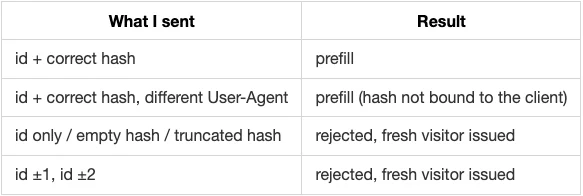
Step 2: rule out forgery
The signature is keyed. The obvious unkeyed sha/md5 constructions were tried for ten minutes, nothing matched, and the researcher stopped.
Step 3: find that the pair is accepted from the URL
The tracking script fires a <script src> to an analytics endpoint on every page view, and the URL carries the full pair:
GET /analytics?conly=true&account_id=…&visitor_id=88119432&visitor_id_sign=7669bcc6…a116ac
When the server sees a pair in the query string, it answers with that pair as Set-Cookie. The cookie is accepted from the URL, which makes the URL itself the session.
Step 4: prove it with a clean browser
In a new Chrome context with zero cookies that had never seen the domain, only the analytics URL with the researcher's own pair was opened. The cookies were installed. Opening a landing page then showed the test prospect's B2B PII, prefilled.
On its own this is low severity, because it needs a leak of a tracker URL first: browser history, proxy logs, a CDN log, or the copy the researcher found archived in the Wayback Machine from 2020.
Step 5: flip theft into fixation
Instead of stealing a victim's pair, hand the victim the attacker's pair. The landing pages honour the parameters, not only the analytics endpoint, as long as conly=true is in the query. That flag is also what makes the server overwrite a cookie the browser already has:
/landing-page?visitor_id=Y&visitor_id_sign=… -> Set-Cookie visitor_id12345=X (existing cookie kept)/landing-page?conly=true&visitor_id=Y&visitor_id_sign=… -> Set-Cookie visitor_id12345=Y (overwritten)
The whole attack is now a single link on the company's real domain, rendering the company's real form.
Step 6: attacker obtains a pair
A fresh attacker profile visits any form once and receives a pair. No account and no secret are involved. The id used in the demonstration is 88120015.
Step 7: victim opens the link
A clean victim profile opens the crafted URL:
GET /landing-page?conly=true&visitor_id=88120015&visitor_id_sign=fc94958f…6492a30 HTTP/1.1Host: forms.target.tldHTTP/1.1 200 OKset-cookie: visitor_id12345=88120015; Max-Age=31536000; path=/; secure; SameSite=Noneset-cookie: visitor_id12345-hash=fc94958f…6492a30; Max-Age=31536000; path=/; secure; SameSite=None
The attacker's id is installed verbatim, for 365 days. The victim sees a normal form and fills it in with throwaway values.
Step 8: attacker reads the victim's submissions
Still holding only the original cookies, the attacker loads a different form on the domain:
GET /another-landing-page HTTP/1.1Cookie: visitor_id12345=88120015; visitor_id12345-hash=fc94958f…6492a30HTTP/1.1 200 OK…<input type="text" name="…" value="[B2B PII]" …><input type="text" name="…" value="[B2B PII]" …>
A control run before the victim clicked, with the same identity and the same page, returned empty fields. After the click, the victim's B2B PII was prefilled on the attacker's screen. The platform attached the victim's brand-new prospect to the fixed visitor instead of detaching when the email did not match.
Because conly=true overwrites existing cookies, it does not matter whether the victim has visited before. One click switches their browser to the attacker's identity. Anything submitted before the click stays with the old visitor and out of reach; everything submitted after it belongs to the attacker.
Step 9: test a zero-click variant
The cookies are set with SameSite=None, so the next question was whether an <img> pointing at the tracking URL, hidden on a page the attacker controls, could plant the identity without a click.
It could not. Even with SameSite=None, modern browsers' default third-party cookie protections refused to store the cookie from a cross-site request, so it never reached the victim's first-party jar. The link remains the attack: one click, on the company's own domain.
Root cause
The visitor token is accepted from the URL query string and fixated in the victim's browser. The signature is keyed, so the token cannot be forged, but it does not need to be: the attacker simply uses a pair the platform issued to them.
The conly=true parameter is what allows an existing cookie to be overwritten, which removes the precondition that the victim be a first-time visitor. The cookies are set with Max-Age=31536000, path=/, secure and SameSite=None, so the fixed identity persists for a year.
Existing defences did not stop it. The signature prevents forgery but not fixation. SameSite=None allows the cookie to be set in cross-site contexts in principle, though browser third-party cookie protections blocked the image-based variant. The first-pass testing focused on injection into prefill and UTM parameters and on client-side sinks, none of which touch the identity mechanism.
Impact
An attacker can fixate a victim's browser to the attacker's visitor identity with a single link on the company's real domain. From then on, for the cookie's full one-year lifetime, every lead form the victim submits across the company's campaigns lands in a prospect record that prefills on the attacker's screen. That covers webinar sign-ups, quote requests and "send me the details" forms, because every campaign form on the main site routes through this host.
The data exposed is B2B PII entered into lead forms. Submissions made before the click stay with the victim's previous visitor and are not exposed. The attack requires the victim to click the link; the zero-click image variant did not work because of browser third-party cookie protections. The report classifies the issue as Improper Authentication, Generic (CWE-287).
Fix
The root cause is split. The vendor accepts a signed token from the query string and merges on mismatch, and received a separate note about it. The customer still owns a quick fix: turn on the "always show an empty form" mode and keep sensitive fields off prefilled forms.
Variants to test
- Signed identifiers accepted from the query string. Look for analytics or tracking endpoints that echo a signed id back as
Set-Cookie. A positive result is a clean browser receiving the cookie from a URL alone and then being recognised as that visitor. - Overwrite flags on landing pages. Test whether a parameter such as
conly=truemakes the server replace an existing cookie rather than keep it. A positive result is aSet-Cookiethat changes the value in a browser that already held one. - Merge on mismatch. Submit a form with an email that differs from the fixed visitor's record and then load another form as that visitor. A positive result is the new submission prefilling under the fixed identity instead of creating a separate prospect.
- Cross-site planting with
SameSite=None. Try an<img>or similar cross-site request to the tracking URL from a page you control. A positive result is the cookie appearing in the victim's first-party jar without a click; in this report it did not, because of browser third-party cookie protections. - Leaked tracker URLs. Check archives, logs and history for analytics URLs carrying the pair. A positive result is a URL that, opened in a clean browser, reproduces another visitor's prefilled data.
What happened, in plain words
A company runs a set of web pages where people sign up for things: webinars, quotes, whitepapers, and so on. Those pages live on a subdomain of the company's site, and behind them sits a marketing tool that many other companies also use. The tool has a friendly feature: if you have filled in a form before, it remembers you and fills the form in for you next time.
To remember you, the tool gives your browser a small piece of identifying data, called a cookie. The cookie holds a number that stands for you, plus a signature that proves the number is genuine. The problem the researcher found is that the tool will also accept that same identifying data from the address of a link (the URL). So if someone sends you a link that carries their number, your browser adopts it, and from then on the tool thinks you are them. Anything you type into any of the company's forms for the next year shows up, already filled in, on the sender's screen.
This is a beginner-friendly walkthrough of how the researcher found it, proved it, and wrote it up. Every technical term is explained the first time it appears, and every request is shown exactly as it appeared, followed by a plain-words explanation.
The setup: what the target actually is
The target is a web address, called forms.target.tld in the write-up. A subdomain is a smaller address that sits under a company's main address: if the main site is www.target.tld, then forms.target.tld is a part of the same company's world, just at a different address. This particular subdomain is a vanity host, meaning it is a nice-looking name that points at somebody else's service. Think of it like a personalised phone number that forwards to a call centre: the number looks like yours, but the people answering work for a separate company.
That separate company is a marketing-automation platform. Marketing automation means software that runs campaigns for you: it hosts the sign-up pages, collects the details people type in, and keeps track of who signed up for what. The host serves 43 landing pages, each with a lead form. A lead form is simply a form that collects contact details from someone who might become a customer. B2B means business-to-business: the details are about people at other companies, such as a work email address and a job title. PII stands for personally identifiable information, which is any data that can be tied to a specific person.
There is no custom backend. A backend is the part of a website that runs on the server and does the actual work, as opposed to the pages you see in your browser. Here, all of that logic is vendor code: software written by the marketing platform company, which thousands of other businesses also run. That matters later, because it means the behaviour is not unique to this one company.
This is not a site people browse to on purpose. It is a service the main domain calls into. The marketing pages on www.target.tld embed its forms in three ways: through iframes, which are little windows inside a page that show content from another address; through postMessage glue, which is a way for two windows to pass messages to each other in the browser; and through plain links into campaign pages. All of this exists to power campaign features: sign up for a webinar, request a quote, download a whitepaper, get the details sent to your inbox. Every "fill the form, we'll email you" flow lands on this host, and customers never notice they have left the main site.
The feature at the centre of the report is visitor recognition. The platform identifies a returning visitor through a cookie pair: two cookies that work together, one a numeric id and one a 52-byte signature, with a one-year lifetime. A cookie is a small piece of text a website asks your browser to store and send back on every later visit to that site. It is how a site recognises you between page loads, because the web itself has no memory. A signature here is a short string computed from the id using a secret key, so that the server can later check the id has not been tampered with. A known visitor becomes a known prospect, and the platform prefills the form with what it already holds. That is the intended behaviour, and it is genuinely useful.
How the researcher worked
The researcher worked from the proxy history of the captured traffic. A proxy is a tool that sits between your browser and the website and lets you read and edit every request and response. They also used two separate Chrome contexts: a fresh attacker profile and a clean victim profile. A browser profile (or context) is a separate browser session with its own cookies and history, so two profiles on the same computer behave like two different people. No accounts, credentials or special roles were needed on either side. The attacker profile only had to visit any form once to be issued a pair.
All domain, company, vendor and identifier values in the write-up are replaced, and the program holds the full report. In other words, the real names are hidden so the write-up can be published safely.
Finding it: the second visit
The host had been tested before. That first pass was a full sweep that found nothing worth reporting, and the notes said: "thin vendor host, nothing here, move on." The return visit was a routine re-check to see whether anything had changed: new pages, new parameters, new scripts. A parameter is a named value attached to a web address, like the ?page=2 you sometimes see in a URL.
On opening one of the landing pages, the form was already filled in, with the exact throwaway values the researcher always uses when testing forms. Nothing had been typed, clicked or submitted on that site for a long time. The page still greeted the visitor as a returning one.
The question that drove the rest of the session was: after all this time, how does this site still remember who I am?
The first pass had covered the obvious ground, and it is worth knowing what those checks mean, because they explain why the bug was missed:
- Reflected XSS through the prefill parameters and UTM params:
"><every time. XSS, or cross-site scripting, is when a site takes something you typed and puts it into the page as code, so an attacker can run their own script in someone else's browser. "Reflected" means the value bounces straight back from the request into the page. UTM params are tags added to links so marketing tools can tell which campaign brought you in. The researcher sent quote and angle-bracket characters, the classic building blocks of an injection, and the site encoded them safely every time. - Canaries in every field on a failed POST: encoded in every attribute context. A canary is a unique marker value you put in a field so you can spot exactly where it reappears. A POST is the kind of request a browser sends when you submit a form, carrying your data in the body rather than the address. An attribute context means the place inside an HTML tag where a value is inserted, such as
value="...". The canary came back safely encoded in each of those places. - Inline JS across all pages: a tag-manager loader, an IE viewport shim, one label tweak. No
innerHTML, nodocument.write, nopostMessagehandler. JS is JavaScript, the language that runs in the browser. A tag-manager loader is a script that pulls in other tracking scripts. An IE viewport shim is a small compatibility fix for old Internet Explorer.innerHTMLanddocument.writeare JavaScript ways of inserting content into a page, and they are risky when fed untrusted input. ApostMessagehandler is code that listens for messages from other windows. None of these risky patterns were present. - Scanner pass for SQLi, SSTI and upload: zero. A scanner is an automated tool that fires thousands of known attack patterns. SQLi is SQL injection, where an attacker slips database commands into input. SSTI is server-side template injection, where an attacker slips template code into input. Upload refers to attacks on file-upload features. The scanner found nothing.
Missing CSP, HSTS and X-Frame-Options were noted as informational at best. These are three browser security headers, which are instructions a server sends alongside a page. CSP (Content Security Policy) limits which scripts may run. HSTS (HTTP Strict Transport Security) forces the browser to use encrypted connections. X-Frame-Options controls whether other sites may embed the page in a frame. Missing headers are common and usually low impact, hence "informational".
What the first pass missed was not a payload but a behaviour, and it only becomes visible when you come back. A payload is a piece of attack input; a behaviour is how the site acts over time. The first visit tested what the site did with input. The second visit noticed what the site did with memory.
Exploitation
Step 1: identify the identity mechanism
The prefilled field looked like this, with the value redacted:
<input type="text" name="form_field_01" value="[B2B PII]" class="text" …>
Line by line:
<input type="text" ...>is an HTML tag that draws a one-line text box on the page.name="form_field_01"is the internal name of that box, used when the form is submitted.value="[B2B PII]"is what is already inside the box. Here the real content is replaced with the label[B2B PII]so no personal data is published. The point is that the box was not empty: the server had filled it in.class="text"is a styling label, telling the page's design which look to apply.- The
…means the rest of the tag was cut for brevity.
In the proxy history the mechanism was in plain sight: a cookie pair made of a numeric id and a 52-byte signature, with a one-year lifetime.
visitor_id12345=88119432visitor_id12345-hash=7669bcc6…a116ac
Line by line:
visitor_id12345=88119432is the first cookie. The part before the=is its name, the part after is its value. The value88119432is a number that stands for this visitor.visitor_id12345-hash=7669bcc6…a116acis the second cookie. Its name ends in-hash, and its value is a long string, shown shortened with…. This is the signature: a value computed from the id using a secret key, so the server can check the id is genuine.- The two are shown run together here because that is how they appeared in the captured traffic.
Known visitor, known prospect, prefilled form. The next question was how the server decides which cookie is really the visitor, and whether that decision can be made wrong.
Step 2: rule out forgery
The signature is keyed. That means it is computed with a secret key that only the server knows, so an outsider cannot produce a valid signature for a made-up id. The obvious unkeyed sha/md5 constructions were tried for ten minutes, nothing matched, and the researcher stopped. sha and md5 are hashing algorithms: they turn any input into a fixed-length fingerprint. Unkeyed means no secret is involved, so anyone can compute the same fingerprint. The researcher tried guessing that the signature was just a plain hash of the id, which would have let them forge one. It was not, so they stopped rather than sink time into it. The "five-minute rule" is a habit of giving a dead-end idea a short, fixed budget before moving on.
Step 3: find that the pair is accepted from the URL
The tracking script fires a <script src> to an analytics endpoint on every page view, and the URL carries the full pair:
GET /analytics?conly=true&account_id=…&visitor_id=88119432&visitor_id_sign=7669bcc6…a116ac
Line by line:
GETis the type of request a browser makes when it simply asks for something, as opposed to sending form data./analyticsis the path being requested: an analytics endpoint, meaning a service that records visits.?starts the query string, the part of a URL that carries parameters.conly=trueis a parameter namedconlyset totrue. Its meaning becomes important later.account_id=…identifies which customer account the tracking belongs to; the value is hidden.visitor_id=88119432is the same numeric id as in the cookie.visitor_id_sign=7669bcc6…a116acis the same signature as in the cookie, shortened with….
When the server sees a pair in the query string, it answers with that pair as Set-Cookie. Set-Cookie is the instruction a server sends to tell the browser to store a cookie. The cookie is accepted from the URL, which makes the URL itself the session. A session is the period during which a site treats you as one continuous, identified visitor. Normally a session lives in a cookie; here, because the cookie can be installed from a link, the link is effectively the session.
Step 4: prove it with a clean browser
In a new Chrome context with zero cookies that had never seen the domain, only the analytics URL with the researcher's own pair was opened. The cookies were installed. Opening a landing page then showed the test prospect's B2B PII, prefilled.
Why this step matters: it isolates the mechanism. If a browser that has never visited the site can be turned into "the researcher" purely by opening a URL, then the URL alone is enough to carry an identity. No password, no login, no prior visit.
On its own this is low severity, because it needs a leak of a tracker URL first: browser history, proxy logs, a CDN log, or the copy the researcher found archived in the Wayback Machine from 2020. Severity is a rough measure of how much damage a bug can do and how easily. A CDN is a content delivery network, a service that caches and serves content from many locations, and it keeps logs. The Wayback Machine is an archive that stores old copies of web pages. The point is that tracker URLs end up in many places, so a leaked one could be opened by someone else to become that visitor.
Step 5: flip theft into fixation
Instead of stealing a victim's pair, hand the victim the attacker's pair. This is session fixation: instead of taking over someone's existing session, you make them use a session you already know. The everyday comparison is a coat-check ticket. If you can hand someone your ticket and they use it, the coat they collect is yours, and anything they leave at the counter under that ticket comes back to you.
The landing pages honour the parameters, not only the analytics endpoint, as long as conly=true is in the query. That flag is also what makes the server overwrite a cookie the browser already has:
/landing-page?visitor_id=Y&visitor_id_sign=… -> Set-Cookie visitor_id12345=X (existing cookie kept)/landing-page?conly=true&visitor_id=Y&visitor_id_sign=… -> Set-Cookie visitor_id12345=Y (overwritten)
Line by line:
/landing-page?visitor_id=Y&visitor_id_sign=…is a landing page URL carrying a visitor idYand its signature. The&separates parameters.-> Set-Cookie visitor_id12345=X (existing cookie kept)means the server replied with a cookie valueX, which is the value the browser already had. In other words, withoutconly=true, the server left the existing identity alone./landing-page?conly=true&visitor_id=Y&visitor_id_sign=…is the same URL withconly=trueadded.-> Set-Cookie visitor_id12345=Y (overwritten)means the server replied with the new valueY, replacing what the browser held. Theconlyflag is what switches on the overwrite.
The whole attack is now a single link on the company's real domain, rendering the company's real form. That is what makes it convincing: the victim sees the genuine site, not a lookalike.
Step 6: attacker obtains a pair
A fresh attacker profile visits any form once and receives a pair. No account and no secret are involved. The id used in the demonstration is 88120015.
Why this is easy: the platform hands out a visitor id to anyone who loads a form, the same way a shop hands a loyalty card to any walk-in customer. The attacker does not need to break anything to get an identity; they just need to be a visitor.
Step 7: victim opens the link
A clean victim profile opens the crafted URL:
GET /landing-page?conly=true&visitor_id=88120015&visitor_id_sign=fc94958f…6492a30 HTTP/1.1Host: forms.target.tldHTTP/1.1 200 OKset-cookie: visitor_id12345=88120015; Max-Age=31536000; path=/; secure; SameSite=Noneset-cookie: visitor_id12345-hash=fc94958f…6492a30; Max-Age=31536000; path=/; secure; SameSite=None
Line by line:
GET /landing-page?conly=true&visitor_id=88120015&visitor_id_sign=fc94958f…6492a30 HTTP/1.1is the victim's browser asking for the landing page, with the attacker's id and signature in the query string.HTTP/1.1is the version of the web protocol being used.Host: forms.target.tldtells the server which site the request is for. Many sites can share one server, so the browser names the one it wants.HTTP/1.1 200 OKis the server's reply line.200is the standard code for "here is the page, all good".set-cookie: visitor_id12345=88120015; Max-Age=31536000; path=/; secure; SameSite=Nonestores the attacker's id in the victim's browser.Max-Age=31536000is the lifetime in seconds, which is 365 days.path=/means the cookie applies to the whole site.securemeans the browser only sends it over encrypted connections.SameSite=Nonemeans the browser may send it even when the request comes from another site.set-cookie: visitor_id12345-hash=fc94958f…6492a30; Max-Age=31536000; path=/; secure; SameSite=Nonestores the matching signature with the same settings.
The attacker's id is installed verbatim, for 365 days. The victim sees a normal form and fills it in with throwaway values. Nothing looks wrong from the victim's side: the address is the company's, the page is the company's, the form is the company's.
Step 8: attacker reads the victim's submissions
Still holding only the original cookies, the attacker loads a different form on the domain:
GET /another-landing-page HTTP/1.1Cookie: visitor_id12345=88120015; visitor_id12345-hash=fc94958f…6492a30HTTP/1.1 200 OK…<input type="text" name="…" value="[B2B PII]" …><input type="text" name="…" value="[B2B PII]" …>
Line by line:
GET /another-landing-page HTTP/1.1is the attacker asking for a different form on the same site.Cookie: visitor_id12345=88120015; visitor_id12345-hash=fc94958f…6492a30is the attacker's browser sending its cookies. TheCookieheader is how a browser presents its stored cookies to the server. These are the attacker's own original values.HTTP/1.1 200 OKis the server's success reply.…marks content cut for brevity.<input type="text" name="…" value="[B2B PII]" …>appears twice: two text boxes, each already filled in. The real values are replaced with[B2B PII].
A control run before the victim clicked, with the same identity and the same page, returned empty fields. A control run is a baseline test with nothing changed, so you can be sure the difference you see later is caused by the thing you changed. After the click, the victim's B2B PII was prefilled on the attacker's screen. The platform attached the victim's brand-new prospect to the fixed visitor instead of detaching when the email did not match. In plain terms: the victim typed a different email address, which clearly is not the attacker's, and the platform still filed the submission under the attacker's visitor id.
Because conly=true overwrites existing cookies, it does not matter whether the victim has visited before. One click switches their browser to the attacker's identity. Anything submitted before the click stays with the old visitor and out of reach; everything submitted after it belongs to the attacker.
Step 9: test a zero-click variant
The cookies are set with SameSite=None, so the next question was whether an <img> pointing at the tracking URL, hidden on a page the attacker controls, could plant the identity without a click. An <img> tag loads a picture from a URL, and loading it makes a request to that URL. If that request could set the cookie, the attacker would only need the victim to view a page, not click a link. A zero-click attack is one that needs no interaction at all.
It could not. Even with SameSite=None, modern browsers' default third-party cookie protections refused to store the cookie from a cross-site request, so it never reached the victim's first-party jar. A third-party cookie is one set by a site other than the one you are looking at. The first-party jar is the browser's storage for cookies belonging to the site you are actually on. Browsers now block many third-party cookies by default, so the image trick failed. The link remains the attack: one click, on the company's own domain.
Root cause
The visitor token is accepted from the URL query string and fixated in the victim's browser. A token here is the signed id that stands for a visitor. The platform then merges on mismatch: when a submission arrives with an email that does not match the fixed visitor's record, it attaches the new prospect to that visitor rather than detaching. The signature is keyed, so the token cannot be forged, but it does not need to be: the attacker simply uses a pair the platform issued to them.
The conly=true parameter is what allows an existing cookie to be overwritten, which removes the precondition that the victim be a first-time visitor. The cookies are set with Max-Age=31536000, path=/, secure and SameSite=None, so the fixed identity persists for a year.
Existing defences did not stop it. The signature prevents forgery but not fixation. Replay means using a valid value again in a context it was not meant for. SameSite=None allows the cookie to be set in cross-site contexts in principle, though browser third-party cookie protections blocked the image-based variant. The first-pass testing focused on injection into prefill and UTM parameters and on client-side sinks, none of which touch the identity mechanism. A client-side sink is a place in the browser-side code where data gets inserted into the page, the kind of spot XSS exploits.
Impact
An attacker can fixate a victim's browser to the attacker's visitor identity with a single link on the company's real domain. From then on, for the cookie's full one-year lifetime, every lead form the victim submits across the company's campaigns lands in a prospect record that prefills on the attacker's screen. That covers webinar sign-ups, quote requests and "send me the details" forms, because every campaign form on the main site routes through this host.
The data exposed is B2B PII entered into lead forms. Submissions made before the click stay with the victim's previous visitor and are not exposed. The attack requires the victim to click the link; the zero-click image variant did not work because of browser third-party cookie protections. The report classifies the issue as Improper Authentication, Generic (CWE-287). Improper authentication means the system's way of deciding who you are can be fooled. CWE-287 is the catalogue number for that class of weakness in the Common Weakness Enumeration, a public list of known software weakness types.
Fix
The root cause is split. The vendor accepts a signed token from the query string and merges on mismatch, and received a separate note about it. The customer still owns a quick fix: turn on the "always show an empty form" mode and keep sensitive fields off prefilled forms. In everyday terms: stop the tool from filling in anything personal on those forms.
Variants to test
These are the checks another tester could repeat on a similar site. Each one names what to look for and what a positive result looks like.
- Signed identifiers accepted from the query string. Look for analytics or tracking endpoints that echo a signed id back as
Set-Cookie. A positive result is a clean browser receiving the cookie from a URL alone and then being recognised as that visitor. - Overwrite flags on landing pages. Test whether a parameter such as
conly=truemakes the server replace an existing cookie rather than keep it. A positive result is aSet-Cookiethat changes the value in a browser that already held one. - Merge on mismatch. Submit a form with an email that differs from the fixed visitor's record and then load another form as that visitor. A positive result is the new submission prefilling under the fixed identity instead of creating a separate prospect.
- Cross-site planting with
SameSite=None. Try an<img>or similar cross-site request to the tracking URL from a page you control. A positive result is the cookie appearing in the victim's first-party jar without a click; in this report it did not, because of browser third-party cookie protections. - Leaked tracker URLs. Check archives, logs and history for analytics URLs carrying the pair. A positive result is a URL that, opened in a clean browser, reproduces another visitor's prefilled data.
Glossary
- Attribute context: the place inside an HTML tag where a value is inserted, such as
value="...". - B2B: business-to-business; here, contact details of people at other companies.
- Backend: the server-side part of a website that does the actual work.
- Behaviour (of a site): how a site acts over time, as opposed to how it handles a single input.
- Browser profile / context: a separate browser session with its own cookies and history, behaving like a different person.
- Canary: a unique marker value placed in a field to see where it reappears.
- CDN: content delivery network; a service that caches and serves content from many locations and keeps logs.
- Client-side sink: a place in browser-side code where data is inserted into the page.
- Cookie: a small piece of text a site asks the browser to store and send back on later visits.
- Cookie pair: two cookies that work together, here an id and its signature.
- Control run: a baseline test with nothing changed, used to confirm what caused a later difference.
- CSP: Content Security Policy; a header limiting which scripts may run on a page.
- CWE-287: the catalogue entry for Improper Authentication in the Common Weakness Enumeration.
- First-party jar: the browser's storage for cookies belonging to the site you are actually on.
- GET: the request type a browser uses to simply ask for something.
- HSTS: HTTP Strict Transport Security; a header forcing encrypted connections.
- HTML: the language that describes the structure of a web page.
- HTTP/1.1: a version of the protocol browsers and servers use to talk.
- Iframe: a small window inside a page showing content from another address.
- Improper Authentication: a weakness where the system's way of deciding who you are can be fooled.
- Informational: a finding noted but considered too low impact to be a real vulnerability.
- Inline JS: JavaScript written directly inside a page rather than in a separate file.
- JS (JavaScript): the language that runs in the browser.
- Keyed signature: a signature computed with a secret key, so outsiders cannot produce a valid one.
- Lead form: a form collecting contact details from a potential customer.
- Marketing automation: software that hosts campaign pages and tracks who signed up for what.
- Max-Age: a cookie setting giving its lifetime in seconds.
- Merge on mismatch: attaching a new submission to an existing visitor record even when the details do not match.
- Parameter: a named value attached to a web address.
- Payload: a piece of attack input.
- PII: personally identifiable information; data tied to a specific person.
- POST: the request type a browser uses to submit form data in the body.
- postMessage: a browser mechanism for two windows to pass messages.
- Proxy: a tool between browser and site that lets you read and edit traffic.
- Query string: the part of a URL after
?that carries parameters. - Reflected XSS: cross-site scripting where input bounces straight back from the request into the page.
- Replay: using a valid value again in a context it was not meant for.
- Scanner: an automated tool that fires many known attack patterns.
- Secure (cookie flag): the browser only sends the cookie over encrypted connections.
- Session: the period during which a site treats you as one identified visitor.
- Session fixation: making a victim use a session the attacker already knows, instead of stealing theirs.
- Set-Cookie: the server instruction telling the browser to store a cookie.
- Severity: a rough measure of how much damage a bug can do and how easily.
- SHA / MD5: hashing algorithms that turn input into a fixed-length fingerprint.
- Signature: a short string computed from a value with a secret key, used to check it is genuine.
- SameSite=None: a cookie setting allowing the browser to send the cookie even on requests from another site.
- SQLi: SQL injection; slipping database commands into input.
- SSTI: server-side template injection; slipping template code into input.
- Subdomain: a smaller address under a company's main address.
- Tag-manager loader: a script that pulls in other tracking scripts.
- Third-party cookie: a cookie set by a site other than the one you are looking at.
- Token: here, the signed id that stands for a visitor.
- Unkeyed hash: a fingerprint computed with no secret, so anyone can compute it.
- Upload (attack): attacks against file-upload features.
- UTM params: tags added to links so marketing tools can tell which campaign brought you in.
- Vanity host: a nice-looking address that points at somebody else's service.
- Vendor code: software written by a third-party company and used by many businesses.
- Visitor recognition: a feature that identifies returning visitors and prefills forms for them.
- Wayback Machine: an archive storing old copies of web pages.
- X-Frame-Options: a header controlling whether other sites may embed the page in a frame.
- XSS: cross-site scripting; getting a site to run an attacker's script in someone else's browser.
- Zero-click: an attack needing no interaction from the victim.



