Massive Users Account Takeovers(Chaining Vulnerabilities to IDOR)😲
Default test phone numbers on a production login system accepted any OTP, and a sign-up endpoint's uid parameter allowed logging in as any user by supplying their phone number. An attacker could take over any account, including admin and employee accounts, by knowing or brute-forcing phone numbers.
 Published on infosecwriteups.com
In this, I will show an interesting case where I was able to take over any user account of an application even the admin/employee account.
The full write-up lives on its author's site
It belongs to its author, so we link to it rather than copy it. The other two tabs are our own rewrites, checked against it.
Context
The target is a website the author calls redacted.com. Its login model is phone-number based: a user identifies themselves with a mobile number and confirms with an OTP. The author does not name the product or the organisation, and says the target cannot be disclosed because of privacy policy reasons. The report was published on 25 December 2021 and describes the author's seventh write-up.
The feature at the centre of the report is the sign-up endpoint. It accepts a POST request carrying the phone number in several parameters, and the response tells the client whether the number belongs to an existing user. That response field, combined with a weakness in how one of the parameters is handled, is what the author chains into account takeover.
Setup
The author does not describe any special tooling, accounts or versions. The author describes manually checking responses for each parameter by changing them to victim phone numbers. Later, for the brute-force part, the author refers to using Intruder and filtering results on a response JSON field. The author says phone numbers can be gathered through reconnaissance such as Google and GitHub dorks, LinkedIn and contact pages.
Finding it
While observing the login flow, the author noticed that a set of phone numbers behaved differently from real ones. Numbers such as 9999999999, 8888888888, 7777777777 …………1111111111 etc. did not require actual authentication: the author could log in to them with any OTP value. With an ordinary number, such as the author's own, the application did perform real authentication.
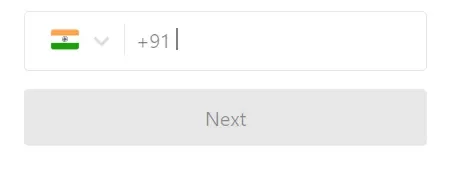
The author's explanation is that developers sometimes leave default phone numbers in place before deploying to production, so they can access the application instantly and test internal functionality without a correct OTP. Once the application is deployed to production, it is the developer's responsibility to disable that functionality, because those accounts can still hold developer or employee information such as address, email, bank details and other metadata. When the functionality is left enabled, an outsider can log in to those default numbers.
At this point the author considered reporting the issue, but held back and instead asked what could be done by using this functionality to enter other users' accounts.
Exploitation
Step 1: analyse the sign-up request
The author started analysing requests and responses, their parameters and tokens. The sign-up POST request looks like the screenshot below.
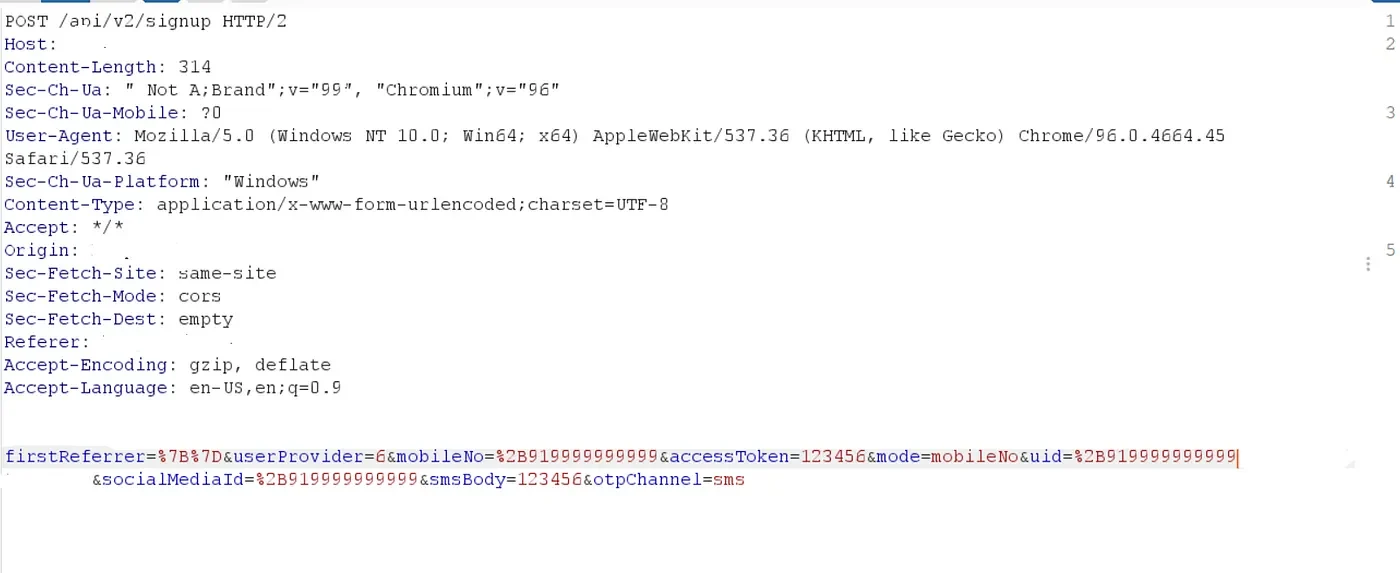
The request carries the given phone number in a lot of parameters, and the default numbers listed above can be accessed for any OTP value. The three parameters the author focuses on are mobileNo, uid and socialMediaId.
Step 2: test each parameter with a victim's phone number
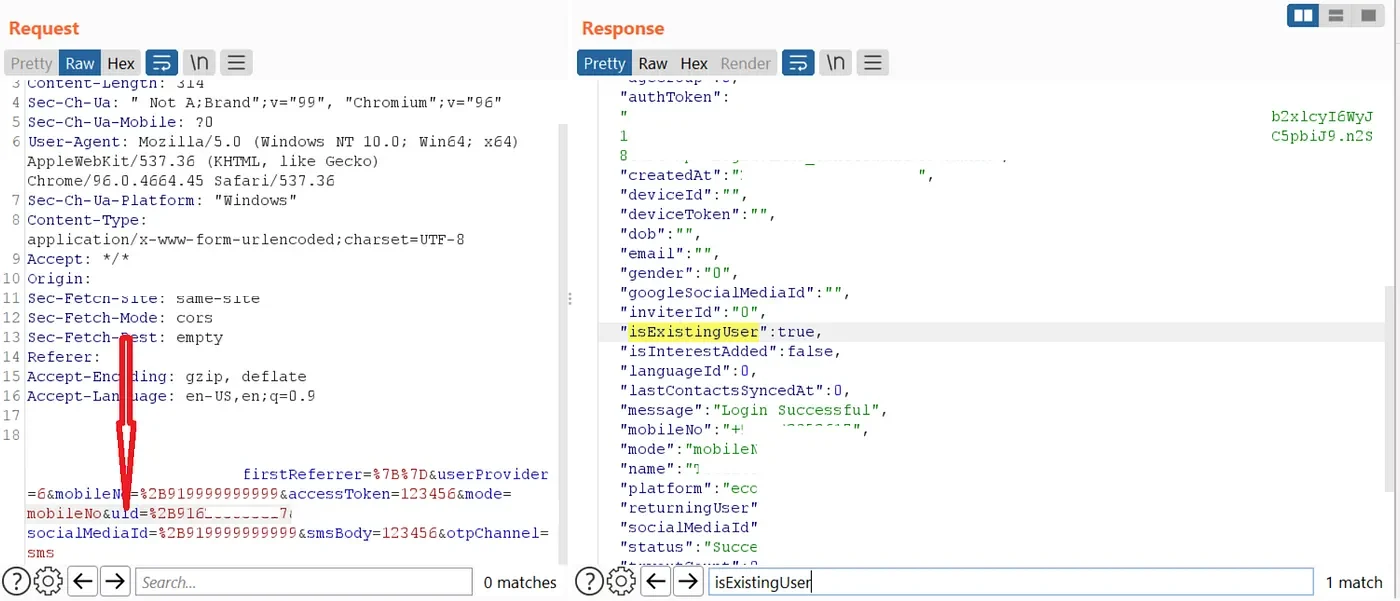
The author manually checked the responses for all three parameters by changing them to victim phone numbers. Of the three, the uid parameter was found to be vulnerable. The sample screenshot below shows how the author can view the user information and then log in to the account.
Step 3: confirm the takeover from the response
The response JSON parameter isExistingUser and the message Login Successful confirm both the existence of the account and its takeover. With this, the author can log in to any account by knowing its phone number.
Step 4: remove the need to know the number in advance
There was no rate limit on the sign-up endpoint. Because of that, the author could brute force phone numbers, use Intruder and filter results on the response JSON parameter isExistingUser=true, which confirms an existing user. In this way the author could enter any user, employee or admin account.
Root cause
Two weaknesses combine. First, the production application still honours a set of default phone numbers for which no real OTP check is performed, a leftover of pre-deployment testing that was never disabled. Second, the uid parameter was found to be vulnerable: changing it to a victim's phone number returned that user's information and a successful login. The response then discloses whether the account exists through isExistingUser and confirms the login through the Login Successful message.
Because there was no rate limit on the sign-up endpoint, the author could brute force phone numbers and filter on isExistingUser=true to confirm existing users.
Impact
An attacker who knows a user's phone number can log in to that account, including user, employee and admin accounts. Because the sign-up endpoint has no rate limit, the attacker can also brute force phone numbers and identify existing users from the response, removing the need for prior knowledge of a number. The author states that the impact becomes critical for this reason, and that he reported the issue and received a bounty. The amount is not disclosed, and neither is the target.
Fix
The report does not describe what the organisation changed. Based on the weaknesses described, the default phone numbers that bypass OTP verification should be removed from the production environment, the uid parameter should not be trusted to select the account, and the sign-up endpoint should be rate limited so that phone numbers cannot be enumerated through isExistingUser.
Variants to test
- Default or test accounts in production. Try well-known placeholder values in login and sign-up flows, such as repeated-digit phone numbers, and see whether any OTP is accepted. A positive result is a successful login without a valid OTP.
- Parameter tampering on identity fields. In a sign-up or login request, change each parameter that carries the identifier (here mobileNo, uid, socialMediaId) to another user's value and compare responses. A positive result is another user's information returned, or a success message for an account you do not own.
- Existence oracles in responses. Look for fields such as isExistingUser that reveal whether an account exists, and check whether they can be used to enumerate users. A positive result is a reliable difference in the response for existing versus non-existing identifiers.
- Missing rate limits on sign-up and OTP endpoints. Send a large number of requests with varying phone numbers and filter on the existence field. A positive result is a stable enumeration at volume without throttling or blocking.
What happened, in plain words
A website let people log in with their phone number. You typed your number, the site sent you a one-time code (OTP) by SMS, and you typed that code back to prove the number was yours. That is the normal flow.
The researcher found two problems that, added together, let him log in as almost anyone, including staff and administrators.
- Some phone numbers, made of repeated digits such as 9999999999 or 8888888888, were left in the live site as test accounts. For those numbers the site accepted any OTP value. These are leftovers from the days before launch, when developers wanted to get into the app quickly without waiting for an SMS.
- The sign-up request carried the phone number in several places. One of them, a field called
uid, was found to be vulnerable. Changing it to someone else's number made the server hand back that person's information and log the researcher in as them.
The sign-up endpoint also had no limit on how many times you could call it. So the researcher did not even need to know a victim's number in advance: he could try many numbers quickly and watch a field in the reply, isExistingUser, to see which ones belonged to real accounts.
He reported it, the organisation paid a bounty, and he does not name the site. Throughout the report the site is called redacted.com. The write-up was published on 25 December 2021 and is the author's seventh.
The pieces you need to know first
Before walking through the steps, here are the ideas the report leans on, explained from scratch.
- A web request and a response. When you fill in a form and press a button, your browser sends a message to a server (the request) and the server sends one back (the response). The request says what you want; the response says what happened. Think of a request as an order slip at a counter and the response as the tray that comes back.
- An endpoint. An endpoint is one specific address on a server that does one specific job, such as "create an account" or "check a login code". The sign-up endpoint is the one this report is about.
- An API. An API is the part of a website that answers requests with data rather than with a web page. Your browser's page talks to it behind the scenes. When the report shows a request and a JSON reply, that is the API at work.
- Parameters. Parameters are the named pieces of information inside a request, like the fields on a paper form: name, phone number, and so on. Each has a label (the name) and a value.
mobileNo=9999999999means the parameter calledmobileNohas the value9999999999. - JSON. JSON is a common way for a server to write data as text, using curly braces and quoted labels.
{"isExistingUser": true}is JSON meaning "the field isExistingUser is true". It is just a structured list of labelled values. - A token. A token is a short piece of text that a server gives your browser after you log in, so that later requests can prove who you are without sending your password again. Think of a cloakroom ticket: you hand in your coat, get a ticket, and the ticket gets the coat back. Session cookies and login tokens are the same idea. The report mentions tokens being inspected but does not show any, so none appear here.
- OTP. A one-time password. A short code, usually sent by SMS, that is valid once and for a short time. It proves you hold the phone number.
- Authentication. The process of proving who you are. Logging in is authentication. If a system skips it, it is letting people in without proof.
- Account takeover. When an attacker gets into someone else's account and can act as them. It is the worst outcome of a login flaw.
- IDOR (Insecure Direct Object Reference). A bug where the server accepts an identifier sent by the client (a user ID, an account number, a phone number) and uses it to fetch or change something, without checking that the client is allowed to touch that thing. The everyday version: a hotel clerk accepts whatever room number you say and hands over the key without checking that you booked that room.
- Parameter tampering. Simply editing a value in a request before it is sent, to see whether the server believes it. It is the manual version of an IDOR test.
- Rate limiting. A cap on how many requests a client may make in a period. Without it, a script can try thousands of values quickly. With it, the server starts refusing after a few.
- Brute force. Trying many values in a row until one works. Here it means trying many phone numbers to find real accounts.
- Enumeration. Working out which values exist in a system, one by one, from the differences in the replies. If the reply for a real number differs from the reply for a fake one, the reply itself tells you which is which.
- Reconnaissance. Gathering information about a target before attacking. Here it means collecting phone numbers from public places.
- A proxy. A tool that sits between your browser and the server so you can read and edit requests before they go out. The report does not name the tool used.
- Intruder. A feature of the Burp Suite proxy that sends the same request many times with one value changed each time, and lets you sort the replies. The report mentions it for the brute-force step.
- Dorks. Search queries that find exposed information, for example on Google or GitHub. The report lists Google and GitHub dorks, LinkedIn and contact pages as places to find phone numbers.
- Bounty. A payment a company makes to a researcher who reports a security bug responsibly.
Finding the first weakness: test numbers that skip the code
The author was watching the login flow. He noticed that a group of phone numbers behaved differently from ordinary ones. The numbers were 9999999999, 8888888888, 7777777777 …………1111111111 etc. For these, he could log in with any OTP value. For a normal number, such as his own, the site did check the code properly.
Why does this happen? Before a site goes live, developers often add placeholder accounts so they can get in instantly and test features without waiting for an SMS. The plan is always to switch them off before launch. When that step is forgotten, the accounts stay live, and they often still hold real information about the people who used them: address, email, bank details and other metadata.
At this point the author thought about reporting the issue, but held back. Instead he asked a different question: if these numbers get in without a code, can the same mechanism be used to get into other people's accounts?
Chaining it: reading the sign-up request
He started looking at the requests and responses of the sign-up flow, at their parameters and tokens. The sign-up POST request looks like the screenshot below.
The request carries the given phone number in a lot of parameters, and the default numbers listed above can be accessed for any OTP value. The three parameters he focuses on are mobileNo, uid and socialMediaId.
Why look at all of them? Because a server that receives the same fact in several places can be inconsistent about which copy it trusts. If the phone number appears in three fields, the server might check one and use another. The only way to know is to change each one in turn and watch the reply.
Testing each parameter with a victim's number
He changed each of the three parameters to a victim's phone number, one at a time, and compared the responses. Of the three, uid turned out to be the vulnerable one. The sample screenshot below shows how he could view the user information and then log in to the account.
This is the IDOR pattern: the uid parameter was found to be vulnerable, and changing it to a victim's phone number returned that user's information and a successful login. Changing the value was enough to switch accounts.
Confirming the takeover from the reply
The response JSON parameter isExistingUser and the message Login Successful confirmed both that the account existed and that it had been taken over. With that, the author could log in to any account simply by knowing its phone number.
Why does the reply matter so much? Because a reply is evidence. A success message for an account you do not own is proof that the server treated you as that user. And a field that says whether an account exists is a gift to an attacker, because it answers the question "is this number worth pursuing?" without any guesswork.
Removing the need to know the number in advance
The sign-up endpoint had no rate limit. Because of that, the author could brute force phone numbers, use Intruder, and filter results on the response JSON parameter isExistingUser=true, which confirms an existing user. In this way he could enter any user, employee or admin account.
Why does this change the severity? Knowing a victim's number is a hurdle. Without a rate limit, the hurdle disappears: a script can try number after number, and the reply sorts the real accounts from the fake ones. What started as a targeted attack becomes a mass one.
Why it worked
Two weaknesses combine.
- The live application still honoured a set of default phone numbers for which no real OTP check was performed. This was a leftover from pre-launch testing that was never disabled.
- The sign-up endpoint trusted the uid parameter supplied by the client and used it to identify the account. Changing it to a victim's phone number returned that user's information and a successful login. The reply then disclosed whether the account existed through isExistingUser and confirmed the login through the Login Successful message.
Because there was no rate limit on the sign-up endpoint, the author could brute force phone numbers and filter on isExistingUser=true to confirm existing users.
Impact
An attacker who knows a user's phone number can log in to that account, including user, employee and admin accounts. Because the sign-up endpoint has no rate limit, the attacker can also brute force phone numbers and identify existing users from the response, removing the need for prior knowledge of a number. The author states that the impact becomes critical for this reason, and that he reported the issue and received a bounty. The amount is not disclosed, and neither is the target.
Fix
The report does not describe what the organisation changed. Based on the weaknesses described, the default phone numbers that bypass OTP verification should be removed from the production environment, the uid parameter should not be trusted to select the account, and the sign-up endpoint should be rate limited so that phone numbers cannot be enumerated through isExistingUser.
Variants to test
- Default or test accounts in production. Try well-known placeholder values in login and sign-up flows, such as repeated-digit phone numbers, and see whether any OTP is accepted. A positive result is a successful login without a valid OTP.
- Parameter tampering on identity fields. In a sign-up or login request, change each parameter that carries the identifier (here mobileNo, uid, socialMediaId) to another user's value and compare responses. A positive result is another user's information returned, or a success message for an account you do not own.
- Existence oracles in responses. Look for fields such as isExistingUser that reveal whether an account exists, and check whether they can be used to enumerate users. A positive result is a reliable difference in the response for existing versus non-existing identifiers.
- Missing rate limits on sign-up and OTP endpoints. Send a large number of requests with varying phone numbers and filter on the existence field. A positive result is a stable enumeration at volume without throttling or blocking.
Glossary
- Account takeover: gaining control of someone else's account and being able to act as them.
- API: the part of a website that answers requests with data rather than web pages.
- Authentication: the process of proving who you are, such as logging in.
- Endpoint: one specific address on a server that performs one specific job.
- Enumeration: working out which values exist in a system from differences in the replies.
- IDOR (Insecure Direct Object Reference): a bug where the server accepts an identifier sent by the client and uses it without checking that the client is allowed to touch that object.
- Intruder: a Burp Suite feature that sends the same request many times with one value changed each time and lets you sort the replies.
- JSON: a text format for structured data, using curly braces and quoted labels.
- OTP: a one-time password, usually a short code sent by SMS, valid once and for a short time.
- Parameter: a named piece of information inside a request, with a label and a value.
- Parameter tampering: editing a value in a request before it is sent, to see whether the server believes it.
- Proxy: a tool that sits between your browser and the server so you can read and edit requests.
- Request and response: the message your browser sends to a server and the message the server sends back.
- Token: a short piece of text given to your browser after login so later requests can prove who you are, like a cloakroom ticket.


