Reflective XSS via search box [Bypassing Cloudflare WAF].
A search box on a website reflected user input without proper sanitisation, allowing HTML injection. The author crafted a payload that bypassed Cloudflare's WAF and achieved reflected cross-site scripting (XSS).

Like every bug hunter should, take a look at what’s in scope. I saw their main domain was in scope REDACTED.COM/.
The full write-up lives on its author's site
It belongs to its author, so we link to it rather than copy it. The other two tabs are our own rewrites, checked against it.
Context
On 1 August 2021 the researcher picked a program on HackerOne to hunt against. The program name is redacted in the write-up, but its main domain was in scope, and the feature under test was the site's search box. A search box of this kind takes the user's query string and reflects it back into the results page, so the natural first question is whether the reflected value is HTML-encoded before it reaches the response.
Setup
No accounts, roles, tools or versions are described. The only precondition the write-up establishes is that the main domain was in scope and that the site sat behind Cloudflare, whose WAF interfered with several of the payloads tried.
Finding it
The researcher started, as usual, by checking what was in scope, then went to the search box and tried an HTML injection. It worked: the input was reflected in a way that produced HTML rather than inert text. The write-up notes that nobody appeared to have pushed this further towards XSS.
With a confirmed HTML injection, the next step was to try XSS payloads. Those were blocked by Cloudflare's WAF.

Exploitation
Step 1: map the filter
Rather than guessing at payloads, the researcher set out to learn which characters the WAF and the application treated differently:
what kind of special or regular characters get filtered, removed or acts differently from their waf in place.
A batch of special characters was submitted:
Two of them stood out. Anything placed after & and # behaved differently from the rest. Testing each symbol on its own showed the behaviour:
&in the search box turned into&=undefined.#removed everything after it.
Step 2: first working payload
Armed with that, the researcher built a payload using URL encoding:
%3E%3Csvg onmouseover%3d"confirm(1"/%3E
which decodes to:
"><svg onmouseover="confirm(1"/>

URL encoding was chosen because the site rendered the encoded characters and nothing suggested the WAF had been triggered. At this point the researcher had a working XSS payload.
Step 3: the parenthesis problem
Adding a closing parenthesis at the end broke it. This version did not trigger XSS:
"><svg onmouseover="confirm(1)"/>
Cloudflare blocked it again. The researcher went back to the two characters that had behaved strangely, & and #, and combined them with a decimal reference. The decimal reference itself was not rendering, and the &# pair served as a way to keep the reflected XSS input from being removed or modified.
Step 4: final payload
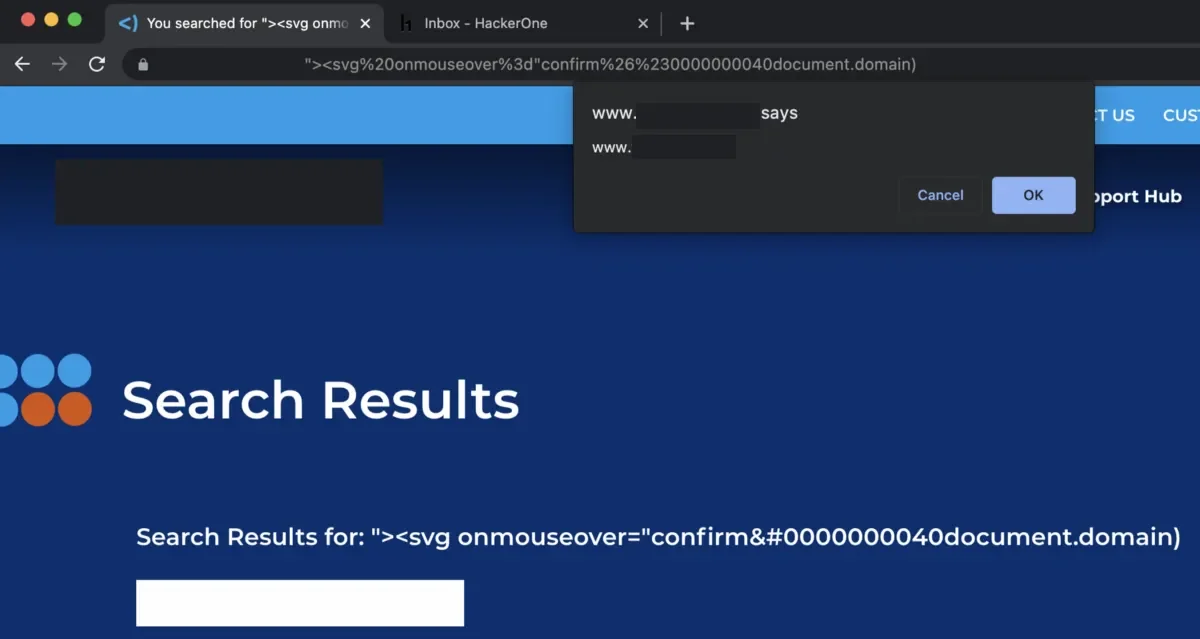
The final payload was:
%22%3E%3Csvg%20onmouseover%3d%22confirm%26%230000000040document.domain)
This produced the alert.
Root cause
The write-up attributes the bypass to how the site handles inputs, characters and parsing. Cloudflare's WAF blocked the straightforward payloads, while the encoded form showed no sign of triggering it, and the & and # handling helped keep the payload intact. The exact server-side code is not shown, so the precise parsing mistake is not stated.
Impact
The researcher is explicit that this payload bypassed that site's WAF because of how that site handles inputs, characters and parsing, and that it will not work on most sites, since every site handles every input differently, including its regular expressions. Within those limits, the demonstrated effect is script execution in the search results page when the crafted payload is submitted.
The report was closed as a duplicate. The program decided not to fix the issue, and according to the write-up it was still present two years later. Other people had reported HTML injection on the site but had not pushed for XSS; the researcher who reported it received $250, and the issue remained.
Fix
Nothing was changed: the program chose not to fix the issue.
Variants to test
- Send a benign HTML tag through any reflected parameter and check whether it comes back as markup. A positive result is a tag rendered as HTML rather than shown as text.
- Submit the full special-character set and compare each character's effect on the reflected value. A positive result is a character that changes what follows it, such as truncating the value or producing a placeholder like
&=undefined. - Repeat a blocked payload with URL encoding. A positive result is the same payload rendering without a WAF block.
- Where a character such as
&or#alters parsing, fold it into the payload together with a decimal character reference. A positive result is the payload surviving intact to the browser and executing. - Try the payload with and without a trailing closing parenthesis. A positive result is one form executing where the other is blocked, which points at the filter's matching rules rather than the application's encoding.
What happened, in plain words
A security researcher spent a day in August 2021 looking for bugs on a company's website through HackerOne, a platform where companies invite people to test their systems and pay for the problems they find. The company's name is hidden in the write-up, but its main website was fair game to test, and the part the researcher chose to poke at was the search box.
A search box is one of the simplest things on a website: you type words, press enter, and the site shows you a results page that usually repeats your words back ("results for: your words"). The interesting question for a security tester is what happens to those words on the way back. If the site treats them as plain text, nothing bad happens. If it treats them as instructions for the browser, then a visitor can make the page do things the site's owners never intended, such as run a small piece of code. That class of problem is called cross-site scripting, or XSS.
The researcher found that the search box did repeat input back as browser instructions, which is called HTML injection. From there they tried to turn it into full XSS, but the site sits behind Cloudflare, a service that filters incoming traffic and blocks suspicious requests before they reach the site. Cloudflare's filter, called a web application firewall or WAF, blocked the obvious attempts. So the researcher stopped guessing and started studying which characters the filter and the site treated differently. Two characters, & and #, behaved oddly. By combining them with a special way of writing characters, the researcher got a payload past the filter and made the browser pop up an alert box, which is the standard harmless proof that code ran.
The report was then closed as a duplicate, meaning someone else had already reported the same thing. The company chose not to fix it, and according to the write-up the problem was still there two years later. The person who first reported it received $250.
The setup
The write-up does not describe any accounts, user roles, tools or software versions. The only things it establishes are that the company's main domain was in scope (allowed to be tested) and that the site was protected by Cloudflare, whose WAF interfered with several of the payloads.
A quick word on the pieces involved, since they come up throughout:
- HackerOne: a website where companies publish "programs" listing what may be tested and what they pay for valid findings.
- Scope: the list of systems a tester is allowed to touch. Testing outside it is not allowed.
- Cloudflare WAF: a filter that sits in front of a website and inspects requests. If a request looks like a known attack, the filter answers instead of the website. Think of a bouncer at a door who checks everyone before they get in.
- Payload: the piece of text a tester sends in the hope that it does something interesting. In XSS, the payload is usually a fragment of HTML or JavaScript.
Finding it
The researcher began, as usual, by reading what was in scope, then went to the search box and tried an HTML injection: sending a small piece of HTML and seeing whether the page came back with it as markup rather than as visible text. It worked. The write-up notes that nobody seemed to have pushed this further towards XSS.
With HTML injection confirmed, the next step was to try actual XSS payloads. Those were blocked by Cloudflare's WAF.
Exploitation
Step 1: map the filter
Instead of guessing at payloads, the researcher set out to learn which characters the WAF and the application treated differently:
what kind of special or regular characters get filtered, removed or acts differently from their waf in place.
A batch of special characters was submitted:
This is simply a row of punctuation marks, sent as a search query. The idea is to watch how each one comes back: some may be removed, some may be changed, some may cut off whatever follows. It is like testing a lock by trying every key on a ring, one at a time, and noting which ones turn.
Two of them stood out. Anything placed after & and # behaved differently from the rest. Testing each symbol on its own showed the behaviour:
&in the search box turned into&=undefined.#removed everything after it.
In plain terms: when the site saw an &, it seemed to expect something to follow and produced the word undefined, which is what many programming languages show when a value is missing. When it saw a #, everything after that point disappeared from the reflected result. Both behaviours tell a tester that the site is parsing the input in a particular way, and parsing quirks are exactly what filters can be slipped past.
Step 2: first working payload
Armed with that, the researcher built a payload using URL encoding:
%3E%3Csvg onmouseover%3d"confirm(1"/%3E
which decodes to:
"><svg onmouseover="confirm(1"/>
URL encoding is a way of writing characters that are awkward in a web address by replacing each one with a percent sign and a code. %3E is >, %3C is <, %3D is =, and %22 is a double quote. Browsers and servers translate these back automatically, so the site sees the same characters either way.
Line by line, the decoded payload does this:
"closes whatever attribute the site had already opened around the search term.>closes the surrounding HTML tag entirely, so what follows is treated as a fresh piece of markup.<svg ...>opens an image-like element called SVG.onmouseover="confirm(1"attaches an event: when the mouse moves over that element, the browser runs the codeconfirm(1, which asks the user to confirm something./>closes the SVG element.
URL encoding was chosen because the site rendered the encoded characters and nothing suggested the WAF had been triggered. At this point the researcher had a working XSS payload.
Step 3: the parenthesis problem
Adding a closing parenthesis at the end broke it. This version did not trigger XSS:
"><svg onmouseover="confirm(1)"/>
Cloudflare blocked it again. The only difference from the working version is the ) after the 1, which completes the confirm(1) call. Cloudflare blocked it again.
The researcher went back to the two characters that had behaved strangely, & and #, and combined them with a decimal reference. A decimal reference is a way of writing a character as &# followed by its numeric code, which the browser turns back into the character when it displays the page. The decimal reference itself was not rendering, and the &# pair served as a way to keep the reflected XSS input from being removed or modified.
Step 4: final payload
The final payload was:
%22%3E%3Csvg%20onmouseover%3d%22confirm%26%230000000040document.domain)
Decoding it piece by piece:
%22is", which closes the attribute.%3Eis>, which closes the tag.%3Csvgis<svg, opening the SVG element.%20is a space.onmouseover%3d%22isonmouseover=", starting the event handler.confirm%26%230000000040document.domain)isconfirm(document.domain).
This produced the alert.
Root cause
The write-up attributes the bypass to how the site handles inputs, characters and parsing. Cloudflare's WAF blocked the straightforward payloads, while the encoded form showed no sign of triggering it, and the & and # handling helped keep the payload intact. The exact server-side code is not shown, so the precise parsing mistake is not stated.
In everyday terms: the site takes what you type and pastes it into the page as if it were part of the page's own instructions, instead of showing it as harmless text. The bouncer outside (Cloudflare) checks for known troublemakers, but the site's own habit of trusting whatever comes through the door is the real problem.
Impact
The researcher is explicit that this payload bypassed that site's WAF because of how that site handles inputs, characters and parsing, and that it will not work on most sites, since every site handles every input differently, including its regular expressions. Regular expressions are patterns used to match text, and different sites write them differently, so a trick that slips past one may be caught by another. Within those limits, the demonstrated effect is script execution in the search results page when the crafted payload is submitted.
The report was closed as a duplicate. The program decided not to fix the issue, and according to the write-up it was still present two years later. Other people had reported HTML injection on the site but had not pushed for XSS; the researcher who reported it received $250, and the issue remained.
Fix
Nothing was changed: the program chose not to fix the issue. HTML-encoding means turning characters like < and > into their safe written forms so the browser shows them as text instead of acting on them.
Variants to test
- Send a benign HTML tag through any reflected parameter and check whether it comes back as markup. A positive result is a tag rendered as HTML rather than shown as text.
- Submit the full special-character set and compare each character's effect on the reflected value. A positive result is a character that changes what follows it, such as truncating the value or producing a placeholder like
&=undefined. - Repeat a blocked payload with URL encoding. A positive result is the same payload rendering without a WAF block.
- Where a character such as
&or#alters parsing, fold it into the payload together with a decimal character reference. A positive result is the payload surviving intact to the browser and executing. - Try the payload with and without a trailing closing parenthesis. A positive result is one form executing where the other is blocked, which points at the filter's matching rules rather than the application's encoding.
Glossary
- HackerOne: a platform where companies publish programs inviting people to test their systems and pay for valid findings.
- Scope: the list of systems a tester is permitted to test.
- Search box: a field on a website where a visitor types words to look for content; the site often repeats those words on the results page.
- Reflection: when a website sends user input back to the browser inside the page it returns.
- HTML: the language that describes the structure and content of a web page, using tags such as
<svg>. - HTML injection: getting a website to treat user input as HTML markup rather than as plain text.
- XSS (cross-site scripting): a vulnerability where an attacker gets code to run in another visitor's browser through a website that reflects or stores their input unsafely.
- Payload: the piece of text a tester sends in the hope that it triggers the behaviour they are looking for.
- Cloudflare: a service that sits in front of many websites and filters incoming traffic.
- WAF (web application firewall): a filter that inspects requests and blocks ones that look like known attacks.
- URL encoding: writing characters as a percent sign plus a code, such as
%3Efor>, so they can travel safely in a web address. - Attribute: a setting inside an HTML tag, such as
onmouseover="...", that gives the element extra behaviour. - Event handler: code attached to an element that runs when something happens to it, such as the mouse moving over it.
- SVG: a type of image format written in HTML-like markup, which can carry event handlers.
confirm(): a browser function that shows a small dialog asking the user to confirm something; used here as harmless proof that code ran.- Decimal character reference: a way of writing a character as
&#followed by its numeric code, which the browser turns back into the character. - Regular expression: a pattern used to match text, often used by filters to spot suspicious input.
- Duplicate report: a report for a problem that has already been reported by someone else.
- Bounty: the payment a company gives for a valid security finding.