Salesforce bug hunting to Critical bug
Salesforce Aura endpoints can be misconfigured to allow unauthenticated access to data such as user profiles, documents, and collaboration groups. An attacker could query these endpoints to retrieve sensitive information like email addresses, invoices, and internal discussions.
 Published on infosecwriteups.com
Ah, yes, third party is 9 out of 10 times out of scope. But sometimes it's not.
The full write-up lives on its author's site
It belongs to its author, so we link to it rather than copy it. The other two tabs are our own rewrites, checked against it.
Context
Salesforce is a SaaS platform, and unlike Zendesk it can be misconfigured by its clients or left in a default state that allows access to data that was never meant to be publicly reachable. That is the whole premise of this write-up: the bug class lives in the gap between what a Salesforce tenant exposes by default and what the customer believes it has locked down.
The feature at the centre of it is the Aura endpoint. Aura is the framework behind Lightning components, and the pages that talk to it are the usual community, help and support subdomains that organisations stand up on Salesforce. Those pages send POST requests to an Aura endpoint with a message parameter in the body, and that parameter is where the interesting behaviour sits.
The author is explicit that this is a simple bug to test for, and that the interesting part is not the test but the judgement about what the result means. The same test produces a low-severity finding on one tenant and something far more serious on another, and telling the two apart is the skill being described.
Setup
No accounts, roles or versions are described. The tooling is deliberately light:
- A subdomain on Salesforce/Aura. Typical names are
help.target.com,support.target.comorcommunity.target.com, but it can be something arbitrary such asstate.target.com. - Burp Suite, or simply the Firefox or Chrome network inspector, to observe requests.
- Nuclei with the Salesforce Aura module, for wide-scope programmes where the subdomains have to be enumerated at scale. The author notes that a manual approach is sometimes still necessary.
The precondition is simply that the target has a Salesforce/Aura subdomain with a POST request carrying a message parameter.
Finding it
Start by locating a subdomain that is served by Salesforce/Aura. On a wide-scope programme, run nuclei with the Salesforce Aura module to automate the search; otherwise, browse the organisation's help, support and community hosts and look at what they load.
Once you have a candidate, open it with Burp or the browser's network inspector and find any POST request to an Aura endpoint. The author's marker for the right request is straightforward: you will know you are looking at it when the body contains a message parameter.
That is the entire discovery phase described in the report.
Exploitation
Step 1: capture the Aura POST request
Intercept or observe a POST to the Aura endpoint from the public page. The report does not reproduce the full request, only the identifying feature: a message parameter in the body. Keep the request as it is; the next step only changes that one value.
Step 2: replace the message parameter
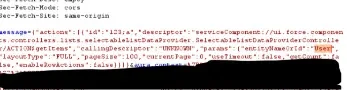
Edit the message parameter, replacing its value with the payload below. The author notes that you do not even have to encode it:
Step 3: read the response and classify it
The response tells you which of two worlds you are in.
If the result shows Success together with an email address such as [redacted] or [redacted], you have found what the author calls a highly likely Low bug, P4.
If instead the response shows an email address of the form [redacted], or null, or Guest user isn't authorized, then the subdomain has been properly configured and you should move on.
That contrast is the core of the article, and it is worth sitting with. The same request, the same parameter, the same endpoint: the difference between a P4 and a properly hardened tenant is entirely in what the tenant returned.
The low versus the critical
Plenty of Salesforce sites carry the low, P4 version of this bug. It is quick and easy to test, but turning it into a bounty can be a process. In the author's experience the bounty for this one falls between $50 and $150.
Above that sit the medium, high and critical findings, and the critical is described as the rarest breed. The small stuff is getting User or UserProfile to return a non-default, non-null value. The medium and large findings come from other objects, and those are the ones genuinely worth chasing.
Content and ContentDocument
This object is the classic false positive of the pair. At first it looks exciting because it returns a huge list of documents, and then you look closer and they are .png files and similar, with names like logo, brand or design. In the author's experience those have never been interesting.
When the documents are .doc, .pdf and the like, they are very much worth investigating. The author once found a large set of PDF documents containing detailed bank invoices and a lot of PII. That was the fastest payout they have had: less than 24 hours, $2,000, and not a private programme.
CollaborationGroup
This one announces its own value in the response text. If it contains discussions about company plans, the names of employees and their positions at the company, the abuse case is obvious, and the programme in question will know exactly how much it does not want that information accessible.
In the author's experience this did not reach critical, P1 or even P2, but P3 pays well on good programmes. A P3 does not pay as well as a P1 or P2, but it tends to be four to five times more than a P4, depending on the programme.
Root cause
The report does not describe the underlying Salesforce implementation, so the mechanism has to be read from the behaviour. The Aura endpoint accepts a message parameter and, on a misconfigured or default-state tenant, can return data that should not be public, such as a user's email address. On a correctly configured tenant the same request returns a Salesforce-internal address, null, or Guest user isn't authorized, which is the guest user being denied as it should be.
In other words, the exposure is a configuration and default-state problem on the customer side, not a flaw in the request itself. The request is legitimate; what it is allowed to reach is the variable. The author frames the scope question around exactly this: if it is something the customer can configure themselves to be better secured, it is highly likely to be treated as an exception to third-party scope. That is why the same bug is in scope on one programme and out of scope on another.
Impact
The impact depends entirely on which object answers.
User/UserProfilereturning a real address is the P4 case: a small information disclosure, typically worth $50 to $150 in the author's experience.Content/ContentDocumentreturning.doc,.pdfand similar files can expose bank invoices and large amounts of PII, as in the case that paid $2,000 within 24 hours.CollaborationGroupreturning internal discussions, employee names and positions shows how an attacker could abuse it, and the programme will know it does not want that accessible. The author rates this at P3 rather than P1 or P2.
All of this is conditional on the tenant being misconfigured or left in its default state. Where the response is a Salesforce address, null, or Guest user isn't authorized, there is no impact to report.
Fix
The report does not describe a fix applied by any programme. What it does say is that the difference between the vulnerable and the safe response is configuration: the tenants that return [redacted], null or Guest user isn't authorized are the ones that have properly configured the subdomain. The implied remedy is therefore to configure the subdomain properly, as the tenants returning [redacted], null or Guest user isn't authorized have done.
Variants to test
- Other Aura hosts on the same organisation. Try
help.,support.,community.and arbitrary names such asstate.. A positive result isSuccessplus atarget.comor public email address; a negative is a Salesforce address,nullorGuest user isn't authorized. Content/ContentDocumenton any tenant that passes the first test. Look at the file types..pngand brand assets are noise;.doc,.pdfand similar are worth opening. A positive result is documents such as bank invoices containing PII.CollaborationGroupon the same tenants. Read the response text. A positive result is discussion of company plans, employee names and their positions.- Wide-scope programmes. Run nuclei with the Salesforce Aura module across the scope, Run nuclei with the Salesforce Aura module across the scope, and fall back to a manual approach where necessary.
- Scope check before you invest. Ask whether the customer could have configured the object to be secure. If the answer is yes, expect the programme to treat it as an exception, and weigh that against the effort of chasing the bigger objects.
What happened, in plain words
This is a story about a bug that is easy to test but hard to judge. The author hunts for bugs on Salesforce, a service that companies use to run their help desks, support portals and community forums. When a company sets up one of those public pages on Salesforce, the page has to talk to Salesforce's servers in the background to fetch information. Sometimes the company leaves a setting in its default, permissive state, and data that was never meant to be public becomes reachable: an employee's email address, internal documents, or private group discussions.
The author's point is that the same simple test produces a tiny finding on one company and a serious one on another. The test itself takes minutes. Knowing what the answer means, and whether the programme will pay for it, is the actual skill. The article walks through the test, then through the bigger prizes hiding behind it, and finally through the question every beginner eventually hits: is this even in scope?
Background you need first
Before the steps make sense, a few ideas need to be clear. None of them require any prior security knowledge.
What Salesforce is. Salesforce is a company that rents out software over the internet. A business does not install anything on its own computers; it signs up, and Salesforce runs the software for it. This model is called SaaS, short for Software as a Service. Think of it like renting a flat instead of buying a house: the landlord owns the building, but you decide who gets a key and which doors stay locked. That last part matters here, because the tenant (the company renting Salesforce) is the one who decides how much is locked.
What a subdomain is. A domain is the main address of a website, like target.com. A subdomain is a prefix in front of it, like help.target.com or support.target.com. Companies use subdomains to split their website into sections: one for help pages, one for support, one for community forums. Each subdomain can be hosted by a different service, which is why help.target.com might actually be a Salesforce page even though the company's main site is not.
What an endpoint is. When your browser loads a page, it does not just receive one big document. It sends many small requests to specific addresses on the server, each asking for a piece of data. Each of those addresses is called an endpoint. Think of a restaurant: the menu is the website, but the kitchen has separate hatches for starters, mains and drinks. Each hatch is an endpoint, and each one accepts a particular kind of order.
What an API is. An API is the set of rules for how one piece of software asks another for data. It is the menu of hatches and the format of the order. When a web page needs to show you your account details, it does not reload the whole page; it calls an API endpoint in the background and gets back a small structured answer, usually in a format called JSON, which is just text arranged as labelled fields.
What a POST request is. Browsers talk to servers using HTTP, the language of the web. There are several verbs. A GET request asks for something, like "give me this page". A POST request sends something, like "here is my form, process it". When you submit a search box or a login form, your browser sends a POST. The data you send travels in the body of the request, which is the part after the headers.
What a parameter is. A parameter is a named value inside a request. If a request body contains message=hello, then message is the parameter name and hello is its value. Parameters are how the page tells the server what it wants done.
What Aura is. Aura is the name of the framework Salesforce uses to build its interactive pages, the ones behind what Salesforce calls Lightning components. When you click something on a Salesforce community or help page and the page updates without reloading, an Aura request is usually what happened behind the scenes. Aura endpoints are the hatches those pages talk to.
What a guest user is. Most Salesforce portals are public: anyone can read the help articles without logging in. Salesforce still needs to give that anonymous visitor an identity so it can decide what they are allowed to see. That identity is called the guest user. A correctly configured tenant tells the guest user "no" when it asks for private data. A misconfigured one says "yes".
What information disclosure means. This is the vulnerability class in this article. Nothing is broken, nothing crashes, no one gains control of the server. The system simply hands out information to someone who should not have it. It is the difference between a burglar breaking a window and a burglar finding the front door unlocked with the alarm switched off. The second is still a break-in, and it is often easier.
What severity ratings mean. Bug bounty programmes grade findings on a scale. You will see P1 through P4, or Critical, High, Medium and Low. P1 or Critical is the worst: serious data exposure or full takeover. P4 or Low is minor: a small leak with limited value. The exact definitions vary by programme, but the ordering is universal. The author uses both naming schemes interchangeably.
What a bug bounty programme is. A company invites outside researchers to test its systems and promises to pay for valid findings. The rules of that invitation are the scope. Something in scope is fair game; something out of scope is not, even if it is vulnerable. Third-party services, meaning software the company rents rather than builds, are often declared out of scope, because the company cannot fix them itself. The author opens with exactly this tension: third party is nine times out of ten out of scope, but sometimes it very much is in scope.
The bug
The author describes the bug as really simple, and points readers who want a deeper analysis to a separate article on testing Salesforce SaaS applications. The simplicity is the point: the test is one request with one changed value.
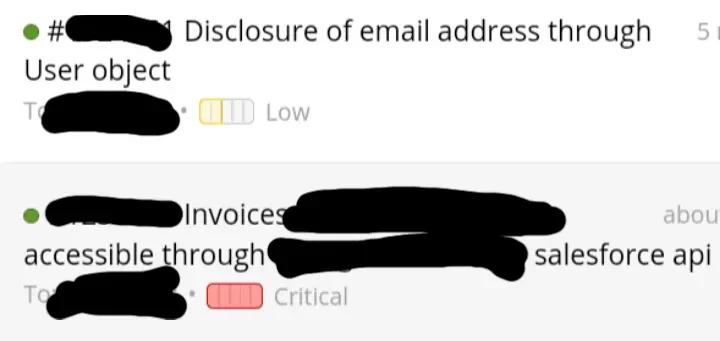
The image contrasts the two outcomes side by side, labelled "Low vs Critical". It is there to fix the central idea in your head before the steps: the same test, two very different results.
Step 1: find a Salesforce subdomain
First you have to find a subdomain that is served by Salesforce and uses Aura. The usual suspects are:
help.target.comsupport.target.comcommunity.target.com
But it can also be something arbitrary, such as state.target.com. The naming is not a reliable signal; what matters is what the page loads behind the scenes.
On a wide-scope programme, meaning one where the company invites testing across many of its systems, the author recommends using a tool called nuclei with its Salesforce Aura module to automate the search. Nuclei is a scanner: you give it a list of addresses and a set of checks, and it reports which addresses match. The Salesforce Aura module is one such check, written specifically to spot Aura endpoints. Automation is useful when there are hundreds of subdomains to look at. The author adds that a manual approach may still be necessary, because scanners miss things and because a human looking at a page notices context a scanner cannot.
Why this step comes first: you cannot test a hatch you have not found. The whole bug lives on Aura endpoints, so the search is for pages that talk to one.
Step 2: find a POST request to an Aura endpoint
Once you have a Salesforce/Aura site, open it in Burp Suite or simply in the Firefox or Chrome network inspector, and find any POST request to an Aura endpoint.
Burp Suite is a tool that sits between your browser and the internet and lets you read and edit every request. The browser's own network inspector does something similar without extra software: press F12, open the Network tab, reload the page, and you see every request the page made, with its headers and body. For a beginner, the browser inspector is the easier starting point; Burp becomes useful when you want to change a request before it is sent.
You will know you have the right request when its body contains a message parameter. That is the author's marker. There is no need to understand the rest of the request at this stage; the presence of message tells you this is the hatch the page uses to ask Salesforce for data.
Why this step matters: the next step edits exactly this parameter. If you pick the wrong request, changing it will do nothing, and you will wrongly conclude the target is safe.
Step 3: replace the message parameter
This is where you learn whether the target is vulnerable. Edit the message parameter in the body, replacing its value with the payload below. The author notes that you do not even have to encode it, meaning you can paste it in as plain text without converting special characters into percent-encoded form.
It is the single edit that the whole test depends on.
You are not breaking in; you are using the front door and asking for a different room. Whether the server hands it over is entirely up to how the tenant is configured.
Step 4: read the response and decide
The response tells you which of two worlds you are in. There are only two outcomes, and the difference between them is the whole article.
Outcome one: the target is vulnerable. If the result shows Success together with an email address such as [redacted] or [redacted], you have found what the author calls a highly likely Low bug, P4. The server accepted your changed request and returned a real person's email address to an anonymous visitor.
Outcome two: the target is properly configured. If the response instead shows an email address of the form [redacted], or null, or Guest user isn't authorized, then the subdomain has been configured correctly and you should move on. Each of those three answers is a refusal in a different style:
[redacted]means the server returned a Salesforce-internal address rather than a customer one, so nothing private leaked.nullis one of the answers a properly configured subdomain returns.Guest user isn't authorizedmeans the anonymous visitor was told, explicitly, that they are not allowed to see this.
Why this distinction is the core skill: the request is identical in both cases. The endpoint is identical. The parameter is identical. The only variable is the tenant's configuration. A beginner tends to see "the request succeeded" and assume a bug; the author is teaching you to read what came back, not whether something came back.
The low versus the critical
Plenty of Salesforce websites carry the low, P4 version of this bug. It is quick and easy to test, but turning it into a bounty can be a process. In the author's experience the bounty for this one falls between $50 and $150.
Above that sit the medium, high and critical findings, and the critical is described as the rarest breed. The small stuff is getting User or UserProfile to return a non-default, non-null value. User and UserProfile are the Salesforce objects, meaning the database tables, that hold account and profile information. Getting a real email address out of them is the P4 case you just tested for.
The medium and large findings come from other objects, and those are the ones genuinely worth chasing. The author names two: Content/ContentDocument and CollaborationGroup. Both sound promising from their names alone. One of them, in the author's experience, is far more likely to disappoint.
Content and ContentDocument
Content and ContentDocument are the Salesforce objects that hold documents.
This is the classic false positive of the pair. At first it looks exciting because it returns a huge list of documents. Then you look closer and they are .png files and similar, with names like logo, brand or design. Those are marketing assets, and in the author's experience they have never been interesting. A company logo being public is not a finding; it is on the company's homepage.
When the documents are .doc, .pdf and the like, they are very much worth investigating. The author once found a large set of PDF documents containing detailed bank invoices and a lot of PII. PII stands for personally identifiable information: names, addresses, account numbers, anything that identifies a real person. That finding was the author's fastest payout ever: less than 24 hours, $2,000, and not a private programme, meaning it was open to any researcher who found it.
Why the file type matters so much: the object is the same in both cases. The difference between noise and a $2,000 payout is what the tenant happened to upload into it. This is a recurring theme: the bug class is uniform, the value is entirely in the data.
CollaborationGroup
CollaborationGroup is a Salesforce object whose response text can contain discussions about company plans and employee names and positions. This one announces its own value in the response text. If the response contains discussions about company plans, the names of employees and their positions at the company, the abuse case is obvious, and the programme will know exactly how much it does not want that information accessible.
The programme in question will know exactly how much it does not want that information accessible. In the author's experience this did not reach critical, P1, or even P2, but P3 pays well on good programmes. A P3 does not pay as well as a P1 or P2, but it tends to be four to five times more than a P4, depending on the programme.
The scope question
The important thing here, especially if you are trying to do bug hunting as a full-time job or single source of income, is understanding what a programme considers third party and out of scope. The author's rule of thumb: if it is something the customer can configure themselves to be better secured, it is highly likely to be treated as an exception.
That is why the same finding is in scope on one programme and out of scope on another, and why the author spends so much of the article on judgement rather than technique. The test is trivial. Deciding whether it is worth reporting, and to whom, is not.
Glossary
- SaaS: Software as a Service; software a company rents over the internet instead of installing on its own machines.
- Tenant: one customer's own separate instance of a rented service, with its own settings and data.
- Subdomain: a prefix on a domain, such as
help.inhelp.target.com, used to split a website into sections. - Endpoint: a specific address on a server that accepts a particular kind of request.
- API: the set of rules for how one piece of software asks another for data.
- HTTP: the language browsers and servers use to exchange requests and responses.
- GET request: an HTTP request that asks the server to return something.
- POST request: an HTTP request that sends data to the server for it to process.
- Request body: the part of a request that carries the data being sent, as opposed to the headers.
- Parameter: a named value inside a request, such as
messageinmessage=hello. - JSON: a plain-text format for structured data, arranged as labelled fields.
- Aura: the Salesforce framework behind its interactive Lightning pages, and the endpoints those pages talk to.
- Lightning components: the building blocks Salesforce uses to construct interactive pages.
- Guest user: the identity Salesforce gives to an anonymous, not-logged-in visitor so it can decide what they may see.
- Information disclosure: a vulnerability where a system hands out data to someone who should not have it, without anything breaking.
- Vulnerability class: a category of bug, such as information disclosure, that many individual findings can belong to.
- Severity rating: a grade for how serious a finding is, commonly P1 to P4 or Critical to Low.
- P1 / P2 / P3 / P4: severity tiers, P1 being the most serious and P4 the least.
- Critical / High / Medium / Low: the same tiers under different names.
- Bug bounty programme: an invitation from a company to outside researchers to test its systems in exchange for payment for valid findings.
- Scope: the rules of that invitation, defining what may and may not be tested.
- In scope / out of scope: whether a given system or finding is covered by those rules.
- Third party: software or infrastructure a company rents rather than builds, which it often cannot fix itself.
- Wide-scope programme: a programme that invites testing across many of the company's systems rather than a narrow list.
- Nuclei: a scanner that runs a set of checks against a list of addresses and reports matches.
- Salesforce Aura module: a nuclei check written specifically to spot Aura endpoints.
- Burp Suite: a tool that sits between browser and internet and lets you read and edit requests.
- Network inspector: the browser's built-in panel, usually opened with F12, that lists every request a page makes.
- Encoding: converting special characters into a safe form, such as percent-encoding, before sending them.
- Object: in Salesforce, a database table holding one kind of record, such as users, files or groups.
User/UserProfile: the Salesforce objects holding account and profile information.Content/ContentDocument: the Salesforce objects holding uploaded files and documents.CollaborationGroup: the Salesforce object behind shared groups and their discussions.- PII: personally identifiable information; data that identifies a real person, such as names, addresses or account numbers.
- Social engineering: manipulating a real person into helping an attacker, often using details gathered from a leak.
- False positive: something that looks like a finding at first but turns out not to be one.


