Scary Tickets😨
The author found that Zendesk and Help Scout add incoming emails to an existing ticket when a hidden ticket hash appears in the subject or body, even if the sender is not the original requester. By getting a support address added as a CC and then signing up for a Google account with that address, an attacker could obtain a verified @company.com email and use it to log in to internal services that trust the company domain.
 Published on sites.google.com
When the blog was originally published, a lot of hackers including me were super excited on how it worked and wanted to test it in a live target. Multiple hackers found and reported it in bug bounty targets that used it.
The full write-up lives on its author's site
It belongs to its author, so we link to it rather than copy it. The other two tabs are our own rewrites, checked against it.
Context
This research revisits the "Ticket Trick" idea published by Inti on Medium, which showed how a support desk can be abused to obtain a valid @domain.com email address. The systems examined here are Zendesk and Help Scout, both of which turn inbound email into tickets and thread later email into an existing ticket.
The feature at the centre of it is email and ticket threading. When a customer replies to a ticket by email, the support system has to decide which ticket the message belongs to, and then append the message to that ticket. Zendesk documents three ways of matching an incoming email to a ticket:
- Emails are checked for
In-Reply-ToandReferencesheaders. If those exist, they are used to add ticket content to the email - support+id<ticketid>@company.zendesk.com is present in the receiver's email. If that is the case, email content is added to the ticket.
- There is a hidden reference to the ticket in the email body.
Inti's original technique used the second mechanism. The researcher here ignored it and focused on the first and third. The first is not usable in an attack, because when a third party company sends an email to the victim, the attacker cannot control the references and in-reply-to headers. That left the hidden reference in the body.
The overall goal was to obtain a verified @domain.com Google account and use it against services that trust the email domain, such as internal domains behind Google login, Atlassian cloud instances, Zoom, Asana and Slack.
Setup
- A Zendesk test instance and a Help Scout trial instance, both controlled by the researcher.
- A research partner, Brandon Nguyen, with a second email account used to send mail into the ticket.
- A second account of the researcher's own for the Help Scout tests.
- Gmail's show original feature to read raw email headers and bodies.
- hunter.io to collect candidate support addresses for a target domain.
- For Help Scout, the
Auto Replyfeature was enabled on the test instance so that an automated response would be produced.
Finding it
Zendesk: the hidden reference in the body
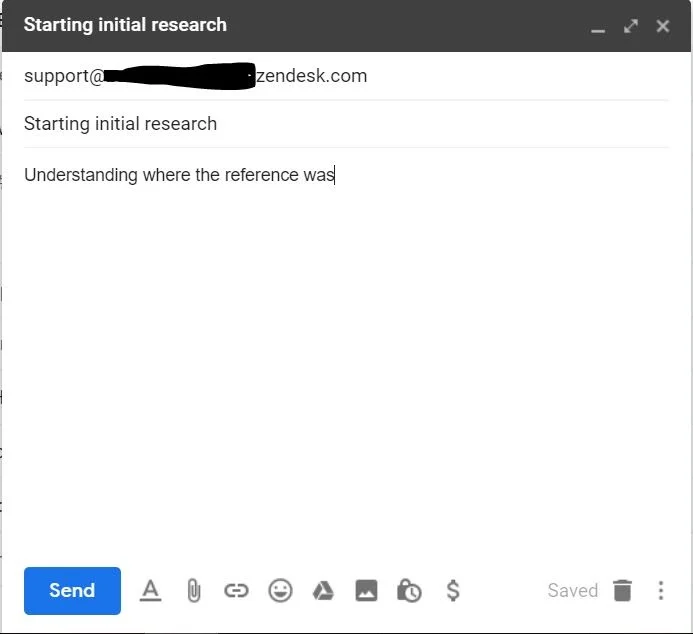
To study the third matching method, the researcher sent an email to the research support system.
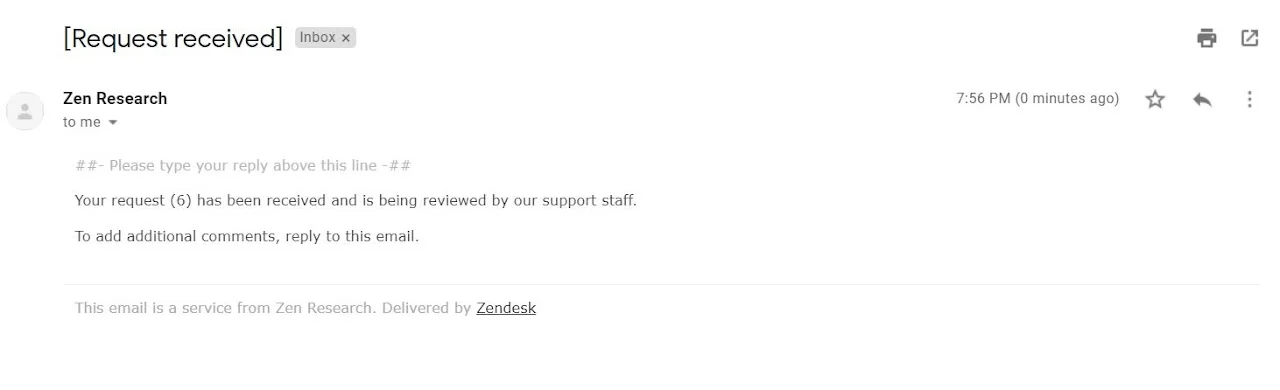
The support system replied automatically. That automated reply is the usual way a ticket is created in Zendesk: it is an acknowledgement from support that the ticket was received.
With the automated response in hand, the next step was to find the hidden reference to the ticket inside the email body. Using show original in Gmail, the raw message was inspected. The first lines were the email headers, up to the boundary string ----==[redacted], after which the body began.
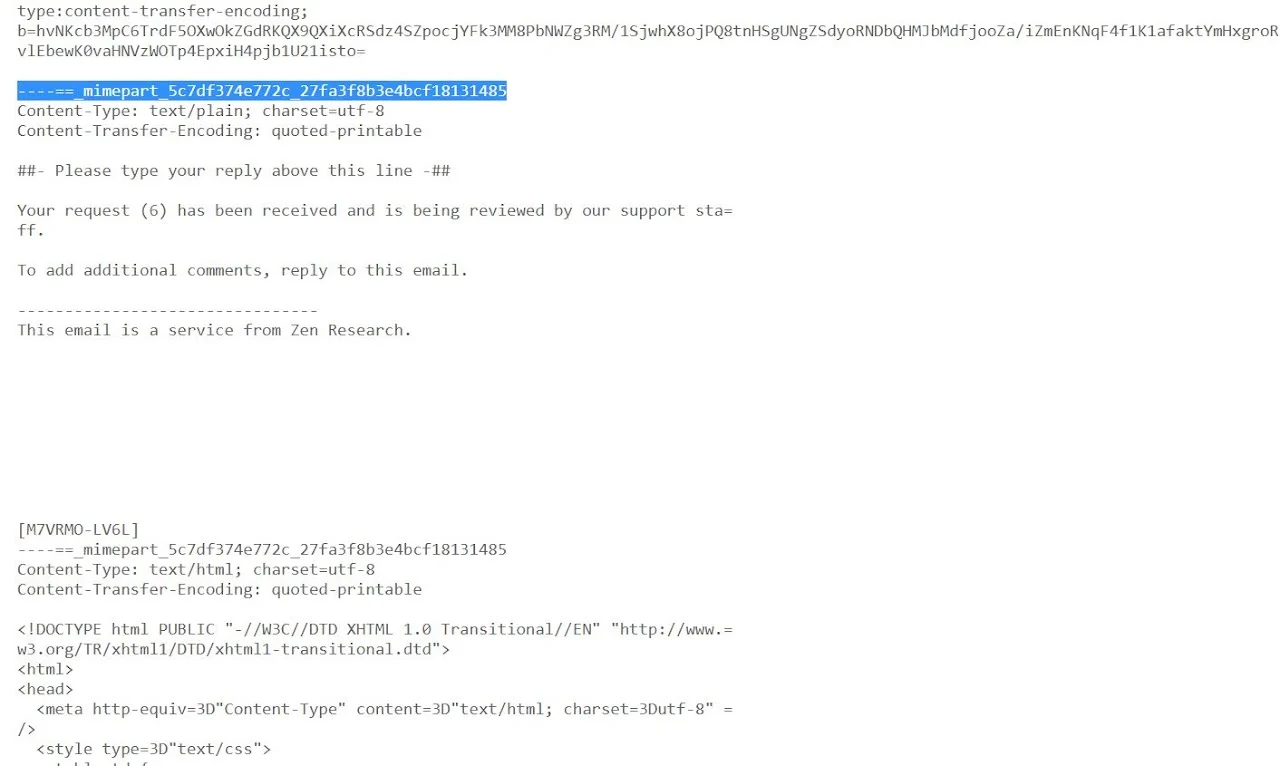
The message contained two ----==-mimepart sections: the first is the plain text body and the second is the HTML body, so that clients which only accept plain text can still display the message. Past the line This email is a service from Zendesk. there was an alphanumeric string:
[M7VRMO-LV6L]
That string was copied into the researcher's notes as the ticket hash for the next phase.
Zendesk: what the agent sees
So far the request had only been sent as a customer. The agent side of the same ticket looked normal.
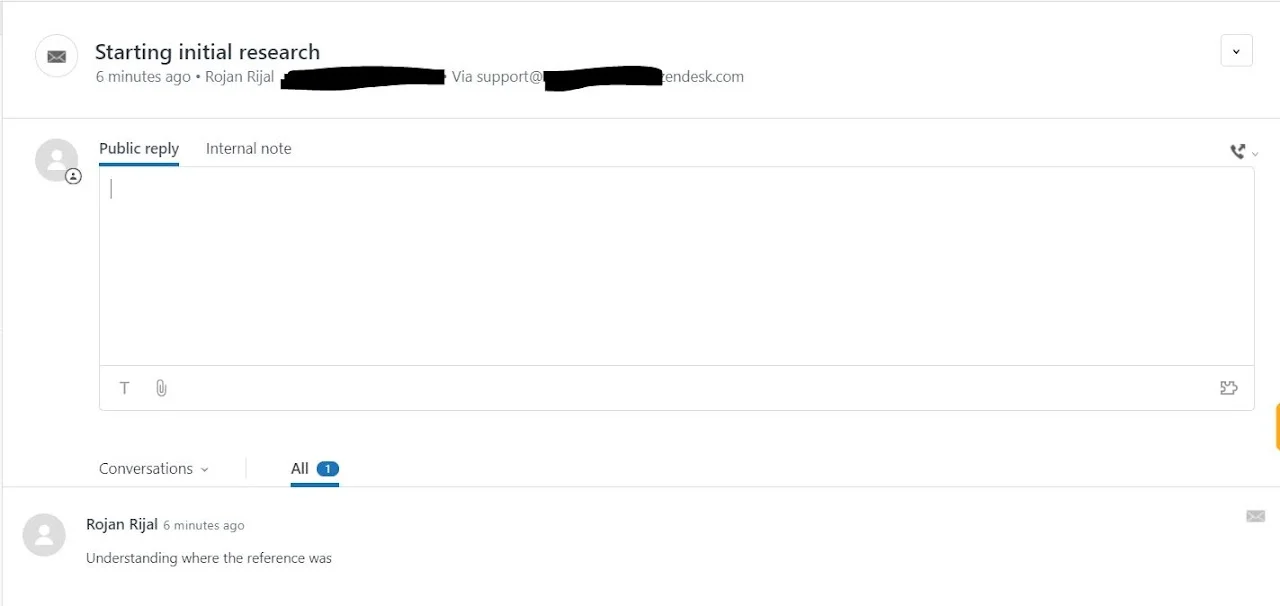
The research partner Brandon Nguyen was then asked to send an email to [redacted] with the subject set to the hash:
[M7VRMO-LV6L]
This tested what happens on the Zendesk side when an email carrying the hash is not sent by the original sender. The agent side showed something unexpected.
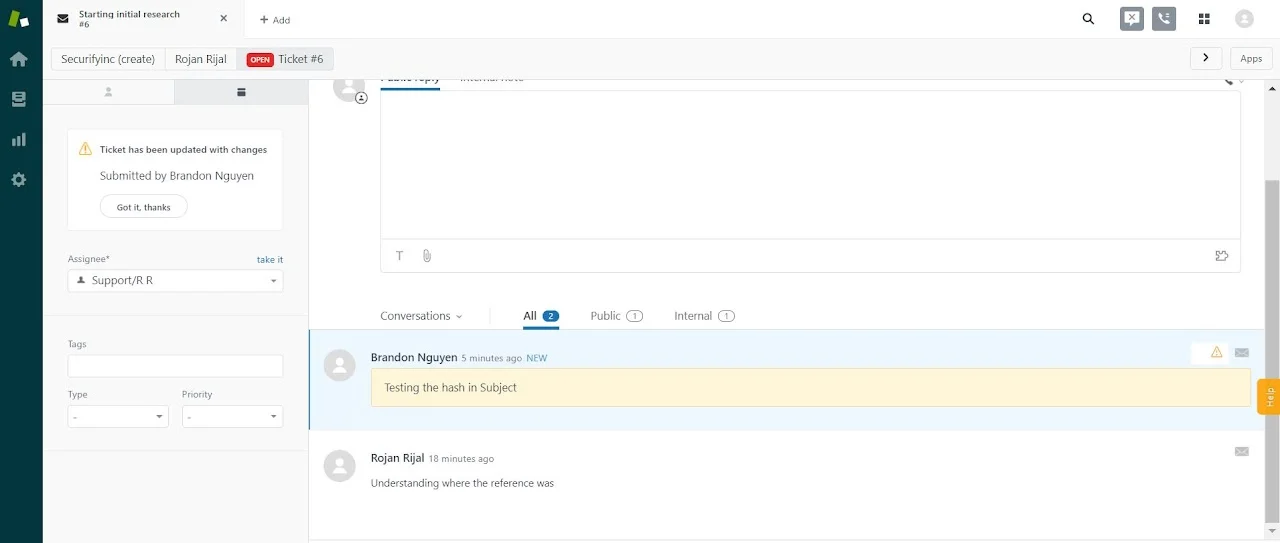
The email arrived as a private note in the ticket rather than a public comment visible to the original sender. The ! marker carried the explanation Brandon Nguyen was not a part of this conversation. A linked Zendesk article explained the rule: If you want to allow the new user to comment publicly on the ticket, an agent, the requester, or a CC on the ticket needs to add them as a CC.
So the current sender also had to be CCed in. The friend's email was added as a CC on the ticket, and he sent another email with the hash as the subject. This time the message went through as a public message.
Zendesk Agent Portal
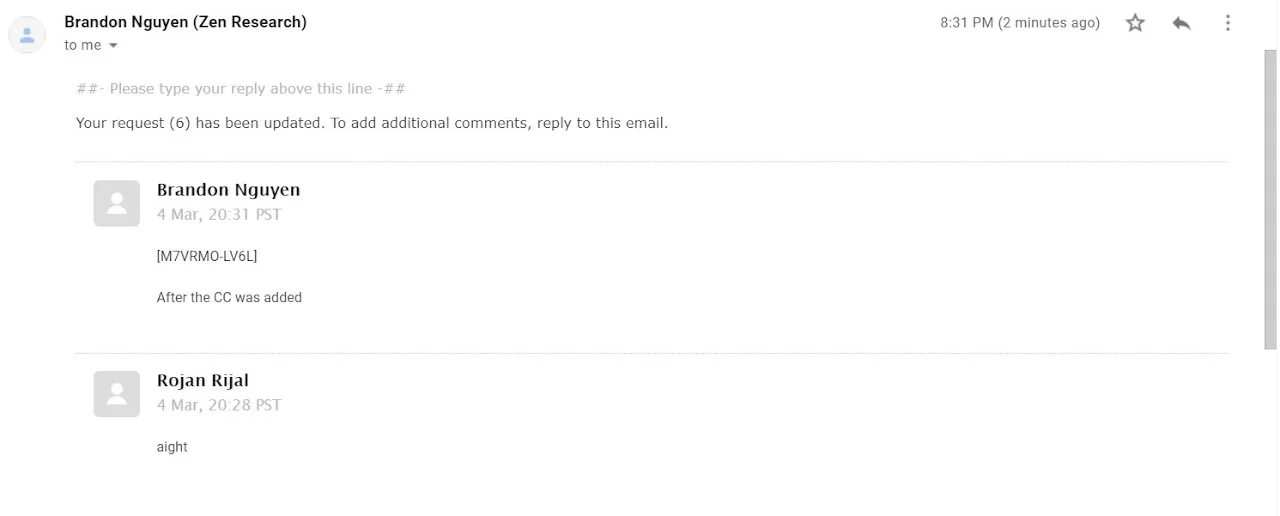
Customer side email thread
Help Scout: the same pattern
Help Scout runs in the same way as Zendesk minus some features. There was little documentation about how its threading worked, so the researcher investigated directly. The first email was sent to the test instance, and because Auto Reply was enabled, an automated response came back.
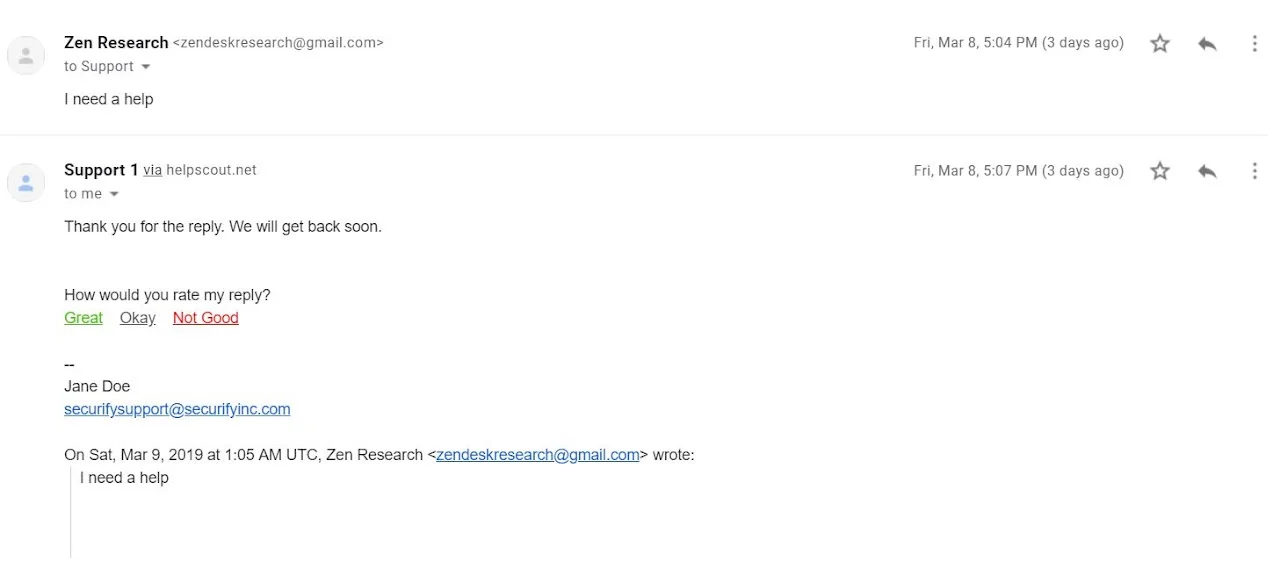
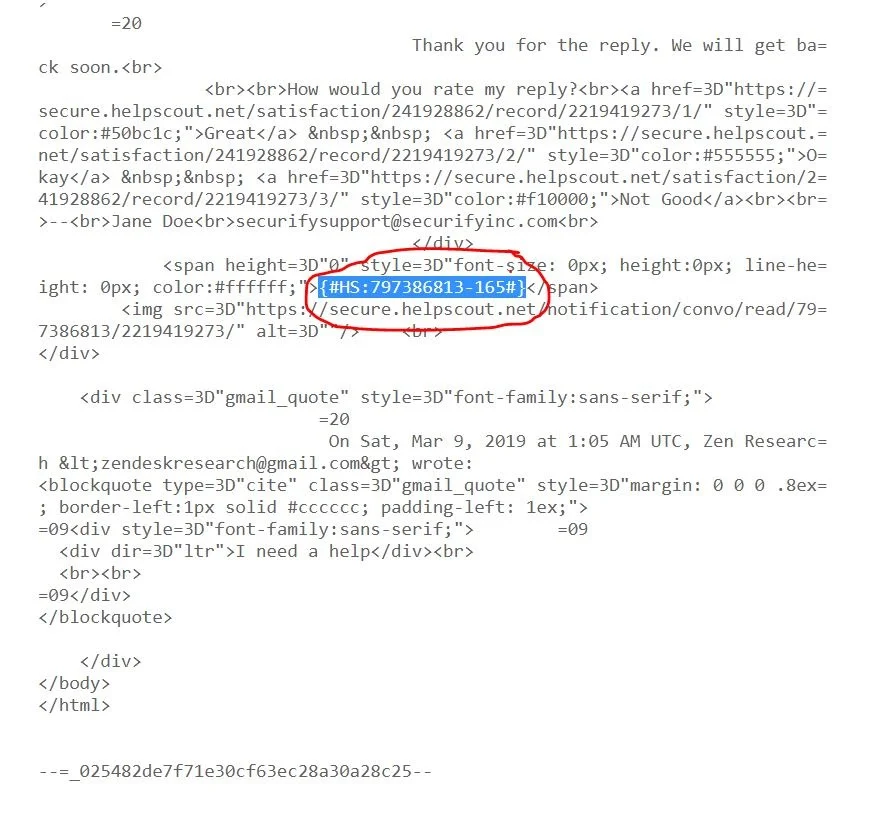
Checking the source of that reply showed a hash included in the email as well.
An email from a second account was then sent to the support address with the hash in the body. Help Scout, like Zendesk, appended the email to the ticket. There was a complication: on the agent side, the second email had become the original sender. Any future correspondence from the support agent would go to the second email and not to the attacker's email.
The reason was that the second email was simply the most recent one. Sending a new email from the attacker's address to the ticket, with the hash in the body, put the attacker's address back as the original sender and restored receipt of future correspondence.
Exploitation
Step 1: obtain a verified @domain.com Google account through Zendesk
Each test began with finding the company's support email addresses, using hunter.io to list candidates for the domain. A simple email asking for help on the account was sent. If the service was Zendesk, an automated reply confirming the email usually came back, and the hash was taken from it as in the analysis above.
The next step was the Google signup at accounts.google.com. Google allows signing up for an account on a domain without creating a GSuite account, which is useful for calendars, groups and similar services. Most Sign in with Google integrations use Google's OpenID and only check the domain of the email address at signup or signin, which is what made the attack dangerous.
To get a valid [redacted] address, [redacted] was first added as a CC to the ticket by replying to the automated reply. Then the Google signup was started, with the ticket hash used as the first name and last name. When Google sends a verification code, it emails [redacted] with the hash in the body under Hi {firstname} {lastname}. Because the hash is in the body, the verification email is threaded into the ticket.
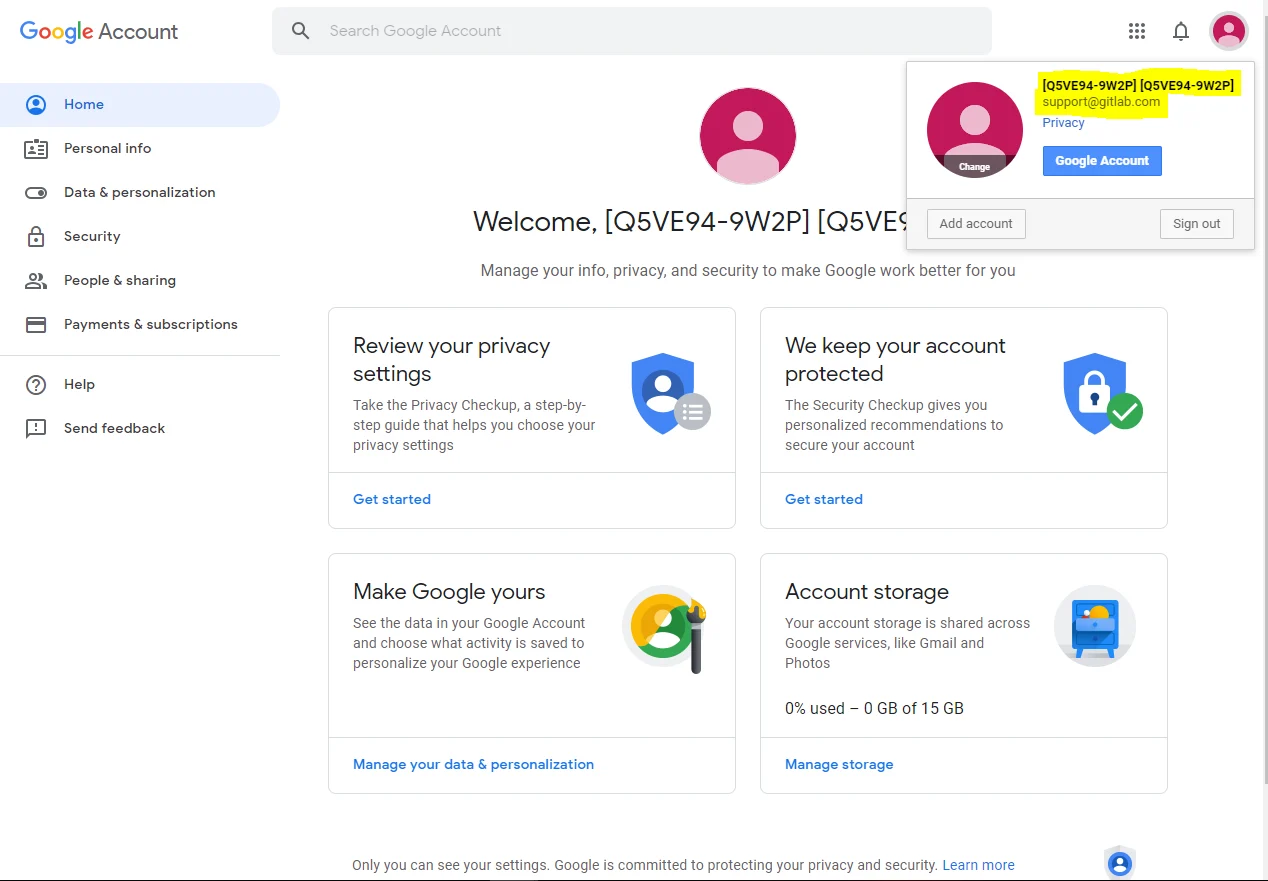
Verified [redacted]
Step 2: use the verified email against internal services
With a verified email in Google, the researcher tested places that were internal or sensitive for the company, using Gitlab as the example. One such site is https://prometheus.gitlab.com/, which requires a @gitlab.com domain to sign in.
Two OAuth designs matter here. In some sites the OAuth simply checks that the domain used to sign in matches the company domain and that the user account exists in the system. In services like Prometheus, accounts are auto-provisioned, so a @gitlab.com user who does not exist in the system can still log in with limited permissions. In other cases companies use GSuite based OAuth: the same Google login appears, but the backend checks whether the email exists in the organisation's GSuite user list. An email verified through the Zendesk technique will not be in the GSuite org, because only a non-existing email can be verified in Google. If the company uses GSuite SSO, the sign-in cannot be exploited this way.
Gitlab was using the regular OAuth, which allowed login to their Prometheus instance. The report notes that no image was supplied for security reasons.
Step 3: Atlassian cloud instances
Where no internal domain could be found, another route was Atlassian's cloud JIRA at atlassian.net. Most of these instances allowed anyone with the company domain to sign in and view JIRA tickets. One company had migrated all its OAuth to GSuite SSO but had forgotten to move its JIRA login, which allowed the researcher to log in and view the JIRA tickets.
Internal domains with Google login and Atlassian are not the only vectors. The same approach was used against other third party services such as Zoom and Asana, to reach company restricted resources including recorded videos (Zoom) and internal project management (Asana).
Step 4: Help Scout and Slack
Inti's original work included getting into a company's Slack instance: if an attacker could sign up on a company's Zendesk instance with [redacted], they could join the Slack instance because Slack sent invitations through that no-reply address. Slack then added a random alphanumeric suffix after no-reply, for example [redacted], so the address could not be guessed.
With Help Scout the approach was different. Slack's free plan has no enterprise tools such as SSO, Slack instances can have a domain restriction limiting who can join automatically, and Slack provides a feature to find all the workspaces you can join, are invited to, or are part of. Each of these features was combined with Help Scout to reach internal Slack instances. The researcher states that no Slack instance was joined during the research, except one after explicit written permission from the company, which watched the signup to make sure nothing malicious was done.
For this exploit, company means a target found vulnerable to the Help Scout attack. Emailing [redacted] produced an autoreply showing Help Scout was in use, and the hash token was taken from it.
4a. Create an attacker-owned Slack instance
A Slack instance was created with the company's hash token as the workspace name. The support@ address was then invited to my Slack instance through Slack's invite feature. That instance is now on the list of instances the support address has been invited to.
4b. Make Slack list the instances
Slack's https://slack.com/signin/find page lists every Slack instance you are part of, invited to, or able to sign up to, given an email address. Slack emails that list to the address, with each instance's name and URL and a hyperlink to join. Because the attacker's instance is in the list, it appears in the email too, with the ticket hash as its name. The whole email that Slack sends to [redacted] is therefore threaded into the attacker's support ticket.
4c. Get the email back
The Slack list is now embedded on the ticket as a public comment, but Help Scout does not automatically send the content to the attacker's email. As noted during the Help Scout analysis, Slack's email is now the original sender because it was the most recent email to the ticket. To receive the next set of replies and see the previous threads, the attacker replies to the first email from support with something generic such as "Thank you", which puts the attacker's address back as the original sender. Then it is a matter of waiting.
4d. Use the links in the threaded email
The threaded email contains a hyperlink called Join, a simple link with a token that allows signing up directly. Where Join is present, private Slack access can be obtained directly without much work.
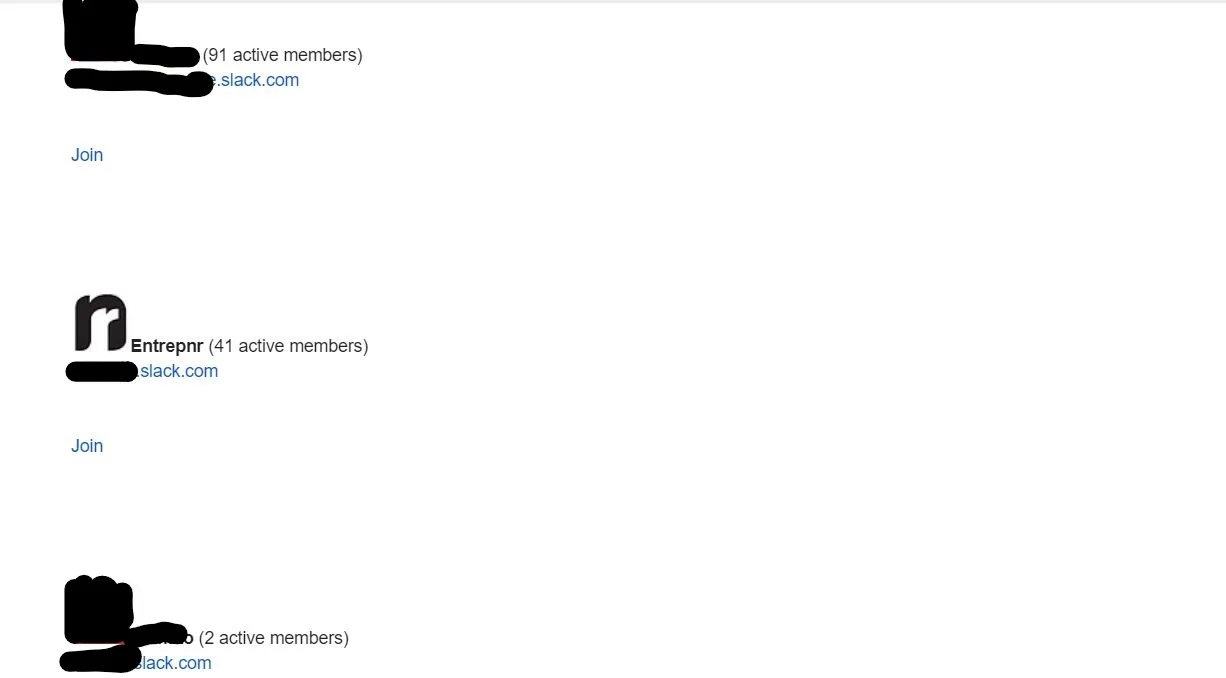
Slack also includes a hyperlink called Launch, a one time use magic link that logs directly into the user account. It only exists if the support@ address is a registered user on the Slack instance, and it is only active for 24 hours. If the support agent does not reply within 24 hours of exploitation, the magic link will not work. In some Slack instances this was overcome by using [redacted] where the company allowed anyone with @company.com to register.
The video below shows an exploit through Help Scout in full.
Root cause
The support systems thread inbound email into an existing ticket based on a hidden reference in the email body. That reference is included in automated replies sent to the customer, so anyone who can trigger an automated reply learns the ticket hash. Any later email that carries the hash in the body or subject is appended to the same ticket, even when it comes from a different address. Zendesk limits the effect by treating a sender who is not part of the conversation as a private note, but adding that sender as a CC turns their message into a public comment.
On the Google side, the weakness is that domain based signup and most Sign in with Google integrations only check the domain of the email address. A verification email sent to [redacted] is threaded into the attacker's ticket because the hash appears in the body, so the attacker can read the code and complete verification for an address that does not otherwise exist. GSuite based OAuth checks the organisation's user list and is therefore not bypassed this way.
On the Slack side, the workspace finder emails a list of instances, including attacker-controlled ones, to the support address, and that email is threaded into the ticket. The Join link gives direct signup where present; the Launch magic link logs in only if the support address is a registered user and within 24 hours.
Impact
Across about 25 companies tested, 20 were found vulnerable, and in all cases some internal access was gained. Applications accessed, with the permissions involved, were:
- Slack
- Asana
- Internal domains
- Zoom
- JIRA & Confluence through Atlassian.net
- Priv esc in the company's own domain with a registered @company.com account.
- Internal support portal in Zendesk that was only open for internal employees. Contained JIRA tickets for some API issues.
- Dropbox
The impact depends on how the target's services authenticate. Regular OAuth that only checks the email domain, and auto-provisioning services such as Prometheus, are exposed. GSuite SSO is not, because the verified address is not in the organisation's user list. The Launch magic link is limited to 24 hours and requires the support address to be a registered Slack user; the Join link gives direct signup where it is present.
Fix
Zendesk limited easy exploitation by blocking any no-reply@ emails and sending them straight to Spam. This does not make every company secure: third party services that send verification email from anything other than no-reply@ will still have those emails added to the inbox.
Help Scout has not pushed a major fix, because doing so would require changing the whole platform structure. The recommendation is to add an email filter that blocks no-reply@ emails and any email that looks automated, such as verification emails and forgot password emails, and to tell support agents not to reply to suspicious emails.
Variants to test
- Other support platforms with a body hash. Send an email to a target's support address and read the automated reply with show original. A positive result is an alphanumeric token in the body that, when placed in the subject or body of a message from a second address, appends that message to the same ticket.
- Zendesk CC behaviour. Send the hash from a second address and check the agent view. A private note with a "not part of this conversation" marker confirms the sender is not yet trusted; adding that address as a CC and resending should turn the message into a public comment.
- Help Scout sender ordering. After threading a message from a second address, check which address is treated as the original sender. A positive result is that a later email from the attacker's address, carrying the hash, restores the attacker as the original sender.
- Domain based Google signup. Use the ticket hash as first and last name during signup for [redacted] A positive result is a verification email threaded into the ticket, with the code visible under
Hi {firstname} {lastname}. - Internal domains behind Google login. Try signing in to internal hosts that require the company domain. A positive result is a login with auto-provisioned limited permissions, as with Prometheus; a GSuite SSO check will reject the account.
- Atlassian cloud. Try signing in to atlassian.net instances with the verified address. A positive result is access to JIRA tickets that should be restricted to the company domain.
- Slack workspace discovery. Create a Slack instance named after the ticket hash, invite the support address, and request the workspace list at slack.com/signin/find. A positive result is the list, including the attacker's instance, threaded into the ticket, with a Join link or a Launch magic link.
What happened, in plain words
Imagine a company's customer support desk. Customers write emails to it, and the support system turns each email into a numbered "ticket" so that staff can track the conversation. When a customer replies later, the system has to work out which ticket the new email belongs to, so it can stick the reply onto the right conversation. That matching is the whole story here.
A support system called Zendesk does this matching in three ways. One of them is a small hidden code (a "hash") tucked into the body of the emails it sends out. If a later email contains that same code, Zendesk assumes it belongs to the same ticket and adds it. The problem: anyone who can make the support desk send them an automated reply can read that code. And once you have the code, you can make emails from a different address land inside someone else's ticket.
Why does that matter? Because many companies let people sign up for a Google account using their company email address, and many internal tools (dashboards, project trackers, chat) only check that your email ends in the company's domain. If you can get a verified @company.com Google account, even one that does not really belong to an employee, those tools may let you in. The trick is to get the verification email from Google to land inside the support ticket, where you can read the code.
The researcher, working with two friends, tested this against Zendesk and a second support system called Help Scout, then used the resulting accounts against real companies. Of about 25 companies tested, 20 were vulnerable, and in every case some internal access was gained. This article walks through the whole thing from the beginning, assuming you have never done security work before.
Background: what a support desk actually does
A "support desk" (also called a helpdesk or ticketing system) is software that companies use to handle customer emails. You send an email to something like [redacted] The software creates a ticket: a record with a number, the customer's message, and a status. A support agent reads it and replies. If you reply again, your reply is added to the same ticket so the whole conversation stays in one place.
The feature at the centre of this research is called email and ticket threading. "Threading" means keeping a chain of messages together as one conversation, the way your email app groups replies under one subject. The support system has to decide, for every incoming email, which ticket it belongs to. Get that decision wrong and messages end up in the wrong place.
Zendesk documents three ways it matches an incoming email to a ticket:
- Emails are checked for
In-Reply-ToandReferencesheaders. If those exist, they are used to add ticket content to the email - support+id<ticketid>@company.zendesk.com is present in the receiver's email. If that is the case, email content is added to the ticket.
- There is a hidden reference to the ticket in the email body.
Let us unpack those three, because they are the foundation of everything else.
An email header is the hidden information at the top of every email: who sent it, who it is for, the subject, and technical fields the mail software uses. You normally do not see headers; you see the message. In-Reply-To and References are headers that email programs use to say "this message is a reply to that earlier message". They are like the "Re: your last email" label, but machine readable.
Method 2 is the one the original "Ticket Trick" write-up by Inti used. The support address itself contains the ticket number, so replying to [redacted] obviously belongs to ticket 12345. It is like writing the ticket number on the envelope.
Method 3 is the interesting one: a hidden code inside the body of the email. The researcher ignored method 2 and focused on methods 1 and 3. Method 1 cannot be used in an attack, because when a third party company sends an email to the victim, the attacker cannot control the references and in-reply-to headers. You cannot reach into someone else's outgoing email and edit its headers. That left the hidden reference in the body.
The overall goal was to obtain a verified @domain.com Google account and use it against services that trust the email domain, such as internal domains behind Google login, Atlassian cloud instances, Zoom, Asana and Slack.
Setup: what you need to follow along
- A Zendesk test instance and a Help Scout trial instance, both controlled by the researcher. A "test instance" is your own private copy of the software, where you can experiment without touching a real company.
- A research partner, Brandon Nguyen, with a second email account used to send mail into the ticket.
- A second account of the researcher's own for the Help Scout tests.
- Gmail's show original feature to read raw email headers and bodies. This is a menu option in Gmail that shows the email as the mail server sees it, headers and all, instead of the pretty version.
- hunter.io to collect candidate support addresses for a target domain. It is a website that guesses company email addresses from a domain name.
- For Help Scout, the
Auto Replyfeature was enabled on the test instance so that an automated response would be produced. "Auto Reply" is a setting that makes the system send a canned acknowledgement whenever a new email arrives.
Finding it
Zendesk: the hidden reference in the body
To study the third matching method, the researcher sent an email to the research support system.
The support system replied automatically. That automated reply is the usual way a ticket is created in Zendesk: it is an acknowledgement from support that the ticket was received. Think of it like a shop assistant saying "thanks, we have your request, here is your reference number".
With the automated response in hand, the next step was to find the hidden reference to the ticket inside the email body. The body is the actual message text, as opposed to the headers. Using show original in Gmail, the raw message was inspected. The first lines were the email headers, up to the boundary string ----==[redacted], after which the body began.
A boundary string is a line of random-looking text that separates the parts of an email that contains more than one version of the message. Emails often carry a plain-text version and an HTML (formatted) version at the same time, and the boundary marks where one part ends and the next begins. It is like the perforated line between two sections of a printed form.
The message contained two ----==-mimepart sections: the first is the plain text body and the second is the HTML body, so that clients which only accept plain text can still display the message. Past the line This email is a service from Zendesk. there was an alphanumeric string:
[M7VRMO-LV6L]
That string was copied into the researcher's notes as the ticket hash for the next phase. A hash here is not a password hash; it is just a short code that identifies the ticket. The square brackets are part of it. The researcher called it the "ticket hash" from then on.
Zendesk: what the agent sees
So far the request had only been sent as a customer. The agent side of the same ticket looked normal. The "agent side" is the view a support employee sees when they open the ticket in Zendesk.
The research partner Brandon Nguyen was then asked to send an email to [redacted] with the subject set to the hash:
[M7VRMO-LV6L]
This tested what happens on the Zendesk side when an email carrying the hash is not sent by the original sender. The idea: if the hash alone is enough to attach a message to the ticket, then a stranger who somehow learns the hash can inject messages into someone else's conversation. The agent side showed something unexpected.
The email arrived as a private note in the ticket rather than a public comment visible to the original sender. A private note is a message only support staff can see; a public comment is one the customer can see too. The ! marker carried the explanation Brandon Nguyen was not a part of this conversation. A linked Zendesk article explained the rule: If you want to allow the new user to comment publicly on the ticket, an agent, the requester, or a CC on the ticket needs to add them as a CC.
"CC" means carbon copy: adding someone else's address to the conversation so they receive the same messages. The rule says: a stranger's email is treated as a private note until that stranger is explicitly added to the ticket. So the current sender also had to be CCed in. The friend's email was added as a CC on the ticket, and he sent another email with the hash as the subject. This time the message went through as a public message.
Zendesk Agent Portal
Customer side email thread
So the hash alone is not quite enough: the sender also has to be on the ticket's list of participants. That is a small hurdle, not a wall, because the attacker controls the ticket and can add any address as a CC.
Help Scout: the same pattern
Help Scout runs in the same way as Zendesk minus some features. There was little documentation about how its threading worked, so the researcher investigated directly. The first email was sent to the test instance, and because Auto Reply was enabled, an automated response came back.
Checking the source of that reply showed a hash included in the email as well.
An email from a second account was then sent to the support address with the hash in the body. Help Scout, like Zendesk, appended the email to the ticket. There was a complication: on the agent side, the second email had become the original sender. Any future correspondence from the support agent would go to the second email and not to the attacker's email.
The reason was that the second email was simply the most recent one. Sending a new email from the attacker's address to the ticket, with the hash in the body, put the attacker's address back as the original sender and restored receipt of future correspondence. Think of it like a group chat where the last person to speak is treated as the one in charge of the thread; speak again and you are back in charge.
Exploitation
Step 1: obtain a verified @domain.com Google account through Zendesk
Each test began with finding the company's support email addresses, using hunter.io to list candidates for the domain. A simple email asking for help on the account was sent. If the service was Zendesk, an automated reply confirming the email usually came back, and the hash was taken from it as in the analysis above.
The next step was the Google signup at accounts.google.com. Google allows signing up for an account on a domain without creating a GSuite account, which is useful for calendars, groups and similar services. "GSuite" (now called Google Workspace) is Google's paid business product; the free signup path lets you create a Google account tied to your company's domain without the company paying for the full product. Most Sign in with Google integrations use Google's OpenID and only check the domain of the email address at signup or signin, which is what made the attack dangerous.
"Sign in with Google" is the button you see on many websites that lets you log in with your Google account instead of a separate password. OpenID is the standard behind that button: the website asks Google "is this person who they say they are?" and Google answers yes or no. If the website only checks that the email ends in @company.com, then any Google account with such an address passes, even one that does not belong to a real employee.
To get a valid [redacted] address, [redacted] was first added as a CC to the ticket by replying to the automated reply. Then the Google signup was started, with the ticket hash used as the first name and last name. When Google sends a verification code, it emails [redacted] with the hash in the body under Hi {firstname} {lastname}. Because the hash is in the body, the verification email is threaded into the ticket.
The attacker then reads the verification code from the ticket instead of from an inbox they do not own.
Verified [redacted]
Step 2: use the verified email against internal services
With a verified email in Google, the researcher tested places that were internal or sensitive for the company, using Gitlab as the example. One such site is https://prometheus.gitlab.com/, which requires a @gitlab.com domain to sign in. "Internal" means it is not meant for the public; it is for staff only.
Two OAuth designs matter here. OAuth is the system that lets one website ask another "can this person in?" without sharing passwords. In some sites the OAuth simply checks that the domain used to sign in matches the company domain and that the user account exists in the system. In services like Prometheus, accounts are auto-provisioned, so a @gitlab.com user who does not exist in the system can still log in with limited permissions. "Auto-provisioned" means the service creates an account on the spot the first time someone logs in, rather than requiring an administrator to add them first.
In other cases companies use GSuite based OAuth: the same Google login appears, but the backend checks whether the email exists in the organisation's GSuite user list. An email verified through the Zendesk technique will not be in the GSuite org, because only a non-existing email can be verified in Google. If the company uses GSuite SSO, the sign-in cannot be exploited this way. SSO (single sign-on) is a setup where one central system, here GSuite, decides who is allowed in, and every other tool trusts that decision.
Gitlab was using the regular OAuth, which allowed login to their Prometheus instance. The report notes that no image was supplied for security reasons.
Step 3: Atlassian cloud instances
Where no internal domain could be found, another route was Atlassian's cloud JIRA at atlassian.net. JIRA is a popular tool for tracking tasks and bugs; Atlassian is the company that makes it, and their cloud version runs at atlassian.net instead of on the company's own servers. Most of these instances allowed anyone with the company domain to sign in and view JIRA tickets. One company had migrated all its OAuth to GSuite SSO but had forgotten to move its JIRA login, which allowed the researcher to log in and view the JIRA tickets.
Internal domains with Google login and Atlassian are not the only vectors. The same approach was used against other third party services such as Zoom and Asana, to reach company restricted resources including recorded videos (Zoom) and internal project management (Asana). A "vector" is simply a path an attacker can take; here it means another kind of service that trusts the company domain.
Step 4: Help Scout and Slack
Inti's original work included getting into a company's Slack instance: if an attacker could sign up on a company's Zendesk instance with [redacted], they could join the Slack instance because Slack sent invitations through that no-reply address. Slack is a workplace chat tool; a "Slack instance" (or workspace) is one company's private chat space. Slack then added a random alphanumeric suffix after no-reply, for example [redacted], so the address could not be guessed.
With Help Scout the approach was different. Slack's free plan has no enterprise tools such as SSO, Slack instances can have a domain restriction limiting who can join automatically, and Slack provides a feature to find all the workspaces you can join, are invited to, or are part of. Each of these features was combined with Help Scout to reach internal Slack instances. The researcher states that no Slack instance was joined during the research, except one after explicit written permission from the company, which watched the signup to make sure nothing malicious was done.
For this exploit, company means a target found vulnerable to the Help Scout attack. Emailing [redacted] produced an autoreply showing Help Scout was in use, and the hash token was taken from it.
4a. Create an attacker-owned Slack instance
A Slack instance was created with the company's hash token as the workspace name. The support@ address was then invited to my Slack instance through Slack's invite feature. That instance is now on the list of instances the support address has been invited to.
4b. Make Slack list the instances
Slack's https://slack.com/signin/find page lists every Slack instance you are part of, invited to, or able to sign up to, given an email address. Slack emails that list to the address, with each instance's name and URL and a hyperlink to join. Because the attacker's instance is in the list, it appears in the email too, with the ticket hash as its name. The whole email that Slack sends to [redacted] is therefore threaded into the attacker's support ticket.
4c. Get the email back
The Slack list is now embedded on the ticket as a public comment, but Help Scout does not automatically send the content to the attacker's email. As noted during the Help Scout analysis, Slack's email is now the original sender because it was the most recent email to the ticket. To receive the next set of replies and see the previous threads, the attacker replies to the first email from support with something generic such as "Thank you", which puts the attacker's address back as the original sender. Then it is a matter of waiting.
4d. Use the links in the threaded email
The threaded email contains a hyperlink called Join, a simple link with a token that allows signing up directly. Where Join is present, private Slack access can be obtained directly without much work. A token here is a short secret string that acts like a temporary key: whoever holds the link holds the key.
Slack also includes a hyperlink called Launch, a one time use magic link that logs directly into the user account. A "magic link" is a URL that logs you in without a password, just by being clicked. It only exists if the support@ address is a registered user on the Slack instance, and it is only active for 24 hours. If the support agent does not reply within 24 hours of exploitation, the magic link will not work. In some Slack instances this was overcome by using [redacted] where the company allowed anyone with @company.com to register.
The video below shows an exploit through Help Scout in full.
Root cause
The support systems thread inbound email into an existing ticket based on a hidden reference in the email body. That reference is included in automated replies sent to the customer, so anyone who can trigger an automated reply learns the ticket hash. Any later email that carries the hash in the body or subject is appended to the same ticket, even when it comes from a different address. Zendesk limits the effect by treating a sender who is not part of the conversation as a private note, but adding that sender as a CC turns their message into a public comment.
On the Google side, the weakness is that domain based signup and most Sign in with Google integrations only check the domain of the email address. A verification email sent to [redacted] is threaded into the attacker's ticket because the hash appears in the body, so the attacker can read the code and complete verification for an address that does not otherwise exist. GSuite based OAuth checks the organisation's user list and is therefore not bypassed this way.
On the Slack side, the workspace finder emails a list of instances, including attacker-controlled ones, to the support address, and that email is threaded into the ticket. The Join link gives direct signup where present; the Launch magic link logs in only if the support address is a registered user and within 24 hours.
Impact
Across about 25 companies tested, 20 were found vulnerable, and in all cases some internal access was gained. Applications accessed, with the permissions involved, were:
- Slack
- Asana
- Internal domains
- Zoom
- JIRA & Confluence through Atlassian.net
- Priv esc in the company's own domain with a registered @company.com account.
- Internal support portal in Zendesk that was only open for internal employees. Contained JIRA tickets for some API issues.
- Dropbox
"Priv esc" is short for privilege escalation: gaining a higher level of access than you should have. The impact depends on how the target's services authenticate. Regular OAuth that only checks the email domain, and auto-provisioning services such as Prometheus, are exposed. GSuite SSO is not, because the verified address is not in the organisation's user list. The Launch magic link is limited to 24 hours and requires the support address to be a registered Slack user; the Join link gives direct signup where it is present.
Fix
Zendesk limited easy exploitation by blocking any no-reply@ emails and sending them straight to Spam. This does not make every company secure: third party services that send verification email from anything other than no-reply@ will still have those emails added to the inbox.
Help Scout has not pushed a major fix, because doing so would require changing the whole platform structure. The recommendation is to add an email filter that blocks no-reply@ emails and any email that looks automated, such as verification emails and forgot password emails, and to tell support agents not to reply to suspicious emails.
Variants to test
- Other support platforms with a body hash. Send an email to a target's support address and read the automated reply with show original. A positive result is an alphanumeric token in the body that, when placed in the subject or body of a message from a second address, appends that message to the same ticket.
- Zendesk CC behaviour. Send the hash from a second address and check the agent view. A private note with a "not part of this conversation" marker confirms the sender is not yet trusted; adding that address as a CC and resending should turn the message into a public comment.
- Help Scout sender ordering. After threading a message from a second address, check which address is treated as the original sender. A positive result is that a later email from the attacker's address, carrying the hash, restores the attacker as the original sender.
- Domain based Google signup. Use the ticket hash as first and last name during signup for [redacted] A positive result is a verification email threaded into the ticket, with the code visible under
Hi {firstname} {lastname}. - Internal domains behind Google login. Try signing in to internal hosts that require the company domain. A positive result is a login with auto-provisioned limited permissions, as with Prometheus; a GSuite SSO check will reject the account.
- Atlassian cloud. Try signing in to atlassian.net instances with the verified address. A positive result is access to JIRA tickets that should be restricted to the company domain.
- Slack workspace discovery. Create a Slack instance named after the ticket hash, invite the support address, and request the workspace list at slack.com/signin/find. A positive result is the list, including the attacker's instance, threaded into the ticket, with a Join link or a Launch magic link.
Glossary
- Support desk / helpdesk: software that turns customer emails into numbered tickets so staff can track conversations.
- Ticket: a record of one customer request, with a number, the messages, and a status.
- Threading: keeping a chain of messages together as one conversation.
- Email header: hidden technical information at the top of an email, such as sender, recipient and reply links.
- Email body: the actual message text, as opposed to the headers.
- In-Reply-To / References: email headers that say which earlier message a reply belongs to.
- Boundary string: a line of random-looking text that separates the parts of a multi-part email.
- MIME part: one section of an email that carries a version of the message, such as plain text or HTML.
- Hash (ticket hash): here, a short code that identifies a ticket, found in the body of automated replies.
- Private note: a message in a ticket that only support staff can see.
- Public comment: a message in a ticket that the customer can also see.
- CC (carbon copy): adding another address to a conversation so they receive the same messages.
- Agent side: the view a support employee sees when opening a ticket.
- Auto Reply: a setting that makes a system send a canned acknowledgement when a new email arrives.
- Test instance: your own private copy of a piece of software, used for experiments.
- Show original: a Gmail option that displays the raw email, headers and all.
- GSuite / Google Workspace: Google's paid business product for company accounts.
- Sign in with Google: a button on many websites that lets you log in with your Google account.
- OpenID: the standard behind Sign in with Google; the website asks Google to confirm who you are.
- OAuth: the system that lets one website ask another whether a person is allowed in, without sharing passwords.
- SSO (single sign-on): a setup where one central system decides who is allowed in, and other tools trust that decision.
- GSuite SSO: SSO where GSuite is the central system; it checks the organisation's user list.
- Auto-provisioned: an account created automatically the first time someone logs in, without an administrator adding them.
- Internal domain: a website or service meant only for staff, not the public.
- JIRA: a popular tool for tracking tasks and bugs.
- Atlassian: the company that makes JIRA; its cloud version runs at atlassian.net.
- Slack: a workplace chat tool; a Slack instance (workspace) is one company's private chat space.
- Token: a short secret string that acts like a temporary key.
- Magic link: a URL that logs you in without a password, just by being clicked.
- Vector: a path an attacker can take to reach a target.
- Privilege escalation (priv esc): gaining a higher level of access than you should have.
- API: a way for one piece of software to talk to another; here it appears only as the subject of some JIRA tickets.
- Hunter.io: a website that guesses company email addresses from a domain name.






