SSTI to Local File Read
A server-side template injection in the name field was rendered in password-reset emails, allowing the attacker to read local files via the Twig source function. The attacker could not escalate to remote code execution.

A server-side template injection hiding in a password-reset email, turned into local file read.
The full write-up lives on its author's site
It belongs to its author, so we link to it rather than copy it. The other two tabs are our own rewrites, checked against it.
Context
This is a server-side template injection (SSTI) found on a private program a few months before the write-up. The program belonged to a company that hires people for home improvements and construction. Only the main domain was in scope, and XSS and CSRF were excluded as site-wide known issues, which the author estimates cut the realistic chances of a valid finding to about 25%.
The application itself was small, with only a few pages, of which two or three were interesting. Web applications commonly use template engines to generate pages and emails dynamically, embedding user input as they go. SSTI happens when the application takes that input and renders it without sanitising it properly. In this case the injection point was a name field, and the rendering surface was a password-reset email.
Setup
The author was invited to the program. The only precondition was an account: they created one and started exploring. No special tooling is described; the work was done by hand, changing profile data and requesting password resets. The author notes that they knew very little about SSTI at the time and had to research it during the engagement.
Finding it
The exploration started on the Edit Profile page. With CSRF out of scope, the author looked for IDOR and file-upload bugs and came up empty. What stood out was that the name field allowed special characters. The first thing that came to mind was testing it for SSTI.
Exploitation
Step 1: Inject an arithmetic probe into the name field
The name was changed to a payload that asks the template engine to multiply 7 by the string '7' and append the word test:
{{7*'7'}} test
The payload was saved. The author then searched the application for 49 test reflected anywhere, and it was not there. The last place it could surface was email, so they went to the forgot-password page and requested a reset.
Step 2: Read the result in the password-reset email
The email rendered the payload, and the greeting read "Hello 49". That looked like SSTI right away. The multiplication had been evaluated by the template engine rather than printed literally, which confirms server-side evaluation of the name value.
Step 3: Identify the engine
The author then did what you would expect: sprayed SSTI payloads blindly hoping for a quick P1. That did not happen. To exploit SSTI you first have to identify the back-end template engine, sending different payloads and inferring the engine from the server's responses. After some trial and error, the engine was identified as Twig.
Step 4: Try the usual Twig payloads
The standard Twig payloads were tried and failed, mostly returning empty emails. A few of the ones run:
{{['id']|filter('system')}}
"{{'/etc/passwd'|file_excerpt(1,30)}}"@
{{['cat\x20/etc/passwd']|filter('system')}}
These use the filter filter to call system on array elements, and file_excerpt to pull a slice of a local file. They failed, mostly returning empty emails.
Step 5: Work around the sandbox
After more reading, the author realised the engine was probably running in a sandbox. A few bypasses were tried with no luck, so it was time to actually read Twig's documentation. Working through the functions it listed, most returned no email or an empty one. Finally {{source}} came through and allowed reading local files:
{{source("\etc\hosts")}}
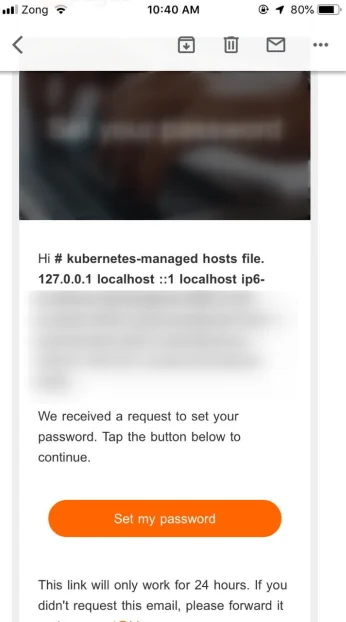
The screenshot shows the local file read landing in the password-reset email.
Root cause
The name field accepted template syntax and the value was later rendered by Twig when the password-reset email was generated, without sanitising or escaping the user input. The engine was probably running in a sandbox, since the usual Twig payloads returned empty output, but {{source}} still came through and let the author read local files. That function was enough to turn template evaluation into local file read.
Impact
An authenticated user could read local files on the server by placing a payload in their profile name and triggering a password-reset email. The author could not escalate the primitive to remote code execution. The report does not describe which files beyond the example were read or what sensitive data they contained.
Fix
The report does not say what the program owner changed. The general fix is to stop rendering user-controlled values as template source: escape or sanitise profile fields before they are passed to the template engine, and restrict or remove dangerous functions such as source from the sandbox available to templates that handle user input.
Variants to test
- Inject
{{7*'7'}}into every profile field (name, company, address, bio) and request a password reset, an invitation or any other transactional email. A positive result is49appearing in the rendered email instead of the literal payload. - Try engine-identification payloads for other engines (Jinja2, Freemarker, Velocity, Smarty) in the same fields. A positive result is arithmetic or string operations being evaluated in the output.
- Where Twig is suspected, test
{{source("/etc/passwd")}}and other file-reading functions from the documentation. A positive result is file contents appearing in the email body. - Test sandbox bypasses with
filter,mapandreducecalling PHP functions such assystem. A positive result is command output in the rendered email. - Look for the same injection in other rendering surfaces: PDF exports, invoices, notification emails and admin panels that display user-supplied names. A positive result is the payload being evaluated rather than printed.
What happened, in plain words
A security researcher found a bug in a website that lets you create an account. The bug allowed them to read files stored on the server by putting a special code into their profile name and then triggering a password-reset email. The email was generated by a template engine, a piece of software that fills in placeholders with values. Because the name was inserted into the template without being cleaned, the engine executed the code instead of just printing it. The researcher could not take full control of the server (remote code execution), but reading local files was still a real impact. The bug was reported and eventually rewarded.
This article explains the whole process from scratch, assuming you only know how to use a browser and a computer. We will cover what a template engine is, what server-side template injection (SSTI) means, how the researcher found and exploited it, and what we can learn. All the technical terms are explained in the glossary at the end.
The target
The researcher was invited to a private bug bounty program. A bug bounty program is a scheme where companies pay people to find and report security problems in their systems. This particular company hires people for home improvements and construction. Only the main website (the domain) was in scope, meaning only bugs found on that website would be rewarded. Also, two types of bugs were explicitly out of scope: cross-site scripting (XSS) and cross-site request forgery (CSRF). These were considered known issues across the whole site, so the researcher estimated their chances of finding a valid bug were only about 25%. That is a low chance, but they decided to try anyway.
The application was small, with only a few pages, and only two or three of them looked interesting. The researcher created an account and started exploring. They found some XSS early on, mostly to convince themselves they could still find things, but XSS was out of scope so those would not count.
Finding the injection
The researcher began by looking at the Edit Profile page. Since CSRF was out of scope, they focused on other types of bugs: IDOR (insecure direct object reference, where you can access someone else's data by changing an identifier) and file-upload vulnerabilities. They did not find any. However, they noticed that the name field allowed special characters. That is unusual because many applications restrict what you can enter in a name field. The first thing that came to mind was to test for server-side template injection (SSTI).
SSTI happens when an application takes user input and inserts it into a template without properly sanitising it. A template engine is software that combines a template (a page or email with placeholders) with data to produce the final output. If the user input contains template syntax, the engine may execute it as code instead of treating it as plain text. To test for this, the researcher changed their name to a payload that asks the template engine to multiply 7 by the string '7' and append the word "test":
{{7*'7'}} test
This payload uses double curly braces {{ }}, which is common template syntax for evaluating an expression. Inside, 7*'7' multiplies the number 7 by the string '7'. In many template engines, this would either produce an error or coerce the string to a number and yield 49. The word "test" is just a marker to help find the output later. The researcher saved this as their name.
Then they searched the application for the string 49 test to see if it appeared anywhere. It did not. The last place it could show up was in an email, so they went to the forgot-password page and requested a password reset. The email that arrived rendered the payload, and the greeting read "Hello 49". That confirmed that the template engine had evaluated the expression: it multiplied 7 by '7' to get 49, instead of printing the literal text {{7*'7'}} test. This was a clear sign of SSTI.
Identifying the engine
At this point, the researcher did what many people do: they started spraying SSTI payloads blindly, hoping to find a critical bug (P1) quickly. That did not work. They knew very little about SSTI at the time, so they did some research. To exploit SSTI, you first need to identify which template engine is running on the server. Different engines have different syntax and features, so you send various payloads and observe how the server responds. After some trial and error, they figured out it was Twig, a template engine for PHP.
Fighting the sandbox
The researcher then tried the usual Twig payloads. These failed, mostly returning empty emails. Here are a few of the payloads they ran:
{{['id']|filter('system')}}
"{{'/etc/passwd'|file_excerpt(1,30)}}"@
{{['cat\x20/etc/passwd']|filter('system')}}
Let's break these down line by line.
-
First line:
{{['id']|filter('system')}}{{ ... }}is Twig's syntax for outputting the result of an expression.['id']is an array containing the string 'id'.|filter('system')is a Twig filter that applies a function to each element of the array. Here it applies the PHP functionsystemto the element 'id'. Thesystemfunction executes a command and prints the output. So this payload attempts to run the commandidon the server and display its output.- If successful, the email would contain the output of the
idcommand (which shows user information). It did not.
-
Second line:
"{{'/etc/passwd'|file_excerpt(1,30)}}"@- The double quotes and
@are likely part of an email address context, but the core is{{'/etc/passwd'|file_excerpt(1,30)}}. '/etc/passwd'is a path to a common Unix file that lists user accounts.|file_excerpt(1,30)is a Twig filter that extracts a portion of a file. The arguments1and30likely specify the starting line and number of lines. So this tries to read the first 30 lines of/etc/passwd.- If successful, the email would contain those lines. It did not.
- The double quotes and
-
Third line:
{{['cat\x20/etc/passwd']|filter('system')}}- Similar to the first, but the array contains the string
'cat\x20/etc/passwd'. The\x20is a hexadecimal escape for a space character, so the string becomescat /etc/passwd. - The
filter('system')appliessystemto that string, attempting to run the commandcat /etc/passwdand display the file contents. - Again, no output.
- Similar to the first, but the array contains the string
After more reading, the researcher realised the engine was probably running in a sandbox. A sandbox is a security mechanism that restricts what code can do, limiting access to dangerous functions. They tried a few sandbox bypasses with no luck, so they decided to read Twig's documentation thoroughly. They worked through the functions listed in the documentation, and most returned no email or an empty one. Finally, the source function came through and allowed reading local files:
{{source("\etc\hosts")}}
Let's explain this line:
{{ ... }}again outputs the result.source("\etc\hosts")calls the Twig functionsourcewith the argument"\etc\hosts". Thesourcefunction returns the contents of a file. The path\etc\hostsuses backslashes; the intent is to read the hosts file, which maps hostnames to IP addresses. Regardless, it worked and returned the file contents.
The screenshot shows the local file read landing in the password-reset email. This confirmed that local file read was possible.
Outcome
The researcher submitted the report. The program owner first triaged it as P3, but later rewarded it as P2. They could not escalate it to remote code execution, but being able to pull local files through an email template was a satisfying chain. They thanked their friend m0pp1 for help with exploitation.
Root cause
The root cause is that the name field accepted template syntax and the value was later rendered by Twig when generating the password-reset email, without sanitising or escaping the user input. The engine was probably running in a sandbox, since the usual Twig payloads returned empty output, but {{source}} still came through and let the researcher read local files. That function was enough to turn template evaluation into local file read.
Impact
An authenticated user could read local files on the server by placing a payload in their profile name and triggering a password-reset email. The researcher could not escalate this to remote code execution. The report does not describe which files beyond the example were read or what sensitive data they contained.
Fix
The report does not say what the program owner changed. The general fix is to stop rendering user-controlled values as template source: escape or sanitise profile fields before they are passed to the template engine, and restrict or remove dangerous functions such as source from the sandbox available to templates that handle user input.
Variants to test
- Inject
{{7*'7'}}into every profile field (name, company, address, bio) and request a password reset, an invitation or any other transactional email. A positive result is49appearing in the rendered email instead of the literal payload. - Try engine-identification payloads for other engines (Jinja2, Freemarker, Velocity, Smarty) in the same fields. A positive result is arithmetic or string operations being evaluated in the output.
- Where Twig is suspected, test
{{source("/etc/passwd")}}and other file-reading functions from the documentation. A positive result is file contents appearing in the email body. - Test sandbox bypasses with
filter,mapandreducecalling PHP functions such assystem. A positive result is command output in the rendered email. - Look for the same injection in other rendering surfaces: PDF exports, invoices, notification emails and admin panels that display user-supplied names. A positive result is the payload being evaluated rather than printed.
Glossary
- SSTI (Server-Side Template Injection): A vulnerability where user input is inserted into a template and executed by the template engine, potentially allowing code execution or file read.
- Template engine: Software that combines templates with data to produce output like HTML pages or emails.
- Twig: A template engine for PHP, used by many web applications.
- Sandbox: A security mechanism that restricts what code can do, limiting access to dangerous functions.
- Payload: A piece of code or data designed to exploit a vulnerability.
- XSS (Cross-Site Scripting): A vulnerability that allows attackers to inject client-side scripts into web pages viewed by other users.
- CSRF (Cross-Site Request Forgery): A vulnerability that tricks a user into performing unwanted actions on a web application they are authenticated to.
- IDOR (Insecure Direct Object Reference): A vulnerability where an application exposes internal objects, such as files or database records, without proper access control.
- RCE (Remote Code Execution): A vulnerability that allows an attacker to execute arbitrary code on a remote server.
- P1, P2, P3: Severity ratings used in bug bounty programs, with P1 being the highest (critical) and P3 being lower (medium/low).
- Bug bounty program: A program where organizations reward individuals for finding and reporting security vulnerabilities.
- Domain: The address of a website, like example.com.
- In scope: Within the allowed boundaries of a bug bounty program; bugs found outside are not rewarded.
- Out of scope: Not allowed; bugs of this type will not be rewarded.
- Filter: In Twig, a filter modifies the output of an expression, often applying a function to each element of an array.
- Function: In programming, a named block of code that performs a task and can be called with arguments.
- Array: A data structure that holds a list of items.
- String: A sequence of characters, like text.
- Hexadecimal escape: A way to represent characters using their hexadecimal codes, e.g.
\x20for space. - Local file read: A vulnerability that allows an attacker to read files stored on the server's filesystem.
- Remote code execution: A vulnerability that allows an attacker to run arbitrary commands on a server.
- Sanitise: To clean or validate user input to prevent malicious code from being executed.
- Escape: To convert special characters into a safe form so they are treated as plain text, not code.
- Transactional email: An email automatically sent in response to a user action, such as a password reset.
- Forgot-password page: A page where users can request a password reset email.
- Edit Profile page: A page where users can change their account details, such as name.
- Name field: An input field for the user's name.
- Payload: The code or data used to exploit a vulnerability.
- P1, P2, P3: See above.
- Triaged: The process of evaluating and prioritising a reported vulnerability.
- Rewarded: Given a bounty (monetary reward) for a valid report.
- Exploitation: The act of taking advantage of a vulnerability.
- Chain: A sequence of vulnerabilities or steps that together achieve a greater impact.
- m0pp1: A friend who helped with exploitation.
- @R29k_: The researcher's Twitter handle.
- Write-up: A detailed explanation of a vulnerability and how it was found and exploited.



