Story of a weird CSRF bug
 Published on infosecwriteups.com
A couple of months ago I found an upload endpoint which was vulnerable to csrf ,but when I started with creating the poc for it . I realized that it’s not going to be that easy as it looks.
The full write-up lives on its author's site
It belongs to its author, so we link to it rather than copy it. The other two tabs are our own rewrites, checked against it.
Context
The target was a bidding site on a HackerOne program. The researcher asked for disclosure permission but got no response, so the site is referred to here as redacted.com. Users had to upload verification documents, such as a driving licence or a passport, before they could access the bidding section.
The verification document upload endpoint accepts a document only once. After a document has been uploaded it cannot be changed, and it is then manually verified by staff. That single-submission rule matters later, because a forged upload blocks the real one.
Setup
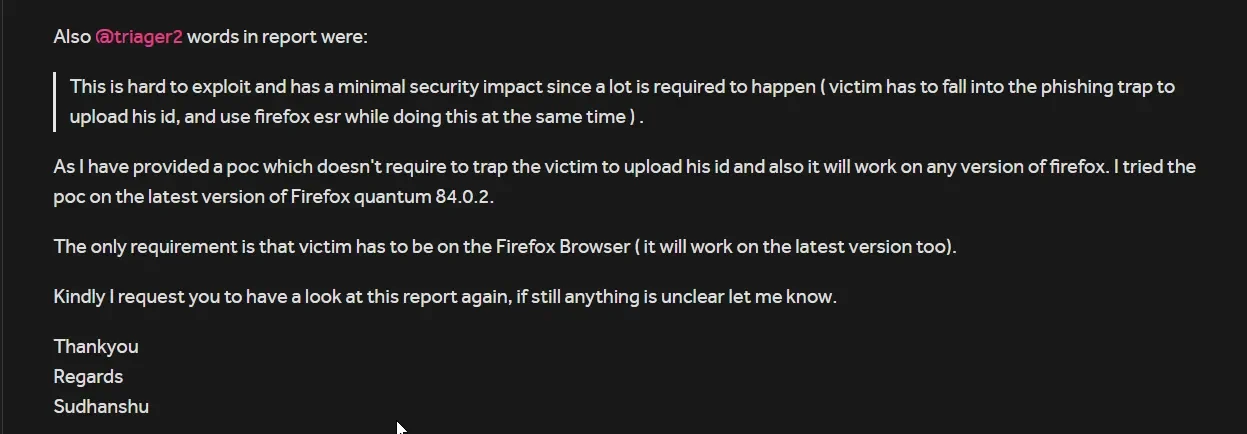
The proof of concept was an HTML file opened in the browser. The researcher's proof of concept was an HTML file opened locally, using the fetch method first and later a Form inside an iframe with a data protocol. The final proof of concept worked in the latest version of Firefox; at that time Firefox 84.0.2 was the latest version.
Finding it
The request a user makes when uploading a verification document looked like this:
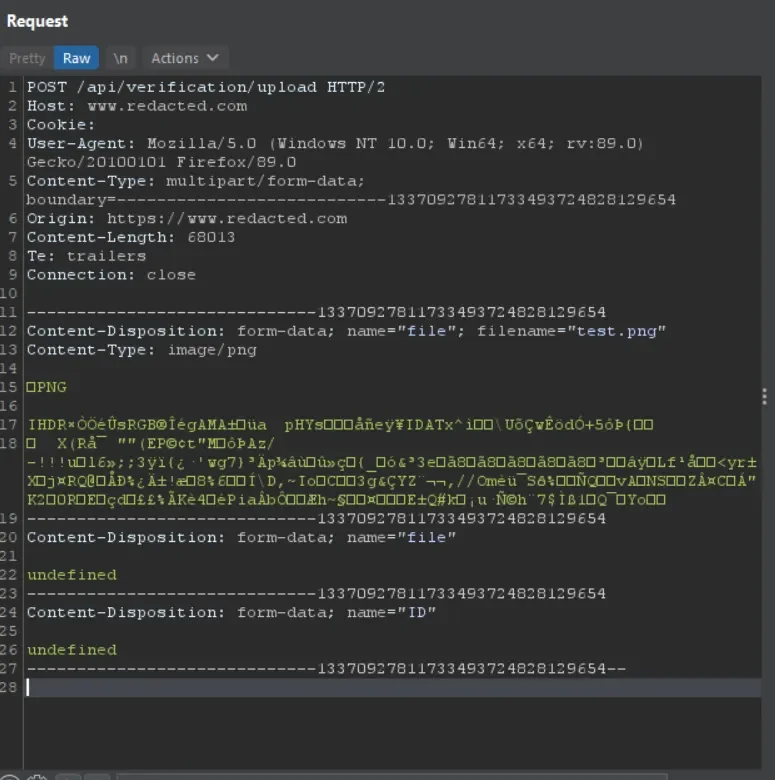
There is no csrf token in the request, which suggested it might be vulnerable to CSRF. The request does carry an Origin header set to https://www.redacted.com, and that header turned out to be the first obstacle.
Exploitation
Step 1: a plain fetch proof of concept
The researcher quickly built a CSRF proof of concept using the fetch method. Opening the HTML file in the browser produced a 403 forbidden response.
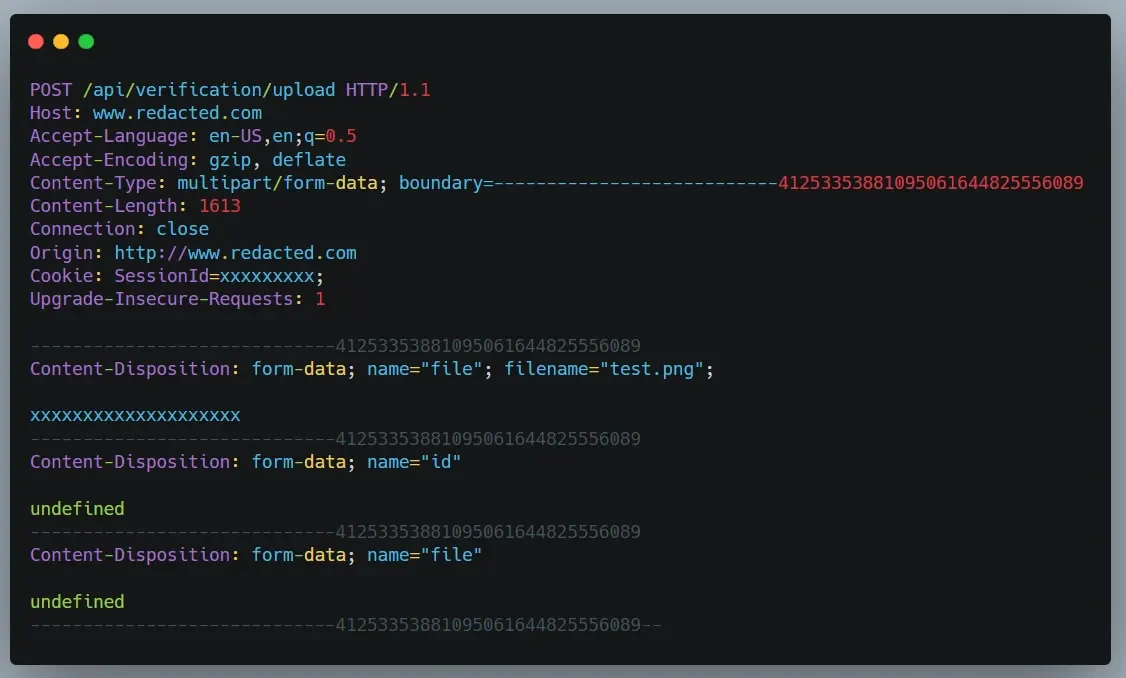
The cause was the Origin check. If the proof of concept is hosted on https://www.attacker.com/csrf.html, the browser sends Origin: https://www.attacker.com on the fetch request. That value does not match https://www.redacted.com, the Origin check fails, and the server returns 403 forbidden.
Step 2: trying to fool the Origin check
The researcher tried variations in the Origin header such as redacted.commxyz, redacted.com.xyz and xyz.redacted.com. None of them worked. The idea behind these attempts is a common regex mistake, for example a developer forgetting to escape the dot character, which would let such lookalike values through.
Step 3: removing the Origin header
The Origin header was then removed from the request entirely and the request was forwarded. It worked: 200 ok response, and the file was successfully uploaded.
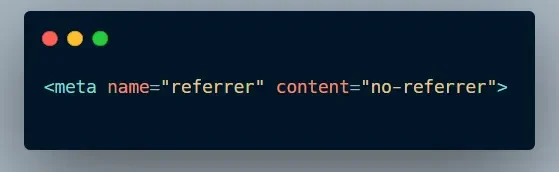
When there is no Origin header in the request, the application does not validate it. This is similar to the situation where a Referer check is in place and you use a meta tag with the content attribute set to no-referrer.
Step 4: sending a request without an Origin header from a browser
The researcher searched for a way to make a request from a browser without the Origin header being sent, and found a tweet describing one. Following it worked: the request was sent without the Origin header. It only worked when the Form method was used inside an iframe with a data protocol. With fetch and other similar methods the Origin header is always sent.
Step 5: the filename problem
With the Origin header problem solved, a second problem remained. Being restricted to the Form method means the CSRF proof of concept cannot be interaction-less.
Looking again at the vulnerable request, line 12 contains a filename parameter followed by the image data. Those parts cannot be included by the attacker in the CSRF proof of concept, because they are only included when a file upload input is used. The researcher points to a writeup on aetherlab.net, "Here it is, the file upload CSRF", for more information.
The proof of concept at this stage looked like this:
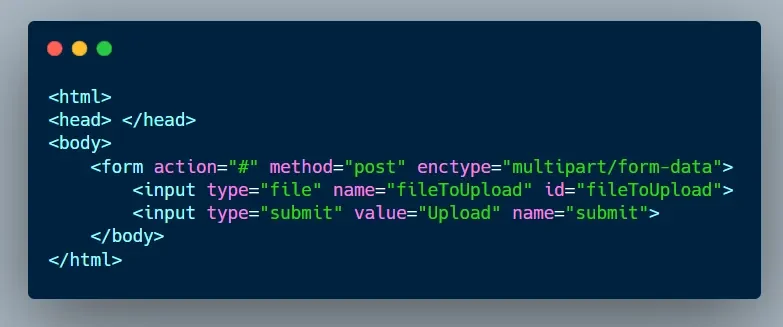
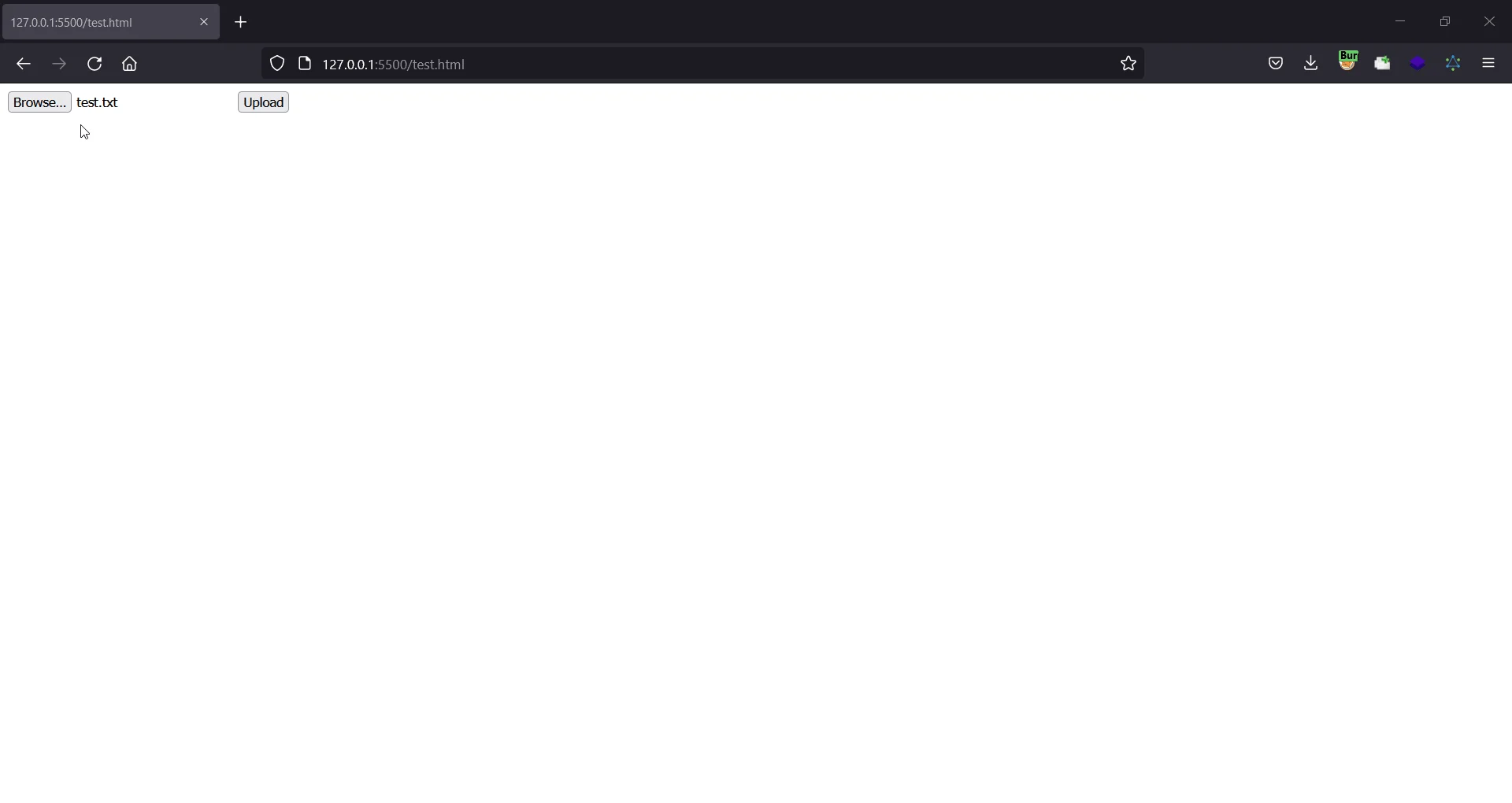
As the gif shows, exploiting this CSRF vulnerability this way means telling the victim to click the upload button and then choose a file from their own system. That user interaction makes the attack unrealistic: the victim has to upload a file because the attacker told them to.
Step 6: borrowing a multipart parsing trick
At this point the researcher remembered a video by Liveoverflow about bugs found in Google Cloud Platform during the $100k Hacking Prize competition, and a blog post by @obmihail about a file uploading CSRF in Google Cloud Shell Editor. Besides the CSRF details, that post describes a bug in multipart requests parsing which allowed the researcher to upload any file with his own content, something that is not possible with the HTML form.
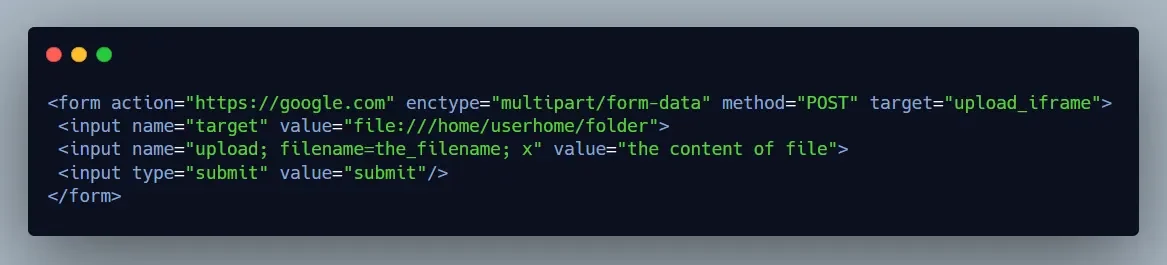
Upon submitting that form, the request body sent is:
-----------------------------[redacted]-Disposition: form-data; name="target"file:///home/userhome/folder-----------------------------[redacted]-Disposition: form-data; name="upload; filename=the_filename; x"the content of file-----------------------------37419614939920406503637463242--
With this multipart parsing bug the researcher had full control over the file contents, which removed the need for the victim to choose a file. The CSRF attack could now be performed without any user interaction.
Step 7: the final proof of concept
The final CSRF proof of concept is here:
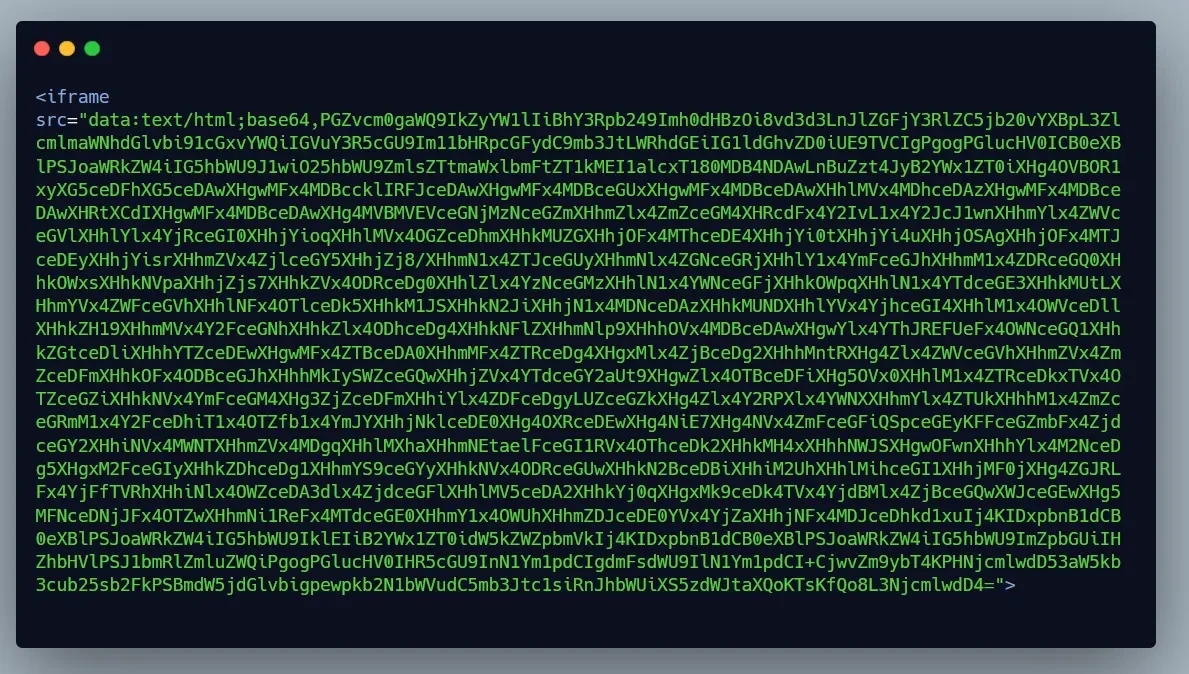
The base64 decoded part is the key. Focusing on the name attribute:
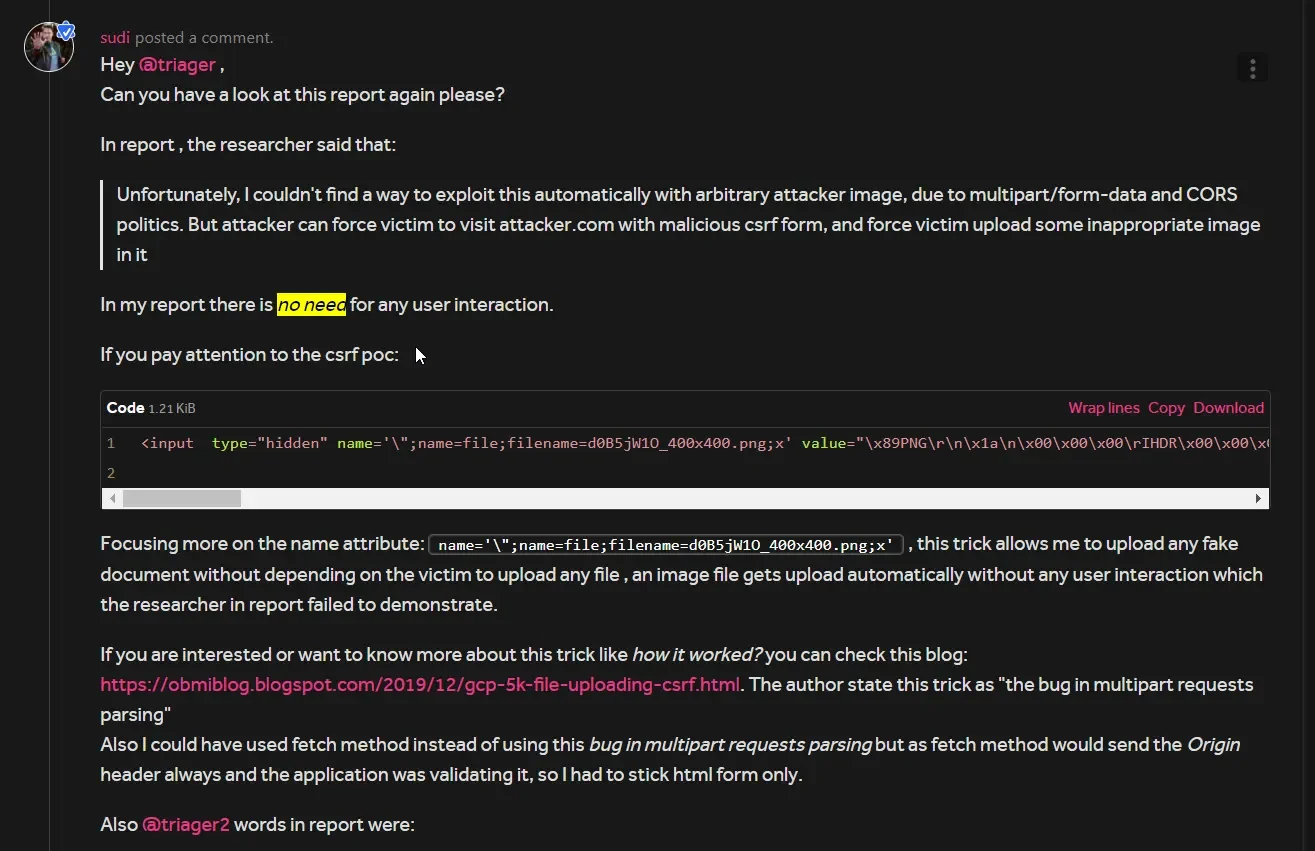
name='\";name=file;filename=d0B5jW1O_400x400.png;x'
This trick allows uploading any fake document without depending on the victim to upload a file: an image file gets uploaded automatically, with no user interaction.
Root cause
The upload endpoint had no CSRF token, and its only protection was an Origin check. That check was not applied when the Origin header was absent, so a request without the header was accepted. The browser-side trick of submitting a Form inside an iframe with a data protocol produced exactly such a request, while fetch and similar methods always attach Origin.
The remaining barrier was the multipart body: a normal HTML form cannot set the filename and file content itself. The multipart parsing behaviour described in the referenced blog let the attacker control the file contents through the crafted name attribute, so the upload no longer depended on the victim picking a file. The report does not describe the server-side code, so the exact parsing flaw is only implied by the referenced research.
Impact
An attacker could submit fake verification documents on behalf of a user. Because verification documents can only be submitted once, the victim's account would not get verified and the victim would have to create a new account.
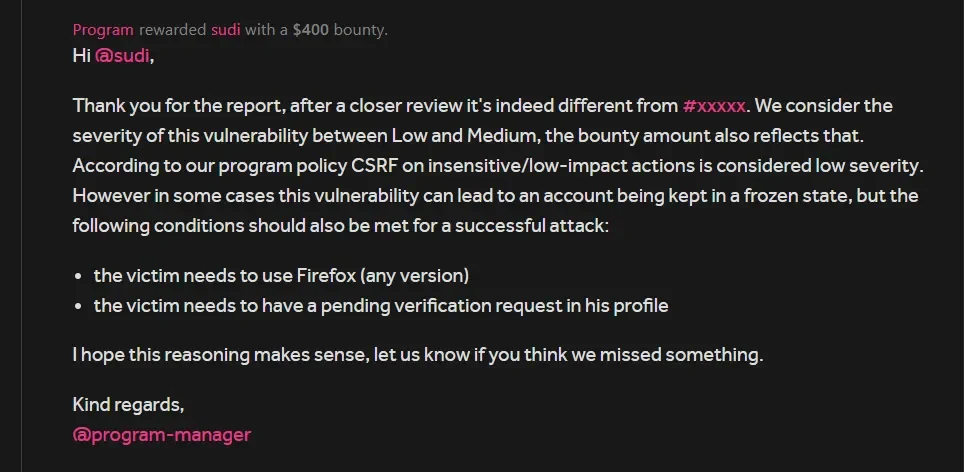
The attack surface was limited to Firefox users and to newly created accounts that had not yet submitted any verification documents. For those reasons the severity was lowered to Medium.
Fix
The report does not say what was changed.
Variants to test
- Remove the Origin header from a state-changing request and forward it. A positive result is a normal success response where the same request with a foreign Origin is rejected.
- Try lookalike Origin values such as
redacted.commxyz,redacted.com.xyzandxyz.redacted.com. A positive result is acceptance of any value that is not exactly the legitimate origin, which points to a regex that does not escape the dot. - Submit a Form inside an iframe with a data protocol and check whether the request arrives without Origin. A positive result is a state-changing request that the server accepts.
- Craft a multipart body whose part name carries
filenameand content, following the pattern above. A positive result is a stored file whose contents the attacker chose, with no file selection by the victim. - Target single-submission features such as identity verification. A positive result is a forged submission that consumes the one allowed attempt and blocks the legitimate one.
Timeline note
The report was submitted after the researcher verified that the final proof of concept worked, and it was marked as duplicate. The researcher was invited to that report and found that someone had already reported the issue, but without a CSRF proof of concept that avoided user interaction. To get past the Origin validation, that earlier report demonstrated a proof of concept that only works in a very low version of Mozilla Firefox and required the victim to upload a document. It was closed as Informative because it required too much user interaction.
The researcher's proof of concept required no user interaction and worked in the latest version of Firefox, and the researcher explained to the triager how the report differed from the original one.
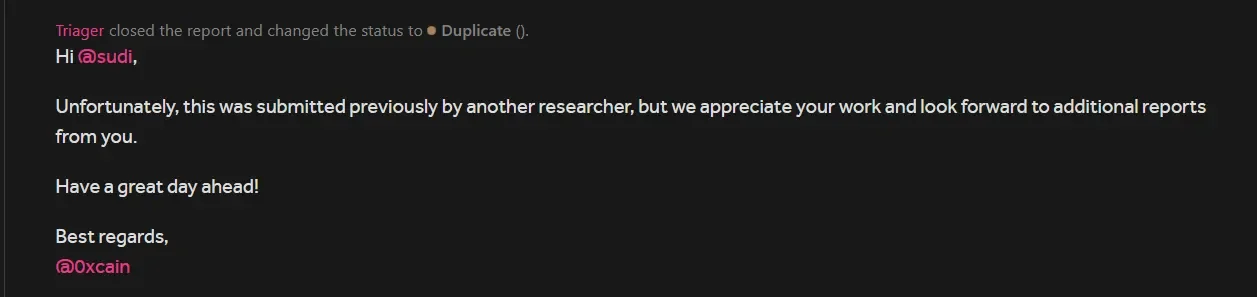
The triager forwarded the report details to the team. The team acknowledged the issue, found that it was indeed different from the duplicate report, and the report was triaged and rewarded as a Medium severity bug.
What happened, in plain words
A security researcher found a way to make a website accept a fake identity document on behalf of another user, without that user doing anything at all. The site was a bidding site, where people had to prove who they were by uploading a document such as a driving licence or a passport before they could take part in bidding. The upload form had no secret anti-forgery code in it, so the researcher suspected it could be tricked into accepting an upload that the user never intended to make. Getting there took several attempts, because the site had a second line of defence and because browsers make it hard to fake a file upload. In the end the researcher found a way to upload a file of their own choosing, with no clicks from the victim, and reported it. The researcher's report was marked as a duplicate of an earlier one, but the earlier report needed the victim to pick a file and only worked in an old browser. The researcher explained the difference, the team agreed, and the bug was rewarded as Medium severity.
A few words before we start, because they come up constantly.
- A server is the computer that runs a website. Your browser asks it for pages and sends it data.
- A request is one message your browser sends to the server, for example "here is my document, please store it". A response is the server's reply, for example "stored" or "forbidden".
- An endpoint is one specific address on the server that does one specific job, like a counter at an office. The upload endpoint is the counter where documents are handed in.
- A header is a small labelled line attached to a request or response, carrying extra information. Think of the label on a parcel: the parcel is the body, the label says where it came from and what is inside.
- A cookie is a small piece of data the server asks your browser to keep and send back with every later request, so the server can recognise you. It is like the wristband you get at an event: you show it at the door and you are let in without explaining who you are again.
- A token is a random secret value that a page includes so the server can check that the request really came from that page and not from somewhere else. A CSRF token is exactly that, used to stop the attack described below.
The target and the feature
The site was part of a HackerOne program. HackerOne is a platform where companies invite researchers to test their systems and report problems. The researcher asked the company for permission to write publicly about the finding but got no response, so the site is called redacted.com throughout.
The feature at the centre of it is identity verification. To reach the bidding section, a user has to upload a verification document, for example a driving licence or a passport. The upload endpoint accepts a document only once. After that the document cannot be changed, and staff check it by hand. Keep that single-submission rule in mind: it is what turns a forged upload into real damage, because the one allowed attempt is used up by the attacker's file and the real user is left with no way to verify.
The vulnerability class: CSRF
CSRF stands for Cross-Site Request Forgery. The idea is simple. When you are logged in to a site, your browser automatically attaches your cookie to every request it sends to that site. The server sees a valid cookie and treats the request as yours. CSRF abuses that trust: an attacker gets your browser to send a request to the site, and the site cannot tell that you never meant to send it.
An everyday comparison: imagine a bank counter where the clerk knows you by sight and never asks for a signature. If someone hands the clerk a withdrawal slip while you are standing there, the clerk processes it as if you had asked. The clerk is not careless about identity, they simply have no way to tell your request from a forged one. A CSRF token is the signature: a value the attacker cannot guess and cannot read from another site, so a forged slip is rejected.
Finding it
The request a user makes when uploading a verification document looked like this:
What to look at in that request:
- The request goes to the upload endpoint of redacted.com, the counter where documents are handed in.
- The body is in multipart/form-data format. That is the format browsers use when a form contains a file. The body is split into parts, each part has a small header block saying what the part is called, and then the part's content follows.
- One part carries the file. Its header includes a
filenamevalue, the name of the file on the user's computer, and the part's content is the file's bytes. - There is no
csrf tokenanywhere in the request. That is the signal: nothing in the request proves it was generated by the site's own page rather than by a page on another site. - The request does carry an
Originheader set tohttps://www.redacted.com. We will come back to this header, because it turned out to be the first obstacle.
So the suspicion was CSRF. The next job was to prove it, which means writing a proof of concept, usually shortened to PoC: a small piece of code or a small page that demonstrates the attack actually works, without doing harm.
Exploitation
Step 1: a plain fetch proof of concept
A proof of concept for CSRF is normally an HTML page. The attacker hosts it somewhere, or sends it to the victim, and when the victim's browser opens it, the page quietly sends the forged request to the target site. The researcher built one using the fetch method. fetch is a built-in browser function that JavaScript uses to send requests to a server from a page.
Opening that HTML file in the browser produced a 403 forbidden response.
403 is the server's way of saying "I understood your request and I refuse it". The cause was the Origin check. The Origin header is added by the browser itself, not by the page, and it says which site the request is coming from. If the proof of concept is hosted on https://www.attacker.com/csrf.html, the browser sends Origin: https://www.attacker.com on the fetch request. That value does not match https://www.redacted.com, the check fails, and the server answers 403.
Why this matters: the Origin header is one of the few things a page cannot lie about, because the browser fills it in. That is exactly why sites use it as a defence.
Step 2: trying to fool the Origin check
The researcher tried variations in the Origin header such as redacted.commxyz, redacted.com.xyz and xyz.redacted.com. None of them worked.
The reasoning behind these attempts is a common programming mistake. A site often checks the Origin with a regular expression, a pattern-matching tool. In a regular expression, a dot normally means "any single character", so a developer who forgets to escape it writes a pattern that also matches redacted.commxyz and similar lookalikes. If that mistake had been present, one of these values would have been accepted. It was not present here, so all three were rejected.
Step 3: removing the Origin header
The Origin header was then removed from the request entirely and the request was forwarded. It worked: 200 ok response, and the file was successfully uploaded.
200 is the server's way of saying "done". So the check was not "the Origin must be correct". It was "if an Origin is present, it must be correct, and if it is absent, carry on". That is a gap: an attacker who can produce a request with no Origin at all walks straight through.
This is similar to the situation where a Referer check is in place and you use a meta tag with the content attribute set to no-referrer. The Referer header is another browser-supplied header, saying which page linked to the one being requested. A page can suppress it with that meta tag, and a server that only checks Referer when it is present has the same gap.
Step 4: sending a request without an Origin header from a browser
Removing a header by hand in a tool is easy. The hard part is making a victim's browser do it, because the browser, not the page, decides whether Origin is attached. The researcher searched for a way to make a browser send a request without the Origin header and found a tweet describing one. Following it worked: the request was sent without the Origin header.
It only worked when the Form method was used inside an iframe with a data protocol. Let us unpack that, because it is the heart of the trick.
- A form is the classic HTML way of sending data to a server. You fill in fields, press submit, and the browser builds the request. A form can include a file picker.
- An iframe is a page inside a page, a small window embedded in the main one.
- A data protocol (a URL starting with
data:) is a way of putting a whole page's content directly into a URL instead of loading it from a server. The browser treats it as a page with no website behind it.
When a form inside such an iframe submits, the browser has no real site to name as the origin, so it sends no Origin header. With fetch and other similar methods the Origin header is always sent, which is why the earlier attempt failed and this one succeeded.
Step 5: the filename problem
With the Origin header problem solved, a second problem remained. Being restricted to the Form method means the CSRF proof of concept cannot be interaction-less. A form with a file input needs a human: the browser will not let a page choose a file from the user's disk on its own, for obvious privacy reasons.
Looking again at the vulnerable request, line 12 contains a filename parameter followed by the image data. Those parts cannot be included by the attacker in the CSRF proof of concept, because they are only included when a file upload input is used. In other words, the attacker can make the browser send the request, but cannot make it carry a file of the attacker's choosing. The researcher points to a writeup on aetherlab.net, "Here it is, the file upload CSRF", for more information.
The proof of concept at this stage looked like this:
As the gif shows, exploiting this CSRF vulnerability this way means telling the victim to click the upload button and then choose a file from their own system. That user interaction makes the attack unrealistic: the victim has to upload a file because the attacker told them to. A victim who is asked to pick a file and press upload will usually stop and wonder why. An attack that depends on that is not much of an attack.
Step 6: borrowing a multipart parsing trick
At this point the researcher remembered a video by Liveoverflow about bugs found in Google Cloud Platform during the $100k Hacking Prize competition, and a blog post by @obmihail about a file uploading CSRF in Google Cloud Shell Editor. Besides the CSRF details, that post describes a bug in multipart requests parsing which allowed the researcher to upload any file with his own content, something that is not possible with the HTML form.
Parsing means reading a structured piece of text and working out what it means. A multipart body is structured: it is a series of parts, each introduced by a boundary line and a small header block. If the server's parser and the browser disagree about where one part ends and the next begins, an attacker can smuggle extra structure into a place the server did not expect. That is the trick being borrowed here.
Upon submitting that form, the request body sent is:
-----------------------------[redacted]-Disposition: form-data; name="target"file:///home/userhome/folder-----------------------------[redacted]-Disposition: form-data; name="upload; filename=the_filename; x"the content of file-----------------------------37419614939920406503637463242--
Line by line, in plain words:
-----------------------------37419614939920406503637463242is the boundary, a long random-looking string that marks the start of each part. The browser picks it and tells the server what it is, so the server knows where to split.Content-Disposition: form-data; name="target"says this part is a form field calledtarget, andfile:///home/userhome/folderis its value. This part is a form field called target with the value file:///home/userhome/folder.- The boundary appears again, starting the next part.
Content-Disposition: form-data; name="upload; filename=the_filename; x"is the interesting line. The part's name is supposed to be a simple label. Here the label itself containsfilename=the_filename, so a parser that reads the label loosely can be made to treat the part as a file upload with a filename the attacker chose.the content of fileis the part's content, which the attacker also controls.- The final boundary with
--on the end marks the end of the body.
With this multipart parsing bug the researcher had full control over the file contents, which removed the need for the victim to choose a file. The CSRF attack could now be performed without any user interaction.
Step 7: the final proof of concept
The final CSRF proof of concept is here:
The base64 decoded part is the key. Base64 is a way of writing arbitrary data using only plain letters, digits and a couple of symbols, so it can be pasted into places that only accept text. Decoding it gives back the original bytes. Focusing on the name attribute:
name='\";name=file;filename=d0B5jW1O_400x400.png;x'
What this line does, piece by piece:
name=starts the part's name, the label the server reads first.\"is an escaped double quote. The quote is there to close the label early, so that whatever follows is read as further structure rather than as part of the name.;name=file;filename=d0B5jW1O_400x400.png;xis the smuggled structure. It declares a file part calledfilewith a filename ending in.png, andxcloses it off.
This trick allows uploading any fake document without depending on the victim to upload a file: an image file gets uploaded automatically, with no user interaction.
Root cause
The upload endpoint had no CSRF token, and its only protection was an Origin check. That check was not applied when the Origin header was absent, so a request without the header was accepted. The browser-side trick of submitting a Form inside an iframe with a data protocol produced exactly such a request, while fetch and similar methods always attach Origin.
The remaining barrier was the multipart body: a normal HTML form cannot set the filename and file content itself. The multipart parsing behaviour described in the referenced blog let the attacker control the file contents through the crafted name attribute, so the upload no longer depended on the victim picking a file. The report does not describe the server-side code, so the exact parsing flaw is only implied by the referenced research.
Impact
An attacker could submit fake verification documents on behalf of a user. Because verification documents can only be submitted once, the victim's account would not get verified and the victim would have to create a new account. The harm is that the victim's account would not get verified and the victim would have to create a new account.
The attack surface was limited to Firefox users and to newly created accounts that had not yet submitted any verification documents. For those reasons the severity was lowered to Medium. Severity ratings weigh how much damage is possible and how many people are exposed; here both were limited.
Fix
The report does not say what was changed.
Variants to test
If you want to look for the same pattern on a site you are allowed to test, these are the checks, each with what a positive result looks like:
- Remove the Origin header from a state-changing request and forward it. A positive result is a normal success response where the same request with a foreign Origin is rejected.
- Try lookalike Origin values such as
redacted.commxyz,redacted.com.xyzandxyz.redacted.com. A positive result is acceptance of any value that is not exactly the legitimate origin, which points to a regex that does not escape the dot. - Submit a Form inside an iframe with a data protocol and check whether the request arrives without Origin. A positive result is a state-changing request that the server accepts.
- Craft a multipart body whose part name carries
filenameand content, following the pattern above. A positive result is a stored file whose contents the attacker chose, with no file selection by the victim. - Target single-submission features such as identity verification. A positive result is a forged submission that consumes the one allowed attempt and blocks the legitimate one.
Timeline note
The report was submitted after the researcher verified that the final proof of concept worked, and it was marked as duplicate. A duplicate means the platform already has a report for the same issue, and normally only the first one counts.
The researcher was invited to that report and found that someone had already reported the issue, but without a CSRF proof of concept that avoided user interaction. To get past the Origin validation, that earlier report demonstrated a proof of concept that only works in a very low version of Mozilla Firefox and required the victim to upload a document. It was closed as Informative because it required too much user interaction. Informative means the report was read and judged not to be a security bug worth acting on.
The researcher's proof of concept required no user interaction and worked in the latest version of Firefox, and the researcher explained to the triager how the report differed from the original one. A triager is the person on the platform who reads reports, checks them and decides whether they are valid.
The triager forwarded the report details to the team. The team acknowledged the issue, found that it was indeed different from the duplicate report, and the report was triaged and rewarded as a Medium severity bug.
Glossary
- Base64: a way of writing arbitrary data using only plain letters, digits and a couple of symbols, so it can be pasted where only text is allowed; decoding gives back the original bytes.
- Boundary: the long random-looking string in a multipart body that marks where each part starts and ends.
- Browser: the program you use to view web pages, which also decides which headers are attached to requests.
- Cookie: a small piece of data the server asks the browser to keep and send back with later requests, so the server can recognise the user.
- CSRF (Cross-Site Request Forgery): an attack where another site makes the victim's browser send a request the victim never intended, and the target site treats it as genuine.
- CSRF token: a random secret value included in a page so the server can check a request really came from that page.
- Data protocol: a URL starting with
data:that carries a whole page's content inside the URL instead of loading it from a server. - Duplicate: a report for an issue the platform already has a report for.
- Endpoint: one specific address on a server that performs one specific job.
- Fetch: a built-in browser function that JavaScript uses to send requests to a server from a page.
- Form: the classic HTML way of sending data to a server, including file pickers.
- Header: a small labelled line attached to a request or response carrying extra information.
- Iframe: a page embedded inside another page.
- Informative: a report that was read and judged not to be a security bug worth acting on.
- Multipart/form-data: the body format browsers use when a form contains a file, made of parts separated by a boundary.
- Origin header: a browser-supplied header saying which site a request comes from; a page cannot set it to a lie.
- Parsing: reading structured text and working out what it means.
- Proof of concept (PoC): a small page or piece of code that demonstrates an attack actually works.
- Referer header: a browser-supplied header saying which page linked to the one being requested.
- Regular expression: a pattern-matching tool for text, in which a dot normally means any single character.
- Request: one message a browser sends to a server.
- Response: the server's reply to a request.
- Server: the computer that runs a website and answers requests.
- Severity: a rating of how much damage a bug allows and how many people are exposed.
- Token: a random secret value used to prove that a request or session is genuine.
- Triager: the person on a bug bounty platform who reads, checks and judges reports.
- 200 ok: the server's reply meaning the request succeeded.
- 403 forbidden: the server's reply meaning the request was understood and refused.