Why a 100-Character Password Broke This Login Form: Username Enumeration via Response Timing
The login form returned identical responses but took longer when a valid username was submitted, because password hashing only ran for existing accounts. An attacker could measure response times to enumerate valid usernames, and the IP-based lockout was bypassed by spoofing the X-Forwarded-For header.
 Published on medium.com
Lab three in my Web Security Academy series — where the vulnerability isn’t in what the app says, but in how long it takes to say it
The full write-up lives on its author's site
It belongs to its author, so we link to it rather than copy it. The other two tabs are our own rewrites, checked against it.
Context
This is the third lab in a series on PortSwigger's Web Security Academy, and it targets a login form whose behaviour is deliberately unhelpful to an attacker in the obvious sense: whatever you submit, the application returns the same response text. There is no differing wording and no stray punctuation to compare, which is what the first two labs in the series relied on. The only observable difference between a username that exists and one that does not is how long the server takes to answer.
The lab is titled "Username enumeration via response timing". The researcher identified a valid username from a candidate list, then recovered that account's password, using response times and a way around the application's lockout policy.
Setup
The tooling is Burp Suite, with the Proxy to capture the login request and Intruder to run the attacks. Two payload sources are used: a preset list of candidate usernames (and later a preset list of candidate passwords), and Burp's built-in Numbers payload generator for the spoofed address. No accounts, roles or credentials are described beyond the login form itself.
Two preconditions shape the whole attack:
- The application locks out an IP address entirely after three failed login attempts. Any attack that fires many requests from one address will be blocked partway through.
- The lockout logic can be sidestepped by supplying a different client IP on every request through the
X-Forwarded-Forheader, which the application apparently trusts when deciding what the "real" client IP is.
Finding it
The starting observation is that the login form gives back the exact same response text no matter what is entered. Nothing in the body distinguishes a valid username from an invalid one, so the usual enumeration signals are absent.
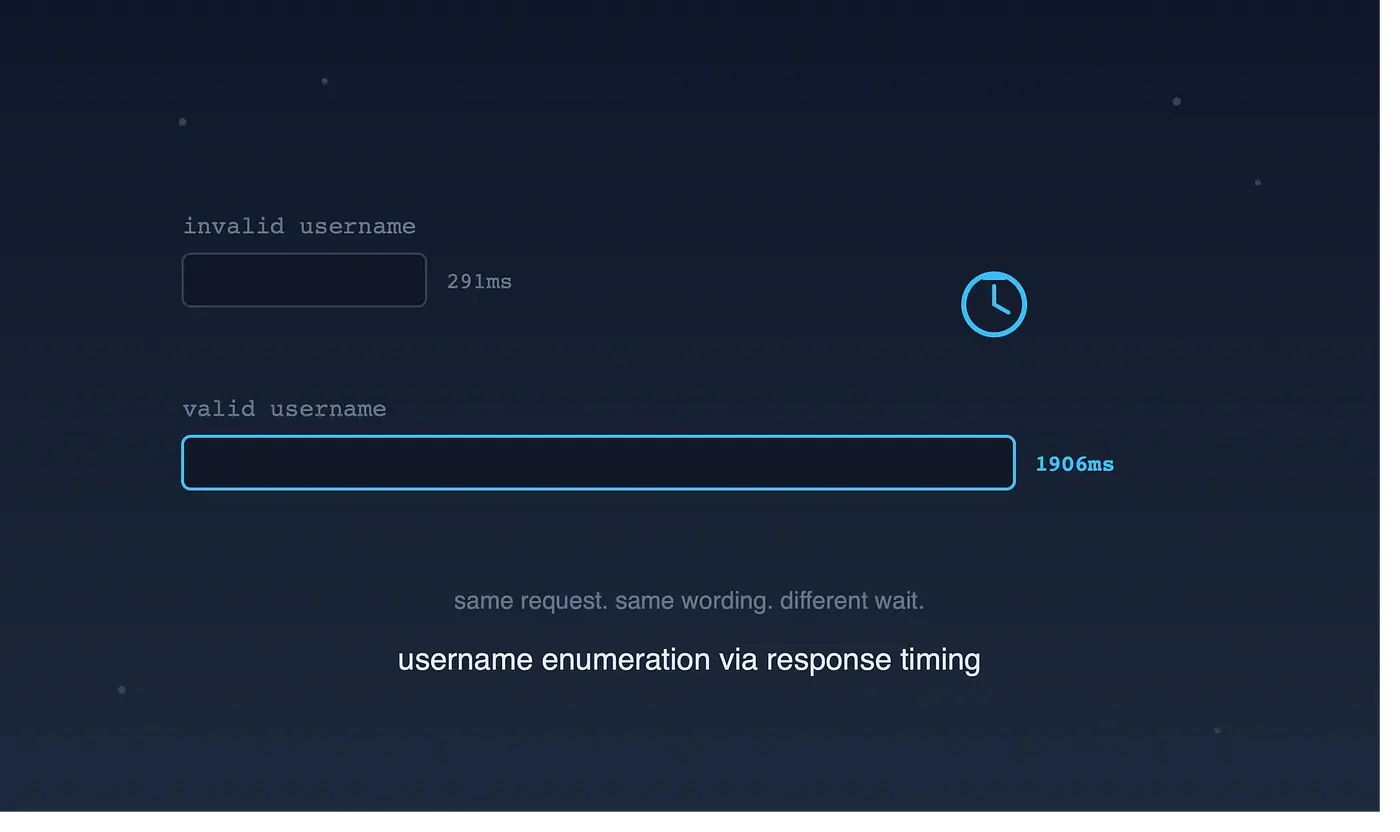
The reason a timing difference exists at all is in how the login handler is built. Many login systems only run the expensive part of password verification, hashing the submitted password and comparing it, if the username actually exists. When the username does not exist, the application can fail fast and skip that work entirely. Password hashing algorithms designed for this purpose, such as bcrypt, are deliberately slow, and the time they take scales with the length of the input being hashed. A valid username therefore triggers the slow hashing step, an invalid one does not, and the gap shows up as a measurable difference in response time.
That gap is small. If it is only a few milliseconds, ordinary network jitter, server load or connection variance can swallow it. Ten requests with a short password may produce response times that overlap so much that no reliable conclusion can be drawn: the signal is real but buried in noise. The researcher tried a short password first and found the response times far too close together.
Exploitation
Step 1: exaggerate the timing signal
The fix for a weak signal is to give the vulnerable code more work to do. A 100-character password makes the hashing step itself take measurably longer for a valid username, because the algorithm has more input to process. That stretches the timing gap wide enough to be obvious when eyeballing a results table, without any statistical analysis. With the 100-character password, the valid username's response time stood out clearly from the rest.
Step 2: plan around the lockout
After three failed login attempts the application locked out the researcher's IP address entirely. Rate limiting by IP is a reasonable control on its own, but it prevents Intruder from firing dozens of requests in a row. The workaround is to spoof a different IP address on every single request with the X-Forwarded-For header. If the lockout logic keys off that header rather than the actual TCP connection, the server never sees the same "IP" twice and never accumulates enough failed attempts from any single one to trigger a lockout.
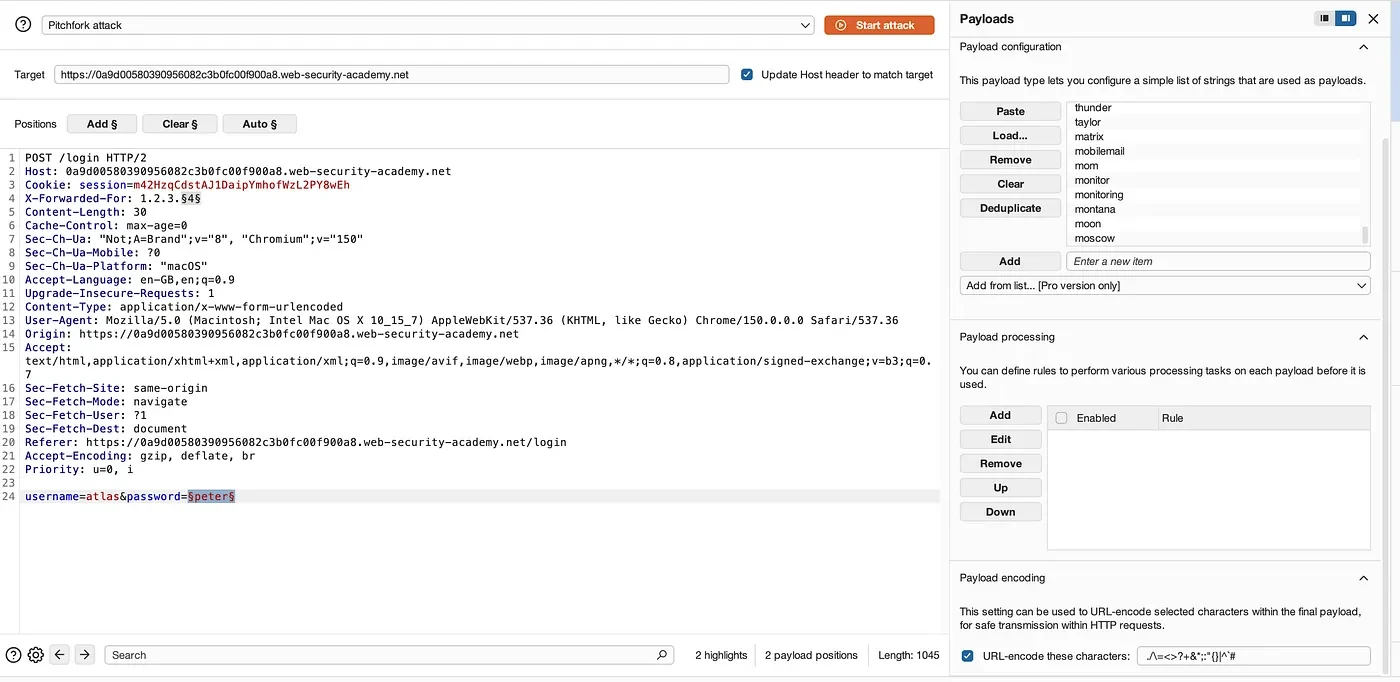
This means every request needs a second marked position alongside the value actually being tested: the X-Forwarded-For header, paired with either the username or the password depending on the phase. The value not being tested in that round, password in phase one and username in phase two, is not marked at all. It stays typed into the request as a plain static value, untouched by Intruder.
Step 3: choose the attack type
Burp Intruder offers four attack types, and the choice matters here:
| Attack type | Payload sets | Behaviour |
|---|---|---|
| Sniper | one | Cycles the set through one position at a time, other positions keep their original value |
| Battering ram | one | Inserts the same payload into every marked position simultaneously |
| Pitchfork | multiple, one per position | Iterates the sets in parallel, first item with first item, second with second |
| Cluster bomb | multiple | Tries every possible combination of the sets |
Cluster bomb was the initial thought, since two positions are marked each round. But it would test every combination of fake IP against every candidate in the other list. Because the IP has to change on every single request just to avoid another lockout, cluster bomb would demand a unique IP for every combination in the grid rather than one per test that matters, and the request count explodes.
Pitchfork is the right choice. The IP changes in lockstep with whichever value is being tested, username first and then password, while the third value stays as a fixed string already typed into the request and never marked as a position. One fresh IP is paired with one candidate value per request, with no wasted combinations.
Step 4: phase one, finding the valid username
- Capture a login request with a placeholder username, and type a 100-character password directly into the password field as a plain, static value. This field is never marked as a position; it stays as-is for every request.
- Add an
X-Forwarded-Forheader to the request. - Send the request to Burp Intruder.
- Mark two positions: the
X-Forwarded-Forvalue and the username field. - Set the attack type to Pitchfork.
- Load the candidate username list as one payload set.
- Set the other payload set, for
X-Forwarded-For, to Burp's built-in Numbers payload generator, applied only to the last octet of the address. The header stays as a fixed base such as1.2.3.with just the final number auto-incrementing on each request, which is enough to make every request look like it came from a distinct IP.
Step 5: read the results
Once the attack has run, sort Burp's results table by the response time column. Scanning down the sorted list, one username's response time sits well clear of the tight cluster the rest occupy. That outlier is the valid username: the only request where the server actually ran the expensive hashing step. The IP rotation meant none of the earlier failed attempts had triggered a lockout before that request was reached.
Step 6: phase two, confirming the password
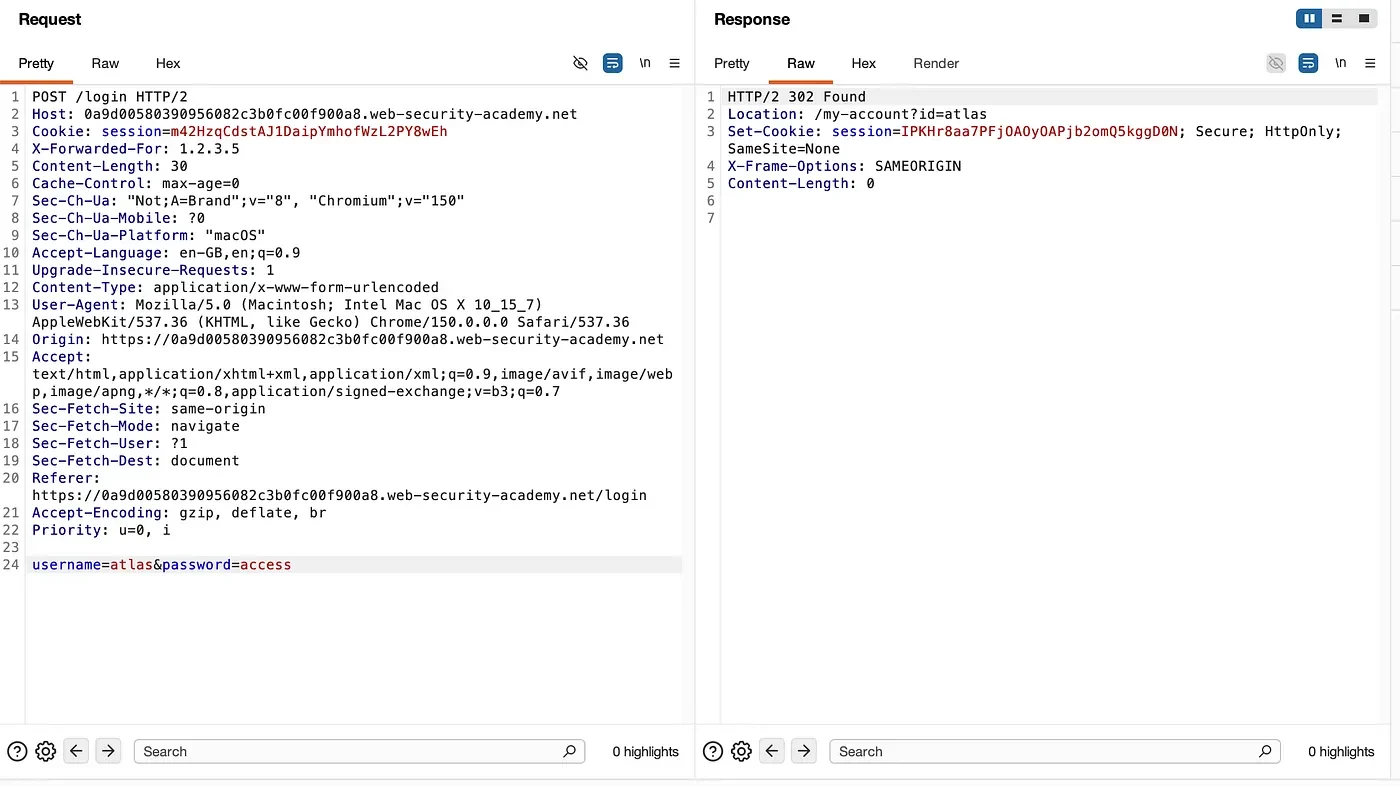
With the username confirmed, a second Pitchfork attack recovers the password. The confirmed username now goes into the request as a static value and is no longer marked as a position. Two positions are marked instead:
- The
X-Forwarded-Forheader, using the same last-octet Numbers payload, still auto-incrementing to dodge the lockout. - The password field, using a preset list of candidate passwords.
The request that returned a redirect to the account page, rather than the standard login error, confirmed the correct password and completed the lab.
Root cause
The application runs the expensive password verification step only when the username exists, and the duration of that step depends on the length of the submitted password. The response body is identical in both cases, so the only leak is the timing difference, which is small enough to be hidden by normal variance unless the input is made long enough to widen it. The lockout policy, the one control that would slow down enumeration, keys off a client-supplied X-Forwarded-For header rather than the real connection, so it can be bypassed by fabricating a fresh address on every request. Trusting that header for a security decision is a separate, common vulnerability in its own right, and here it is what makes an otherwise solid defensive control completely bypassable.
Impact
An attacker with a candidate list can determine which usernames exist on the login form, and then recover the password for a valid account, without any difference in response content to alert on. The attack depends on the timing gap being measurable, which in turn depends on making the password long enough to widen it, and on the lockout being bypassable through a spoofable client IP. Where those conditions hold, a valid username and its password can be recovered.
Fix
The report does not describe any fix. It notes that trusting a client-supplied header like X-Forwarded-For for security decisions is a separate, common vulnerability in its own right.
Variants to test
- Timing-based username enumeration on other login forms. Submit a very long password with each candidate username and sort by response time. A positive result is one username whose response time sits clearly outside the cluster formed by the rest.
- Short versus long test values. Run the same enumeration with a short password and then a long one. A positive result is a signal that is invisible or ambiguous with the short value and obvious with the long one, which confirms the timing gap scales with input length.
- Lockout bypass through
X-Forwarded-For. Send repeated failed logins with an incrementing last octet in the header. A positive result is that the lockout never triggers, while the same requests without the header are blocked after the threshold. - Other client-supplied IP headers. Where
X-Forwarded-Foris not honoured, try the equivalent headers the application or its proxy might trust. A positive result is the same lockout bypass. - Attack type selection. When two positions must vary together, compare Pitchfork against Cluster bomb on request count and coverage. A positive result is Pitchfork producing exactly one request per candidate pair, with no combination explosion.
What happened, in plain words
A website had a login form: a box for a username and a box for a password. When you typed something wrong, the site replied with exactly the same message every time. It never said "that username does not exist" or "wrong password". So there was nothing in the words to tell you whether a username was real.
But the site still gave something away: the time it took to answer. When the username was real, the server did extra work before replying, and that work took longer. When the username was fake, the server skipped the work and answered faster. The difference was tiny, a few milliseconds, and easy to miss. By sending a very long password, the researcher made the extra work take longer, so the difference became easy to see.
There was a second obstacle. After three failed logins the site blocked the researcher's IP address, which is the number that identifies a computer on the internet. The block could be avoided by telling the site, on every request, that the request came from a different address. The site believed that claim. With a fresh fake address each time, the block never triggered.
Using these two tricks, the researcher found a real username, then confirmed its password and completed the lab.
Background: what the lab is and what tools it uses
This is the third lab in a series on PortSwigger's Web Security Academy, a site with practice exercises for people learning web security. Each lab is a small, deliberately vulnerable website you are allowed to attack.
This lab is called "Username enumeration via response timing". Enumeration means working through a list of guesses to find out which ones are real. Here the list is usernames, and the clue is not what the site says but how long it takes to say it.
The tool used is Burp Suite, a program that sits between your browser and a website. Two parts of it matter here:
- Proxy: it records the requests your browser sends and the responses that come back, so you can look at them and change them.
- Intruder: it takes one request and sends it many times, each time swapping in a different value from a list you supply. Think of it as a machine that fills in a form over and over, once per item on a shopping list.
A request is the message your browser sends to a server, for example "here is a username and password, please log me in". A response is the server's reply.
Two lists of guesses are used: a list of candidate usernames, and later a list of candidate passwords. For the fake addresses, Burp's built-in Numbers generator is used, which simply produces 1, 2, 3 and so on.
Two facts that shape the whole attack
- The site blocks an IP address completely after three failed login attempts. An IP address is the number that identifies a device on a network, a bit like a postal address for a computer. Any attack that sends many requests from one address gets cut off partway through.
- The block can be avoided by sending a different client IP on every request in a header called
X-Forwarded-For. A header is an extra line of information attached to a request, like the notes on the outside of an envelope.X-Forwarded-Foris a header meant for proxies, the middle machines that pass traffic along, to record which client the request originally came from. The site apparently trusted this header when deciding what the "real" client IP was.
Why the response time differs at all
Many login systems only do the expensive part of checking a password if the username actually exists. That expensive part is hashing: running the password through a mathematical recipe that turns it into a fixed-looking string, so the site can compare it with the stored one without ever keeping the real password. Hashing is deliberately slow, because slow hashing makes it much harder for an attacker who steals the stored values to guess the originals.
Crucially, the time hashing takes grows with the length of the input. A long password takes longer to hash than a short one.
So: a real username triggers the slow hashing step, a fake one does not, and the gap appears as a difference in response time. A useful everyday comparison is a receptionist who only checks the appointment book when you give a name that sounds familiar. If the name is unknown, they answer "no" instantly. If it is known, they go and look, and you wait.
Why a 100-character password and not 10
This is the difference between the attack working and not working at all.
If the gap between "hashed a password" and "did not hash a password" is only a few milliseconds, ordinary network jitter, server load or connection variance can swallow it. Jitter is the natural variation in how long messages take to travel, the same way a bus is sometimes a minute early and sometimes late. Ten requests with a short password may produce response times that overlap so much that no reliable conclusion can be drawn: the signal is real, but buried in noise.
A much longer password, in this case 100 characters, makes the hashing step take measurably longer for a valid username, because the algorithm has more input to process. That stretches the timing gap wide enough to be obvious even when just eyeballing a results table, rather than something you would need statistical analysis to detect. The researcher tried a short password first and the response times were far too close together to draw any reliable conclusion. Switching to a 100-character password made the valid username's response time stand out clearly from the rest.
The lesson generalises beyond this one lab: when you are trying to detect a timing-based signal, exaggerate the condition that produces it. A subtle timing bug can become an obvious one just by giving the vulnerable code more work to do.
The lockout problem
Before a clean attack across the full username list was possible, there was a wall: after three failed login attempts, the application locked out the researcher's IP address entirely. Rate limiting by IP is a completely reasonable defensive control on its own, standard practice, but it meant dozens of requests from Burp Intruder in a row could not be fired without getting blocked partway through.
The workaround was to spoof a different IP address on every single request, using the X-Forwarded-For header. Many applications trust this header to determine the "real" client IP when they sit behind a proxy or load balancer, and if the lockout logic keys off that header instead of the actual TCP connection, the block can be sidestepped entirely by sending a fresh, fabricated value on every request. The server never sees the same "IP" twice, so it never accumulates enough failed attempts from any single one to trigger a lockout.
That meant this attack needed a second marked position alongside whatever was actually being tested: the X-Forwarded-For header, paired with either the username or the password depending on the phase. The value not being tested that round, password in phase one and username in phase two, did not need to be marked as a position at all. It just stayed typed into the request as a plain, static value, untouched by Intruder.
A quick detour: Burp Intruder's attack types
Burp Intruder offers four attack types, and picking the wrong one either breaks the attack or wastes an enormous number of requests. A position is a spot in the request that Intruder is allowed to change; a payload set is the list of values it puts there.
| Attack type | Payload sets | Behaviour |
|---|---|---|
| Sniper | one | Cycles the set through one position at a time, other positions keep their original value |
| Battering ram | one | Inserts the same payload into every marked position simultaneously |
| Pitchfork | multiple, one per position | Iterates the sets in parallel, first item with first item, second with second |
| Cluster bomb | multiple | Tries every possible combination of the sets |
- Sniper uses a single payload set, cycling through it one position at a time while every other marked position stays at its original value. This is what was used in labs one and two, where only the username needed to vary.
- Battering ram uses a single payload set, but inserts the same payload into every marked position simultaneously. Useful when one value must be repeated in multiple places in a request, like a username appearing in both a header and the body.
- Pitchfork uses multiple payload sets, one per marked position, and iterates through them in parallel: position 1's first item pairs with position 2's first item, position 1's second item pairs with position 2's second item, and so on. The lists move in lockstep, like two people walking side by side, each taking one step per count.
- Cluster bomb uses multiple payload sets, but tries every possible combination of them. If you have 50 usernames and 50 passwords, that is 2,500 requests, not 50.
For this lab, cluster bomb was the initial thought, since two positions are marked each round: the IP and whichever field is being tested. But that would mean testing every combination of fake IP against every candidate in the other list, which explodes fast. With the IP needing to change on every single request just to avoid getting locked out again, a cluster bomb approach would have demanded a unique IP for every combination in the grid, rather than one per actual test that matters.
Pitchfork was the right call. The IP needed to change in lockstep with whichever value was actually being tested, username first and then password, while the third value, whichever one was not being tested that round, simply stayed as a fixed string already typed into the request, never marked as a position at all. Pitchfork's parallel iteration handles the two marked positions together: one fresh IP paired with one candidate value per request, no wasted combinations.
Setting up the attack
With that reasoning settled, the work happens in two phases.
Phase 1: finding the valid username
- Capture a login request with a placeholder username, and type a 100-character password directly into the password field as a plain, static value. This field is never marked as a position; it stays as-is for every request.
- Add an
X-Forwarded-Forheader to the request. - Send the request to Burp Intruder.
- Mark two positions: the
X-Forwarded-Forvalue and the username field. - Set the attack type to Pitchfork.
- Load the candidate username list as one payload set, a straightforward preset list of candidate strings.
- Set the other payload set, for
X-Forwarded-For, to Burp's built-in Numbers payload generator, applied only to the last octet of the address. The header stays as a fixed base such as1.2.3.with just the final number auto-incrementing on each request, which is enough to make every request look like it came from a distinct IP.
An IP address is written as four numbers separated by dots, for example [redacted]. The last of those numbers is called the last octet. Changing only that number is a cheap way to produce a long series of different-looking addresses: [redacted], [redacted], [redacted] and so on.
Reading the results
Once the attack has run, sort Burp's results table by the response time column. Scanning down the sorted list, one username's response time sits well clear of the tight cluster the rest occupy. That outlier is the valid username: the only request where the server actually ran the expensive hashing step. The IP rotation meant none of the earlier failed attempts had triggered a lockout before that request was reached.
Phase 2: confirming the password
With the username confirmed, a second Pitchfork attack recovers the password. The confirmed username now goes into the request as a static value and is no longer marked as a position. Two positions are marked instead:
- The
X-Forwarded-Forheader, using the same last-octet Numbers payload, still auto-incrementing to dodge the lockout. - The password field, using a preset list of candidate passwords.
The request that returned a redirect to the account page, rather than the standard login error, confirmed the correct password and completed the lab. A redirect is the server telling the browser "the page you want is somewhere else, go there instead". On a successful login that is normal behaviour: the site sends you to your account page. On a failed login it sends you back to the form with an error.
Why it works: the root cause
The application runs the expensive password verification step only when the username exists, and the duration of that step depends on the length of the submitted password. The response body is identical in both cases, so the only leak is the timing difference, which is small enough to be hidden by normal variance unless the input is made long enough to widen it.
The lockout policy, the one control that would slow down enumeration, keys off a client-supplied X-Forwarded-For header rather than the real connection, so it can be bypassed by fabricating a fresh address on every request. Trusting that header for a security decision is a separate, common vulnerability in its own right, and here it is what makes an otherwise solid defensive control completely bypassable.
What an attacker could do with this
An attacker with a candidate list can determine which usernames exist on the login form, and then recover the password for a valid account, without any difference in response content to alert on. The attack depends on the timing gap being measurable, which in turn depends on making the password long enough to widen it, and on the lockout being bypassable through a spoofable client IP. Where those conditions hold, a valid username and its password can be recovered.
How to fix it
The report does not describe any fix. It notes that trusting a client-supplied header like X-Forwarded-For for security decisions is a separate, common vulnerability in its own right.
Other places to try the same ideas
- Timing-based username enumeration on other login forms. Submit a very long password with each candidate username and sort by response time. A positive result is one username whose response time sits clearly outside the cluster formed by the rest.
- Short versus long test values. Run the same enumeration with a short password and then a long one. A positive result is a signal that is invisible or ambiguous with the short value and obvious with the long one, which confirms the timing gap scales with input length.
- Lockout bypass through
X-Forwarded-For. Send repeated failed logins with an incrementing last octet in the header. A positive result is that the lockout never triggers, while the same requests without the header are blocked after the threshold. - Other client-supplied IP headers. Where
X-Forwarded-Foris not honoured, try the equivalent headers the application or its proxy might trust. A positive result is the same lockout bypass. - Attack type selection. When two positions must vary together, compare Pitchfork against Cluster bomb on request count and coverage. A positive result is Pitchfork producing exactly one request per candidate pair, with no combination explosion.
Glossary
- Burp Suite: a program used to intercept, inspect and resend the traffic between a browser and a website.
- Proxy (Burp): the part of Burp that sits between browser and site and records every request and response.
- Intruder (Burp): the part of Burp that resends one request many times, substituting values from lists.
- Request: the message a browser sends to a server, such as a login form submission.
- Response: the server's reply to a request.
- Header: an extra line of information attached to a request or response, such as the client's claimed address.
X-Forwarded-For: a header meant for proxies to record the original client IP; it can be set to anything by the sender.- IP address: the number identifying a device on a network, like a postal address for a computer.
- Last octet: the final number in a four-part IP address, for example the 4 in
[redacted]. - Spoofing: claiming to be something you are not, here a different IP address.
- Rate limiting: restricting how many requests a client may make in a period.
- Lockout: blocking an account or address after too many failed attempts.
- Username enumeration: working through a list of guesses to discover which usernames exist.
- Timing attack: learning information from how long a system takes to respond rather than from what it says.
- Hashing: running input through a one-way mathematical recipe to produce a fixed-length value, used to store passwords without keeping the originals.
- bcrypt: a deliberately slow hashing algorithm designed for passwords.
- Jitter: natural variation in how long network messages take to arrive.
- Payload: one value from a list that gets inserted into a marked position.
- Payload set: the list of values Intruder works through.
- Position: a spot in a request that Intruder is allowed to change.
- Sniper: an Intruder attack type that varies one position at a time using one list.
- Battering ram: an Intruder attack type that puts the same value into every marked position at once.
- Pitchfork: an Intruder attack type that advances several lists in parallel, one item from each per request.
- Cluster bomb: an Intruder attack type that tries every combination of several lists.
- Numbers payload generator: a Burp feature that produces 1, 2, 3 and so on as payloads.
- Redirect: a server instruction telling the browser to go to a different page instead.
- Root cause: the underlying design or coding flaw that makes a vulnerability possible.
- Vulnerability: a weakness in a system that an attacker can use to do something the owner did not intend.



