XSS Filter Evasion + IDOR
The endpoint for creating and editing customers was vulnerable to an IDOR, allowing any authenticated user to view and edit other merchants' customer details by changing the customer ID in the URL. The same endpoint also had a stored XSS vulnerability because the filter removed HTML tags but not event handlers, so an attacker could inject JavaScript that executed when a victim visited a crafted link.
 Published on systemweakness.com
Bug Bounty
The full write-up lives on its author's site
It belongs to its author, so we link to it rather than copy it. The other two tabs are our own rewrites, checked against it.
Context
The target is a site that offers an online payment integration system. Merchants use it to manage customers and issue invoices to them. The researcher, JM Sanchez (0xEchidonut), had already reported several XSS and CSRF issues on the same site, all of which were closed as duplicates. This write-up covers the one that was accepted: a stored XSS chained with an IDOR in the customer management feature.
Setup
The report does not describe the tooling, the number of accounts or any software versions. What it does establish is the precondition for the whole chain: the researcher had access to more than one merchant account, because the IDOR was confirmed by opening the same URL in a second account. The customer editing feature is reachable through a URL of the form:
/MerchantUser/create_customer/CUS-123456–A1B2C3
The last path segment is the customer identifier: the literal prefix CUS- followed by a 12 character alphanumeric value.
Finding it
While testing the site's functionality the researcher came across the URL above and tested it straight away. The endpoint was vulnerable to IDOR: pasting the same link into another account let the researcher view and edit that customer's details without authorisation.
The obstacle to turning the IDOR into something more serious was enumeration. A 12 character alphanumeric permutation is not impossible to brute force, but the researcher judged it unrealistic, and quoted cracking time estimates to make the point: a seven character password can fall in a fraction of a millisecond, eight characters take about five hours, nine take five days, ten take four months, eleven take ten years, and twelve characters represent roughly 200 years of security. On that basis, enumerating every valid CustomerID would take approximately 200 years.
The researcher therefore held the finding and looked for a way to chain it. The next attempt was to find an information disclosure bug that would enumerate CustomerIDs. Nothing was found. Before giving up, the endpoint was tested once more for XSS.
Exploitation
Step 1: establish that tags are stripped
Earlier testing had skipped XSS on this endpoint because the filter automatically removes HTML tags. The researcher's assessment is that it likely uses the strip_tags function in PHP. The reasoning that unlocked the bug: if tags cannot be used, then do not use tags.
Step 2: break out of the input attribute
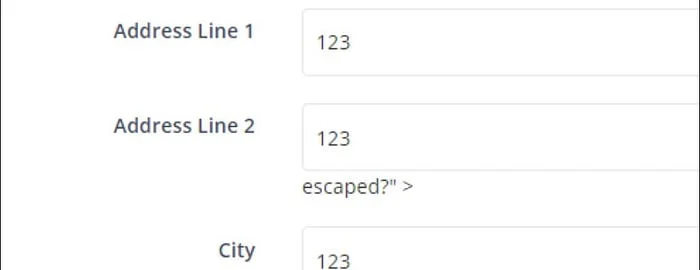
When the customer's information is saved, it is stored in the value attribute of an <input> element. The researcher tried to escape the attribute with:
"> escaped?
This succeeded. The stored markup is now parsed as:
<input name="…" class="…" value="">escaped? ">
The "> closes the value attribute and the <input> tag, so everything after it is treated as markup outside the element rather than as attribute content.
Step 3: get an event handler past the filter
The obvious next move is to attach a JavaScript event handler and inject commands. But a second filter removes every event handler it can recognise. The researcher's idea was to combine the HTML tag with the event handler so that the filter sees only a tag. The payload used was:
" onmo<x>useover="alert(document['cookie'])">
The filter does not see the onmouseover event handler, only the HTML tag. After saving, the value is stored as:
" onmouseover="alert(document['cookie'])">
Hovering the cursor over the element executed the JavaScript.
Step 4: remove the need for interaction
Still not satisfied, the researcher entered a payload that does not require user interaction:
" onf<x>ocus="alert(document['cookie'])" autofocus">
Step 5: chain the XSS with the IDOR
The stored XSS lives in the same endpoint that is vulnerable to IDOR. Since other users' CustomerIDs cannot be guessed, the IDOR is used to target them with the XSS. By creating a customer whose information contains the XSS payload, the researcher can copy the link and send it to the target. Once the target opens the link, arbitrary JavaScript runs in their browser. The researcher notes this can be escalated to account takeovers and the theft of private information.
Root cause
The customer details are stored in the value attribute of an <input> element, and a "> sequence broke out of the attribute and the element. Two filters were in place. The event handler filter was bypassed by splitting the handler name with a tag:
- A tag filter, likely PHP's
strip_tags, removes HTML tags. The payloads do not rely on a tag surviving; the breakout is done with attribute syntax. - An event handler filter removes every event handler it can recognise. Because the handler name is broken by
<x>, the filter does not match it, while the browser reconstructsonmouseover(oronfocus) when it parses the markup.
The second payload does not require user interaction.
Impact
An attacker who can create a customer with the payload as its information can send the resulting link to a target. When the target opens it, arbitrary JavaScript executes in their browser. The researcher states this can be escalated to account takeovers and the theft of private information. The IDOR is what makes targeting practical: without it, reaching a specific victim would require guessing a 12 character alphanumeric CustomerID, which the researcher estimates at roughly 200 years of enumeration. The report does not describe the victim's role or the exact data exposed.
Fix
The defences that failed were the tag filter and the event handler filter, both of which operate on keywords rather than on the context where the data is written.
Variants to test
-
Split event handler names with a tag, as here:
onmo<x>useover,onf<x>ocus. A positive result is the handler firing after the browser parses the stored value. -
Break out of an attribute with
">and check whether the following text is parsed as markup rather than attribute content. A positive result is a new element or handler appearing outside the original<input>. -
Use
autofocuswith an event handler to remove the interaction requirement. A positive result is execution on page load with no cursor or keyboard input. -
Test the same customer URL from a second account for IDOR, both to read and to edit. A positive result is another merchant's customer details being returned or modified.
-
Look for information disclosure that enumerates identifiers, which would make the IDOR exploitable without the XSS chain. A positive result is a listing or API response containing other customers' IDs.
What happened, in plain words
A security researcher found two separate weaknesses in the same feature of a payment website, and then joined them together so that each one made the other more dangerous.
The website lets businesses (called merchants) keep a list of their customers and send those customers invoices. Each customer has its own web address, and that address ends with a long code that identifies the customer. The first weakness was that anyone logged in could open another merchant's customer address and see or change that customer's details, even though they had no permission to do so. This kind of flaw is called an IDOR, short for Insecure Direct Object Reference: the site hands you a direct reference to a thing (here, a customer) and does not check whether you are allowed to touch it.
The second weakness was that the customer's details were shown back on a web page, and the site's filters could be bypassed. If you typed special characters into a customer's information, those characters could break out of the place where the text was supposed to sit and turn into instructions that the browser would run. That is called cross-site scripting, or XSS. The site had two filters meant to stop this, and the researcher got past both of them.
On its own, the IDOR was hard to use against a chosen victim, because you would have to guess that long customer code. On its own, the XSS needed a victim to open a page. Together, the researcher could create a customer whose details contained the XSS trick, copy that customer's link, and send it to a target. When the target opened the link, code written by the researcher ran in the target's browser. The researcher says this could be pushed further to take over accounts and steal private information.
The report was sent on 1 December 2021, accepted for review on 11 January 2022, and paid 800 US dollars.
The site and the feature
Before the details, a few words about what the site is. It offers an online payment integration system. In everyday terms, think of it as a service a shop signs up to so that it can keep a record of the people who owe it money and send them bills. The shop is the merchant. The people it bills are the customers. The merchant logs in to a dashboard and manages customers and invoices there.
A web page like this is not a single fixed document. When you click something, your browser sends a request to the site's server, and the server sends back data or a new page. The address you see in the browser bar is the URL. The part of the URL after the site name is the path, and it often contains identifiers, which are codes that tell the server which record you mean. A server endpoint is simply a particular address on the server that accepts a particular kind of request.
A cookie is a small piece of text that a website asks your browser to store and to send back with every request to that site. Sites commonly use a cookie to remember that you are logged in, so that you do not have to type your password on every page. Because of that, a cookie is a valuable secret: anyone who can read your cookie for a site may be able to act as you on that site.
Background: duplicates and the one that counted
The researcher, JM Sanchez (0xEchidonut), describes himself as a student and a bug bounty hunter. Bug bounty programmes pay people for reporting security flaws responsibly instead of exploiting them. He had already reported many XSS and CSRF issues on this same site. CSRF, cross-site request forgery, is a different trick where another website causes your browser to send a request you did not intend. All of those earlier reports were closed as duplicates, meaning someone else had reported the same thing first, so they earned nothing. This write-up is about the one report that was accepted.
Setup
The report does not describe which tools were used, how many accounts existed, or any software versions. What it does make clear is the starting condition for the whole chain: the researcher had access to more than one merchant account. That matters because the IDOR was confirmed by opening the same link in a second account. Without a second account, you cannot show that one merchant can reach another merchant's data.
The customer editing feature is reached through a URL of this shape:
/MerchantUser/create_customer/CUS-123456–A1B2C3
Line by line: the leading slash means this path starts at the site's root. MerchantUser is the part of the site that deals with merchant users. create_customer is the action, here creating or editing a customer. The final segment, CUS-123456–A1B2C3, is the customer identifier. It is made of the literal prefix CUS- followed by a 12 character alphanumeric value, meaning letters and digits mixed together. The identifier is the direct reference in Insecure Direct Object Reference: it names exactly one customer, and the question the site should ask is whether the person making the request is allowed to name that customer.
Finding it
While testing the site's features, the researcher came across the URL above and tested it straight away. The endpoint was vulnerable to IDOR. Pasting the same link into another account let him view and edit that customer's details without authorisation. In plain terms: the site checked that you were logged in, but not that the customer belonged to you.
The problem with turning this into something more serious was enumeration, which means trying every possible value of the identifier until you find real ones. A 12 character alphanumeric value is not impossible to brute force, meaning to try guesses one after another until one works, but the researcher judged it unrealistic. To make the point he quoted estimates of how long it takes to crack passwords of different lengths: a seven character password can fall in a fraction of a millisecond, eight characters take about five hours, nine take five days, ten take four months, eleven take ten years, and twelve characters represent roughly 200 years of security. On that basis, trying every valid CustomerID would take approximately 200 years.
So the researcher held the finding and looked for a way to chain it, meaning to combine it with a second flaw so that the pair does more damage than either alone. The next attempt was to find an information disclosure bug, a flaw that leaks data the site did not mean to show, which would list CustomerIDs for him. He found nothing. Before giving up, he tested the endpoint once more for XSS.
Exploitation
Step 1: work out that tags are stripped
Earlier testing had skipped XSS on this endpoint because a filter automatically removes HTML tags. HTML is the language web pages are written in, and a tag is a piece of markup in angle brackets, such as <input>, that tells the browser to create something. The researcher's assessment is that the filter likely uses the strip_tags function in PHP, a common programming language for websites; that function removes tags from text. The reasoning that unlocked the bug was simple: if tags cannot be used, then do not use tags. Instead of trying to sneak a tag past the filter, he looked for a way to abuse the markup that was already on the page.
Step 2: break out of the input attribute
When a customer's information is saved, it is stored in the value attribute of an <input> element. An attribute is a named setting inside a tag, written as name="value", and the quotation marks mark where the value starts and ends. An <input> element is the box on a form where you type. The site was placing the customer's text inside those quotation marks, so the browser would treat it as plain text to display in the box.
The researcher tried to escape the attribute, meaning to close the quotation marks early so that the rest of his text would be treated as markup rather than as text inside the box. He used:
"> escaped?
Line by line: the double quote closes the value attribute that the site opened. The > closes the <input> tag itself. The space and the word escaped? are ordinary text that now sits outside the element. This succeeded. The stored markup is now parsed as:
<input name="…" class="…" value="">escaped? ">
Line by line: <input starts the element. name="…" and class="…" are attributes the site set, shown shortened here. value="" is the attribute the site meant to fill with the customer's text, but it is now empty because the researcher's quote closed it. The > ends the tag. Then escaped? "> appears as ordinary page content outside the input. The important consequence is that anything the researcher writes after the > is no longer trapped inside an attribute; the browser reads it as markup.
Step 3: get an event handler past the filter
The obvious next move is to attach a JavaScript event handler and inject commands. JavaScript is the programming language browsers run, and an event handler is an attribute whose name starts with on, such as onmouseover, which tells the browser to run some JavaScript when the user does something, here moving the mouse over the element. But a second filter removes every event handler it can recognise. The researcher's idea was to combine the HTML tag with the event handler so that the filter sees only a tag. The payload used was:
" onmo<x>useover="alert(document['cookie'])">
Line by line: the leading " closes the value attribute, as before. onmo<x>useover is the handler name onmouseover with a small tag, <x>, inserted in the middle. ="alert(document['cookie'])" gives the handler its JavaScript: alert opens a pop-up box, and document['cookie'] reads the page's cookies, which as explained above can include the login secret. The final "> closes the tag. The trick is that the filter looks for the exact word onmouseover and does not find it, because the word is broken in two by <x>. A browser, however, is forgiving: when it parses the markup it puts the name back together and treats the result as the onmouseover handler.
The filter does not see the onmouseover event handler, only the HTML tag. After saving, the value is stored as:
" onmouseover="alert(document['cookie'])">
Line by line: this is the same payload with the <x> gone, because the browser reconstructed the handler name when it read the page. The stored text now contains a working onmouseover handler whose code reads the cookie. Hovering the cursor over the element executed the JavaScript. In other words, simply moving the mouse over the customer's information on the page was enough to run the researcher's code.
Step 4: remove the need for interaction
Still not satisfied, because a victim might never hover over the right spot, the researcher entered a payload that does not require user interaction:
" onf<x>ocus="alert(document['cookie'])" autofocus">
Line by line: the leading " closes the value attribute. onf<x>ocus is onfocus, the handler that runs when an element receives focus, meaning it becomes the active element on the page, split by <x> in the same way as before. ="alert(document['cookie'])" is the code to run. autofocus is an attribute that tells the browser to give this element focus automatically when the page loads. The final "> closes the tag. The result is that the code runs as soon as the page opens, with no mouse movement or key press from the victim.
Step 5: chain the XSS with the IDOR
The stored XSS lives in the same endpoint that is vulnerable to IDOR. Stored means the malicious text is saved on the server and shown to whoever opens the page later, rather than being reflected back only to the person who sent it. Since other users' CustomerIDs cannot be guessed, the IDOR is used to target them with the XSS. By creating a customer whose information contains the XSS payload, the researcher can copy the link and send it to the target. Once the target opens the link, arbitrary JavaScript runs in their browser. The researcher notes this can be escalated to account takeovers and the theft of private information. Account takeover means using the stolen cookie or session to act as the victim on the site.
Root cause
The customer details are stored in the value attribute of an <input> element. Output encoding means converting characters that have special meaning in HTML, such as quotes and angle brackets, into harmless equivalents before writing them into the page, so that they cannot end the attribute or the tag. Because that was missing, a "> sequence breaks out of the attribute and the element.
Two filters were in place. The event handler filter was bypassed by splitting the handler name with a tag:
- A tag filter, likely PHP's
strip_tags, removes HTML tags. The payloads do not rely on a tag surviving; the breakout is done with attribute syntax. - An event handler filter removes every event handler it can recognise. Because the handler name is broken by
<x>, the filter does not match it, while the browser reconstructsonmouseover(oronfocus) when it parses the markup.
The second payload does not require user interaction.
Impact
An attacker who can create a customer with the payload as its information can send the resulting link to a target. When the target opens it, arbitrary JavaScript executes in their browser. The researcher states this can be escalated to account takeovers and the theft of private information. The IDOR is what makes targeting practical: without it, reaching a specific victim would require guessing a 12 character alphanumeric CustomerID, which the researcher estimates at roughly 200 years of enumeration. The report does not describe the victim's role or the exact data exposed.
Fix
The defences that failed were the tag filter and the event handler filter, both of which operate on keywords rather than on the context where the data is written.
Variants to test
-
Split event handler names with a tag, as here:
onmo<x>useover,onf<x>ocus. A positive result is the handler firing after the browser parses the stored value. -
Break out of an attribute with
">and check whether the following text is parsed as markup rather than attribute content. A positive result is a new element or handler appearing outside the original<input>. -
Use
autofocuswith an event handler to remove the interaction requirement. A positive result is execution on page load with no cursor or keyboard input. -
Test the same customer URL from a second account for IDOR, both to read and to edit. A positive result is another merchant's customer details being returned or modified.
-
Look for information disclosure that enumerates identifiers, which would make the IDOR exploitable without the XSS chain. A positive result is a listing or API response containing other customers' IDs.
Glossary
- API: a defined way for one piece of software to ask another for data or actions, usually over the web.
- Attribute: a named setting inside an HTML tag, written as
name="value", with quotes marking where the value begins and ends. - autofocus: an HTML attribute that makes the browser give an element focus automatically when the page loads.
- Brute force: trying guesses one after another until one works.
- Bug bounty: a programme that pays people for reporting security flaws responsibly.
- Cookie: a small piece of text a site asks your browser to store and send back with requests, often used to remember that you are logged in.
- CSRF (cross-site request forgery): a trick where another website causes your browser to send a request to a site you are logged in to, without your intent.
- CustomerID: the code that identifies one customer, here
CUS-plus 12 alphanumeric characters. - Duplicate: a report closed because the same flaw had already been reported by someone else.
- Endpoint: a particular address on a server that accepts a particular kind of request.
- Enumeration: trying every possible value of an identifier until real ones are found.
- Event handler: an HTML attribute starting with
on, such asonmouseover, that runs JavaScript when the user does something. - Focus: the state of being the active element on a page, the one that receives typing or other input.
- HTML: the language web pages are written in, built from tags in angle brackets.
- IDOR (Insecure Direct Object Reference): a flaw where a site hands you a direct reference to a record and does not check whether you are allowed to access it.
- Information disclosure: a flaw that leaks data the site did not mean to show.
- JavaScript: the programming language browsers run to make pages interactive.
- Merchant: the business that uses the payment site to manage customers and send invoices.
- Output encoding: converting characters with special meaning in HTML, such as quotes and angle brackets, into harmless equivalents before writing them into a page.
- Path: the part of a URL after the site name that points to a particular place on the server.
- PHP: a common programming language for websites;
strip_tagsis one of its functions. - Session: the logged-in state a site keeps for you, usually tied to a cookie.
- Stored XSS: cross-site scripting where the malicious text is saved on the server and shown to whoever opens the page later.
- strip_tags: a PHP function that removes HTML tags from text.
- Tag: a piece of HTML markup in angle brackets, such as
<input>, that tells the browser to create something. - URL: the address of a page or resource on the web.
- XSS (cross-site scripting): a flaw where text you supply is shown on a page in a way that lets it run as code in someone's browser.