Zero Permissions, Full DDL: How I Broke Table Authorization in AT&T’s Snowflake Backend
The API verified that a JWT was valid and matched the submitted userId, but never checked whether the user was authorised to perform DDL operations or to act on a given table. Any authenticated user could therefore create, read the schema of, download records from, and truncate another user's Snowflake table just by knowing its name.

Penetration Testing
The full write-up lives on its author's site
It belongs to its author, so we link to it rather than copy it. The other two tabs are our own rewrites, checked against it.
Knowing someone's name is not the same as knowing their secrets. A guard who checks your pass at the gate but never asks where you're going has done half his job, and the wrong half. That is the shape of the bug below: an API that verified every caller's identity and then let any of them do whatever they liked to anyone else's database objects.

Context
The target platform included a supply-chain planning and forecasting module, a separate API service running alongside the main portal. That module exposed a table management interface: endpoints for creating tables, reading their schemas, downloading their records, checking their existence, and truncating them. All of these operations ran against a live Snowflake database on the backend.
The API enforced authentication correctly. Every request required a valid JWT, and the token had to match the userId field submitted in the request body; a mismatched pair was rejected. That part worked.
What did not exist was the next layer: authorization. The API never asked whether the authenticated user was allowed to perform DDL operations at all, and it never asked whether the user owned, or had any relationship to, the table they were acting on. Authentication without authorization is a gate with no rooms behind it.
Setup
Two users, two separate accounts, no relationship between them. Both were zero-permission portal users with no elevated roles and no declared access to any of the platform's tables.
- User A: the table creator, authenticated with their own JWT.
- User B: a completely separate account, different JWT, different user ID, no connection to User A or to anything User A created.
The goal was to have User B act on User A's table using only the table name.
Finding it
The API key required for all requests was available from the publicly served frontend configuration file, with no login needed:
GET /config.js HTTP/1.1Host: [REDACTED]HTTP/1.1 200 OK...VITE_JAVA_API_KEY: "[REDACTED]"...
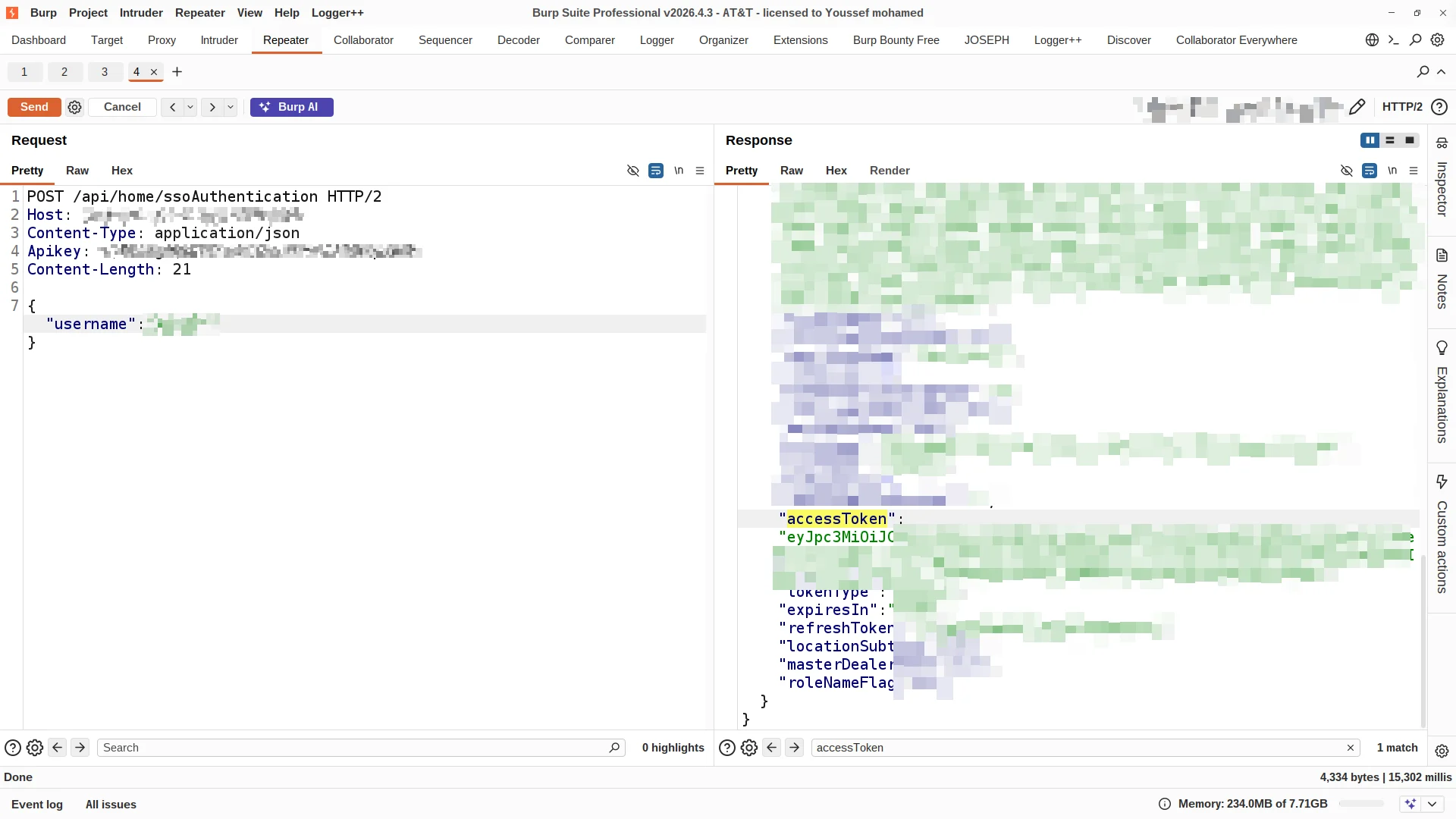
Two JWTs were then obtained via the SSO endpoint, one per user. The SSO endpoint accepted a username in the request body and issued a signed JWT in return, without requiring a password or MFA. That credential-free behaviour was reported and confirmed separately; here it is used only to establish two authenticated sessions for the authorization test.
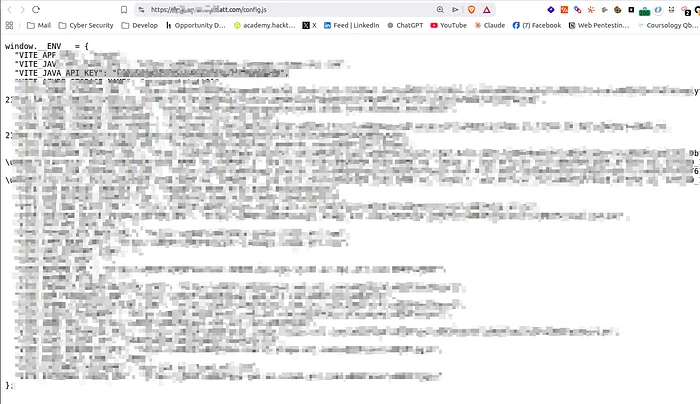
Config.js
POST /api/home/ssoAuthentication HTTP/1.1Host: [REDACTED]Content-Type: application/jsonAPIKey: [REDACTED]{"username":"[USER_A]"}→ response data.accessToken = <TOKEN_A>
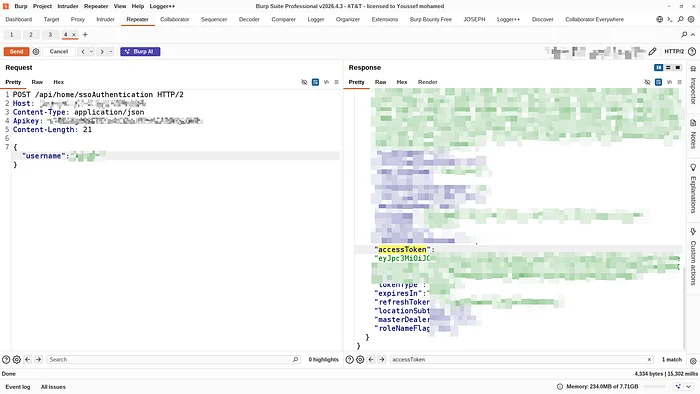
AccessToken user A
POST /api/home/ssoAuthentication HTTP/1.1Host: [REDACTED]Content-Type: application/jsonAPIKey: [REDACTED]{"username":"[USER_B]"}→ response data.accessToken = <TOKEN_B>
AccessToken user B
Two valid sessions, no elevated roles, no module-specific permissions. The total prerequisites were zero beyond a valid username.
Exploitation
Step 1: User A creates a live table
User A submitted a createTable request against the API. The request body specified a table name, an owner field (User A's username), a description, and two columns.
Response:
{"statusCode": 200, "statusMessage": "Success"}
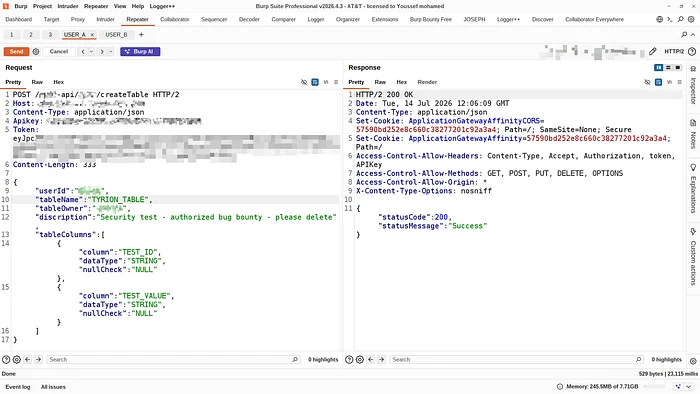
Create-Table
Table existence was confirmed via checkDuplicateTable:
Response:
{"data": 1, "statusCode": 200, "statusMessage": "Success"}
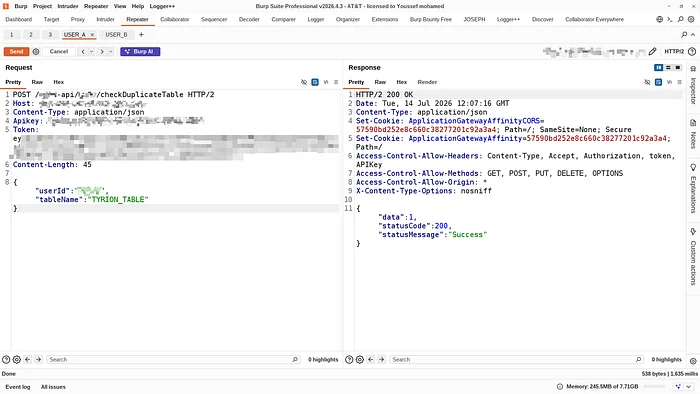
Table existence
data: 0 means the table does not exist; data: 1 means it does. Before the createTable call, every tested name returned data: 0. This confirmed the backend executed a real CREATE TABLE in the Snowflake database, not a cached check and not a mock response.
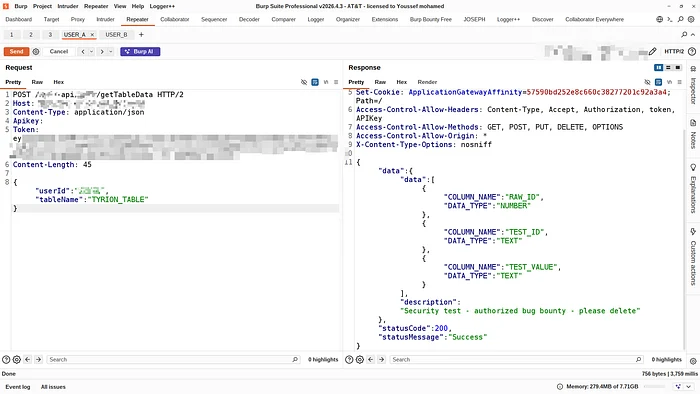
The schema was then retrieved via getTableData:
Response:
{ "data": { "data": [ {"COLUMN_NAME": "RAW_ID", "DATA_TYPE": "NUMBER"}, {"COLUMN_NAME": "TEST_ID", "DATA_TYPE": "TEXT"}, {"COLUMN_NAME": "TEST_VALUE", "DATA_TYPE": "TEXT"} ], "description": "Security test - authorized bug bounty - please delete" }, "statusCode": 200, "statusMessage": "Success"}
The response included a RAW_ID NUMBER column that was not in the original request, added automatically by the backend's own table creation logic. This confirmed the API executed the full CREATE TABLE statement rather than just validating the input and storing metadata. A real Snowflake table now existed, created by a zero-permission user who had no business creating database objects.
getTableData
Step 2: User B reads User A's table schema
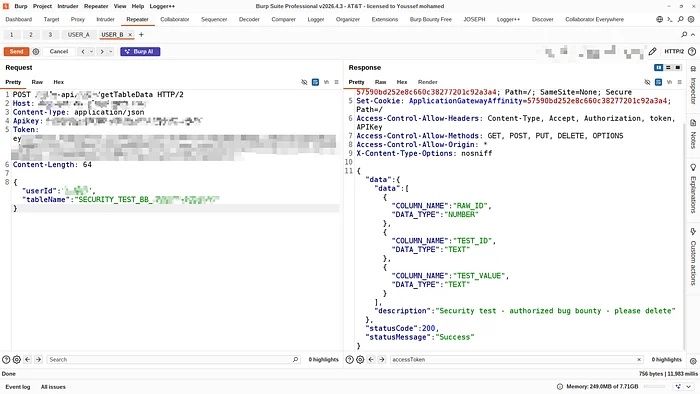
Everything from this point forward used User B's JWT and user ID. User B had no connection to User A, no knowledge of the table beyond its name, and no elevated permissions.
Response:
{ "data": { "data": [ {"COLUMN_NAME": "RAW_ID", "DATA_TYPE": "NUMBER"}, {"COLUMN_NAME": "TEST_ID", "DATA_TYPE": "TEXT"}, {"COLUMN_NAME": "TEST_VALUE", "DATA_TYPE": "TEXT"} ], "description": "Security test - authorized bug bounty - please delete" }, "statusCode": 200, "statusMessage": "Success"}
HTTP 200 and the full schema. The API returned User A's table data to User B without checking whether User B had any relationship to it.
User B
Step 3: User B confirms the table exists
Response:
{"data": 1, "statusCode": 200, "statusMessage": "Success"}
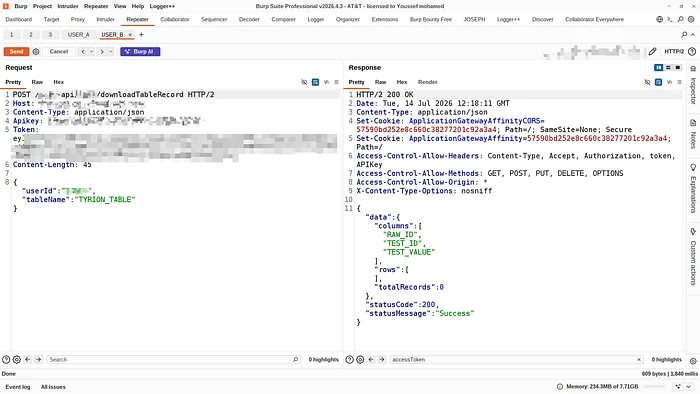
Step 4: User B downloads all records
Response:
{ "data": { "columns": ["RAW_ID", "TEST_ID", "TEST_VALUE"], "rows": [], "totalRecords": 0 }, "statusCode": 200, "statusMessage": "Success"}
HTTP 200 and the full column list. The record download was accepted; the table was empty by design, so no production data was touched.
downloads all records
Step 5: User B truncates User A's table
{"statusCode": 200, "statusMessage": "Success"}
HTTP 200. TRUNCATE TABLE, a DDL statement that removes every row from a table instantly, was accepted and executed by the backend against a table created and owned by a completely different user. The API never checked whether User B owned the table, had been granted access to it, or held any role that would permit DDL operations. The only thing it checked was that the JWT was valid and matched the userId in the request body.
The operation was repeated on a second test table with the same result.
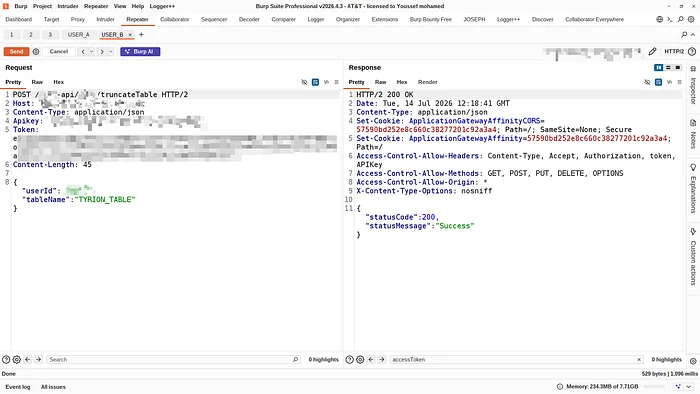
User B truncates User A's table
Step 6: The rest of the surface
Every operation that was tested across users succeeded without restriction.
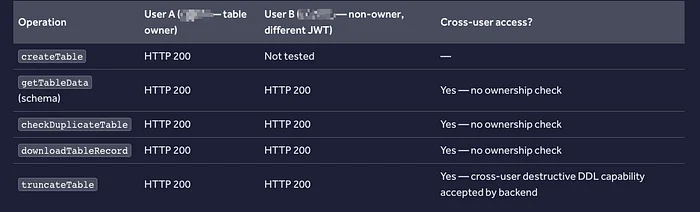
Authorization Matrix
Also observed during testing: deleteTableRecord, editTableRecord, and bulkUploadIMEI all reached backend processing, returning application-level errors (409, 500, 400) rather than authorization rejections. The errors were caused by the empty table state, not by any access control gate. These endpoints were not tested further beyond confirming they reached the application layer.
Root cause
The API conflated two distinct security properties:
- Authentication: verifying that a JWT is valid and belongs to the stated user. This was implemented and working.
- Authorization: verifying that the authenticated user is permitted to perform the requested operation on the requested object. This was not implemented at all for the module.
The result was that any authenticated portal user, with zero permissions, no module role and no relationship to any table, could create Snowflake database objects and invoke DDL operations against any table name the API would resolve. The tableOwner field in the createTable request was supplied by the caller and stored, but never consulted when another caller arrived to act on the same table. It was metadata, not enforcement.
Two checks were missing, in one module, and should have existed in two places:
- Missing role check. The DDL endpoints,
createTableandtruncateTable, were reachable by any authenticated user regardless of whether they held any module-related role. A standard portal user with zero declared permissions had no business touching Snowflake DDL. The role gate simply was not there. - Missing ownership check. The
tableOwnerfield was recorded at creation time but never consulted when subsequent requests arrived. The API verified the caller's identity, confirming the JWT matched theuserId. It never asked whether thatuserIdhad any relationship to the target table. Any caller who knew a table name could act on it.
Authentication proves who you are. Authorization decides what you are allowed to do. The first without the second is a locked door with no walls around it.
Impact
Any authenticated portal user could create database objects in the live Snowflake backend and invoke DDL operations against any table name the API would resolve, with no role and no relationship to the table's owner. The confirmed demonstrations were against researcher-created empty tables, so no production data was touched.
The higher-risk implication, unconfirmed but structurally plausible, is that if operational table names are resolvable through the same tableName parameter with no additional gating, the truncateTable endpoint would accept a non-owner request against a populated production table and return HTTP 200 just as it did here. That path was not tested and production tables were not targeted. The behaviour on researcher-created empty tables is sufficient to establish the finding.
Fix
Enforce authorization on the module, in both places identified above: a role check on the DDL endpoints so that only users holding the appropriate role can call createTable and truncateTable, and an ownership check on every table-scoped operation so that the stored tableOwner is consulted, not merely recorded, before a caller acts on a table.
- Owner field trusted from the request. Send a
createTablewithtableOwnerset to another user's name, then act on the table with that other user's session. A positive result is that the second user can read or truncate the table, showing ownership is caller-supplied and never enforced. - JWT and
userIdmatched but nothing else checked. Take any low-privilege account, pair its own token with its ownuserId, and call each DDL endpoint. A positive result is HTTP 200 with a success status oncreateTableortruncateTablefor an account with no declared role. - Table name as the only key. With a second account that has never seen the table, call
getTableData,checkDuplicateTable,downloadTableRecordandtruncateTableusing only the name. A positive result is a full schema or column list, or a success status on truncate, returned to the unrelated account. - Existence oracle. Call
checkDuplicateTablewith guessed names from a low-privilege account and comparedata: 0againstdata: 1. A positive result is reliable enumeration of table names across tenants or owners. - Application errors instead of authorization errors. Probe endpoints such as
deleteTableRecord,editTableRecordandbulkUploadIMEIand read the error codes. A positive result is a 400, 409 or 500 that reflects the state of the data rather than a 401 or 403, which suggests the request reached backend processing without an access control gate. - Frontend config exposure. Fetch
/config.jsunauthenticated and look for API keys or environment values. A positive result is a usable key that the API accepts on subsequent requests.
What happened, in plain words
A company ran a web portal for supply-chain planning and forecasting. Alongside the main portal sat a separate piece of software, an API, that managed tables of data. An API is the part of a website that the page in your browser talks to behind the scenes: your browser sends a request, the API sends back an answer, usually in a compact text format called JSON. You never see it directly, but every button you press on a modern site ends up as one of these requests.
The table management API let users create tables, look at their structure, download their contents, check whether a table exists, and empty them. All of that ran against a real Snowflake database. Snowflake is a cloud data warehouse: a large, hosted database service where companies keep serious business data.
The API did check who was calling. Every request had to carry a valid token, a short signed string that proves which account is making the call, and the token had to match the user ID written in the request. That part worked.
What the API never checked was whether the caller was allowed to do what they were asking. Any logged-in user, even one with no permissions at all, could create tables and empty tables belonging to somebody else. The researcher proved it with two ordinary accounts and nothing else.
The rest of this article walks through the same steps the researcher took, explaining each concept as it appears.
The two words at the centre of this bug
Before anything else, two terms that sound similar and mean very different things.
- Authentication answers the question who are you? Showing a passport at a border is authentication.
- Authorization answers the question what are you allowed to do? A passport does not give you the right to enter every room in the country.
The researcher's comparison is a guard at a gate who checks your pass but never asks where you are going. He has done half his job, and the wrong half.
That is the shape of this bug: the API verified every caller's identity and then let any of them do whatever they liked to anyone else's database objects.
Context: what the product was
The target platform had a supply-chain planning and forecasting module. Supply-chain planning is the work of deciding how much stock to buy, where to store it and when to ship it; forecasting is predicting future demand. Companies do this with tables of numbers, so a module that lets users create and manage tables makes sense as a feature.
That module was a separate API service running alongside the main portal. It exposed a table management interface with endpoints for:
- creating tables,
- reading their schemas (the list of columns and their types),
- downloading their records (the actual rows of data),
- checking whether a table exists,
- truncating them (emptying a table in one go).
An endpoint is simply a specific address inside an API, like a counter in a large office. Each endpoint does one job.
All of these operations ran against a live Snowflake database on the backend. "Live" means real: not a demo, not a test copy.
The API enforced authentication correctly. Every request needed a valid JWT. JWT stands for JSON Web Token: a compact string that the server signs, so it can later tell that the token is genuine and has not been altered. Think of it as a stamped wristband at an event: the stamp is hard to fake, and it says which visitor you are. The token also had to match the userId field submitted in the request body; a mismatched pair was rejected. That part worked.
What did not exist was the next layer: authorization. The API never asked whether the authenticated user was allowed to perform DDL operations at all. DDL stands for Data Definition Language: the family of database commands that change the structure of a database rather than its contents. CREATE TABLE (make a table) and TRUNCATE TABLE (empty a table instantly) are DDL. Ordinary users of a business application almost never need DDL; they add and read rows, they do not build and demolish tables.
The API also never asked whether the user owned, or had any relationship to, the table they were acting on. Authentication without authorization is a gate with no rooms behind it.
Setup: two accounts, no connection
The researcher used two users, two separate accounts, with no relationship between them. Both were zero-permission portal users: accounts that exist in the portal but have no elevated roles and no declared access to any of the platform's tables. A role is a named bundle of permissions, for example "analyst" or "administrator"; having no role means having no special rights.
- User A: the table creator, authenticated with their own JWT.
- User B: a completely separate account, different JWT, different user ID, no connection to User A or to anything User A created.
The goal was to have User B act on User A's table using only the table name. That last phrase matters: User B was not given a link, an ID or a share.
Finding it: where the API key came from
The API key required for all requests was available from the publicly served frontend configuration file, with no login needed:
GET /config.js HTTP/1.1Host: [REDACTED]HTTP/1.1 200 OK...VITE_JAVA_API_KEY: "[REDACTED]"...
Line by line:
GET /config.js HTTP/1.1Host: [REDACTED]is the request.GETis the method used to ask for a file./config.jsis the file being asked for.Host: [REDACTED]says which server to ask. The line breaks in the original have been lost in copying, so the request and the start of the response run together; the meaning is still clear.HTTP/1.1 200 OKis the server's answer.200is the standard code for "here you are, everything went fine".VITE_JAVA_API_KEY: "[REDACTED]"is a line inside the file. It is a setting that the frontend uses, and it contains an API key.
Why this step: a frontend configuration file is a file the website's own pages load in order to know how to talk to the API. Because browsers must be able to read it, anyone can fetch it, logged in or not. If a secret is written into it, that secret is public. An API key is a password-like string that identifies an application rather than a person; here the API demanded one on every request, so having it was the entry ticket for the next steps.
Two JWTs were then obtained via the SSO endpoint, one per user. SSO means single sign-on: a central login service that issues tokens for other applications. The SSO endpoint accepted a username in the request body and issued a signed JWT in return, without requiring a password or MFA. MFA is multi-factor authentication, the "enter a code from your phone as well" step. That credential-free behaviour was reported and confirmed separately; here it is used only to establish two authenticated sessions for the authorization test. In other words, the researcher is not claiming credit for that weakness in this report; it is simply how two logged-in sessions were obtained.
Config.js
POST /api/home/ssoAuthentication HTTP/1.1Host: [REDACTED]Content-Type: application/jsonAPIKey: [REDACTED]{"username":"[USER_A]"}→ response data.accessToken = <TOKEN_A>
Line by line:
POST /api/home/ssoAuthentication HTTP/1.1Host: [REDACTED]is a request to the SSO endpoint.POSTis the method used to send data to the server, as opposed toGET, which asks for data.Content-Type: application/jsontells the server that the body of the request is JSON, the standard text format for structured data.APIKey: [REDACTED]carries the key taken from the configuration file.{"username":"[USER_A]"}is the body: the username of User A, and nothing else. No password field appears.→ response data.accessToken = <TOKEN_A>records the outcome: the server's answer contained an access token for User A, written here as<TOKEN_A>.
Why this step: to test whether one user can touch another user's data, you need two genuine, logged-in users. This call produced the first.
AccessToken user A
POST /api/home/ssoAuthentication HTTP/1.1Host: [REDACTED]Content-Type: application/jsonAPIKey: [REDACTED]{"username":"[USER_B]"}→ response data.accessToken = <TOKEN_B>
Line by line:
- The request is identical to the previous one except for the body.
{"username":"[USER_B]"}asks for a token for User B instead.→ response data.accessToken = <TOKEN_B>records that the server returned a token for User B, written here as<TOKEN_B>.
Why this step: the second account. Two valid sessions, no elevated roles, no module-specific permissions. The total prerequisites were zero beyond a valid username.
AccessToken user B
Exploitation
Step 1: User A creates a live table
User A submitted a createTable request against the API. The request body specified a table name, an owner field (User A's username), a description, and two columns.
Line by line:
POST /REDACTED-api/REDACTED/createTable HTTP/1.1Host: [REDACTED]is the request to the create-table endpoint. The path is partly hidden with[REDACTED]to avoid pointing at the live system.Content-Type: application/jsonsays the body is JSON.APIKey: [REDACTED]carries the application key from the configuration file.token: <TOKEN_A>carries User A's JWT. This is the identity check the API does perform."userId": "[USER_A_ID]"is the user ID in the body. The API requires it to match the token."tableName": "[TEST_TABLE_NAME]"is the name of the table to create. This name is the only thing another user will later need."tableOwner": "[USER_A]"is the owner field. Note that the caller supplies it; the server does not derive it."discription": "Security test - authorized bug bounty - please delete"is a description, spelled that way in the API itself. It marks the table as a test object so that anyone finding it knows to remove it."tableColumns": [...]lists the columns. Each entry has acolumnname, adataTypeofSTRING, and anullCheckofNULL.
Why this step: to show that a zero-permission user can create a database object at all. If the request succeeds, the first half of the problem is proven before any cross-user action happens.
Response:
{"statusCode": 200, "statusMessage": "Success"}
Line by line:
"statusCode": 200means the server reports success."statusMessage": "Success"is the human-readable version of the same thing.
Create-Table
Table existence was confirmed via checkDuplicateTable:
Line by line:
- The request goes to the
checkDuplicateTableendpoint, which answers the question "does a table with this name already exist?". token: <TOKEN_A>and"userId": "[USER_A_ID]"identify User A, as before.{"userId": "[USER_A_ID]", "tableName": "[TEST_TABLE_NAME]"}is the body: the same user ID and the table name to look up.
Why this step: a success message alone could be a polite lie. Asking a second endpoint whether the table exists is an independent check.
Response:
{"data": 1, "statusCode": 200, "statusMessage": "Success"}
Line by line:
"data": 1is the answer to the question.data: 0means the table does not exist;data: 1means it does."statusCode": 200and"statusMessage": "Success"again report that the call itself went through.
Before the createTable call, every tested name returned data: 0. This confirmed the backend executed a real CREATE TABLE in the Snowflake database, not a cached check and not a mock response. A cached answer is one stored from earlier; a mock is a fake stand-in used in testing. Neither would prove anything about the real database.
Table existence
The schema was then retrieved via getTableData:
Line by line:
- The request goes to
getTableData, which returns information about a table. - The headers and body are the same pattern as before: application key, User A's token, User A's ID, the table name.
Why this step: to see the table's structure as the database actually stored it, which reveals whether the server did real work or only recorded a name.
Response:
{ "data": { "data": [ {"COLUMN_NAME": "RAW_ID", "DATA_TYPE": "NUMBER"}, {"COLUMN_NAME": "TEST_ID", "DATA_TYPE": "TEXT"}, {"COLUMN_NAME": "TEST_VALUE", "DATA_TYPE": "TEXT"} ], "description": "Security test - authorized bug bounty - please delete" }, "statusCode": 200, "statusMessage": "Success"}
Line by line:
- The outer
"data"object holds the answer. - The inner
"data"array lists the columns. Each entry has aCOLUMN_NAMEand aDATA_TYPE. RAW_IDof typeNUMBERis a column that was not in the original request.TEST_IDandTEST_VALUEof typeTEXTare the two columns that were requested. Note that the request saidSTRINGand the database reportsTEXT; different systems use different names for the same idea."description"echoes back the description sent at creation."statusCode": 200and"statusMessage": "Success"report success.
The response included a RAW_ID NUMBER column that was not in the original request, added automatically by the backend's own table creation logic. This confirmed the API executed the full CREATE TABLE statement rather than just validating the input and storing metadata. Metadata is data about data: a note saying "a table called X exists", without any table actually existing. A real Snowflake table now existed, created by a zero-permission user who had no business creating database objects.
getTableData
Step 2: User B reads User A's table schema
Everything from this point forward used User B's JWT and user ID. User B had no connection to User A, no knowledge of the table beyond its name, and no elevated permissions.
Line by line:
- The endpoint and table name are exactly the same as in User A's call.
token: <TOKEN_B>is now User B's token, and"userId": "[USER_B_ID]"is User B's ID. The pair matches, so the identity check passes.- Nothing in the request says "I am not the owner". The only thing that differs from User A's request is who is asking.
Why this step: this is the actual test. If the API returns the schema, it has answered User B's question without ever asking whether User B is allowed to know.
Response:
{ "data": { "data": [ {"COLUMN_NAME": "RAW_ID", "DATA_TYPE": "NUMBER"}, {"COLUMN_NAME": "TEST_ID", "DATA_TYPE": "TEXT"}, {"COLUMN_NAME": "TEST_VALUE", "DATA_TYPE": "TEXT"} ], "description": "Security test - authorized bug bounty - please delete" }, "statusCode": 200, "statusMessage": "Success"}
Line by line:
- The answer is identical to the one User A received: the same three columns and the same description.
"statusCode": 200means the server treated the request as perfectly normal.
HTTP 200 and the full schema. The API returned User A's table data to User B without checking whether User B had any relationship to it.
User B
Step 3: User B confirms the table exists
Line by line:
- The same existence-check endpoint as before, now called with User B's token and User B's ID.
- The table name is the only piece of information about User A's table that User B supplies.
Why this step: to show that the existence check also ignores ownership. The existence check also returned success to User B, who had no relationship to the table.
Response:
{"data": 1, "statusCode": 200, "statusMessage": "Success"}
Line by line:
"data": 1tells User B that the table exists."statusCode": 200and"statusMessage": "Success"report that the call went through.
Step 4: User B downloads all records
Line by line:
- The request goes to
downloadTableRecord, the endpoint that returns the rows of a table. token: <TOKEN_B>and"userId": "[USER_B_ID]"identify User B.{"tableName": "[TEST_TABLE_NAME]", "userId": "[USER_B_ID]"}is the body. The fields are the same as before, in a different order; JSON does not care about order.
Why this step: reading a schema tells you the shape of the data; downloading records tells you the data itself.
Response:
{ "data": { "columns": ["RAW_ID", "TEST_ID", "TEST_VALUE"], "rows": [], "totalRecords": 0 }, "statusCode": 200, "statusMessage": "Success"}
Line by line:
"columns"lists the three column names, which User B should not have been able to see."rows": []is an empty list: the table had no data in it."totalRecords": 0confirms the count is zero."statusCode": 200and"statusMessage": "Success"report that the download was accepted.
HTTP 200 and the full column list. The record download was accepted; the table was empty by design, so no production data was touched. Production data is the real business data a company relies on, as opposed to test data. Keeping the test table empty meant the demonstration could not harm anyone.
downloads all records
Step 5: User B truncates User A's table
Line by line:
- The request goes to
truncateTable. To truncate a table is to delete every row in it in one operation, while leaving the table itself in place. token: <TOKEN_B>and"userId": "[USER_B_ID]"identify User B, the non-owner.{"userId": "[USER_B_ID]", "tableName": "[TEST_TABLE_NAME]"}is the body: User B's ID and the name of User A's table.
Why this step: reading is bad, but destroying is worse. Truncation is a DDL operation, the kind of command that should be reserved for people with database responsibilities.
{"statusCode": 200, "statusMessage": "Success"}
Line by line:
"statusCode": 200means the server accepted and carried out the request."statusMessage": "Success"says the same in words.
HTTP 200. TRUNCATE TABLE, a DDL statement that removes every row from a table instantly, was accepted and executed by the backend against a table created and owned by a completely different user. The API never checked whether User B owned the table, had been granted access to it, or held any role that would permit DDL operations. The only thing it checked was that the JWT was valid and matched the userId in the request body.
The operation was repeated on a second test table with the same result.
User B truncates User A's table
Step 6: The rest of the surface
Every operation that was tested across users succeeded without restriction.
Authorization Matrix
An authorization matrix is a simple grid: operations down one side, users across the other, and in each cell whether the action was allowed. Filling it in shows at a glance where the gaps are.
Also observed during testing: deleteTableRecord, editTableRecord, and bulkUploadIMEI all reached backend processing, returning application-level errors (409, 500, 400) rather than authorization rejections. The errors were caused by the empty table state, not by any access control gate. These endpoints were not tested further beyond confirming they reached the application layer.
What those codes mean, in general terms:
- 400 means the request was malformed or did not make sense to the server.
- 409 means the request conflicted with the current state of the data.
- 500 means the server hit an unexpected error while processing.
- 401 means "you are not authenticated"; 403 means "you are authenticated but not allowed".
The point is the difference between the two groups. A 401 or 403 would have shown a gate doing its job. A 400, 409 or 500 shows the request got past the gate and into the application's own logic, where it failed for reasons to do with the data, not with permission. The application layer is the part of the system that implements business logic, as opposed to the outer layer that checks identity.
Root cause
The API conflated two distinct security properties:
- Authentication: verifying that a JWT is valid and belongs to the stated user. This was implemented and working.
- Authorization: verifying that the authenticated user is permitted to perform the requested operation on the requested object. This was not implemented at all for the module.
The result was that any authenticated portal user, with zero permissions, no module role and no relationship to any table, could create Snowflake database objects and invoke DDL operations against any table name the API would resolve. The tableOwner field in the createTable request was supplied by the caller and stored, but never consulted when another caller arrived to act on the same table. It was metadata, not enforcement. Enforcement means the system actually acts on a rule; recording a rule and ignoring it is not enforcement.
Two checks were missing, in one module, and should have existed in two places:
- Missing role check. The DDL endpoints,
createTableandtruncateTable, were reachable by any authenticated user regardless of whether they held any module-related role. A standard portal user with zero declared permissions had no business touching Snowflake DDL. The role gate simply was not there. - Missing ownership check. The
tableOwnerfield was recorded at creation time but never consulted when subsequent requests arrived. The API verified the caller's identity, confirming the JWT matched theuserId. It never asked whether thatuserIdhad any relationship to the target table. Any caller who knew a table name could act on it.
Authentication proves who you are. Authorization decides what you are allowed to do. The first without the second is a locked door with no walls around it.
Impact
Any authenticated portal user could create database objects in the live Snowflake backend and invoke DDL operations against any table name the API would resolve, with no role and no relationship to the table's owner. The confirmed demonstrations were against researcher-created empty tables, so no production data was touched.
The higher-risk implication, unconfirmed but structurally plausible, is that if operational table names are resolvable through the same tableName parameter with no additional gating, the truncateTable endpoint would accept a non-owner request against a populated production table and return HTTP 200 just as it did here. That path was not tested and production tables were not targeted. The behaviour on researcher-created empty tables is sufficient to establish the finding. "Structurally plausible" means the code path looks the same; it is a reasoned expectation, not a demonstrated result.
Fix
Enforce authorization on the module, in both places identified above: a role check on the DDL endpoints so that only users holding the appropriate role can call createTable and truncateTable, and an ownership check on every table-scoped operation so that the stored tableOwner is consulted, not merely recorded, before a caller acts on a table.
Variants to test
Each one is a small experiment with a clear "positive result" that would confirm the weakness.
- Owner field trusted from the request. Send a
createTablewithtableOwnerset to another user's name, then act on the table with that other user's session. A positive result is that the second user can read or truncate the table, showing ownership is caller-supplied and never enforced. - JWT and
userIdmatched but nothing else checked. Take any low-privilege account, pair its own token with its ownuserId, and call each DDL endpoint. A positive result is HTTP 200 with a success status oncreateTableortruncateTablefor an account with no declared role. - Table name as the only key. With a second account that has never seen the table, call
getTableData,checkDuplicateTable,downloadTableRecordandtruncateTableusing only the name. A positive result is a full schema or column list, or a success status on truncate, returned to the unrelated account. - Existence oracle. Call
checkDuplicateTablewith guessed names from a low-privilege account and comparedata: 0againstdata: 1. A positive result is reliable enumeration of table names across tenants or owners. Enumeration means listing things one by one; a tenant is one customer's separate slice of a shared system. - Application errors instead of authorization errors. Probe endpoints such as
deleteTableRecord,editTableRecordandbulkUploadIMEIand read the error codes. A positive result is a 400, 409 or 500 that reflects the state of the data rather than a 401 or 403, which suggests the request reached backend processing without an access control gate. - Frontend config exposure. Fetch
/config.jsunauthenticated and look for API keys or environment values. A positive result is a usable key that the API accepts on subsequent requests.
Glossary
- API: the interface a website's pages use to talk to its servers; requests go in, structured answers come back.
- API key: a password-like string that identifies an application rather than a person, sent with requests.
- Application layer: the part of a system that implements business logic, as opposed to the outer layer that checks identity.
- Authentication: proving who you are, for example with a token or a password.
- Authorization: deciding what an authenticated user is allowed to do.
- Authorization matrix: a grid of operations against users showing which combinations are permitted.
- Cached: stored from an earlier answer and reused, rather than computed fresh.
- Column: one field of a table, such as a name or an ID; a table is made of columns and rows.
- Configuration file: a file a website loads to learn its settings; if served publicly, anything in it is public.
- DDL (Data Definition Language): database commands that change structure, such as creating or emptying tables.
- Endpoint: one specific address inside an API that performs one job.
- Enforcement: actually applying a rule, as opposed to merely recording it.
- Enumeration: listing items one by one, often by guessing names.
- Existence oracle: an endpoint that reveals whether something exists, which leaks information to people who should not know.
- Frontend: the part of a website that runs in your browser.
- GET: the request method used to ask for a file or page.
- HTTP 200: the standard response code meaning the request succeeded.
- HTTP 400 / 409 / 500: response codes meaning a malformed request, a conflict with current data, and an unexpected server error respectively.
- HTTP 401 / 403: response codes meaning not authenticated, and authenticated but not allowed.
- JSON: a plain-text format for structured data, built from names and values.
- JWT (JSON Web Token): a signed string that a server issues to identify a logged-in user and can later verify.
- Metadata: data about data, such as a note that a table exists, without the table itself.
- MFA (multi-factor authentication): logging in with more than one proof, such as a password plus a phone code.
- Mock: a fake stand-in used in testing that does not touch the real system.
- POST: the request method used to send data to a server.
- Production data: the real business data a company relies on, as opposed to test data.
- Role: a named bundle of permissions, such as analyst or administrator.
- Schema: the structure of a table: its columns and their types.
- Snowflake: a cloud data warehouse service where companies store large amounts of business data.
- SSO (single sign-on): a central login service that issues tokens other applications accept.
- Supply-chain planning and forecasting: deciding how much stock to buy, store and ship, and predicting future demand.
- Tenant: one customer's separate slice of a shared system.
- Token: a short string issued at login that proves which account is making a request.
- Truncate: to delete every row of a table in one operation while leaving the table in place.
- Zero-permission user: an account with no special roles or declared access rights.

