Remotely Hijacking Zoom Clients
Zoom's client software treated incoming UDP packets as if they came from the trusted TCP channel, allowing an attacker to spoof server messages. This let an attacker hijack desktop controls, send keystrokes, and manipulate other meeting features without being an attendee.
 Published on medium.com
I would like to walkthrough a severe logic flaw vulnerability found in Zoom’s Desktop Conferencing Application. This logic flaw (CVE-2018–15715) affects Zoom clients for MacOS, Linux, and Windows and allows an attacker (doesn’t even have to be meeting attendee) to hijack various components of a live meetingsuch as…
The full write-up lives on its author's site
It belongs to its author, so we link to it rather than copy it. The other two tabs are our own rewrites, checked against it.
Context
Zoom's desktop conferencing client ships a proprietary inter-thread messaging system. Message objects are instances of a Zoom message class, msg_db_t, and are posted to message queues where message pumps process and dispatch them to the handlers that update application state. The Windows client contains four message pumps in Util.dll, three of which appear to be used.
The class is small:
class msg_db_t : public ssb_allocator {
  msg_db* prev;
  msg_db* next;
  BYTE* dataBegin;
  BYTE* dataEnd;
  DWORD rw_lock;
};
When a client joins a meeting it contacts a Zoom server over TCP to announce that the meeting is starting or being joined. The server notifies attendees, sets up UDP streaming, and performs a peer-to-peer check to decide whether audio and video can flow directly between clients or must be proxied. The TCP channel is then used throughout the meeting for attendee status and meeting state. UDP carries the audio and video stream, whether P2P or proxied.
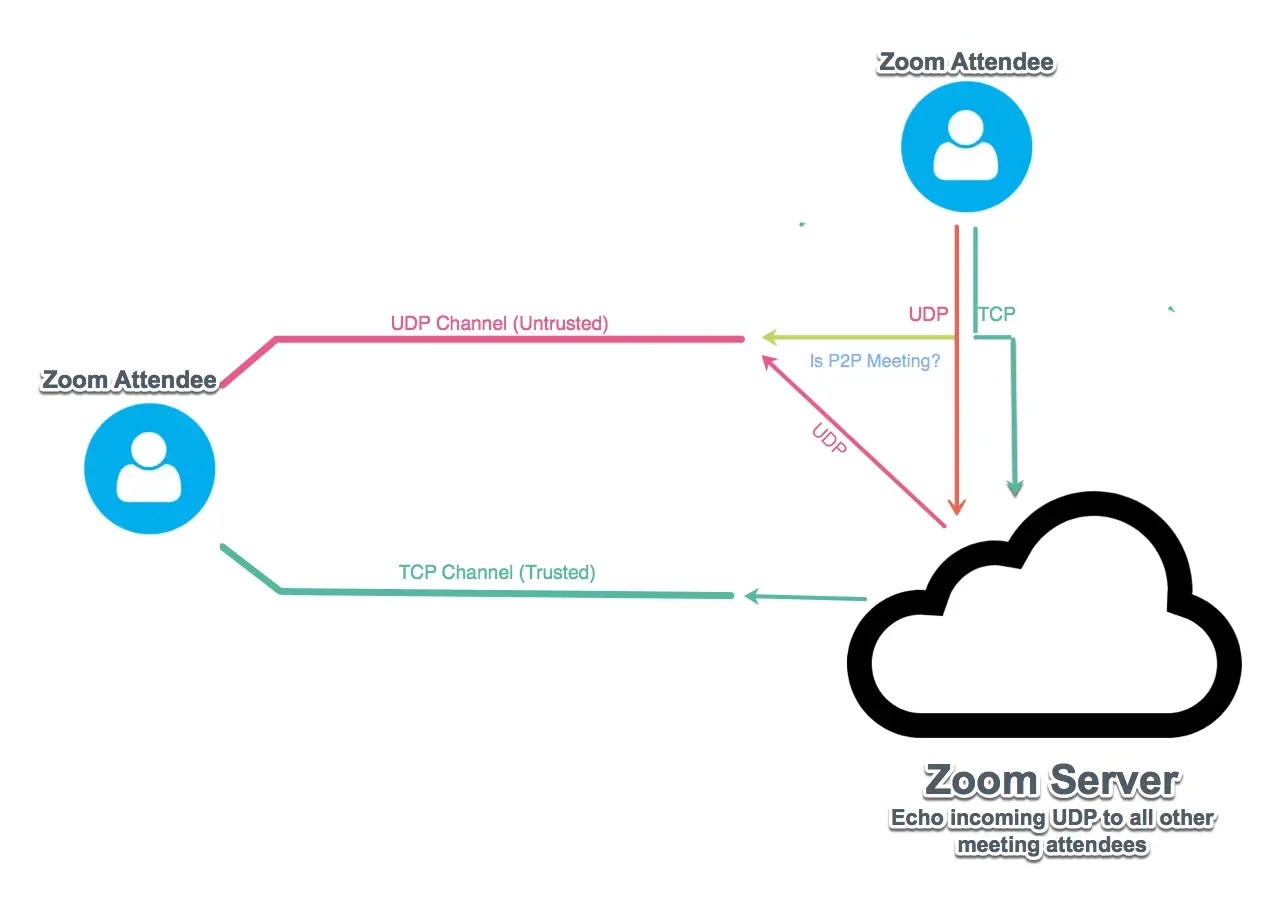
Networking of Zoom Clients
The logic flaw described here affects the Zoom clients for MacOS, Linux and Windows. It lets an attacker, who does not even have to be a meeting attendee, hijack components of a live meeting, including forcing desktop control permissions and sending keystrokes to an attendee who is sharing their screen.
Setup
The walkthrough uses the Windows Zoom client as the example. Hardware breakpoints, with some IDA debug scripting, were used to break when specific messages were read off a queue. Hardware breakpoints were used to break when specific messages were read off a queue, so execution could be traced from message creation to the pump that processed it. The proof of concept is in Tenable's repository, with message templates in msg_templates.py.
Finding it
The messaging system
The four message pumps in Util.dll process and dispatch incoming messages to the various Zoom components that carry out functions.

Zoom Message Pumps
Tracking a message through this system is hard: stepping into a message posting system and following where the pump reads it is like finding a needle in a haystack where the haystack is being shot out of a fire hose. Hardware breakpoints made it tractable.
Network messages
One of the pumps is ssb::select_t::loop. It loops and calls util.dll!process_io_event, which calls a virtual function that generically handles receiving network traffic from a socket_io_t based class in tp.dll.
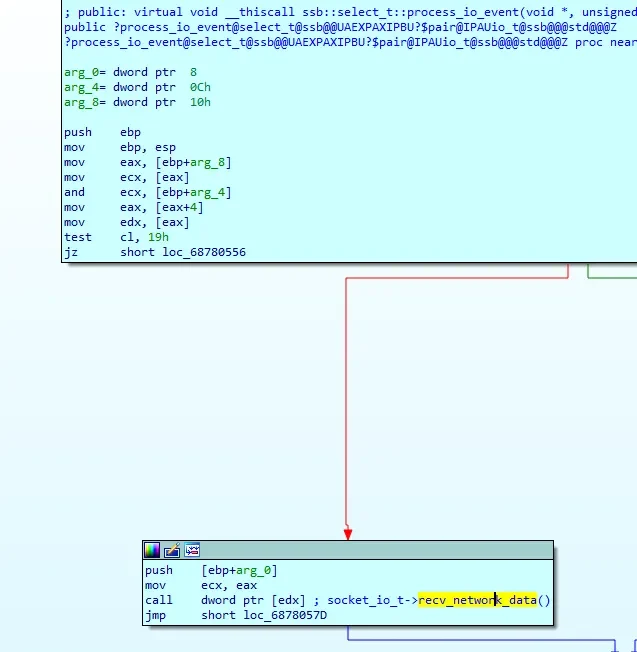
process_io_event calling into "recv_network_data" to generate a network message
The abstraction covers both UDP and TCP (socket_io_udp_t and socket_io_tcp_t). All process_io_event is expected to do is read incoming network data and wrap it in a msg_db_t message object.
That object is posted to the events queue, where the next pump, ssb::events_t::loop, takes over. It pops the message and dispatches it to the appropriate event message handler so the program state is updated according to the new network data. The handler is a 35 block switch case in ssb_sdk.dll.
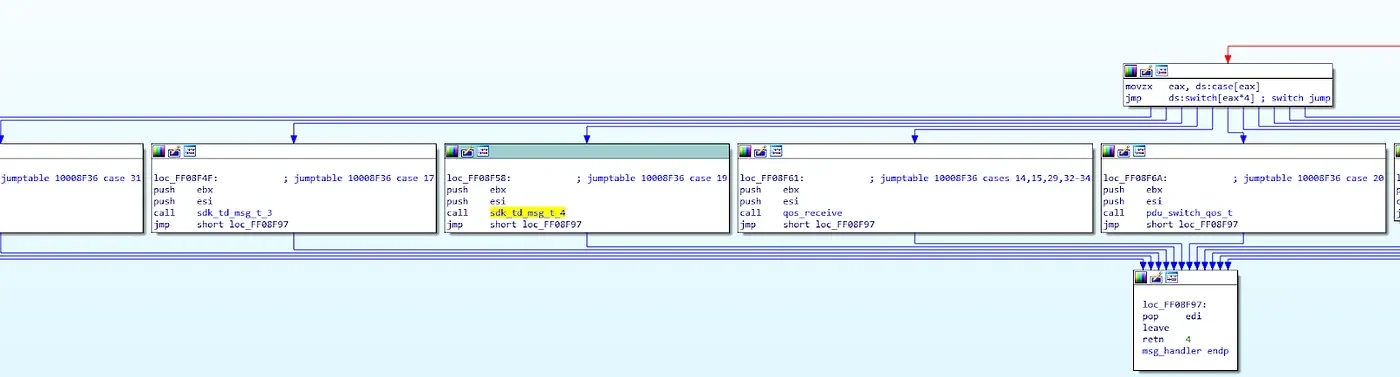
Message Handler for Event Messages
An identifier in the message selects the case; the author calls these function IDs. Examples of switch case functionality triggered by function IDs are Qos_receive, Pdu_keep_alive and Sdk_td_msg. There is no single case that says hijack screen controls or spoof chat messages. Most cases craft yet another message, posted to another queue, processed by different handlers that branch into further DLLs and invoke more switch cases that may craft more messages. That depth is not needed to explain this vulnerability.
The logic flaw
UDP and TCP data are both read by process_io_event and eventually posted to the same handler. TCP is the trusted channel used by Zoom servers, yet at this point Zoom does not check where the crafted message came from. All it knows is that it has an event message to process, and process_io_event hands these out with whatever packets arrive, TCP or not. The trusted TCP channel can therefore be spoofed with the untrusted UDP channel.
The next question is what special functionality a Zoom server can invoke in a client unsolicited. The answer is more than expected, and screen sharing is the example.
Exploitation
Step 1: Understand how desktop control is normally granted
An attendee sharing their screen can hand control to another attendee, giving that attendee remote desktop abilities. Security is built in so control cannot easily be hijacked. In the request/granting method, an attendee requests control, the presenter gets a prompt and clicks allow, which sends the proper support_response_type value to Zoom servers.
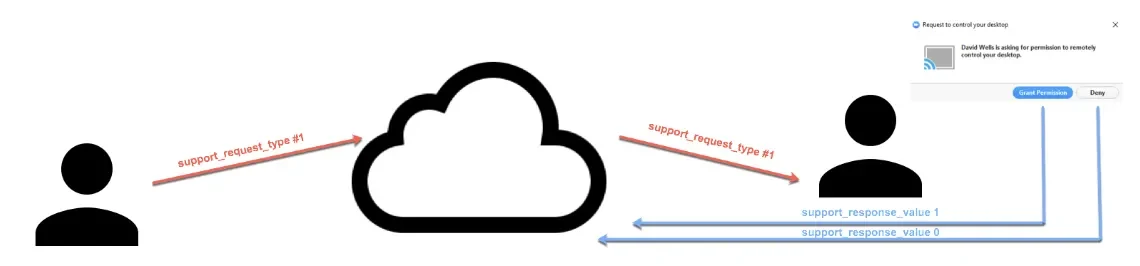
Zoom's Solicited Granting of Desktop Control
This route is a dead end for an attacker: it is backwards to the attacker's ability. The attacker cannot make the client say things to the Zoom server, only impersonate a Zoom server and tell the client things.
Step 2: Examine the unsolicited path
The second way of authenticating screen controls is manual, from the presenter's side.

Zoom's Unsolicited Granting of Desktop Control
Here presenters decide to whom they give access. It sounds as though the thick client would need a local change of state before reaching out to Zoom servers, which would mean impersonating the server alone could not trigger it remotely. That is not the case. When the client reaches out to the Zoom server after clicking give mouse/keyboard control, it is really waiting for its local SDK to be invoked back by the Zoom servers so it can tell the presenter who to give access to. Zoom server packets ultimately trigger who is sharing what with whom; anything else is just a request for Zoom servers to execute it.
All that is needed is to send the give desktop control packet to the target attendee.
Step 3: Adapt the packet for UDP
UDP messages are parsed differently, so this is not a simple replay of TCP packets. The function ID must be arranged at a different offset, and other touch ups are needed: changing the header altogether when exploiting over P2P rather than through a Zoom server, and setting the attendee ID field so the desktop control context applies properly. These variations are handled in the POC's message templates, where the offsets are taken care of and message fields are replaced with context relevant data from the attacker using the tool.
Reversing Zoom's TCP desktop control instruction showed the function ID to hit is sdk_msg_t (0x0e), with additional data needed to trigger the desktop control part specifically.
Step 4: Send the three requests
Three separate requests are needed:
- Tell attendee Y to give attendee X desktop control
- Notify attendee Y that control is in effect from attendee X
- Send keystrokes/mouse data from attendee X to attendee Y
Once this is done, desktop controls of a screen sharing user are hijacked over UDP and keystrokes can be sent. The remote attendee chosen does not matter, because the attacker's follow up keystrokes spoof as the new authenticated attendee.
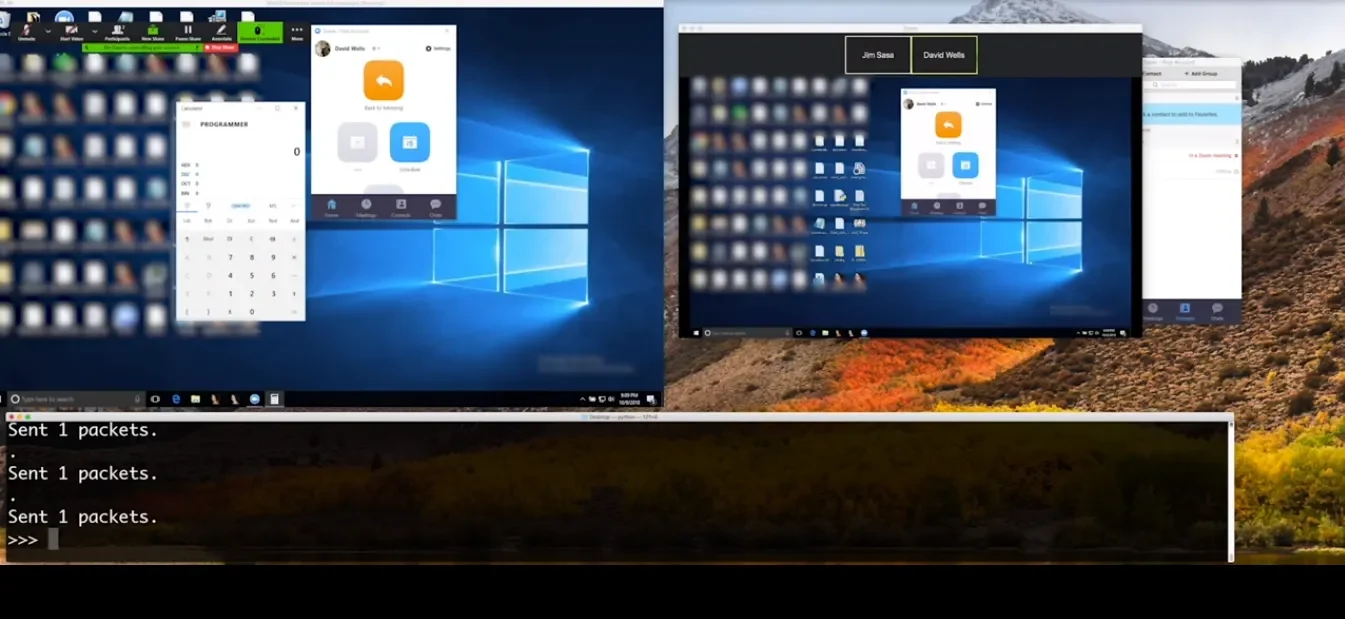
Popping Calculator in Remote Zoom Client.
Other functionality
Impersonating a Zoom server through this handler allows other actions: raising other people's hands during a meeting, kicking out attendees and locking them out, invoking the Zoom trial version timeout, which kills the meeting for everyone, and spoofing chat messages so they appear to come from other attendees.
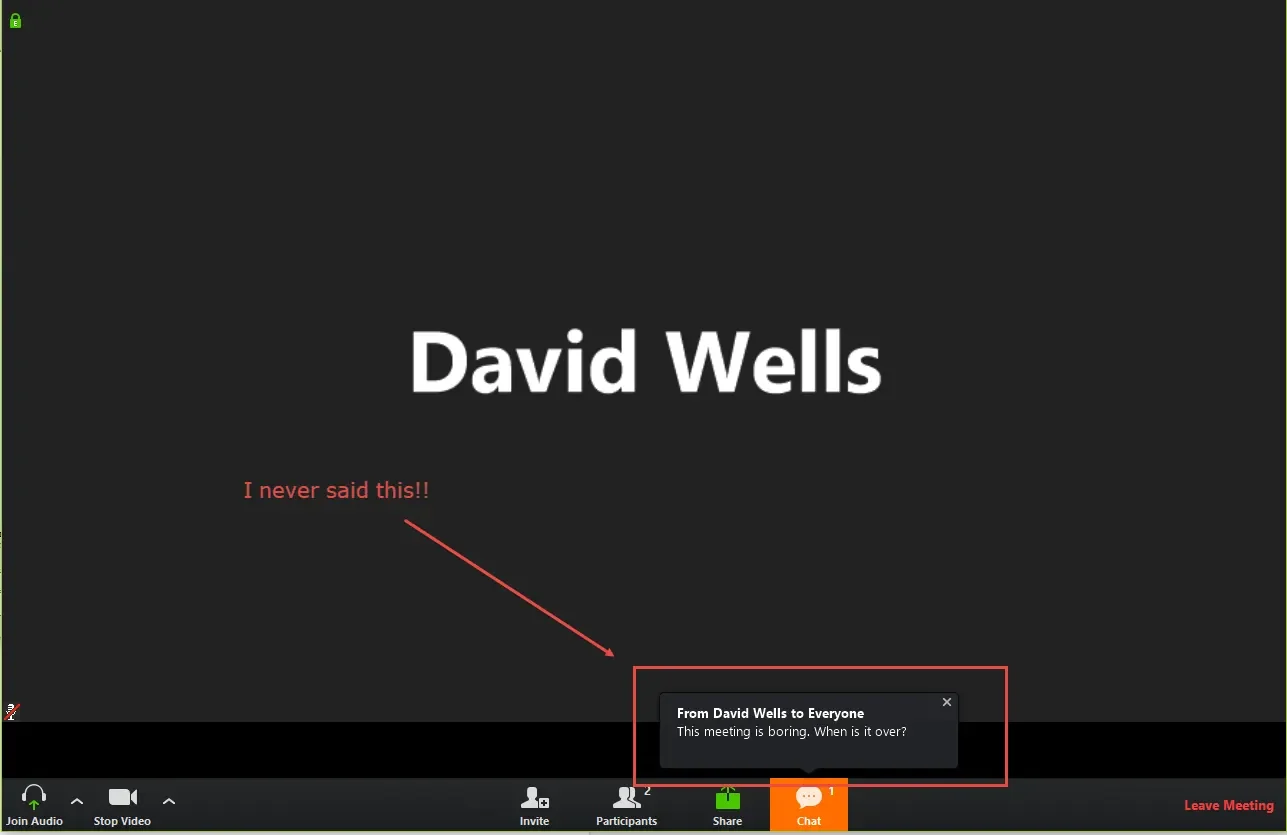
Awkward…
Attack vectors
These attacks run over UDP and need no response, so they can be carried out by non-attendees. If a meeting attendee is on the attacker's local network, perhaps meeting with others over WAN, the attacker can slip UDP packets into their local stream via spoofing. Those packets get sent to the Zoom server session and echoed back out to all other meeting members, triggering the bug for any attendee, including those over WAN.
Theoretically, and not yet tested, this can be exploited as a fully remote non-attendee over WAN, given knowledge of the public IP of the business or user in the meeting and the ability to spoof that public IP. The attacker sends a UDP packet to the Zoom server with a spoofed source IP and port combination used by the victim, slipping into the conferencing UDP stream. The public IP part must be known; the source port can be brute forced until controls are hijacked. The destination UDP port for Zoom servers is always 8801, which removes some of the unknowns and makes the scenario feasible. Desktop control is blind for the attacker, but a WIN_KEY+R followed by a command might be all that is needed.
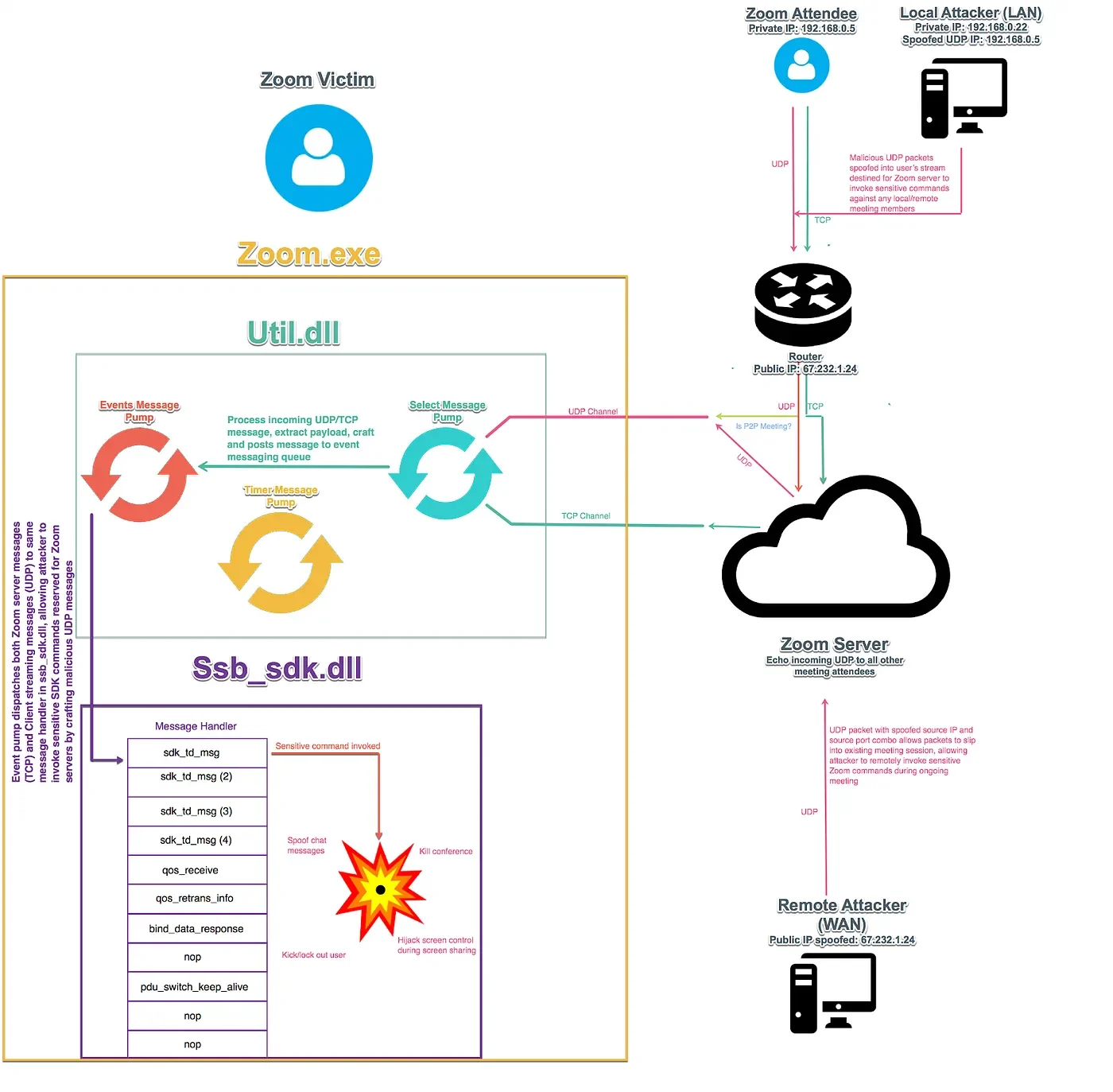
Zoom Exploit Diagram
Encrypted meetings do not protect against this vulnerability. Testing confirmed it, because the UDP channel uses unencrypted UDP packets for the function IDs being invoked.
Root cause
process_io_event reads both UDP and TCP traffic and posts the resulting messages to the same event handler, which dispatches on a function ID without checking the transport the message arrived on. The trusted TCP channel and the untrusted UDP channel therefore share a dispatch path, and at this point Zoom does not check where the message came from. The request/granting prompt for desktop control does not help, because the unsolicited path relies on server packets to decide who gets control, so a forged server packet is enough.
Fix
Zoom released an update for MacOS and Windows. In the patch, a function called before entering the message handler switch case checks whether the message origin came from the TCP channel by querying a member in the tp_adapter object. If the message did not come from TCP, an additional check looks for sensitive function IDs in the packet. If found, execution is diverted to the red zone.
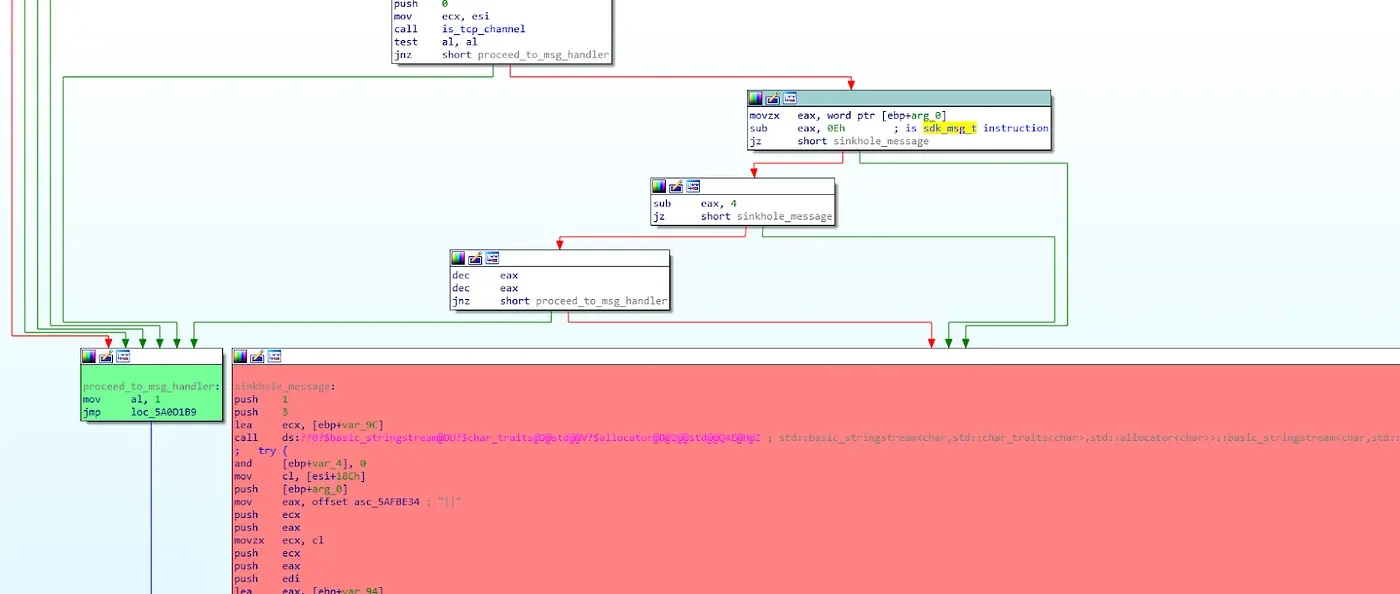
New Patch Checking if Message Came from TCP
The red zone notifies Zoom servers that this type of attack was attempted, sending a new tag called EVT_CMD_ILLEGAL_SRC that also reports the offending attack message. Zoom servers also appeared to be patched against the attack and now filter out harmful UDP packets, so testing with the POC requires a P2P meeting with an unpatched Zoom client.
Variants to test
- Send a UDP packet carrying a sensitive function ID to a client and observe whether it is dispatched. A positive result is the action being carried out without a TCP-origin check, for example desktop control being granted.
- Compare the TCP and UDP layouts of the same instruction. A positive result is finding the function ID at a different offset in the UDP form, with the header and attendee ID fields adjustable.
- Test the unsolicited desktop control path by sending the give desktop control packet alone. A positive result is the presenter's client handing control to the chosen attendee without a prompt.
- Test in an encrypted meeting. A positive result is the same behaviour, since the relevant UDP packets are unencrypted.
- Test from a non-attendee on the same local network by spoofing packets into the attendee's stream. A positive result is the action being echoed to all meeting members.
- Test the WAN scenario with a spoofed public source IP and port, sending to UDP port 8801 and brute forcing the source port. A positive result is the packet joining the conferencing stream and triggering the action.
- Try other function IDs from the 35 case handler, such as those behind raising hands, kicking attendees, invoking the trial timeout and spoofing chat. A positive result is any of those actions being performed by a forged UDP packet.
What happened, in plain words
Zoom is a program for holding meetings over the internet. During a meeting, one person can share their screen so everyone else sees it, and can hand over control of their mouse and keyboard to another person. That handover is meant to be protected: the person sharing has to agree to it.
A security researcher found a logic flaw in Zoom's desktop client, tracked as CVE-2018-15715. A logic flaw is a mistake in how a program decides things, rather than a crash or a memory error. Here the mistake was that the Zoom program treated two very different kinds of network traffic as if they were the same. One kind comes from Zoom's own servers, which the program trusts. The other kind comes from other people's computers, which it should not trust. Because the program did not check which kind a message was, an attacker could send a fake message that looked like it came from a trusted Zoom server. With that, the attacker could force a screen-sharing user to hand over desktop control, then send keystrokes to that person's computer. The attacker did not even have to be in the meeting.
The logic flaw affected the Zoom clients for MacOS, Linux and Windows. Zoom released an update for MacOS and Windows.
Desktop Control Authorization Bypassed and Keystrokes Sent to Remote Attendee
The vulnerability covers more than desktop control. It also lets an attacker manipulate other restricted meeting features, as we will see. The walkthrough uses the Windows Zoom client as the example.
Background: how a program like Zoom is built
Before the bug makes sense, you need a little picture of what is going on inside a program like Zoom. A program is not one single thing happening at once. It is more like an office with many workers. Some workers listen for network traffic, some draw the screen, some play audio. They need to pass notes to each other. The system that carries those notes is called a messaging system.
The messaging system
Zoom's client has its own messaging system, written by Zoom rather than taken from a standard library. A note in this system is an object of a class called msg_db_t. A class is a blueprint for a bundle of data in a program. Each note is placed on a queue, which is a line of notes waiting to be handled, and a message pump takes notes off the queue and hands them to the right part of the program.
The Windows client contains four message pumps, located in a file called Util.dll, and three of them appear to be used. A .dll file is a library of code that a Windows program loads and shares; think of it as a toolbox the main program opens.
Zoom Message Pumps
The note class is small. Here is its general structure as shown in the report:
class msg_db_t : public ssb_allocator {
  msg_db* prev;
  msg_db* next;
  BYTE* dataBegin;
  BYTE* dataEnd;
  DWORD rw_lock;
};
Line by line:
class msg_db_t : public ssb_allocator {declares a new class namedmsg_db_tthat builds on an existing class calledssb_allocator. Thepublicpart means the new class inherits the allocator's abilities, in this case the ability to obtain memory.msg_db* prev;andmsg_db* next;are pointers to the previous and next note. A pointer is a reference to a place in memory. Having both lets notes be chained together in a list, like carriages of a train.BYTE* dataBegin;andBYTE* dataEnd;mark where the note's actual content starts and ends in memory.BYTEmeans one byte of data.DWORD rw_lock;is a lock used to coordinate reading and writing. A lock is like a key to a shared room: only one worker holds it at a time, so two workers do not scribble over the same note.};closes the class.
When a Zoom client needs its meeting status updated, or receives packets that are part of an audio or video stream, it builds one of these notes and posts it to the appropriate queue. The pump for that queue processes it and dispatches it to the right handler, which carries out the desired action or update.
Tracking a message through this system is hard. The researcher compared it to finding a needle in a haystack, where the haystack is being shot out of a fire hose. The tool that made it tractable was the hardware breakpoint, a debugger feature that pauses the program at a chosen point so you can look around. A debugger is a tool for running a program slowly and inspecting it. With hardware breakpoints, the researcher could stop exactly when a particular note was read off a queue and follow the path from creation to processing.
How Zoom talks over the network
When a Zoom client starts or joins a meeting, it contacts a Zoom server over TCP to announce that the meeting is starting or being joined. TCP is one of the two main ways computers send data over the internet. Think of TCP as a phone call: both sides stay connected, and the network makes sure everything arrives in order. The other way is UDP, which is more like sending postcards: each one is fired off on its own, with no guarantee of arrival and no back-and-forth.
The Zoom server uses that TCP connection to notify the right attendees that a meeting member has joined or started a meeting, to set up UDP streaming for the new client, and to perform a peer-to-peer check. Peer-to-peer, or P2P, means two computers talk directly to each other instead of both going through a central server. If the check says P2P is possible, the Zoom server can lay low and leave the audio and video to be streamed directly from client to client. The TCP channel is then used throughout the meeting for updates on attendee status and meeting state.
Networking of Zoom Clients
In short: the TCP channel is used to talk to the trusted Zoom server and receive status updates throughout the meeting, while the UDP channel is used for streaming audio and video, whether that is P2P or proxied through the Zoom server. Proxied means the traffic goes through the server rather than directly between the two people.
How network messages become notes
One of the message pumps listed earlier is called ssb::select_t::loop. It loops and calls into util.dll!process_io_event. The ! notation means "the function inside this file", so this is the function process_io_event inside util.dll. That function is responsible for calling a virtual function that generically handles receiving network traffic from a socket_io_t based class in tp.dll. A virtual function is a function whose exact version is chosen at runtime, so one generic call can end up in different code depending on the kind of connection.
process_io_event calling into "recv_network_data" to generate a network message
Whether the traffic is UDP or TCP, represented by socket_io_udp_t or socket_io_tcp_t, the abstraction takes care of it. An abstraction here means one piece of code that hides the differences between two things behind a single interface, like a universal remote that works with several brands of television. All that is really expected from process_io_event is that incoming network data is read and wrapped in a note object of type msg_db_t.
That note is eventually posted to the events queue, where the next pump, ssb::events_t::loop, takes over. It pops the note off the queue and dispatches it to the appropriate event message handler so the program state is updated according to the new network data. This particular handler is a 35 block switch case located in ssb_sdk.dll. A switch case is a programming construct that picks one branch out of many based on a value, like a railway switch sending a train down one of many tracks.
Message Handler for Event Messages
The network message is sent to this handler, where an identifier inside the message tells it which case to invoke. The researcher calls these function IDs. Some examples of switch case functionality that can be triggered by function IDs are:
Qos_receivePdu_keep_aliveSdk_td_msg
There is no single case that says "hijack screen controls" or "spoof chat messages". Things get much more complex beyond these 35 cases. Most cases craft yet another message, which is posted to another queue, processed by different handlers that branch into a DLL the researcher does not even discuss, and invoke more and more switch cases that may craft more messages. That depth is not needed to explain this vulnerability.
The logic flaw itself
One thing you may have realised about this design is that UDP and TCP data are both read by process_io_event and eventually posted to the same handler. TCP is considered the trusted channel used by Zoom servers. Yet at this point Zoom is not checking where the crafted message came from. All it knows is that it has an event message to process, and process_io_event hands these out with whatever packets come its way, TCP or not. This means the trusted TCP channel can be spoofed with the untrusted UDP channel. Spoofing means pretending to be something you are not, in this case making a packet look like it came from the trusted server.
That is interesting, but the next question is what special functionality a Zoom server can invoke in a client without being asked. The answer is more than you might expect. Screen sharing is the example.
How the attack works
Step 1: Understand how desktop control is normally granted
In a Zoom meeting, an attendee has the option to share their screen. They also have the option to hand over controls to another attendee. That means full control, as in remote desktop abilities, for the attendee who receives it. Because of this, security is built in so control cannot easily be hijacked.
One screen control option uses a request and granting method. An attendee requests control, a prompt pops up for the presenter, and the presenter has to click allow, which then sends the proper support_response_type value to Zoom servers.
Zoom's Solicited Granting of Desktop Control
This route is a dead end for an attacker, because it is backwards to what the attacker can do. The attacker cannot make the client say things to the Zoom server. The attacker can only impersonate a Zoom server and tell the client things.
Step 2: Examine the unsolicited path
The second way of authenticating screen controls is manual, from the presenter's side.
Zoom's Unsolicited Granting of Desktop Control
This second option is the unsolicited approach, where presenters decide to whom they want to give access. When the presenter hands over controls this way, it sounds as though the thick client would need a local change of state before reaching out to Zoom servers. A thick client is a program that does most of the work on your own computer rather than in a browser. If a local change of state were required, impersonating the server alone could not trigger the feature remotely. That is not the case.
When the client reaches out to the Zoom server after clicking give mouse/keyboard control, it is really just waiting for its local SDK to be invoked back by the Zoom servers so it can tell the presenter who to give access to. An SDK is a software development kit, a bundle of code that Zoom's own program uses to perform meeting functions. In short, Zoom server packets ultimately trigger who is sharing what with whom, and anything else is just a request for Zoom servers to execute it.
After investigating this functionality, it turns out all that is needed is to send the give desktop control packet to the target attendee.
Step 3: Adapt the packet for UDP
With the UDP channel, messages are parsed differently, so this is not as simple as a replay attack from the TCP packets. A replay attack means recording a legitimate message and sending it again later. The function ID has to be arranged at a different offset, and some other touch ups are needed: changing the header altogether if the attack is over P2P rather than through a Zoom server, and setting the attendee ID field so the desktop control context applies properly. An offset is a position counted from the start of a packet, and a header is the fixed opening part of a packet that says what kind of packet it is and where it is going. These variations are handled in the POC's message templates, where the offsets are taken care of and various message fields are replaced with context relevant data from the attacker using the tool. A POC is a proof of concept, a small tool that demonstrates the bug.
After reversing Zoom's TCP desktop control instruction, the researcher found the function ID to hit is sdk_msg_t (0x0e). Reversing here means taking apart compiled code to work out what it does. 0x0e is the number 14 written in hexadecimal, a base-16 way of writing numbers that programmers often use. Additional data is needed to trigger the desktop control part specifically.
Step 4: Send the three requests
Researching the general protocol for this to work, three separate requests are needed:
- Tell attendee Y to give attendee X desktop control
- Notify attendee Y that control is in effect from attendee X
- Send keystrokes/mouse data from attendee X to attendee Y
Once this is done, desktop controls of a screen sharing user are hijacked over UDP and keystrokes can be sent. The remote attendee chosen does not matter, because the attacker's follow up keystrokes spoof as the new authenticated attendee.
Popping Calculator in Remote Zoom Client.
Other things the same trick allows
Now that the attacker can take advantage of this message handler and basically impersonate a Zoom server, other things become possible too. The researcher found you can raise other people's hands during a meeting, kick out meeting attendees and lock them out, invoke the Zoom trial version timeout, which kills the meeting for everyone, and even spoof chat messages so they appear to come from other meeting attendees.
Awkward…
Who can carry out the attack
This is where it gets really interesting. Not only can the attack be carried out as an attendee in the Zoom meeting, but because these attacks are over UDP and no response is needed, it can also be carried out by non-attendees. If a Zoom meeting attendee is on your local network, for example, and perhaps meeting with others over WAN, you can slip these UDP packets into their local stream via spoofing. Those packets then get sent to the Zoom server session and echoed back out to all other meeting members, triggering the bug for any of the meeting attendees, even the ones over WAN. A local network is the set of computers sharing one connection, such as in an office or home. WAN means wide area network, the internet beyond that local network.
It gets better. Because no response is needed, theoretically, and not yet tested, this can be exploited as a fully remote non-attendee over WAN, given that the attacker knows the public IP of the business or user that is part of the meeting and has the ability to spoof that public IP address. An IP address is the numeric address of a computer on a network, and the public IP is the one the outside world sees. In this scenario, the attacker could send a UDP packet to the Zoom server with a spoofed source IP and port combination being used by the victim, and also slip into the conferencing UDP stream. A port is a numbered channel on a computer, so one machine can run several network conversations at once. The attacker would have to know the public IP part, while the source port could simply be brute forced until controls are hijacked. Brute forcing means trying every possibility until one works. The destination UDP port for Zoom servers is always 8801, which takes care of some of the unknowns and provides a feasible scenario. Desktop control will be blind for the attacker, but a WIN_KEY+R followed by a command might be all that is needed. Blind means the attacker cannot see the screen; WIN_KEY+R is the Windows keyboard shortcut that opens the Run dialog, where a command can be typed.
Zoom Exploit Diagram
You may wonder about encrypted Zoom meetings. Surely encryption protects against this, since the attacker could not craft a properly encrypted UDP packet. Encryption means scrambling data so only the intended recipient can read it. Testing confirmed that encrypted meetings do not protect against this vulnerability, because the UDP channel uses unencrypted UDP packets for these function IDs that the attacker wants to invoke.
Why it worked
process_io_event reads both UDP and TCP traffic and posts the resulting messages to the same event handler. That handler dispatches on a function ID without checking which transport the message arrived on. The trusted TCP channel and the untrusted UDP channel therefore share one dispatch path, and at this point Zoom does not check where the message came from. The request and granting prompt for desktop control does not help either, because the unsolicited path relies on server packets to decide who gets control, so a forged server packet is enough.
The fix
In the patch, a function called before entering the message handler switch case checks whether the message origin came from the TCP channel by querying a member in the tp_adapter object. If it is determined that the message was not from the TCP channel, an additional check is done to see if the packet contains sensitive function IDs. If found, execution flow is diverted to the red zone.
New Patch Checking if Message Came from TCP
The red zone actually notifies Zoom servers that this type of attack was attempted, which is interesting and good to see: Zoom is keeping an eye out for potential attack telemetry. Telemetry here means data sent back about what is happening. A new tag is sent to Zoom servers called EVT_CMD_ILLEGAL_SRC, which also reports the offending attack message.
It is also worth mentioning that Zoom servers appeared to be patched against this attack and now filter out harmful UDP packets, so testing with the POC would require a P2P meeting with an unpatched Zoom client.
Things to try if you want to test it yourself
- Send a UDP packet carrying a sensitive function ID to a client and observe whether it is dispatched. A positive result is the action being carried out without a TCP-origin check, for example desktop control being granted.
- Compare the TCP and UDP layouts of the same instruction. A positive result is finding the function ID at a different offset in the UDP form, with the header and attendee ID fields adjustable.
- Test the unsolicited desktop control path by sending the give desktop control packet alone. A positive result is the presenter's client handing control to the chosen attendee without a prompt.
- Test in an encrypted meeting. A positive result is the same behaviour, since the relevant UDP packets are unencrypted.
- Test from a non-attendee on the same local network by spoofing packets into the attendee's stream. A positive result is the action being echoed to all meeting members.
- Test the WAN scenario with a spoofed public source IP and port, sending to UDP port 8801 and brute forcing the source port. A positive result is the packet joining the conferencing stream and triggering the action.
- Try other function IDs from the 35 case handler, such as those behind raising hands, kicking attendees, invoking the trial timeout and spoofing chat. A positive result is any of those actions being performed by a forged UDP packet.
How it was disclosed
This vulnerability went through Tenable's coordinated disclosure process. Coordinated disclosure means the researcher tells the vendor privately and gives them time to fix it before details are published. Tenable's research advisory contains a disclosure timeline and a link to Zoom's release notes, and there is a more customer-oriented write-up on Tenable's blog.
Glossary
- API: a defined way for one piece of software to ask another to do something, like a menu of allowed requests.
- Attendee: a person who has joined a Zoom meeting.
- Brute force: trying every possible value until one works, such as every source port.
- Class: a blueprint in a program that describes a bundle of data and the operations on it.
- Client: the program on your own computer that connects to a service, here the Zoom desktop app.
- CVE: a public identifier for a known security vulnerability, here CVE-2018-15715.
- Debugger: a tool that runs a program slowly and lets you inspect and pause it.
- Desktop control: the ability to move another person's mouse and type on their keyboard during screen sharing.
- DLL: a library of code on Windows that programs load and share.
- Encryption: scrambling data so only the intended recipient can read it.
- Function ID: the identifier inside a message that selects which branch of the handler runs.
- Handler: the part of a program that receives a message and carries out the matching action.
- Hardware breakpoint: a debugger feature that pauses the program at a chosen point, implemented by the processor itself.
- Header: the fixed opening part of a network packet that describes what it is and where it goes.
- Hexadecimal: a base-16 way of writing numbers, often used in programming, where
0x0emeans 14. - IP address: the numeric address of a computer on a network; the public IP is the one the outside world sees.
- Local network: the computers sharing one connection, such as in an office or home.
- Logic flaw: a mistake in how a program decides things, rather than a crash or memory error.
- Message pump: the part of a program that takes messages off a queue and hands them to the right handler.
- Message queue: a line of messages waiting to be processed.
- Offset: a position counted from the start of a packet or block of data.
- P2P (peer-to-peer): two computers talking directly to each other instead of through a central server.
- Packet: one unit of data sent over a network.
- POC: proof of concept, a small tool that demonstrates a vulnerability.
- Pointer: a reference to a place in memory.
- Port: a numbered channel on a computer so several network conversations can run at once.
- Presenter: the person sharing their screen in a meeting.
- Proxied: traffic that goes through a server rather than directly between two people.
- Replay attack: recording a legitimate message and sending it again later.
- Reversing: taking apart compiled code to work out what it does.
- SDK: software development kit, a bundle of code a program uses to perform functions.
- Spoofing: pretending to be something you are not, such as making a packet look like it came from a trusted server.
- Switch case: a programming construct that picks one branch out of many based on a value.
- TCP: a network protocol that keeps a connection open and guarantees ordered delivery, like a phone call.
- Telemetry: data sent back about what is happening, used here to report attack attempts.
- Thick client: a program that does most of its work on your own computer rather than in a browser.
- UDP: a network protocol that fires off packets individually with no guarantee of arrival, like postcards.
- Virtual function: a function whose exact version is chosen at runtime.
- WAN: wide area network, the internet beyond a local network.


