DLL Hijacking when creating Rescue Media Builder leading to Privilege Escalation
The Rescue Media Builder binary loads a missing DLL called tcmalloc.dll from a user-writable folder in the user's PATH, so a local attacker can plant a malicious DLL that runs with Administrator rights. The attacker can then use a scheduled task to escalate from Administrator to SYSTEM.

- Triaged in 2 days
- Fixed in 4 months
- Paid in 3 days
- Disclosed after 3.9 years
Summary
Acronis True Image 2021 provides a Rescue Media Builder tool which lets the user create a bootable media to recover system if it becomes unbootable.
MediaBuilder.exe is the binary which manages such functionalities. The application is vulnerable to DLL hijacking attack because it searches for a non-existing DLL file named tcmalloc.dll (Google's custom implementation of dynamic memory allocation) in locations which can be controlled by the attacker or normal user thus placing a malicious DLL in one of the folder will result it getting loaded by MediaBuilder.exe with Administrator privileges which can be escalated to SYSTEM privileges thus resulting in Privilege Escalation.
Every Windows system contains %USERPROFILE%\AppData\Local\Microsoft\WindowsApps folder as a value in the User PATH environment variable where MediaBuilder.exe will search for the DLL if not found in the preceding Search order folders. The malicious DLL file can be placed in this folder as normal user has Full control over this folder.
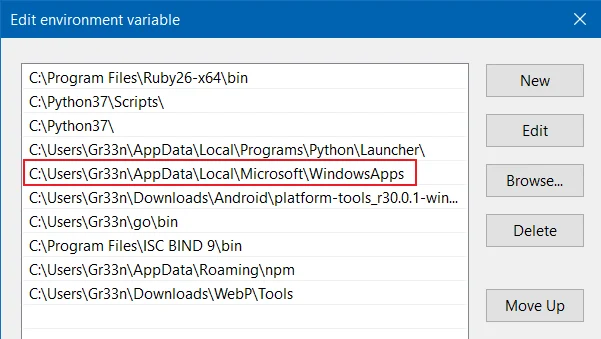
Even if %USERPROFILE%\AppData\Local\Microsoft\WindowsApps folder is not in User PATH environment variable, attacker can add any folder of his choice to the User PATH environment variable as this does not require Administrative permissions.
Steps To Reproduce
I created a DLL file which when loaded spawns cmd.exe while giving information as to which application loaded the DLL, path from where the file was loaded, and user privilege. I have attached the DLL file as well as the C++ code to build the DLL below if any necessary changes are to be made.
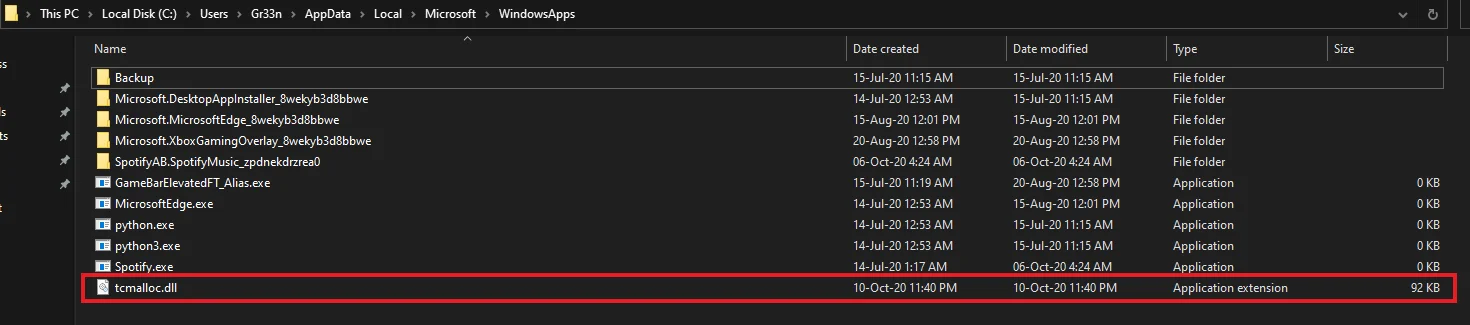
[ 1 ] - Copy or write the DLL file named tcmalloc.dll which is to be executed in %USERPROFILE%\AppData\Local\Microsoft\WindowsApps folder.
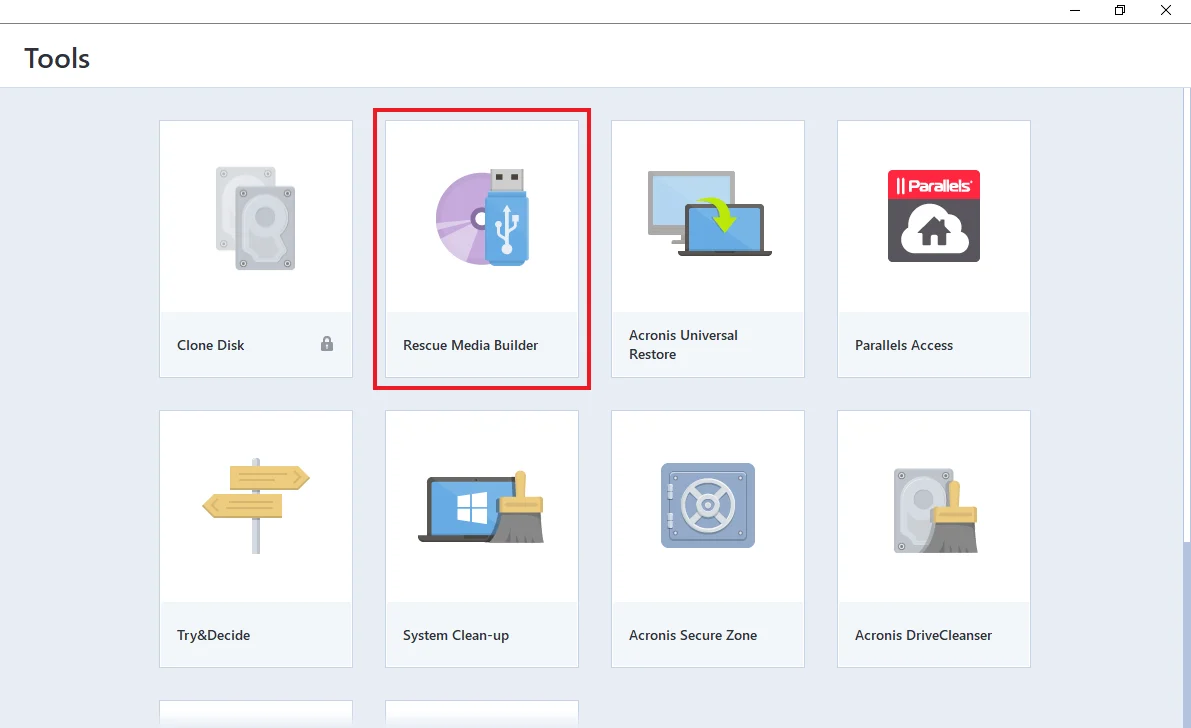
[ 2 ] - Got to Tools tab of True Image and open Rescue Media Builder.
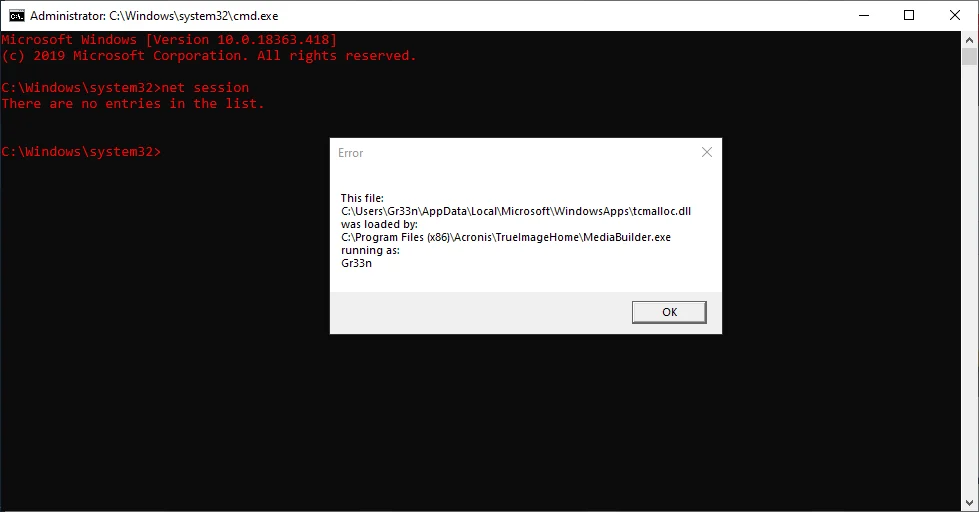
A cmd.exe window will open when MediaBuilder.exe loads the DLL file.
We can see in the title of the cmd.exe window that it was started with Administrator privileges. To confirm, I ran net session command which gives There are no entries in this list output if executed with Administrator privileges and Access denied if executed as a normal user.
Escalating from Administrator privileges to NT AUTHORITY\SYSTEM
[ 1 ] - From the Command Prompt that was executed after the DLL was loaded, create a scheduled task by using the Windows built-in schtasks.exe utility.
schtasks /create /SC WEEKLY /RU "NT AUTHORITY\SYSTEM" /TN EOP /TR C:\Windows\System32\winver.exe /IT /RL HIGHEST

[ 2 ] - Run the task created in above step from the elevated Command Prompt.
schtasks /run /I /TN EOP
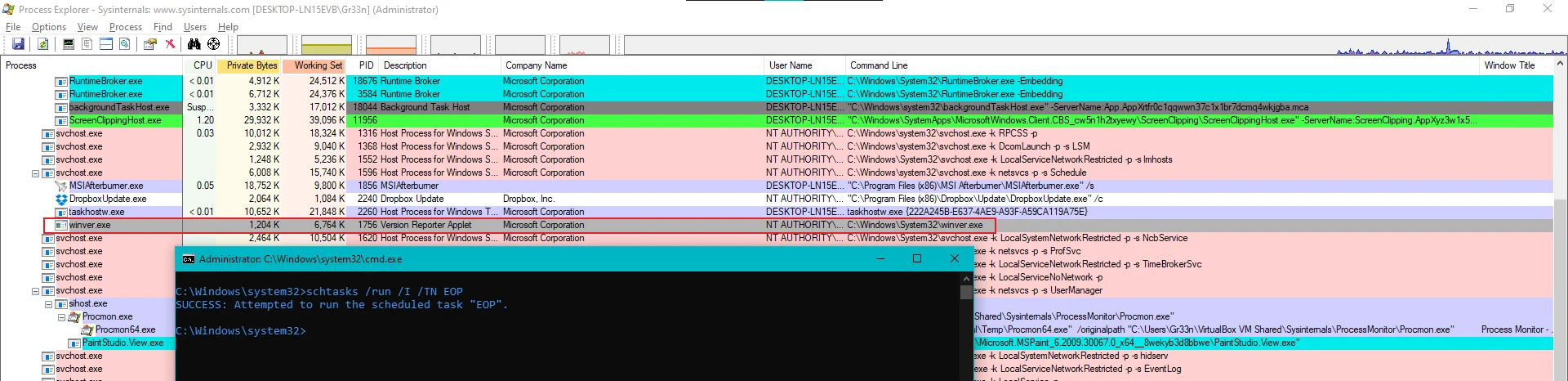
winver.exe can be seen executed as NT AUTHORITY\SYSTEM resulting in SYSTEM privileged code execution.
Impact
Attackers gaining privilege to execute commands as Administrator or NT AUTHORITY\SYSTEM.
Not written yet. The AI write-up for this report has not been written yet. The Original tab links to the source.
How it worked
Impact
An attacker who can write to the user's profile could execute code as Administrator and then as NT AUTHORITY\SYSTEM.
What the attacker needed
Local access to the user account; ability to write to the user profile folder; user launches Rescue Media Builder
How it was found
- Place a malicious DLL named tcmalloc.dll in the user's WindowsApps folder.
- Open the Tools tab in True Image and launch Rescue Media Builder.
- The DLL loads and a command prompt opens with Administrator privileges.
- Create a scheduled task that runs as SYSTEM from that prompt.
- Run the scheduled task to execute code as SYSTEM.
Explained by bugbounty.wiki with AI from the original and checked against quotes from it; it can still be wrong. Read the original before relying on a detail.
Not written yet. The AI write-up for this report has not been written yet. The Original tab links to the source.
When a program starts, Windows looks for supporting library files (DLLs) in a set order of folders. If a program asks for a DLL that is not there, an attacker can put a fake one in a folder the program checks, and the program will run the attacker's code. Here the program runs with high privileges, so the fake DLL runs with those privileges too.
What is RCE?
Running the attacker's code on the target's servers: through command or code injection, unsafe deserialisation or template injection.



