Local Privilege Escalation when updating Acronis True Image
The Acronis True Image updater writes a log file to a user-writable temporary folder with SYSTEM privileges. An attacker can create a symbolic link from that log file to a protected system file, causing the updater to overwrite the target file with log content, leading to privilege escalation.

- Triaged in 34 hours
- Fixed in 4 months
- Paid in 2 days
- Disclosed after 3.6 years
Summary
Acronis True Image has a feature that updates itself with its newer version automatically or manually depending on the user choice. When updating, the software writes log file named %temp%\Acronis\DriverSetup\inst.log with SYSYEM privileges accessible to normal user . This can be escalated to privileged write vulnerability by an attacker to write to files that he does not have permission to leading to Privilege Escalation.
Steps To Reproduce
I'm using Acronis True Image Version 2021, Build 32010 and will update it to latest build for demonstration.

In this example, I will overwrite C:\Windows\System32\drivers\pci.sys file which cannot be modified by normal user.
[ 1 ] - Delete %temp%\Acronis\DriverSetup if it already exists.
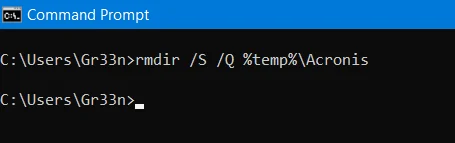
rmdir /S /Q %temp%\Acronis\DriverSetup
[ 2 ] - Create empty %temp%\Acronis folder.
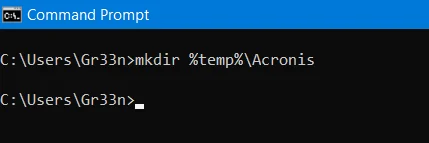
mkdir %temp%\Acronis
[ 3 ] - Create a symlink from %temp%\Acronis\DriverSetup\inst.log file to C:\Windows\System32\drivers\pci.sys file.
CreateSymlink %temp%\Acronis\DriverSetup\inst.log C:\Windows\System32\drivers\pci.sys

[ 4 ] - Go to Account tab in Acronis True Image and click on A new version is available. True Image will begin to download the latest version.
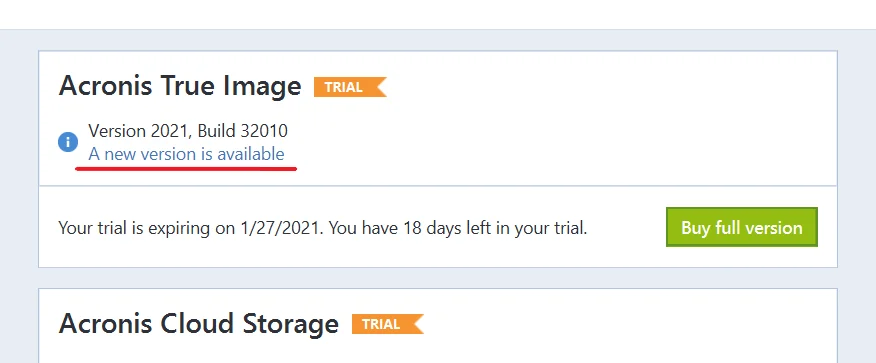
Wait for True Image to download new build.

[ 5 ] - The installer will open after the download is complete, click on Update in the installer.

While installing the new build, setupapp_amd64.exe will write to the log file in %temp%\Acronis\DriverSetup\inst.log with SYSTEM privileges and because of the symlink, pci.sys file will get overwritten.

This is the MD5 hash of pci.sys file before the attack.
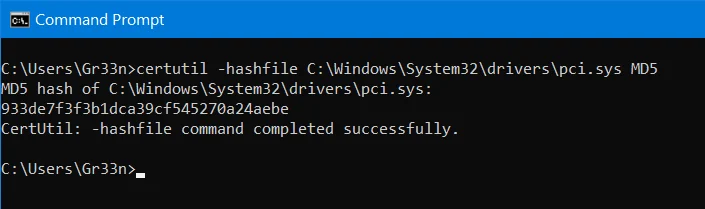
This is the MD5 hash of pci.sys file after the attack.
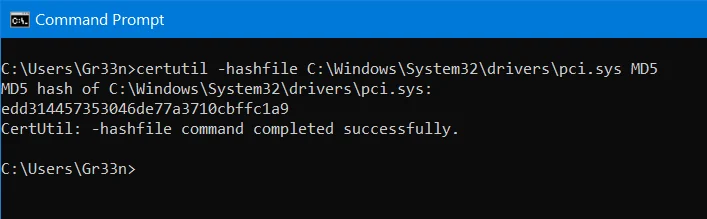
This proves that the content of pci.sys file was overwritten with the content of inst.log file
Tested on:
Windows 10 Home Version 20H2 (OS Build 19042.685) Acronis True Image Version 2021, Build 32010
Impact
Attacker can overwrite any file of his choice without permission. Further, the vulnerability can be escalated to SYSTEM privileged code execution if the content of the file can be controlled.
Context
Acronis True Image (now sold as Acronis Cyber Protect Home Office) is a backup and recovery product for Windows. It includes a self-update feature: the application checks for a newer build and, depending on the user's choice, downloads and installs it automatically or manually. The update path is the part of the product that matters here, because the installer runs with high privileges while writing into a location a normal user can reach.
The report describes a local privilege escalation. During an update, the software writes a log file to %temp%\Acronis\DriverSetup\inst.log with SYSTEM privileges, and that path is accessible to a normal user. If an attacker can make that path point somewhere else, the privileged writer follows it and overwrites a file the attacker could not otherwise touch.
Setup
The researcher tested on:
- Windows 10 Home Version 20H2 (OS Build 19042.685)
- Acronis True Image Version 2021, Build 32010, updated to the latest build for the demonstration
The report describes a normal user account on a machine with Acronis True Image installed and an update available. No special tooling is described beyond the ability to create a directory symbolic link, which the report shows with a CreateSymlink command.
Finding it
The observation is straightforward once you look at where the updater writes. The self-update feature writes its log to %temp%\Acronis\DriverSetup\inst.log. %temp% resolves inside the user's own profile, so a normal user can create, delete and replace anything under it. The process doing the writing, however, runs with SYSTEM privileges. A privileged process writing to a path the unprivileged user controls is the classic setup for a link-following attack: the user does not need write access to the final target, only the ability to redirect the path the privileged process opens.
The report frames this as a privileged write vulnerability: the attacker redirects the log write to a file they have no permission to modify, and the privileged writer overwrites it on their behalf.
Exploitation
The demonstration targets C:\Windows\System32\drivers\pci.sys, a driver file that a normal user cannot modify. The starting point is the installed build, which is then updated to the latest build.
Step 1: Remove any existing DriverSetup directory
rmdir /S /Q %temp%\Acronis\DriverSetup
This clears the DriverSetup folder under %temp%\Acronis if it already exists, so the next steps start from a clean state.
Step 2: Create the Acronis temp directory
mkdir %temp%\Acronis
This creates the parent folder that the updater expects under the user's temp directory.
Step 3: Create the symlink
CreateSymlink %temp%\Acronis\DriverSetup\inst.log C:\Windows\System32\drivers\pci.sys
This makes the log path the updater will write to resolve to the protected driver file. The attacker does not need write access to pci.sys; they only need to be able to create the link at a path inside their own temp directory.
Step 4: Trigger the update
In the Account tab of Acronis True Image, click on A new version is available. True Image begins downloading the latest version.
Wait for the download of the new build to finish.
Step 5: Run the installer
When the download completes, the installer opens. Click Update in the installer.
During installation of the new build, setupapp_amd64.exe writes to the log file at %temp%\Acronis\DriverSetup\inst.log with SYSTEM privileges. Because that path is now a symlink to pci.sys, the driver file is overwritten with the log content.
The report records the MD5 hash of pci.sys before the attack:
and after the attack:
Comparing the two hashes shows that the content of pci.sys was replaced with the content of inst.log, which confirms the privileged write landed on the protected file.
Root cause
The updater writes a log file into a per-user, world-writable location (%temp%) while running as SYSTEM, and it follows whatever the path resolves to at the time of the write. Nothing in the described flow prevents the log path from being a symbolic link, so the privileged process opens the link target instead of a file it created itself. The report does not describe any mitigation.
Impact
An attacker with a normal user account can overwrite any file of their choice without having permission to do so. The report notes that the vulnerability can be escalated further to SYSTEM privileged code execution if the content of the overwritten file can be controlled. In the demonstrated case the overwritten file is a driver and the content written is the log file.
Fix
The report does not describe a fix or a vendor response.
Variants to test
- Point the log symlink at other protected files the updater might touch, such as service binaries or configuration files, and check whether the hash changes after the update.
- Try a directory junction or a mount point instead of a file symlink, in case the writer creates the file rather than opening an existing one.
- Check whether the log content can be influenced, for example by controlling values that end up in the log line, since that determines whether the write can become code execution rather than a plain overwrite.
- Look for other privileged components in the same update flow that write into
%temp%or other user-writable paths, and test each with the same redirection.
Hunting notes
This class of bug hides wherever a privileged service or installer writes into a user-controlled directory: temp folders, user profile paths, and any location the unprivileged user can create or replace. During recon, the signal is a privileged process whose file operations land under %temp% or a similar per-user path. The way the researcher showed impact here was to pick a file the normal user provably cannot modify, record its hash before and after, and demonstrate that the privileged write changed it.
What happened, in plain words
Acronis True Image is a backup and recovery program for Windows. It can update itself: when a new version is available, it downloads and installs it, either automatically or when you click a button. The problem is in how the updater writes a log file during that process.
A log file is just a text file where a program records what it is doing, so that problems can be diagnosed later. During an update, Acronis writes a log to a path inside your own temporary folder: %temp%\Acronis\DriverSetup\inst.log. %temp% is a folder inside your own user profile that you can write to with a normal account. But the program that writes the log runs with SYSTEM privileges, which is the highest level of permission on Windows, higher than a normal administrator.
Because the log path is in a folder you control, you can replace that path with a symbolic link (a shortcut that points to another file). If you make the log path point to a protected file, such as a Windows driver, then when the privileged updater writes its log, it actually writes into the protected file. The updater has permission to write there; you do not. So you have tricked a powerful program into doing something you could not do yourself. This is called a local privilege escalation: you start as a normal user and end up causing changes that only a much more powerful account should be able to make.
The researcher demonstrated this by overwriting C:\Windows\System32\drivers\pci.sys, a driver file that a normal user cannot modify. They recorded the file's MD5 hash (a kind of digital fingerprint) before and after, and showed that it changed.
The setup
The test was done on:
- Windows 10 Home Version 20H2 (OS Build 19042.685)
- Acronis True Image Version 2021, Build 32010, which was then updated to the latest build for the demonstration.
The report describes a normal user account on a machine where Acronis True Image is installed and an update is available. The report does not mention any special tools beyond the ability to create a directory symbolic link, which it does with a command called CreateSymlink.
Finding the problem
The key observation is where the updater writes its log. The self-update feature writes to %temp%\Acronis\DriverSetup\inst.log. The %temp% folder is inside your own user profile, so you can create, delete and replace anything in it. But the process doing the writing runs as SYSTEM. When a powerful process writes to a path that a normal user can control, you have the classic setup for a link-following attack: you do not need permission to write to the final target file; you only need to be able to redirect the path that the powerful process opens.
The report calls this a privileged write vulnerability: the attacker redirects the log write to a file they have no permission to modify, and the privileged writer overwrites it on their behalf.
Exploitation
The demonstration targets C:\Windows\System32\drivers\pci.sys, a driver file that a normal user cannot modify. The starting point is the installed build, which is then updated to the latest build.
Step 1: Remove any existing DriverSetup directory
rmdir /S /Q %temp%\Acronis\DriverSetup
This command deletes the DriverSetup folder under %temp%\Acronis if it already exists, so that the next steps start from a clean state. rmdir is the Windows command to remove a directory; /S means remove all files and subfolders, and /Q means do it quietly without asking for confirmation.
Step 2: Create the Acronis temp directory
mkdir %temp%\Acronis
This creates the parent folder that the updater expects under your temporary directory. mkdir is the command to make a directory. Creating this folder yourself ensures that the path exists and that you control it.
Step 3: Create the symlink
CreateSymlink %temp%\Acronis\DriverSetup\inst.log C:\Windows\System32\drivers\pci.sys
This creates a symbolic link (a kind of shortcut) at the path where the updater will write its log, pointing to the protected driver file. The first path is the link you create; the second path is the target it points to. Now, whenever a program tries to write to %temp%\Acronis\DriverSetup\inst.log, Windows will actually write to C:\Windows\System32\drivers\pci.sys. You do not need write permission on pci.sys; you only need to be able to create the link inside your own temp folder, which you can.
Step 4: Trigger the update
In the Account tab of Acronis True Image, click on A new version is available. True Image begins downloading the latest version.
Wait for the download of the new build to finish.
Step 5: Run the installer
When the download completes, the installer opens. Click Update in the installer.
During installation of the new build, setupapp_amd64.exe writes to the log file at %temp%\Acronis\DriverSetup\inst.log with SYSTEM privileges. Because that path is now a symlink to pci.sys, the driver file is overwritten with the log content.
The report records the MD5 hash of pci.sys before the attack:
and after the attack:
Comparing the two hashes shows that the content of pci.sys was replaced with the content of inst.log, which confirms the privileged write landed on the protected file. An MD5 hash is like a fingerprint of a file: if the file changes, the hash changes too. The fact that the hash is different after the attack proves the file was modified.
Root cause
The updater writes a log file into a per-user, world-writable location (%temp%) while running as SYSTEM, and it follows whatever the path resolves to at the time of the write. Nothing in the described flow prevents the log path from being a symbolic link, so the privileged process opens the link target instead of a file it created itself. The report does not describe any mitigation.
Impact
An attacker with a normal user account can overwrite any file of their choice without having permission to do so. The report notes that the vulnerability can be escalated further to SYSTEM privileged code execution if the content of the overwritten file can be controlled. In the demonstrated case the overwritten file is a driver and the content written is the log file.
Fix
Variants to test
- Point the log symlink at other protected files the updater might touch, such as service binaries or configuration files, and check whether the hash changes after the update.
- Try a directory junction or a mount point instead of a file symlink, in case the writer creates the file rather than opening an existing one.
- Check whether the log content can be influenced, for example by controlling values that end up in the log line, since that determines whether the write can become code execution rather than a plain overwrite.
- Look for other privileged components in the same update flow that write into
%temp%or other user-writable paths, and test each with the same redirection.
Hunting notes
This class of bug hides wherever a privileged service or installer writes into a user-controlled directory: temp folders, user profile paths, and any location the unprivileged user can create or replace. During recon, the signal is a privileged process whose file operations land under %temp% or a similar per-user path. The way the researcher showed impact here was to pick a file the normal user provably cannot modify, record its hash before and after, and demonstrate that the privileged write changed it.
Glossary
- Privilege escalation: Gaining higher permissions than you are supposed to have, often from a normal user to an administrator or SYSTEM.
- SYSTEM: The highest privilege level on Windows, used by the operating system itself; more powerful than a normal administrator account.
- Log file: A file where a program records events and errors for later diagnosis.
- %temp%: An environment variable that points to the current user's temporary folder, where any program run by that user can write.
- Symbolic link (symlink): A special file that acts as a shortcut to another file or folder; opening the link opens the target.
- Driver: A low-level program that lets the operating system communicate with hardware; drivers run with high privileges.
- MD5 hash: A short string of characters computed from a file's contents; changing the file changes the hash, so it acts like a fingerprint.
- Privileged write: Writing to a file using a process that has higher permissions than the user who triggered the write.
- Link-following attack: An attack where a privileged process is tricked into following a symbolic link created by an unprivileged user, so it operates on a different file than intended.
- Reparse point: A Windows feature that allows a file or folder to redirect to another location; symbolic links and junctions are types of reparse points.
- Directory junction: A type of reparse point that redirects a folder to another folder.
- Mount point: A folder that is mapped to a disk or partition.
- Code execution: Running your own commands or programs on a system, especially with high privileges.
- Recon: The phase of security testing where you gather information about a system to find weaknesses.


