Local Privilege Escalation and Code Execution when restoring files from Quarantine
The restore feature of Acronis True Image's antivirus quarantine was vulnerable to a directory junction attack, allowing an attacker to write arbitrary files to protected locations. This could lead to local privilege escalation, denial of service, and SYSTEM-level code execution.

- Triaged in 3 days
- Fixed in 5 months
- Paid in 24 days
- Disclosed after 4.0 years
Summary
Acronis True Image has an Antivirus functionality which provides real-time protection and signature-based defenses against viruses and malwares. The Quarantine has a Restore feature which can be used to restore quarantined files back to their original location if the user is sure that the file is not a threat. The Restore file feature makes sure to stop Symlink attack successfully but it is vulnerable to Directory junction attack. After more testing, I was able to create or modify any file on the system with attacker controlled data that a normal user does not have access to thus resulting in a Local Privilege Escalation vulnerability.
Steps To Reproduce
[ 1 ] - Create a new folder anywhere on the system.
I created a folder named 'eicar' on my system. %userprofile% is a Windows environment variable for the user folder which is 'C:\Users\Gr33n' in my case.
mkdir %userprofile%\Desktop\eicar
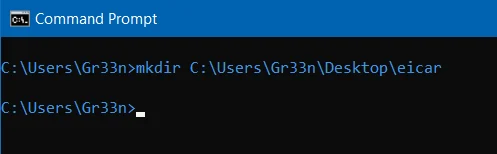
[ 2 ] - Write the EICAR test string to a file you want to replace or write as the target file as a fake virus for Acronis AV to detect. (eicar.bat in this case)
echo|set /p="X5O!P%@AP[4\PZX54(P^)7CC)7}$EICAR-STANDARD-ANTIVIRUS-TEST-FILE!$H+H*" > %userprofile%\Desktop\eicar\eicar.bat

After writing EICAR string to a file in 'eicar' folder, Acronis AV will detect it as a threat and will await for instructions wheather to trust the file or quarantine it.
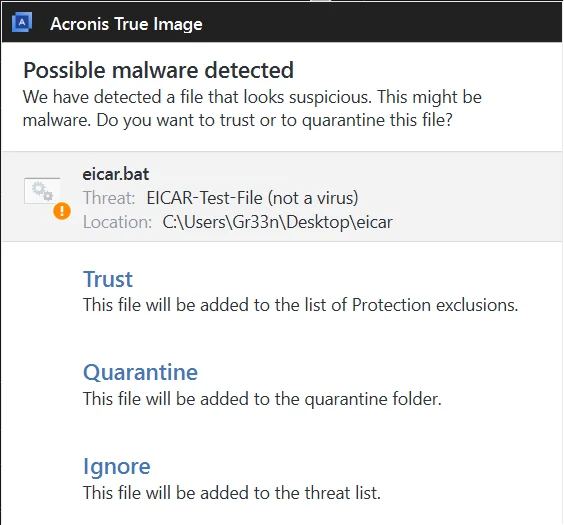
[ 3 ] - Before choosing the Quarantine option, we must change the contents of the detected eicar.bat file.
I will change the contents of eicar.bat file with a simple 'calc' command which opens Microsoft Calculator when executed in a batch file.
echo calc > %userprofile%\Desktop\eicar\eicar.bat
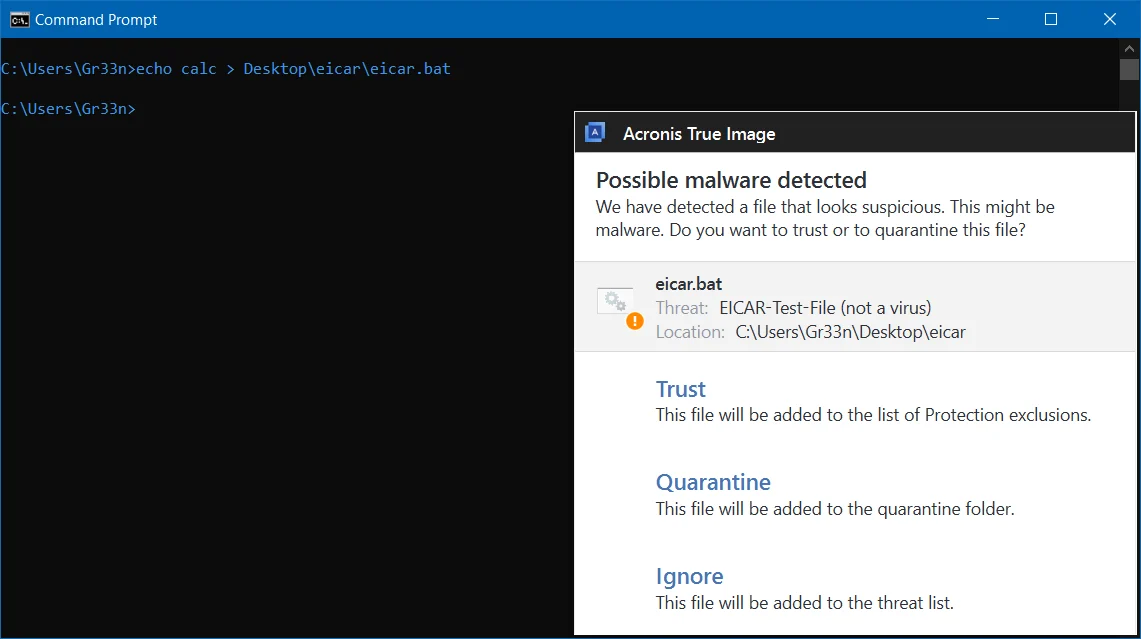
[ 4 ] - Click on Quarantine option in the Acronis AV threat detected overlay.
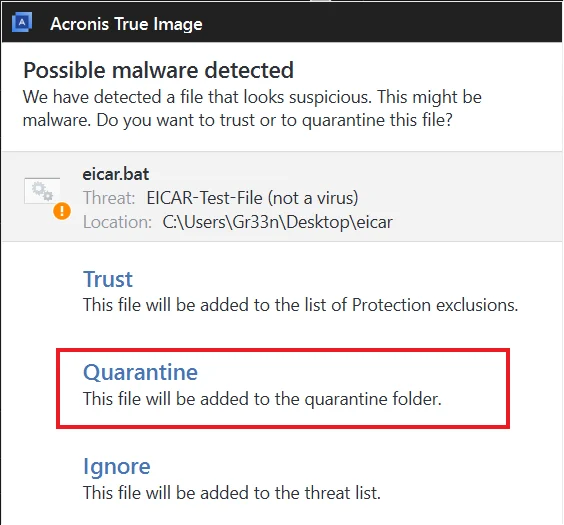
The edited eicar.bat will be moved into Acronis AV's Quarantine folder.
[ 5 ] - Delete the whole eicar folder as it a prerequisite for creating Directory Junction.
rmdir /S /Q %userprofile%\Desktop\eicar
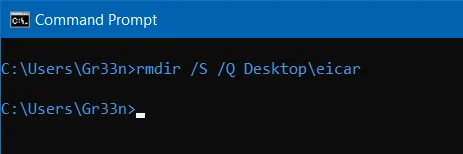
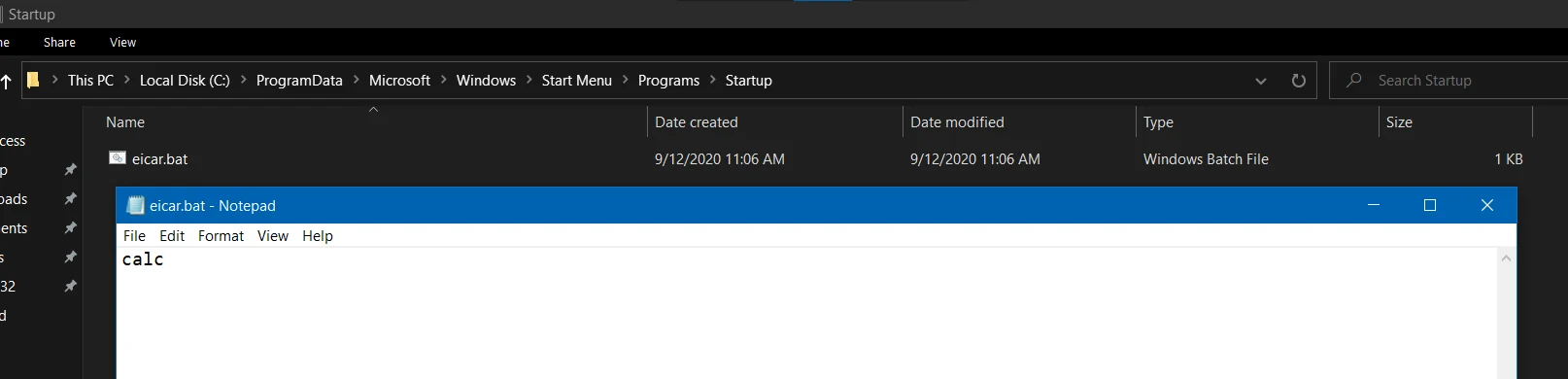
[ 6 ] - Create a Directory Junction from the 'eicar' folder to any target folder you want to write to but don't have permission for. I chose 'C:\ProgramData\Microsoft\Windows\Start Menu\Programs\StartUp' folder in Windows which executes any programs in it on system start as the logged in user. This means logging in as SYSTEM will execute the program from SYSTEM privileges.

[ 7 ] - Restore the quarantined 'eicar.bat' file from Acronis AV Quarantine.
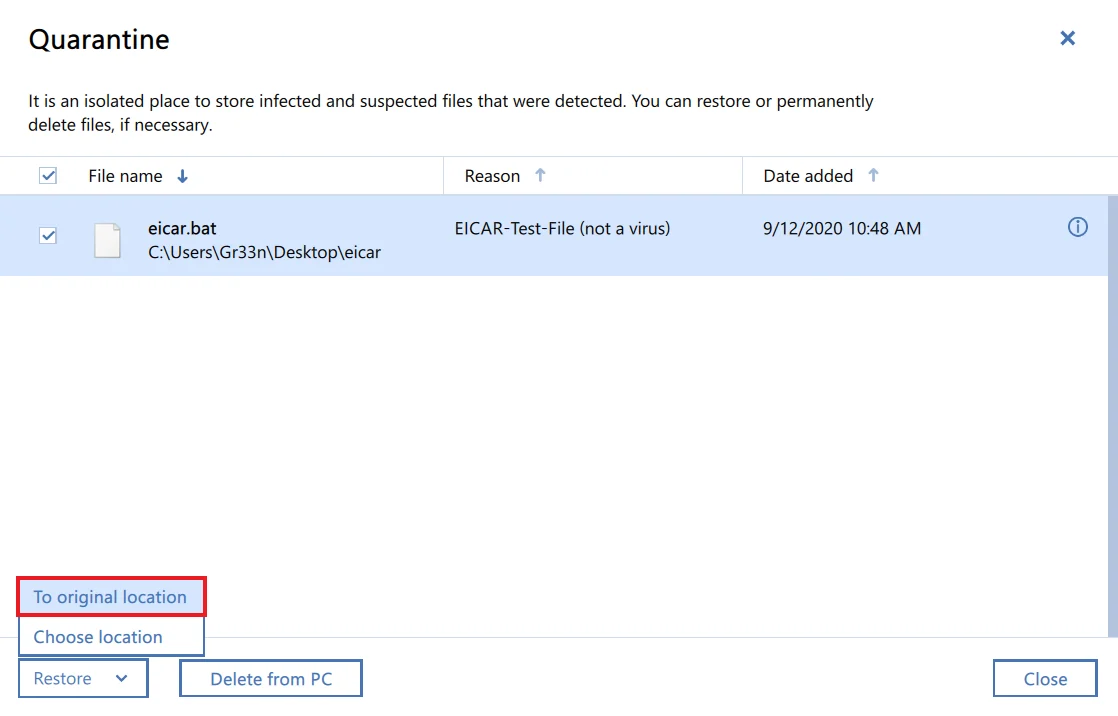
Acronis AV will restore the 'eicar.bat' to its original location but due to the Directory Junction from that folder to 'Startup' folder, the 'eicar.bat' file will be restored in 'Startup' folder.
Note
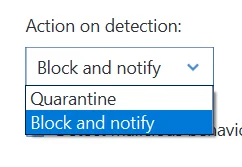
From Acronis AV's settings, I chose 'Block and notify' as Action on detection so that I could easily get screenshots for the demonstration of this report and it is the option that most people prefer. The vulnerability will also work when 'Quarantine' option is selected if attacker controlled data is written in detected file (eicar.bat) in a short time frame before Acronis AV moves the file into Quarantine which requires a little bit of trial an error.
Recommendations
Detect Directory Junction on file's origin folder and stop the restore process.
Impact
##Denial of Service (DoS) Using the above demonstrated vulnerability, an attacker can corrupt important files which are necessary for the working of the Acronis AV thus denying user from using its protection.
An attacker can also corrupt important files which are necessary for Windows to boot such as 'C:\Windows\System32\drivers\pci.sys' file. User won't be able to boot into Windows if this file gets corrupted resulting into a DoS attack.
##SYSTEM level Code execution [ 1 ] - I saw that Acronis AV users a 'schedul2.exe' application which executes 'C:\Program Files (x86)\Acronis\Agent\bin\adp-rest-util.exe' with SYSTEM privileges so I tried the above demonstrated attack on 'adp-rest-util.exe' and was able to execute attacker controlled command as SYSTEM as it can seen in the Process Monitor.

[ 2 ] - Attacker can plant malicious DLL files for applications running as SYSTEM or Acronis components itself in directories of DLL search order and the malicious DLL will be loaded when the application is launched resulting in SYSTEM level code execution.
Context
Acronis Cyber Protect Home Office, formerly Acronis True Image, ships an antivirus component that provides real-time protection and signature-based detection of viruses and malware. When a file is detected, the user is offered a choice: trust the file or move it to Quarantine. Quarantine also has a Restore feature, which puts a quarantined file back at its original location once the user is satisfied it is not a threat.
The restore path is the interesting part. According to the researcher, it successfully defends against a symlink attack, but it does not defend against a directory junction. That gap allows a normal user to create or overwrite files they would not otherwise be able to touch, with attacker-controlled content, which turns into local privilege escalation.
Setup
The work was done on Windows with Acronis AV enabled. The researcher's user profile is C:\Users\Gr33n, referenced throughout through the %userprofile% environment variable. The demonstration uses the EICAR antivirus test string as a harmless stand-in for malware, a batch file as the payload carrier, and the Windows Startup folder as the target of the junction. No special tooling is described beyond the Windows command prompt and Process Monitor, which is used later to observe SYSTEM-level execution.
The precondition is that Acronis AV is installed and running with its real-time protection active.
Finding it
The researcher's starting observation is that the Restore feature stops a symlink attack but not a directory junction attack. Both are ways of making one path resolve to another location, so a defence that covers only one of them leaves the other open. Because restore writes the quarantined file back to its original path, and that path can be redirected with a junction, the write can be aimed at a directory the user cannot normally write to.
A second observation matters for the payload: the file that gets quarantined is not necessarily the file that gets restored. There is a window between detection and the quarantine action in which the contents of the detected file can be changed. The restore then writes the changed content, not the content that was scanned.
Exploitation
Step 1: Create a working folder
A new folder is created on the desktop to hold the file that will be detected.
mkdir %userprofile%\Desktop\eicar
This folder is the original location that the restore will later target, and therefore the folder that will be replaced by a junction.
Step 2: Write the EICAR test string
The EICAR test string is written into a batch file so that Acronis AV detects it as a threat.
echo|set /p="X5O!P%@AP[4\PZX54(P^)7CC)7}$EICAR-STANDARD-ANTIVIRUS-TEST-FILE!$H+H*" > %userprofile%\Desktop\eicar\eicar.bat
Once the string is in place, Acronis AV flags the file and waits for instructions on whether to trust it or quarantine it.
Step 3: Replace the detected content
Before choosing Quarantine, the contents of the detected file are overwritten. The replacement is a single calc command, which opens the Microsoft Calculator when the batch file runs.
echo calc > %userprofile%\Desktop\eicar\eicar.bat
At this point the file on disk no longer matches what was detected, but the detection state still refers to the same path.
Step 4: Quarantine the file
The Quarantine option is selected in the Acronis AV threat-detected overlay.
The edited eicar.bat, containing the calc command rather than the EICAR string, is moved into Acronis AV's Quarantine folder.
Step 5: Remove the original folder
The original folder has to be gone before a junction can take its place.
rmdir /S /Q %userprofile%\Desktop\eicar
Step 6: Create a directory junction
A junction is created at the old path, pointing at a folder the user cannot write to. The researcher chose the Windows Startup folder, C:\ProgramData\Microsoft\Windows\Start Menu\Programs\StartUp, because anything placed there runs at system start for the account that logs in. If SYSTEM logs in, the program runs with SYSTEM privileges.
Step 7: Restore from Quarantine
The quarantined eicar.bat is restored through Acronis AV's Quarantine interface.
Acronis AV writes the file back to its original location, but that location is now a junction, so the file lands in the Startup folder instead.
If SYSTEM logs in, the restored batch file would execute with SYSTEM privileges.
A note on the detection action
For the screenshots, the researcher set the Action on detection in Acronis AV's settings to 'Block and notify', which is the option most people prefer. The same attack works with the 'Quarantine' option selected, provided the attacker-controlled content is written into the detected file within the short window before Acronis AV moves it into Quarantine. That timing requires some trial and error.
Root cause
The restore routine resolves the original path and writes the file there, but it only checks for symlinks on that path. A directory junction is a different reparse point type and is not caught, so the write follows the junction into a protected directory. The check covers symlinks but not directory junctions.
The second half of the bug is that the content written on restore is whatever is on disk at quarantine time, not the content that was scanned. The detection and the quarantine are separate moments, and the file can be swapped in between.
Impact
Denial of service
An attacker can corrupt files that Acronis AV needs in order to work, denying the user its protection. They can also corrupt files Windows needs to boot, such as C:\Windows\System32\drivers\pci.sys. If that file is corrupted, the user cannot boot into Windows, which is a denial of service.
SYSTEM-level code execution
The researcher noticed that Acronis AV uses a schedul2.exe application which executes C:\Program Files (x86)\Acronis\Agent\bin\adp-rest-util.exe with SYSTEM privileges. Running the same attack against adp-rest-util.exe allowed attacker-controlled commands to execute as SYSTEM, as observed in Process Monitor.
Separately, an attacker can plant malicious DLLs for applications running as SYSTEM, or for Acronis components themselves, in directories that are part of the DLL search order. The malicious DLL is loaded when the application launches, which again gives SYSTEM-level code execution.
Fix
The recommendation is to detect a directory junction on the file's origin folder and stop the restore process when one is present. The report does not describe a fix that was shipped.
Variants to test
- Other reparse point types on the restore path. A positive result is the restored file appearing in a directory the user cannot write to.
- Other privileged writers that restore, extract or copy files to a user-influenced path. A positive result is a file with attacker content landing in a protected directory.
- Content swap between detection and quarantine on other AV products. A positive result is the quarantined file differing from the detected one.
- Targeting binaries that privileged services execute, as was done with
adp-rest-util.exe. A positive result is a command running as SYSTEM. - Planting DLLs in search-order directories used by SYSTEM services. A positive result is the DLL loading when the service starts.
Hunting notes
This kind of bug hides in features that write files back to a path the user supplied earlier: quarantine restore, backup restore, extraction, download-to-folder and update staging. The signal during recon is a privileged component that takes a path from an unprivileged context and writes to it, especially when the product already shows awareness of symlinks, which suggests the developers thought about redirection but may have missed a variant.
What happened, in plain words
Acronis Cyber Protect Home Office, which used to be called Acronis True Image, is a backup and protection program for Windows. One part of it works like an antivirus: it watches files as they are used and checks them against a list of known bad files, much like a bouncer with a list of banned faces. When it finds something suspicious, it does not delete it straight away. It asks you what to do: trust the file, or move it to a safe holding area called Quarantine.
Quarantine is like a locked drawer for suspicious files. Nothing in the drawer can run, and you can look at what is inside and decide later. The drawer has a Restore button: if you decide a file was harmless after all, Restore puts it back exactly where it came from.
That Restore button is where the problem is. When it puts a file back, it trusts the folder path it saved earlier. On Windows, a folder path can be quietly redirected to a different folder using a trick called a directory junction, which is a bit like putting a forwarding address on an envelope: you post it to one address, but it is delivered somewhere else. The researcher found that Restore defends against one version of this trick (a symlink) but not against the junction version.
So a normal user, with no administrator rights, can:
- Get a harmless test file flagged by the antivirus.
- Swap its contents for a command of their choosing before it is quarantined.
- Delete the original folder and replace it with a junction pointing at a protected folder.
- Press Restore, and watch the file land in the protected folder instead.
If that protected folder is one Windows runs programs from at startup, the planted file runs with the highest privileges on the machine. That is a local privilege escalation: a normal user turning into a system-level user.
The pieces you need to know first
Before walking through the steps, here are the ideas the report leans on, explained from scratch.
- Antivirus (AV): software that checks files for known bad content. "Signature-based" means it compares files against a list of known patterns, like a fingerprint database. The EICAR string used here is a standard, harmless test pattern that every antivirus is designed to flag, so researchers can test AV behaviour without using real malware.
- Quarantine: a folder where the antivirus moves suspicious files so they cannot run. The user can later restore them.
- Privilege: what a program or user is allowed to do. A normal user account can write to their own folders but not to system folders. SYSTEM is the most powerful account on Windows, above even administrator, and it can do anything.
- Local privilege escalation (LPE): a bug that lets someone with low privileges gain higher ones on the same machine. "Local" means you already have some access to the computer; you are not breaking in from the internet.
- Symlink (symbolic link): a file or folder that acts as a shortcut to another location. Opening the link opens the target.
- Directory junction: a similar Windows shortcut for folders, but implemented differently under the hood. Because it is a different mechanism, a security check written for symlinks may not notice it. This difference is the heart of the bug.
- Reparse point: the general Windows name for these redirection objects. A symlink and a junction are both reparse points, but of different types.
- Environment variable: a named value Windows keeps for you.
%userprofile%expands to your user folder, for exampleC:\Users\Gr33non the researcher's machine. It saves you typing the full path. - Batch file (
.bat): a plain text file of Windows commands that runs when you double-click it. - DLL: a shared library file that programs load to get extra code. Windows searches a set order of folders to find a DLL, and if an attacker can put a malicious DLL in one of those folders, the program may load it.
- Process Monitor: a free Microsoft tool that records what programs do, including which programs they start and with what privileges. The researcher used it as evidence.
Setting the scene
The test machine ran Windows with Acronis True Image's antivirus switched on and its real-time protection active. The only tools mentioned are the Windows command prompt and, later, Process Monitor.
Acronis AV must be installed and running with real-time protection active.
No special software is needed beyond that.
The two observations behind the bug
The researcher started from two observations.
First, the Restore feature blocks a symlink attack but not a directory junction attack. Both tricks redirect a path to somewhere else, so a defence that only knows about one of them leaves the other open. Since Restore writes a file back to its saved path, and that path can be redirected, the write can be aimed at a folder the user could never write to directly.
Second, the file that gets quarantined is not necessarily the file that was scanned. There is a gap in time between the antivirus noticing a file and the moment it moves that file into Quarantine. During that gap, the contents on disk can be changed. Restore then writes the changed content, not the content that was checked.
Put together: you can make the antivirus carry a file of your choosing into a protected folder for you, using its own privileges.
Walking through the attack
Step 1: Create a working folder
A new folder is created on the desktop to hold the file that will be detected.
mkdir %userprofile%\Desktop\eicar
Line by line:
mkdirmeans "make directory", the Windows command for creating a folder.%userprofile%is replaced by Windows with the path of your user folder. On the researcher's machine that isC:\Users\Gr33n.\Desktop\eicaris the rest of the path, so the folder ends up on the desktop and is calledeicar.
Why this step: this folder is the "original location" that Restore will later write back to. Because it is the folder that will be swapped for a junction, it has to exist first so the antivirus records it as the file's home.
Step 2: Write the EICAR test string
The EICAR test string is written into a batch file so that Acronis AV detects it as a threat.
echo|set /p="X5O!P%@AP[4\PZX54(P^)7CC)7}$EICAR-STANDARD-ANTIVIRUS-TEST-FILE!$H+H*" > %userprofile%\Desktop\eicar\eicar.bat
Line by line:
echonormally prints text to the screen.|(a pipe) sends that output into the next command instead.set /p=reads a line of text and prints it without adding a newline at the end. The text in quotes is the EICAR string, a harmless pattern that antivirus products are built to recognise.>redirects the output into a file instead of the screen.%userprofile%\Desktop\eicar\eicar.batis the file being written: a batch file calledeicar.batinside theeicarfolder.
Why this step: the antivirus needs something to detect. The EICAR string gives it exactly that, without any real malware being involved.
Once the string is in place, Acronis AV flags the file and waits for instructions on whether to trust it or quarantine it.
Step 3: Replace the detected content
Before choosing Quarantine, the contents of the detected file are overwritten. The replacement is a single calc command, which opens the Microsoft Calculator when the batch file runs.
echo calc > %userprofile%\Desktop\eicar\eicar.bat
Line by line:
echo calcproduces the textcalc.>writes that text into the file, replacing whatever was there.- The file is the same
eicar.batas before.
Why this step: this is the content swap. The antivirus has already decided the file is bad based on the EICAR string, but the file on disk now contains something else. calc is a harmless stand-in for whatever an attacker would really want to run; it is easy to see working because the Calculator window pops up.
At this point the file on disk no longer matches what was detected, but the antivirus's record still points at the same path.
Step 4: Quarantine the file
The Quarantine option is selected in the Acronis AV threat-detected overlay.
The edited eicar.bat, containing the calc command rather than the EICAR string, is moved into Acronis AV's Quarantine folder.
Why this step: the antivirus now holds your file, with your content, in its own protected storage. It will later put it back for you, using its own privileges.
Step 5: Remove the original folder
The original folder has to be gone before a junction can take its place.
rmdir /S /Q %userprofile%\Desktop\eicar
Line by line:
rmdirremoves a directory./Smeans include everything inside it, not just the folder itself./Qmeans quiet: do not ask for confirmation.- The path is the same
eicarfolder from step 1.
Why this step: you cannot create a junction at a path that is already occupied by a real folder. The path has to be free so the junction can take its place.
Step 6: Create a directory junction
A junction is created at the old path, pointing at a folder the user cannot write to. The researcher chose the Windows Startup folder, C:\ProgramData\Microsoft\Windows\Start Menu\Programs\StartUp, because anything placed there runs at system start for the account that logs in. If SYSTEM logs in, the program runs with SYSTEM privileges.
Why this step: this is the redirect. The antivirus still believes the file's home is the eicar folder on the desktop, but that path now leads to the Startup folder. Anything written to the old path actually lands in Startup.
Why the Startup folder: it is a well-known Windows location whose contents are launched automatically when a user logs in. It is a convenient, reliable place to get code to run without the user doing anything.
Step 7: Restore from Quarantine
The quarantined eicar.bat is restored through Acronis AV's Quarantine interface.
Acronis AV writes the file back to its original location, but that location is now a junction, so the file lands in the Startup folder instead.
Why this step: this is the moment the antivirus does the work for the attacker. It writes the file with its own privileges, following the junction, into a folder the attacker could not write to directly.
If SYSTEM logs in, the restored batch file would execute with SYSTEM privileges.
A note on the detection action
For the screenshots, the researcher set the Action on detection in Acronis AV's settings to 'Block and notify', which is the option most people prefer. The same attack works with the 'Quarantine' option selected, provided the attacker-controlled content is written into the detected file within the short window before Acronis AV moves it into Quarantine. That timing requires some trial and error.
Why this matters: it shows the bug is not an artefact of one unusual setting; the same attack works with the Quarantine option, with some trial and error.
Why it works
The restore routine works out the original path and writes the file there, but it only checks that path for symlinks. A directory junction is a different type of reparse point and is not caught, so the write follows the junction into a protected directory. The check covers symlinks but not directory junctions.
The second half of the bug is that the content written on restore is whatever is on disk at quarantine time, not the content that was scanned. Detection and quarantine are separate moments, and the file can be swapped in between.
What an attacker could do with it
Denial of service
An attacker can corrupt files that Acronis AV needs in order to work, denying the user its protection. They can also corrupt files Windows needs to boot, such as C:\Windows\System32\drivers\pci.sys. If that file is corrupted, the user cannot boot into Windows, which is a denial of service.
In plain terms: denial of service means making something unusable rather than taking it over. Here the attacker is not stealing data; they are breaking the machine or its protection so it stops working.
SYSTEM-level code execution
The researcher noticed that Acronis AV uses a schedul2.exe application which executes C:\Program Files (x86)\Acronis\Agent\bin\adp-rest-util.exe with SYSTEM privileges. Running the same attack against adp-rest-util.exe allowed attacker-controlled commands to execute as SYSTEM, as observed in Process Monitor.
The product itself launches a privileged helper, and the attacker has arranged for that helper's file to be replaced with their own content. Process Monitor is the evidence: it records which program ran and under which account, so the screenshot shows the attacker's command running as SYSTEM.
Separately, an attacker can plant malicious DLLs for applications running as SYSTEM, or for Acronis components themselves, in directories that are part of the DLL search order. The malicious DLL is loaded when the application launches, which again gives SYSTEM-level code execution.
In plain terms: when a program starts, Windows looks for its DLLs in a fixed list of folders. If an attacker can drop a file with the right name into one of those folders, the program picks up the attacker's file instead of the real one, and the attacker's code runs with the program's privileges.
The fix
The recommendation is to detect a directory junction on the file's origin folder and stop the restore process when one is present. The report does not describe a fix that was shipped.
Other places to look
The same pattern can be tested elsewhere:
- Other reparse point types on the restore path. A positive result is the restored file appearing in a directory the user cannot write to.
- Other privileged writers that restore, extract or copy files to a user-influenced path. A positive result is a file with attacker content landing in a protected directory.
- Content swap between detection and quarantine on other AV products. A positive result is the quarantined file differing from the detected one.
- Targeting binaries that privileged services execute, as was done with
adp-rest-util.exe. A positive result is a command running as SYSTEM. - Planting DLLs in search-order directories used by SYSTEM services. A positive result is the DLL loading when the service starts.
Where this kind of bug hides
This kind of bug lives in features that write files back to a path the user supplied earlier: quarantine restore, backup restore, extraction, download-to-folder and update staging. The signal during recon is a privileged component that takes a path from an unprivileged context and writes to it, especially when the product already shows awareness of symlinks, which suggests the developers thought about redirection but may have missed a variant.
Glossary
- Antivirus (AV): software that checks files for known bad content and blocks or quarantines them.
- Signature-based detection: comparing a file against a list of known patterns of malicious content.
- EICAR test string: a harmless, standard text pattern that antivirus products are designed to flag, used for testing.
- Quarantine: a protected folder where an antivirus keeps suspicious files so they cannot run.
- Restore: the Quarantine feature that puts a quarantined file back at its original location.
- Privilege: what a user or program is allowed to do on a system.
- SYSTEM: the most powerful account on Windows, with full control over the machine.
- Local privilege escalation (LPE): a bug that lets a low-privileged user gain higher privileges on the same machine.
- Symlink (symbolic link): a shortcut object that points to another file or folder.
- Directory junction: a Windows folder shortcut implemented differently from a symlink, which some security checks miss.
- Reparse point: the general Windows term for redirection objects such as symlinks and junctions.
- Environment variable: a named value Windows substitutes into commands, such as
%userprofile%for your user folder. - Batch file (
.bat): a text file of Windows commands that runs when executed. - DLL: a shared library file that programs load for extra code.
- DLL search order: the fixed list of folders Windows checks when looking for a DLL.
- Process Monitor: a Microsoft tool that records what programs run and with what privileges.
- Denial of service (DoS): making a system or service unusable rather than taking it over.
- Real-time protection: the part of an antivirus that watches files as they are used, rather than only on a scheduled scan.
- Overlay: a pop-up panel shown by a program over other windows, here the antivirus's threat notification.


