Local Privilege Escalation when deleting a file from Quarantine
Acronis True Image's antivirus quarantine feature deletes a hidden empty file at the original path without checking for symbolic links, allowing a local attacker to redirect the deletion to an arbitrary file. An attacker could delete any file or folder on the system, even without permissions.

- Triaged in 28 hours
- Fixed in 5 months
- Paid in 20 days
- Disclosed after 3.9 years
Summary
Acronis True Image has an Antivirus functionality which provides real-time protection and signature-based defenses against viruses and malwares. When a file is put in Quarantine by Acronis AV it is not completely deleted from the original location, but rather the original file is emptied and reduced to 0 byte size and then made hidden. The Quarantine has a Delete from PC feature which can be used to delete the selected file from Acronis AV's Quarantine folder as well as the hidden empty file from the original path. The delete operation that gets performed on Acronis AV's Quarantine folder is safe as normal user does not have access to it but the delete operation on the hidden empty file is vulnerable to a symlink attack.
Steps To Reproduce
In this example I will try to delete C:\Windows\System32\drivers\pci.sys file which is a Windows driver file that a normal user does not have the permissions to delete.
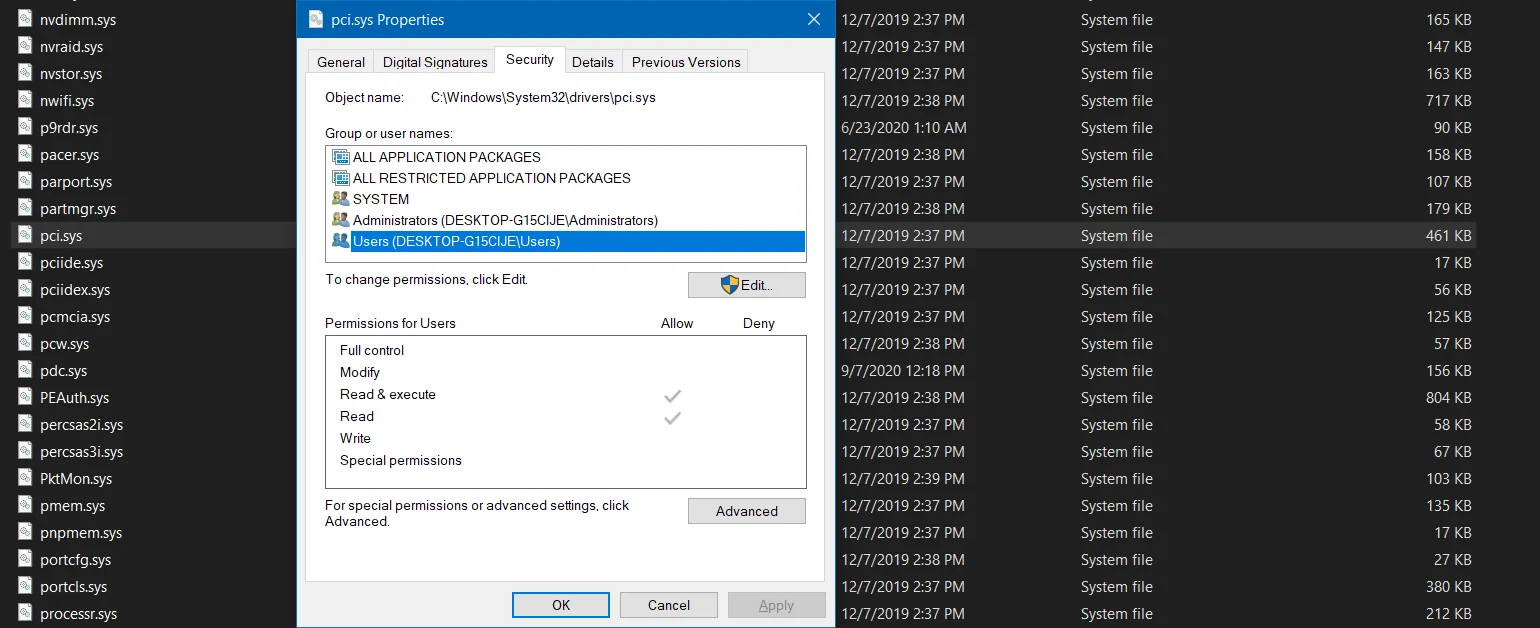
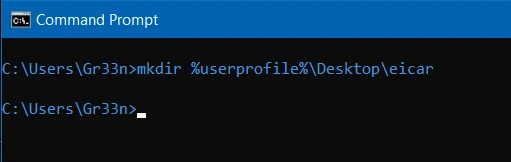
[ 1 ] - Create a new folder anywhere on the system. I created a folder named 'eicar' on my system. %userprofile% is a Windows environment variable for the user folder which is 'C:\Users\Gr33n' in my case.
mkdir %userprofile%\Desktop\eicar
[ 2 ] - Write the EICAR string in the folder created above so that Acronis's AV detects it as a threat and puts the file in Quarantine.
echo|set /p="X5O!P%@AP[4\PZX54(P^)7CC)7}$EICAR-STANDARD-ANTIVIRUS-TEST-FILE!$H+H*" > %userprofile%\Desktop\eicar\eicar.exe

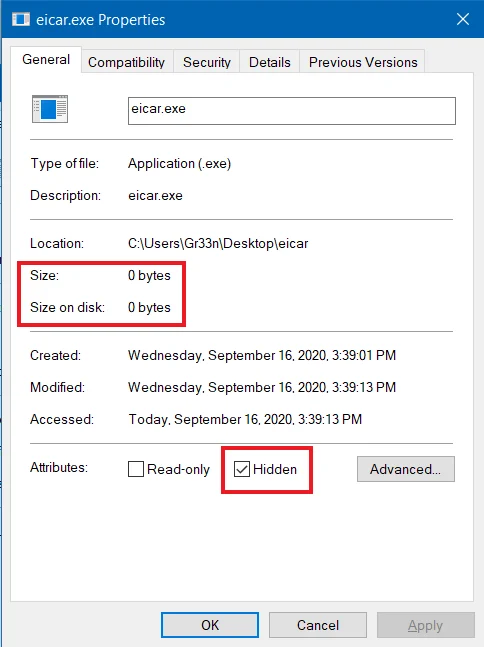
Acronis AV will put eicar.exe into its Quarantine and make the original eicar.exe file empty and hidden.
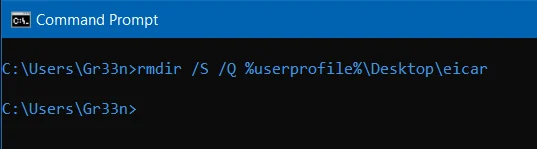
[ 3 ] - Delete the 'eicar' folder which contains the hidden and empty 'eicar.exe' file as it is a prerequisite for creating a symlink.
rmdir /S /Q %userprofile%\Desktop\eicar\eicar.exe
[ 4 ] - Create a symlink from 'eicar.exe' file to the target file which is to be deleted. To create a symlink without administrator rights, we first need to create a Mount Point such that "%userprofile%\Desktop\eicar" directory points to the "\RPC Control" object directory and then create a symlink such that "\RPC Control\eicar.exe" file points to the target file (pci.sys in this example).
A simple way to perform this is by using James Forshaw's symboliclink-testing-tools. The tools can be built with Visual Studio 2013 or higher. https://github.com/googleprojectzero/symboliclink-testing-tools
I have used CreateSymlink tool from symboliclink-testing-tools in this example.
CreateSymlink.exe %userprofile%\Desktop\eicar\eicar.exe C:\Windows\System32\drivers\pci.sys

[ 5 ] - Open Acronis AV's Quarantine, select the file and choose the option Delete from PC.
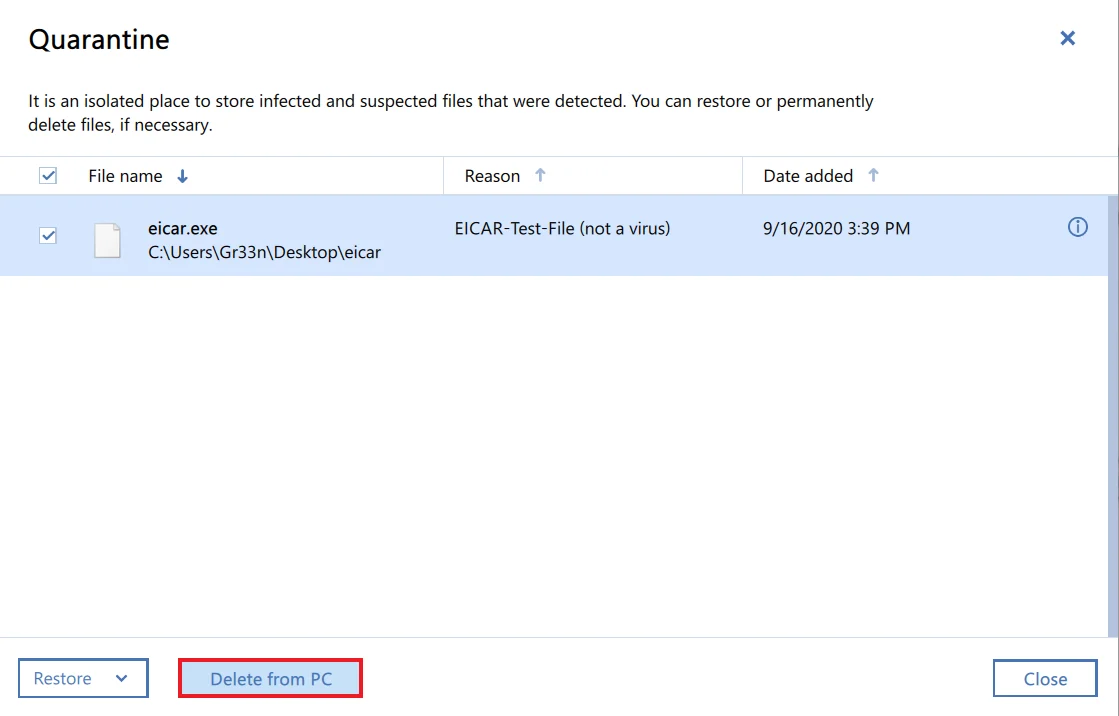
Acronis AV will delete the file from its Quarantine and it will also try to delete the empty and hidden 'eicar.exe' file but because of the symlink, the delete operation will be performed on C:\Windows\Systen32\drivers\pci.sys file resulting in its deletion.

To delete a folder, append "::$index_allocation" to the target folder when creating symlink.
For example, CreateSymlink.exe %userprofile%\Desktop\eicar\eicar.exe C:\Temp::$index_allocation will create a symlink from 'eicar.exe' file to C:\Temp folder because of the way files are stored in NTFS and 'Temp' folder will be deleted after the attack.
Recommendations
Impersonate as normal user when deleting the hidden and empty file.
Escalating this vulnerability further to privileged write
I think I may have found a way to escalate this privileged delete vulnerability to privileged write to increase the severity of the issue but I will need some time to verify that.
Impact
Attacker can delete any file or folder of his choice even when he does not have the permissions to do so.
Context
Acronis True Image (now Acronis Cyber Protect Home Office) ships an antivirus component that provides real-time protection and signature-based detection of viruses and malware. When the AV engine decides a file is malicious, it moves it to Quarantine. The move is not a real move: the original file is not deleted from its location. Instead the original file is emptied, reduced to 0 bytes, and then marked hidden. The content lives on in the Quarantine folder.
Quarantine exposes a Delete from PC action. Selecting a quarantined item and choosing that option does two things: it deletes the file from Acronis AV's Quarantine folder, and it deletes the hidden, empty placeholder that was left at the original path. The first deletion is safe, because a normal user has no access to the Quarantine folder. The second deletion is the interesting one: the report states it is vulnerable to a symlink attack.
The researcher's summary states the problem directly: the delete operation on the hidden empty file is vulnerable to a symlink attack.
Setup
The example targets a file that a normal user cannot delete:
C:\Windows\System32\drivers\pci.sys
This is a Windows driver file. The attack is carried out as a normal, unprivileged user. The only external tool used is James Forshaw's symboliclink-testing-tools, which the report says can be built with Visual Studio 2013 or higher and is available at:
https://github.com/googleprojectzero/symboliclink-testing-tools
The specific tool used from that repository is CreateSymlink. Creating a symlink without administrator rights requires a two-stage construction: first a mount point so that a directory points into the \RPC Control\ object directory, then a symlink inside that object directory pointing at the target file. CreateSymlink performs this for you.
The test payload is the EICAR antivirus test string, which the AV engine detects as a threat.
Finding it
The observation is about what Quarantine leaves behind. Because the original file is only emptied and hidden rather than removed, the path still exists on disk after quarantine. When the user later chooses Delete from PC, the product deletes the leftover path, and with a symlink in place the delete lands on the link target. Since the path sits in a user-writable location, the user can replace the leftover file with a link to something else, and the privileged delete follows the link.
The researcher frames the asymmetry clearly: the Quarantine folder itself is protected from normal users, so deleting from there is safe, but the delete against the hidden empty file at the original location is not protected against redirection.
Exploitation
Step 1: Create a working folder
A new folder is created anywhere on the system. In the example it is named eicar on the Desktop. %userprofile% is the Windows environment variable for the user folder, which in the researcher's case is C:\Users\Gr33n.
mkdir %userprofile%\Desktop\eicar
Step 2: Write the EICAR string so the AV quarantines it
The EICAR test string is written into a file called eicar.exe inside that folder, so that Acronis AV detects it as a threat and quarantines it.
echo|set /p="X5O!P%@AP[4\PZX54(P^)7CC)7}$EICAR-STANDARD-ANTIVIRUS-TEST-FILE!$H+H*" > %userprofile%\Desktop\eicar\eicar.exe
Acronis AV puts eicar.exe into its Quarantine and makes the original eicar.exe file empty and hidden. That hidden, zero-byte file is the artefact the rest of the attack abuses.
Step 3: Remove the leftover file
The hidden, empty eicar.exe is deleted, because its presence is a prerequisite problem for creating a symlink at the same path.
rmdir /S /Q %userprofile%\Desktop\eicar\eicar.exe
Step 4: Create a symlink to the target file
A symlink is created from eicar.exe to the file that should be deleted. Because the attacker has no administrator rights, the mount point trick is needed: the %userprofile%\Desktop\eicar directory is made to point at the \RPC Control\ object directory, and then a symlink is created so that \RPC Control\eicar.exe points at the target file, pci.sys in this example. CreateSymlink from symboliclink-testing-tools does this in one command.
CreateSymlink.exe %userprofile%\Desktop\eicar\eicar.exe C:\Windows\System32\drivers\pci.sys
Step 5: Trigger Delete from PC
In Acronis AV's Quarantine, the quarantined file is selected and the Delete from PC option is chosen.
Acronis AV deletes the file from its Quarantine and also tries to delete the empty, hidden eicar.exe. Because of the symlink, the delete operation is performed on the target instead, and pci.sys is deleted.
Deleting a folder instead of a file
The report also covers directories. To delete a folder, append ::$index_allocation to the target folder when creating the symlink. For example:
CreateSymlink.exe %userprofile%\Desktop\eicar\eicar.exe C:\Temp::$index_allocation
This creates a symlink from eicar.exe to the C:\Temp folder, because of the way files are stored in NTFS, and the Temp folder is deleted after the attack.
Root cause
The Quarantine design keeps a placeholder at the original path: the file is truncated to 0 bytes and hidden, not removed. The Delete from PC operation later deletes that placeholder by path. The path is in a location the unprivileged user controls, and the delete can be redirected through a symlink rather than hitting the file that was originally quarantined. A user can therefore substitute a link for the placeholder and have the product's delete applied to an arbitrary target.
The Quarantine folder's own access control does not help here. The Quarantine folder's own access control protects the copy inside Quarantine, but the second half of the operation runs against the user-writable original location. The report's recommendation points at the missing control: the delete of the hidden, empty file should be performed while impersonating the normal user, so that the operation is bounded by that user's own permissions.
Impact
An attacker can delete any file or folder of their choice, even when they do not have the permissions to do so. The deletion is carried out by the product rather than by the attacker's own account. The report demonstrates this against a Windows driver file and describes a folder variant via ::$index_allocation.
The researcher also states that they think they may have found a way to escalate this privileged delete into a privileged write, which would increase the severity, but that this needs time to verify. No verified write primitive is shown.
Fix
The recommendation in the report is to impersonate the normal user when deleting the hidden and empty file, so that the delete cannot exceed what that user is allowed to do. The report does not describe a fix that was applied by the vendor.
Variants to test
- Folder targets. Use
::$index_allocationon a directory path, as in the report, and check whether the folder is removed after Delete from PC. A positive result is the target directory disappearing. - Other quarantine or restore flows. Any product action that touches the original path after quarantine (delete, restore, clean, purge) is worth testing with a substituted link at that path. A positive result is the privileged operation acting on the link target rather than the placeholder.
- Other user-writable placeholder locations. Try quarantining files from different user-controlled directories and substituting links in each. A positive result is deletion of a file outside the user's permissions from any of those locations.
- Privileged write. The researcher raised the possibility of turning the delete into a write but did not verify it. Testing whether a link can redirect a write, rename or restore into a privileged location is the natural next step; a positive result would be content modification of a protected file.
Hunting notes
This class of bug hides wherever a privileged service keeps a reference to a file in a user-writable directory and later acts on it by path. Quarantine and antivirus products are a natural fit because they deliberately leave a placeholder behind, but backup, restore, installer and updater flows that record original paths have the same shape.
During recon, look for features that report or act on an original location after moving, quarantining or cleaning a file, and check whether that location is writable by the user who triggers the action. The signal is a privileged operation whose target path the user can replace between the two events.
On impact: the researcher made the case concrete by choosing a target a normal user cannot delete (C:\Windows\System32\drivers\pci.sys) and showing it deleted after the Quarantine action. That demonstration, rather than a theoretical argument, is what establishes the privilege boundary being crossed.
What happened, in plain words
Acronis True Image, now sold as Acronis Cyber Protect Home Office, is a backup and protection program for home computers. One of its features is an antivirus (AV) component: software that watches files as they are created and checks them against a list of known threats, a bit like a security guard at a door who checks every visitor against a list of banned people.
When the AV decides a file is dangerous, it does not simply destroy it. It moves it to a special holding area called Quarantine, the way a suspicious parcel might be put in a locked room instead of being thrown away. The important detail is that the move is not a real move. The original file stays where it was, but its contents are wiped out: it is shrunk to 0 bytes, meaning it becomes an empty file, and then it is marked hidden, so it no longer shows up in a normal folder view. The actual content is kept inside the Quarantine folder.
Quarantine has a button called Delete from PC. When you select a quarantined item and press it, two things happen:
- The copy inside Acronis's Quarantine folder is deleted. This part is safe, because a normal user account has no access to that folder.
- The hidden, empty placeholder left at the original location is deleted too. This is the part with the problem.
The second deletion happens on a path that the user can influence, and the report states it is vulnerable to a symlink attack. The researcher's own summary puts it plainly: the delete operation on the hidden empty file is vulnerable to a symlink attack.
A symbolic link (symlink) is a file that acts as a signpost to another file or folder. Think of a shortcut on your desktop: it is not the program itself, it just points at it. When a program opens the shortcut, the operating system quietly redirects it to the real thing. That is useful, but it also means that if a privileged program is told to delete "the file at this path" and that path is a signpost, the program may end up deleting whatever the signpost points at.
This is a local privilege escalation: a normal user, who is not allowed to touch certain protected files, finds a way to make a more powerful part of the system do it on their behalf. The user tricks the product into deleting a file the user could not delete alone.
Setup
The example targets a file that a normal user cannot delete:
C:\Windows\System32\drivers\pci.sys
This is a Windows driver file, part of the operating system itself. A regular user account has no permission to remove it. The whole attack is carried out as a normal, unprivileged user, with no administrator rights.
The only external tool used is James Forshaw's symboliclink-testing-tools. The report says it can be built with Visual Studio 2013 or higher, and gives its location:
https://github.com/googleprojectzero/symboliclink-testing-tools
The specific tool used from that repository is called CreateSymlink. Creating a symlink without administrator rights needs a two-stage construction: first a mount point so that a directory points into the \RPC Control\ object directory, then a symlink inside that object directory pointing at the target file. CreateSymlink performs both stages for you in one command.
A mount point is like redirecting a corridor: anyone walking down that corridor expecting to reach one room ends up in another. \RPC Control\ is a special internal directory in Windows used for communication between programs. By making a normal folder point there, and then placing a link inside it, a user without admin rights can create a link that would normally require higher privileges.
The test payload is the EICAR antivirus test string, which Acronis AV detects as a threat. It is not malware; it exists precisely so that people can test whether their AV is working, the way a fire drill is not a real fire.
Finding it
The observation is about what Quarantine leaves behind. Because the original file is only emptied and hidden rather than removed, the path still exists on disk after quarantine. When the user later chooses Delete from PC, the product deletes the leftover path, and with a symlink in place the delete lands on the link target. Since the path sits in a user-writable location, the user can replace the leftover file with a link to something else, and the privileged delete follows the link.
The researcher frames the asymmetry clearly: the Quarantine folder itself is protected from normal users, so deleting from there is safe, but the delete against the hidden empty file at the original location is not protected against redirection.
Exploitation
Step 1: Create a working folder
A new folder is created anywhere on the system. In the example it is named eicar on the Desktop. %userprofile% is the Windows environment variable for the user folder, which in the researcher's case is C:\Users\Gr33n.
mkdir %userprofile%\Desktop\eicar
Line by line: mkdir is the Windows command to make a directory (folder). %userprofile% is replaced by Windows with the path of the current user's home folder, so on the researcher's machine the command becomes mkdir C:\Users\Gr33n\Desktop\eicar. The result is an empty folder on the Desktop called eicar. This folder is where the test file will live, and it is a place the user fully controls, which is exactly what the attack needs.
Step 2: Write the EICAR string so the AV quarantines it
The EICAR test string is written into a file called eicar.exe inside that folder, so that Acronis AV detects it as a threat and quarantines it.
echo|set /p="X5O!P%@AP[4\PZX54(P^)7CC)7}$EICAR-STANDARD-ANTIVIRUS-TEST-FILE!$H+H*" > %userprofile%\Desktop\eicar\eicar.exe
Line by line: echo normally prints text to the screen. The vertical bar | passes that output to the next command, set /p=, which prints text without adding a new line at the end. The quoted part is the EICAR string itself, the harmless text that antivirus products recognise. The > symbol redirects the output into a file instead of the screen, and the file is %userprofile%\Desktop\eicar\eicar.exe, that is, a file named eicar.exe inside the folder created in step 1. The .exe ending makes it look like a program, which is what the AV is watching for.
Acronis AV puts eicar.exe into its Quarantine and makes the original eicar.exe file empty and hidden. That hidden, zero-byte file is the artefact the rest of the attack abuses. In everyday terms: the guard takes the suspicious parcel to the locked room, but leaves an empty, invisible box on your doorstep with a label saying "this was the parcel".
Step 3: Remove the leftover file
The hidden, empty eicar.exe is deleted, because its presence is a prerequisite problem for creating a symlink at the same path.
rmdir /S /Q %userprofile%\Desktop\eicar\eicar.exe
Line by line: rmdir removes a directory, but here it is pointed at a file path. /S means also process everything inside, and /Q means quiet, do not ask for confirmation. The path is the leftover empty eicar.exe. The reason for this step is simple: you cannot create a new link at a path where a file already exists. The old placeholder has to be cleared out first so the attacker can put a signpost in its place.
Step 4: Create a symlink to the target file
A symlink is created from eicar.exe to the file that should be deleted. Because the attacker has no administrator rights, the mount point trick is needed: the %userprofile%\Desktop\eicar directory is made to point at the \RPC Control\ object directory, and then a symlink is created so that \RPC Control\eicar.exe points at the target file, pci.sys in this example. CreateSymlink from symboliclink-testing-tools does this in one command.
CreateSymlink.exe %userprofile%\Desktop\eicar\eicar.exe C:\Windows\System32\drivers\pci.sys
Line by line: CreateSymlink.exe is the tool from the repository. The first argument is the path where the link should appear, the same eicar.exe path the product will later try to delete. The second argument is the target, the protected driver file. After this command, the path eicar.exe is no longer a file: it is a signpost that says "go to pci.sys". Anyone who deletes "the file at eicar.exe" will, in practice, delete pci.sys.
Step 5: Trigger Delete from PC
In Acronis AV's Quarantine, the quarantined file is selected and the Delete from PC option is chosen.
Acronis AV deletes the file from its Quarantine and also tries to delete the empty, hidden eicar.exe. Because of the symlink, the delete operation is performed on the target instead, and pci.sys is deleted. The user never had permission to delete that driver, but the product did, and the product was pointed at it by the signpost.
Deleting a folder instead of a file
The report also covers directories. To delete a folder, append ::$index_allocation to the target folder when creating the symlink. For example:
CreateSymlink.exe %userprofile%\Desktop\eicar\eicar.exe C:\Temp::$index_allocation
Line by line: this is the same tool and the same link path, but the target is now C:\Temp followed by ::$index_allocation. That suffix is a special NTFS notation that refers to the folder itself as an object rather than to its contents. NTFS is the file system Windows uses to store files on disk. The result is a symlink from eicar.exe to the C:\Temp folder, and the Temp folder is deleted after the attack, just as the file was in the earlier example.
Root cause
The Quarantine design keeps a placeholder at the original path: the file is truncated to 0 bytes and hidden, not removed. The Delete from PC operation later deletes that placeholder by path. The path is in a location the unprivileged user controls, and the delete can be redirected through a symlink rather than hitting the file that was originally quarantined. A user can therefore substitute a link for the placeholder and have the product's delete applied to an arbitrary target.
In plain terms: the product remembers a location, not a specific object. Between the moment the placeholder is created and the moment it is deleted, the user can swap what lives at that location. The product trusts the address and does not check that the thing at the address is still the thing it left there.
The Quarantine folder's own access control does not help here. The Quarantine folder's own access control protects the copy inside Quarantine, but the second half of the operation runs against the user-writable original location. The report's recommendation points at the missing control: the delete of the hidden, empty file should be performed while impersonating the normal user, so that the operation is bounded by that user's own permissions. Impersonation here means the program temporarily acts with the user's rights instead of its own higher rights, like a manager stepping back and letting an employee try the door with their own key.
Impact
An attacker can delete any file or folder of their choice, even when they do not have the permissions to do so. The deletion is carried out by the product rather than by the attacker's own account. The report demonstrates this against a Windows driver file and describes a folder variant via ::$index_allocation.
The researcher also states that they think they may have found a way to escalate this privileged delete into a privileged write, which would increase the severity, but that this needs time to verify. No verified write primitive is shown. A privileged write would mean changing the contents of a protected file rather than removing it, which is generally more serious.
Fix
The recommendation in the report is to impersonate the normal user when deleting the hidden and empty file, so that the delete cannot exceed what that user is allowed to do. The report does not describe a fix that was applied by the vendor.
Variants to test
- Folder targets. Use
::$index_allocationon a directory path, as in the report, and check whether the folder is removed after Delete from PC. A positive result is the target directory disappearing. - Other quarantine or restore flows. Any product action that touches the original path after quarantine (delete, restore, clean, purge) is worth testing with a substituted link at that path. A positive result is the privileged operation acting on the link target rather than the placeholder.
- Other user-writable placeholder locations. Try quarantining files from different user-controlled directories and substituting links in each. A positive result is deletion of a file outside the user's permissions from any of those locations.
- Privileged write. The researcher raised the possibility of turning the delete into a write but did not verify it. Testing whether a link can redirect a write, rename or restore into a privileged location is the natural next step; a positive result would be content modification of a protected file.
Hunting notes
This class of bug hides wherever a privileged service keeps a reference to a file in a user-writable directory and later acts on it by path. Quarantine and antivirus products are a natural fit because they deliberately leave a placeholder behind, but backup, restore, installer and updater flows that record original paths have the same shape.
During recon, look for features that report or act on an original location after moving, quarantining or cleaning a file, and check whether that location is writable by the user who triggers the action. The signal is a privileged operation whose target path the user can replace between the two events.
On impact: the researcher made the case concrete by choosing a target a normal user cannot delete (C:\Windows\System32\drivers\pci.sys) and showing it deleted after the Quarantine action. That demonstration, rather than a theoretical argument, is what establishes the privilege boundary being crossed.
Glossary
- Antivirus (AV): software that watches for and blocks files it recognises as malicious.
- Quarantine: a protected holding area where an antivirus keeps suspicious files instead of deleting them outright.
- Placeholder: the empty, hidden file left at the original location after a file is quarantined.
- Hidden file: a file marked so that normal folder views do not display it.
- 0 bytes: a file with no content at all, an empty file.
- Symbolic link (symlink): a file that acts as a signpost pointing to another file or folder; opening it redirects to the target.
- Mount point: a redirection that makes one directory lead to another location, used here to reach the
\RPC Control\object directory without admin rights. \RPC Control\: a special internal Windows object directory used for communication between programs.- Reparse point: the general Windows mechanism behind symlinks and mount points; the system follows it to find the real target.
- Local privilege escalation: a normal user making a more privileged part of the system perform an action the user could not do alone.
- Privilege: the level of access an account has; administrator accounts have more than normal users.
- Privileged delete: a deletion carried out with higher rights than the person who triggered it.
- Privileged write: modifying the contents of a protected file using higher rights.
- EICAR string: a harmless standard text that antivirus products are designed to flag, used for testing.
- Environment variable: a named value the operating system substitutes into commands, such as
%userprofile%for the user's home folder. mkdir: Windows command that creates a folder.rmdir: Windows command that removes a folder; with/Sit processes contents and with/Qit does not ask for confirmation.echo/set /p=: commands that print text; combined with>they write that text into a file.- Redirection (
>): sending a command's output into a file instead of the screen. - NTFS: the file system Windows uses to store files on disk.
::$index_allocation: an NTFS notation that refers to a folder itself as an object, used here to make a link target a whole directory.- Impersonation: a program temporarily acting with a user's rights instead of its own higher rights.
- Access control: the rules that decide which users may read, change or delete which files.
- Recon: the exploratory phase of security testing, looking for features worth probing.
- Payload: the input or file used to trigger the behaviour being tested.


